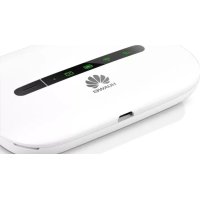
E5330 - Router HUAWEI - Free user manual and instructions
Find the device manual for free E5330 HUAWEI in PDF.



| Product Type | Mobile WiFi Router |
| Brand | Huawei |
| Model | E5330 |
| WiFi Standard | 802.11 b/g/n |
| Frequency | 2.4 GHz |
| Ports | 1 x micro-USB |
| Power | Rechargeable lithium-ion battery |
| Administration Interface | Web (http://192.168.8.1) |
| Default Username and Password | admin / admin |
| Maximum Number of Users | 10 |
| Operating Temperature | 0 °C to +35 °C |
| Storage Temperature | -10 °C to +45 °C |
| WiFi Security | WPA / WPA2 |
| Features | Messaging, SIM management, standby |
| Indicator Lights | Power, messages, battery, WiFi, signal |
Frequently Asked Questions - E5330 HUAWEI
User questions about E5330 HUAWEI
0 question about this device. Answer the ones you know or ask your own.
Ask a new question about this device
Download the instructions for your Router in PDF format for free! Find your manual E5330 - HUAWEI and take your electronic device back in hand. On this page are published all the documents necessary for the use of your device. E5330 by HUAWEI.
USER MANUAL E5330 HUAWEI
Quick Start
The Mobile WiFi function descriptions and illustrations in this document are for your reference only. The product you have purchased may vary.
For detailed information about the functions and configurations of the Mobile WiFi, refer to the online help on the web management page. To access Mobile WiFi's web management page, use a connected device's browser and visit http://192.168.8.1. The default user name and password is admin.
Note:
If the IP address conflicts with other IP addresses on the network, the IP address of the Mobile WiFi automatically changes. Please try http://192.168.9.1. If you cannot log in, contact an authorized dealer.
Appearance
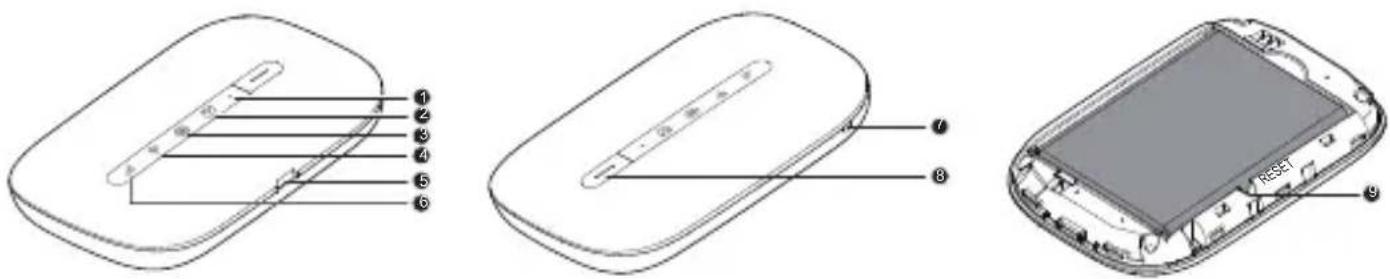
① Power indicator
Blinks slowly: The Mobile WiFi enters the standby mode.
② Messages indicator
- Green: New message.
- Blinking green: Inbox full.
③ Battery indicator
- Green: Sufficient battery.
-
Blinking green: Charging the battery.
-
Red: Low battery.
④ Wi-Fi indicator - Green: Wi-Fi turned on.
- Blue: Connected to WLAN.
⑤ Micro USB port
⑥ Signal indicator
- Green: Strong signal.
- Orange: Weak signal.
- Red: No signal.
⑦ Lanyard hole
⑧ Power button
Press and hold the ☐ button to turn the Mobile WiFi on or off.
⑨ RESET button
Press and hold the RESET button to restore to factory values.
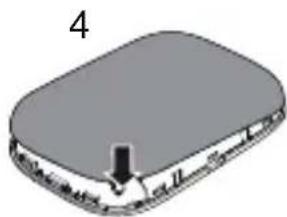
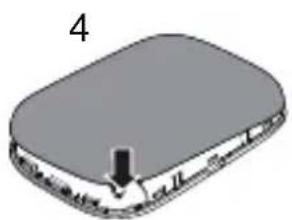
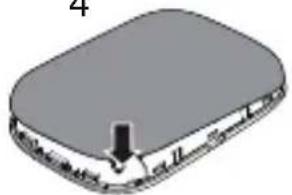
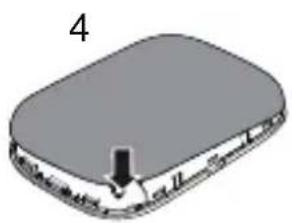
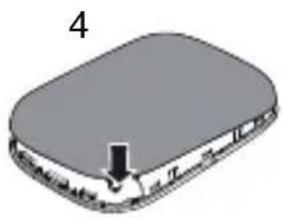
Installing
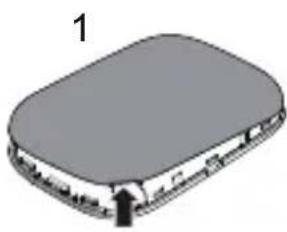
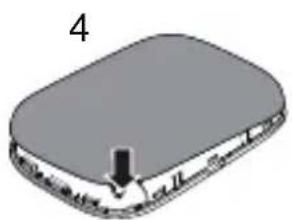
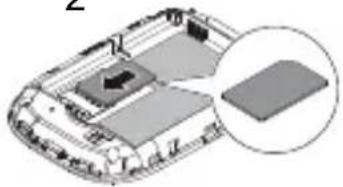
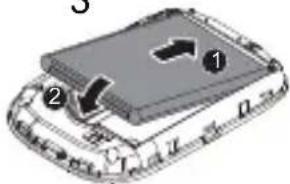
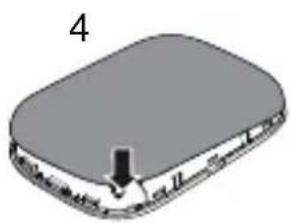
Install the SIM card and battery according to the illustration.
natural_image
3D diagram of a rectangular electronic device with a black arrow pointing to its side (no text or symbols)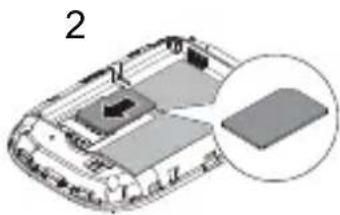
natural_image
3D diagram of a vehicle chassis with a highlighted rectangular component (no text or symbols)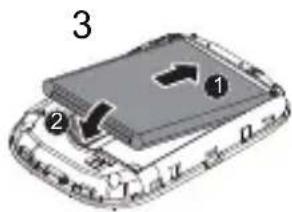
natural_image
3D diagram of a rectangular object with a black arrow pointing to its surface, labeled '4' (no text or symbols on the object itself)SSID and Wireless Network Encryption Key
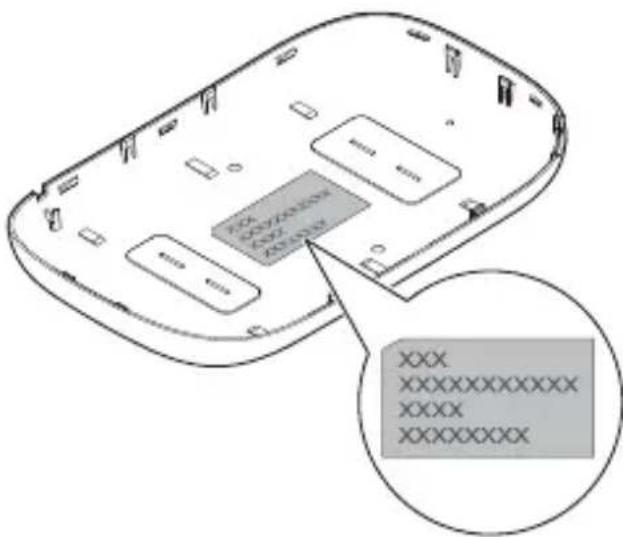
When a Wi-Fi device establishes a connection to the Mobile WiFi for the first time, you may need to enter the default Service Set Identifier (SSID) and wireless network encryption key.
The default SSID and encryption key are printed on the Mobile WiFi label.
It is recommended that you can log in to the web management page and change your SSID and wireless network encryption key.
natural_image
3D diagram of a rectangular electronic device with a black arrow pointing to its side (no text or symbols)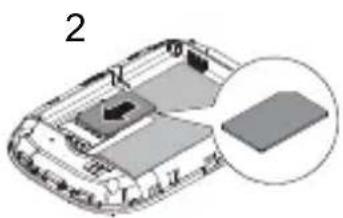
natural_image
3D diagram of a vehicle chassis with a highlighted rectangular component (no text or symbols)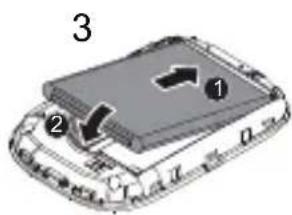
natural_image
3D diagram of a rectangular electronic device with a black arrow pointing to its base (no text or symbols)natural_image
3D diagram of a rectangular electronic device with a black arrow pointing to its side (no text or symbols)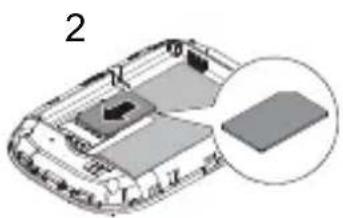
natural_image
3D diagram of a vehicle chassis with a highlighted rectangular component (no text or symbols)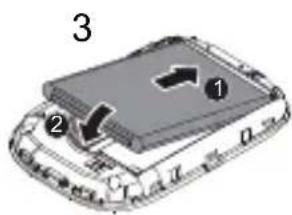
natural_image
3D diagram of a rectangular electronic device with a black arrow pointing to its base (no text or symbols)natural_image
3D diagram of a rectangular electronic device with a black arrow pointing to its side (no text or symbols)2
natural_image
3D diagram of a vehicle chassis with a highlighted rectangular component (no text or symbols)3
4
natural_image
3D diagram of a rectangular object with a downward arrow and label '4' (no text or symbols on the object itself)natural_image
3D diagram of a rectangular electronic device with a black arrow pointing to its side (no text or symbols)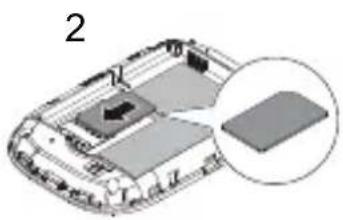
natural_image
3D diagram of a vehicle chassis with a highlighted rectangular component (no text or symbols)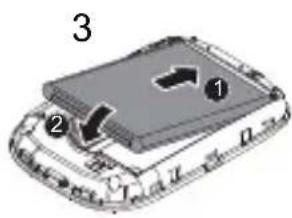
natural_image
3D diagram of a rectangular object with a black arrow pointing to its surface, labeled '4' (no text or symbols on the object itself)natural_image
3D diagram of a rectangular electronic device with a black arrow pointing to its side (no text or symbols)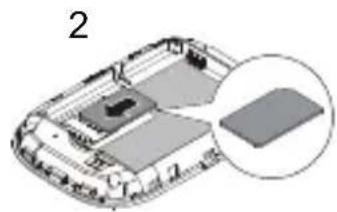
natural_image
3D diagram of a vehicle chassis with a highlighted rectangular component (no text or symbols)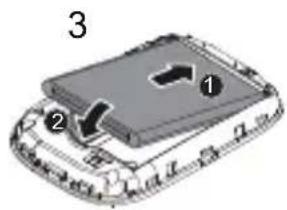
natural_image
3D diagram of a rectangular electronic device with a labeled component (no text or symbols present)natural_image
3D diagram of a rectangular electronic device with a black arrow pointing to its side (no text or symbols)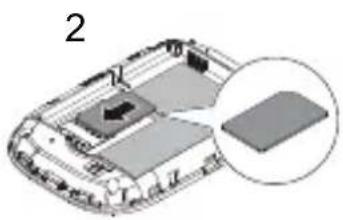
natural_image
3D diagram of a vehicle chassis with a highlighted rectangular component (no text or symbols)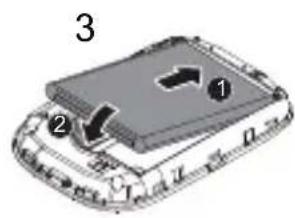
natural_image
3D diagram of a rectangular object with a black arrow pointing to its surface, labeled '4' (no text or symbols on the object itself)

Brand : HUAWEI
Model : E5330
Category : Router