SPD2204BM - DVD combo PHILIPS - Free user manual and instructions
Find the device manual for free SPD2204BM PHILIPS in PDF.


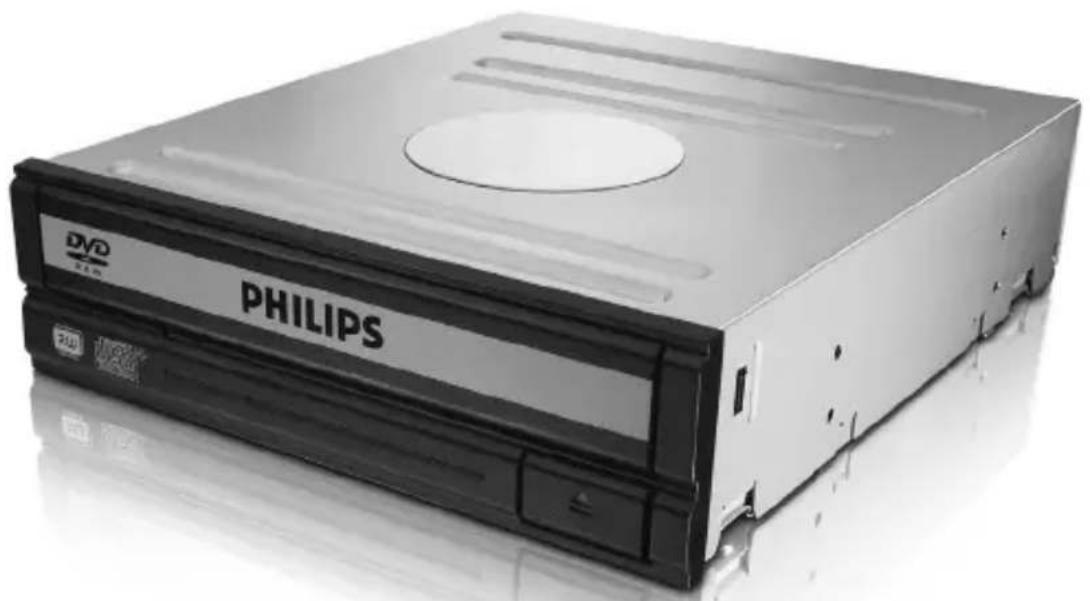
| Product Type | Internal DVD Combo Drive for Computer |
| Brand | Philips |
| Model | SPD2204BM |
| Form Factor | 5.25-inch Half-Height Optical Drive |
| Interface | IDE (ATAPI) |
| Jumper Configuration | Master / Slave |
| Power Supply | Standard internal power connector (12V / 5V) |
| Readable Formats | DVD-Video, Audio CD, CD-R, CD-RW |
| Dimensions (approx.) | 146 x 41 x 170 mm (W x H x D) |
| Weight (approx.) | 0.8 kg |
| Care and Cleaning | Clean the exterior with a soft dry cloth. Do not use liquids or abrasive products. |
| Safety | Discharge static electricity by touching an unpainted metal part before handling. Keep plastic bags away from young children. |
| Spare Parts and Repairability | Spare parts are not listed. For any service, contact Philips support or an authorized technician. |
| General Information | Check Master/Slave configuration before installation. Use the supplied IDE cable. Visit www.philips.com/support for assistance. |
Frequently Asked Questions - SPD2204BM PHILIPS
User questions about SPD2204BM PHILIPS
0 question about this device. Answer the ones you know or ask your own.
Ask a new question about this device
Download the instructions for your DVD combo in PDF format for free! Find your manual SPD2204BM - PHILIPS and take your electronic device back in hand. On this page are published all the documents necessary for the use of your device. SPD2204BM by PHILIPS.
USER MANUAL SPD2204BM PHILIPS
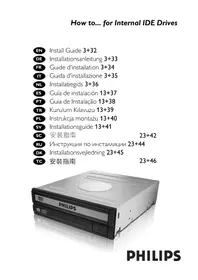
How to... for Internal IDE Drives
EN Install Guide 3+32
DE Installationsanleitung 3+33
FR Guide d'installation 3+34
IT Guida d'installazione 3+35
NL Installatiegids 3+36
ES Guia de instalacion 13+37
PT Guia de Instalação 13+38
TR Kurulum Kilavuzu 13+39
PL Instrukcja montazu 13+40
Installationsguide 13+41
安装指南 23+42
RU INHcTpkykunno HcTaAaun 23+44
DK Installationsvejledning 23+45
安装指南 23+46
How to install?
Please refer to your PC manual or contact your local dealer for more information.
#
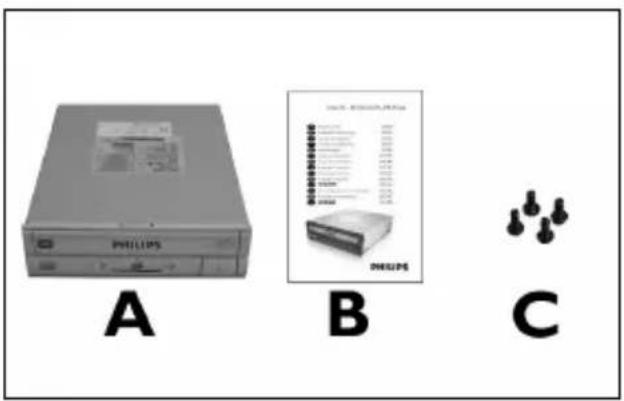
EN This can be found in the box:
A: Your new drive
B: This manual
C:4 screws in a small bag
EN Touch an unpainted metal part (eg. your heating or an unpainted part of your computer case).
This will avoid any damage to your computer by electrostatic discharge.
10 These are the connections (on the back of your drive) you will have to use for connecting the drive to the computer.
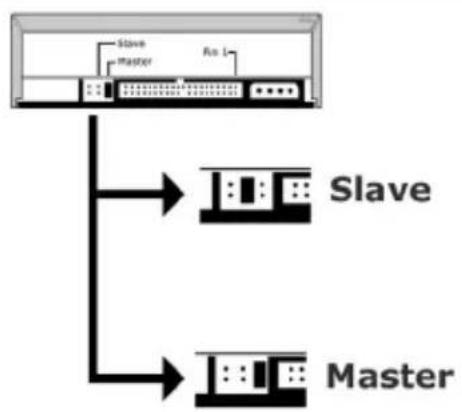
11 EN Choose "Master" or "Slave" for the jumper, as seen in steps 7, 8 or 9.
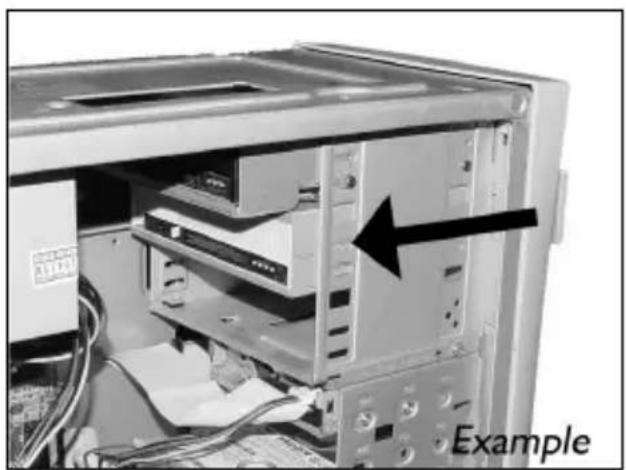
12 EN Put the drive into your computer.
DE Schieben Sie das Laufwerk in ihren Computer.
FR Montez l'appareil dans l'ordinateur.
Mettere l'unità nel computer.
NL Schuif het station in uw computer.
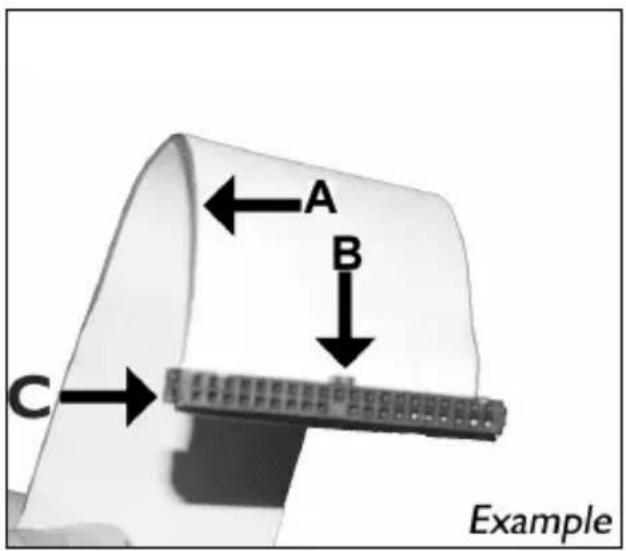
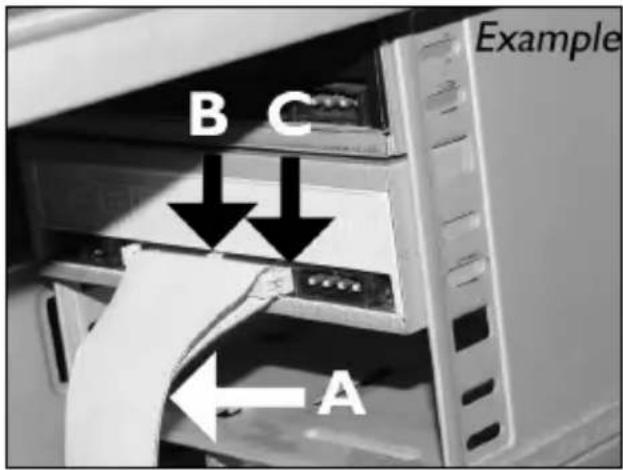
EN Find the IDE-cable which may look like this example:
A: Coloured line.
B: Notch and closed hole.
C:Pin1.
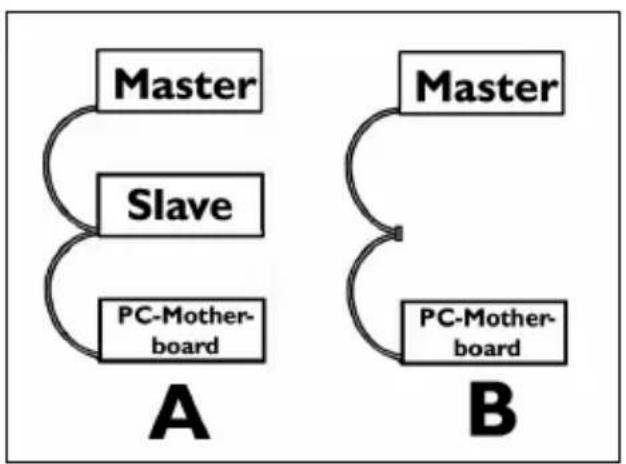
EN Connect the IDE cable like in A (2 devices) or B (only 1 device).
Do not choose 2 "Master" or 2 "Slave" devices on 1 cable.
A: Coloured line.
B: Notch and closed hole.
C:Pin1.
EN Find a free power cable like this example.
Please note the edges of the connector.
Restart your computer.

Please refer to your PC manual or contact your local dealer for more information.
SC 可在包装盒中找到以下物件:
A: 新驱动器。
B:本手册。
C:小袋装的4颗螺钉。
RU 3TO MOXHO HauTN BOKHe:
A: BaII HOBbI ΣNCKOBOa
B:△aHHoe pyKOBOCTBO
C:4BnHTa B KOMNaKTHOM NaKeTe
DK Dette findes i kassen:
A: Dit nye drev
B: Denne manual
C: 4 skruer i en lille pose
EN This can be found in the box: A: Your new drive B: This manual C: 4 screws in a small bag
SC 关闭计算机。
RU BbIKIOUHTe BaI KOMNBIOTep.
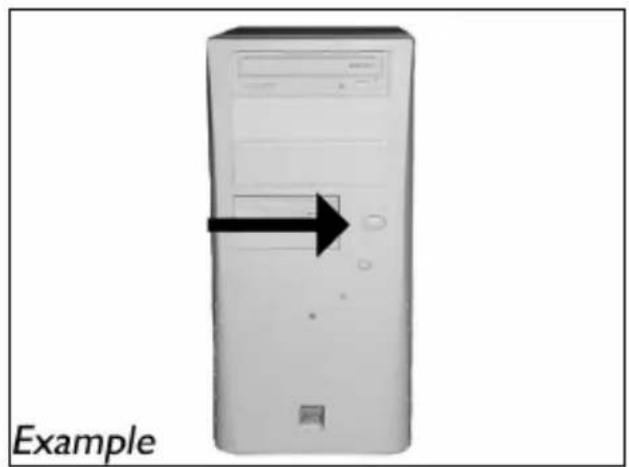
EN Switch your computer off.
觸摸未塗漆的金屬部分(例如,您的電腦外殼發熱或未塗漆的部分)。這可避免靜電釋放而損壞您的電腦。
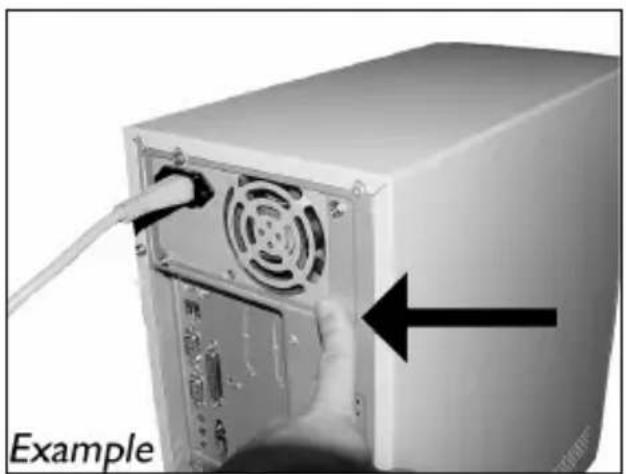
EN Touch an unpainted metal part (eg. your heating or an unpainted part of your computer case). This will avoid any damage to your computer by electrostatic discharge.
4 断开计算机电源。
RU OTCOeAHHHTe Ka6eAb NITaHnI OT BaWero PC.
DK Tag strormkablet fra computeren ud.
TC 拔掉電腦電源線。
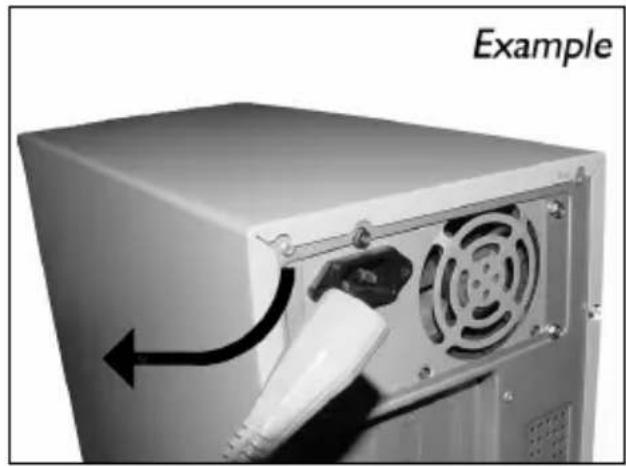
EN Disconnect the power cable from the PC.
5
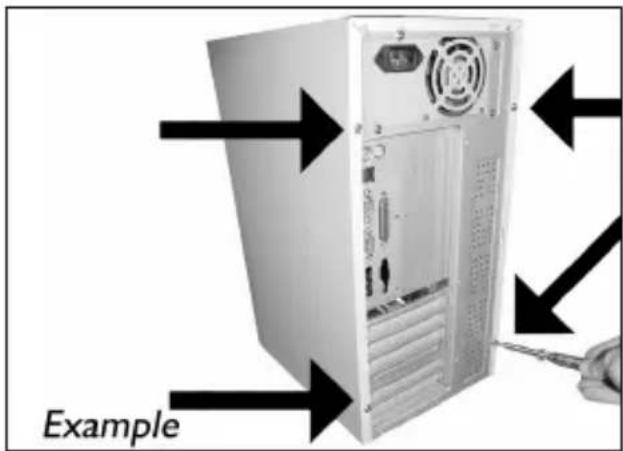
EN Open your computer. You may have to unleash screws which are mostly located at the back of your computer. See your computer manual for more details.
6
SC 打开计算机盖。
RU CHIMMITE KpbILIKY KOMMbIOTepa.
Dk Tag daekslet af computeren.
拆下電腦外殼。
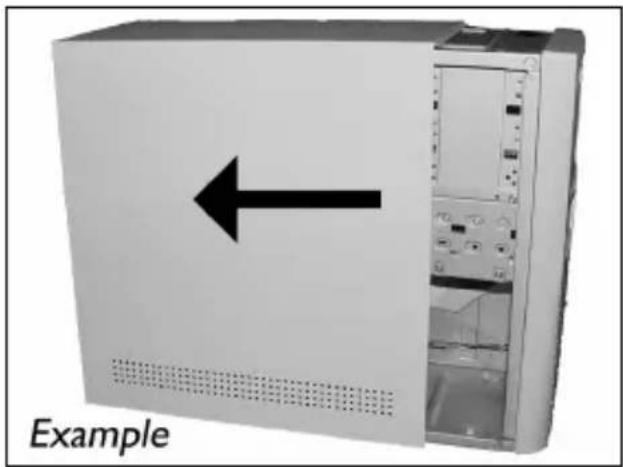
EN Take off the cover of the computer.
7
如果更换驱动器,则将其取出并检查其设置(“Master(主驱动器)”还是“Slave(辅驱动器)”。记住此设置,然后转至步骤10。
RU ECAN Bbl 3aMeHReTe AACKOBoA, AOCTaHbTe erO n npOBepBte yCTaHOBky erO ("Master" mN "Slave"). 3anOMHnTe 3Ty yCTaHOBky n nepeiAnTe K wary 10.
DK Hvis du udskifter et drev, sa tag det ud og se, hvilken indstilling dewet har ("Master" eller "Slave"). Husk donne indstilling og gā videre til pkt. 10.
TC 若您要更換光碟機,請將它取出並檢查其設定(“Master”或“Slave”)。記下此設定,然後至步驟10。
EN If you replace a drive, take it out and check which setting it has ("Master" or "Slave"). Remember this setting and go to step 10.
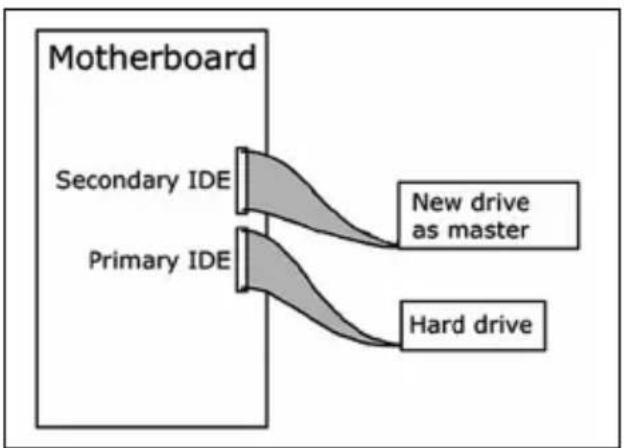
如未安装任何驱动器,则记住“Master(主驱动器)”并转至步骤10。
RU ECAN BBI He HNCTaMpyeTe DACKOBDA. 3aONMHNTe yCTaHOBky "Master" n nepeiAnTe K wary 10.
DK Husk blot på "Master", hvis du ikke har noget drev installereret, og gå til pkt. 10.
TC 若您未安裝光碟機,請記下“Master”,然後至步驟10。
EN If you have no drive installed, remember "Master" and go to step 10.
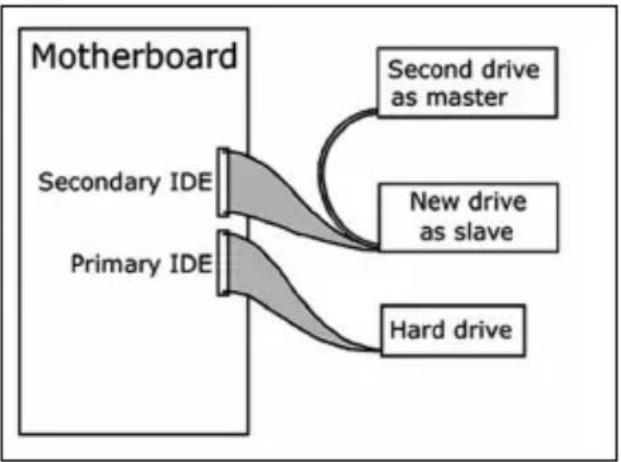
EN If you add a drive, check the drive has which remains in the PC ("Master" or "Slave", see step 11), remember the OTHER setting.
EN Find the IDE-cable which may look like this example:
A: Coloured line.
B: Notch and closed hole.
C:Pin1.
A: Coloured line.
B: Notch and closed hole.
C:Pin1.
16
SC 找到此例所示的空闲电源线。
请注意接头的边缘。
RU HaIaNTe CBO6oADHbI Ka6eAb NITaHnA,
KOTOpbI BblAHT, KaB B 3TOM npImepe: IomeTbTe Kpa pa3beMa.
DK Find et ledigt stromkabel som i dette
eksempel.
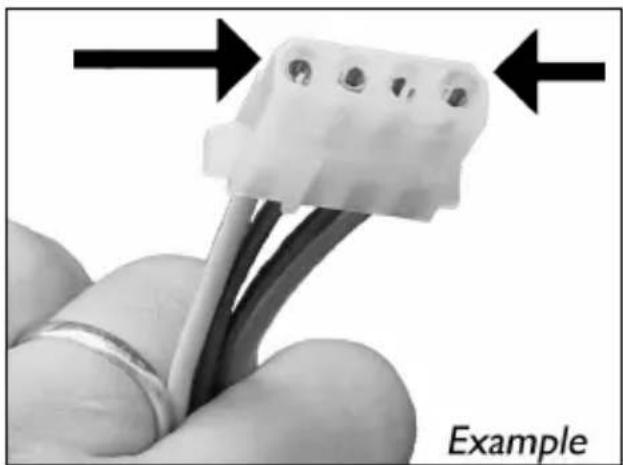
EN Find a free power cable like this example.
Please note the edges of the connector.
17
SC 将电源线连接到驱动器
(从步骤16起边缘将朝上)。
RU BCTBbTe Ka6eAa NITaHnBa WbA dNCKOBDA.
(каяизшара 16doЖнbl 6blTb BBepy).
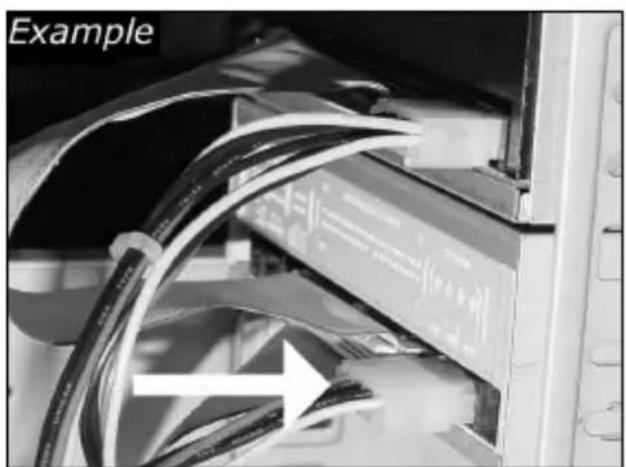
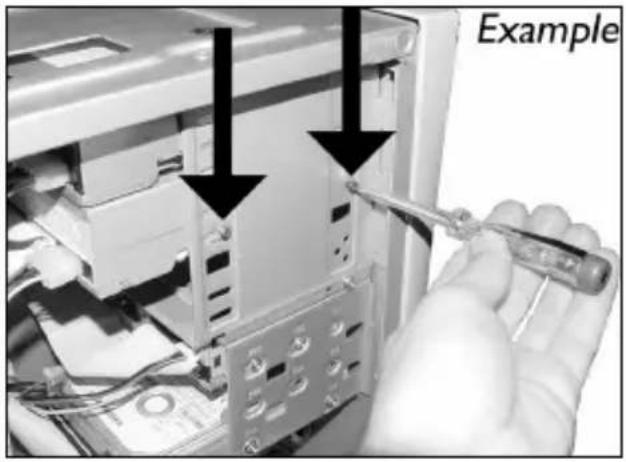
EN Connect the power cable into your drive
(the edges from step 16 will be on top).
More info or help needed
Visit www.philips.com/storageupdates
EN
Troubleshooting
Philips optical disc drives are manufactured with utmost care. In case of problems, it often appears that the drive itself is not defective. You can simply solve most of these problems by using the support tools offered by Philips.
When you're experiencing problems:
1 Please check the information in the "How to..." manual.
2 Check the Philips support websites www.philips.com/storageupdates and www.philips.com/support for interactive support, troubleshooting, and the newest software updates.
3 Should you encounter any more difficulties during installation or use, please contact Philips Customer Care via the e-mail address or telephone numbers that can be found at www.philips.com/contact.
Prior to claiming a drive for warranty, you must request a return reference number at www.philips.com/support or contact Philips Customer Care.
Additional warranty information is available in the "Philips Warranty" folder on the Nero software disc.
Be responsible Respect copyrights
"The making of unauthorised copies of copy-protected material, including computer programmes, files, broadcasts and sound recordings, may be an infringement of copyrights and constitute a criminal offence. This equipment should not be used for such purposes."
WEEE mark:Disposal of your old product
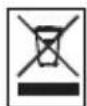
Your product is designed and manufactured with high quality materials and components, which can be recycled and reused. Please inform yourself about the local separate collection system for electrical and electronic products, including those marked by following symbol.
Please act according to your local rules and do not dispose of your old products with your normal household waste.
WARNING
Plastic bags can be dangerous.
To avoid danger of suffocation, keep this bag away from babies and small children.
Be responsible Respect copyrights
Be responsible Respect copyrights
Be responsible Respect copyrights
O: Indicates that this toxic or hazardous substance contained in all of the homogeneous materials for this part is below the limit requirement in SJ/T11363 - 2006.
X: Indicates that this toxic or hazardous substance contained in at least one of the homogeneous materials used for this part is above the limit requirement in SJ/T11363 - 2006.

环使用期限 Environmental Protection Use Period
This logo refers to the period (10 years)
This logo refers to the period (10 years) during which the toxic or hazardous substances or elements contained in electronic information products will not leak or mutate so that the use of these substances or elements will not result in any severe environmental pollution, any bodily injury or damage to any assets.
Be responsible Respect copyrights
More info or help needed
Visit www.philips.com/storageupdates
EN
Troubleshooting
Philips optical disc drives are manufactured with utmost care. In case of problems, it often appears that the drive itself is not defective. You can simply solve most of these problems by using the support tools offered by Philips.
When you're experiencing problems:
1 Please check the information in the "How to..." manual.
2 Check the Philips support websites www.philips.com/storageupdates and www.philips.com/support for interactive support, troubleshooting, and the newest software updates.
3 Should you encounter any more difficulties during installation or use, please contact Philips Customer Care via the e-mail address or telephone numbers that can be found at www.philips.com/contact.
Prior to claiming a drive for warranty, you must request a return reference number at www.philips.com/support or contact Philips Customer Care.
Additional warranty information is available in the "Philips Warranty" folder on the Nero software disc.
Be responsible Respect copyrights
"The making of unauthorised copies of copy-protected material, including computer programmes, files, broadcasts and sound recordings, may be an infringement of copyrights and constitute a criminal offence. This equipment should not be used for such purposes."
WEEE mark:Disposal of your old product
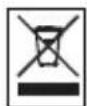
Your product is designed and manufactured with high quality materials and components, which can be recycled and reused. Please inform yourself about the local separate collection system for electrical and electronic products, including those marked by following symbol.
Please act according to your local rules and do not dispose of your old products with your normal household waste.
WARNING
Plastic bags can be dangerous.
To avoid danger of suffocation, keep this bag away from babies and small children.
FCC 15.105 rule:
This equipment has been tested and found to comply with the limits for a Class B digital device, pursuant to Part 15 of the FCC Rules. These limits are designed to provide reasonable protection against harmful interference in a residential installation. This equipment generates, uses and can radiate radio frequency energy and, if not installed and used in accordance with the instructions, may cause harmful interference to radio communications. However, there is no guarantee that interference will not occur in a particular installation. If this equipment does cause harmful interference to radio or television reception, which can be determined by turning the equipment off and on, the user is encouraged to try to correct the interference by one or more of the following measures:
- Reorient or relocate the receiving antenna.
- Increase the separation between the equipment and receiver.
- Connect the equipment into an outlet on a circuit different from that to which the receiver is connected.
- Consult the dealer or an experienced radio/TV technician for help.
Warning: Changes or modifications made to this equipment not expressly approved by Philips may void the FCC authorization to operate this equipment.
FCC 15.19 rule:
This device complies with Part 15 of the FCC Rules and with RSS-210 of Industry Canada. Operation is subject to the following two conditions:
(1) this device my not cause harmful interference, and
(2) this device must accept any interference received, including interference that may cause undesired operation.
C
Electric-, Magnetic- and Electromagnetic Fields ("EMF")
- Philips Royal Electronics manufactures and sells many products targeted at consumers, which, like any electronic apparatus, in general have the ability to emit and receive electro magnetic signals.
- One of Philips' leading Business Principles is to take all necessary health and safety measures for our products, to comply with all applicable legal requirements and to stay well within the EMF standards applicable at the time of producing the products.
- Philips is committed to develop, produce and market products that cause no adverse health effects.
- Philips confirms that if its products are handled properly for their intended use, they are safe to use according to scientific evidence available today.
- Philips plays an active role in the development of international EMF and safety standards, enabling Philips to anticipate further developments in standardization for early integration in its products.
Safety Precautions
USA/Canada: This player is for use only with IBM compatible UL listed Personal Computers or Macintosh UL listed workstations, weighing less than 18kg .
LASER SAFETY
This unit employs a laser. Do not remove the cover or attempt to service this device when connected due to the possibility of eye damage.
LASER-SICHERHEIT
USE OF CONTROLS OR ADJUSTMENTS OR PERFORMANCE OF PROCEDURES OTHER THAN THOSE SPECIFIED HEREIN MAY RESULT IN HAZARDOUS LASER RADIATION EXPOSURE.
WARNING
CLASS 1 LASER PRODUCT
LUOKAN I LASERLAITE
KLASSE 1 LASER-PRODUKT
CAUTION INVISIBLE LASER RADIATION. WHEN OPEN AVOID EXPOSURE TO BEAM
VARO! AVATTAESSA OLET ALTIINA NAKYVALLE JA NAKYMATTOMALLE LASER SATEILLLE.
ALÄ KATSO SATEESEEN
VARNING OSYNLIG LASERSTRALNING NAR DENNA DEL AR ÖPPNAD BETRAKTA EJ STRÄLEN ADVERSEL USYNLIG LASERSTRALING NAR DEKSEL APNES UNNGA EKSPONERING FOR STRÄLEN DANGER INVISIBLE LASER RADIATION. WHEN OPEN AVOID DIRECT EXPOSURE TO BEAM VORSICHT UNSICHTBARE LASERSTRAHLUNG WENN ABDECKUNG GÖFFNET NICTT DEM STRAHL AUSSETZEN
LASER
Type Semiconductor laser GaAlAs
Wave length 775-795 nm (CD) - 660 nm (DVD)
Output power (measured above the objective lens)
Read: 1,4 mW - 2,5 mW
Write: 90 mW (CD) - 27 mW (DVD)
Beam divergence 60 degree
Additional information available at our website:
www.philips.com/storageupdates
www.philips.com/storage
Specifications subject to change without notice.
All dimensions shown are approximate.
All rights reserved.
Reproduction, copying, usage, modifying, hiring, renting, public performance, transmission and/or broadcasting in whole or part is prohibited without the written consent of Philips Electronics N.V.
- How to... for Internal IDE Drives
- How to install?
- #
- 5
- 6
- More info or help needed
- EN
- Troubleshooting
- Be responsible Respect copyrights
- WEEE mark:Disposal of your old product
- WARNING
- 环使用期限 Environmental Protection Use Period
- FCC 15.105 rule:
- FCC 15.19 rule:
- Electric-, Magnetic- and Electromagnetic Fields ("EMF")
- Safety Precautions
- LASER SAFETY
- LASER-SICHERHEIT
- LASER
Brand : PHILIPS
Model : SPD2204BM
Category : DVD combo