ManualGo.com
MultiMeal - Saucepan CROCK-POT - Free user manual and instructions
Find the device manual for free MultiMeal CROCK-POT in PDF.


Frequently Asked Questions - MultiMeal CROCK-POT
Download the instructions for your Saucepan in PDF format for free! Find your manual MultiMeal - CROCK-POT and take your electronic device back in hand. On this page are published all the documents necessary for the use of your device. MultiMeal by CROCK-POT.
USER MANUAL MultiMeal CROCK-POT
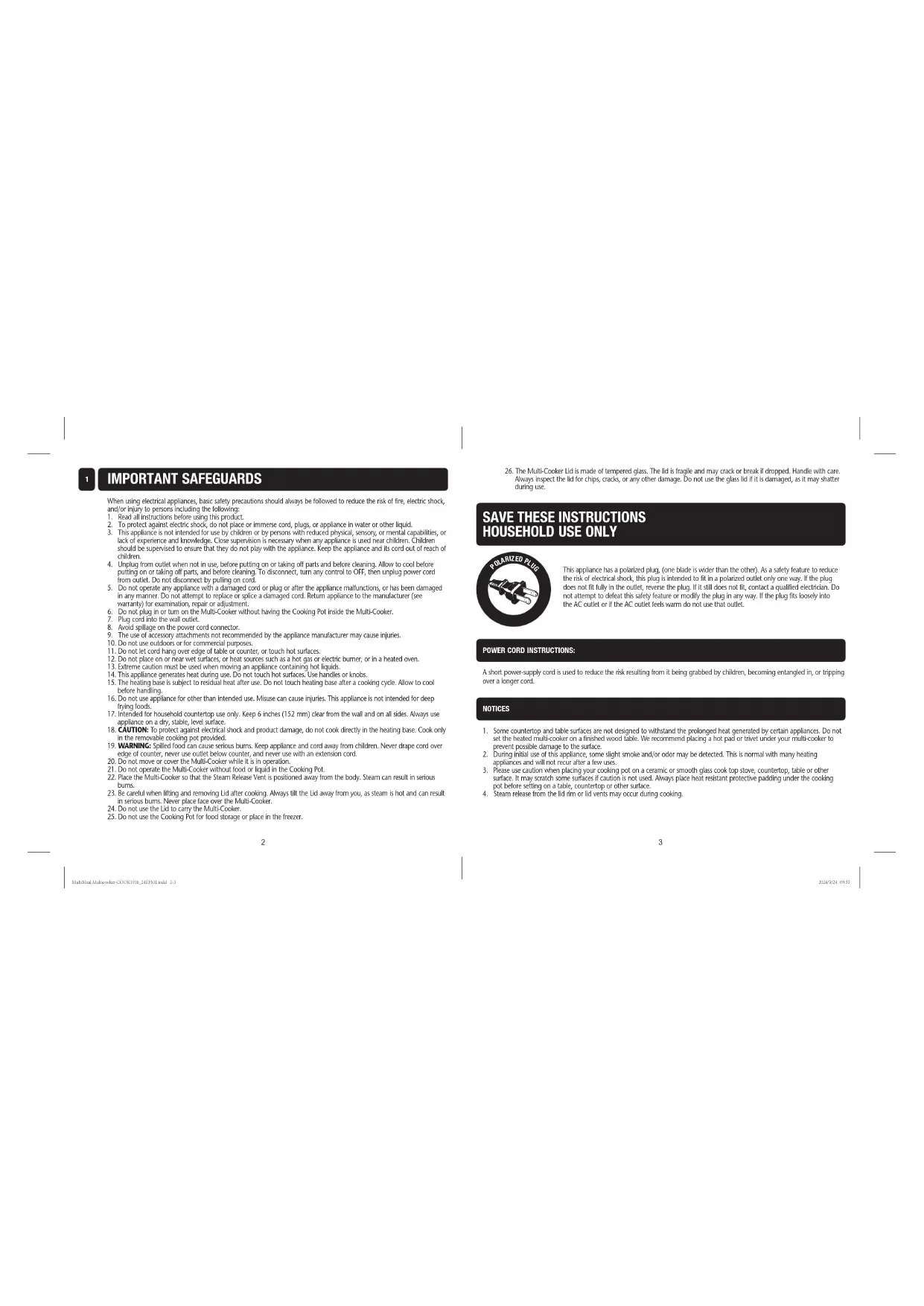
SAVE THESE INSTRUCTIONS
This appliance has a polarized plug, (one blade is wider than the other). As a safety feature to reduce the risk of electrical shock, this plug is intended to fit in a polarized outlet only one way. If the plug does not fit fully in the outlet, reverse the plug. If it still does not fit, contact a qualified electrician. Do not attempt to defeat this safety feature or modify the plug in any way. If the plug fits loosely into the AC outlet or if the AC outlet feels warm do not use that outlet. When using electrical appliances, basic safety precautions should always be followed to reduce the risk of fire, electric shock, and/or injury to persons including the following:
1. Read all instructions before using this product.
2. To protect against electric shock, do not place or immerse cord, plugs, or appliance in water or other liquid.
3. This appliance is not intended for use by children or by persons with reduced physical, sensory, or mental capabilities, or lack of experience and knowledge. Close supervision is necessary when any appliance is used near children. Children should be supervised to ensure that they do not play with the appliance. Keep the appliance and its cord out of reach of children.
4. Unplug from outlet when not in use, before putting on or taking off parts and before cleaning. Allow to cool before
putting on or taking off parts, and before cleaning. To disconnect, turn any control to OFF, then unplug power cord from outlet. Do not disconnect by pulling on cord.
5. Do not operate any appliance with a damaged cord or plug or after the appliance malfunctions, or has been damaged
in any manner. Do not attempt to replace or splice a damaged cord. Return appliance to the manufacturer (see warranty) for examination, repair or adjustment.
6. Do not plug in or turn on the Multi-Cooker without having the Cooking Pot inside the Multi-Cooker.
7. Plug cord into the wall outlet.
8. Avoid spillage on the power cord connector.
9. The use of accessory attachments not recommended by the appliance manufacturer may cause injuries.
10. Do not use outdoors or for commercial purposes.
11. Do not let cord hang over edge of table or counter, or touch hot surfaces.
12. Do not place on or near wet surfaces, or heat sources such as a hot gas or electric burner, or in a heated oven.
13. Extreme caution must be used when moving an appliance containing hot liquids.
14. This appliance generates heat during use. Do not touch hot surfaces. Use handles or knobs.
15. The heating base is subject to residual heat after use. Do not touch heating base after a cooking cycle. Allow to cool before handling.
16. Do not use appliance for other than intended use. Misuse can cause injuries. This appliance is not intended for deep
17. Intended for household countertop use only. Keep 6 inches (152 mm) clear from the wall and on all sides. Always use
appliance on a dry, stable, level surface.
18. CAUTION: To protect against electrical shock and product damage, do not cook directly in the heating base. Cook only
in the removable cooking pot provided.
19. WARNING: Spilled food can cause serious burns. Keep appliance and cord away from children. Never drape cord over
edge of counter, never use outlet below counter, and never use with an extension cord.
20. Do not move or cover the Multi-Cooker while it is in operation.
21. Do not operate the Multi-Cooker without food or liquid in the Cooking Pot.
22. Place the Multi-Cooker so that the Steam Release Vent is positioned away from the body. Steam can result in serious
burns. 23. Be careful when lifting and removing Lid after cooking. Always tilt the Lid away from you, as steam is hot and can result in serious burns. Never place face over the Multi-Cooker.
24. Do not use the Lid to carry the Multi-Cooker.
25. Do not use the Cooking Pot for food storage or place in the freezer.
26. The Multi-Cooker Lid is made of tempered glass. The lid is fragile and may crack or break if dropped. Handle with care. Always inspect the lid for chips, cracks, or any other damage. Do not use the glass lid if it is damaged, as it may shatter during use. IMPORTANT SAFEGUARDS
1. Some countertop and table surfaces are not designed to withstand the prolonged heat generated by certain appliances. Do not set the heated multi-cooker on a finished wood table. We recommend placing a hot pad or trivet under your multi-cooker to prevent possible damage to the surface.
2. During initial use of this appliance, some slight smoke and/or odor may be detected. This is normal with many heating
appliances and will not recur after a few uses. 3. Please use caution when placing your cooking pot on a ceramic or smooth glass cook top stove, countertop, table or other surface. It may scratch some surfaces if caution is not used. Always place heat resistant protective padding under the cooking pot before setting on a table, countertop or other surface.
4. Steam release from the lid rim or lid vents may occur during cooking.
A short power-supply cord is used to reduce the risk resulting from it being grabbed by children, becoming entangled in, or tripping over a longer cord. NOTICES POWER CORD INSTRUCTIONS: MultiMeal Multicooker COOK1916_24EFM1.indd 2-3MultiMeal Multicooker COOK1916_24EFM1.indd 2-3 2024/5/24 09:352024/5/24 09:354 5
4. 8QT Pot (Select models only.)
i) Synch Finish Button (DualSync Technology)
h h Cooking Functions Your MultiMeal Multicooker has five (5) cooking functions:
1. SLOW COOK: Gradually cooks food at low temperatures over an extended period of time, resulting in tender, flavorful
2. SEAR / SAUTE: Quickly heats and browns food to lock in flavor and create a delicious, caramelized exterior.
3. STEAM: Gently cooks food using hot vapor, preserving nutrients and flavors while ensuring even cooking.
4. RICE / GRAIN: Automatically cooks perfect fluffy rice or grains with precise timing and temperature control.
5. KEEP WARM: Maintains a consistent low temperature to keep cooked food warm without overcooking.
6. BAKE: Evenly cooks dishes with dry heat. Perfect for baking cakes, bread, or casseroles. (only on select models).
- Pot Tips o For models sold with the additional 8QT pot, ALWAYS remove the 8QT pot from the multicooker before cooking with both 3.7QT pots. o Only cook with the pots provided with your Multicooker. o Multicooker pots are safe for use in the oven. o Use only non-metal utensils inside Multicooker pots to prevent scratches and damage to the non-stick coating. o Do not use traditional stoneware in this unit, only the metal pots.
- Lid Tips o Lids for the Multicooker are NOT oven safe. o For proper steam ventilation, avoid resting objects of any kind on the lids.
- Food Handling Tips o For best results, ensure ingredients have properly thawed before cooking in the multicooker.
- Control Panel Tips o In some cases, you may want to change a cook function you’ve selected. To choose a different cook mode, press the SELECT button again to reselect cook modes.
- Cooking Tips o Your Multicooker can perform various cooking tasks but it's different from regular slow cookers. You may need to alter the cooking time for some slow cooking recipes. o Sear larger cuts and quantities of meat in stages. This will prevent the meat from steaming or boiling. o Avoid overcrowding pots to prevent unwanted moisture build-up when cooking. o Max water volume for STEAM function is 1.5 cups or 350 ml. COOKING FUNCTIONS
1. Remove all packaging components.
2. Wash the lids, pots, and wire rack in warm, soapy water. Make sure to dry thoroughly. (For models sold with the
additional 8QT pot, make sure to remove, wash, and dry as well.)
3. Place both 3.7QT pots OR the single 8QT pot (model CPMCRTC80D-OM only) inside your MultiMeal Multicooker.
IMPORTANT: For models sold with the additional 8QT pot, ALWAYS remove the 8QT (4) pot from the Multicooker before cooking with both 3.7QT (3) pots.
4. Plug in the power cord into a 120V outlet.
1. Press the POWER button. The control panel will illuminate.
Cooking With Your Multicooker
1. Press to select the Left Pot cook settings or for the Right Pot cook settings. The respective Pot Indicator will
illuminate when selected and the cook mode will flash. a. NOTE: For models sold with an 8QT pot, press to use the single large 8QT pot accessory. The 8QT Pot Indicator and Left cook modes will illuminate. IMPORTANT: Do NOT operate this unit without both pots securely fitted inside when using the dual pot mode. This can lead to poor cooking performance and expose extremely hot surfaces.
2. Use the UP and DOWN buttons to cycle through the cook modes. Once you reach your desired mode, press SELECT
to confirm and continue. a. NOTE: For SLOW COOK and SEAR/ SAUTE modes, you must choose the HI or LOW temperature setting. Use the UP and DOWN arrows to toggle between HI and LOW. Then, press SELECT to confirm and continue. b. NOTE: (For model CPMCRTC37D-OM) In BAKE mode, you can choose HI for 350°F or LOW for 300°F temperature settings. For the combined RICE/STEAM mode, choose HI for rice or grains and LOW to steam.
3. Once the mode and the temperature (if applicable) are selected, use the UP and DOWN buttons to set your desired
cook time. Press SELECT to save your cook settings or press START to begin cooking! a. NOTE: If SEAR / SAUTE function is selected (and select models with BAKE), you must preheat the unit before ingredients are added! For instructions on how to preheat, see Preheat Function section below. b. NOTE: See our cook charts online or on page 11-14 for suggested cook times and temperatures!
4. Repeat Steps 1-3 for your second pot!
a. NOTE: If you opted to press SELECT in Step 3 for your initial pot set up, those settings have been saved. Press START at this time to begin dual-pot cooking!
5. Once cooking is completed, your multicooker will beep and flash ‘Done’ on the control panel. Some modes (SLOW
COOK, STEAM, RICE, BAKE) will automatically start the KEEP WARM function to keep your food ready until serving time. a. NOTE: We do NOT recommend using the KEEP WARM setting for more than four (4) hours. 6. (Optional) If only one pot has finished cooking and you wish to remove its ingredients, make sure to return the pot to its base. This will maintain the cooking quality of the unfinished pot and prevent the heating plate from being exposed.
7. To turn off unit, press the POWER button.
Steam Function The steam function utilizes steam to cook food gently and evenly. It's ideal for steaming vegetables, seafood, and baking. This function involves adding water to the pot which generates steam to cook the food placed on the wire rack. It's a healthy cooking method that helps retain nutrients and flavors in the food. To steam foods properly:
1. Add water to a single 3.7QT pot.
- NOTE: Maximum water volume for STEAM function is 1.5 cups or 350 ml.
2. Place wire rack inside pot.
3. Select the STEAM function to begin steaming.
Preheat Function The preheat feature makes sure your multicooker reaches the right temperature before cooking. Preheating before cooking makes the outcome of your recipes more consistent and helps them cook faster. Using the Preheat Function
1. Select the SEAR / SAUTE function (or BAKE on select models).
a. NOTE: The preheat function is only available for the SEAR / SAUTE function (and select models with BAKE).
2. Press the START button.
3. The preheat status bar will illuminate. Your cook time will hold until completed.
a. TIP: To save time, prepare any necessary ingredients while waiting for the unit to preheat.
4. Listen for a beep. This means preheating is complete.
CAUTION!! Foods and pots will be very hot! Always use oven mitts to remove the pots and remove foods using tongs or utensils.
WARNING: Always place lid steam vents towards the back of the unit (away from body) to prevent steam burns. Refer to
the 1 and 2 lid labels to ensure the steam vents are placed correctly.
5. Add ingredients as necessary.
6. Securely fit both lids onto the pot(s).
7. Press the START button to begin the timer.
a. NOTE: If the START button is NOT pressed within two (2) minutes of preheat completing, the unit will auto-start.
8QT Pot for model CPMCRTC80D-OM only. MultiMeal Multicooker COOK1916_24EFM1.indd 6-7MultiMeal Multicooker COOK1916_24EFM1.indd 6-7 2024/5/24 09:352024/5/24 09:358 9 Use the optional SYNC FINISH feature to sync both pots to finish at the same time, even if cook modes and times are different for each pot. See Sync Finish chart below. Using the Sync Finish Feature
1. Press the SYNC FINISH button at any time before pressing START.
a. NOTE: For best results, avoid using SYNC FINISH if the difference in cook time for each pot is more than two (2) hours. b. NOTE: SYNC FINISH cannot be used with SEAR/SAUTE as it requires constant supervision. General Guidance for Sync Finish Feature
- It is recommended to use the SYNC function for recipes with less than a 2-hour difference to ensure best food quality and proper food handling guidance.
- NOTE: For recipes that are greater than a 2-hour difference: o The side with longer cook time will start first. The side with shorter cook time will start cooking after two (2) hours have passed and then switch to keep warm (counting up time on display) until the longer side is completed. When the longer side completes cooking, both sides will switch to keep warm and count up together.
- NOTE: When using BAKE and Sync Finish, there can minor differences in completion times due to the BAKE function preheating.
- Rice will always be cooked within the first 15 minutes and will shift to keep warm for the rest of the duration.
- Visit https://www.foodsafety.gov/ or https://www.fsis.usda.gov/ for more information on all safe food handling. Sync Finish Chart Before cleaning, ALWAYS turn your unit off, unplug it from the electrical outlet, and allow it to cool. CAUTION: NEVER immerse the Heating Base in water or other liquid. This appliance has no user serviceable parts. Any servicing beyond that described in the Cleaning Section should be performed by an Authorized Service Representative only. See warranty available online. Cleaning Your Multicooker
1. Wash lid(s), steam rack, and pots in the dishwasher or with a cloth in hot, soapy water.
a. Important notes on cleaning your multicooker:
- Handwashing is recommended to extend the lifespan and quality of the ceramic nonstick coating.
- NOTE: Do NOT use abrasive cleaners or scouring pads. A cloth, sponge, or rubber spatula will usually remove residue.
- To remove water spots and other stains, use a non-abrasive cleaner or vinegar.
- Multicooker lid will not withstand sudden temperature changes. Do not wash hot lid(s) with cold water.
2. Dry all parts thoroughly.
3. Clean the outside of the multicooker with a soft cloth and warm, soapy water. Wipe dry.
Storing Your Multicooker
1. Ensure the unit is cleaned thoroughly and unplugged from the electrical outlet.
2. Place both 3.7QT pots inside of your unit.
a. NOTE: For units with the 8QT pot, place 8QT pot inside of your multicooker. Next, stack 3.7QT pots side by side inside of the 8QT pot.
3. Place steam rack inside pots.
4. Place lid(s) securely on top of pots.
5. Store in a cool, dry place.
- Press and hold the START/PAUSE button for 3 seconds. This will stop any items from cooking and cancel settings that had been entered. o If you have not started the cooking process, this will cancel the latest pot’s settings that were entered. For example, if you entered settings for Pot 1 first, and then entered the settings for Pot 2, then pressing and holding START/ PAUSE for 3 seconds will only cancel Pot 2’s settings. To cancel the first pot settings, press the respective Pot button then press and hold START/PAUSE for 3 seconds. o If cooking has begun, this will stop and cancel all entered settings for all pots. The control panel will return to standby mode, displaying dashes and alternating the Pot indicators.
- Press or to temporarily pause cooking on a single pot, without interrupting the second. The cook mode will begin to flash, indicating the respective pot has paused cooking. Press START/PAUSE to resume the single paused pot.
- To temporarily pause both pots while they are actively cooking, or to pause cooking in the 8QT pot, press START/ PAUSE. To resume, press START/PAUSE again. o NOTE: For models sold with an 8QT Pot, the button will also pause cooking for the 8QT Pot. For models without this button, press to pause cooking for the 8QT Pot. To change the selected cook mode, time, or temperature for your pots:
- After cooking has started: o Press or depending on which pot you need to update. The cook mode will begin to flash, indicating the respective Pot has temporarily paused cooking. NOTE: the other pot will not pause. Only the respective pot selected. For the 8QT pot or to pause both pots, press START/PAUSE. The cook mode(s) will begin to flash. o To update cook mode – Press UP or DOWN to cycle through modes then press SELECT once desired mode is flashing. Then complete temperature and/or cook time settings using the UP or DOWN buttons to toggle and press SELECT to confirm. Press START to resume cooking. o To update cook temperature (only applicable on SLOW COOK, SEAR / SAUTE, and select models with BAKE) – press SELECT until the cook temperature is flashing. Press UP or DOWN to toggle HI and LO temperatures, then press SELECT. You will need to reset the cook time, then press START to resume cooking. o To update cook time – Press SELECT until the time is flashing. Then press UP or DOWN to cycle through time. Then press START to resume cooking.
- Before cooking has started: o Press 1 or 2 depending on which pot you need to update. The cook mode will begin to flash. NOTE: the other pot settings will still be saved if already selected. NOTE: For the 8QT pot, press . If your 8QT pot was purchased separately, and you have already selected the 8QT mode, press . The cook mode will begin to flash. o To update cook mode – Press UP or DOWN to cycle through modes then press SELECT once desired mode is flashing. Then complete temperature and/or cook time settings using the UP or DOWN buttons to toggle and press SELECT to confirm. Press START to resume cooking. o To update cook temperature (only applicable on SLOW COOK, SEAR / SAUTE, and select models with BAKE) – press SELECT until the cook temperature is flashing. Press UP or DOWN to toggle HI and LO temperatures, then press SELECT. You will need to reset the cook time, then press START to resume cooking. o To update cook time – Press SELECT until the time is flashing. Then press UP or DOWN to cycle through time. Then press START to resume cooking. To turn your multicooker off:
- Press the power button . Welcome to the cooking charts section for your MultiMeal Crockpot! Whether you're a novice or seasoned chef, these charts are designed to simplify your cooking experience, providing suggested cooking times and settings for a variety of ingredients and dishes. Visit https://www.foodsafety.gov/ or https://www.fsis.usda.gov/ for more information on all safe food handling. COOKING CHARTS
Temperature Chart Mode Temp settings Used for SLOW COOK HI, LOW High and low temps: Slowly cook proteins, soups or stews for rich and tender results. You may need to alter the cooking time for some traditional slow cooking recipes. SEAR/SAUTÉ HI, LOW High-temp: For quick sear on proteins and reducing sauces. Low-temp: For sautéing veggies and simmering liquids. RICE/STEAM NOTE: On select models, Steam/ Rice functions are combined as one. If Steam/Rice is separate: Apply preset temperatures. High-temp: Use the high-temp setting to cook grains like white and brown rice, quinoa, oats or more. Find our full grains chart on page 12. For white rice, follow a 1:1 rice to liquid ratio; for 1 cup of uncooked rice, the cook time would be 15 minutes. Low-temp: Use the low-temp setting to steam veggies, fish, dumplings, or more! Add 1.5 cup of cold water. BAKE (ON SELECT MODELS) HI, LOW High (350°F) and low (300°F) temps: Bake desserts, breads, proteins, or veggies. NOTE: We recommend using loaf pans or ramekins placed on the included Wire Rack when baking foods. KEEP WARM Preset temperature Keep meals ready until serving time. MultiMeal Multicooker COOK1916_24EFM1.indd 10-11MultiMeal Multicooker COOK1916_24EFM1.indd 10-11 2024/5/24 09:352024/5/24 09:3512 13 Slow Cooking Chart Slow Cooking Time Meat Weight Low Cook Time High Cook Time Large Pork Roast* 6-7 Lbs 9:30 h 7:30 h Pork Loin 3-4 Lbs 6:00 h 5:00 h Poultry** 6 Lbs 7:30 h 5:00 h Beef Roast 3-4 Lbs 8:30 h 5:45 h Stew Meat 3 Lbs 6:00 h 4:45 h Fish*** 2 Lbs 2:30 h 4:45 h Grain Cooking Chart Grain per 1 Cup Rinse Water per Cup Program Time Quinoa No 2 Cups 12 Minutes Oats No 1.5 Cups 8 Minutes Buckwheat Yes 1 Cup 12 Minutes Bulgur Wheat Yes 1.5 Cups 15 Minutes Pearl Barley Yes 2.5 Cups 32 Minutes NOTE: Cook times are estimates and may vary based on food type, preparation, and external temperatures. Visit https://www.foodsafety.gov/ or https://www.fsis.usda.gov/ for more information on safe internal cooking temperatures *Pork butt, pork shoulder **Whole chicken, bone-in turkey breast *** If fish is added in after multicooker has been fully heated to simmer point, it will cook within 15-30 minutes. 3.7QT Rice Cooking Chart Rice Type Uncooked Rice Water Program Time Long Grain White Rice or Basmati White Rice 1 Cup 1 Cup 15 min 2 Cups 2 Cups 18 min 3 Cups 3 Cups 20 min 4 Cups 4 Cups 22 min 5 Cups 5 Cups 25 min Long Grain Brown Rice or Basmati Brown Rice 1 Cup 1.5 Cups 32 min 2 Cups 3 Cups 35 min 3 Cups 4.5 Cups 38 min 4 Cups 6 Cups 41 min 5 Cups 7.5 Cups 44 min Rice Cooking Tips Cook times may vary depending on the starting temp of your water and if soak the rice. For more firm rice use less water, for more fluffy, sticky rice add more water. Program time includes preheating and simmer time. 8QT Rice Cooking Chart (Only for Select Models) Rice Type Grain (cups) Water (cups) Program Time (min) Long Grain White Rice 3 cups 3 cups 18 min 4 cups 4 cups 20 min 12 cups 12 cups 28 min Basmati White Rice 3 cups 3 cups 18 min 6 cups 6 cups 25 min Long Grain Brown Rice 2 cups 3 cups 35 min 10 cups 15 cups 44 min Buckwheat 2 cups 2 cups 15 min Rice Cooking Tips: Cook times may vary depending on the starting temp of your water and if soak the rice. For more firm rice use less water, for more fluffy, sticky rice add more water. Program time includes preheating + simmer time. MultiMeal Multicooker COOK1916_24EFM1.indd 12-13MultiMeal Multicooker COOK1916_24EFM1.indd 12-13 2024/5/24 09:352024/5/24 09:3514 15 Cup Cakes with Boxed Mix Ingredients:
- 0.5 cup cold water Rack Requirements: Rack with 6 silicone ramekins Program Time: 15 Minutes Program Temperature: HI Instructions
1. Place all ingredients into a mixing bowl.
2. Whisk for 3 minutes until smooth.
3. Divide between 6 silicone ramekins or containers.
Brownies with Boxed Brownie Mix Ingredients:
- 2 tbsp water Rack Requirements: Rack with loaf pan Program Time: 40 Minutes Program Temperature: HI Instructions
1. Place all ingredients into a mixing bowl and stir to
combine. Do not overmix.
2. Line loaf pan with parchment paper or grease with
3. Place mix into loaf pan.
cup warm water Rack, Program Time & Temperature:
- Rack with parchment paper, 40 minutes, HI
- Rack with loaf pan, 35 minutes, HI
- No rack with loaf pan, line pot with foil or parchment, 35 minutes, HI Instructions
1. Combine all ingredients together.
2. Knead for 5 minutes until smooth and elastic.
3. Seta side covered for 1 hour until doubled in size.
4. Split and shape as required, allow to proof for 45
5. Prior to baking, brush with egg wash to encourage
even browning BAKING RECIPES
- 2 pieces of bacon, chopped
- 1 clove of garlic, chopped
- ¾ cup sweet potato, peeled and coarsely grated
- 1 cup broccoli florets, chopped
- Salt & pepper Rack Requirements: No rack Program Time: 10 Minute Saute, 5 Minute Bake Program Temperature: LOW Instructions
1. Select SEAR/SAUTE, LOW and adjust time to 10
minutes. Allow the unit to pre-heat.
2. Add oil, onions, bacon, garlic and stir to saute for 2-3
minutes until softened.
3. Stir in the cooked rice, sweet potato and broccoli.
Cover with the lid and allow to finish cooking, stirring occasionally.
4. Remove the lid, stir well and allow the mixture to cool
5. Add the eggs to a small mixing bowl, season with salt
and pepper and beat with a fork until mixed.
6. Add in the grated cheese and half of the chopped
chives to the egg mixture, stir.
7. Stir in the frozen peas to the pot, pour over the egg
mixture into the pot. Cover with the lid.
8. Select BAKE, LOW and adjust time to 5 minutes.
9. Once preheat has finished, select START and allow the
10. Once cooked, remove the pot and lid and set aside on
a wire rack to cool before removing.
11. Cut into slices and garnish with remaining chives.
Chocolate Chip Brioche Baked Pudding Yields: 2 Servings Ingredients:
- 3 oz. chocolate chip brioche bread, roughly torn into 1 inch chunks
- 2 tbsp butter, melted
- ½ cup heavy cream Rack Requirements: Rack with bowl Program Time: 35-40 Minutes Program Temperature: HI or LOW Instructions
1. Grease the bowl with butter or cooking spray.
2. Place torn brioche into the bowl and scatter chocolate
chips over the bread.
3. Mix the remaining ingredients together in a separate
bowl and pour the mixture over the bread, pressing down with a spoon to submerge the bread in the mixture.
4. Set aside for 10 minutes to soak.
5. Preheat the unit with the rack inside the pot.
6. Once preheat is reached, carefully place the bowl onto
the rack and cover with the lid.
7. Bake until risen and slightly wobbly, roughly 35
8. Remove and allow to cool.
Baked Potatoes Ingredients:
- Whole potatoes Rack Requirements: Rack Program Time: 75 Minutes Program Temperature: HI Instructions
1. Prepare potatoes by poking hole all over the surface
2. Place potatoes on rack.
3. Bake until tender, roughly 75 minutes.
4. Remove from the rack and allow to cool.
½ cup graham crackers, crushed to crumb texture
½ stick melted butter
8oz cream cheese, softened
3 ½ tbsp strawberry syrup Rack Requirements: Rack with ramekins Program Time: 35 Minutes Program Temperature: LOW Instructions
1. Line the bottom of the ramekins or springform tins
with baking paper for easy removal of the cheesecakes when cooled.
2. Place the cracker crumbs and melted butter into a
3. Divide between the two ramekins or springform tins,
pressing down with a spoon to form a uniform bottom layer.
4. Mix the remaining ingredients together besides the
strawberry syrup in a separate bowl until smooth. Divide the mixture between the ramekins and spread on top of the graham cracker crumb crust.
5. Program the unit and allow to preheat with the rack in
6. Carefully add cheesecake ramekins to the rack. Cover
with the lid and allow to bake.
7. Once the bake time elapses, remove the lid and allow
the cheesecakes to cool for 10 minutes before removing and allowing to cool completely.
8. Once completely cool, remove from springform tin or
serve in the ramekin.
9. Drizzle with strawberry syrup before serving.
150g store bought pizza dough or homemade
Handful grated cheese or torn mozzarella
Pinch of dried oregano Rack Requirements: Rack with parchment paper or foil Program Time: 15 Minutes Program Temperature: HI Instructions
1. Use foil or parchment paper to help remove the pizza
easily. Place foil or parchment paper down and roll out desired dough shape, brushing with oil before placing dough onto the parchment paper or foil.
2. Spread tomato sauce or paste onto the rolled out
4. Allow unit to preheat with the rack in the pot.
5. Place the parchment paper or foil with the pizza on
top carefully onto the rack.
6. Once baking is complete, allow to cool for several
minutes before removing. Baking Tips:
- When baking directly in the pot or without a rack, line the pot with foil or parchment paper to reduce the direct heat contact with the bottom heater plate.
- High sugar content recipes are recommended to bake in a dish or pan to prevent excessive browning on the bottom.
- For added browning, finish dishes in an oven or broiler for 2-5 minutes.
- Create a foil sling to remove finished recipes when baking completes. MultiMeal Multicooker COOK1916_24EFM1.indd 16-17MultiMeal Multicooker COOK1916_24EFM1.indd 16-17 2024/5/24 09:352024/5/24 09:3518 19
- CAUTION!! Foods and pots will be very hot! Always use oven mitts to remove the pots and remove foods using tongs or utensils.
- In between uses, be sure to wipe down the inside of your unit! First, unplug and let unit cool. Then use a soft cloth to wipe clean. For best results in your 3.7QT pots, stir often and cut any larger ingredients into smaller pieces.
- REMINDER: For model number CPMCRTC80D-OM, the 3.7QT pots and the 8QT pot should NOT be stacked when cooking. Only stack pots when storing your unit. We recommend using pots placed on the included Wire Rack when baking. If not using the rack, be sure to use a lower temperature setting like BAKE LOW and adjust cook times as needed.
- For more information, visit: https://www.crock-pot.com: o Additional operating instructions and warranty details located in the instruction manual, under the "Support" tab (located at the top-right corner of the website). o For recipes & tips: Visit the “Recipes & Tips” tab located on the home page menu. Please visit www.crock-pot.com for warranty information for your Crock-Pot
product. How to Obtain Warranty Service In Canada If you have any questions regarding this warranty or would like to obtain warranty service or support, please call 1-800-323-9519 or visit the Crock-Pot
website. In Canada, this warranty is offered by Newell Brands Canada ULC, located at 20 B Hereford Street, Brampton, Ontario L6Y OM1. If you would like a physical copy of the warranty for your Crock-Pot
product, feel free to print the warranty available on website listed above, or call us at the phone number listed above or write our Customer Service Department at the address listed above, and we’d be happy to send you a copy. ADDITIONAL TIPS WARRANTY