WEK200 MES - Knife Waring Commercial - Free user manual and instructions
Find the device manual for free WEK200 MES Waring Commercial in PDF.


| Product Type | Cordless Electric Knife |
| Brand | Waring Commercial |
| Model | WEK200 MES |
| Usage | Commercial |
| Power Supply | 9V DC / 850 mA AC adapter, rechargeable lithium-ion batteries |
| Battery Life | 4-hour charge before first use |
| Charge Indicator | Indicator: red (low battery), yellow (charging), green (charged) |
| Included Blades | Carving blade and bread blade |
| Cutting Guide | Adjustable for uniform slices |
| Lighting | Integrated LED light for visibility |
| Safety | LOCK/UNLOCK safety switch |
| Ergonomics | Ergonomic handle, left/right-handed use |
| Material | BPA-free for food contact parts |
| Blade Cleaning | Washable in warm water with detergent or dishwasher |
| Handle Cleaning | Wipe with damp cloth, do not immerse |
| Storage | Carrying/storage case with inside charging capability |
| Weight | Not specified |
| Dimensions | Not specified |
| Included Accessories | Handle, 2 blades, cutting guide, fixing screw, AC adapter, storage case |
Frequently Asked Questions - WEK200 MES Waring Commercial
User questions about WEK200 MES Waring Commercial
0 question about this device. Answer the ones you know or ask your own.
Ask a new question about this device
Download the instructions for your Knife in PDF format for free! Find your manual WEK200 MES - Waring Commercial and take your electronic device back in hand. On this page are published all the documents necessary for the use of your device. WEK200 MES by Waring Commercial.
USER MANUAL WEK200 MES Waring Commercial
For your safety and continued enjoyment of this product, always read the instruction book carefully before using.
When using an electrical appliance, basic safety precautions should always be followed:
- READ ALL INSTRUCTIONS.
- To protect against risk of electrical shock, do not put the knife handle or adapter in water or other liquid. If handle or adapter falls into liquid, unplug the adapter from outlet immediately. Do not reach into the liquid.
- To avoid possible accidental injury, close supervision is necessary when any appliance is used by or near children.
- Ensure safety switch is in the lock position before putting on or taking off parts, and before cleaning.
- Avoid coming into contact with moving parts. Keep hands, hair, clothing and other utensils away from blade during operation to reduce risk of injury to persons and/or damage to the knife.
- Do not operate any appliance with a damaged cord or plug or after the appliance has malfunctioned or has been dropped or damaged in any way or is not operating properly. Return the appliance to the nearest authorized service center for examination, repair, mechanical or electrical adjustments.
- The use of attachments not recommended or provided by Waring Commercial may cause fire, electrical shock, or risk of injury.
- Do not use outdoors or anywhere the cord, adapter or knife might come into contact with water while in use.
- To avoid the possibility of the knife being accidentally pulled off work area, which could result in personal injury or damage to the knife, do not let cord hang over edge of table or counter.
- To avoid damage to cord and possible fire or electrocution hazard, do not let cord come into contact with hot surfaces, including a stove.
- Do not operate knife in water or under running water.
- BLADES ARE SHARP. Handle carefully. Always handle blades with hand away from cutting edge. Always store blades with cutting edge away from you.
- This product contains Li-ion batteries. Do not incinerate or compost batteries, as they will explode at high temperatures.
- Use only the power adapter (9.0VDC-850MA output) as supplied with this product.
SAVE THESE INSTRUCTIONS
UNPACKING INSTRUCTIONS
IMPORTANT – PLEASE READ
This package contains a Waring ™ Commercial Cordless Electric Knife with the following parts:
- Knife main housing
- Adjustable slicing guide
- Carving blade
- Instruction booklet
- Bread blade
- Power Adaptor
- Thumb screw
- Carrying/storage case
To avoid any injury to yourself or damage to the Waring™ Commercial Cordless Electric Knife, please follow these unpacking instructions:
- Place the gift box containing your Waring™ Commercial Cordless Electric Knife on a flat, sturdy surface before unpacking.
- Remove all printed materials.
- Next, turn the box on its side and slide the storage case out, including packing materials.
- Place the unit on a counter or table and read the instructions thoroughly before using.
- Save shipping carton and inserts for later use.
CONTENTS
Features and Benefits .... 4
Use and Care .... 5
Cleaning and Storage....6
Helpful Hints....7
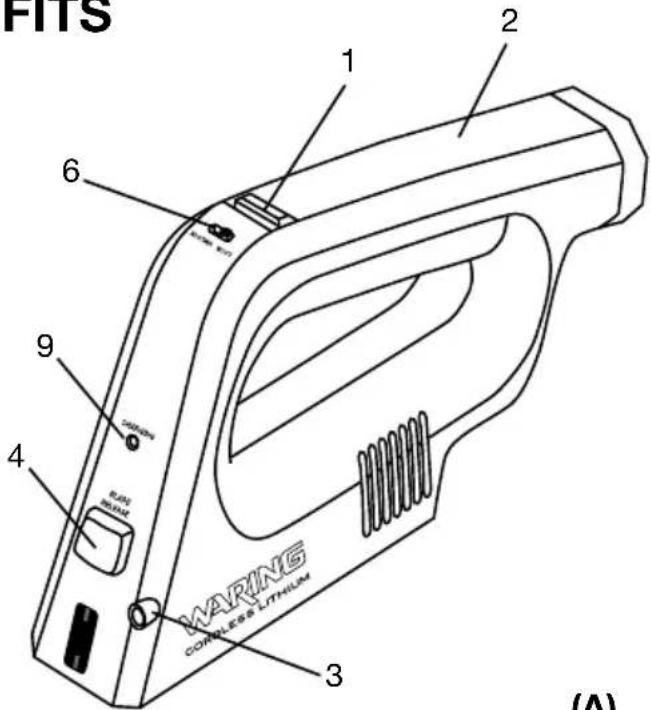
FEATURES AND BENEFITS
1. ON/OFF Control:
One-touch pressure-activated ON/OFF thumb control for simple operation. Convenient for left- or right-hand use.
2. Handle: Ergonomic handle reduces fatigue from long periods of use.
3. LED Guide Light: Adds additional light to the cutting area for maximum illumination.
4. Blade Release Button: Easy inserting, removing or changing blades.
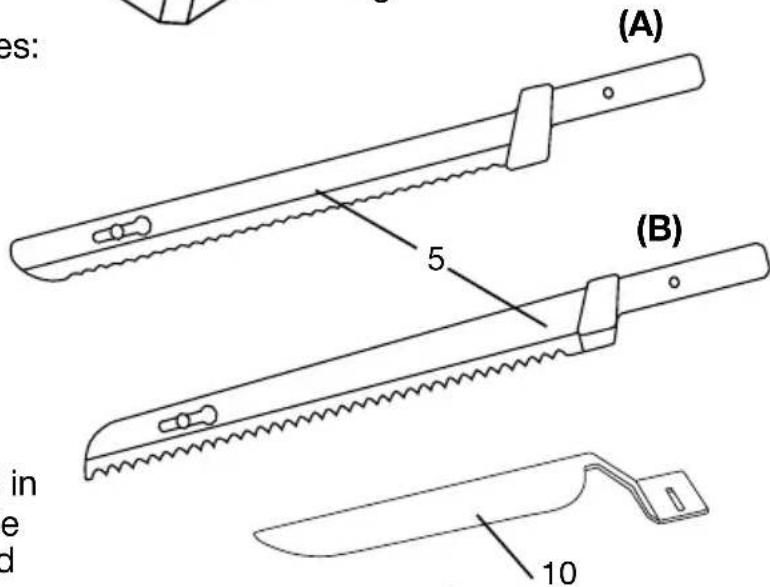
5. Blades: Two full-size blades: (A) carving blade and (B) bread blade.
6. Safety Button: One touch locks or unlocks the ON/OFF control for safety. Keep the safety button locked when knife is not in use.
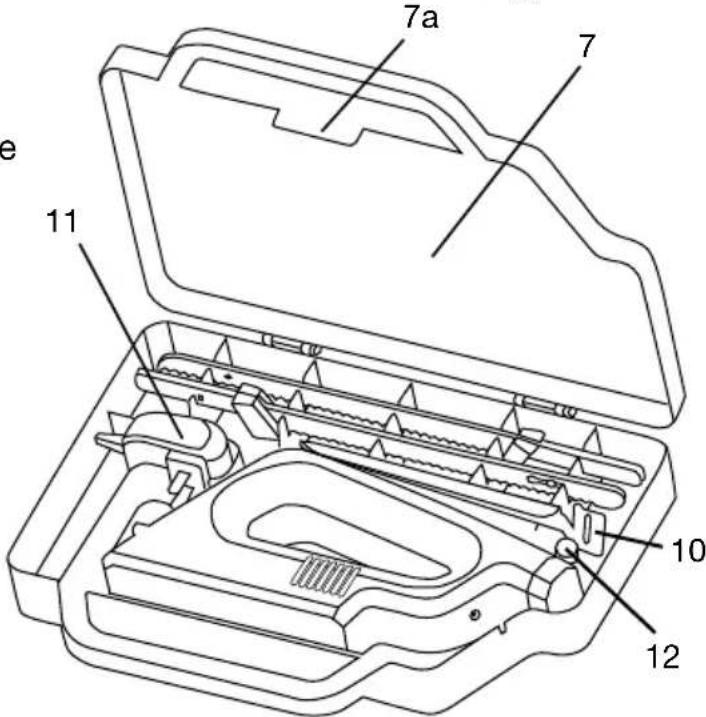
7. Carrying/Storage Case: Safely and securely stores your electric knife when not in use. A small opening on side allows cord to be connected to the knife so it can charge while stored in the case.
7a.Lid Interlock Tab
- BPA Free: All parts that come in contact with food are BPA free. (Not shown)
- ChargingIndicatorLight: Light will illuminate red when battery is low, yellow when charging, and green when charge is complete.
- AdjustableSlicingGuide: Helps ensure every cut is consistent whether cutting thick or thin slices.
- Adaptor
- ThumbScrew: Used to secure slicing guide to housing.
USE AND CARE
Assembling the Blades
-
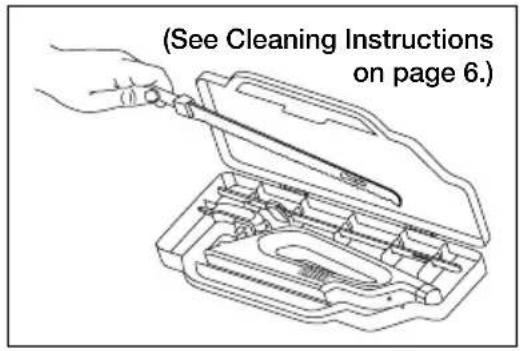
Place storage case on a flat surface with Waring logo facing up. Open lid by lifting interlock latch between handles. Lift top to open
-
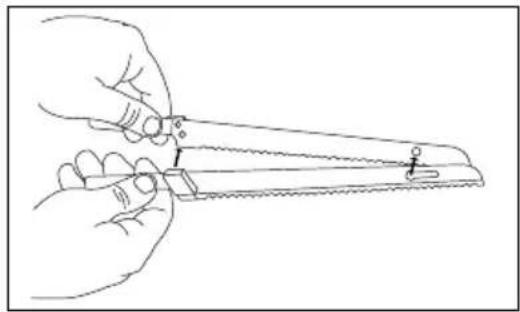
Carefully remove blades from storage case. Before first use, separate the blades and wash them in hot, soapy water or in the dishwasher. CAUTION: BLADES ARE SHARP. HANDLE WITH CARE. Dry thoroughly.
-
Attach the blades by inserting the rivet on one blade into the keyhole of the other blade.
Using Your Waring™ Commercial Cordless Electric Knife
-
Be sure to fully charge your electric knife for 4 hours prior to first use.
-
The blades must be assembled before fitting into knife.
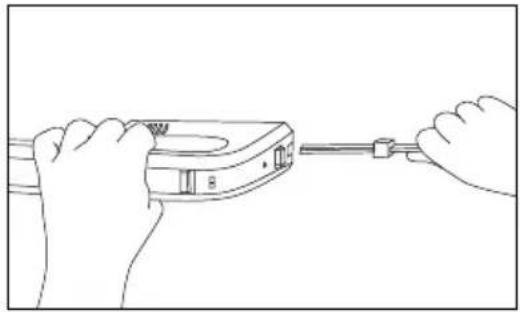
Caution: Always engage lockout before handling blades or blade guide.
Holding the blades with the serrated edge away from you, insert blades until you hear a click. The blades may not line up evenly when properly inserted.
Caution: The blades are very sharp; be careful when handling them.
-
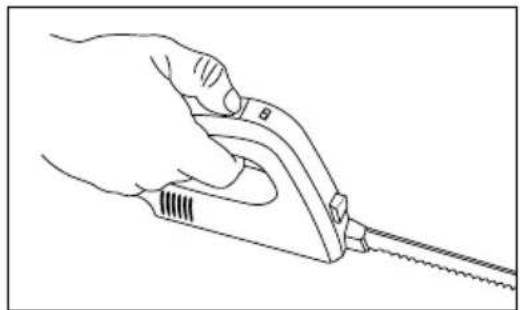
Slide the safety lock to the unlock position and press/hold the thumb control to activate the electric knife.
-
Press and hold the thumb control as you cut, keeping the blade straight so thickness of slices is consistent.
Caution: NEVER place your hand on top of the blade to support it while operating the knife as the blades are designed to move back and forth.
- Blade automatically stops when thumb control is released.
Using the Adjustable Slicing Guide
The adjustable slicing guide is to be used as an optional tool to ensure slices remain consistent and uniform. Use of the slicing guide is not required to operate the knife and can be stored in the provided storage/charging case until necessary.
Attaching/Adjusting the Slicing Guide
To attach the slicing guide to your knife, first ensure the Safety Interlock is in the locked position. Looking at the bottom of the unit, attach the blade guide by inserting and tightening the provided thumb screw once you have selected the desired thickness (markings are found on the underside of guide, see fig. A).
To adjust the slicing guide, loosen thumb screw and slide guide until the desired marking is lined up with the pin (see fig. B). Tighten thumb screw to ensure the guide is securely in place prior to use. During extended periods of use, check every so often to make sure thumb screw does not require re-tightening.
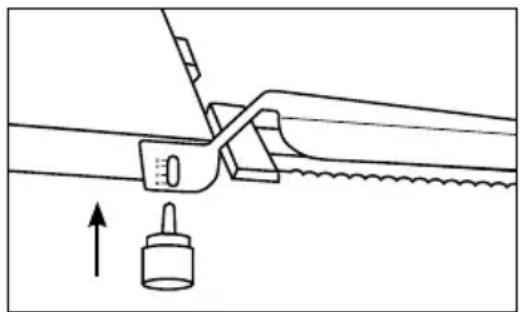
fig. A
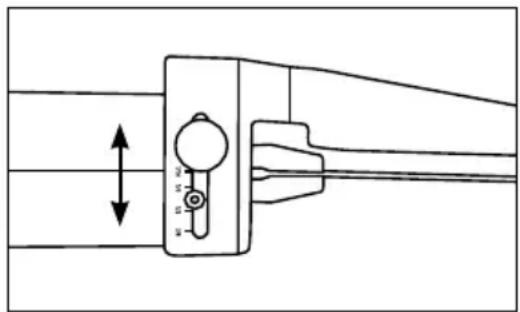
fig. B
CLEANING AND STORAGE
NOTE: Always engage lockout after each use or while it is not in use.
- CAUTION: Engage safety switch to lock position before handling blades. To remove the blades, push the blade release button and grasp the blades with the cutting edge away from you. Slowly pull blades out from knife housing.
- To wash, remove slicing guide (place screw in secure place), and separate the blades by sliding the rivet out of the keyhole. Wash them in hot, soapy water or in the dishwasher and dry thoroughly. Return to carrying/storage case.
- Clean the handle with a slightly damp cloth and wipe dry.
Caution: Do not clean handle with blades in place. Do not immerse the appliance in water or other liquid or place it under running water.
CHARGING
We recommend that you store your appliance in the carrying/storage case when not in use, and be sure to plug knife into outlet while in the case so it is fully charged and always ready for use.
Any other servicing should be performed by an authorized service representative.
DISPOSAL/RECYCLING OF BATTERIES
This product uses two Li-ion rechargeable and recyclable batteries. At the end of the batteries' useful life, they should be recycled. These batteries must not be incinerated or composted.
Li-ion batteries should not be put in municipal waste systems. Contact your local waste collection agency for proper recycling and disposal information for your area.
Please do not attempt to dismantle the knife handle to replace these batteries on your own. Damage could result to the unit.
When it is time to replace and/or recycle the batteries, or to receive additional instructions for disposing of old batteries, call toll free 1-800-492-7464.
HELPFUL HINTS
Carving Blade
The carving blade is very versatile. In addition to slicing meats such as turkey, chicken, salami, ham and roasts, it can also be used to cut fruits like melon and pineapple; vegetables such as squash, eggplant and zucchini, as well as hard cheeses.
Bread Blade
The bread blade glides through loaves for consistent, even slicing. It can also be used to slice bagels and sandwich rolls.
Modo de empleo
Fig. A
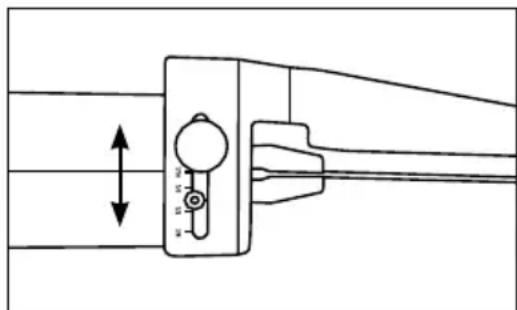
Fig. B
LIMPIEZA Y ALMACENAJE
Mode d'emploi
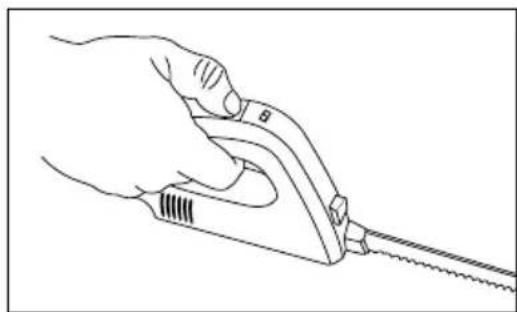
Fig. A
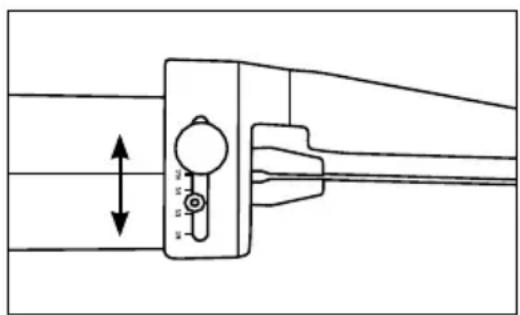
Fig. B
NETTOYAGE ET RANGEMENT
Trademarks or service marks of third parties used herein are the trademarks or service marks of their respective owners.
©2014 Waring Commercial
314 Ella T. Grasso Ave.
Torrington, CT 06790
www.waringcommercialproducts.com
Printed in China
Impreso en China
Imprimé en Chine
WEK200 IB
14WC001846
IB-12633
- SAVE THESE INSTRUCTIONS
- UNPACKING INSTRUCTIONS
- IMPORTANT – PLEASE READ
- CONTENTS
- FEATURES AND BENEFITS
- ON/OFF CONTROL
- 7A.LID INTERLOCK TAB
- USE AND CARE
- ASSEMBLING THE BLADES
- USING YOUR WARING™ COMMERCIAL CORDLESS ELECTRIC KNIFE
- USING THE ADJUSTABLE SLICING GUIDE
- ATTACHING/ADJUSTING THE SLICING GUIDE
- CLEANING AND STORAGE
- CHARGING
- DISPOSAL/RECYCLING OF BATTERIES
- HELPFUL HINTS
- CARVING BLADE
- BREAD BLADE
- MODO DE EMPLEO
- LIMPIEZA Y ALMACENAJE
- MODE D'EMPLOI
- NETTOYAGE ET RANGEMENT
Brand : Waring Commercial
Model : WEK200 MES
Category : Knife