
SG101R - Interactive globe OREGON SCIENTIFIC - Free user manual and instructions
Find the device manual for free SG101R OREGON SCIENTIFIC in PDF.


| Product Type | Interactive Globe |
| Brand | Oregon Scientific |
| Model | SG101R |
| Power | 2 AA batteries (not included) or USB 5V 500 mA adapter (not included) |
| Battery Life | Approximately 4 to 6 hours with new batteries |
| Dimensions (globe) | Approximately 25 cm in diameter |
| Weight | Approximately 1.2 kg |
| Main Functions | Constellation display, light projection, augmented reality compatibility via app |
| App | Smart Globe (free) available on App Store and Google Play |
| Required Operating System | iOS 8.0+ / Android 4.5+; recommended iOS 9.0+ / Android 5.0+ |
| Sensors | Not applicable |
| Lighting | Built-in blue LED to observe constellations |
| Material | Plastic and cardboard for the globe |
| Color | Dark blue globe with luminous dots |
| Care and Cleaning | Remove batteries before cleaning; use a slightly damp soft cloth; do not immerse |
| Safety | Not suitable for children under 3 years (small parts). Use only with a toy transformer. |
| Spare Parts and Repairability | Not available from the manufacturer |
| General Information | Product subject to European WEEE and RoHS directives. P/N 300103926-00003-10 |
Frequently Asked Questions - SG101R OREGON SCIENTIFIC
User questions about SG101R OREGON SCIENTIFIC
0 question about this device. Answer the ones you know or ask your own.
Ask a new question about this device
Download the instructions for your Interactive globe in PDF format for free! Find your manual SG101R - OREGON SCIENTIFIC and take your electronic device back in hand. On this page are published all the documents necessary for the use of your device. SG101R by OREGON SCIENTIFIC.
USER MANUAL SG101R OREGON SCIENTIFIC
Dear Parents/Guardians,
Thank you for selecting SmartGlobe™ Starry by Oregon Scientific. This product combines map and consultations in one globe, and his built in Augmented Reality technology, providing you with a real world view with our didactical Smart Globe App. As a truly international company, all us at Oregon Scientific take a personal interest in designing products that help both children and adults understand more about our global neighbors. It is our goal that you will learn something new and inspiring that might change your perspective of the world.
About Your SmartGlobe™ Starry
Your SmartGlobe™ Starry is supplied with the following parts, please contact Origin Scientific if any parts are missing.
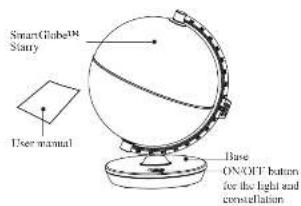
Front
1

Getting Started
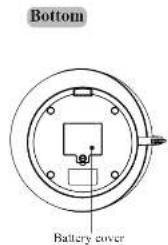
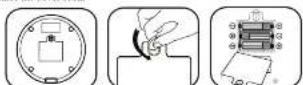
Your SmartGlobal™ Starry is powered by three AA size batteries or USD power source (not included). To make sure you have enough power under the base with a coin and then pull it open as shown, internal batteries and then replace the curve back.
Caution
- Different types of batteries or new and used batteries are not to be mixed.
Only use batteries of the same or equivalent type.
Bullarres are to be inearl with the corral patrity
- Remove batteries from the unit if the unit is not going to be used for a long time.
- Remove all bacteria when replacing
- Do not dispose of batteries in fire.
Non-recharging batteries are not to be charged.
- Rechargeable batteries are to be removed from the product before being charged.
Rechargeable batteries are only 8% charged under adult use. E-Booked benefits are to be removed from the product.
Exclued securities are to be removed from the plan.
In an environment prese to static disasios, the unit may mullifuction. To resul, remove batteries for at least
10 seconds before connecting the power supply again.
2
Use the Augmented Reality App
After activating the App successfully, sick the Moving Globe Dutoes in the middle of the Area and wait for cooling. 1. X-axis: The area above about half the time from the Globe and let the Area over the Globe automatically
3. To start the activities, select the Activity item at the lower right corner.
Precautions
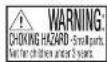
- Warning! Not suitable for children under 3 years. Small parts. Choking hazard.
The toy must only be used with a transformer for boys.
Use in output 500mL from 1:200 with the _2 - The transistor is put into
The nntion is not a 1y. - Translmer unit to be used with the key should be regularly examined for potential hazard, such as damage to the color or color, biology, enclosure of other parts and that in the event of such damage, the key must not be used directly.
Cleaning and Maintenance
Your SmartGlobe should be checked regularly for damage to avoid the danger of an electric shock. Do not use them if they are damaged.
Always remove the batteries before cleaning. Do not attempt to dismantle any part of the product, and only use a soft, dry cloth for cleaning.
Do not get SmartGlobe or any of its parts wot, and be sure that your hands are clean before touching the globes surface.
Contact Information
We would be happy to receive your comments and suggestions, and appreciate your feedback. Fast free to contact us at www.oreopoeirinefco.uk
Oregon Scientific (U.K.) Limited
One St Peter's Road, Maiden
Rank S17QU 11K
Hnne nnnnne ennnnne
Website: www.cogscience.com
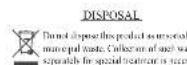
Pursuant to and in accordance with Article 14 of the Directive 2013/19/EU of the European Parliament on waste electrical and electronic equipment (WEEK), and pursuant to and in accordance with Article 20 of the Directive 2013/56/EU of the European Parliament on batteries and accumulators and waste batteries.
The internal symbol of the module has shown on the equipment indicates that, at the end of its useful life, the product must be replaced separately from other work.
Please note that the humanization module must be removed from the equipment before it is given to what is in a remove the hysteresis-accumulators refer to the specifications in the user manual. Therefore, any products that have reached the end of their useful life must be given to waste disposal centres specifying in separate collection orders for each product. This is not to be done after purchasing a new WFPE, pursuant to and in accordance with Article 14 as implemented in the country.
The adequate separate collection for the subsequent start up of the equipment sent to be recycled, reused and disposal in an environmentally compatible way contributes to preventing possible negative effects on the environment and wealth and optimizes the recycling and reuse of components making up the apparatus. Abusive use of the product by the user involves application of the administrative functions according to the laws and regulations.
Observe Constellation
Press the ON/OFF button to turn on the light and observe constellation at night.
The globe shows the key stars and consolidations with their common names.
Augmented Reality App
To activate the Augmentarlity frumction, download and install the App on your Smart Phone or Tablet PC. This App supports both Android OS and Android OS.
System requirements
| 51n. Configuration Recommended Configuration | ||
| iOS 8.0+ iOS 9.0+ | ||
| IUB RAM IUB Storage Space | IUB RAM IUB Storage Space | |
| iPad 4, iPhone 6, iPhone 8, iPad | Air 2 and above | |
| 4.5+ OpenCL, ES2L, 3.5+ OpenCL | L ES2L | |
| IUB RAM IUB Storage Space | IUB RAM IUB Storage Space | |
Install and Activate the Smart Globe App
- Sarch "Smart Globe" in Apple App Store or Google Play
OR Scan the QR code above or in the package box to download the App. 2. Once the "Smart Colors" App registers as account and signs in - Open the small Gooze App, Regist at the account link in 1. On the operation page of the App, scan the activating QR code
of the base to activate the Smart Globe App
Note: The activating QR code is available for activating the App on five smart devices.
Abusive disposal of the product by this user involves application of the administrative actions according to the laws in force.
The toy is only to be connected in Class II equipment bearing the following symbol
P.N.300103926-40005-10
?

Dear Parents/Guardians,
Thank you for selecting SmartGlobe Starry by Oregon Scientific. This product combines map and consultations in one globe, and his built in Augmented Reality technology, providing you with a real world view with our didactical Smart Globe App. As a truly international company, all of us at Oregon Scientific take a personal interest in designing products that help both children and adults understand more about our global neighbors. It is our goal that you will learn something new and inspiring that might change your perspective of the world.
About Your SmartGlobe™ Starry
You SmartGlobe Starry is supplied with the following parts, please contact Oregon Scientific if any parts are missing.
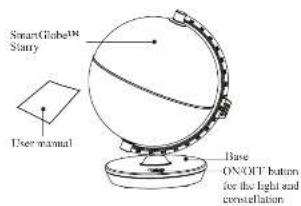
Front
1
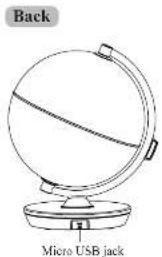
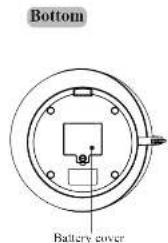
Getting Started
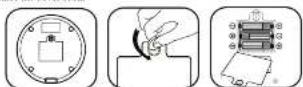
Your SmartGlobe™ Starey is powered by three AA size bitories or USD power source (not included). To make sure you don't have to use the base with a coin and then pull it open as shown, internal bitaries and then replace the curve bank.
Caution
- Different types of batteries or new and used batteries are not to be mixed.
-Only use fullness of the same or equivalent type. - Runters are to be inserted with the correct paternity.
- Removable hatching when the min. time limit is not going to be reached for
- Do not dispose of batteries in fire.
-Non-rechirgable batteries are not to be recharged.
Rechargeable batteries are to be removed from the product before being charged. - Rechargeable batteries are only to be charged under adult use conditions.
- Enlisted members are to be removed from the pool. - The sample's terminals are not to be shut down.
In an environment proce to static discharge, the unit may malfunction. To reset, remove batteries for at lees
10 seconds before connecting the power supply again.
2
Observe Constellation
Press the ON/OFF button to turn on the light and observe constellation at night.
The globo shows the key stars and constellations with their common names.
Augmented Reality App
To activate the Augmented Reality function, download and install the App on your Smart Phone or Tablet PC. This app supports the Android OS and Android OS
System requirements
Inetall and Activate the Smart Globe App
- Search "Smart Globe" in Apple App Store or Google Play
OR Scan the QR code above or on the package how to download the App - Open the "Sarat Gkiv" App, it gives an account of 2. On the accounts are all the following information:
of the hote to arrive the sian (Gioia, A)
Note: The activating OF code is available for a

Note: The activating QR code is available for activating the App on five smart devices.

4
Use the Augmented Reality App
- After activating the App successfully, tick the Moving Glube Button in the middle of the App and wait for loading.
2 Keep your device about 30 cm away from the Glube and let the App see the Glube automatically. - To start the activity, select the Activity menu at the lower right corner.
Precautions
The toy must only be used with a transformer for toys.
Use an output 5 V 500 mA transformer with the core.
The transformer is not a toy.
The toy is not to be connected to more than the recommended number of power supplies.
- Transformer unit to be used with the key should be regularly examined for potential hazard, such as damage to the cable or cord, slip, enclosure of other parts and dust in the event of such damage; the key must not be used directly without a transformer.
Cleaning and Maintenance
Your SmartGlobeTM should be checked regularly for damage to avoid the danger of an electric shock. Do not use them if they are damaged.
Always remove the barriers before cleaning. Do not attempt to dismantle any part of the product, and only use a soft, dry cloth for cleaning.
Do not get SmartGlobe® or any of its parts wet, and be sure that your hands are clean before touching the globe surface.
Contact Information
We would be happy to receive your comments and suggestions, and appreciate your feedback. Feel free to contact us at smarthealths.org/healthcarefe.com.
Oregon Scientific, Inc.
Brea Corpseie Park
3021Stm81Sut2
Bee 1487
BEE.CN 92821
Service: http://www.oregonscientific.com/us/en/service/contactus
Website: http://www.oregonscientific.com-us
This device complies with Part 12 of the FCC Rules. Operation is subject to the following two conditions: (1) this device must accept any interference received, including interference that may cause undetected operations.
Warning: Changes or modifiestives in this use not expressly approved by the party responsible for compliance could void the user's authority to update the equipment.
Note: This equipment has been tested and found to comply with the limits for a Class H digital device, pursuant to Part 15 of the FCC Rules. These limits are designed to provide reasonable protection against harmful interference in a residential installation. This equipment generates, uses and can radiate radio frequency energy and, if not installed and used in accordance with the instructions, may cause harmful interference to radio communications. However, there is no guarantee that interference will not occur in a particular installation. If this equipment does not meet the requirements of the FCC, the user should be aware that the use of this equipment may cause significant damage to the system and, on top of all, the user is encouraged to try to correct the interference by use or mode of the following measures:
- Roiert or realeate the receiving utne.
- Increase the separation between the equipment and receiver.
- Connect the equipment this an our on a circuit different from that to which the receiver is connected. Consult the dealer or an experienced radiatv technician for help.
6
F/N 500163976-20007-7

Cari Genitori/Tutori,
m = 311
Oregon Scientific Global Distribution Limited
Bleck,9-TKaiser Estate,Phs
11 Mon Yue Street Hong Hom
KINHINFAN
Importatore:
e
2085A
13029-656181
Fax:039-6433111
www.gpsocnlidc.com
Oregon Scientific France.
Cerere dathanes-HG
5 avenue Oceges Balle 6010LEP8616 TELFIL
Service client:3301.7768881
Cmail:info@orgemcientific.cn
Website: http://www.wiley.com/wiley/journal/journal.html
Manufacturer/Hersteller:
Oregon Scientific Global Distribution Limited
Block c. S/F Kaiser State, Phase
41 Man Yue Street Hang Hien
Kowloon Hong Kong
Importcur:
Rite in fummernn Ss sdy
- Dear Parents/Guardians,
- About Your SmartGlobe™ Starry
- Getting Started
- Use the Augmented Reality App
- Precautions
- Cleaning and Maintenance
- Contact Information
- Oregon Scientific (U.K.) Limited
- Observe Constellation
- Augmented Reality App
- Install and Activate the Smart Globe App
- Caution
- Inetall and Activate the Smart Globe App
- Oregon Scientific, Inc.
- Cari Genitori/Tutori,
- Importatore:
- Oregon Scientific France.
- Cerere dathanes-HG
- Manufacturer/Hersteller:
- Importcur:
Brand : OREGON SCIENTIFIC
Model : SG101R
Category : Interactive globe