EdgeSelect 120 - Sharpener Chef's Choice - Free user manual and instructions
Find the device manual for free EdgeSelect 120 Chef's Choice in PDF.

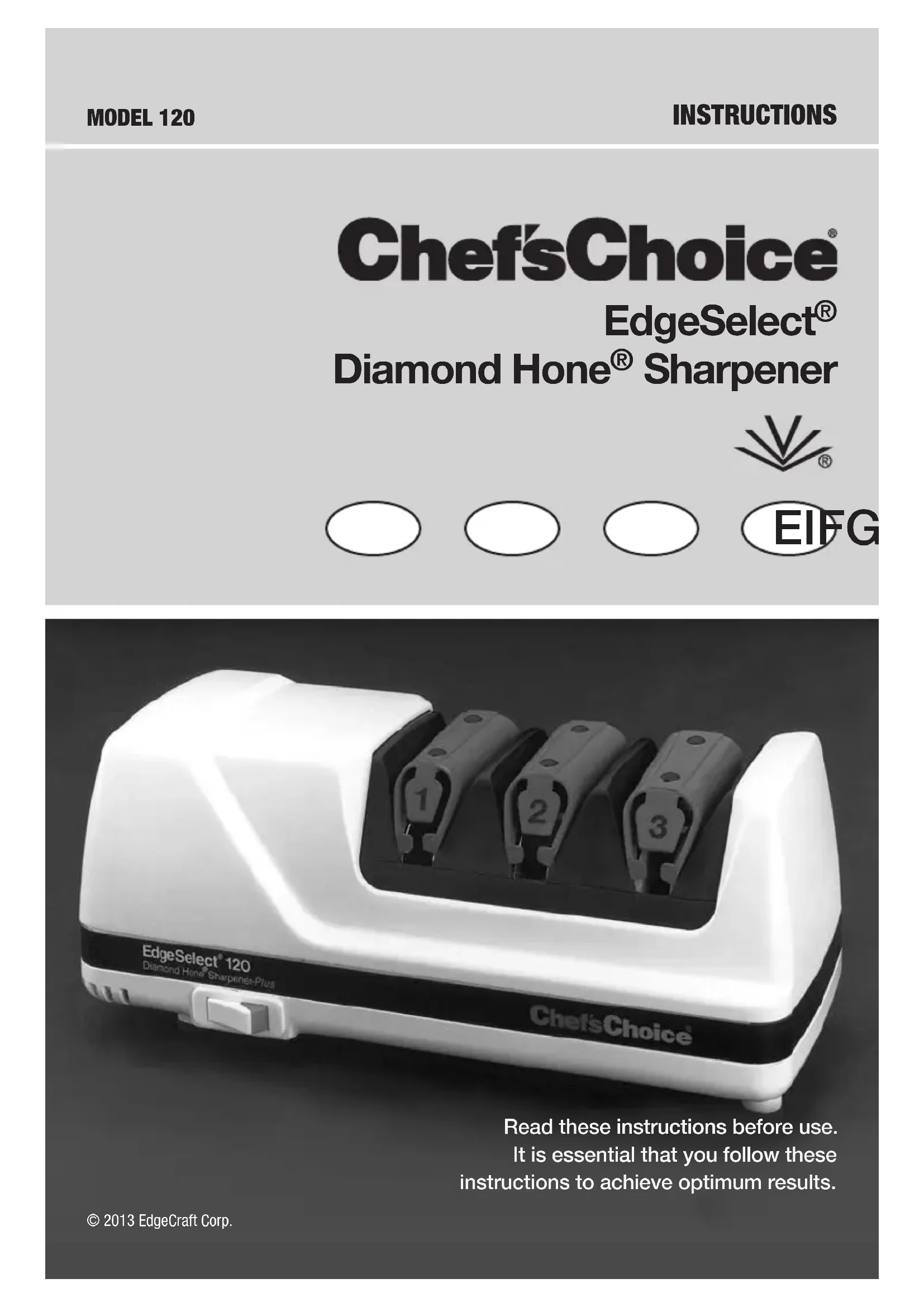


| Product Type | Versatile Diamond Electric Sharpener |
| Brand | Chef's Choice |
| Model | EdgeSelect 120 |
| Use | Domestic |
| Compatible Blade Types | Straight and serrated blades (kitchen knives, pocket knives, hunting knives) |
| Number of Sharpening Stages | 3 (three slots) |
| Sharpening Technology | Diamond conical wheels (1st and 2nd slots) and flexible abrasive wheels (3rd slot) |
| Edge Achieved | Trizor-Plus™ (triple bevel) |
| Sharpening Angles | Progressive according to the slot (more open at each stage) |
| Switch | On/Off with red indicator light |
| Wheel Cleaning Device | Manual slide on the back panel (for the 3rd slot) |
| Regular Maintenance | Clean exterior with a damp cloth; remove the cleaning cover under the device to remove grinding dust |
| Lubrication | Not required (motor, surfaces, and moving parts) |
| Usage Precautions | Do not immerse in water; clean blade before sharpening; use on a stable surface; do not use outdoors |
| Spare Parts and Repairs | Contact Chef'sChoice distributor or return to EdgeCraft factory (out of warranty) |
| Warranty | Limited warranty (excluding excessive or industrial use) |
| Included Accessories | Protector for the 1st slot |
| Country of Manufacture | Not specified in the manual |
Frequently Asked Questions - EdgeSelect 120 Chef's Choice
User questions about EdgeSelect 120 Chef's Choice
0 question about this device. Answer the ones you know or ask your own.
Ask a new question about this device
Download the instructions for your Sharpener in PDF format for free! Find your manual EdgeSelect 120 - Chef's Choice and take your electronic device back in hand. On this page are published all the documents necessary for the use of your device. EdgeSelect 120 by Chef's Choice.
USER MANUAL EdgeSelect 120 Chef's Choice
natural_image
White EdgeSelect 120 Sharpener-Plus device with three labeled ports (1, 2, 3) on its side panel, no visible text or symbols on the device itself.Read these instructions before use.
It is essential that you follow these instructions to achieve optimum results.
IMPORTANT SAFEGUARDS
When using electrical appliances, basic safety precautions should always be followed including the following:
- Read all instructions.
- To protect against electrical hazards, do not immerse the Chef's Choice® in water or other liquid.
- Make sure only clean knife blades are inserted in the Chef'sChoice®.
- Unplug from outlet when not in use, before putting on or taking off parts and before cleaning.
- Avoid contacting moving parts.
- Do not operate any appliance with a damaged cord or plug or after the appliance malfunctions, or is dropped or damaged in any manner.
U.S. customers: You may return your sharpener to EdgeCraft's factory for service where the cost of repair or electrical or mechanical adjustment can be estimated. When the electrical cord on this appliance is damaged, it must be replaced by the Chef's Choice distributor or other qualified service to avoid the danger of electrical shock.
Outside U.S.: Please return your sharpener to your local distributor where the cost of repair or electrical or mechanical adjustment can be estimated. If the supply cord of this appliance is damaged, it must be replaced by a repair facility appointed by the manufacturer because special tools are required. Please consult your Chef's Choice distributor.
-
CAUTION! This appliance may be fitted with a polarized plug (one blade is wider than the other). To reduce the risk of electric shock, this plug will fit in a polarized outlet only one way. If the plug does not fit fully in the outlet, reverse the plug. If it still does not fit, contact a qualified electrician. Do not modify the plug in any way.
-
The use of attachments not recommended or sold by EdgeCraft Corporation may cause fire, electric shock or injury.
-
The Chef's Choice® Model 120 is designed to sharpen kitchen knives, pocket knives and most sports knives. Do not attempt to sharpen scissors, ax blades or any blade that does not fit freely in the slots.
-
Do not let the cord hang over edge of table or counter or touch hot surfaces.
-
When in the "ON" position (Red flash on switch is exposed when "on") the Chef's Choice® should always be on a stable countertop or table.
-
WARNING: KNIVES PROPERLY SHARPENED ON YOUR CHEF'SCHOICE® WILL BE SHARPER THAN YOU EXPECT. TO AVOID INJURY, USE AND HANDLE THEM WITH EXTREME CARE. DO NOT CUT TOWARD ANY PART OF YOUR FINGERS, HAND OR BODY. DO NOT RUN FINGER ALONG EDGE. STORE IN A SAFE MANNER.
-
Do not use outdoors.
-
Close supervision is necessary when any appliance is used by or near children.
-
Do not use honing oils, water or any other lubricant with the Chef's Choice®.
-
For household use only.
-
SAVE THESE INSTRUCTIONS.
Professional chefs and serious cooks world-wide have for many years relied on Chef'sChoice® Diamond Hone® sharpeners to maintain the high performance Trizor® edges on their favorite cutlery. Now with your Chef'sChoice® EdgeSelect® Professional Model 120 you will share the professional advantage with knife edges of astonishing sharpness and durability. The Chef'sChoice® Model 120 incorporates the latest sharpening technology developed by EdgeCraft – the world leader in cutting edge technology® –to create the advanced Trizor-Plus® edge on all your fine-edge and serrated knives.
You will find the Model 120 extremely fast and simple to use. It is safe to use on all quality kitchen, sporting and pocket knives. Please read this instruction booklet thoroughly before using the sharpener to optimize your sharpening results.
Gourmet cooks world-wide acknowledge the value of a fine cutting edge for elegant food preparation. As an owner of the Chef'sChoice® Professional 120 you have the means to create edges of perfection, sharpness and durability previously unobtainable with even the world's most expensive professional sharpening systems. You will find it is a joy to sharpen and use your knives. Remember, a sharp knife is a safe knife because you expect it to be sharp, you respect it and it requires less force to cut. But also remember, the Trizol® edge is incredibly sharp!
The Chef'sChoice® sharpener creates demonstrably superior Trizor-Plus™ edges on knives of any steel – carbon, stainless – or alloy of any hardness. Their sharpness and greater durability have made older sharpening methods that produce conventional and hollow ground edges obsolete.
You can easily and very quickly sharpen the entire cutting edge of your favorite knives, from the tip to the handle or bolster. The highly precise Trizor-Plus ^™ edges will reward you with years of superior knife performance.
UNDERSTANDING THE VERSATILE MODEL 120 EDGESELECT® SHARPENER
The unique Chef'sChoice® EdgeSelect® Diamond Hone® Sharpener is designed so that you may sharpen each knife according to your intended use, such as gourmet food preparation, butchering, dressing of game or filleting of fish. You can sharpen knives with either straight or serrated edges. This three (3) stage sharpener has two precision conical sharpening/honing stages with fine 100% diamond abrasives and one polishing/stropping stage using proprietary flexible abrasive disks. These stages can be used in different sequences to give you either an astonishingly sharp, smooth faceted edge for effortless cutting and presentations or one with a selected amount of residual “bite” along the facets. The edge is ultra sharp and non-serrated. This residual “bite” is created by precisely polished micro flutes that are formed on the facet surface by the ultra honing action of the stropping disks in Stage 3. You will find that these sharp flutes on each side of the ultra sharp and non-serrated cutting edge aid substantially in those difficult cutting chores experienced with fibrous foods, meats, stalky vegetables, dressing of game or household chores such as cutting cardboard, leather, carpet, etc.
The sharpening and honing/polishing actions are controlled by using precision angle guides for the blade and precisely matched conically shaped abrasive disks. The sharpening angles are several degrees larger in each successive stage.
Fine diamond-coated conical disks in Stage 1 create microgrooves along the facets on each side of the edge, establishing the first angled bevel of the Trizor® edge.
In Stage 2, finer microgrooves are created across the facets immediately adjacent to the edge by still finer diamonds as they establish a well defined second bevel on the facets that is a few degrees larger than the bevel developed in Stage 1.
In Stage 3, ultra fine abrasive disks are set at a third and slightly larger angle. They polish and strop the facets immediately adjacent to the edge creating a third micro bevel and establish a microscopically thin, straight and super polished edge of astonishing sharpness. The stropping action simultaneously polishes and sharpens the boundaries of those microgrooves created by the diamond abrasives in Stages 1 and 2 adjacent to the edge until they become sharp micro flutes that will assist the cutting action of “difficult to cut” materials.
This unique three stage design gives you an edge of remarkable sharpness and, because of the triple angle bevel it creates on each facet, you will note knives stay sharp much longer.
The following sections describe the general procedures for optimal sharpening in each stage and then suggest how you can optimize the edge for your intended uses.
Unless you do a lot of heavy duty cutting, you will need to use Stage 1 only infrequently. One of the important advantages of using the EdgeSelect Model 120 is that you can strop and polish your knives to razor sharp edges as often as needed and yet experience little knife wear compared to older sharpening methods. Resharpening can usually be done in Stage 3. Use Stage 2 less often for resharpening and use Stage 1 only for the heaviest duty applications. (See Resharpening Section).
The Chef'sChoice® Model 120 EdgeSelect Sharpener is equipped with a manually activated diamond dressing pad that can be used if necessary to clean any accumulated food or sharp-ening debris off the surface of the polishing/stropping disks. We strongly urge you to clean your knives before sharpening them. You will find you can go months or even a year or more before you need to dress these disks. Only if you sense a distinct decrease in polishing efficiency will there by any need to use this convenient feature described further in a subsequent section.
Each sharpening stage is equipped with elastomeric guide springs positioned over the sharpening disks to provide a spring action that holds the face of your knife securely against precision guide planes in the right and left slots of that stage during sharpening.
Unless you have special blades designed to be sharpened primarily on one side of the edge (such as Japanese Kataba blades) you will want to sharpen equally in the right and left slots of each stage you use. This will ensure that the facets on each side of the edge are of equal size and that the edge will cut straight at all times.
When sharpening in any stage the knife should, on sequential strokes, be pulled alternately through the left slot and the right slot of that stage. Generally only one pull in the left and one in the right slot will be adequate in each stage; occasionally you may need to make two pairs of pulls in a given stage (see subsequent sections for more detail). Always operate the sharpener from the front side. Hold the blade horizontal and level, slide it down between the plastic spring and the guide plane and pull it toward you at a uniform rate as it contacts the sharpening or stropping disks. You will be able to feel and hear the contact as it is made. Always keep the blade moving uniformly through each stage; do not stop your pull in mid stroke. Consistent pull speed of about 4 seconds per stroke for an eight (8) inch blade is recommended. The time can be less for shorter blades and more for longer blades. Never operate the sharpener from the back side.
Use just enough downward pressure when sharpening to ensure uniform and consistent contact of the blade with the abrasive disks on each stroke. Additional pressure is unnecessary and will not speed the sharpening process. Avoid cutting into the plastic enclosure. Accidental cutting into the enclosure will not functionally impact operations of the sharpener or damage the edge.
Figure 1 (below) identifies each of the three stages as described further in the following sections.
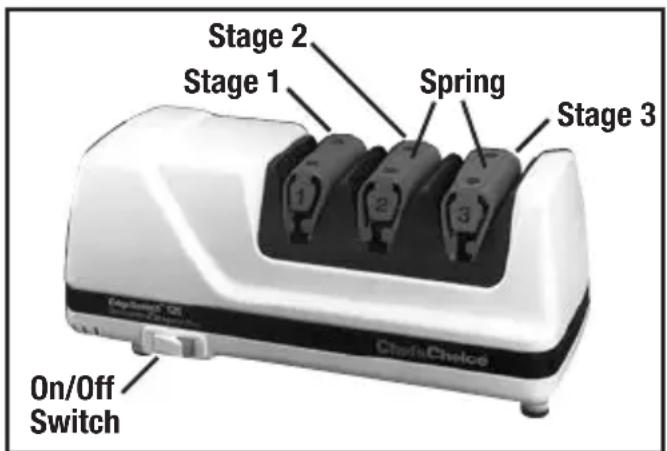
Figure 1. Model 120 Diamond Hone EdgeSelect Sharpener.
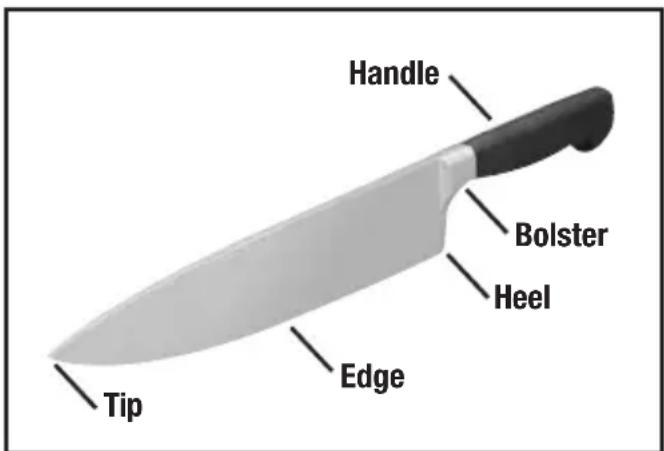
Figure 2. Typical kitchen knife.
READ THIS BEFORE YOU START TO SHARPEN
The Chef'sChoice® Model 120 is designed to sharpen either Straight edge or Serrated edge blades.
- Sharpen Serrated Edge Blades only in Stage 3. Do not sharpen serrated blades in Stages 1 and 2, as that will unnecessarily remove more metal from the serrations. See Section titled Procedure for Sharpening Serrated Blades for more details.
- Straight Edge Blades can be sharpened in all three stages, however, use of Stage 1 may be necessary only if the knife is very dull or if you wish to create an edge with extra "bite". See following Section for more details.
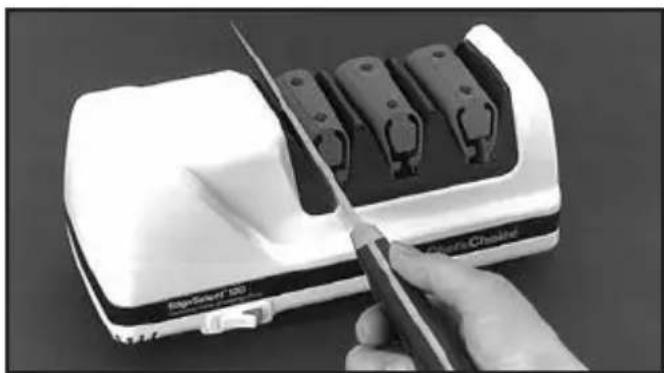
Before you turn on the power, remove the cover positioned over Stage 1 and slip a knife blade smoothly into the slot between the left angle guide of Stage 1 and the elastomeric spring. Do not twist the knife. (See Figure 3.) (Retain the Stage 1 cover as a ready reminder of the sharpening steps.)
Move the blade down in the slot until you feel it contact the diamond disk. Pull it towards you, lifting the handle slightly as you approach the tip. This will give you a feel for the spring tension. Remove the knife and press the Power Switch. A red “indicator” on the switch appears when this switch is turned “ON.”
Stage 1: (If your knife is already reasonably sharp, skip Stage 1 and go directly to Stage 2.) If you are sharpening a knife for the first time or if the knife is very dull, start in Stage 1. Pull the knife once through the left slot of Stage 1 (Figure 3) by slipping the blade between the left angle guide and the polymeric spring while pulling the blade toward you and simultaneously moving the blade downward in the slot until it engages the diamond coated disk. You will hear it make contact with the disk. Insert the blade as close as possible to its bolster or handle. If the blade is curved, lift the handle slightly as you sharpen near the tip of the knife, keeping the blade edge approximately parallel to the table. Sharpen the entire blade length. For an eight (8) inch blade, each pull should take about 4 seconds. Pull shorter blades through in 2-3 seconds and longer blades in 6 seconds. Next, repeat with one full length pull in the right slot of Stage 1.
Note: Each time you insert the blade you should simultaneously pull the blade toward you. Never push the blade away from you. Apply just enough downward pressure to make contact with the wheel - added pressure does not modify or speed the sharpening process.
To ensure even sharpening along the entire blade length, insert the blade near its bolster or handle and pull it at a steady rate until it exits the slot. In each stage, make an equal number of pulls alternating in the left and right slots in order to keep the edge facets symmetrical. Generally in Stage 1 you will find that only one pull in each (left and right) slot is adequate. Then proceed to Stage 2.
natural_image
Close-up of a hand using a power tool to cut a white electronic device with multiple black components (no visible text or symbols)Figure 3. Stage 1. Inserting blade in slot between guide and elastomeric spring. Alternate left and right slots.
Stage 2: Using the above procedure described for Stage 1, sharpen the blade in Stage 2.
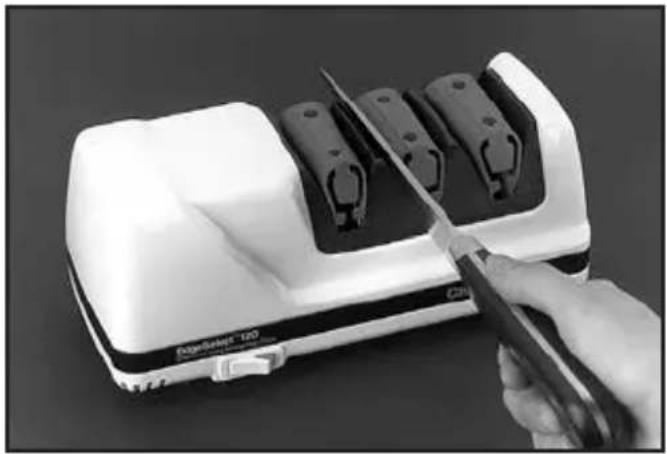
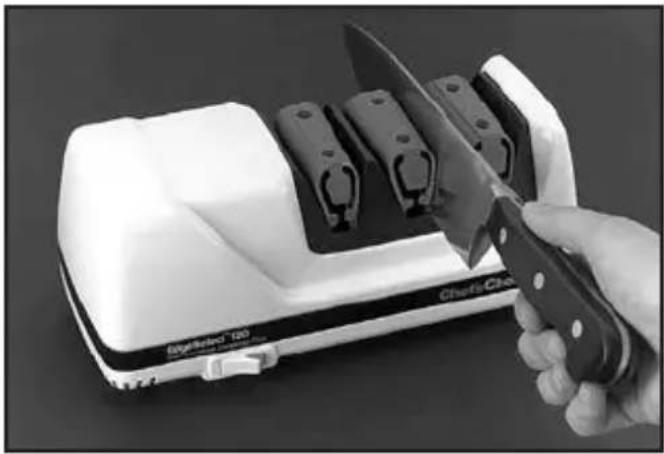
Pull the blade once through the left slot of Stage 2 (Figure 4) and once through the right slot (Figure 5). For an eight (8) inch blade, take about four (4) seconds for each pull. For longer knives, take about 6 seconds per pull and about 2-3 seconds for shorter blades.
Before moving to Stage 3, you will find it helpful to confirm that a burr (Figure 6) exists along one side of the edge. To check for the burr, move your forefinger carefully across the edge as shown in the Figure 7 (below).
(Do not move your finger along the edge - to avoid cutting your finger). If the last pull was in the right slot, the burr will appear only on the right side of the blade (as you hold it) and vice versa. The burr, when present, feels like a rough and bent extension of the edge; the opposite side of the edge feels very smooth by comparison. If a burr exists, proceed to Stage 3.
If no burr exists, make one (1) additional pull in the left and right slots of Stage 2 before proceeding to Stage 3. Slower pulls will help develop the burr. Confirm the presence of the burr and proceed to Stage 3. (Incidentally, a burr is commonly developed whenever the knife is pulled through Stage 1. It is not essential to develop a burr in Stage 1 unless, as discussed later, you intend to bypass Stage 2 and go directly to Stage 3. It is always desirable to have a burr on the edge before stropping in Stage 3.)
If the knife is extremely dull, additional pulls in Stage 2 may be needed or, alternately, make one pair of pulls in Stage 1, then repeat in Stage 2 before proceeding to Stage 3.
natural_image
Hand using a power tool to cut or cut a device with multiple black components (no visible text or symbols)Figure 4. Inserting blade in left slot of Stage 2.
natural_image
Hand using a knife to cut a white appliance with multiple compartments (no visible text or symbols)Figure 5. Inserting blade in right slot of Stage 2.
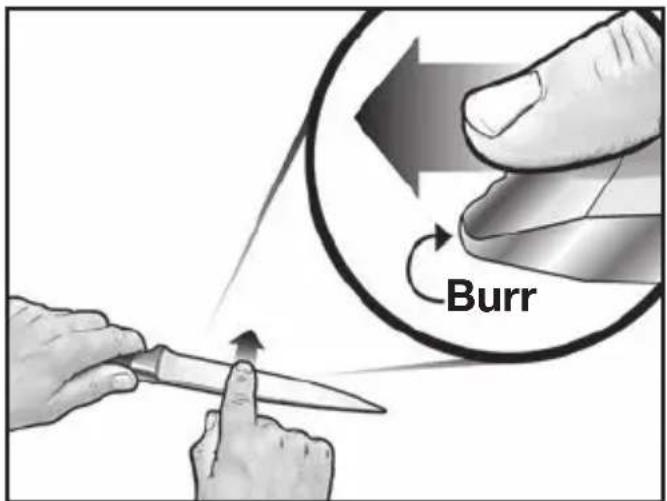
Figure 6. Develop a distinct burr along knife edge before stropping in Stage 3.
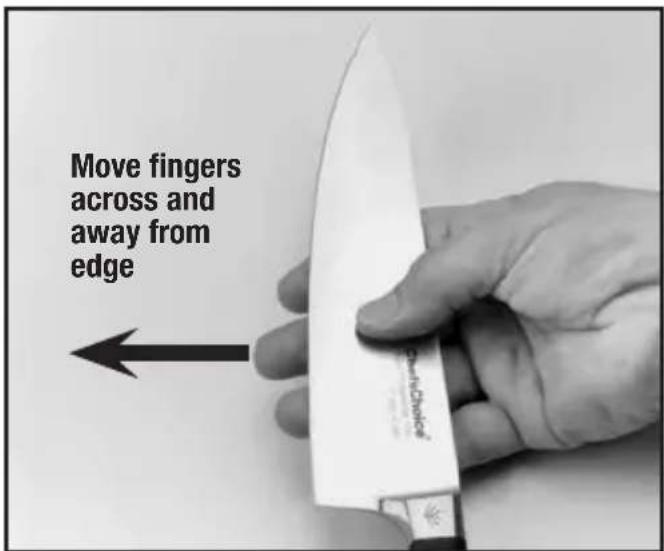
Figure 7. Burr can be detected by sliding fingers across and away from the edge. Caution! See text.
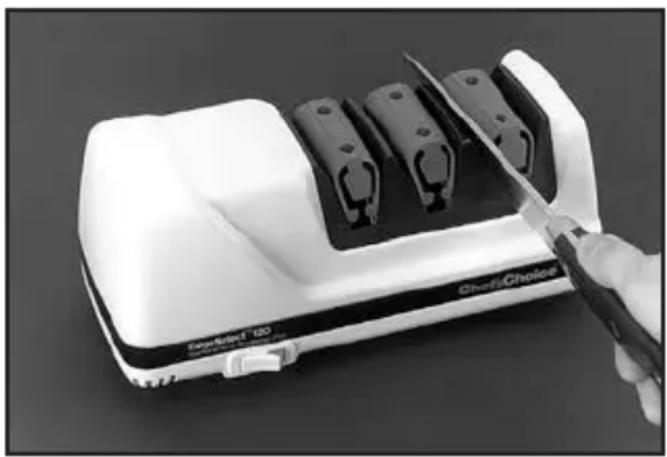
Stage 3: In general only one (1) or two (2) pairs of pulls in Stage 3 will be necessary to obtain a razor sharp edge. As in Stages 1 and 2, make alternate pulls in left (Figure 8) and right slots, pulling the knife through the slots at the same speed used in Stages 1 and 2.
More pulls in Stage 3 will refine the edge further, creating an edge particularly desirable for gourmet preparations. Fewer pulls in Stage 3 may be preferable if you will be cutting fibrous foods as discussed in more detail in the following sections.
OPTIMIZING THE KNIFE EDGE FOR EACH USE
GOURMET FOOD PREPARATION:
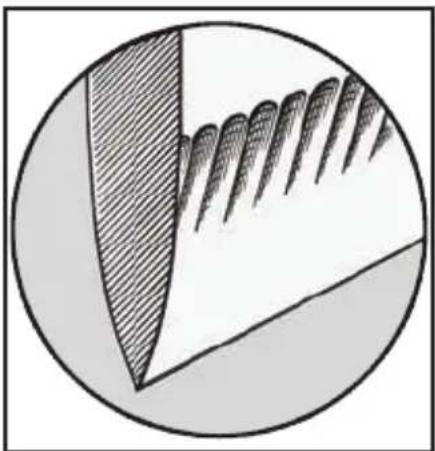
Where the finest and smoothest cuts are preferred in order to prepare smooth unmarked sections of fruits or vegetables, sharpen in Stage 2 (or 1 & 2 as described above) and make extra pulls through Stage 3. Three (3) or more pairs of pulls with each pull alternating in the left and right slots of Stage 3 will refine the third facet and create remarkably smooth and sharp edges, (Figure 9) ideal for the gourmet chef.
When resharpening the Gourmet edge, use Stage 3 each time (alternating left and right slots). If, after a number of resharpenings, it is taking too long to resharpen, you can speed the process by resharpening first in Stage 2, following the procedures detailed, and then resharpen in Stage 3. By this means, you will retain very smooth edges and prolong the life of your knives. This procedure, unlike conventional sharpening, will give you extraordinarily sharp knives every day while removing very little metal.
FOR MEATS, FIELD DRESSING AND HIGHLY FIBROUS MATERIAL:
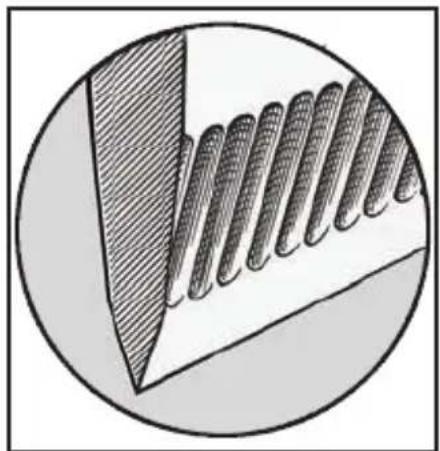
For butchering, field dressing or cutting fibrous materials, you may find it advantageous to sharpen in Stage 1 - followed directly by Stage 3. This will leave sharpened micro flutes along the facets near each side of the edge (Figure 10) that will assist in the cutting of such materials. The edge will be very sharp and unserrated after only one or two alternating pairs of pulls in Stage 3.
To prepare this type of edge, sharpen in Stage 1 until a burr is developed along the edge. Then move directly to Stage 3 and make one or two pairs of pulls there.
To preserve this type of edge, when the knife needs resharpening, use Stage 3 for only one or two re-sharpenings. Then go back to Stage 1 for one (1) pull in each of the left and right slots and return directly to Stage 3. Do not over sharpen in Stage 1.
natural_image
Close-up of a white SmartCheck 180 device with a hand using a knife to cut the blade (no visible text or symbols)Figure 8. Inserting blade only in left slot of Stage 3. Alternate left and right slots.
FOR GAME AND FISH:
The optimum edge for cooked poultry generally can be obtained by using Stage 2 followed by Stage 3. (Figure 11) For raw poultry, Stage 1 followed by Stage 3, as described above, may be preferable. For filleting fish, use a thin but sturdy blade sharpened in Stages 2 and 3.
PROCEDURE FOR SHARPENING SERRATED BLADES:
Serrated blades are similar to saw blades with scalloped depressions and a series of pointed teeth. In normal use the pointed teeth do most of the cutting.
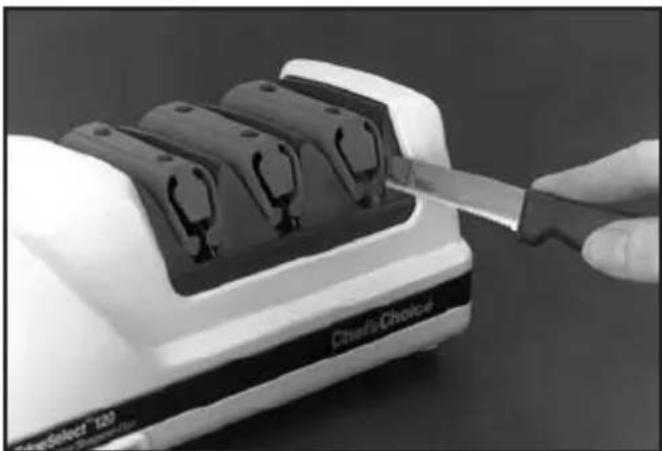
Serrated blades of all types can be sharpened in the Chef'sChoice® Model 120. However, use only Stage 3 (Figure 12), which will sharpen the teeth of the serrations and develop micro blades along the edge of these teeth. Generally five (5) to ten (10) pairs of alternating pulls in Stage 3 will be adequate. If the knife is very dull, more pulls will be needed. If the knife edge has been severely damaged through use, make one fast pull (2-3 seconds for an 8" blade) in each of the right and left slots of Stage 2, then make a series of pulls in Stage 3, alternating right and left slots. Excessive use of Stage 2 will remove more metal along the edge than is necessary in order to sharpen the teeth.
Because serrated blades are saw-like structures, the edges will never appear to be as “sharp” as the edge on a straight edge knife. However, their tooth-like structure will, at times, help break the skin on hard crusty foods and penetrate other materials such as cardboard.
natural_image
Abstract circular diagram with shaded and dotted regions, no text or symbols presentFigure 9. A larger polished facet adjacent to edge is ideal for gourmet preparations.
natural_image
Cross-sectional diagram of a mechanical component with layered internal structure (no text or symbols)Figure 10. Retention of larger microflutes adjacent to edge helps when cutting fiberous foods.
natural_image
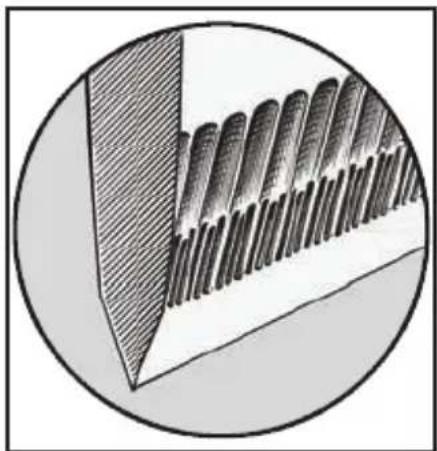
Cross-sectional diagram of a layered structure with diagonal striped pattern inside a circular boundary (no text or symbols)Figure 11. For fish and poultry retention of finer microflutes adjacent to edge can be helpful.
natural_image
Close-up of a hand using a knife to cut or adjust a white Cheris Choice 120 scanner into a black tray (no visible text or symbols on the device itself)Figure 12. Sharpen serrated blades only in Stage 3. (See instructions).
STAGE 3 DRESS TOOL: CLEANING/ DRESSING OF STROPPING/ POLISHING DISKS—STAGE 3:
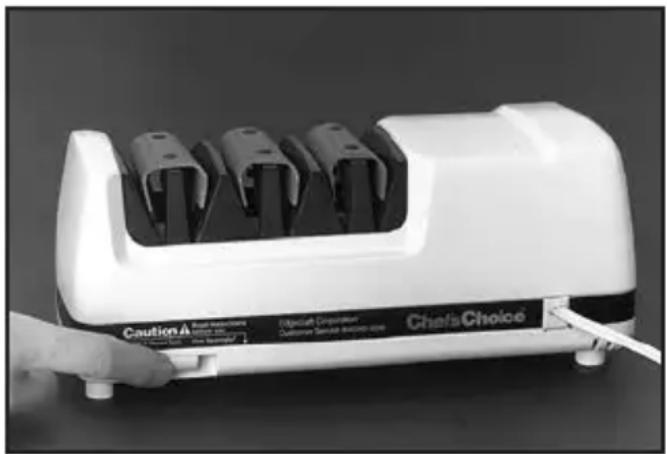
The Chef's Choice® Model 120 is equipped with a built-in accessory to manually clean/ dress the honing disks in Stage 3. In the event these disks become glazed with grease, food or sharpening debris, they can be cleaned and reshaped by actuating the manual lever on the rear of the sharpener. This lever is located within a recess as shown in Figure 13 on the left lower corner as you face the rear of the Model 120.
To actuate the cleaning/dressing tool, make sure the power is on and simply press the small lever in the recess to the right or left and hold for 3 seconds. Then press the lever in the opposite direction and hold for 3 seconds. When the lever is moved in one direction, the dressing tool cleans and reshapes the active surface of one stropping/polishing disk. By moving it in the opposite direction, you clean the other disk.
Use this clean/dress accessory only if and when Stage 3 no longer appears to be sharpening well or when it takes too many pulls to obtain a razor sharp edge. Using this tool removes material from the surface of the Stage 3 disks and hence, if used excessively, will unnecessarily remove too much of the abrasive surface - wearing the disks out prematurely. If that should occur, factory replacement of the disks will become necessary.
If you clean knives regularly before sharpening, you will need to clean or dress the Stage 3 disks only about once a year or even less frequently
RESHARPENING: (SEE SECTIONS ABOVE.)
Resharpen straight edge knives whenever practical using Stage 3. When that fails to quickly resharpen, return to Stage 2 and make one or two pairs of alternating pulls. Then return to Stage 3 where only one to two alternating pairs of pulls will be adequate to put a new razor-like edge on the knife. Use Stage 1 as a first step in resharpening only if you wish to have more “bite” along the edge or if the knife has been dulled excessively.
Resharpen serrated blades in Stage 3 (See sections above.)
natural_image
White portable electric shaver with three black modules and a 'Chef's Choice' label, being handled by a hand (no other text or symbols visible)Figure 13. Stage 3 disks can be cleaned if necessary. Use infrequently. (See instructions.)
- Always clean all food, fat and foreign materials from knife before sharpening or resharpening. If soiled, wash the blade before sharpening.
- Use only light downward pressure when sharpening - just enough to establish secure contact with the abrasive disk.
- Always pull the blade at the recommended speed and at a constant rate over length of blade. Never interrupt or stop the motion of the blade when in contact with the abrasive disks.
- Always alternate pulls in right and left slots (of any stage used). Specialized Japanese blades are an exception and are sharpened primarily on one side of the blade.
- The edge of the knife blade should be maintained while sharpening at a level position relative to the top of the counter or table. To sharpen the blade near the tip of a curved blade, lift the handle up slightly as you approach the tip so that the edge, as it is being sharpened, is maintained "level" to the table.
- There is no need to use a “sharpening steel” on knives sharpened on the Chef’sChoice® Model 120. However, if you prefer a steeled edge, the Chef’sChoice® Professional Sharpening Station® Model 130, which incorporates a mini steel in Stage 2, and the manual SteelPro® Model 470 are available. Consider resharpening with the manual Chef’sChoice® sharpener Model 450 if you are using knives at a remote location away from electrical power. It is recommended that you keep the Model 120 readily accessible and resharpen often, as described in the Sections above.
- Used correctly, you will find you can sharpen the entire blade to within 1/8" of the bolster or handle. This is a major advantage of the Chef's Choice® Model 120 compared to other sharpening methods - especially important when sharpening chef's knives where you need to sharpen the entire blade length in order to maintain the curvature of the edge line.
If your chef's knives have a heavy bolster near the handle extending to the edge, a commercial grinder can modify or remove the lower portion of the bolster so that it will not interfere with the sharpening action allowing you to sharpen the entire blade length. - To increase your proficiency with the Chef's Choice® Model 120, learn how to detect a burr along the edge (as described above). While you can sharpen well without using this technique, it is the best and fastest way to determine when you have sharpened sufficiently in Stages 1 and 2. This will help you avoid over sharpening and ensure incredibly sharp edges every time. Cutting a tomato or a piece of paper is a convenient method of checking for blade sharpness.
NORMAL MAINTENANCE
No lubrication is required for any moving parts, motor, bearings or sharpening surfaces. There is no need for water on abrasives. The exterior of the sharpener may be cleaned by carefully wiping with a damp cloth. Do not use detergents or abrasives.
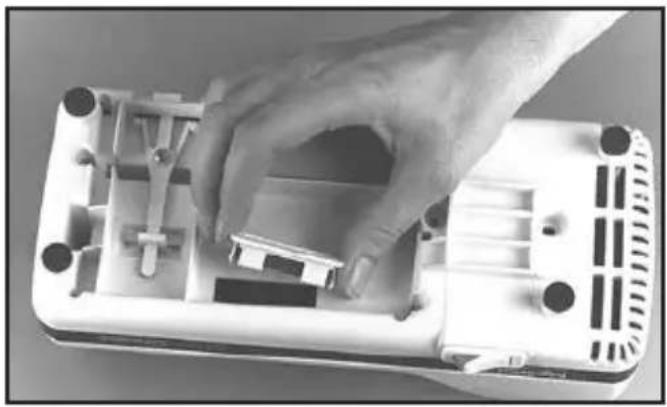
Once a year or so, as needed, you can remove metal dust that will accumulate inside the sharpener from repeated sharpenings. Remove the small rectangular clean-out cover (Figure 14) that covers an opening on the underside of the sharpener. You will find metal particles adhered to a magnet attached to the inside of that cover. Simply rub off or brush off accumulated filings from the magnet with a paper towel or tooth brush and reinsert the cover in the opening. If larger amounts of metal dust have been created or if the Stage 3 disk has been cleaned (using the cleaning/dressing means), you can shake out any remaining dust through the bottom opening when the cover is removed. After cleaning, replace the cover securely with its magnet in place.
SERVICE
In the event post-warranty service is needed, return your sharpener to the EdgeCraft factory where the cost of repair can be estimated before the repair is undertaken. Outside the USA, contact your retailer or national distributor.
Please include your return address, daytime telephone number and a brief description of the problem or damage on a separate sheet inside the box. Retain a shipping receipt as evidence of shipment and as your protection against loss in shipment.
natural_image
Hand installing or adjusting a white plastic electronic device casing (no visible text or symbols)Figure 14. Clean-out cover.
EdgeCraft
World Leader in Cutting Edge Technology
EdgeCraft Corporation 825 Southwood Road, Avondale, PA 19311 U.S.A. Customer Service 610-268-0500
Assembled in the U.S.A. www.chefschoice.com
This product may be covered by one or more EdgeCraft patents and/or patents pending as marked on the product.
Chef'sChoice®, EdgeCraft®, Diamond Hone®, EdgeSelect® and the overall design of the product are registered trademarks of EdgeCraft Corporation, Avondale, PA
Conforms to UL Std. 982 Certified to CAN/CSA Std. C22.2 No. 64
Certified to EN 60335-1, EN 60335-2, EN 55014-1+A1, EN 61000-3-2, EN 61000-3-3
© EdgeCraft Corporation 2013 Printed in China.
K13
C1282Z1
Chef'sChoice®
EdgeSelect®
natural_image
White EdgeSelect 120 Sharpener-Plus device with three labeled ports (1, 2, 3) and a black control panel base (no visible text beyond branding)natural_image
Close-up of a hand using a knife to cut a white device with multiple black components (no visible text or symbols)natural_image
Close-up of a hand using a power tool to cut or adjust electronic devices (no visible text or symbols)natural_image
Hand using a knife to cut a white rectangular object with multiple black components (no visible text or symbols)natural_image
Close-up of a white hard-shell electronic device with black components being cut by scissors, no visible text or symbols on the device itself.natural_image
Abstract circular diagram with shaded regions and layered patterns, no text or symbols presentnatural_image
Cross-sectional diagram of a mechanical component with layered internal structure (no text or symbols)natural_image
Cross-sectional illustration of a mechanical component with layered cylindrical parts, enclosed in a circular frame (no text or symbols)natural_image
Close-up of a hand using a knife to cut or adjust a white 3D printer into a slot (no visible text or symbols)natural_image
White portable water heater with three black modules and a 'Caution A' label, being handled by a hand (no readable text on device body)natural_image
Hand placing a small object into a white plastic electronic device casing (no visible text or symbols)World Leader in Cutting Edge Technology
EdgeCraft Corporation 825 Southwood Road, Avondale, PA 19311 U.S.A. Service clientèle 610-268-0500
Assemblé aux U.S.A. www.chefschoice.com
Conforms to UL Std. 982 Certified to CAN/CSA Std. C22.2 No. 64
Certified to EN 60335-1, EN 60335-2, EN 55014-1+A1, EN 61000-3-2, EN 61000-3-3
© EdgeCraft Corporation 2013 Printed in China.
K13 C1282Z1
Chef'sChoice®
EdgeSelect®
natural_image
White EdgeSelect 120 Sharpener-Plus device with three labeled ports (1, 2, 3) and a black control panel base (no readable text beyond branding)natural_image
Close-up of a hand using a knife to cut a white electronic device with multiple black components (no visible text or symbols)natural_image
Close-up of a hand using a power tool to cut a white electronic device with black components (no visible text or symbols)natural_image
Close-up of a white electric guitar with a knife cutting into its side, no visible text or symbols on the device itself.natural_image
Close-up of a white handheld device labeled 'Charfs Choice' with a hand holding a knife, showing mechanical components (no readable text beyond brand name)natural_image
Abstract circular diagram with shaded and layered segments, no text or symbols presentnatural_image
Cross-sectional diagram of a mechanical component with layered internal structure (no text or symbols)natural_image
Cross-sectional illustration of a layered material structure with no visible text or symbolsnatural_image
Close-up of a hand using a knife to cut or install a white electric shaver into a battery (no visible text or symbols)natural_image
White industrial soap dispenser with three side-mounted buttons and a 'Chassis Choice' label, being handled by a hand (no readable text beyond branding)natural_image
Hand installing or adjusting a white plastic electronic device casing (no visible text or symbols)World Leader in Cutting Edge Technology
EdgeCraft Corporation 825 Southwood Road, Avondale, PA 19311 U.S.A. Assistenza alla clientela 610-268-0500
Assemblato negli U.S.A. www.chefschoice.com
Conforms to UL Std. 982 Certified to CAN/CSA Std. C22.2 No. 64
Certified to EN 60335-1, EN 60335-2, EN 55014-1+A1, EN 61000-3-2, EN 61000-3-3
© EdgeCraft Corporation 2013 Printed in China.
K13 C1282Z1
Chef'sChoice®
natural_image
White EdgeSelect 120 Sharpener-Plus device with three labeled ports (1, 2, 3) on its side panel, no visible text or symbols on the device itself.natural_image
Close-up of a hand using a power tool to cut a white mechanical component with multiple black components (no visible text or symbols)natural_image
Hand using a power tool to cut or cut a white electronic device with black components (no visible text or symbols)natural_image
Hand using a knife to cut a white rectangular object with multiple compartments (no visible text or symbols)natural_image
Close-up of a white appliance with black components being cut by scissors, no visible text or symbols on the device itself.natural_image
Abstract circular diagram with shaded and dotted regions, no text or symbols presentnatural_image
Cross-sectional diagram of a mechanical component with layered internal structure (no text or symbols)natural_image
Cross-sectional illustration of a mechanical component with layered cylindrical parts inside a circular frame (no text or symbols)natural_image
Close-up of a hand using a knife to adjust or install a device with multiple slots (no visible text or symbols)natural_image
White industrial water heater with three vertical slots and a 'Chefs Choice' label, being handled by a hand (no other text or symbols visible)natural_image
Hand placing a small electronic component into a white plastic housing (no visible text or symbols)World Leader in Cutting Edge Technology
EdgeCraft Corporation 825 Southwood Road, Avondale, PA 19311 U.S.A. Klantenservice 610-268-0500
Conforms to UL Std. 982 Certified to CAN/CSA Std. C22.2 No. 64
Certified to EN 60335-1, EN 60335-2, EN 55014-1+A1, EN 61000-3-2, EN 61000-3-3
© EdgeCraft Corporation 2013 Printed in China.
K13 C1282Z1