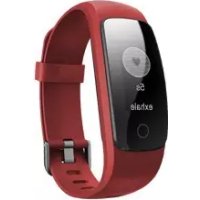
FITLIFEPro - Smartwatch Sunstech - Free user manual and instructions
Find the device manual for free FITLIFEPro Sunstech in PDF.



| Product Type | E-book reader |
| Brand | Sunstech |
| Model | FITLIFEPro / EBI8 |
| Screen | 6 inches, E-ink technology, 800x600 pixels resolution |
| Internal Memory | 8 GB |
| Memory Expansion | MicroSD card up to 64 GB |
| Supported Formats | e-book, music, photos (not precisely specified) |
| Power | Rechargeable battery via USB port, initial charge of 8 hours |
| Connectivity | Micro USB, MicroSD card slot, 3.5 mm headphone jack |
| Controls | Physical buttons: navigation (up, down, left, right, OK), Power, Menu, Back |
| Main Functions | E-book reading, music, photos, calendar, file explorer, settings |
| System Requirements | USB 2.0 port, Windows |
| Maintenance and Cleaning | Soft cloth, slightly damp if necessary. Do not use abrasive products. |
| Safety | Do not expose to rain, temperatures above 40°C, magnetic fields, or direct sunlight. |
| Spare Parts and Repairability | Battery not user-replaceable. Repair by certified technician only. |
| General Information | Made in China. Technical support at www.sunstech.com |
Frequently Asked Questions - FITLIFEPro Sunstech
User questions about FITLIFEPro Sunstech
0 question about this device. Answer the ones you know or ask your own.
Ask a new question about this device
Download the instructions for your Smartwatch in PDF format for free! Find your manual FITLIFEPro - Sunstech and take your electronic device back in hand. On this page are published all the documents necessary for the use of your device. FITLIFEPro by Sunstech.
USER MANUAL FITLIFEPro Sunstech
PRODUCTDESCRIPTION 1
PACKAGECONTENTS 1
SYSTEMSREQUIREMENTS 1
PARTSDESCRIPTION 2
CONFIGURATIONANDUSE 3
WARNING. 5
PRODUCTDESCRIPTION
E-ink6"EBookwithwhichyoureadmorethan2,800books,viewimagesatresolutionof800x600pixels.
It's compact and elegant design offers ample leasing and lightweight appearance, and along with shot key everything is at your fingertips.
It'sprocessorisoptimizedformultitaskingcapabilitiesandquickresponsoto loadbooksandreading.
ThisE-Bookhasaninternalflashmemoryof8GBandalsoincludesa MicroSDcardreaderthatletsyouexpandyourstorageoptionsupto64GB.
ItsE-inkscreenusessthebestPVItechnology,showingclearerandmore definedelectronicinkforyourreading.
ThisE-Bookhasmusicplayer.
Sunstechcommitmenttotheidealsolutionforthegoodreader.Readyour booksasiftheywerepaper!
PACKAGECONTENTS
- E B I 8 .
- Use r g u i d e .
- M i n i U S B C a b l e .
Note: Makesureyourpackagecontainstheelementsdescribedabove.Ifyou findanyitemsaremissingordamaged,pleasecontactyourdealer.
SYSTEMSREQUIREMENTS
- 1 U S B 2 . 0 p o r t .
- W i n d o w s O p e r a t i n g S y s t e m .
PARTSDESCRIPTION
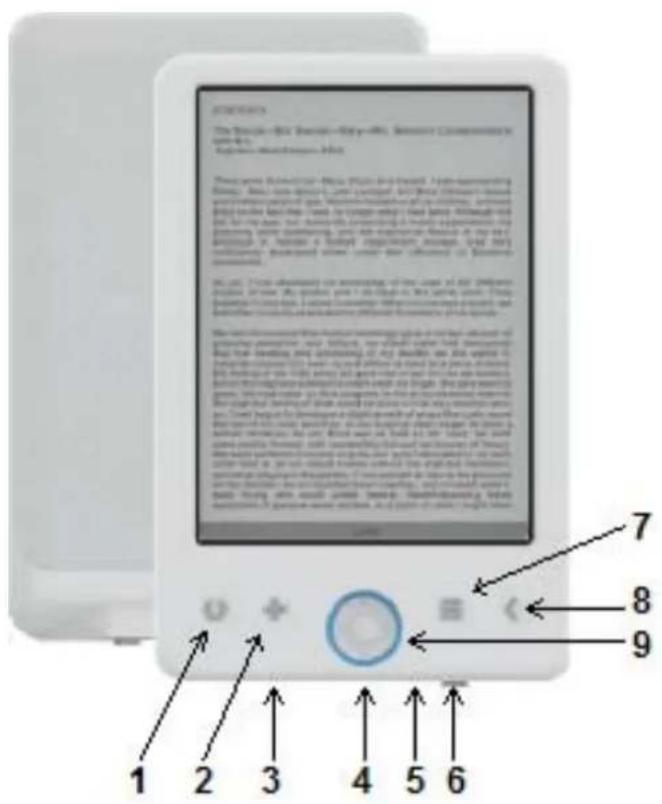
- (Notusefulforthismodel).
- Sizeselector.
3.MicroUSBslot.
4.MicroSDcardport.
5.Jack3.5mminput.
6.Powerbutton. - Menubutton.
8.Backbutton. - Navigationbuttons:up,down,left,right,OK.
CONFIGURATION AND USE
Tumon/TumOff
Holddownthepowerbuttonfor5seconds.
ChargetheEBook
You must first charge it for 8 hours before its first use. Whenthe battery is low, charge it by connecting the supplied USB cable between the PCandeBook. Donot charge it with poweradapters.
CopyfilestotheeBook
ConnecttheeBooktothePCusingthesuppliedUSBcable. Thedevicewill actasastorage device. Performnormalfilemanagementoperationlikeother USBstorage device.
Basicconcepts
Usethebuttonstosscrolltotheitemyouwantfromthelist:
Pressthe OKbutton toconfirmtheselection.
Pressthe Menubutton toopentheoptionsmenu.
Pressthe Backbutton tocanceltheselectionorreturntothepreviousmenu orpressrepeatedlytoreturntothemainmenu.
HistoryBrowser
Fromthemainmenu,select HistoryBrowser andpressthe OKbutton . You can selectyourlast10readingsquickly.
EBook
Fromthemainmenu,select eBook, p r s s t k button toenterinyourbook library.Fromthebooklibrary,usethebuttonstoselectabookandpressthe
OK button to open the book desired. When reading, press the navigation buttons to changepages.Inreadingpage.pressthe Menubutton tousethe optionmenu.
Music
From them main men Music peess OK button toselecttheaudio filefromyourlibrary.Press OKbutton toplayorpauseourmusicandbuttons toselectpreviousornexttrack.
Photo
Pressthemainmenu,select Photo andpressthe OKbutton toenterthe viewer.Selectanimageandpressthe OKbutton toviewfullscreen.Pressthe Menubutton tousetheoptionmenu.
Setting
Fromthemainmenu,select Setting andpressthe OKbutton. Usethe navigationbuttons and OKbutton tosetthelanguageandsystemtimeor otheradjustments.
Browser
Pressthe Menubutton, s e l e Explorer andclickthe OKbutton toenterthe filebrowser.Selectafolderorfiletoopenit,pressthe Menubutton tousethe optionmenu.
Calendar
Fromthemainmenu, select Calendar andpressthe OKbutton. Use the navigationbuttons and OKbutton todisplayyear, month and day.
TECHNICALSUPPORT
Formoreinformationaboutthisproductpleasevisitoursupportsectionon our websitewww.sunstech.com.
WARNING
| Pb | Correctdisposal of this Product (Waste Electrical & Electronic Equipment)(WEEE) Yourproductisdesigned and manufactured with high quality materialsand components which canberecycled andreused. Thissymbolmeansthatelectricalandelectronic equipment, at theirendof-lifeshouldbedispersedof separately from your householdwaste. Please dispose ofthisequipmentat your local communitywaste collection/recyclingcentre. Inthe European Unionthereareseparatecollectionsystemfor usedelectricalandelectronicproducts.Pleasehelpustoconserve theenvironmentwelivein! |
| X↓ | DONOTplaceobjectsontopofthedvice, asobjectsmay scratchthedvice. |
| X↓ | DONOTexposethedevicetodirtyordustyenvironments. |
| X↓ | DONOTplacedevicemonunevenorunstablesurface. |
| X1 | DONOTinsertanyforeignobjectsintothedvice. |
| X | DONOTexposethedevicetostrongmagneticorelectricalfield. |
| X | DONOTexposethedevicetodirectsunlightasitcandamagethe device.Keepawayfromheatsources. |
| 60°C(140°F) | DO NOT store your device in temperatures higher than 40°C(104°F). The internal operating temperature for this device is from 20°C(68°F) to 60°C(140°F). |
ENGLISH
Userguide
EBI8
| DONOTusethedevicewiththerain. | |
| PleasecheckwithyourLocalAuthorityorretailerforproper disposalofelectronicproducts. | |
| Thedevicandadaptormayproductsomeheatduringnormal operationofcharging.Toppreventdiscomfortinjuryfromheat exposure,DONOTleavethedevicewithyourlap. | |
| POWERINPUTRATING:Refertotheratinglabelthedevice andbesurethatthepoweradaptorcomplieswiththerating.Only useaccessoriespecifiedbythemanufacurer. | |
| Cleanthedevicewithasoftcloth.Ifneeded,dampenthecloth slightlybeforecleaning.Neveruseabrasivesorcleaningsolutions. | |
| Alwayspoweroffthedeviceinstallorremoveexternaldevices thatdonotsupporthotplug. | |
| Disconnectthedevicefromanelectricaloutletandpoweroff beforecleaningthedevice. | |
| DONOTdisassemblethedevice.Onlyacertifiedservice techniciansshouldperformrepair. | |
| The device has apertures to disperse heat. DO NOT block the deviceventilation,thedevicemaybecomehotandmalfunctionas aresult. | |
| Risk of explosion if battery replaced by an incorrect type. Dispose ofusedbatteriesaccordngtotheinstruction. |
ENGLISH
Userguide
EBI8
| PLUGGABLEEQUIPMENT:thesocket-outletshallbeinstallednear theequipmentandshallbeeasilyaccessible. | |
| EuropeanUnion:DisposallInformation. Thissymbolmeansthataccordinglyocallawsandregulations yourproductand/oritsbatteryshallbedisposedofseparately fromhouseholdwaste.Whenthisproductreachesitsendoflife, takeittoacollectionpointdesignatedbylocalauthorities.The separatecollectionandrecyclingofyourproductand/oritsbattery atthetimeofdisposalwillhelpconservenaturalresourcesand ensurethatitisrecycledinamannerthatprotectshumanhealth andtheenvironment. | |
| MADEINCHINA |

EB18
EBOOK
GUIADEUSUARIO
CONTENIDO
DESCRIPCIONDELPRODUCTO 1
CONTENIDODELACAJA 1
REQUISITOSDELSYSTEMA 1
DESCRIPCIONDELASPARTES 2
CONFIGURACIONYUSO 3
SOPORTETECNICO 4
ADVERTENCIAS 5
DESCRIPCIONDELPRODUCTO
EIE-BookE-inkde6" conenelquepodrasleermasde2800librosyver imagenesenuaresolucionde800x600pixels.
Sudisenocompactoyeleganteofreceunaspectoagradableyligeroasuvez,ademasaconsusteclasdeaccesorapidotodostaralcancedetumano.
-1puertoUSB2.0.
-SistemaoperativeWindows.
ESPANOL
Guiadeusuario
EBI8
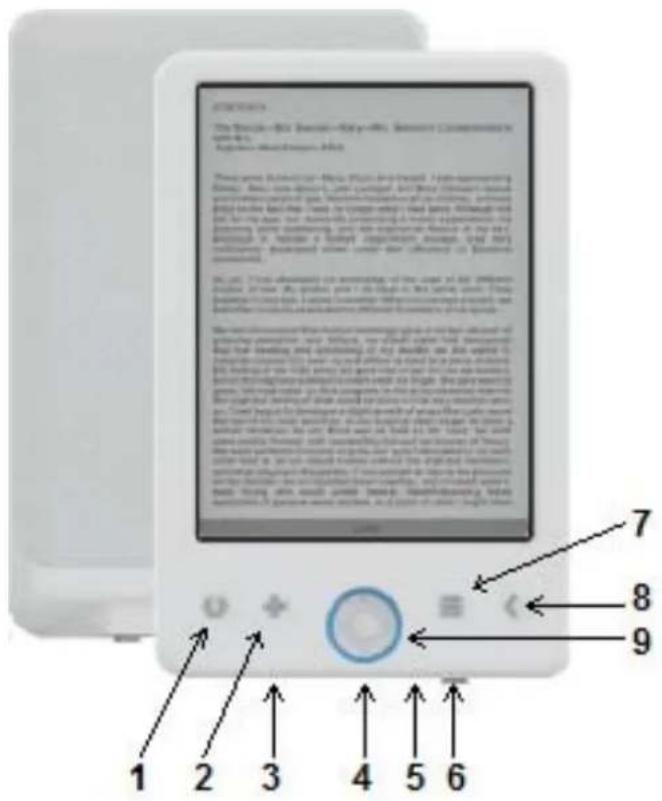
DESCRIPCIONDELASPARTES
For you. For everyone.
Brand : Sunstech
Model : FITLIFEPro
Category : Smartwatch