
TI61A - Cooker AIRLUX - Free user manual and instructions
Find the device manual for free TI61A AIRLUX in PDF.



| Product type | Induction ceramic hob |
| Brand | Airlux |
| Model | TI61A |
| Cut-out dimensions (W x D) | 560 x 490 mm |
| Total power | 6000 W |
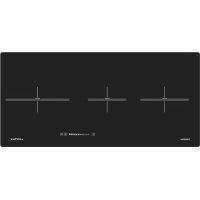
| Number of cooking zones | 3 |
| Front left cooking zone | 2300 W, diameter 190 mm |
| Rear left cooking zone | 1400 W, diameter 150 mm |
| Rear right cooking zone | 2300 W, diameter 260 mm |
| Electrical supply | 230 V ~ 50 Hz (single-phase or two-phase 400 V) |
| Main functions | Timer (0-99 min), automatic cooking "Go and Stop", control panel lock, pan detection, residual heat indicator |
| Care and cleaning | Clean with soapy water or special ceramic hob cleaner; do not use abrasives or steam cleaners |
| Safety | Automatic shut-off, pan detection, child lock, overheat protection |
| Spare parts and repairability | Contact Airlux after-sales service (sav@airlux.com) |
| Manufacturer warranty | Standard (contact after-sales service) |
Frequently Asked Questions - TI61A AIRLUX
User questions about TI61A AIRLUX
0 question about this device. Answer the ones you know or ask your own.
Ask a new question about this device
Download the instructions for your Cooker in PDF format for free! Find your manual TI61A - AIRLUX and take your electronic device back in hand. On this page are published all the documents necessary for the use of your device. TI61A by AIRLUX.
USER MANUAL TI61A AIRLUX
Dear customer,
Thank you for having chosen our induction ceramic hob.
In order to make the best use of your appliance, we would advise you to read carefully the following notes and to keep them for later consultation.
SAFETY 16
Precautions before using 16 Using the appliance 16 Precautions not to damage the appliance 17 Precautions in case of appliance failure 17 Other protections 17
DESCRIPTION OF THE APPLIANCE 18
Technical data 230V~50Hz 18 Control panel 18
USE 19
Sensitive touches 19 Display 19 Ventilation 19
STARTING-UP AND APPLIANCE MANAGEMENT 19
Before the first use 19 Induction principle 19 Starting-up 20 Pan detection 20 Residual heat indication 20 Timer 20 Automatic cooking "go and stop" 21 Control panel locking 21
COOKING ADVICES 22
Pan quality 22 Pan dimension 22 Examples of power setting 22
MAINTENANCE AND CLEANING 22
WHAT TO DO IN CASE OF A PROBLEM 23
ENVIRONMENT PRESERVATION 23
INSTALLATION INSTRUCTIONS 24
ELECTRICAL CONNECTION 25
Precautions before using
- Unpack all the materials.
- The installation and connection of the appliance must be carried out by qualified specialists. The manufacturer cannot be held responsible for damage caused by incorrect installation or connection.
- To be used, the appliance must be properly installed in a kitchen unit and on a suitable, approved work surface.
- This household appliance is intended exclusively for cooking food, and must not be used for any other domestic, commercial, or industrial purpose.
- Remove all labels and self-adhesive stickers from the ceramic glass.
- Do not modify or alter the appliance.
- The cooking plate cannot be used as a freestanding appliance or as a work surface.
- The appliance must be grounded and connected in accordance with local regulations.
- Do not use an extension cable to connect it.
- The appliance must not be installed above a dishwasher or a tumble dryer, as steam may damage the electronic components.
Using the appliance
- Switch the heating zones off after using.
- Keep an eye on the cooking using grease or oils: that may quickly ignite.
- Be careful not to burn yourself while or after using the appliance.
- Make sure no cable of any fixed or moving appliance contacts with the glass or the hot saucepan.
- Magnetically objects (credit cards, floppy disks, calculators) should not be placed near to the engaged appliance.
- Do not place any metallic object except heating containers. In case of untimely engaging or residual heat, this one may heat, melt or even burn.
- Never cover the appliance with a cloth or a protection sheet. This is supposed to become very hot and catch fire.
- This appliance is not intended for use by persons (including children) with reduced physical, sensory or mental capabilities, or lack of experience and knowledge, unless they have been given supervision or instruction concerning use of the appliance by a person responsible for their safety. Children should be supervised to ensure that they do not play with the appliance. Metallic objects such as knives, forks, spoons and lids should not be placed on the hob surface since they can get hot.
Precautions not to damage the appliance
- Raw pan bottoms or damaged saucepans (not enamelled cast iron pots,) may damage the ceramic glass.
- Sand or other abrasive materials may damage ceramic glass.
- Avoid dropping objects, even little ones, on the vitroceramic.
- Do not hit the edges of the glass with saucepans.
- Make sure that the ventilation of the appliance works according to the manufacturer's instructions.
- Do not put or leave empty saucepans on the vitroceramic hobs.
- Sugar, synthetic materials, or aluminum sheets must not come into contact with the heating zones. These may cause breaks or other alterations of the vitroceramic glass by cooling: switch on the appliance and take them immediately out of the hot heating zone (be careful: do not burn yourself).
- Never place any hot container over the control panel.
- If a drawer is situated under the embedded appliance, make sure the space between the content of the drawer and the inferior part of the appliance is large enough (2cm). This is essential to guarantee correct ventilation.
- Never put any inflammable object (e.g., sprays) into the drawer situated under the vitroceramic hob. The eventual cutlery drawers must be resistant to heat.
Precautions in case of appliance failure
- If a defect is noticed, switch off the appliance and turn off the electrical supply.
- If the ceramic glass is cracked or fissured, you must unplug the appliance and contact the after-sales service.
- Repairing has to be done by specialists. Do not open the appliance by yourself. WARNING: If the surface is cracked, switch off the appliance to avoid the possibility of electric shock.
Other protections
- Make sure that the container pan is always centered on the cooking zone. The bottom of the pan must cover as much as possible the cooking zone.
- For the users of pacemakers, the magnetic field could influence its operation. We recommend getting information from the retailer or the doctor.
- Do not use aluminum or synthetic material containers: they could melt on still hot cooking zones.

DO NOT USE INTERMEDIATE REMOVABLE ACCESSORIES TO HEAT PANS WHICH ARE NOT ADAPTED TO INDUCTION. RISKS OF BURNS AND DETERIORATION OF THE HOB.

Technical data: 230V~ 50Hz
| Reference | Total Power | Heating zone | Power * | Diametre |
| TI61H | 6000W | Front left | 2300W | 190 mm |
| TI61A | Rear left | 1400W | 150 mm | |
| Rear Right | 2300W | 260 mm | ||
| TI83H | 6000W | Left | 2300W | 210 mm |
| Centre | 1400W | 145 mm | ||
| Right | 2300W | 240 mm |
- The given power may change according to the dimensions and material of the pan.
Control panel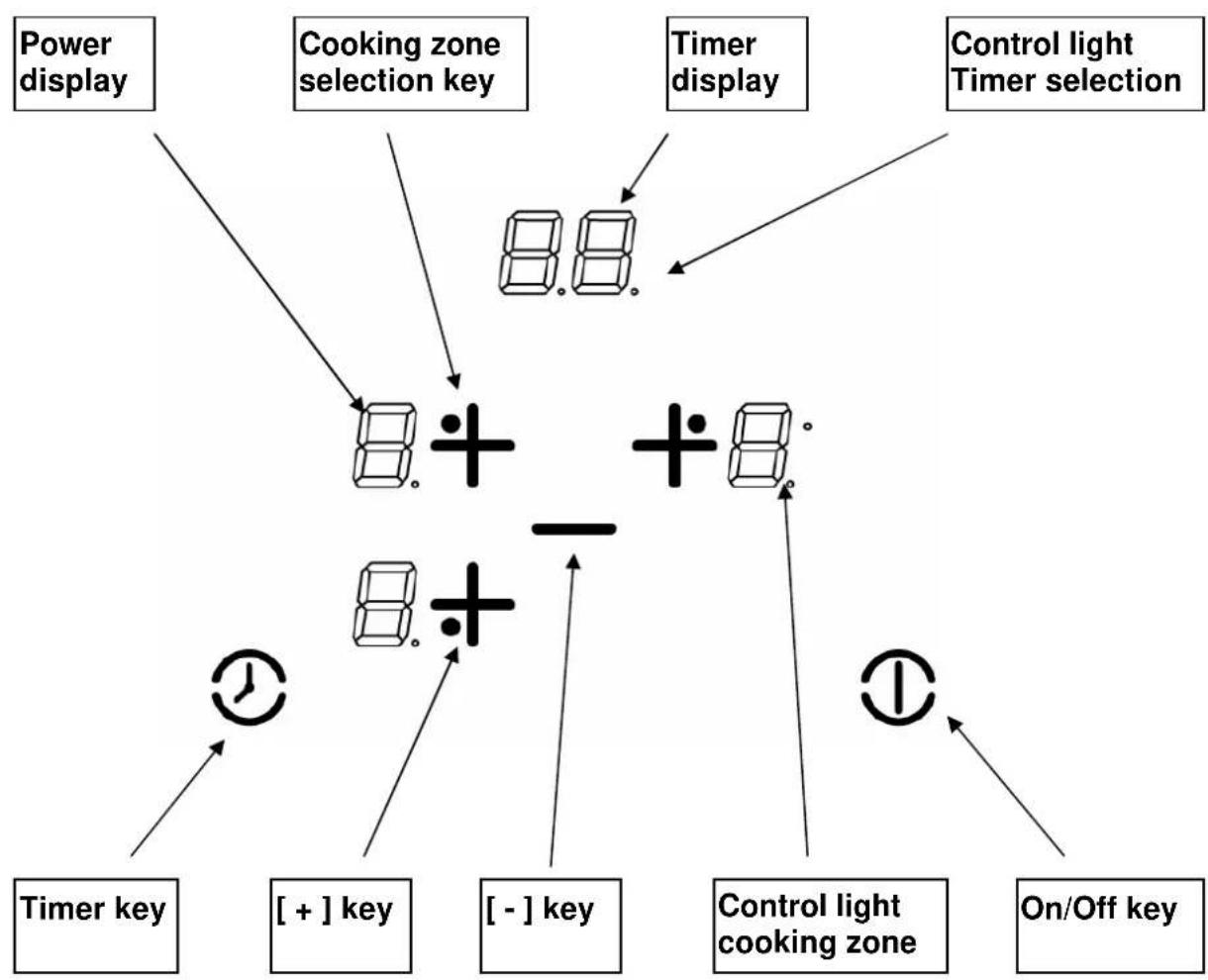
Sensitive touches
Your ceramic hob is equipped with electronic controls with sensitive touch keys. When your finger touches the key, the corresponding command is activated. This activation is validated by a control light, a letter or a number in the display and/or a "beep" sound.
Touch only one key at a time.
Display
| Display | Designation | Function |
| 0 | Zero | The heating zone is activated |
| 1...9 | Power level | Selection of the cooking level |
| U | Pan detection | No pan or inadequate pan |
| E | Error message | Electronic failure |
| H | Residual heat | The heating zone is hot |
| L | Locking | Control panel locking |
| A | Heat accelerator | Automatic cooking |
Ventilation
The cooling system is fully automatic. The cooling fan starts at low speed when the heat generated by the electronic system reaches a certain level. The ventilation switches to high speed when the hob is used intensively. The cooling fan reduces its speed and stops automatically when the electronic circuit has cooled down sufficiently.
STARTING UP AND APPLIANCE MANAGEMENT
Before first use
Clean your hob with a damp cloth, then dry the surface thoroughly. Do not use detergent, as it may cause a blue tint on the glass surface.
Induction principle
An induction coil is located under each heating zone. When it is activated, it produces a variable electromagnetic field that generates inductive currents in the ferromagnetic bottom of the pan. This results in the pan heating up on the heating zone.
Of course, the pan must be suitable:
- All ferromagnetic pans are recommended (check with a small magnet): cast iron and steel pans, enamelled pans, stainless-steel pans with ferromagnetic bottoms...
- Excluded: copper, pure stainless steel, aluminium, glass, wood, ceramic, stoneware...
The induction heating zone automatically adapts to the size of the pan. If the pan diameter is too small, the pan will not work. This diameter varies depending on the heating zone diameter. If the pan is not suitable for the induction hob, the display will show [U].
Starting up
To turn off the hob, first press the [ ] key, then the heating zone [ + ]:
- Start-up / switch off the hob:
| Action | Control panel | Display | Control light |
| To start : | touch the key [ I ] | [ 0 ] | switch on blinking |
| To stop : | touch the key [ I ] | nothing or [ H ] | switch off |
| • Start-up/ switch off a heating zone : | |||
| Action | Control panel | Display | |
| To choose the zone | touch key [ + ] | [ 0 ] | |
| Increase power | touch key [ + ] | [ 1 ] to [ 9 ] | |
| Decrease power | touch key [ - ] | [ 9 ] to [ 1 ] | |
| Stop | simultaneous [ + ] & [ - ] | [ 0 ] or [ H ] | |
If no action is taken within 20 seconds, the electronics returns to standby mode.
Pan detection
The pan detection ensures perfect safety. Induction does not work:
- If there is no pan on the heating zone, or if the pan is not suitable for induction. In this case, it is impossible to increase the power and the display shows [U]. This symbol disappears when a suitable pan is placed on the heating zone.
- If the pan is removed from the heating zone, the operation stops. The display shows [U]. The symbol [U] disappears when the pan is placed back on the heating zone. Cooking continues with the previously set power level.
Residual heat indication
After switching off a heating zone or completely stopping the hob, the heating zones are still hot and show [H] on the display.
The symbol [H] disappears when the heating zones can be touched without danger.
As long as the residual heat indicators are lit, do not touch the heating zones and do not place any heat-sensitive objects on them. There is a risk of burns and fire.
Timer
The timer can be used simultaneously with all heating zones, with different time settings (from 0 to 99 minutes) for each heating zone.
- Setting and modification of the cooking time
| Action | Control panel | Display |
| To select a heating zone | Press on key [+] | The zone control light is on |
| To select the power level | Press on key [+] or [-] | [1]....[9][P] |
| To select « Timer » | Press on key [◎] | The timer displays [00] |
| Decrease the time | Press on key [-] | [60]wents to 59,58,57,... |
| Increase the time | Press on key [◎] | The time increases... |
After a few seconds, the control light stops blinking.
The time is confirmed and cooking starts until the timer reaches [00].
- To stop the cooking time
| Action | Control panel | Display |
| To select a heating zone | Press on key [+] | The zone control light is on |
| To select « Timer » | Press on key [◎] | The remaining time |
| To stop the « Timer » | Press on key [−] and [◎] | Displays [00] then stops |
| simultaneously | ||
| If several timers are activated repeat the process. | ||
Automatic stop at the end of the cooking time
As soon as the selected cooking time is finished, the timer displays blinking [00] and a sound rings. To stop the sound and the blinking, press the key [] .
- Egg timer function
| Action | Control panel | Display |
| Activate the hob | Press on key [1] | The zone control lights are on |
| Select « Timer » | Press on key [◎] | Time [00] minutes |
| Decrease the time | Press on key [-] | [60] wents to 59,58,57,... |
| Increase the time | Press on key [◎] | The time increases... |
After a few seconds, the control light stops blinking.
As soon as the selected cooking time is finished, the timer displays blinking [00] and a sound rings. To stop the sound and the blinking, press the key [] .
Automatic cooking "go and stop"
All cooking zones are equipped with an automatic "go and stop" cooking device. The cooking zone starts at full power for a certain time, then automatically reduces its power to the preselected level.
Start-up:
| Action | Control panel | Display |
| Zone selection | Press on key [+] | [0] and control light on |
| Full power setting | Press on key [+] | [1] ....... to...... [9] |
| Automatic cooking | Press on key [+] | [9] is blinking with [A] |
| Power level selection | Press on key [-] | [9] [8] [7] ......... [1] |
| (for example « 7 ») | [7] is blinking with [A] |
- Switching off the automatic cooking:
| Action | Control panel | Display |
| Zone selection | Press on key [-] | [9][8][7]......[0] |
| Power level selection | Press on key [+] | Level selected |
Control panel locking
To avoid modifying a setting of the cooking zones, particularly during cleaning, the control panel can be locked (with the exception of the On/Off key [0/1]).
Locking:
| Action | Control panel | Display |
| Start | Press on key [I] | [0] or [H] on 3 displays |
| Hob locking | Touch simultaneously [ - ]and [ + ] at front left | No modification[L] on 3 displays |
| Press on key [ + ] |
- Unlocking:
| Action | Control panel | Display |
| Start | Press on key [1] | [L] on 3 displays |
| In the 5 seconds after start : | ||
| Unlocking the hob | Touch simultaneously[ - ] and [ + ] at front leftPress on key [ - ] | [0] or [H] on 3 dNo light on the dis |
Pan quality
Adapted materials: steel, enamelled steel, cast iron, ferromagnetic stainless steel, aluminium with ferromagnetic bottom.
Not adapted materials: aluminium and stainless steel without ferromagnetic bottom, copper, brass, glass, ceramic, porcelain.
The manufacturers specify if their products are induction compatible.
To check if pans are compatible:
- Put a little water in a pan placed on an induction heating zone set at level [ 9 ]. This water must heat in a few seconds.
- A magnet sticks to the bottom of the pan.
Certain pans can make noise when they are placed on an induction cooking zone. These noises don't mean any failure on the appliance and don't influence the cooking operation.
Pan dimension
The cooking zones are, up to a certain limit, automatically adapted to the diameter of the pan. However, the bottom of this pan must have a minimum diameter according to the corresponding cooking zone.
To obtain the best efficiency of your hob, please place the pan well in the center of the cooking zone.
Examples of power setting
(the values below are indicative)
| 1 to 2 Melting | Reheating | Sauces, butter, chocolate, gelatine Dishes prepared beforehand |
| 2 to 3 Simmering | Defrosting | Rice, pudding, sugar syrup Dried vegetables, fish, frozen products |
| 3 to 4 | Steam | Vegetables, fish, meat |
| 4 to 5 | Water | Steamed potatoes, soups, pasta, fresh vegetables |
| 6 to 7 Medium cooking | Simmering | Meat, lever, eggs, sausages Goulash, roulade, tripe |
| 7 to 8 | Cooking | Potatoes, fritters, wafers |
| 9 | Frying, roosting Boiling water | Steaks, omelettes, fried dishes, Water |
MAINTENANCE AND CLEANING
- Switch off the appliance before cleaning. Do not clean the hob if the glass is too hot: risk of burns.
- Remove light marks with a damp cloth with washing-up liquid diluted in a little water. Then rinse with cold water and dry the surface thoroughly.
- Highly corrosive or abrasive detergents and cleaning equipment likely to cause scratches must be absolutely avoided.
- Never use any steam-driven or pressure appliance.
- Do not use any object that may scratch the ceramic glass.
- Ensure that the pan is dry and clean. Ensure that there are no grains of dust on your ceramic hob or on the pan. Sliding rough saucepans will scratch the surface.
- Spillages of sugar, jam, jelly, etc. must be removed immediately. You will thus prevent the surface being damaged.
The hob or the cooking zone doesn't start up:
The hob is badly connected to the electrical network. - The protection fuse cut-off. The locking function is activated. The sensitive keys are covered with grease or water. An object is put on a key.
The symbol [U] displays:
There is no pan on the cooking zone. The pan is not compatible with induction. The bottom diameter of the pan is too small.
The symbol [F] & [E] displays:
- You cannot use this cooking zone anymore.
- Call the After-sales Service.
- The electronic system is defective.
- Disconnect and replug the hob.
- Call the After-sales Service.
One or all cooking zones cut-off:
- The safety system functioned.
- You forgot to cut off the cooking zone for a long time. One or more sensitive keys are covered. The pan is empty and its bottom overheated.
Continuous ventilation after cutting off the hob:
This is not a failure; the fan continues to protect the electronic device. The cooling fan stops automatically.
The automatic cooking system "go and stop" doesn't start up:
- The cooking zone is still hot [H]. The highest power level is set [9]. The cooking level was engaged with [-].
The control panel displays 3 [L]:
Refer to the chapter "Control panel locking" on page 21.
ENVIRONMENT PRESERVATION
- The packaging materials are ecological and recyclable.
- The electronic appliances are composed of recyclable, and sometimes harmful, materials for the environment, but necessary for the proper functioning and safety of the appliance.
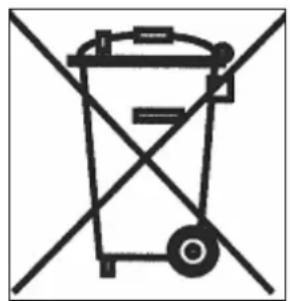
- Do not throw your appliance with household refuse.
- Contact the waste collection center in your municipality that handles recycling of household appliances.
Installation must be carried out exclusively by qualified specialists.
The installer is required to comply with the legislation and standards in force in their country.
How to attach the gasket:
The gasket supplied with the hob prevents any liquid from seeping into the cabinet.
It must be installed carefully, following the diagram below.
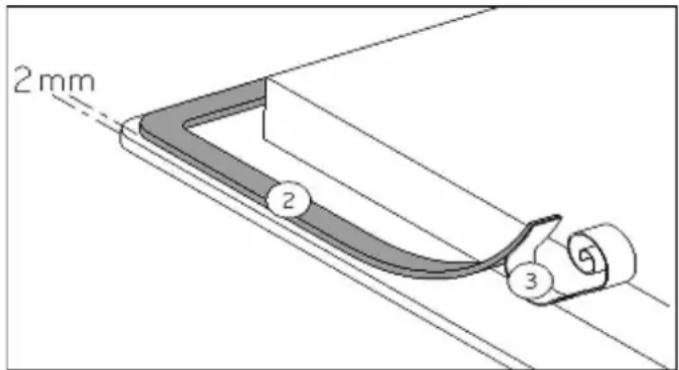
Attach the gasket (2) two millimeters from the outer edge of the glass, after removing the protective sheet (3).
Fitting and installation:
The cutout dimensions are:
-TI61H
560x490mm
-TI61A 560x490mm -TI83H 760x340mm
- The furniture or support in which the hob is installed, as well as the edges of the furniture, the laminate coatings, and the adhesive used to fix them, must be able to withstand temperatures up to 100°C. The wall strips at the edges must be heat-resistant.
- The hobs are classified as "Y" class for heat protection. Ideally, the hob should be installed with ample space on both sides. There may be a wall at the rear and tall units or a wall on one side. On the other side, however, no unit or divider should be higher than the hob.
- Ensure that there is a distance of 50 mm between the hob and the wall or sides.
- Materials which are often used to make worktops expand on contact with water. To protect the cut out edge, apply a coat of varnish or special sealant. Particular care must be given to applying the adhesive joint supplied with the hob to prevent any leakage into the supporting furniture. This gasket guarantees a correct seal when used in conjunction with smooth worktop surfaces.
- Do not install the hob on top of a non-ventilated oven or a dishwasher.
- To guarantee under the bottom of the hob casing a space of 20mm to ensure good air circulation for the electronic device.
- To guarantee between the worktop and the top of the drawer or oven a space of 5mm to allow the exit of the air flow.
- If a drawer is placed under the worktop, avoid putting flammable objects (for example: sprays) or non-heat-resistant objects into this drawer.
- The safety gap between the hob and the cooker hood placed above must respect the indications of the hood manufacturer. In case of absence of instructions, respect a minimum distance of 760 mm.
- The connection cord should be subjected, after building in, to no mechanical constraint, such as for example the fact of the drawer.
- The installation of the hob in non-stationary sites (for example: boat) should be undertaken by specialists.
- The installation of this appliance and the connection to the electrical network should be entrusted only to an electrician perfectly aware of the normative regulations and who respects them scrupulously. Protection against the parts under tension must be ensured after the building-in.
- The data of connection necessary are on the stickers placed on the hob casing near the connection box.
- The connection to the mains must be made using an earthed plug or via an omnipolar circuit breaking device with a contact opening of at least 3mm.
- The electrical circuit must be separated from the network by adapted devices, for example: circuit breakers, fuses or contactors.
Caution!
Always connect the earth wire.
Respect the connection diagram.
The connection box is located underneath at the back of the hob casing. To open the cover, use a medium screwdriver. Place it in the slits and open the cover.
| Mains | Connection | Cable diameter | Cable | Protection calibre |
| 230V~1N 50Hz | 1 Phase + N | 3 x 2.5 mm² | H 05 RR | 25 A* |
| 400V~2N 50Hz | 2 Phases + N | 4 x 1.5 mm² | H 05 RR | 16 A* |
(*) calculated with the simultaneous factor following standard TN 60 335-2-6/1990
Connection of the hob
Setting up the configurations:
For the various kinds of connection, use the brass bridges which are in the box next to the terminal.
Single-phase 230V~ 1P + N
Put the 1st bridge between terminal 2 and 3, the 2nd between 4 and 5.
Attach the earth to the terminal "earth", the neutral N to terminal 5 (or 4), the phase L to one of the terminals 2 or 3.
Two-phase 400V~ 2P+N
Put a bridge between terminal 4 and 5.
Attach the earth to the terminal "earth", the neutral N to terminal 5 (or 4), the phase L1 to terminal 2 and the phase L2 to terminal 3.
Caution! Ensure that you:
- correctly attach the wires and the bridges.
- tighten the screws properly.
Before making the connection, we strongly advise you to locate the phase(s), neutral and earth on the mains. If you have any doubts, call your electrician.
Note: the bridges between terminals 4-5 and between terminals 2-3 were installed during the factory check.
We cannot be held responsible for any incident resulting from incorrect connection or which could arise from the use of an appliance which has not been earthed or has been equipped with a faulty earth connection.
HEAD OFFICE
AIRLUX S.A.
- DEAR CUSTOMER
- SAFETY
- DESCRIPTION OF THE APPLIANCE
- USE
- STARTING-UP AND APPLIANCE MANAGEMENT
- COOKING ADVICES
- MAINTENANCE AND CLEANING
- WHAT TO DO IN CASE OF A PROBLEM
- ENVIRONMENT PRESERVATION
- INSTALLATION INSTRUCTIONS
- ELECTRICAL CONNECTION
- PRECAUTIONS BEFORE USING
- USING THE APPLIANCE
- PRECAUTIONS NOT TO DAMAGE THE APPLIANCE
- PRECAUTIONS IN CASE OF APPLIANCE FAILURE
- OTHER PROTECTIONS
- SENSITIVE TOUCHES
- DISPLAY
- VENTILATION
- STARTING UP AND APPLIANCE MANAGEMENT
- BEFORE FIRST USE
- INDUCTION PRINCIPLE
- STARTING UP
- START-UP / SWITCH OFF THE HOB
- PAN DETECTION
- RESIDUAL HEAT INDICATION
- TIMER
- SETTING AND MODIFICATION OF THE COOKING TIME
- TO STOP THE COOKING TIME
- AUTOMATIC STOP AT THE END OF THE COOKING TIME
- EGG TIMER FUNCTION
- AUTOMATIC COOKING "GO AND STOP
- START-UP
- SWITCHING OFF THE AUTOMATIC COOKING
- CONTROL PANEL LOCKING
- LOCKING
- UNLOCKING
- PAN QUALITY
- PAN DIMENSION
- EXAMPLES OF POWER SETTING
- HOW TO ATTACH THE GASKET
- FITTING AND INSTALLATION
- CAUTION
- CONNECTION OF THE HOB
Brand : AIRLUX
Model : TI61A
Category : Cooker