PAI8105E - Cooker PROGRESS - Free user manual and instructions
Find the device manual for free PAI8105E PROGRESS in PDF.



| Product type | Induction hob |
| Brand | Progress |
| Model | PAI8105E |
| Number of cooking zones | 4 |
| Zone type | Induction |
| Zone diameter | 210 mm (all) |
| Nominal power per zone | 2300 W |
| Booster function | 3200 W (duration 10 minutes) |
| Bridge function | Yes (coupling two zones) |
| Stop+Go function | Yes (standby) |
| Automatic shut-off | Yes (according to cooking level) |
| Control panel lock | Yes |
| Child safety lock | Yes |
| Timer | Yes (99 min max) |
| Power management | Yes |
| Power supply | 230 V ~ 50 Hz |
| Power cable | Provided (H05BB-F Tmax 90°C) |
| Surface | Ceramic glass |
| Residual heat indicator | Yes (display H) |
| Overheating protection | Yes |
| Compatible cookware | Steel, cast iron, enameled steel, stainless steel (flat bottom) |
| Maintenance and cleaning | Scraper for stubborn stains, ceramic glass cleaner |
| Repairability | After-sales service (contact retailer) |
Frequently Asked Questions - PAI8105E PROGRESS
User questions about PAI8105E PROGRESS
0 question about this device. Answer the ones you know or ask your own.
Ask a new question about this device
Download the instructions for your Cooker in PDF format for free! Find your manual PAI8105E - PROGRESS and take your electronic device back in hand. On this page are published all the documents necessary for the use of your device. PAI8105E by PROGRESS.
USER MANUAL PAI8105E PROGRESS
BESCHRIJVING VAN HET PRODUCT
Algemeen overzicht
flowchart
graph TD
    A["1"] --> B["2"]
    B --> C["3"]
    C --> D["4"]
    D --> E["5"]
natural_image
Pure geometric diagram with two identical right-angle corner shapes and bidirectional arrows, no text or symbols present.Timer


A
12 mm
28 mm
38 mm
57 mm
41 mm
31 mm
B
A
12 mm
28 mm
38 mm
57 mm
41 mm
31 mm
B
natural_image
Pure diagram of a square frame with horizontal lines and arrows, no text or symbols present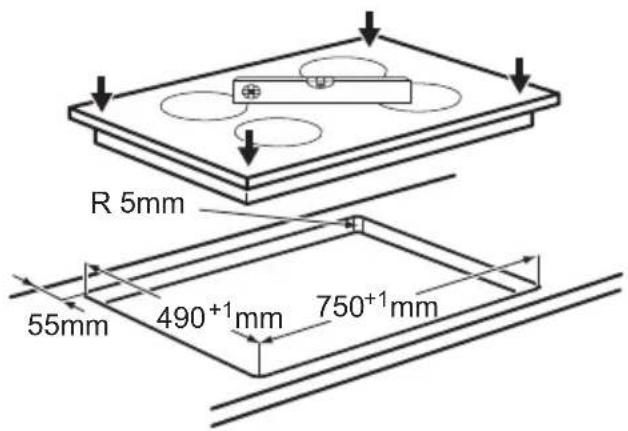
i

natural_image
Technical diagram showing assembly of two metal brackets with mounting holes and dashed lines indicating assembly steps (no text or symbols)Induction 7.4 kW Made in Germany
Ser.Nr. ..... 7.4 kW
PROGRESS


Safety instructions 17
Product description 19
Daily use 20
Helpful hints and tips 22
Care and cleaning 24
Troubleshooting
Installation instructions 26
Technical information 27
Environment concerns 28
Subject to change without notice.
SAFETY INFORMATION
Before the installation and use of the appliance, carefully read the supplied instructions. The manufacturer is not responsible if an incorrect installation and use causes injuries and damages. Always keep the instructions with the appliance for future reference.
Children and vulnerable people safety
⚠ Warning! Risk of suffocation, injury or permanent disability.
- This appliance can be used by children aged from 8 years and above and persons with reduced physical, sensory or mental capabilities or lack of experience and knowledge if they are supervised by an adult or a person who is responsible for their safety.
- Do not let children play with the appliance.
- Keep all packaging away from children.
- Keep children and pets away from the appliance when it operates or when it cools down. Accessible parts are hot.
- If the appliance has a child safety device, we recommend that you activate it.
- Cleaning and user maintenance shall not be made by children without supervision.
General Safety
- The appliance and its accessible parts become hot during use. Do not touch the heating elements.
- Do not operate the appliance by means of an external timer or separate remote-control system.
-
Unattended cooking on a hob with fat or oil can be dangerous and may result in fire.
-
Never try to extinguish a fire with water, but switch off the appliance and then cover flame e.g. with a lid or a fire blanket.
- Do not store items on the cooking surfaces.
- Do not use a steam cleaner to clean the appliance.
- Metallic objects such as knives, forks, spoons and lids should not be placed on the hob surface since they can get hot.
- If the glass ceramic surface is cracked, switch off the appliance to avoid the possibility of electric shock.
- After use, switch off the hob element by its control and do not rely on the pan detector.

SAFETY INSTRUCTIONS
Installation

Warning! Only a qualified person must install this appliance.
- Remove all the packaging.
- Do not install or use a damaged appliance.
- Obey the installation instruction supplied with the appliance.
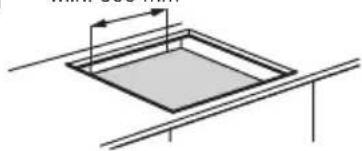
- Keep the minimum distance from the other appliances and units.
- Always be careful when you move the appliance because it is heavy. Always wear safety gloves.
- Seal the cut surfaces with a sealant to prevent moisture to cause swelling.
- Protect the bottom of the appliance from steam and moisture.
- Do not install the appliance adjacent to a door or under a window. This prevents hot cookware to fall from the appliance when the door or the window is opened.
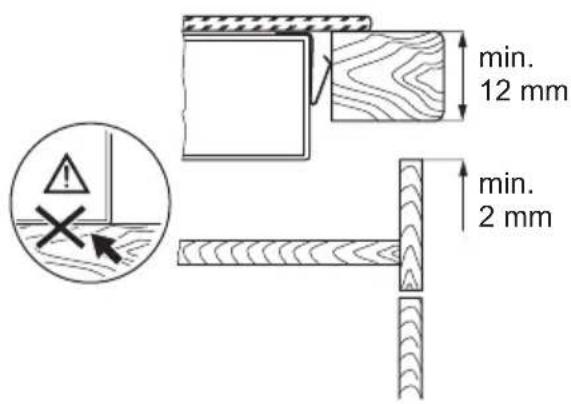
- If the appliance is installed above drawers make sure that the space, between the bottom of the appliance and the upper drawer, is sufficient for air circulation.
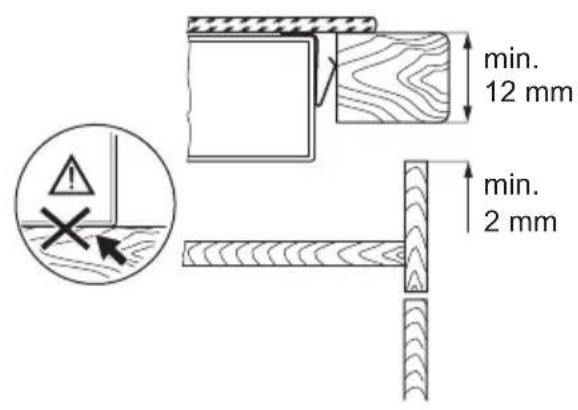
- Make sure that the ventilation space of 2 mm, between the worktop and the front of the below unit, is free. The warranty does not cover damages caused by the lack of an adequate ventilation space.
- The bottom of the appliance can get hot. We recommend to install a non-combus-tile separation panel under the appliance to prevent access to the bottom.
Electrical connection

Warning! Risk of fire and electrical shock.
- All electrical connections must be made by a qualified electrician.
- The appliance must be earthed.
- Before carrying out any operation make sure that the appliance is disconnected from the power supply.
- Use the correct electricity mains cable.
- Do not let the electricity mains cable tangle.
- Make sure the mains cable or plug (if applicable) does not touch the hot appliance or hot cookware, when you connect the appliance to the near sockets
- Make sure the appliance is installed correctly. Loose and incorrect electricity mains cable or plug (if applicable) can make the terminal become too hot.
- Make sure that a shock protection is installed.
- Use the strain relief clamp on cable.
-
Make sure not to cause damage to the mains plug (if applicable) or to the mains cable. Contact the Service or an electrician to change a damaged mains cable.
-
The electrical installation must have an isolation device which lets you disconnect the appliance from the mains at all poles. The isolation device must have a contact opening width of minimum 3 mm.
- Use only correct isolation devices: line protecting cut-outs, fuses (screw type fuses removed from the holder), earth leakage trips and contactors.
Use

Warning! Risk of injury, burns or electric shock.
- Use this appliance in a household environment.
- Do not change the specification of this appliance.
- Do not use an external timer or a separate remote-control system to operate the appliance.
- Do not let the appliance stay unattended during operation.
- Do not operate the appliance with wet hands or when it has contact with water.
- Do not put cutlery or saucepan lids on the cooking zones. They can become hot.
- Set the cooking zone to "off" after each use. Do not rely on the pan detector.
- Do not use the appliance as a work surface or as a storage surface.
- If there is a crack on the surface, disconnect power supply to prevent the electrical shock.
- Users with a pacemaker must keep a distance of minimum 30 cm from the induction cooking zones when the appliance is in operation.

Warning! Risk of fire or explosion.
- Fats and oil when heated can release flammable vapours. Keep flames or heated objects away from fats and oils when you cook with them.
- The vapours that very hot oil releases can cause spontaneous combustion.
-
Used oil, that can contain food remnants, can cause fire at a lower temperature than oil used for the first time.
-
Do not put flammable products or items that are wet with flammable products in, near or on the appliance.
- Do not try to extinguish a fire with water. Disconnect the appliance and cover the flame with a lid or a fire blanket.

Warning! Risk of damage to the appliance.
- Do not keep hot cookware on the control panel.
- Do not let cookware to boil dry.
- Be careful not let objects or cookware fall on the appliance. The surface can be damaged.
- Do not activate the cooking zones with empty cookware or without cookware.
- Do not put aluminium foil on the appliance.
- Cookware made of cast iron, aluminium or with a damaged bottom can cause scratches on the glass ceramic. Always lift these objects up when you have to move them on the cooking surface.
Care and Cleaning

Warning! Risk of damage to the appliance.
- Clean regularly the appliance to prevent the deterioration of the surface material.
- Do not use water spray and steam to clean the appliance.
- Clean the appliance with a moist soft cloth. Only use neutral detergents. Do not use abrasive products, abrasive cleaning pads, solvents or metal objects.
Disposal

Warning! Risk of injury or suffocation.
- Contact your municipal authority for information on how to discard the appliance correctly.
- Disconnect the appliance from the mains supply.
- Cut off the mains cable and discard it.
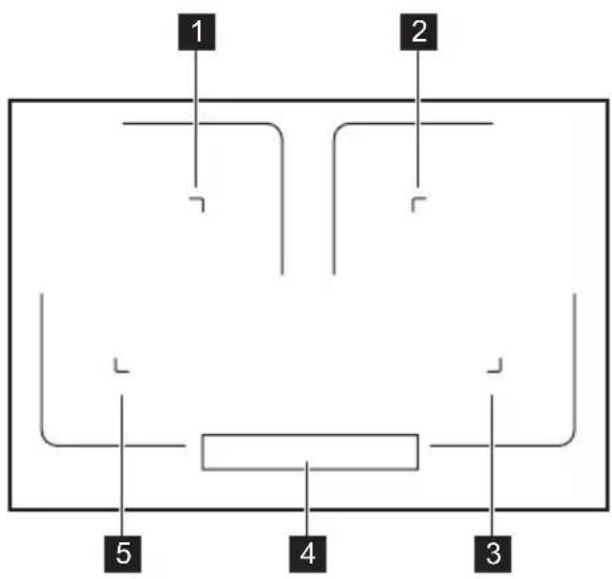
General overview

1 Induction cooking zone
2 Induction cooking zone
3 Induction cooking zone
4 Control panel
5 Induction cooking zone
Control panel layout
![1 74 8 0 1 2 3 4 5 6 7 8 9 P : 88 : 0 1 2 3 4 5 6 7 8 9 P 9 [ ] 9 0 1 2 3 4 5 6 7 8 9 P - [ ] + 0 1 2 3 4 5 6 7 8 9 P 9 89](/content/2026/02/390530/images/6e93895a3d57633af04af5528fc0b8d72f417802047b0bfd4c520c040273fbce.jpg)
Use the sensor fields to operate the appliance. The displays, indicators and sounds tell which functions operate.
| Sensor field Function | ||
| 1 | ➊ | To activate and deactivate the appliance. |
| 2 | ➎ | To lock / unlock the control panel. |
| 3 | || | To activate and deactivate the STOP+GO function. |
| 4 | Timer indicators of cooking zones To show for which cooking zone you set the time. | |
| 5 | The timer display | To show the time in minutes. |
| 6 | P | To activate the Power function. |
| 7 | ➌ | To activate the Bridge function. |
| 8 | A heat setting display | To show the heat setting. |
| 9 | A control bar | To set a heat setting. |
| 10 | +/- | To increase or decrease the time. |
| 11 | To set a cooking zone. | |
Heat setting displays
| Display Description | |
| 0 | The cooking zone is deactivated. |
| 1 - 9 | The cooking zone operates. |
| u | The STOP+GO function operates. |
| A | The Automatic Heat Up function operates. |
| P | Power function operates. |
| E + digit | There is a malfunction. |
| H | The cooking zone is still hot (residual heat). |
| L | Lock / The Child Safety Device operates. |
| F | Not correct cookware or too small or no cookware on the cooking zone. |
| - | The Automatic Switch Off function operates. |
Residual heat indicator

Warning! The risk of burns from residual heat!
The induction cooking zones make the heat necessary for cooking directly in the bottom of the cookware. The glass ceramic is hot from the heat of the cookware.
DAILY USE
Activation and deactivation
Touch Ⓐ for 1 second to activate or deactivate the appliance.
Automatic Switch Off
The function deactivates the appliance automatically if:
- All cooking zones are deactivated (☐).
- You do not set the heat setting after you activate the appliance.
- You spill something or put something on the control panel for more than 10 seconds, (a pan, a cloth, etc.). An acoustic signal sounds some time and the appliance deactivates. Remove the object or clean the control panel.
- The appliance becomes too hot (e.g. when, a saucepan boils dry). Before you use the appliance again, wait for the cooking zone to cool down.
- You use incorrect cookware. The symbol F comes on and the cooking zone deactivates automatically after 2 minutes.
- You do not deactivate a cooking zone or change the heat setting. After some time
- comes on and the appliance deactivates. See below.
- The relation between heat setting and times of the Automatic Switch Off function:
• ☐, ☐ +26 hours
• 3 - 4 - 5 hours
- 5 - 4 hours
- 6 - 9 - 1.5 hours
The heat setting
Touch the control bar at the heat setting. Move your finger along the control bar to change the setting. Do not release before you have a correct heat setting. The display shows the heat setting.

Bridge function
The Bridge function connects two cooking zones and they operate as one.
First set the heat setting for one of the cooking zones.
To activate the Bridge function touch [ ].
To set or change the heat setting touch one of the control sensors.
To deactivate the Bridge function touch [] . The cooking zones operate independently.
When you use only one cooking zone of the pair we recommend that you use the rear cooking zone. Also when you use large cookware we recommend that you put it near to the rear cooking zone.
Automatic Heat Up
You can get a necessary heat setting in a shorter time if you activate the Automatic Heat Up function. This function sets the highest heat setting for some time (see the diagram), and then decreases to the necessary heat setting.
To start the Automatic Heat Up function for a cooking zone:
-
Touch P (comes on in the display).
-
Immediately touch the necessary heat setting. After 3 seconds Ⓗ comes on in the display.
To stop the function change the heat setting.

Power function
The Power function makes more power available to the induction cooking zones. The Power function can be activated for a limited period of time (see Technical Information chapter). After that, the induction cooking zone automatically sets back to highest heat setting. To activate, touch P, P comes on. To deactivate, change the heat setting.
Power management
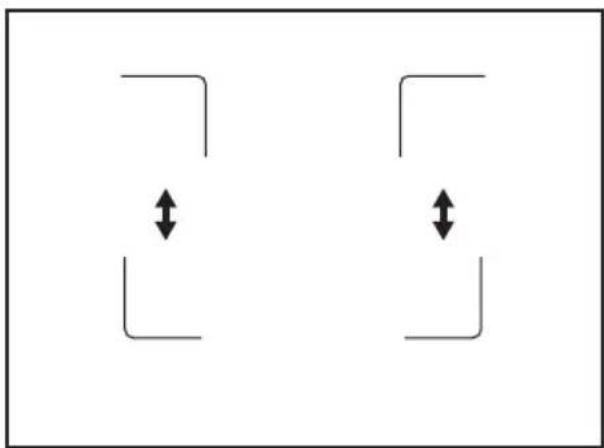
The power management divides the power between two cooking zones in a pair (see the illustration). The power function increases the power to the maximum level for one cooking zone in the pair. The power in the second cooking zone automatically decreases. The heat setting display for the reduced zone changes between two levels.
natural_image
Two identical abstract geometric shapes with double-headed arrows, no text or symbols presentTimer
Count Down Timer
Use the Count Down Timer to set how long the cooking zone operates for only this one time.
Set the Timer after the selection of the cooking zone.
You can set the heat setting before or after you set the timer.
• To set the cooking zone: touch 📊 again and again until the indicator of a necessary cooking zone comes on.
- To activate or change the Timer: touch + or - of the timer to set the time (00 - 99 minutes). When the indicator of the cooking zone starts to flash slow, the time counts down.
- To deactivate the Timer: set the cooking zone with ⏻ and touch —to deactivate the Timer. The remaining time
counts back to 00. The indicator of the cooking zone goes out.
- To see the remaining time: set the cooking zone with ⏻. The indicator of the cooking zone starts to flash quickly.
The display shows the remaining time.
When the time comes to an end, the sound operates and 00 flashes. The cooking zone deactivates.
• To stop the sound: touch ⏻
Minute Minder
You can use the Timer as a Minute Minder while the cooking zones do not operate.
Touch ⏻ . Touch for to set the time.
When the time comes to an end, the sound operates and 00 flashes
• To stop the sound: touch ⏻
STOP+GO
The STOP + GO function sets all cooking zones that operate to the lowest heat setting (☐).
When STOP + GO operates, you cannot change the heat setting.
The STOP + GO function does not stop the timer function.
- To activate this function touch || . The symbol 📊 comes on.
- To deactivate this function touch || . The heat setting that you set before comes on.
Lock
When the cooking zones operate, you can lock the control panel, but not Ⓐ. It prevents an accidental change of the heat setting.
HELPFUL HINTS AND TIPS
i INDUCTION COOKING ZONES
For induction cooking zones a strong electro-magnetic field creates the heat in the cookware very quickly.
Cookware for induction cooking zones
Important! Use the induction cooking zones with correct cookware.
Cookware material
- correct: cast iron, steel, enamelled steel, stainless steel, the bottom made of multi-First set the heat setting.
To start this function touch 🔒. The symbol L comes on for 4 seconds.
The Timer stays on.
To stop this function touch 🔒. The heat setting that you set before comes on.
When you stop the appliance, you also stop this function.
The Child Safety Device
This function prevents an accidental operation of the appliance.
To activate The Child Safety Device
- Activate the appliance with Ⓘ. Do not set the heat settings.
- Touch 🔒 for 4 seconds. The symbol 📁 comes on.
- Deactivate the appliance with ①.
To deactivate The Child Safety Device
- Activate the appliance with ⏻. Do not set the heat settings. Touch 🔒 for 4 seconds. The symbol 📋 comes on.
- Deactivate the appliance with ①.
To override The Child Safety Device for only one cooking time
- Activate the appliance with Ⓘ. The symbol Ⓛ comes on.
- Touch 🔒 for 4 seconds. Set the heat setting in 10 seconds. You can operate the appliance.
- When you deactivate the appliance with Ⓐ, The Child Safety Device operates again.
layer (with correct mark from a manufacturer).
- not correct: aluminium, copper, brass, glass, ceramic, porcelain.
Cookware is correct for an induction hob if ...
- ... some water boils very quickly on a zone set to the highest heat setting..
- ... a magnet pulls on to the bottom of the cookware.
The bottom of the cookware must be as thick and flat as possible.
The noises during operation
If you can hear
- crack noise: cookware is made of different materials (Sandwich construction).
- whistle sound: you use one or more cooking zones with high power levels and the cookware is made of different materials (Sandwich construction).
- humming: you use high power levels.
- clicking: electric switching occurs.
- hissing, buzzing: the fan operates.
The noises are normal and do not refer to appliance malfunction.
Energy saving

How to save energy
- If it is possible, always put the lids on the cookware.
- Put cookware on a cooking zone before you start it.
- Use the residual heat to keep the food warm or to melt it.
The cooking zone efficiency
The cooking zone efficiency is related to the diameter of the cookware. The cookware with a smaller diameter than the minimum receives only a part of the power generated by the cooking zone. For the minimum diameters see the Technical Information chapter.
The Examples of cooking applications
The relation between the heat setting and the cooking zone consumption of power is not linear.
When you increase the heat setting it is not proportional to the increase of the cooking zone consumption of power.
It means that the cooking zone with the medium heat setting uses less than a half of its power.
The data in the table is for guidance only.
| Heat setting | Use to: Time Hints | Nominal | power consumption | |
| 1 | Keep warm the food you cooked | as required Put a lid on a cookware 3 % | ||
| 1 - 2 | Hollandaise sauce, melt: butter, chocolate, gelatine | 5 - 25 min Mix from time to time 3 – 5 % | ||
| 1 - 2 | Solidify: fluffy omelettes, baked eggs | 10 - 40 min Cook with a lid on 3 – 5 % | ||
| 2 - 3 | Simmer rice and milkbased dishes, heating up ready-cooked meals | 25 - 50 min Add the minimum twice as much liquid as rice, mix milk dishes part procedure through | 5 – 10 % | |
| 3 - 4 | Steam vegetables, fish, meat | 20 - 45 min Add some tablespoons of liquid | 10 – 15 % | |
| 4 - 5 | Steam potatoes | 20 - 60 min | Use max. 1⁄4 l water for 750 g of potatoes | 15 – 21 % |
| 4 - 5 | Cook larger quantities of food, stews and soups | 60 - 150 min Up to 3 l liquid plus ingredients | 15 – 21 % | |
| 6 - 7 | Gentle fry: escalope, veal cordon bleu, cutlets, ris-soles, sausages, liver, roux, eggs, pancakes, doughnuts | as necessary | Turn halfway through | 31 – 45 % |
| 7 - 8 | Heavy fry, hash browns, loin steaks, steaks | 5 - 15 min | Turn halfway through | 45 – 64 % |
| 9 | Boil water, cook pasta, sear meat (goulash, pot roast), deep-fry chips | 100 % | ||
| P | Boil large quantities of water. Power management is activated. | |||
Information on acrylamides
Important! According to the newest scientific knowledge, if you brown food (specially the one which contains starch),
acrylamides can pose a health risk. Thus, we recommend that you cook at the lowest temperatures and do not brown food too much.
CARE AND CLEANING
Clean the appliance after each use. Always use cookware with clean bottom.
i Scratches or dark stains on the glass-ceramic cause no effect on how the appliance operates.
-
Clean the appliance with a moist cloth and some detergent.
-
At the end rub the appliance dry with a clean cloth.
To remove the dirt:
-
- Remove immediately: melted plastic, plastic foil, and food with sugar. If not, the dirt can cause damage to the appliance. Use a special scraper for the glass. Put the scraper on the glass surface at an acute angle and move the blade on the surface.
- Remove after the appliance is sufficiently cool: limescale rings, water rings, fat stains, shiny metallic discolorations. Use a special cleaning agent for glass ceramic or stainless steel.
TROUBLESHOOTING
| Problem Possible Remedy | ||
| You cannot activate the appli-ance or operate it. | Activate the appliance again | and set the heat setting in less than 10 seconds. |
| You touched 2 or more sensor | fields at the same time. | Touch only one sensor field. |
| The STOP+GO function oper-ates. | Refer to the chapter “Daily Use”. | |
| There is water or fat stains on the control panel. | Clean the control panel. | |
| An acoustic signal sounds and the appliance deactivates.An acoustic signal sounds when the appliance is deactiva-ted. | You put something on one or more sensor fields. | Remove the object from the sensor fields. |
| The appliance deactivates. You put something on the sen-sor field ⏻ . | Remove the object from the sensor field. | |
| The residual heat indicator does not come on. | The cooking zone is not hot because it operated only for a short time. | If the cooking zone operated sufficiently long to be hot, speak to the service centre. |
| The Automatic Heat Up function does not operate. | The cooking zone is hot. Let the cooking zone become sufficiently cool. | |
| The highest heat setting is set. | The highest heat setting has the same power as the Automatic Heat Up function. | |
| The heat setting changes between two levels. | The Power management is activated. | Refer to “Power management”. |
| The sensor fields become hot. The cookware is too large or you put it too near to the controls. | Put large cookware on the rear cooking zones if necessary. | |
| - comes on | The Automatic Switch Off operates. | Deactivate the appliance and activate it again. |
| L comes on | The Child Safety Device or the Lock function operates. | Refer to the chapter “Daily Use”. |
| F comes on | No cookware is on the cooking zone. | Put cookware on the cooking zone. |
| Incorrect cookware. Use the correct cookware. | ||
| The diameter of the bottom of | the cookware is too small for the cooking zone. | Move cookware to a smaller cooking zone. |
| E and number comes on. | There is an error in the appliance. | Disconnect the appliance from the electrical supply for some time. Disconnect the fuse from the electrical system of the house. Connect it again. If E comes on again, speak to the service centre. |
| E4 comes on | There is an error in the appliance because a cookware boils dry. The overheating protection for the cooking zones and the Automatic Switch Off operate. | Deactivate the appliance. Remove the hot cookware. After approximately 30 seconds, activate the cooking zone again. If the cookware was the problem, the error message goes out of the display, but the residual heat indicator can stay. Let the cookware become sufficiently cool and refer to “Cookware for the induction cooking zone” to see if your cookware is compatible with the appliance. |
If you tried the above solutions and cannot repair the problem, speak to your dealer or the customer service. Give the data from the rating plate, three digit letter code for the glass ceramic (it is in the corner of the glass surface) and an error message that comes on.
Make sure, you operated the appliance correctly. If not the servicing by a customer service technician or dealer will not be free of charge, also during the warranty period. The instructions about the customer service and conditions of guarantee are in the guarantee booklet.
INSTALLATION INSTRUCTIONS
Warning! Refer to the Safety chapters.
Before the installation
Before the installation of the appliance, record the information below from the rating plate. The rating plate is on the bottom of the appliance casing.
- Model ......
- PNC ....
- Serial number ......
Built-in appliances
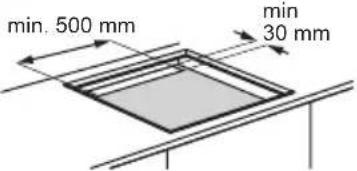
- Only use the built-in appliances after you assemble the appliance into correct built-
Assembly

in units and work surfaces that align to the standards.
Connection cable
- The appliance is supplied with the connection cable.
- Replace the damaged mains cable with a special cable (type H05BB-F Tmax 90°C; or higher). Speak to your local Service Centre.


i
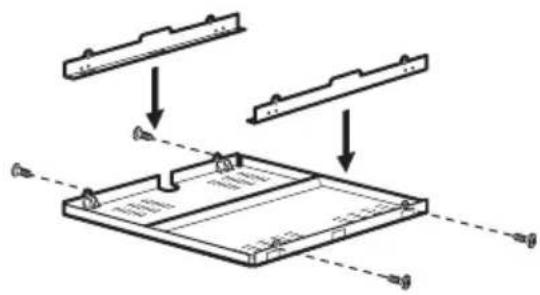
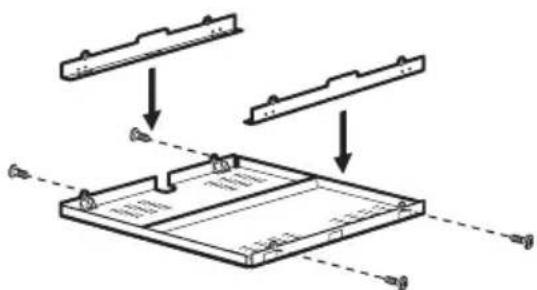
If you use a protection box (an additional accessory ^1) ), the front airflow space of 2 mm and protective floor directly below the appliance are not necessary.
You can not use the protection box if you install the appliance above an oven.
1) The protection box accessory may not be available in some countries. Please contact your local supplier.
TECHNICAL INFORMATION
Induction 7.4 kW Made in Germany
Ser.Nr. ..... 7.4 kW
PROGRESS
Cooking zones power
| Cooking zone Nominal Power (Max heat setting) [W] | Power Function activated [W] | Power function maximum duration [min] | Minimum cook-ware diameter [mm] |
| Right rear — 210 mm | 2300 W 3200 W 10 180 | ||
| Right front — 210 mm | 2300 W 3200 W 10 180 | ||
| Left rear — 210 mm | 2300 W 3200 W 10 180 | ||
| Left front — 210 mm | 2300 W 3200 W 10 180 |
The power of the cooking zones can be different in some small range from the data in
the table. It changes with the material and dimensions of the cookware.
ENVIRONMENT CONCERNS
The symbol 📄 on the product or on its packaging indicates that this product may not be treated as household waste. Instead it should be taken to the appropriate collection point for the recycling of electrical and electronic equipment. By ensuring this product is disposed of correctly, you will help prevent potential negative consequences for the environment and human health, which could otherwise be caused by inappropriate waste handling of this product. For more detailed information about recycling of this product, please
contact your local council, your household waste disposal service or the shop where you purchased the product.
Packaging material

The packaging materials are friendly to the environment and can be recycled. The plastic components are identified by marking: >PE<,>PS<, etc. Discard the packaging materials as household waste at the waste disposal facilities in your municipality.
SOMMAIRE
Fonction Booster
natural_image
Pure diagram of two identical right-angle corner shapes with double-headed arrows indicating vertical and horizontal directions (no text or symbols)Minuteur
Minuteur dégressif


A
12 mm
28 mm
38 mm
57 mm
41 mm
31 mm
B

A
12 mm
28 mm
38 mm
57 mm
41 mm
31 mm
B
natural_image
Pure diagram of a square frame with horizontal lines and arrows, no text or symbols present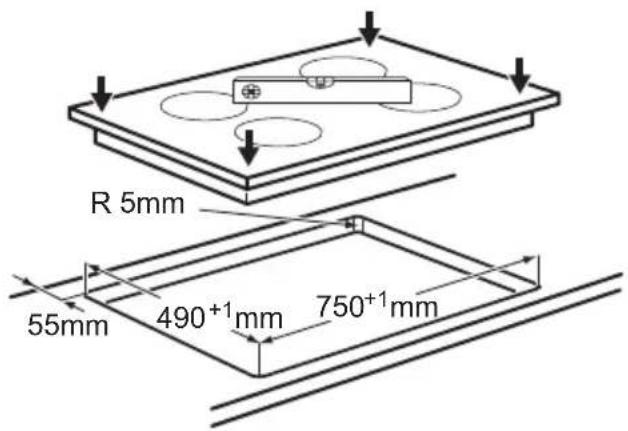

i

Induction 7.4 kW Made in Germany
Ser.Nr. 7.4 kW
PROGRESS

natural_image
Pure geometric diagram with two identical right-angle corner shapes and bidirectional arrows, no text or symbols present.Timer
Kurzzeitmesser
i
Induction 7.4 kW Made in Germany
Ser.Nr. 7.4 kW
PROGRESS

Kochzonenleistung


- BESCHRIJVING VAN HET PRODUCT
- Algemeen overzicht
- Timer
- SAFETY INFORMATION
- Children and vulnerable people safety
- General Safety
- SAFETY INSTRUCTIONS
- Installation
- Electrical connection
- Use
- Care and Cleaning
- Disposal
- Residual heat indicator
- DAILY USE
- Activation and deactivation
- Automatic Switch Off
- The function deactivates the appliance automatically if:
- The heat setting
- Bridge function
- Automatic Heat Up
- Power function
- Power management
- Count Down Timer
- Set the Timer after the selection of the cooking zone.
- Minute Minder
- STOP+GO
- Lock
- HELPFUL HINTS AND TIPS
- i INDUCTION COOKING ZONES
- Cookware for induction cooking zones
- Cookware material
- The Child Safety Device
- To activate The Child Safety Device
- To deactivate The Child Safety Device
- To override The Child Safety Device for only one cooking time
- Cookware is correct for an induction hob if ...
- The noises during operation
- If you can hear
- The noises are normal and do not refer to appliance malfunction.
- Energy saving
- The Examples of cooking applications
- Information on acrylamides
- To remove the dirt:
- INSTALLATION INSTRUCTIONS
- Built-in appliances
- Assembly
- Connection cable
- TECHNICAL INFORMATION
- Cooking zones power
- ENVIRONMENT CONCERNS
- Packaging material
- SOMMAIRE
- Fonction Booster
- Minuteur
- Minuteur dégressif
- Kurzzeitmesser
Brand : PROGRESS
Model : PAI8105E
Category : Cooker