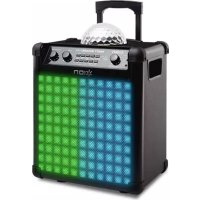
Party Rocker Max - Speaker ION - Free user manual and instructions
Find the device manual for free Party Rocker Max ION in PDF.



| Product Type | Portable amplified speaker with LED lighting |
| Brand | ION |
| Model | Party Rocker Max |
| Power Supply | AC 100-240 V via IEC cable, rechargeable lead-acid battery |
| Battery | Rechargeable lead-acid battery, full charge after each use recommended |
| Connectivity | Bluetooth (compatible with Bluetooth 4.0) |
| Audio Inputs | 1 stereo auxiliary input 3.5 mm |
| Microphone Inputs | 2 mono inputs 6.35 mm (1/4") with individual volume control |
| Lighting Effects | Light dome with Beat Sync, Auto, Single Color, Freeze, Off modes + equalization bars with 16 effects |
| Light Control | On/Off button, color selector (red, green, blue, white, pink, orange), dome and general modes |
| Echo Effect | Echo adjustment for microphones |
| General Volume | Main volume knob for input mix |
| Charge Indicator | Multi-color LED: green (on), yellow (charging), red (charging when off), flashing green/yellow (low battery) |
| Fuse | Accessible and replaceable fuse, use appropriate rating |
| Box Contents | Party Rocker Max, microphone with cable, 3.5 mm auxiliary cable, power cable, quick start guide, safety instructions |
| Repairability | User-replaceable fuse; battery requires service intervention |
| Cleaning | Dry cloth; do not use liquids or abrasive products |
| Safety | Read instructions; do not expose to water; use correct fuse rating |
Frequently Asked Questions - Party Rocker Max ION
User questions about Party Rocker Max ION
0 question about this device. Answer the ones you know or ask your own.
Ask a new question about this device
Download the instructions for your Speaker in PDF format for free! Find your manual Party Rocker Max - ION and take your electronic device back in hand. On this page are published all the documents necessary for the use of your device. Party Rocker Max by ION.
USER MANUAL Party Rocker Max ION
Quickstart Guide English (3-6)
Appendix English (27)
Quickstart Guide (English)
Introduction
Box Contents
Party Rocker Max
Microphone with Cable
1/8" Stereo Aux Cable
Power Cable
Quickstart Guide
Safety & Warranty Manual
Support
For the latest information about this product (system requirements, compatibility information, etc.) and product registration, visit ionaudio.com.
Rechargeable Batteries
Rechargeable lead-acid batteries are the same type used in automobiles. As with your car battery, how you use this battery has a significant impact on its lifespan. With proper use and treatment, a lead-acid battery can last for years. Here are some recommendations for getting the longest life from the internal battery.
General Usage Fully charge the battery before using it.
Charge the battery completely after each use.
Storage For best product longevity, do not store at exceedingly hot (greater than 90^ F/ 32^ C) or exceedingly cold (less than 32^ F/ 0^ C) temperatures.
It is acceptable to leave your sound system plugged in. This will not overcharge the battery.
If you leave the battery level low and do not charge it for 6 months, it may permanently lose capacity.
Repair If the battery fails to charge, check your fuse near the power cable input. If your fuse is intact and it still will not charge, contact ION Audio at ionaudio.com.
Disposal Bring the unit to a recycling center or dispose of in accordance with local ordinances.
Quick Setup
- Make sure all items listed under Introduction > Box Contents at the beginning of this guide are included in the box.
- Read safety instruction booklet before using the product.
- For optimal performance, place Party Rocker Max in the center of the room so it is unobstructed by walls, furniture, etc.
- Turn down the Master Volume on the Party Rocker Max.
- Turn on Party Rocker Max.
- Connect your music player with an audio cable or Bluetooth. (see Connecting with a Bluetooth Device for more details on this)
- Adjust the volume on your music player and on Party Rocker Max as needed.
- Adjust the Light Mode buttons on Party Rocker Max as needed.
- Turn off Party Rocker Max when not in use.
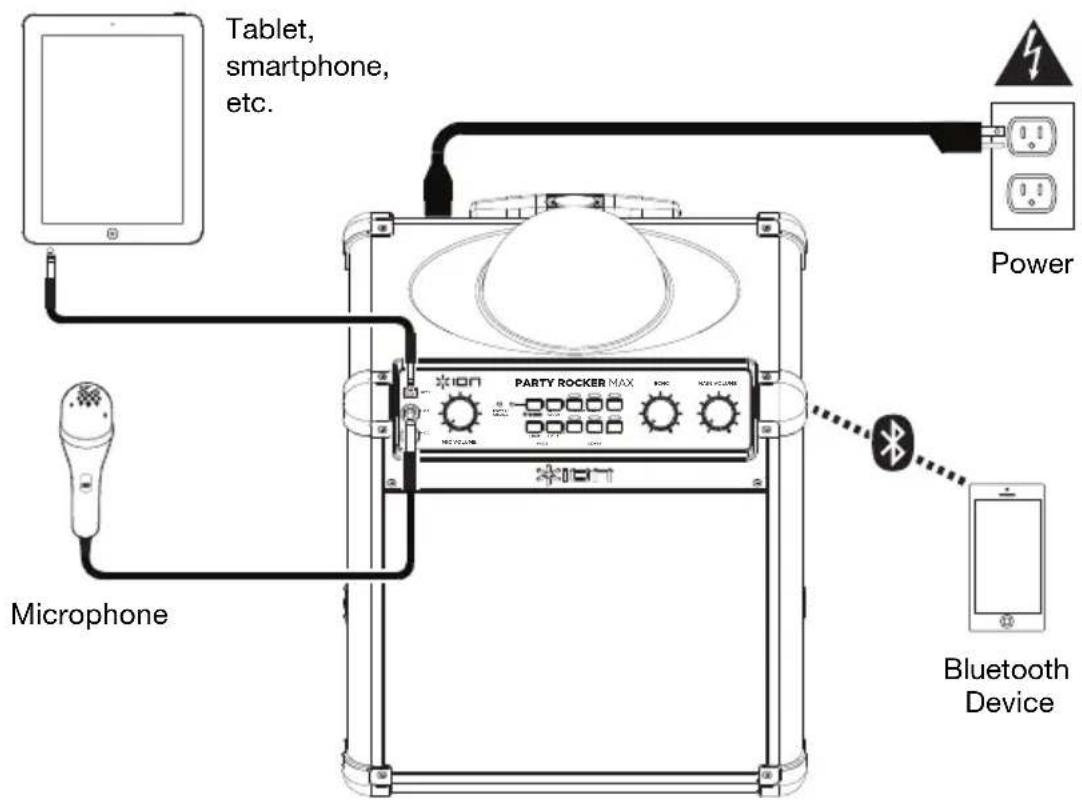
Connection Diagram
Items not listed under Introduction > Box Contents are sold separately.
Features
Front Panel
-
Auxiliary input: This stereo 1/8" input can be used to connect a smartphone, MP3 player, or other audio source.
-
Microphone Inputs with Volume Control (1/4"): These mono inputs accept 1/4" inputs such as a microphone, guitar, or other musical instrument.
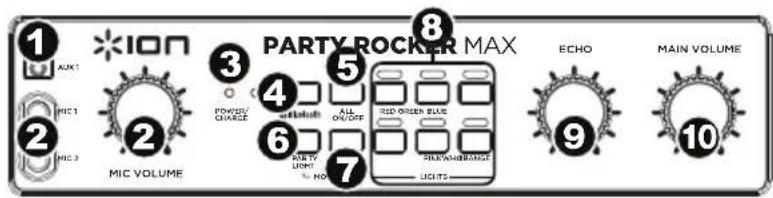
- Power/Charge LED: Indicates various states of activity on Party Rocker Max.
• Solid Green LED: Party Rocker Max is powered on.
• Solid Yellow LED: Battery is charging with the power on.
- Solid Green/Blinking Yellow LED: Party Rocker Max is powered on and the battery is low.
• Solid Red LED: Battery is charging with the power off.
- LED OFF: Power is off, power cable is connected, and the battery is fully charged.
- Bluetooth LED/Disconnect Button: The LED will be lit when a device is paired to Party Rocker Max. This LED will not be lit when Party Rocker Max is first powered on (unless it was previously paired with a device). Press the button to disconnect a paired Bluetooth device.
- All Lights On/Off: Press this button to turn all lights on or off.
- Party Light Mode: There are four modes to select from for how the dome lights react to the music:
- Beat Sync: The dome lights spin and change color to the beat of the music playing.
- Auto: The dome lights spin and change color with a predetermined pattern regardless of the beat of the music playing.
- Single Color: The lights change one color at a time and do not move.
- Freeze: All colors remain on and unmoving until a new mode is selected.
• Off: The dome lights turn off.
- Speaker Light Mode: Press this button to cycle through these different light effects:
• EQ Bars (reactive to music)
• Vertical Lights Wipe (non-reactive to music)
• Diagonal Lights Wipe (non-reactive to music)
• Vertical Lights Scrolling (non-reactive to music)
• Snowflake/Square Lights (non-reactive to music)
- Moving Block Bar (reactive to music)
• Pulsating Block (reactive to music)
• Horizontal Pulsating Bar (reactive to music)
• Diagonal with Changing Colors (reactive to music)
• Cross with Changing Colors (reactive to music)
• Solid Color (reactive to music)
- Pulsating Block with Spinning Block (reactive to music)
- Snowflake/Square Lights Fill (non-reactive to music)
• Vertical Pulsating Bar (reactive to music)
- Moving Diagonal (non-reactive to music)
- Off (no lights)
- Spinning Crosses and Expanding Square (non-reactive to music)
- Light Buttons: Use these buttons to turn each color in the dome on or off-Red, Green, Blue, White, Pink, and Orange.
- Echo: Use this knob to add or remove an echo effect to the Microphone Inputs.
- Master Volume Control: This adjusts the speaker's main mix volume, which includes Microphone Inputs, Auxiliary Input, and the audio of a paired Bluetooth device.
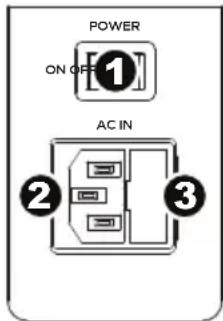
Rear Panel
- Power On/Off Switch: Turns Party Rocker Max on or off.
- Power Cable Input (IEC): Insert the included power cable here to power the unit.
- Fuse: If the unit's fuse is broken, lift this tab to replace the fuse. Replace it with a fuse with an appropriate rating. Using a fuse with an incorrect rating can damage the unit and/or fuse.
Connecting with a Bluetooth Device
- Turn on your Bluetooth device.
- Power on Party Rocker Max and it will automatically go into pairing mode to search for Bluetooth devices. You will know you are in pairing mode when the Bluetooth LED is off.
- If your Bluetooth device is not able to pair to Party Rocker Max, press the Bluetooth Disconnect button on the unit to break previous Bluetooth connections and reset the Bluetooth module.
- Navigate to your Bluetooth device's setup screen, find Party Rocker Max and connect. Note: If your Bluetooth device prompts for a pairing code, enter 0000.
- Bluetooth LED will light up solid when it is "paired." Note: If you experience trouble pairing or playing music, update your device's OS.
- To disconnect pairing, press the Bluetooth Disconnect button on Party Rocker Max.
- To connect to another Bluetooth device, repeat steps 3-4.
Note: Maximum range will be achieved when using devices with Bluetooth 4.0.
Troubleshooting
If the sound is distorted: Try lowering the volume control of your sound source or musical instrument. Also, try to reduce the overall volume of Party Rocker Max.
If there is too much bass: Try adjusting the tone or EQ control on your sound source to lower the bass level. This will allow you to play the music louder before clipping (distortion) occurs.
If there is a high-pitched whistling noise when using microphones: This is probably feedback. Point the microphone away from the speaker.
If you can't hear the microphone over the music volume: Turn down the music volume from your source.
Technical Specifications
| Output Power | 100 W (peak) | |
| Drivers | 8" / 203 mm woofer3" / 76 mm tweeter | |
| Bluetooth | Profile: A2DP, AVRCPRange: Up to 100 feet / 30.5 meters * | |
| Frequency Response | 65 Hz – 20 kHz (± 3 dB) | |
| Microphone Type | Dynamic microphone recommended (included) | |
| Battery | 12 V, 9.0 Ah SLA | |
| Battery Life **(when fully charged) | Up to 75 hours (with music only)Up to 6 hours (with lights and music) | |
| Recharge Time | 10 hours | |
| Power | Input | Voltage: 100–240 VAC, 50/60 Hz, 120 W |
| Dimensions(width x depth x height) | 11.0" x 15.0" x 17.25"279 x 381 x 438 mm | |
| Weight | 24.6 lbs.11.16 kg | |
Specifications are subject to change without notice.
* Bluetooth range is affected by walls, obstructions, and movement. For optimal performance, place the product in the center of the room so it is unobstructed by walls, furniture, etc.
** Battery life may vary based on temperature, age, and volume usage of product.
Trademarks & Licenses
ION Audio is a trademark of ION Audio, LLC, registered in the U.S. and other countries.
The Bluetooth word mark and logos are owned by the Bluetooth SIG, Inc. and any use of such marks by ION Audio is under license.
All other product names, company names, trademarks, or trade names are those of their respective owners.
ionaudio.com
Brand : ION
Model : Party Rocker Max
Category : Speaker