USER MANUAL LVI 1266 MGI SCHOLTES
Instructions for installation and use
Geschirrspüler

Panier supérieur

Gicleur supérieur

natural_image
Technical line drawing of a mechanical component with no visible text or symbols
natural_image
Metallic tray with cylindrical objects and a small object on top (no visible text or symbols)
natural_image
Black-and-white photo of a plastic crate containing various food items including eggs, tomatoes, and a bowl (no text or symbols visible)
natural_image
Basket filled with various items including vegetables and fruits, no visible text or symbols
natural_image
Black-and-white photo of a plastic basket filled with various white food items (no visible text or labels)

natural_image
Three white plastic baskets with grid patterns, arranged side by side (no text or symbols visible)

natural_image
Close-up of hands assembling a wireframe plastic box with arrows indicating material movement (no text or symbols visible)
natural_image
Diagram of two rectangular electronic devices with a curved cable or wire connection, labeled 'B' (no text or symbols on devices)

natural_image
Close-up of a hand holding a small electronic component, with no visible text or symbols in the main image area.
natural_image
Close-up of a metallic mechanical component with a central circular feature and a handle (no visible text or symbols)
Safety Is a Good Habit to Get Into
NOTICE
Carefully read the instructions contained in this manual, as they provide important information which is essential to safe and proper installation, use and maintenance of the appliance.
This appliance complies with the following EEC

- 73/23/EEC (Low Voltage) and subsequent modifications;
- 89/336/EEC (Electromagnetic Compatibility) and subsequent modifications.
- 97/17/EEC (Labelling)
-2002/96/EC (WEEE)
(Waste Electrical and Electronic Equipment)

-
Carefully dispose of the packing material.
-
After removing the packing, check to make sure that the appliance is not damaged. If in doubt, contact a qualified professional.
-
The dishwasher must only be used by adults for the washing of household dishes and cooking utensils.
4.Fundamental rules to follow when using the appliance:
- Never touch the dishwasher when barefoot or with wet hands or feet;
- We discourage the use of extension cords and multiple sockets;
- During installation, the power supply cord must not be excessively or dangerously bent or flattened;
- If the appliance is not operating properly or maintenance must be performed, disconnect the appliance from the power supply.
-
Keep detergents out of the reach of children, who must also be kept away from the dishwasher when it is open.
-
This appliance cannot be installed outdoors, not even if the area in which it is installed is covered by a roof; it is also very dangerous to leave it exposed to the rain and elements.
-
Do not touch the heating element during or after a wash cycle.
-
Do not lean or sit on the door when it is open, as this could overturn the dishwasher.
-
If the appliance malfunctions, turn off water supply to the appliance and disconnect the plug from the wall socket. Then, consult the section entitled, "Troubleshooting." If you cannot resolve the problem, contact a service centre.
-
Appliances which are no longer being used must be made inoperable by cutting the power supply cord and removing the door lock.
To maintain the EFFICIENCY and SAFETY of this appliance, we recommend:
- call only the Service Centers authorized by the manufacturer
● always use original Spare Parts
Close-up View (control panel)
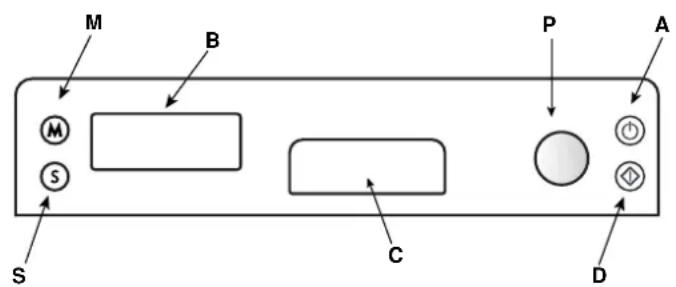
A: Stand-by button
B: Display
C: Door opening handle
D: Start/Reset button
M: "Mode" button
S: "Select" button
P: Knob for selecting cycles
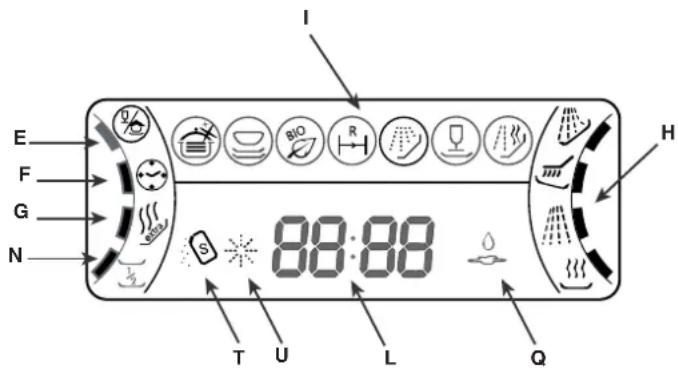
E: Auto Duo-Wash cycle indicator light
F: Delayed start indicator light
G: Extra drying indicator light
H: Cycle phase indicator lights
I: Wash cycle symbols
L: Multifunction numeric indicator
N: Upper or lower rack
T: Low salt indicator light
U: Low rinse aid indicator light
Q: Water leak indicator light
Close-up View (Interior)
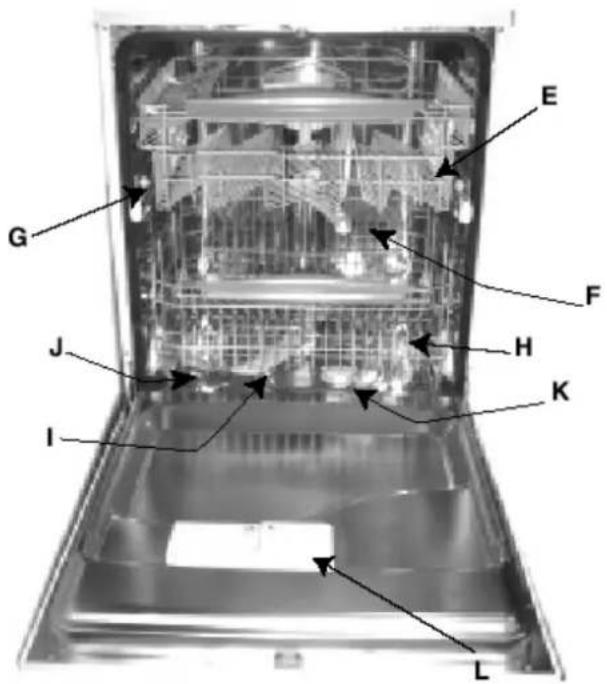

Upper Rack

Top Sprayer Arm

Rack Height Adjustor

Lower Rack

Bottom Sprayer Arm

Salt Container Cap

Washing Filter

Detergent and Rinse Aid Dispenser
| Technical characteristics |
| Width cm. 59,5 |
| Depth cm. 57 |
| Height cm. 82 |
| Capacity 12 standard place settings |
| Mains water pressure 4,3 psi - 145 psi (30 KPa÷ 1MPa) (0,3 ÷ 10 bar) |
| Power voltage See data plate |
| Total absorber power See data plate |
| Fuse See data plate |
Salt .....
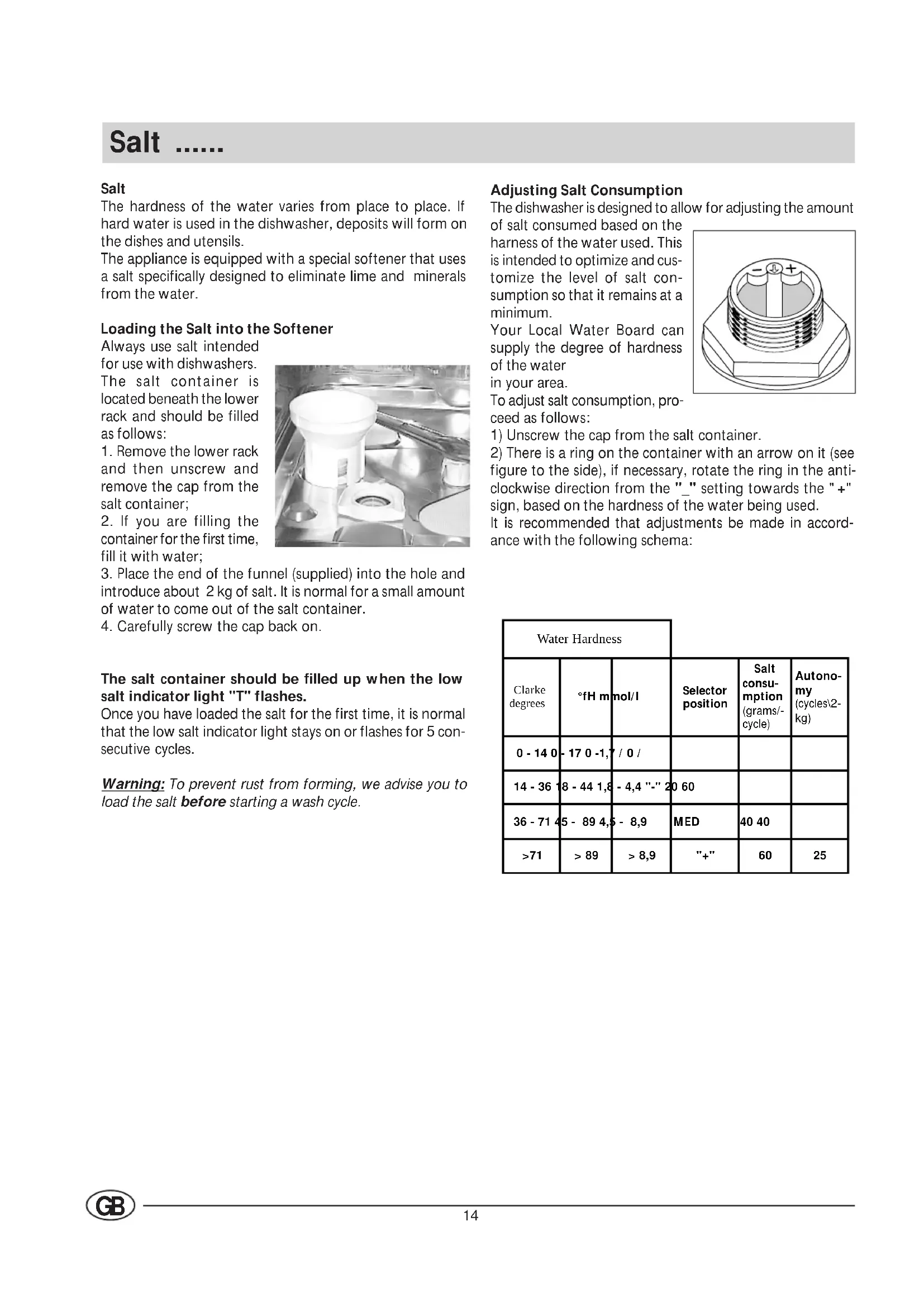
Salt
The hardness of the water varies from place to place. If hard water is used in the dishwasher, deposits will form on the dishes and utensils.
The appliance is equipped with a special softener that uses a salt specifically designed to eliminate lime and minerals from the water.
Loading the Salt into the Softener
Always use salt intended for use with dishwashers.
The salt container is located beneath the lower rack and should be filled as follows:
-
Remove the lower rack and then unscrew and remove the cap from the salt container;
-
If you are filling the container for the first time, fill it with water;
-
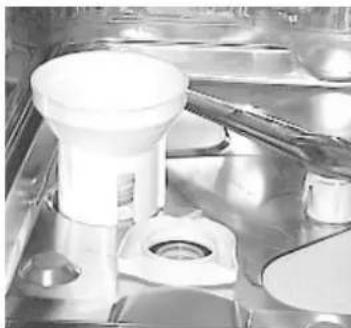
Place the end of the funnel (supplied) into the hole and introduce about 2 kg of salt. It is normal for a small amount of water to come out of the salt container.
-
Carefully screw the cap back on.
natural_image
Close-up of a mechanical device with a white funnel and circular base (no visible text or symbols)
The salt container should be filled up when the low salt indicator light "T" flashes.
Once you have loaded the salt for the first time, it is normal that the low salt indicator light stays on or flashes for 5 consecutive cycles.
Warning: To prevent rust from forming, we advise you to load the salt before starting a wash cycle.
Adjusting Salt Consumption
The dishwasher is designed to allow for adjusting the amount
of salt consumed based on the harness of the water used. This is intended to optimize and customize the level of salt consumption so that it remains at a minimum.
Your Local Water Board can supply the degree of hardness of the water in your area.
natural_image
Technical line drawing of a mechanical component with threaded base and hexagonal base (no text or symbols)
To adjust salt consumption, proceed as follows:
1) Unscrew the cap from the salt container.
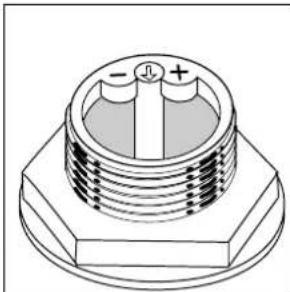
2) There is a ring on the container with an arrow on it (see figure to the side), if necessary, rotate the ring in the anticlockwise direction from the "_" setting towards the "+" sign, based on the hardness of the water being used.
It is recommended that adjustments be made in accordance with the following schema:
| Water Hardness | |
| Clarke degrees | °fH mmol/l | Selector position | Salt consumption (grams/-cycle) | Autonomy (cycles\2-kg) |
| 0 - 14 0 | - 17 0 -1,7 | / 0 / | | | |
| 14 - 36 | 18 - 44 1,8 | - 4,4 "-" | 20 60 | | |
| 36 - 71 | 45 - 89 4,5 | - 8,9 | MED | 40 40 | |
| >71 | > 89 | > 8,9 | "+" | 60 | 25 |
Detergent and Rinse Aid ....
Detergent
Detergent specifically intended for use with dishwashers must be used. The dispenser must be refilled before the start of each wash cycle following the instructions provided in the "Wash Cycle Table." The detergent dispenser is located on the inside panel of the door.
Loading the detergent
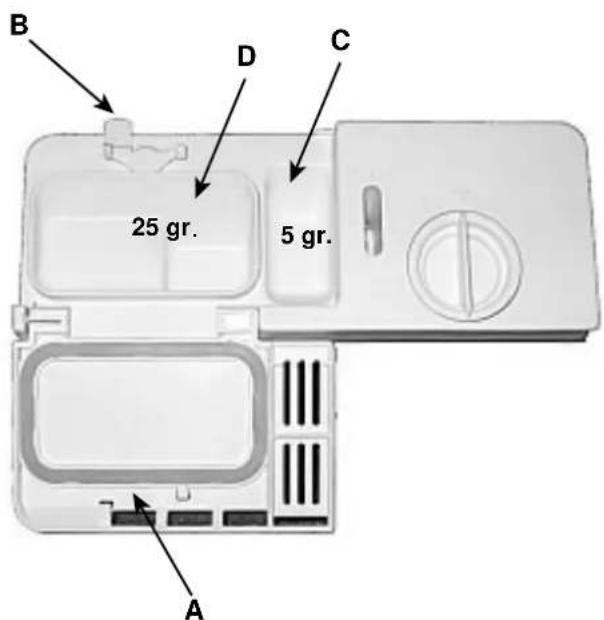
To open lid "A", press button "B". The cleaning detergent should be introduced into the two containers "C" and "D" up to the rim.
After pouring in the detergent, replace the lid, pressing down until it clicks.
Dishwasher detergent in tablets is now available on the market, in which case you should place one tablet into container " D" and replace the lid.
Notice: To facilitate closing the cover, remove any excess detergent on the edges of the dispenser.
The rinse aid.
This product makes dishes sparkle more as it improves their drying. The rinse aid container is situated on the inside of the door: It should be filled up when the low rinse aid indicator light "U" flashes on the display.
Loading the Rinse Aid
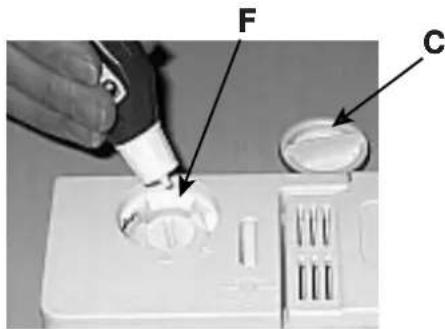
To open the dispenser, turn the "C" cap in the anti-clockwise direction and then pour in the rinse aid, making sure not to overfill. The amount of rinse aid used for each cycle can be regulated by turning the "F" dose adjustor, located beneath the "C" cap, with a screwdriver. There are 6 different settings; the normal dosage setting is 4.
Important:
Proper dosage of the rinse aid improves drying.
If drops of water remain on the dishes or spotting occurs, the dosage adjustor should be turned to a higher setting. If the dishes have white streaks, turn the dosage adjustor to a lower setting.
Warning
Three-in-one dishwasher tablets are now available on the market, and combine detergent, salt and rinse aid all in one. If the water in your area is hard or very hard, we still recommend you pour extra salt into the relevant dispenser to prevent the formation of white streaks on your dishes or on the interior of the appliance.
Using a three-in-one product means it is no longer necessary to put rinse aid into the relevant container.
If you want to achieve perfectly dry dishes, you may add rinse aid as long as the dosage adjuster is set to no.2.
In any case, please read the manufacturer's instructions on the packet.
If you use only these products, it is normal for the salt and rinse aid indicator lights to flash permanently after a certain number of cycles.
Loading the Dishwasher
First of all.
Before placing the dishes in the racks, remove the largest scraps of food left over on your plates; you will thus avoid blocking the filter, which would reduce the efficacy of the wash.
If the saucepans and frying pans are very dirty, allow them to soak before being washed. To make it easier to load your dishes, pull the racks out.
What goes into the lower rack?
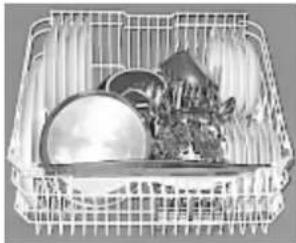
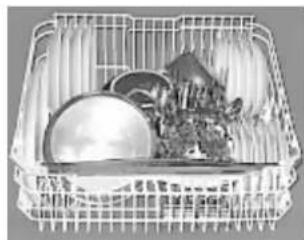
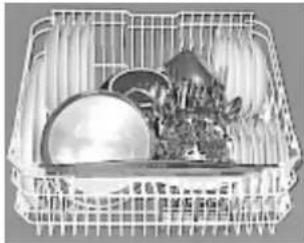
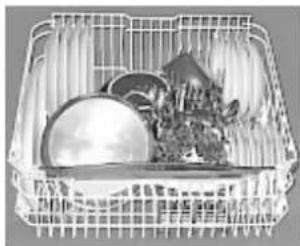
We recommend you place the most difficult dishes to wash into the lower rack: saucepans, lids, soup dishes and plates, but also: mugs, cups and glasses. (see photos for load examples).
- Serving dishes and large lids: place them on the sides of the rack.
- Saucepans, salad bowls: must always be placed upside down.
- Very deep dishes: place them obliquely, thus allowing water to run down them and cleaning them better.
- Glasses and cups: position them as indicated in the figure.
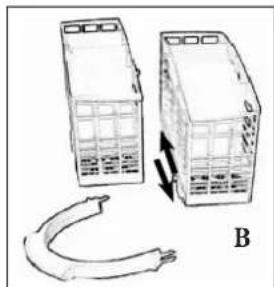
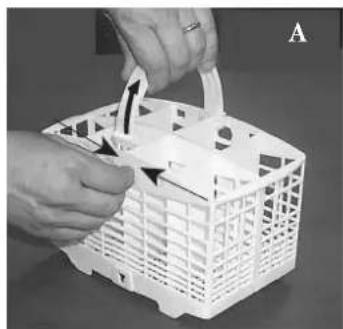
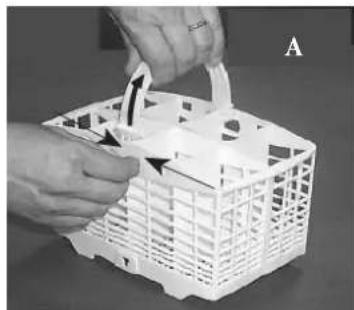
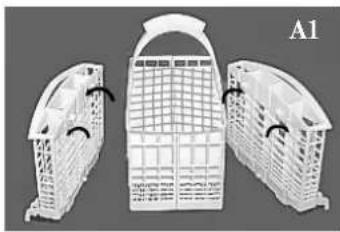
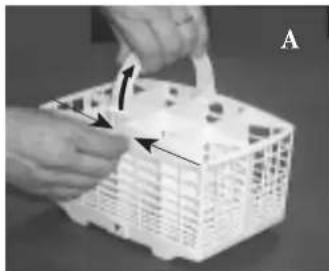
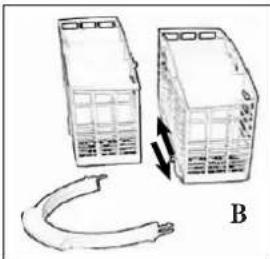
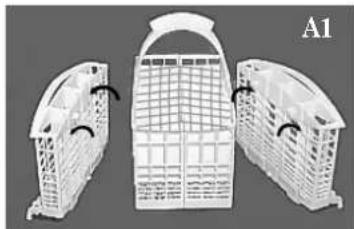
The cutlery basket can be split up by pulling out the handle (see figures A and B).
When you only have little cutlery to wash, you can use just half the basket.
This basket is equipped with two removable grids: insert the cutlery one by one into the slots, with the handles at the bottom. Knives and utensils with sharp blades or tips should be positioned with the sharp parts at the bottom.
Position them so that they don't touch.
In this specific model, the cutlery basket is fitted with two detachable side compartments, as shown in figure A1, which can be hooked on either to the upper or lower rack, as required.
What goes into the upper rack?
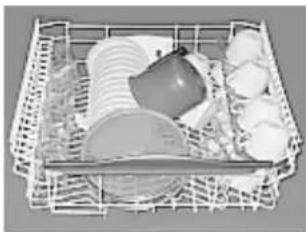
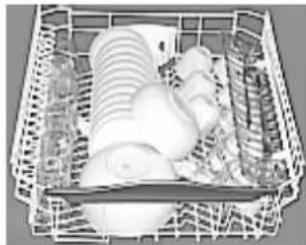
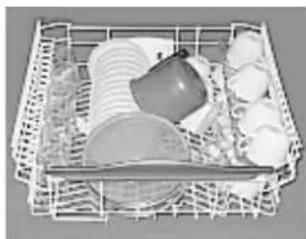
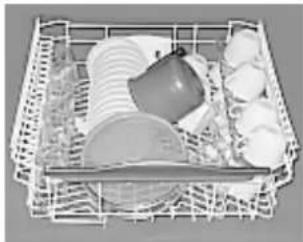
Place delicate and lightweight dishes in the upper rack: glasses, tea cups and coffee cups, saucers - but plates too - shallow salad bowls, slightly dirty frying pans and shallow pans (the photo illustrates a few examples).
Position lightweight dishes in such a way as to avoid their being moved by the spray of water.
The appliance can also be equipped with one or two tip-up compartments onto which you can place mugs and cups, as well as long sharp knives and serving cutlery.
After loading the dishes, remember to check that the blades on the sprayer arms can turn freely without knocking against any dishes.
How to adjust the Upper rack
The top rack can be adjusted using the two rack heights (top and bottom).
Load examples
Bottom Rack
Top Rack

natural_image
Metal tray with plastic strips and a small object on the right side (no visible text or symbols)
natural_image
Black-and-white photo of a plastic crate containing various food items including eggs, tomatoes, and a pomegranate (no text or symbols visible)
natural_image
Interior view of a shopping basket filled with items including a bowl, umbrella, and glass (no visible text or symbols)

natural_image
Basket filled with plastic containers and plastic sheets, no visible text or symbols

natural_image
Three white plastic crates with grid patterns, arranged side by side (no text or symbols visible)
natural_image
Close-up of hands assembling a white plastic basket with a handle (no text or symbols visible)

natural_image
Diagram of two rectangular electronic devices connected by a coiled cable, with no visible text or symbols.

natural_image
Hand holding a small electronic component next to a grid of rectangular components (no visible text or symbols)
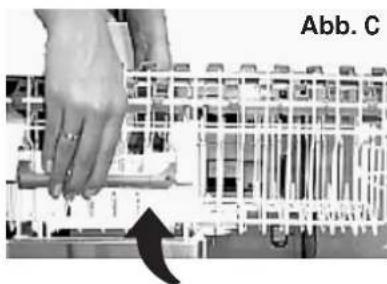
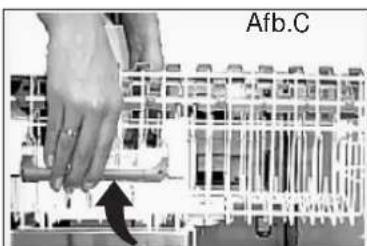
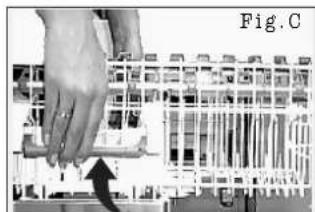
The upper rack can be adjusted for height by using the knobs located on the sides of the rack itself (see figure C)
Turning on the Appliance
First of all.
Insert the plug into the electricity socket to power the dishwasher. Turn on the water tap completely and press the Stand-by button "A".
The display turns on and 4 dashes appear: these indicate that the dishwasher is awaiting instructions.
Starting and selecting the cycle.
To select the wash cycle, turn knob "P" clockwise; the corresponding symbols will light up in sequence:

choose the cycle you deem most suited to the type of dishes to be washed (take a look at page 19, where you will find the wash cycle table).
Keep the Start "D" button pressed for a few seconds and the wash cycle begins, but if you have left the dishwasher door open, the word "DOOR" will be displayed; shut it and press the same button again.
A beep sounds and then the wash cycle begins and only the symbol corresponding to the wash cycle selected is displayed. You can see the amount of time left until the end of the wash cycle on the counter. Do not expect a precise countdown as the wash cycle starts with an estimated cycle time that is updated, thanks to the sensor it is fitted with, as the cycle progresses, according to a number of parameters that ensure maximum wash efficiency.
Cycle phase indicator lights
The dishwasher is provided with 4 indicator lights "H" which come on in sequence as the appliance is performing that specific phase of the wash cycle.
These phases are:

Cancelling or modifying a wash cycle in progress.....
You can modify the wash cycle in progress, if it has only just started. Keep the Reset button "D" pressed for about 3 seconds: a prolonged beep will sound, followed by three short beeps. Indicator light "I" turns off and the 4 dashes appear to indicate that all the settings have been cancelled. You are now free to re-set the correct wash cycle.
If you have left out a dish...
Interrupt the wash cycle by pressing the Stand-by button, insert the dish you had forgotten and press the same button again. The cycle will start up from where you interrupted it.
There's been a power failure? Have you opened the dishwasher door?
The wash cycle stops and then restarts when the electricity comes back on or when you shut the door.
Have you left the dishwasher door open?
The word "DOOR" flashes on the display. Shut the appliance door and the wash cycle will start up again.
At the end of the wash cycle....
The end of the wash cycle is indicated by two short beeps and the word "END" flashes on the display.
Warning:
Turn the display off by pressing button “A”, unplug the appliance from the electricity socket to cut off the power supply; the power supply cable should consequently be easily accessible.
- Turn off the water tap.
- Wait a few minutes before unloading the dishes: they are very hot! If you wait a little while, they dry better.
• Empty the lower rack first.
Make sure the wash cycle has ended before removing the dishes!
Warning:
If opening the door soon after the end of the programme, or during it, stand away from the Dishwasher, to avoid possible injury from hot steam.
“Duo Wash” Cycle:

This is a special cycle that runs a differentiated wash on the two racks: delicate for glassware and glasses on the upper rack and heavy duty for saucepans and frying pans on the lower rack.
Press the (Mode) button "M" and select the Duo-Wash symbol, then press "S" (Select): "on" means it is selected and the corresponding rectangle will light up, whereas "off" means it is disabled; after approx. 5 seconds, you will automatically quit the menu.
Now press Start and the wash cycle starts with a beep.
Delayed start, Extra drying and Half load
You want to wash just half a load?

Remember to halve the amount of detergent.
Have you only got a few dishes that need washing? If so, load them all on a single rack to save on water, detergent and electricity. Press the "M" (Mode) button repeatedly until symbol "N" is selected: the corresponding rectangle will light up. Using button S (select), you can decide to wash a half-load on the upper rack or on the lower one.
Each time you press it, a beep will sound and the corresponding symbol will light up. The symbol for the selected rack is displayed. Off means “no selection” has been made Once you have made your selection, start the wash cycle by pressing START.
This option is available with all wash cycles.

Before you start the selected wash cycle, press button “M” (Mode) repeatedly until the extra drying symbol “G” is selected, and the corresponding rectangle lights up. Press button “S” (Select) and select On to enable the extra drying, or Off to disable it. Remember that with the extra drying enabled, the wash cycle will last longer to provide you with dryer dishes.
This option is incompatible with the soak cycle.
You decide when it starts.

When you have loaded the dishes, you can choose when to start your dishwasher before setting the wash cycle desired. Press button "M" (Mode) and then select the symbol "F" corresponding to the delayed start:
the corresponding rectangle will darken. Now press button "S" (Select) to delay the wash cycle start by 1 to 24 hours. If you press the button again, the word "OFF" is displayed (no selection made).
Each time the button is pressed, a beep will sound; once you have made your selection, make sure the appliance door is shut and start the wash cycle by pressing button "D" (START). The countdown to the delayed start will begin on the display. Once the countdown is up, the wash cycle begins and the approximate amount of time left until the end of the wash cycle is displayed.
Have you changed your mind?
If you change your mind and wish to set a different delay press the Mode and Select buttons and repeat the selection. If on the other hand you want to cancel the delay set and you wish to start the wash cycle immediately, press the Select button repeatedly until it is set to zero. The indicator light "F" will turn off.
Wash Cycle Table
Dishwasher washing guarantees your dishes will be cleaned in a hygienic setting for safer, cleaner results.
Remember: in the automatic wash cycles, the cycles could undergo some modifications due to the intervention of the sensor which evaluates how dirty the dishes are and optimises the cycle in accordance.
| Cycle | Cycle selection instructions | Cycle description | Detergent for pre-wash+wah | Rinse Aid | Wahc duration (tolerance ±10% without extra drying) |
 Auto Super Wah Auto Super Wah | Very dirty dishes and pans (not to be used for delicate items) | Pre-wash with hot water at 40°CWash at 65°C2 cold rinsesHot rinse at 70°CDrying | 5 + 25 g | * | 120' |
 AutoDaily Wah AutoDaily Wah | Cycle for normally dirty pans and dishes. Standard daily cycle. | Wash at 50°C Cold rinseHot rinse at 70°CDrying | 30 g | * | 88' |
 Auto BIO Auto BIO | Environmentally-friendly cycle, with low energy consumption levels, suitable for normally dirty pans and dishes. | 2 Cold pre-washesWash at 50°CHot rinse at 65°CDrying | 5 + 25 g | * | 145' |
 Rapid Rapid | Economic and fast cycle to be used for slightly dirty dishes. Run cycle immediately after use. Without drying except when the extra drying option has been selected. | Short wash at 47°CHot rinse at 62°C | 25 g | *(with extra dry) | 24' |
 Soaking Soaking | Preliminarywashcyclefor dishes while awaiting completion of the load with the dishes from the next meal. | Short cold wash to prevent food from drying onto the dishes | | | 12' |
 Crystal Crystal | Special cycle to be used for more delicate items which are sensitive to high temperatures.Runcycle immediatelyafter use. | Wash at 52°CRinse at 45°CHot rinse at 65°CDrying | 25 g | * | 98' |
 Special Guest Special Guest | Rinse and drying cycle for dishes that are seldom used and are only dusty. | Hot rinse at 65°CDrying | | * | 36' |
OPTIONAL WASH CYCLE
 Auto Duo Wash Auto Duo Wash | Wash differentiated on the two racks delicate for glassware and glasses on the upper rack and heavy duty for the pans on the lower rack. | Cold pre-washWash at 52°C Lukewarm rinse at 45°CHot rinse at 65°CDrying | 5 + 25 g | * | 108' |
Energy Saving Tips
- It is important to try and run the dishwasher when it is fully loaded in order to save on energy. In order to prevent odors from forming and food from caking onto the dishes, you can run the hold cycle.
-
Choose the right wash cycle: the choice of cycle depends on the type of dishware, cookware and utensils being washed and how dirty they are.
-
Use the right amount of detergent: if you use too much detergent, the result will not be cleaner dishes, but, rather, a greater negative impact on the environment.
- There is no utility in rinsing dishes, cookware and utensils before placing them in the dishwasher.
How to Keep Your Dishwasher in Shape
After Every Wash
After every wash, turn off the water supply to the appliance and leave the door slightly ajar so that moisture and odors are not trapped inside.
Remove the Plug
Before cleaning or performing maintenance, always remove the plug from the socket. Do not run risks.
No Solvents or Abrasive Cleaning Products
To clean the exterior and rubber parts of the dishwasher, do not use solvents or abrasive cleaning products. Rather, use only a cloth and warm soapy water.
To remove spots or stains from the surface of the interior, use a cloth dampened with water and a little white vinegar, or a cleaning product made specifically for dishwashers.
When You Go on Holiday
When you go on holiday, it is recommended that you run a wash cycle with the dishwasher empty and then remove the plug from the socket, turn off the water supply and leave the door of the appliance slightly ajar. This will help the seals last longer and prevent odors from forming within the appliance.
Moving the Appliance
If the appliance must be moved, try to keep it in the vertical position. If absolutely necessary, it can be positioned on its back.
Seals
One of the factors that cause odors to form in the dishwasher is food that remains trapped in the seals. Periodic cleaning with a damp sponge will prevent this from occurring.
Disposal of old electrical appliances
The European Directive 2002/96/EC on Waste Electrical and Electronic Equipment (WEEE), requires that old household electrical appliances must not be disposed of in the normal unsorted municipal waste stream. Old appliances must be collected separately in order to optimise the recovery and recycling of the materials they contain and reduce the impact on human health and the environment.
The crossed out “wheeled bin” symbol on the product reminds you of your obligation, that when you dispose of the appliance it must be separately collected.
Consumers should contact their local authority or retailer for information concerning the correct disposal of their old appliance.

Cleaning and Special Maintenance
The filter assembly
If you want consistent good results from your dishwasher, you need to clean the filter assembly.
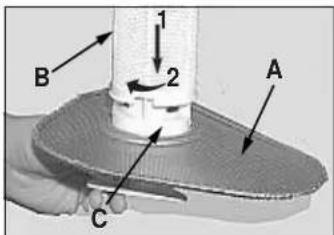
The food particles are removed from the wash water, allowing it to be recirculated during the cycle, filtered perfectly. For this reason, it is a good idea to remove the larger food particles trapped inside the cup "C" and the semi-circular filter A after each wash; pull the cup handle upwards to remove them. Just rinse them under running water.
The entire filter assembly should be cleaned thoroughly once a month: cup C + semi-circular filter A + cylindrical filter B. Rotate filter "B" anticlockwise to remove it.
For cleaning, use a non metallic brush.
Reassemble the filter parts (as shown in the figure) and reinsert the whole assembly into the dishwasher. Position it into its housing and press downwards.
The dishwasher is not to be used without filters. Improper replacement of the filters may reduce the efficiency of the wash and even damage your dishwasher.
Cleaning the Sprayer Arms
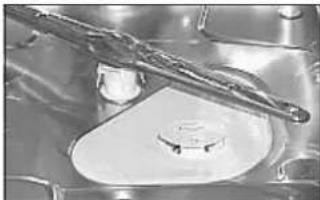
It may happen that food particle become encrusted on the sprayer arms and block the holes (see "Close up view (interior)", letters F-l). Check the sprayer arms periodically and clean them when needed.
natural_image
Close-up of a metallic mechanical component with a handle and central circular feature (no visible text or symbols)
Troubleshooting
It may occur that the dishwasher does not function or does not function properly. Before calling for assistance, let us see what can be done first: have you forgot to press one of the buttons or to perform an essential operation?
The Dishwasher Does Not Start
Have you checked whether:
- the plug is pushed into the socket correctly;
- the power is on in the house:
- the door is closed properly;
- the ON-OFF switch is on "ON";
- the water supply is turned on.
The Dishwasher Does Not Load Water
Have you checked whether:
- the water is turned on and the hose is connected properly;
- the water supply to the house is on and has sufficient pressure;
- the water supply hose is crimped or bent;
- the filter for the water supply hose is clogged.
The Dishes Are Not Clean
Have you put the right amount of detergent into the dispenser?
Is the wash cycle suitable for the dishes you have placed inside the appliance?
Are the filter and microfilter clean?
Can the sprayer arms turn freely?
The Dishwasher Does Not Drain
Have you checked whether:
- the drain hose is crimped or bent.
Have you checked whether:
- the lid to the salt container is closed properly;
- the rinse aid dosage is correct.
Error messages.
Your dishwasher is equipped with a safety system which is able to detect any operating anomalies.
These anomalies or faults are signalled by several codes consisting of letters and numbers that flash up on the display. Make a note of the error code that appears, turn the appliance off, turn off the water tap and call for technical assistance.
Tap off alarm
If you have forgotten to turn on the water tap, your appliance will remind you with a long series of prolonged beeps and the wording H2O will flash up on the display. Turn the tap on and the wash cycle will start up after a few minutes.
If you are not there when this signal appears, the appliance will switch to alarm mode and the code "AL06" will flash on the display. Turn the display off by keeping the Stand-by button pressed, check that there is water in the mains supply and turn on the tap; turn the display back on by keeping the same button pressed again.
Repeat the programming operations and start the dishwasher by pressing the START button.
Clogged filter alarm
If the appliance is blocked and the code "AL05" is flashing, this means the filter is clogged by large particles of food residue. Turn the display off by keeping the Stand-by button pressed.
Clean the filter thoroughly and reposition it in its seat as illustrated on this page. Then turn it back on. Repeat the programming operations and start the dishwasher by pressing the START button.
Water leak alarm
If this indicator light is flashing, this means the appliance is blocked due to a water leak. Turn off the water tap, cut off the electricity supply and call for technical assistance.
If, despite all these checks, the dishwasher still does not function and/or the problem persists, contact the nearest authorised service centre and provide them with the following information:
- the nature of the problem;
- the model type number (Mod. ...) and the serial number (S/N ....), which are indicated on the plate located on the side of the inner part of the door.
Never call on unauthorised technicians and refuse to allow parts to be installed that are not original spare parts.
Installation
Positioning the Appliance
Position the appliance in the desired location. The back should rest against the wall behind it, and the sides, along the adjacent cabinets or wall. The dishwasher is equipped with water supply and drain hoses that can be positioned to the right or the left to facilitate proper installation.
Levelling the Appliance
Once the appliance is positioned, adjust the feet (screwing them in or out) to adjust the height of the dishwasher, making it level. In any case, the appliance should not be inclined more than 2^ .
If the appliance is level, it will help ensure proper performance.
Adjustment of Back Feet
Insert the appliance in the cutout and then adjust the height of the machine using the screws located at the bottom front. Use a screwdriver to turn the screws in the clockwise direction to raise the dishwasher and in the anticlockwise direction to lower it.
Cold water connection.
This electric household appliance should be connected to the water mains using the cold water supply hose provided with the appliance only. Do not use a different hose. In the event of replacements, use original spare parts only.
Connect the cold water supply hose to a 3/4 gas threaded connection, taking care to screw it tightly onto the tap.
If the water hoses are new or have been out of use for an extended period of time, let the water run to make sure it is clear and free of impurities before making the connection. If this precaution is not taken, the water inlet could get blocked, causing damage to your dishwasher.
Hot Water Connection
The water supply to the appliance can also be connected to the house's hot water line (centralised system, heating system), as long as it does not exceed a temperature of 60^ C.
In this case, the wash cycle time will be shortened by about 15 minutes and the wash efficiency slightly reduced.
The connection must be made to the hot water line following the same procedures as those for the connection to the cold water line.
Anti-flooding protection
Your dishwasher is provided with a special system which blocks the water supply in the event of leaks inside the appliance. It is further equipped with a water inlet hose comprising an outer clear hose and an inner red hose, which can both withstand extremely high pressures. Should the inner hose break, the outer hose will consequently turn red. Safety in the event of flooding is ensured by the second clear hose
that contains the former. It is vital that you check the outer hose regularly: if you see it has turned bright red, then you know you have to replace it as soon as possible. Call for an authorised technical engineer to come and replace it.
Drain Hose Connection
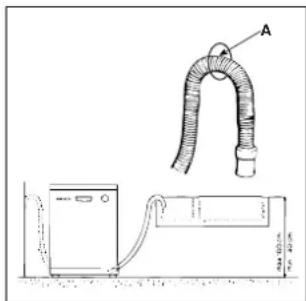
Fit the drain pipe into a drain line with a minimum diameter of 4 cm or place it over the sink. Avoid restricting or bending it.
The part of the pipe marked with the letter A s hould be between 40 and 100 cm above the ground.
The pipe should not be immersed in water.
natural_image
Technical line drawing of a household air conditioner unit with a coiled hose and fan (no text or symbols)
Electrical Connection
After making sure that the voltage and frequency values for the current in the home correspond to those on the rating plate (located on the stainless steel inner door of the appliance) and that the electrical system is sized for the maximum voltage on the rating plate, insert the plug into an electrical socket which is earthed properly (the earthing of the appliance is a safety requirement mandated by law). If the electrical socket to which the appliance must be connected is not appropriate for the plug, replace the plug, rather than using adaptors or the like as they could cause overheating and burns.
Should the electricity supply cable be damaged, we recommend that you only contact authorised Technical Service Centres for the replacement.
CAUTION
The dishwasher plug must be accessible even when the appliance is installed so that maintenance can be done safely.
Condensation-proof tape.
On some models, a transparent condensation-proof adhesive tape has been provided.
It should be stuck onto the lower side of your wooden worktop to protect it from the formation of condensation.
When not provided, this tape can be requested as a spare part from authorised retailers.

A: Stand-by-Taste
B: Display
C: Türgriff

Oberkorb

Oberer Sprüharm

natural_image
Close-up of a kitchen utensil with a white filter and metal bowl (no visible text or symbols)
natural_image
Technical line drawing of a mechanical component with threaded base and mounting base (no text or symbols)
natural_image
Illustration of a plastic tray with cylindrical objects and a small object on the side (no visible text or symbols)

natural_image
Black-and-white photo of a plastic crate containing various food items including bread, cheese, and vegetables (no text or labels visible)

natural_image
Black-and-white photo of a shopping basket filled with items including a bowl, umbrella, and a garden (no visible text or symbols)

natural_image
Interior view of a plastic basket containing various white plastic items (no visible text or labels)

natural_image
Three architectural building designs with grid patterns and curved roof structures, labeled A1 (no text or symbols on structures)
natural_image
Close-up of hands assembling a white plastic basket with a handle (no text or symbols visible)

natural_image
Diagram of two electronic devices with a curved cable and directional arrow, labeled B (no text or symbols on devices)
natural_image
Close-up of hands pressing a component into a grid-like structure, with an arrow indicating motion (no visible text or symbols)
natural_image
Close-up of a metallic mechanical component with a central circular feature and a diagonal tool (no visible text or symbols)
Elektroanschluß
A: Stand-by knop
B: Display
C: Handvat deur
D: Start/Reset knop
M: Knop "Mode"
S: Knop "Select"
P: Keuzeknop programma

E: Controlelampje programma auto Duo-Wash

Bovenste korf

Bovenste sproeiarm

regelen hoogte korf

Onderste korf

Onderste sproeiarm

Deksel zoutreservoir

Filter

Doseerbakje afw as- en glansmiddel
Technische eigenschappen
natural_image
Close-up of a kitchen appliance with a white funnel and metal tray (no visible text or symbols)
natural_image
Technical line drawing of a mechanical component with threaded base and mounting holes (no text or symbols)
natural_image
Illustration of a tray with plastic containers and a small object on the right (no visible text or symbols)
Bovenkorf

natural_image
Black-and-white photo of a plastic crate containing various food items including bread, cheese, and vegetables (no visible text or labels)
natural_image
Black-and-white photo of a basket filled with various items including fruits, vegetables, and a mushroom (no visible text or symbols)

natural_image
Black-and-white photo of a plastic basket filled with various food items (no visible text or labels)
natural_image
Three white plastic baskets with grid patterns, arranged side by side (no text or symbols visible)
natural_image
Close-up of hands assembling a wireframe plastic basket with arrows indicating movement (no text or symbols visible)
natural_image
Diagram of two electronic components connected by a cable, labeled B (no text or symbols on the components themselves)
natural_image
Close-up of a metallic mechanical component with a central circular feature and a diagonal rod (no visible text or symbols)
Zijn er problemen?

Cestello superiore

natural_image
Close-up of a mechanical device with a white funnel and circular base (no visible text or symbols)
natural_image
Technical line drawing of a mechanical component with threaded base and hexagonal base (no text or symbols)
natural_image
Illustration of a plastic tray with metal strips and a small object on the side (no text or symbols visible)
natural_image
Black-and-white photo of a plastic crate containing various items including a dome-shaped container, eggs, and a teapot (no visible text or symbols)
natural_image
Black-and-white photo of a basket filled with various food items including vegetables, meat, and fish (no visible text or labels)

natural_image
Black-and-white photo of a basket filled with various food items, including eggs and vegetables (no visible text or labels)
natural_image
Three white plastic building structures with grid patterns and curved handles, labeled A1 (no text or symbols on structures)

natural_image
Close-up of hands assembling a wireframe plastic container with arrows indicating assembly (no text or symbols visible)

natural_image
Diagram of two electronic devices connected by a cable, labeled B (no text or symbols on devices)
natural_image
Hand pressing a button on a computer screen (no visible text or symbols)
natural_image
Close-up of a metallic mechanical component with a handle and central hub (no visible text or symbols)
60044 Fabriano (AN) Italy
Tel +39 0732 6611
www.scholtes.com
This document is printed by
Xerox Business Service - Docutech P-04/05
Document number: 195046465.04