
Jukebox Bluetooth - Loudspeaker ION - Free user manual and instructions
Find the device manual for free Jukebox Bluetooth ION in PDF.



| Product type | Speaker with docking station |
| Brand | ION |
| Model | Jukebox Bluetooth |
| Dimensions (W x H x D) | 40 x 30 x 25 cm (estimated) |
| Weight | 4.5 kg (estimated) |
| Power supply | 12 V DC, 3 A via included AC adapter |
| Power consumption | 36 W (estimated) |
| Connectivity | Bluetooth, 3.5 mm stereo line input |
| Bluetooth version | 4.0 (estimated) |
| Bluetooth range | 10 m |
| Docking station | Yes, for mobile devices |
| Speakers | 2 built-in speakers |
| Output power | 20 W (estimated) |
| Remote control | Yes, included (batteries not included) |
| USB charging | USB port to charge a device (device turned on) |
| Care and cleaning | Clean with a soft, dry cloth. Do not use abrasive cleaners or solvents. |
| Safety | Use only the supplied AC adapter. Do not expose to water or moisture. |
| Spare parts | AC adapter, remote control (available at ionaudio.com) |
| Repairability | Contact ION customer service for any repairs. |
| General information | Manual available in multiple languages. Product registration recommended at ionaudio.com. |
Frequently Asked Questions - Jukebox Bluetooth ION
User questions about Jukebox Bluetooth ION
0 question about this device. Answer the ones you know or ask your own.
Ask a new question about this device
Download the instructions for your Loudspeaker in PDF format for free! Find your manual Jukebox Bluetooth - ION and take your electronic device back in hand. On this page are published all the documents necessary for the use of your device. Jukebox Bluetooth by ION.
USER MANUAL Jukebox Bluetooth ION
Jukebox Bluetooth
Power Adapter
Remote
Quickstart Guide
- Safety and Warranty Information Booklet
Registration
Please go to ionaudio.com to register your Jukebox Bluetooth. Registering your product ensures that we can keep you up-to-date with any new product developments and provide you with world-class technical support, should you run into any problems.
Using Jukebox Bluetooth with your Device
Setup Instructions
Get ready to travel back to the heyday and play groovy tunes using your favorite music app on your device with Jukebox Bluetooth.
- Connect your Bluetooth device to Jukebox Bluetooth (for pairing instructions see the section Connecting a Bluetooth Device). Alternatively, connect a media device such as a CD player, smartphone, or MP3 player to the 1/8" LINE IN of Jukebox Bluetooth. The LINE IN jack can be found on the rear panel.
Note: The LINE IN is recommended to be used only if a Bluetooth device is not connected.
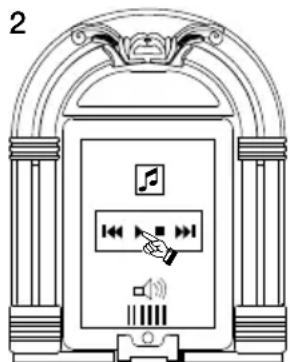
- On your device, launch your music library or your favorite jukebox app to play a song. Adjust the output volume from your device, and by using the volume control on Jukebox Bluetooth remote as needed.
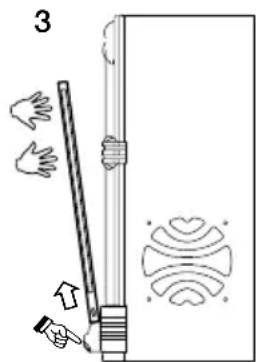
- To release the device from the cradle, hold the device, press the CRADLE RELEASE, and gently remove the device from the cradle.

Connecting a Bluetooth Device
- Turn on your Bluetooth device.
- Power on Jukebox Bluetooth and it will automatically go into pairing mode to search for Bluetooth devices.
- Navigate to your Bluetooth device's setup screen, find "Jukebox BT" and connect.
Note: If your Bluetooth device prompts for a pairing code, enter '0000'
Note: If you experience trouble pairing or playing music, update your device's OS.
- To connect to another Bluetooth device, navigate to your currently connected Bluetooth device's setup screen, find "Jukebox BT" and unpair (process varies slightly by device - consult your Bluetooth device's manual for details). Repeat step 3.
Routing Your Charging Cable
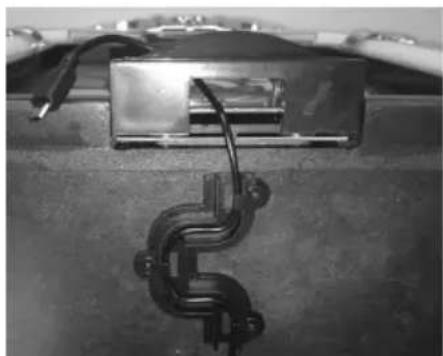
On the bottom of Jukebox Bluetooth, route your charge cable through the cable channel clips to the pass-through slot.
Front Panel
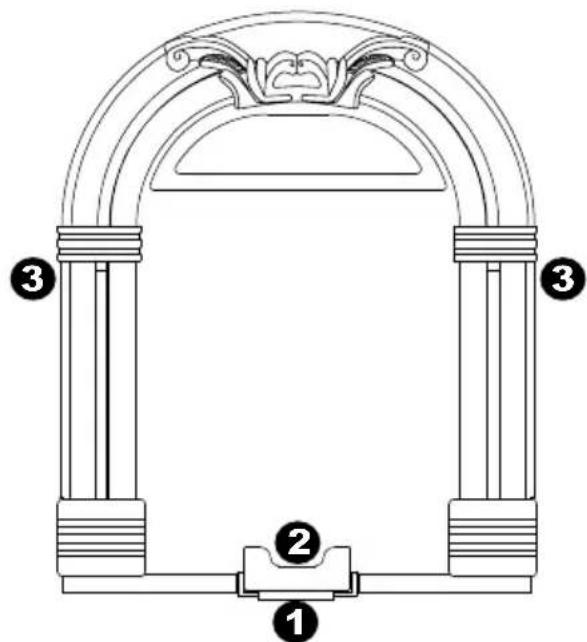
- CRADLE RELEASE* - When this lever is pressed down, the music device will lean forward, allowing you to easily grasp and pull up the music device, removing it from the cradle.
- CRADLE - To rest your music device on Jukebox Bluetooth, place it into the device holder.
- SPEAKERS - Plays back the audio from your music device. Select from your music library or favorite jukebox app (works with most jukebox apps)
*Note: To ensure safe removal of your music device, gently press the CRADLE RELEASE down and securely grasp the music device when it leans forward from the cradle.
Rear Panel
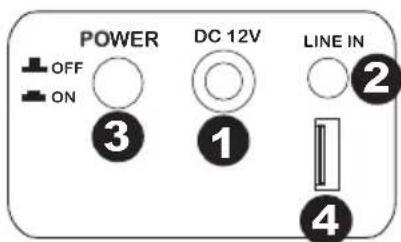
- POWER INPUT - Use the included power adapter (12V DC, 3A, center pin-positive) to connect Jukebox Bluetooth to wall power.
- LINE IN - This stereo 1/8" line-level input can be used to connect a CD player, MP3 player, or other audio source. To adjust the volume of the audio signal, adjust the output volume of your audio source.
- POWER - Press this button to turn Jukebox Bluetooth on or off.
- USB CHARGER - Connect a USB cable here to charge your USB devices, such as MP3 players, smartphones, etc.
Remote
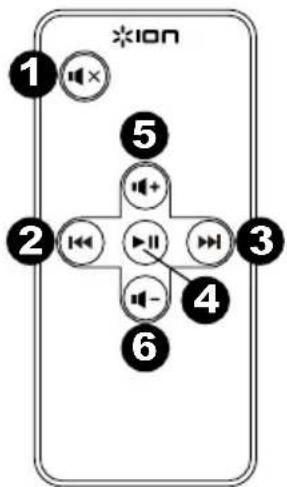
- Mute
- Previous Track
- Next Track
- Play/Pause
- Volume Up
- Volume Down
Note: Room lighting and battery life can affect the operating range of the remote control.
Note: In order to use the remote control for the first time, first pull out the tab attached to the battery compartment.
To change the remote battery, follow the diagram located on the back of the remote. Use a 3V DC CR2025 lithium button cell battery for replacement.
Power: 12V DC, 3A, center pin-positive
Remote Control: 1x3V DC CR2025 button cell battery
Note: Room lighting and battery life can affect the operating range of the remote control.
Trademarks and Licenses
iPad, iPhone, iPod touch, and iPod nano are trademarks or service marks of Apple Inc., registered in the U.S. and other countries.
The Bluetooth word mark and logos are owned by the Bluetooth SIG, Inc. and any use of such marks by ION Audio is under license.
All other product or company names are trademarks or registered trademarks of their respective owners.
ionaudio.com
Brand : ION
Model : Jukebox Bluetooth
Category : Loudspeaker