KFD 9950 XA - Refrigerator BLOMBERG - Free user manual and instructions
Find the device manual for free KFD 9950 XA BLOMBERG in PDF.



| Product type | Combined refrigerator |
| Brand | Blomberg |
| Model | KFD 9950 XA |
| Dimensions (H x W x D) | 185 cm x 70 cm x 65 cm (estimated) |
| Net weight | 75 kg (estimated) |
| Power supply | 220-240 V, 50 Hz |
| Climate class | SN-T |
| Total capacity | 450 L (estimated) |
| Refrigerator capacity | 320 L (estimated) |
| Freezer capacity | 130 L (estimated) |
| Cooling system | Dual (Dual Cooling) |
| Freezer defrost | Automatic |
| Interior lighting | Blue LED (for crisper drawer) |
| Special functions | Holiday, Eco Extra, Quick Cool, Quick Freeze, Control Lock |
| Energy class | A (estimated) |
| Noise level | 42 dB (estimated) |
| Refrigerant | R600a (flammable) |
| Number of doors | 2 |
| Display type | Touch control |
| Maintenance and cleaning | Unplug before cleaning, warm water and baking soda |
| Child safety | Control lock available |
| Spare parts available | For 10 years after purchase |
| General information | User manual available in French and other languages |
Frequently Asked Questions - KFD 9950 XA BLOMBERG
User questions about KFD 9950 XA BLOMBERG
0 question about this device. Answer the ones you know or ask your own.
Ask a new question about this device
Download the instructions for your Refrigerator in PDF format for free! Find your manual KFD 9950 XA - BLOMBERG and take your electronic device back in hand. On this page are published all the documents necessary for the use of your device. KFD 9950 XA by BLOMBERG.
USER MANUAL KFD 9950 XA BLOMBERG
Operating instructions
Please read this manual first!
Dear Customer,
We hope that your product, which has been produced in modern plants and checked under the most meticulous quality control procedures, will provide you an effective service.
For this, we recommend you to carefully read the entire manual of your product before using it and keep it at hand for future references.
This manual
- Will help you use your appliance in a fast and safe way.
- Read the manual before installing and operating your product.
- Follow the instructions, especially those for safety.
- Keep the manual in an easily accessible place as you may need it later.
- Besides, read also the other documents provided with your product.
Please note that this manual may be valid for other models as well.
Symbols and their descriptions
This instruction manual contains the following symbols:
i Important information or useful usage tips.
⚠ Warning against dangerous conditions for life and property.
⚠ Warning against electric voltage.

This product is supplied with the selective sorting symbol for waste electrical and electronic equipment (WEEE).
This means that this product must be handled pursuant to European Directive 2002/96/EC in order to be recycled or dismantled to minimise its impact on the environment. For further information, please contact your local or regional authorities.
Electronic products not included in the selective sorting process are potentially dangerous for the environment and human health due to the presence of hazardous substances.
1 The refrigerator 3
2 Important Safety Warnings 4
Intended use ....4
For products with a water dispenser; .6
Child safety 6
HCA Warning 6
Things to be done for energy saving ..7
Reccomendations for freshfood compartment ....7
3 Installation 8
Points to be considered when re-transporting your refrigerator ....8
Before operating your refrigerator .....8
Electric connection 9
Disposing of the packaging .....9
Disposing of your old refrigerator .....9
Placing and Installation ....10
Floor balance adjustment .....10
Adjusting the gap between the upper door ....11
4 Preparation 12
5 Using your refrigerator 13
Indicator Panel 13
Egg tray 16
Sliding Body Shelves ......16
Chiller compartment ....16
Crisper 17
Movable Middle Section .....18
Blue light 18
Telescopic Drawer 19
Door Open Alarm: 19
Dual cooling system: 19
Freezing fresh food 20
Recommendations for preservation of frozen food ....20
Placing the food 21
Deep-freeze information .....21
6 Maintenance and cleaning 22
Protection of plastic surfaces .....22
7 Recommended solutions for the problems 23
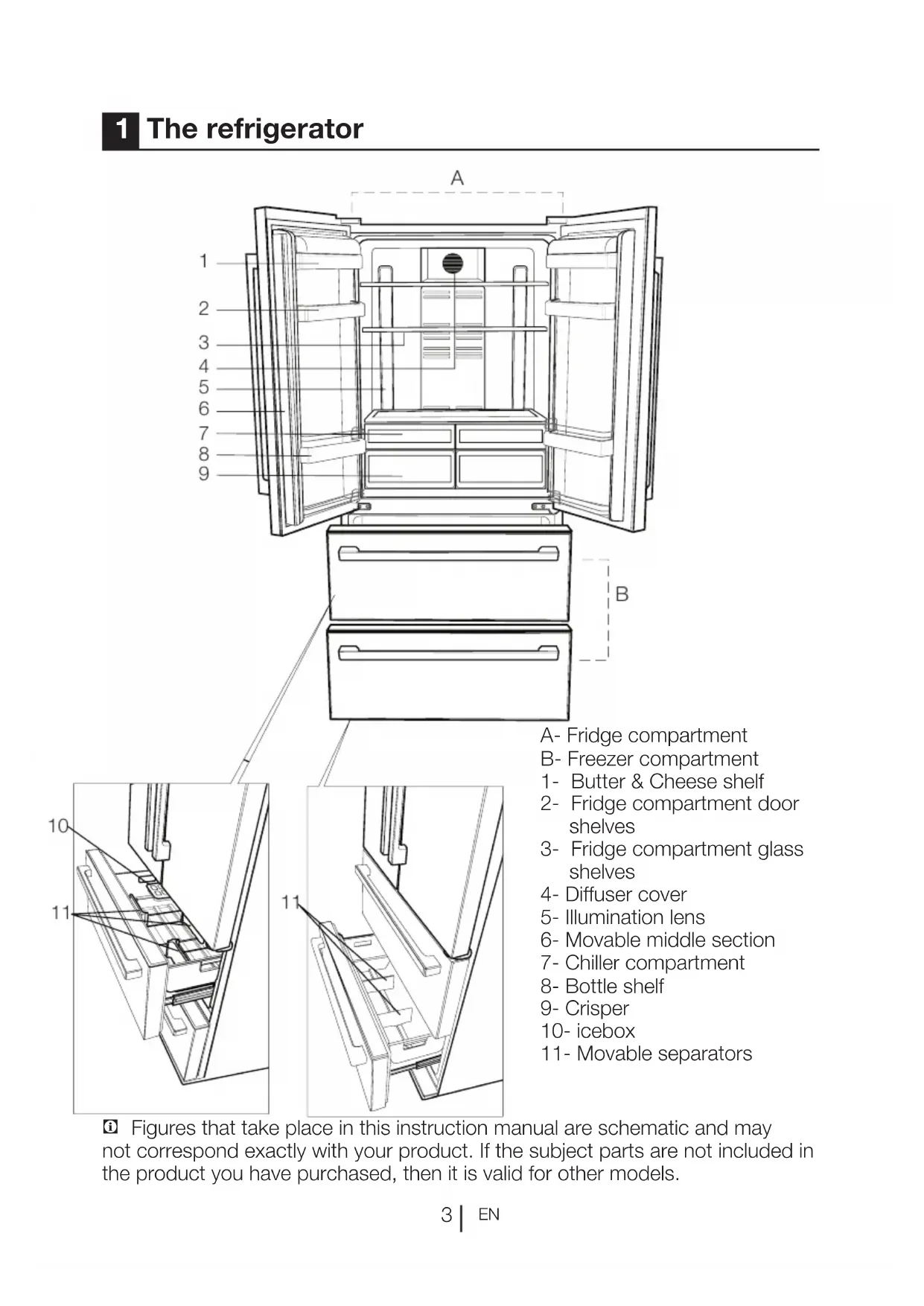
1 The refrigerator

Figures that take place in this instruction manual are schematic and may not correspond exactly with your product. If the subject parts are not included in the product you have purchased, then it is valid for other models.
2 Important Safety Warnings
Please review the following information. Failure to observe this information may cause injuries or material damage. Otherwise, all warranty and reliability commitments will become invalid.
The usage life of the unit you purchased is 10 years. This is the period for keeping the spare parts required for the unit to operate as described.
Intended use
This product is intended to be used
- indoors and in closed areas such as homes;
– in closed working environments such as stores and offices;
– in closed accommodation areas such as farm houses, hotels, pensions.
- This product should not be used outdoors.
General safety
- When you want to dispose/scrap the product, we recommend you to consult the authorized service in order to learn the required information and authorized bodies.
- Consult your authorized service for all your questions and problems related to the refrigerator. Do not intervene or let someone intervene to the refrigerator without notifying the authorised services.
- For products with a freezer compartment; Do not eat cone ice cream and ice cubes immediately after you take them out of the freezer compartment! (This may cause frostbite in your mouth.)
- For products with a freezer compartment; Do not put bottled and canned liquid beverages in the freezer
compartment. Otherwise, these may burst.
- Do not touch frozen food by hand; they may stick to your hand.
- Unplug your refrigerator before cleaning or defrosting.
- Vapor and vaporized cleaning materials should never be used in cleaning and defrosting processes of your refrigerator. In such cases, the vapor may get in contact with the electrical parts and cause short circuit or electric shock.
- Never use the parts on your refrigerator such as the door as a means of support or step.
- Do not use electrical devices inside the refrigerator.
- Do not damage the parts, where the refrigerant is circulating, with drilling or cutting tools. The refrigerant that might blow out when the gas channels of the evaporator, pipe extensions or surface coatings are punctured causes skin irritations and eye injuries.
- Do not cover or block the ventilation holes on your refrigerator with any material.
- Electrical devices must be repaired by only authorised persons. Repairs performed by incompetent persons create a risk for the user.
- In case of any failure or during a maintenance or repair work, disconnect your refrigerator's mains supply by either turning off the relevant fuse or unplugging your appliance.
- Do not pull by the cable when pulling off the plug.
- Place the beverage with higher proofs tightly closed and vertically.
- Never store spray cans containing flammable and explosive substances in the refrigerator.
- Do not use mechanical devices or other means to accelerate the defrosting process, other than those recommended by the manufacturer.
- This product is not intended to be used by persons with physical, sensory or mental disorders or unlearned or inexperienced people (including children) unless they are attended by a person who will be responsible for their safety or who will instruct them accordingly for use of the product
- Do not operate a damaged refrigerator. Consult with the service agent if you have any concerns.
- Electrical safety of your refrigerator shall be guaranteed only if the earth system in your house complies with standards.
- Exposing the product to rain, snow, sun and wind is dangerous with respect to electrical safety.
- Contact authorized service when there is a power cable damage to avoid danger.
- Never plug the refrigerator into the wall outlet during installation. Otherwise, risk of death or serious injury may arise.
- This refrigerator is intended for only storing food items. It must not be used for any other purpose.
- Label of technical specifications is located on the left wall inside the refrigerator.
- Never connect your refrigerator to electricity-saving systems; they may damage the refrigerator.
- If there is a blue light on the refrigerator, do not look at the blue light with optical tools.
- For manually controlled refrigerators, wait for at least 5 minutes to start the refrigerator after power failure.
- This operation manual should be handed in to the new owner of the product when it is given to others.
- Avoid causing damage on power cable when transporting the refrigerator. Bending cable may cause fire. Never place heavy objects on power cable. Do not touch the plug with wet hands when plugging the product.

natural_image
Diagram showing a device with a lightning bolt and cable, no text or symbols present- Do not plug the refrigerator if the wall outlet is loose.
- Water should not be sprayed directly on inner or outer parts of the product for safety purposes.
- Do not spray substances containing inflammable gases such as propane gas near the refrigerator to avoid fire and explosion risk.
- Never place containers filled with water on top of the refrigerator, otherwise this may cause electric shock or fire.
- Do not overload your refrigerator with excessive amounts of food. If overloaded, the food items may fall down and hurt you and damage refrigerator when you open the door. Never place objects on top of the refrigerator; otherwise, these objects may fall down when you open or close the refrigerator's door.
- As they require a precise temperature, vaccines, heat-sensitive medicine and scientific materials and etc. should not be kept in the refrigerator.
- If not to be used for a long time, refrigerator should be unplugged. A possible problem in power cable may cause fire.
- The plug's tip should be regularly cleaned; otherwise, it may cause fire.
- The plug's tip should be cleaned regularly with a dry cloth; otherwise, it may cause fire.
- Refrigerator may move if adjustable legs are not properly secured on the floor. Properly securing adjustable legs on the floor can prevent the refrigerator to move.
- When carrying the refrigerator, do not hold it from door handle. Otherwise, it may be snapped.
- When you have to place your product next to another refrigerator or freezer, the distance between devices should be at least 8cm. Otherwise, adjacent side walls may be humidified.
For products with a water dispenser;
Pressure of water mains should be minimum 1 bar. Pressure of water mains should be maximum 8 bars.
- Use only potable water.
Child safety
- If the door has a lock, the key should be kept away from reach of children.
- Children must be supervised to prevent them from tampering with the product.
HCA Warning
If your product's cooling system contains R600a:
This gas is flammable. Therefore, pay attention to not damaging the cooling system and piping during usage and transportation. In the event of damage, keep your product away from potential fire sources that can cause the product catch a fire and ventilate the room in which the unit is placed.
Ignore this warning if your product's cooling system contains R134a.
Type of gas used in the product is stated in the type plate which is on the left wall inside the refrigerator.
Never throw the product in fire for disposal.
Things to be done for energy saving
- Do not leave the doors of your refrigerator open for a long time.
- Do not put hot food or drinks in your refrigerator.
- Do not overload your refrigerator so that the air circulation inside of it is not prevented.
- Do not install your refrigerator under direct sunlight or near heat emitting appliances such as ovens, dishwashers or radiators.
- Pay attention to keep your food in closed containers.
- For products with a freezer compartment; You can store maximum amount of food items in the freezer when you remove the shelf or drawer of the freezer. Energy consumption value stated for your refrigerator has been determined by removing freezer shelf or drawer and under maximum load. There is no harm to use a shelf or drawer according to the shapes and size of food to be frozen.
- Thawing frozen food in fridge compartment will both provide energy saving and preserve the food quality.
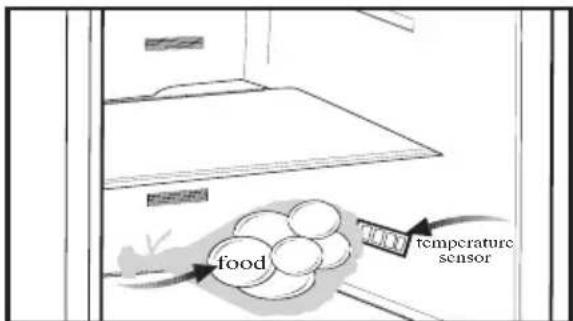
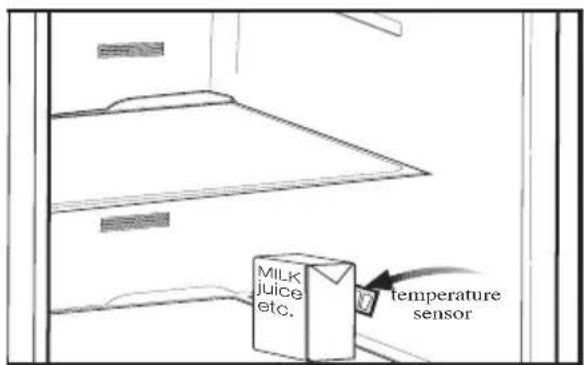
Reccomendations for freshfood compartment \* OPTIONAL
- Please do not let any foodstuff to come to contact with the temperature sensor in freshfood compartment. In order to maintain freshfood compartment at ideal storage temperature, the sensor must not be blocked by fodstuffs.
- Do not place hot foodstuff in your appliance.
3 Installation
i Please remember that the manufacturer shall not be held liable if the information given in the instruction manual is not observed.
Points to be considered when re-transporting your refrigerator
- Your refrigerator must be emptied and cleaned prior to any transportation.
- Shelves, accessories, crisper and etc. in your refrigerator must be fastened securely by adhesive tape against any jolt before repackaging.
- Packaging must be tied with thick tapes and strong ropes and the rules of transportation printed on the package must be followed.
i Always remember...
Every recycled material is an indispensable source for the nature and for our national resources.
If you wish to contribute to recycling the packaging materials, you can get further information from the environmental bodies or local authorities.
Before operating your refrigerator
Before starting to use your refrigerator check the following:
-
Is the interior of the refrigerator dry and can the air circulate freely in the rear of it?
-
You can install the 2 plastic wedges as illustrated in the figure. Plastic wedges will provide the required distance between your refrigerator and the wall in order to allow the air circulation. (The illustrated figure is only an example and does not match exactly with your product.)

natural_image
Technical diagram of a computer monitor rear panel with mounting holes and ventilation slots (no text or labels)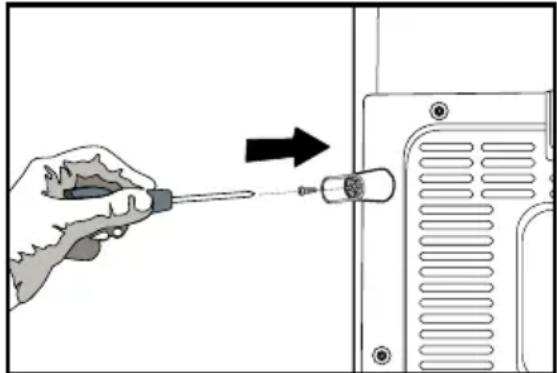
natural_image
Illustration of a hand using a screwdriver to adjust or install a component, with no visible text or symbols.- Clean the interior of the refrigerator as recommended in the "Maintenance and cleaning" section.
- Plug the refrigerator into the wall outlet. When the door is open the respective interior light will come on.
- You will hear a noise as the compressor starts up. The liquid and gases sealed within the refrigeration system may also give rise to noise, even if the compressor is not running and this is quite normal.
- Front edges of the refrigerator may feel warm. This is normal. These areas are designed to be warm to avoid condensation.
Electric connection
Connect your refrigerator to a grounded socket which is being protected by a fuse with the appropriate capacity.
Important:
The connection must be in compliance with national regulations.
The power cable plug must be easily accessible after installation.
The specified voltage must be equal to your mains voltage.
△ Extension cables and multiway plugs must not be used for connection.
A damaged power cable must be replaced by a qualified electrician.
The appliance must not be operated before it is repaired! There is danger of electric shock!
⚠ Warning against electric voltage.
Disposing of the packaging
⚠ The packing materials may be dangerous for children. Keep the packing materials out of the reach of children or dispose them of by classifying them in accordance with the waste instructions. Do not dispose them of along with the normal household waste.
The packing of your refrigerator is produced from recyclable materials.
Disposing of your old refrigerator
Dispose of your old machine without giving any harm to the environment.
⚠️ You may consult your authorized dealer or waste collection center of your municipality about the disposal of your refrigerator.
⚠️ Before disposing of your refrigerator, cut out the electric plug and, if there are any locks on the door, make them inoperable in order to protect children against any danger.
Placing and Installation
⚠ Caution: Never plug the refrigerator into the wall outlet during installation. Otherwise, risk of death or serious injury may arise.
⚠️ If the entrance door of the room where the refrigerator will be installed is not wide enough for the refrigerator to pass through, than call the authorized service to have them remove the doors of your refrigerator and pass it sideways through the door.
- Install your refrigerator to a place that allows ease of use.
- Keep your refrigerator away from heat sources, humid places and direct sunlight.
- There must be appropriate air ventilation around your refrigerator in order to achieve an efficient operation.
If the refrigerator is to be placed in a recess in the wall, there must be at least 5 cm distance with the ceiling and at least 5 cm with the wall.
If the floor is covered with a carpet, your product must be elevated 2.5 cm from the floor.
- Place your refrigerator on an even floor surface to prevent jolts.
- Do not keep your refrigerator in ambient temperatures under 10irc C.
Floor balance adjustment
⚠️ If your refrigerator is unbalanced;
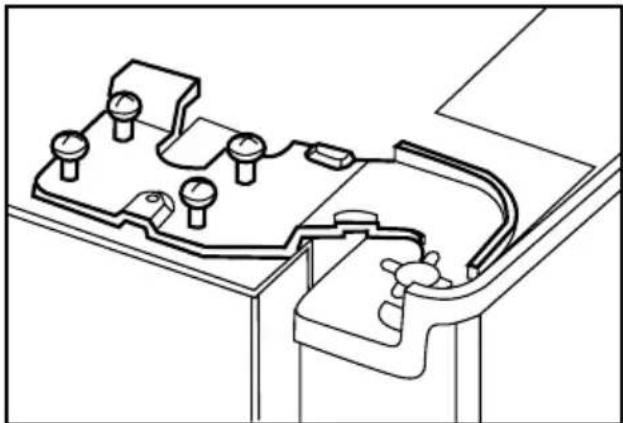
1- Ventilation cover is removed by unscrewing its screws as illustrated in the figure before the procedure.
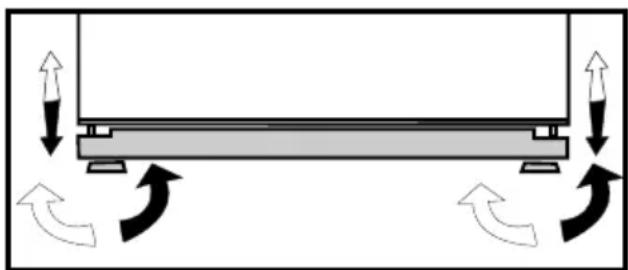
You can balance your refrigerator by turning the front legs of it as illustrated in the figure. The corner where the leg exists is lowered when you turn in the direction of black arrow and raised when you turn in the opposite direction. Taking help from someone to slightly lift the refrigerator will facilitate this process.
2. After the balance issue is remedied, install back the ventilation cover and fasten the screws.

natural_image
Diagram of a mechanical or electrical component with directional arrows indicating motion, no text or symbols present- Remove the screws fastening the lower ventilation cover using a Philips screwdriver.
Adjusting the gap between the upper door

natural_image
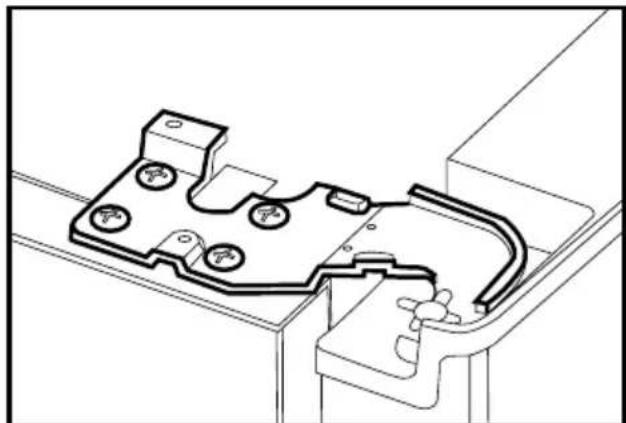
Simple line drawing of a refrigerator with double doors and side drawers (no text or symbols)You can adjust the gap between the fridge compartment doors as illustrated in the figures. Door shelves should be empty when adjusting the door height.

natural_image
Technical line drawing of a mechanical component with an upward arrow indicating motion (no text or symbols)Using a screwdriver, remove the screw of upper hinge cover of the door you want to adjust.

natural_image
Technical line drawing of a mechanical housing or enclosure component (no text or symbols)
natural_image
Technical line drawing of a mechanical component with multiple ports and mounting brackets (no text or symbols)i Adjust the door appropriately as you desire by loosing the screws.
⑧ Fix the door you have adjusted by tightening the screws without changing the position of the door.

natural_image
Technical diagram of a mechanical assembly with pressure gauge and housing (no text or labels)
natural_image
Technical line drawing of a mechanical bracket or clamp component (no text or symbols)i Replace the hinge cover and fix with the screw.
4 Preparation
Your refrigerator should be installed at least 30 cm away from heat sources such as hobs, ovens, central heater and stoves and at least 5 cm away from electrical ovens and should not be located under direct sunlight.
The ambient temperature of the room where you install your refrigerator should at least be 10irc C. Operating your refrigerator under cooler conditions than this is not recommended with regard to its efficiency.
i Please make sure that the interior of your refrigerator is cleaned thoroughly.
i If two refrigerators are to be installed side by side, there should be at least 2 cm distance between them.
When you operate your refrigerator for the first time, please observe the following instructions during the initial six hours.
- The door should not be opened frequently.
- It must be operated empty without any food in it.
- Do not unplug your refrigerator. If a power failure occurs out of your control, please see the warnings in the “Recommended solutions for the problems” section.
i Original packaging and foam materials should be kept for future transportations or moving.
5 Using your refrigerator
Indicator Panel
This touch-control indicator panel allows you to set the temperature without opening the door of your refrigerator. Just touch the relevant button with your finger to set the temperature.
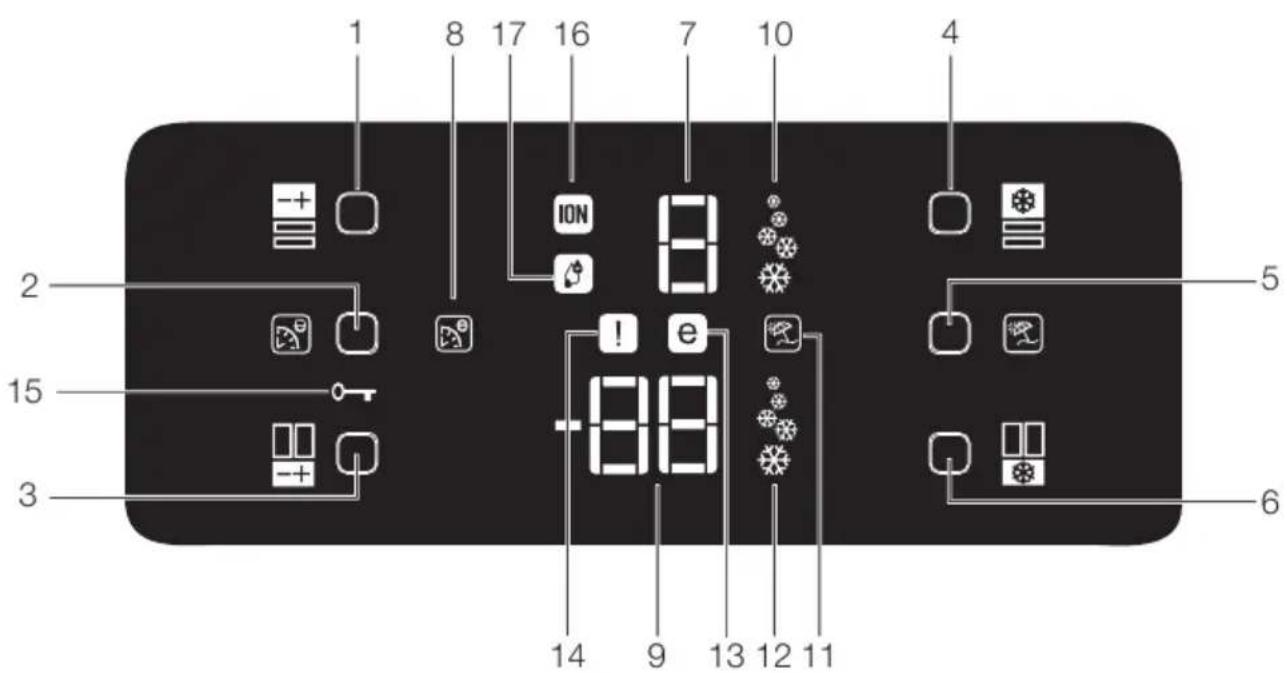
- Fridge Compartment Temperature Setting Button
- Eko-Ekstra Button
- Freezer Compartment Temperature Setting Button
- Quick Cool Button
- Vacation Button
- Fast Freeze Button
- Fridge Compartment Temperature Indicator
-
Eco Extra Function Indicator
-
Freezer Compartment Temperature Indicator
- Quick Cool Function Indicator
- Vacation Function Indicator
- Quick Freeze Function Indicator
- Economy Mode Indicator
- Error Status Indicator
- Key Lock Indicator
- Ionizer Indicator Light
- Humidity Indicator
1- Fridge Compartment Temperature Setting Button
Press this button to set the temperature of the fridge compartment to 8, 6, 4, 2, 8... respectively. Press this button to set the desired temperature for the Fridge Compartment.
2- Eko-Ekstra Button
Press this button briefly to activate the Eco Extra function.
3- Freezer Compartment Temperature Setting Button
Press this button to set the temperature of the freezer compartment to -18, -20, -22, -24, -18... respectively. Press this button to set the desired temperature for the Freezer Compartment.
4. Quick CoolButton
Press this button briefly to activate the Quick Cool function. Press this button again to deactivate the selected function.
5- Vacation Button
Press this button briefly to activate the Vacation function. To stop ice formation, press the same button for 3 seconds.
6- Fast Freeze Button
Press this button briefly to activate the Fast Freeze function. Press this button again to deactivate the selected function.
7- Fridge Compartment Temperature Indicator
Indicates the temperature set for Fridge Compartment.
8- Eco Extra Function Indicator
Indicates that the Eco Extra function is active. If this function is active, your refrigerator will automatically detect the least usage periods and energy-efficient cooling will be performed during those times. Economy indicator will be active while energy-efficient cooling is performed.
9- Freezer Compartment Temperature Indicator
It indicates the temperature set for Freezer Compartment.
10- Quick Cool Function Indicator
Indicates that the Quick Cool function is active. Use this function when you place fresh food into the fridge compartment or when you need to cool your food quickly. When this function is active, your refrigerator will run for 2 hours without stopping.
Press the relevant button again to deactivate this function.
11- Vacation Function Indicator
Indicates that the vacation function is active. If this function is active, "-" appears on the indicator of the fridge compartment and no cooling is performed in the fridge compartment. Other compartments will be cooled in accordance with the temperature set for them.
Press the relevant button again to deactivate this function.
12- Quick Freeze Function Indicator
Indicates that the Quick Freezer function is active. Use this function when you place fresh food into the freezer compartment or when you need ice. When this function is active, your refrigerator will run for 6 hours without stopping.
Press the relevant button again to deactivate this function.
13- Economy Mode Indicator
Indicates that the refrigerator is running in energy-efficient mode. This indicator will be active if the Freezer Compartment temperature is set to -18 or the energy efficient cooling is being performed due to Eco-Extra function.
14- Error Status Indicator
If your refrigerator does not cool adequately or if there is a sensor failure, this indicator will be activated. When this indicator is active, Freezer Compartment Temperature indicator will display "E" and Fridge Compartment Temperature Indicator will display numbers such as "1,2,3...". These numbers on the indicator provides information about the error to the service personnel.
15- Key Lock Indicator
Use this function if you do not want your refrigerator temperature setting changed. Press Eco Extra Button and Freezer Compartment Temperature Setting Button simultaneously for a long time (3 sec) to activate this feature.
Press the relevant buttons again to deactivate this function.
16- Ionizer Indicator Light
Indicator light lights up continuously. This light indicates that your refrigerator is protected against the bacteria.
17- Humidity Indicator
Indicator light lights up continuously. This light indicates that the food kept in the refrigerator is preserved for a long time under ideal humidity.
Egg tray
You can install the egg holder to the desired door or body shelf.
Never store the egg holder in the freezer compartment
Sliding Body Shelves
Sliding body shelves can be pulled by slightly lifting up from the front and moved back and forth. They come to a stop point when pulled towards front to allow you reach the foods placed at the back of the shelf; when it is pulled after slightly lifted upwards at the second stop point, the body shelf will be released.
The shelf should be hold tightly from the bottom as well in order to prevent it from tipping over. The body shelf is placed on the rails at the sides of the refrigerator body by bringing it to one lower or one upper level.
The body shelf should be pushed backwards to seat it completely.

Chiller compartment
Chiller compartments enable the foods to be frozen become ready for freezing. You can also use these compartments to store your food at a temperature a few degrees below the fridge compartment.
You can increase the inner volume of your refrigerator by removing any of the chiller compartments. To do this, pull the compartment towards yourself; the compartment will lean against the stopper and stop. This compartment will be released when you lift it about 1 cm and pull it towards yourself.

natural_image
Line drawing of an open refrigerator interior showing internal compartments and ventilation grilles (no text or symbols)
natural_image
Interior view of a refrigerator showing open doors, shelves, and doorways (no text or symbols visible)
natural_image
Line drawing of a person installing or adjusting a door panel inside a kitchen appliance (no text or symbols)
natural_image
Interior view of a refrigerator showing a hand inserting a tray into the refrigerator (no text or symbols visible)
natural_image
Line drawing of a refrigerator interior showing hand cleaning the door panel (no text or symbols)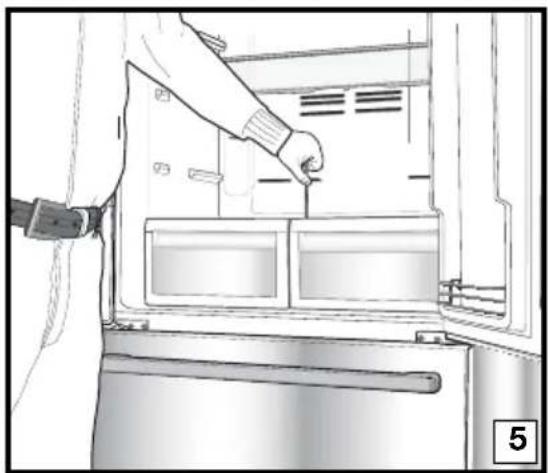
natural_image
Line drawing of a person inserting a component into a refrigerator (no text or symbols visible)
natural_image
Line drawing of a hand inserting a tray into an oven (no text or symbols)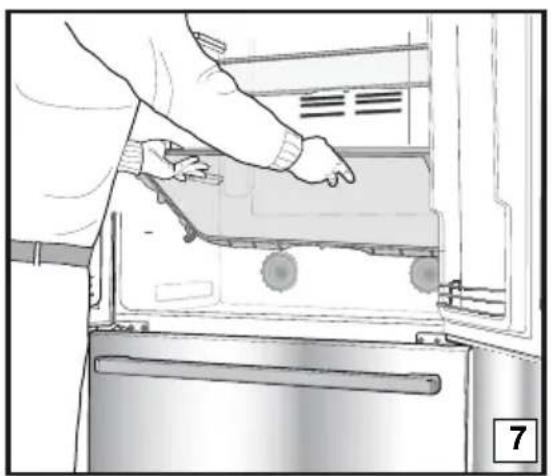
natural_image
Person opening a refrigerator with visible door, handle, and scroll (no text or symbols)Crisper
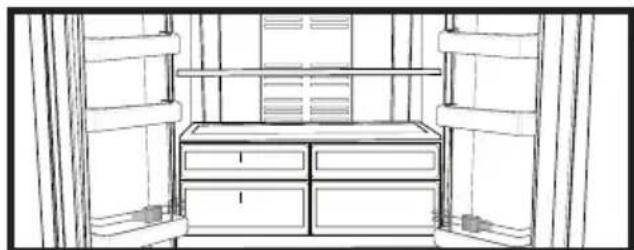
Crisper of your refrigerator is designed specially to keep your vegetables freshly without loosing their humidity. For this purpose, cool air circulation occurs around the crisper in general. Remove the door shelves that align with the crisper before removing the crispers. You can remove the crispers as illustrated in the figure.
Movable Middle Section
Movable middle section is intended to prevent the cold air inside your refrigerator from escaping outside.
1- Sealing is provided when the gaskets on the door presses on the surface of the movable middle section while the fridge compartment doors are closed.
2- Another reason that your refrigerator is equipped with a movable middle section is that it increases the net volume of the fridge compartment. Standard middle sections occupy some non-usable volume in the refrigerator.
3- Movable middle section is closed when the left door of the fridge compartment is closed.
4- It must not be opened manually. It moves under the guidance of the plastic part on the body while the door is closed.
Blue light
Foodstuff stored in the crispers that are enlightened with a blue light continue their photosynthesis by means of the wavelength effect of blue light and thus, preserve their freshness and increase their vitamin content.
natural_image
Line drawing of a room interior with drawers and storage cabinets (no text or symbols)
natural_image
Line drawing of a refrigerator interior with a checkmark overlay (no text or symbols)
natural_image
Technical line drawing of a mechanical assembly with a cross symbol overlay (no text or labels)Telescopic Drawer
Pay attention not to squeeze any parts of your body such as hands, feet and etc. between the movable parts while the drawer is in use in order to avoid any injury.
You can remove the partition in the drawer as illustrated when you want to clean it.
You can remove the drawers only for cleaning. It is not possible to group the drawers in their places after loading them with food when they are removed.

natural_image
Technical line drawings showing two views of a mechanical device with hands adjusting parts (no text or symbols present)Door Open Alarm:
When the door of the fridge compartment remains open for 1 minute, an audible Door Open Alarm will be activated and heard. Just press any button on the indicator or close the open door to silence the alarm.
Dual cooling system:
Your refrigerator is equipped with two separate cooling systems to cool the fresh food compartment and freezer compartment. Thus, air in the fresh food compartment and freezer compartment do not get mixed. Thanks to these two separate cooling systems, cooling speed is much higher then other refrigerators. Odours in the compartments do not get mixed. Also additional power saving is provided since the defrosting is performed individually.
| Freezer Compartment Adjustment | Fridge Compartment Adjustment | Explanations |
| -18°C 4°C This is the normal recommended setting. | ||
| -20,-22 or -24°C 4°C | These settings are recommended when the ambient temperature exceeds 30°C. | |
| Quick Freeze | 4°C | Use when you wish to freeze your food in a short time. Your refrigerator will return to its previous mode when the process is over. |
| -18°C or colder 2°C | If you think that your fridge compartment is not cold enough because of the hot conditions or frequent opening and closing of the door. | |
| -18°C or colder Quick Fridge | You can use it when your fridge compartment is overloaded or if you wish to cool down your food rapidly. It is recommended that you activate quick fridge function 4-8 hours before placing the food. | |
Freezing fresh food
- It must be preferred to wrap or cover the food before placing them in the refrigerator.
- Hot food must cool down to the room temperature before putting them in the refrigerator.
- The foodstuff that you want to freeze must be fresh and in good quality.
- Foodstuff must be divided into portions according to the family's daily or meal based consumption needs.
- The foodstuff must be packaged in an airtight manner to prevent them from drying even if they are going to be kept for a short time.
- Materials to be used for packaging must be tear-proof and resistant to cold, humidity, odor, oils and acids and they must also be airtight. Moreover, they must be well closed and they must be made from easy-to-use materials that are suitable for deep freeze usage.
- Frozen food must be used immediately after they are thawed and they should never be re-frozen.
- Please observe the following instructions to obtain the best results.
- Do not freeze too large quantities
of food at one time. The quality of the food is best preserved when it is frozen right through to the core as quickly as possible.
- Placing warm food into the freezer compartment causes the cooling system to operate continuously until the food is frozen solid.
- Take special care not to mix already frozen food and fresh food.
Recommendations for preservation of frozen food
- Prepacked commercially frozen food should be stored in accordance with the frozen food manufacturer's instructions for a * frozen food storage compartment.
-
To ensure that the high quality achieved by the frozen food manufacturer and the food retailer is maintained, the following should be remembered:
-
Put packages in the freezer as quickly as possible after purchase.
- Ensure that contents are labeled and dated.
- Do not exceed "Use By", "Best Before" dates on the packaging.
Defrosting
The freezer compartment defrosts automatically.
Placing the food
| Freezer compartment shelves | Various frozen food such as meat, fish, ice cream, vegetables and etc. |
| Egg tray Egg | |
| Fridge compartment shelves | Food in pans, covered plates and closed containers |
| Fridge compartment door shelves | Small and packaged food or drinks (such as milk, fruit juice and beer) |
| Crisper Vegetables and fruits | |
| Freshzone compartment | Delicatessen products (cheese, butter, salami and etc.) |
Deep-freeze information
Food must be frozen as rapidly as possible when they are put in a refrigerator in order to keep them in good quality.
The TSE norm requires (according to certain measurement conditions) the refrigerator to freeze at least 4.5 kg of foodstuff at 32irc C ambient temperature to -18irc C or lower within 24 hours for every 100-liters of freezer volume.
It is possible to keep the food for a long time only at -18irc C or lower temperatures.
You can keep the freshness of food for many months (at -18°C or lower temperatures in the deep freeze).
WARNING!
- Foodstuff must be divided into portions according to the family’s daily or meal based consumption needs.
- Foodstuff must be packaged in an airtight manner to prevent them from drying even if they are going to be kept for a short time.
Materials necessary for packaging:
- Cold resistant adhesive tape
- Self adhesive label
- Rubber rings
- Pen
Materials to be used for packaging the foodstuff must be tear-proof and resistant to cold, humidity, odor, oils and acids.
Foodstuff to be frozen should not be allowed to come in contact with the previously frozen items to prevent their partial thawing.
Frozen food must be used immediately after they are thawed and they should never be re-frozen.
6 Maintenance and cleaning
⚠️ Never use gasoline, benzene or similar substances for cleaning purposes.
⚠️ We recommend that you unplug the appliance before cleaning.
△ Never use any sharp abrasive instrument, soap, household cleaner, detergent and wax polish for cleaning.
Use lukewarm water to clean the cabinet of your refrigerator and wipe it dry.
Use a damp cloth wrung out in a solution of one teaspoon of bicarbonate of soda to one pint of water to clean the interior and wipe it dry.
⚠️ Make sure that no water enters the lamp housing and other electrical items.
⚠️ If your refrigerator is not going to be used for a long period of time, unplug the power cable, remove all food, clean it and leave the door ajar.
Check door seals regularly to ensure they are clean and free from food particles.
⚠️ To remove door racks, remove all the contents and then simply push the door rack upwards from the base.
Protection of plastic surfaces
Do not put the liquid oils or oil-cooked meals in your refrigerator in unsealed containers as they damage the plastic surfaces of your refrigerator. In case of spilling or smearing oil on the plastic surfaces, clean and rinse the relevant part of the surface at once with warm water.
7 Recommended solutions for the problems
Please review this list before calling the service. It might save you time and money. This list includes frequent complaints that are not arising from defective workmanship or material usage. Some of the features described here may not exist in your product.
| The refrigerator does not operate. |
| • Is the refrigerator properly plugged in? Insert the plug to the wall socket.• Is the fuse of the socket which your refrigerator is connected to or the main fuse blown out? Check the fuse. |
| Condensation on the side wall of the fridge compartment (MULTIZONE, COOL CONTROL and FLEXI ZONE). |
| • Very cold ambient conditions. Frequent opening and closing of the door. Highly humid ambient conditions. Storage of food containing liquid in open containers.Leaving the door ajar. Switching the thermostat to a colder degree.• Decreasing the time the door left open or using it less frequently.• Covering the food stored in open containers with a suitable material.• Wipe the condensation using a dry cloth and check if it persists. |
| Compressor is not running |
| • Protective thermic of the compressor will blow out during sudden power failures or plug-out plug-ins as the refrigerant pressure in the cooling system of the refrigerator has not been balanced yet. Your refrigerator will start running approximately after 6 minutes. Please call the service if the refrigerator does not startup at the end of this period.• The fridge is in defrost cycle. This is normal for a full-automatically defrosting refrigerator. Defrosting cycle occurs periodically.• Your refrigerator is not plugged into the socket. Make sure that the plug is properly fit into the socket.• Are the temperature adjustments correctly made?• Power might be cut off. |
| The fridge is running frequently or for a long time. |
- Your new product may be wider than the previous one. This is quite normal. Large refrigerators operate for a longer period of time.
- The ambient room temperature may be high. This is quite normal.
- The refrigerator might have been plugged in recently or might have been loaded with food. Cooling down of the refrigerator completely may last for a couple of hours longer.
- Large amounts of hot food might have been put in the refrigerator recently. Hot food causes longer running of the refrigerator until they reach the safe storage temperature.
- Doors might have been opened frequently or left ajar for a long time. The warm air that has entered into the refrigerator causes the refrigerator to run for longer periods. Open the doors less frequently.
- Freezer or fridge compartment door might have been left ajar. Check if the doors are tightly closed.
- The refrigerator is adjusted to a very low temperature. Adjust the refrigerator temperature to a warmer degree and wait until the temperature is achieved.
- Door seal of the fridge or freezer may be soiled, worn out, broken or not properly seated. Clean or replace the seal. Damaged/broken seal causes the refrigerator to run for a longer period of time in order to maintain the current temperature.
Freezer temperature is very low while the fridge temperature is sufficient. - The freezer temperature is adjusted to a very low temperature. Adjust the freezer temperature to a warmer degree and check.
Fridge temperature is very low while the freezer temperature is sufficient. - The fridge temperature might have been adjusted to a very low temperature. Adjust the fridge temperature to a warmer degree and check.
Food kept in the fridge compartment drawers are freezing. - The fridge temperature might have been adjusted to a very low temperature. Adjust the fridge temperature to a warmer degree and check.
Temperature in the fridge or freezer is very high. - The fridge temperature might have been adjusted to a very high degree. Fridge adjustment has an effect on the temperature of the freezer. Change the temperature of the fridge or freezer until the fridge or freezer temperature reaches to a sufficient level.
- Doors might have been opened frequently or left ajar for a long time; open them less frequently.
- Door might have been left ajar; close the door completely.
- Large amount of hot food might have been put in the refrigerator recently. Wait until the fridge or freezer reaches the desired temperature.
- The refrigerator might have been plugged in recently. Cooling down of the refrigerator completely takes time.
The operation noise increases when the refrigerator is running. - The operating performance of the refrigerator may change due to the changes in the ambient temperature. It is normal and not a fault.
Vibrations or noise.
| ·The floor is not even or it is weak. The refrigerator rocks when moved slowly.Make sure that the floor is strong enough to carry the refrigerator, and level.·The noise may be caused by the items put onto the refrigerator. Items on top of the refrigerator should be removed. |
| There are noises coming from the refrigerator like liquid spilling or spraying. |
| ·Liquid and gas flows happen in accordance with the operating principles of your refrigerator. It is normal and not a fault. |
| There is a noise like wind blowing. |
| ·Fans are used in order to cool the refrigerator. It is normal and not a fault. |
| Condensation on the inner walls of refrigerator. |
| ·Hot and humid weather increases icing and condensation. It is normal and not a fault.·Doors might have been left ajar; make sure that the doors are closed fully.·Doors might have been opened frequently or left ajar for a long time; open them less frequently. |
| Humidity occurs on the outside of the refrigerator or between the doors. |
| ·There might be humidity in the air; this is quite normal in humid weather. When the humidity is less, condensation will disappear. |
| Bad odour inside the refrigerator. |
| ·Inside of the refrigerator must be cleaned. Clean the inside of the refrigerator with a sponge, lukewarm water or carbonated water.·Some containers or package materials might cause the smell. Use a different container or different brand packaging material. |
| The door is not closing. |
| ·Food packages may prevent the door's closing. Replace the packages that are obstructing the door.·The refrigerator is not completely upright on the floor and rocking when slightly moved. Adjust the elevation screws.·The floor is not level or strong. Make sure that the floor is level and capable to carry the refrigerator. |
| Crispers are stuck. |
| ·The food might be touching the ceiling of the drawer. Rearrange food in the drawer. |
natural_image
Diagram showing a device with a lightning bolt and cable, no text or symbols present
3 Installation
natural_image
Technical diagram of a computer monitor rear panel with mounting holes and ventilation slots (no text or labels)
natural_image
Hand holding a screwdriver inserted into a device panel, with an arrow indicating direction (no text or symbols present)natural_image
Diagram showing bidirectional arrows and curved arrows on a rectangular object, no text or symbols presentnatural_image
Simple line drawing of a double-door refrigerator with double doors and side drawers (no text or symbols)natural_image
Technical diagram of a mechanical component with an upward arrow indicating motion or force (no text or symbols present)natural_image
Technical line drawing of a mechanical component with mounting holes and internal channels (no text or symbols)natural_image
Technical line drawing of a mechanical component with mounting holes and internal channels (no text or symbols)natural_image
Technical diagram of a mechanical assembly with rotating components and directional arrows (no text or labels)
natural_image
Technical line drawing of a mechanical bracket or bracket component (no text or symbols)natural_image
Line drawing of a refrigerator interior showing front and side views (no text or symbols)
natural_image
Line drawing of an open refrigerator with visible doors, shelves, and doorways (no text or symbols)
natural_image
Line drawing of a person installing or adjusting a door panel inside a refrigerator (no text or symbols)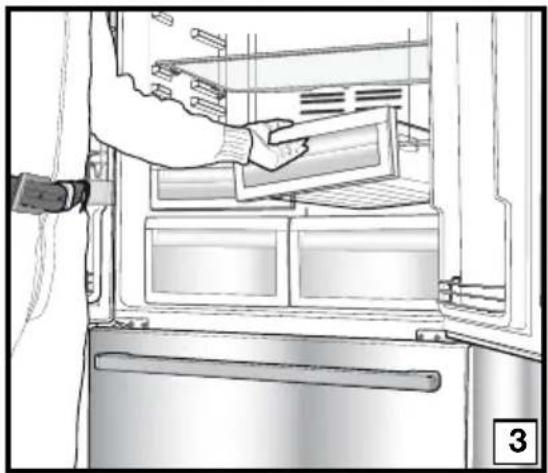
natural_image
Line drawing of a refrigerator interior showing hand placement on the door (no text or symbols)
natural_image
Interior view of a refrigerator showing a hand holding a kitchen utensil, with no visible text or symbols.
natural_image
Line drawing of a person inserting a component into a refrigerator (no text or symbols visible)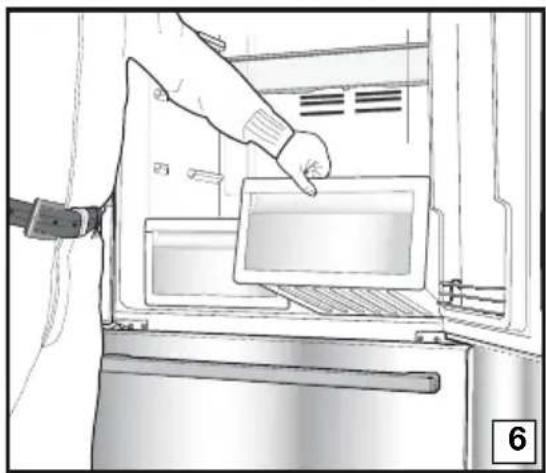
natural_image
Line drawing of a hand inserting a tray into an oven (no text or symbols)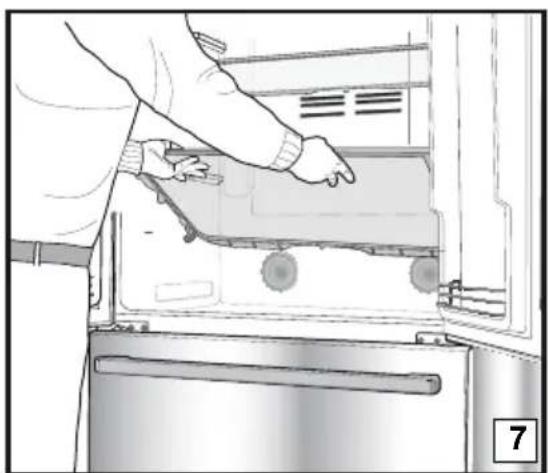
natural_image
Person opening a refrigerator with visible door, handle, and scroll wheel (no text or symbols)Gemüsefach
natural_image
Technical line drawing of a refrigerator interior with a checkmark symbol (no text or labels)
natural_image
Technical line drawing of a mechanical assembly with a cross symbol overlay (no text or labels)
natural_image
Line drawing of a cabinet interior with drawers and doors (no text or symbols)Teleskopschublade
natural_image
Technical line drawings showing two views of a mechanical device with hands adjusting parts (no text or symbols present)Tür-offen-Warnung
natural_image
Diagram showing a lightning bolt striking down on a wall-mounted device with wiring and plug (no text or symbols)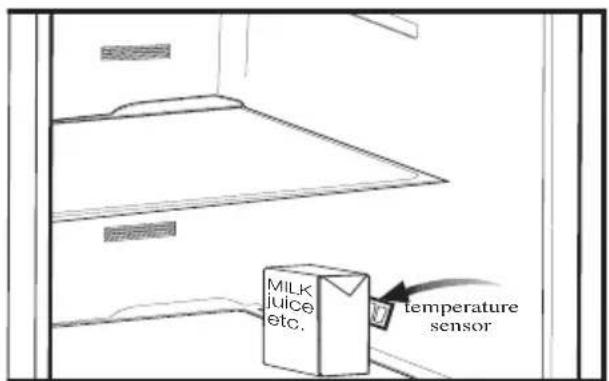
3 Installation
natural_image
Technical line drawing of a computer monitor rear panel with mounting holes and ventilation slots (no text or symbols)
natural_image
Illustration of a hand using a screwdriver to adjust or install a component, with an arrow indicating direction (no text or symbols present)natural_image
Diagram of a mechanical or structural system with directional arrows indicating motion, no text or symbols presentnatural_image
Simple line drawing of a refrigerator with double doors and side drawers (no text or symbols)natural_image
Technical line drawing of a mechanical component with an upward arrow indicating motion (no text or symbols)natural_image
Technical line drawing of a mechanical component with mounting holes and internal channels (no text or symbols)natural_image
Technical line drawing of a mechanical assembly with mounting brackets and housing (no text or symbols)natural_image
Technical diagram of a mechanical assembly with pressure gauges and housing (no text or labels)
natural_image
Technical line drawing of a mechanical bracket or clamp component (no text or symbols)natural_image
Line drawing of an open refrigerator interior showing front and side views (no text or symbols)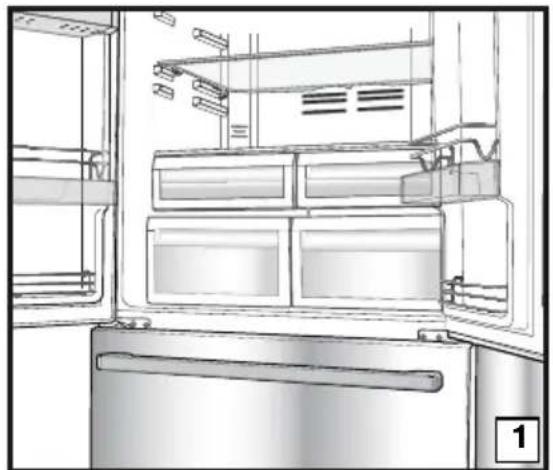
natural_image
Line drawing of an open refrigerator with visible doors, shelves, and doorways (no text or symbols)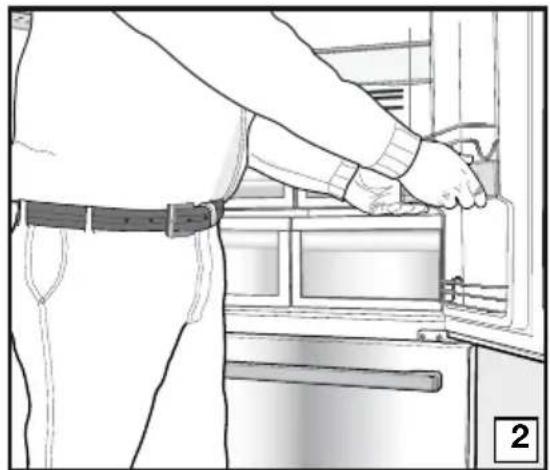
natural_image
Line drawing of a person installing or adjusting a door panel inside a refrigerator (no text or symbols)
natural_image
Line drawing of a refrigerator interior showing a hand inserting a tray into the door (no text or symbols)
natural_image
Interior view of a refrigerator showing a hand holding a kitchen utensil, with no visible text or symbols.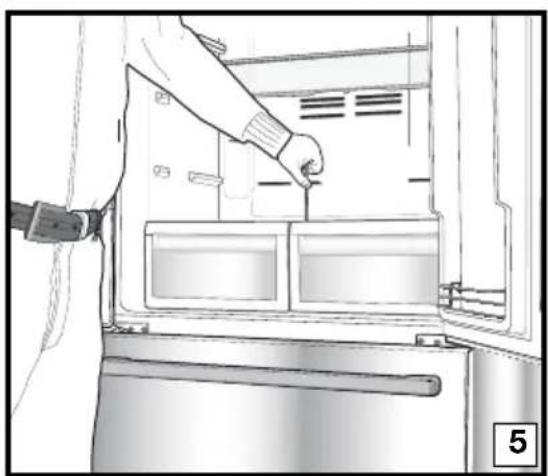
natural_image
Line drawing of a person inserting a component into a refrigerator (no text or symbols)
natural_image
Line drawing of a hand inserting a tray into an oven (no text or symbols)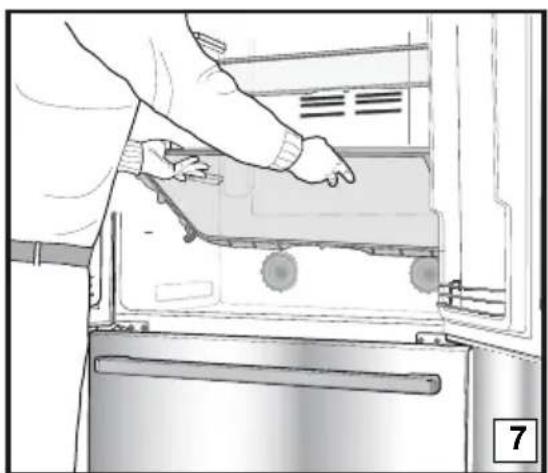
natural_image
Person opening a refrigerator with visible door, handle, and scroll wheel (no text or symbols)Bac à légumes
natural_image
Line drawing of a room interior with drawers and storage shelves (no text or symbols)
natural_image
Technical line drawing of a refrigerator interior with a checkmark overlay (no text or symbols)
natural_image
Technical line drawing of a mechanical assembly with a cross symbol overlay (no text or labels)Tiroir télescopique
natural_image
Technical line drawings showing two views of a mechanical device with hands adjusting parts (no text or symbols present)natural_image
Diagram showing a device with wires and a plug, no text or symbols present
3 Installatie
natural_image
Diagram of a computer monitor rear panel showing internal compartments and mounting points (no text or labels)
natural_image
Illustration of a hand using a screwdriver to adjust or install a component, with an arrow indicating the process (no text or symbols present)natural_image
Diagram showing a mechanical or structural system with directional arrows indicating motion or force, no text or symbols present.natural_image
Simple line drawing of a refrigerator with double doors and side drawers (no text or symbols)natural_image
Technical line drawing of a mechanical component with an upward arrow indicating motion (no text or symbols)natural_image
Technical line drawing of a mechanical component with mounting holes and internal channels (no text or symbols)natural_image
Technical line drawing of a mechanical component with mounting holes and internal channels (no text or symbols)natural_image
Technical diagram of a mechanical assembly with pressure gauges and housing (no text or labels)
natural_image
Technical line drawing of a mechanical bracket or clamp component (no text or symbols)natural_image
Line drawing of an open refrigerator interior showing front and side views (no text or symbols)
natural_image
Line drawing of an open refrigerator with visible doors, shelves, and doorways (no text or symbols)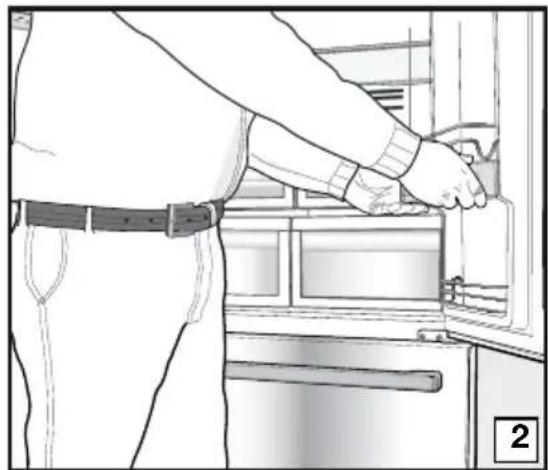
natural_image
Line drawing of a person installing or adjusting a door panel inside a kitchen appliance (no text or symbols)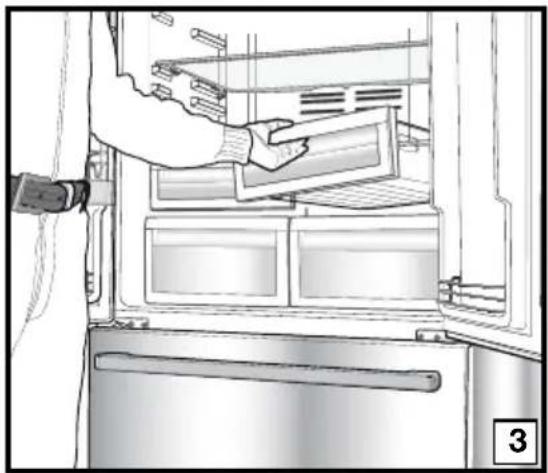
natural_image
Line drawing of a refrigerator interior showing a hand inserting a tray into the door (no text or symbols)
natural_image
Interior view of a refrigerator showing a hand holding a kitchen utensil, with no visible text or symbols.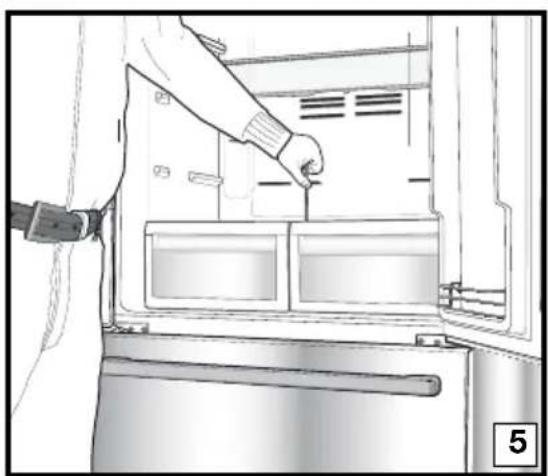
natural_image
Line drawing of a person inserting a component into a refrigerator (no text or symbols)
natural_image
Line drawing of a hand inserting a tray into an oven (no text or symbols)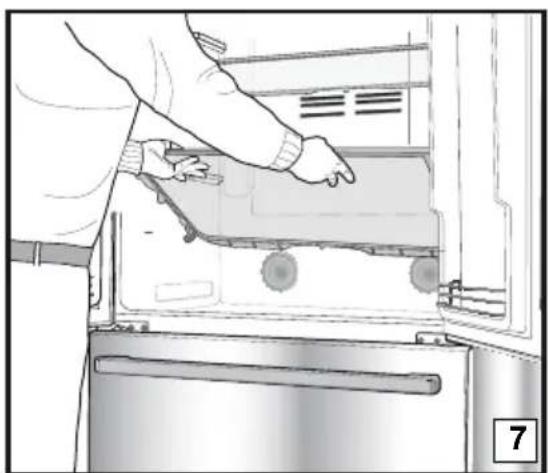
natural_image
Person opening a refrigerator with visible door, handle, and scroll wheel (no text or symbols)Groentelade
natural_image
Line drawing of a room interior with drawers and storage shelves (no text or symbols)
natural_image
Technical line drawing of a refrigerator interior with a checkmark symbol (no text or labels)
natural_image
Technical line drawing of a mechanical assembly with a cross symbol overlay (no text or labels)Uitschuiflade
natural_image
Technical line drawings showing two views of a vehicle's side table: top view and bottom view, both with hand positioning (no text or symbols)Deur Open Alarm
natural_image
Diagram showing a lightning bolt striking down an electrical socket with wires and a plug, no text or symbols present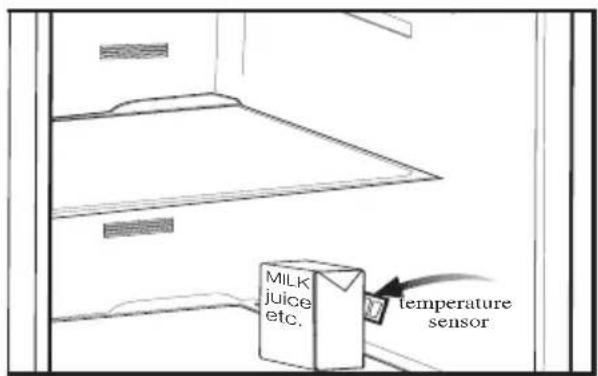
3 Installation
natural_image
Diagram of a computer monitor rear panel with ventilation grilles and mounting holes (no text or labels)
natural_image
Illustration of a hand using a screwdriver to adjust or install a component, with an arrow indicating the process (no text or symbols present)natural_image
Diagram of a mechanical or electrical component with directional arrows indicating motion, no text or symbols presentnatural_image
Line drawing of a double-door refrigerator with double doors and side drawers, no text or symbols presentnatural_image
Technical line drawing of a mechanical component with an upward arrow indicating motion (no text or symbols)natural_image
Technical line drawing of a mechanical housing or bracket component (no text or symbols)natural_image
Technical line drawing of a mechanical component with mounting holes and internal channels (no text or symbols)natural_image
Technical diagram of a mechanical assembly with rotating components and directional arrows (no text or labels)
natural_image
Technical line drawing of a mechanical bracket or clamp component (no text or symbols)natural_image
Line drawing of an open refrigerator interior showing internal compartments and ventilation slots (no text or symbols)
natural_image
Interior view of a refrigerator showing open doors, shelves, and doorways (no text or symbols visible)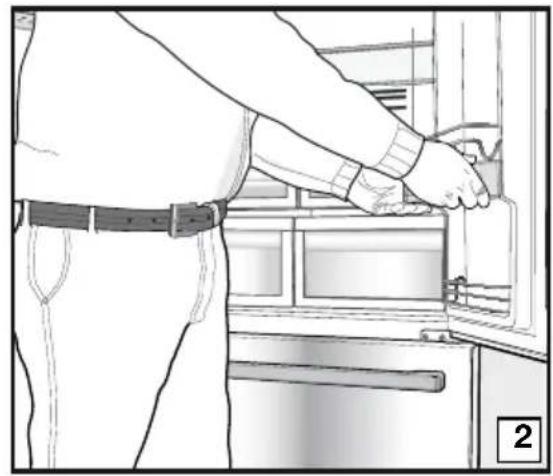
natural_image
Line drawing of a person installing or adjusting an appliance into a kitchen (no text or symbols)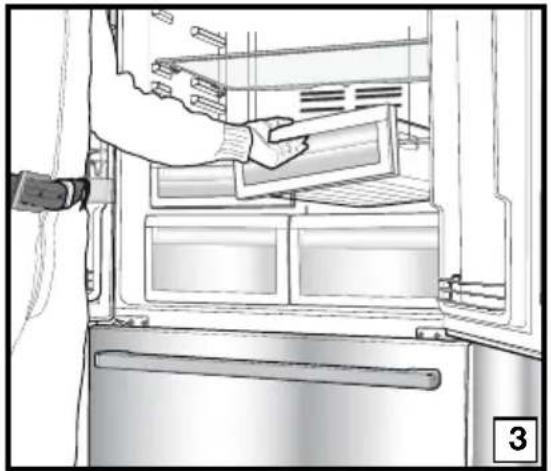
natural_image
Interior view of a refrigerator showing a hand inserting a tray into the refrigerator (no text or symbols visible)
natural_image
Line drawing of a refrigerator interior showing hand cleaning the door panel (no text or symbols)
natural_image
Line drawing of a person inserting a component into a refrigerator (no text or symbols visible)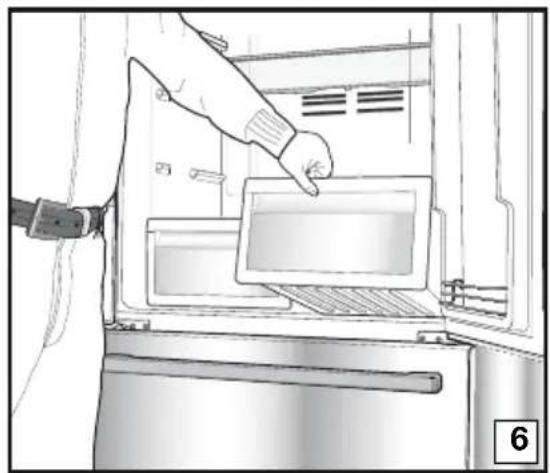
natural_image
Illustration of a hand inserting a tablet into a microwave oven (no text or symbols visible)
natural_image
Person opening a refrigerator with visible door, handle, and scroll (no text or symbols)Grøntsagsrum
natural_image
Line drawing of a cabinet interior with drawers and storage racks (no text or symbols)
natural_image
Technical line drawing of a refrigerator interior with a checkmark symbol (no text or labels)
natural_image
Technical line drawing of a mechanical assembly with a cross symbol overlay (no text or labels)Teleskopisk skuffe
natural_image
Technical line drawings showing two views of a mechanical device with hands adjusting parts (no text or symbols present)Alarm for åben dør:
natural_image
Diagram showing a device with a lightning bolt and cable, no text or symbols present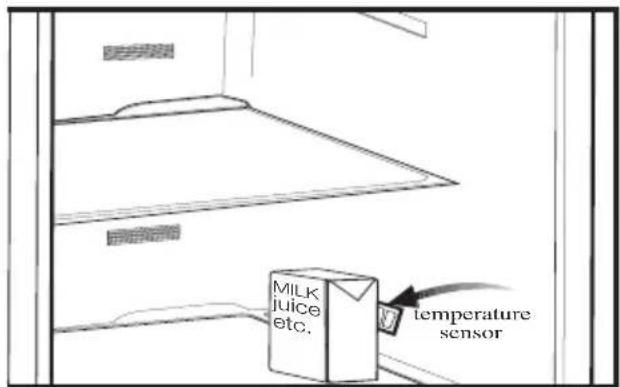
3 Installazione
natural_image
Diagram of a computer monitor rear panel with ventilation grilles and mounting holes (no text or labels)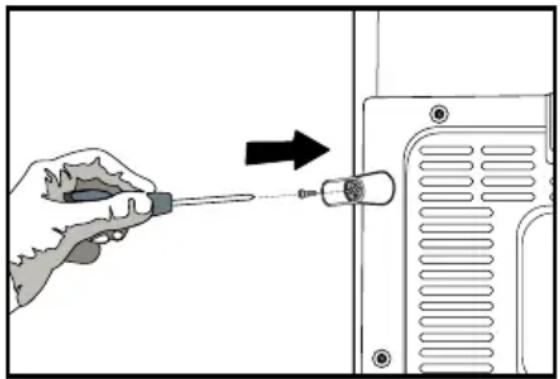
natural_image
Illustration of a hand using a screwdriver to adjust a component on a device (no text or symbols visible)natural_image
Diagram of a mechanical or electrical component with directional arrows indicating motion, no text or symbols presentnatural_image
Simple line drawing of a refrigerator with double doors and side drawers (no text or symbols)natural_image
Technical line drawing of a mechanical component with an upward arrow indicating motion (no text or symbols)natural_image
Technical line drawing of a mechanical component with mounting holes and a curved pipe (no text or symbols)
natural_image
Technical line drawing of a mechanical component with mounting holes and internal channels (no text or symbols)natural_image
Technical diagram of a mechanical assembly with rotating components and directional arrows indicating motion (no text or symbols)
natural_image
Technical line drawing of a mechanical bracket or bracket component (no text or symbols)natural_image
Line drawing of an open refrigerator interior showing front and side compartments (no text or symbols)
natural_image
Interior view of a refrigerator showing open doors, shelves, and storage compartments (no text or symbols visible)
natural_image
Line drawing of a person installing or adjusting a door panel inside a kitchen appliance (no text or symbols)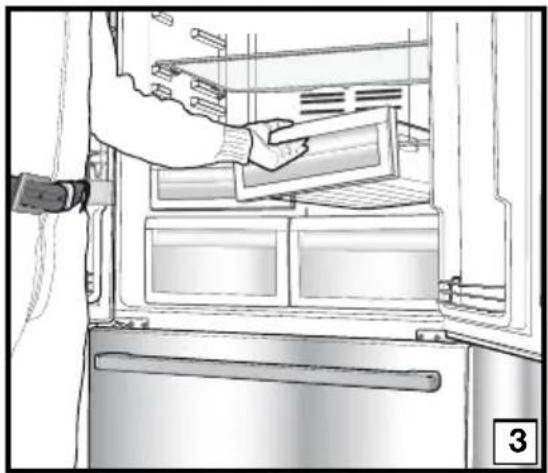
natural_image
Line drawing of a refrigerator interior showing a hand inserting a tray into the door (no text or symbols)
natural_image
Interior view of a refrigerator showing a hand holding a kitchen utensil, with no visible text or symbols.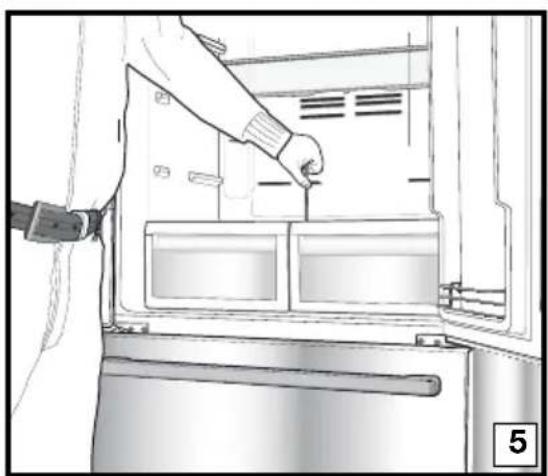
natural_image
Line drawing of a person inserting a component into a refrigerator (no text or symbols)
natural_image
Line drawing of a hand inserting a tray into an oven (no text or symbols)
natural_image
Person opening a refrigerator with visible door, handle, and scroll wheel (no text or symbols)natural_image
Technical line drawing of a door frame with a checkmark overlay (no text or symbols)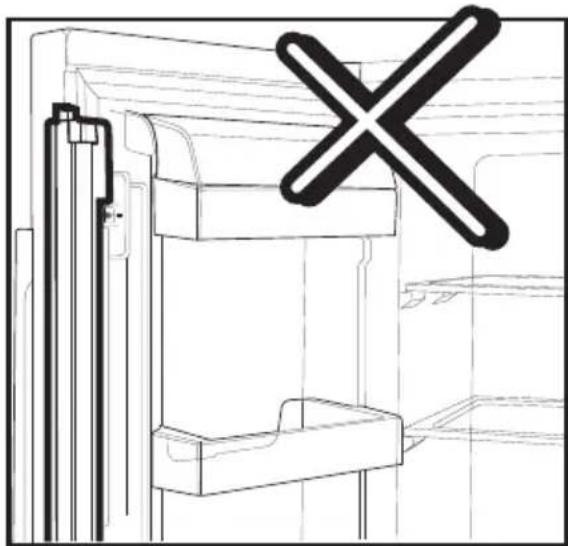
natural_image
Technical line drawing of a mechanical assembly with a cross symbol overlay (no text or labels)
natural_image
Line drawing of a cabinet interior with drawers and doors open (no text or symbols)natural_image
Technical line drawings showing two views of a mechanical device with hands adjusting parts (no text or symbols present)natural_image
Diagram of a refrigerator interior with a lightning bolt and cable, no text or symbols present
3 Asennus
natural_image
Technical line drawing of a computer monitor rear panel with mounting holes and ventilation slots (no text or symbols)
natural_image
Illustration of a hand using a screwdriver to adjust or install a component, with no visible text or symbols.natural_image
Diagram showing a mechanical or structural component with directional arrows indicating motion, no text or symbols present.natural_image
Simple line drawing of a double-door refrigerator with no text or symbolsnatural_image
Technical line drawing of a mechanical component with an upward arrow indicating motion (no text or symbols)natural_image
Technical line drawing of a mechanical component with mounting holes and internal channels (no text or symbols)natural_image
Technical line drawing of a mechanical component with mounting holes and internal features (no text or symbols)natural_image
Technical diagram of a mechanical assembly with rotating components and a curved arrow indicating motion (no text or symbols)
natural_image
Technical line drawing of a mechanical bracket or clamp component (no text or symbols)natural_image
Line drawing of an open refrigerator interior showing internal compartments and ventilation grilles (no text or symbols)
natural_image
Interior view of a refrigerator showing open doors, shelves, and storage compartments (no text or symbols visible)
natural_image
Line drawing of a person installing or adjusting a door panel inside a kitchen appliance (no text or symbols)
natural_image
Line drawing of a refrigerator interior showing a hand inserting a tray into the door (no text or symbols)
natural_image
Interior view of a refrigerator showing a hand holding a kitchen utensil, with no visible text or symbols.
natural_image
Line drawing of a person inserting a component into a refrigerator (no text or symbols visible)
natural_image
Line drawing of a hand inserting a tray into an oven (no text or symbols)
natural_image
Person opening a refrigerator with visible door, handle, and scroll wheel (no text or symbols)Vihanneslokero
natural_image
Technical line drawing of a refrigerator interior with a checkmark symbol (no text or labels)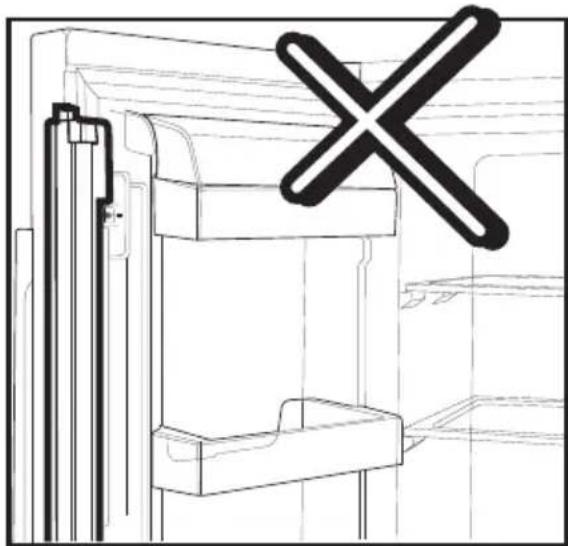
natural_image
Technical line drawing of a mechanical assembly with a cross symbol overlay (no text or labels)
natural_image
Line drawing of a cabinet interior with drawers and doors (no text or symbols)Jatkettava lokero
natural_image
Technical line drawings showing two views of a vehicle door frame, one with hand positioning and the other with foot (no text or symbols)Ovi auki -hälytys:
natural_image
Diagram showing a device with a lightning bolt and cable, no text or symbols present
3 Installasjon
natural_image
Diagram of a computer monitor rear panel with ventilation grilles and mounting holes (no text or labels)
natural_image
Illustration of a hand using a screwdriver to adjust or install a component, with an arrow indicating the process (no text or symbols present)natural_image
Diagram of a mechanical or electrical component with directional arrows indicating motion, no text or symbols presentnatural_image
Line drawing of a double-door refrigerator with vertical door and side drawers (no text or symbols)natural_image
Technical line drawing of a mechanical component with an upward arrow indicating motion (no text or symbols)i Ved bruk av en skrutrekker fjernes skruen på øvre hengseldeksel på døren du ønsker å justere.

natural_image
Technical line drawing of a mechanical component with mounting holes and a curved pipe (no text or symbols)natural_image
Technical line drawing of a mechanical component with mounting holes and internal channels (no text or symbols)natural_image
Technical diagram of a mechanical assembly with pressure gauge and housing (no text or labels)
natural_image
Technical line drawing of a mechanical bracket or clamp assembly (no text or symbols)i Sett på hengseldekslet og fest med skruen.
4 Klargjøring
natural_image
Line drawing of an open refrigerator interior showing front and side views (no text or symbols)
natural_image
Interior view of a refrigerator showing open doors, shelves, and storage compartments (no text or symbols visible)
natural_image
Line drawing of a person installing or adjusting a door panel in an appliance (no text or symbols visible)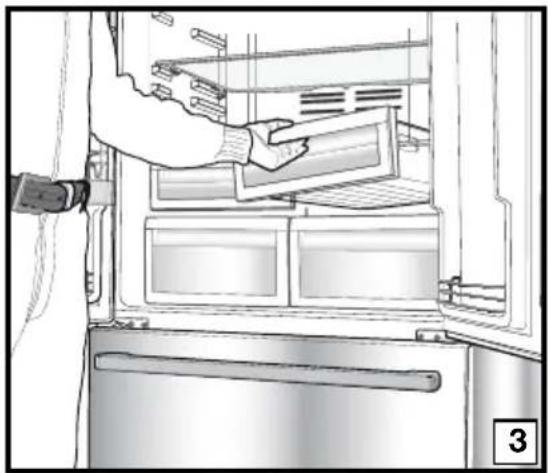
natural_image
Line drawing of a refrigerator interior showing a hand inserting a tray into the door (no text or symbols)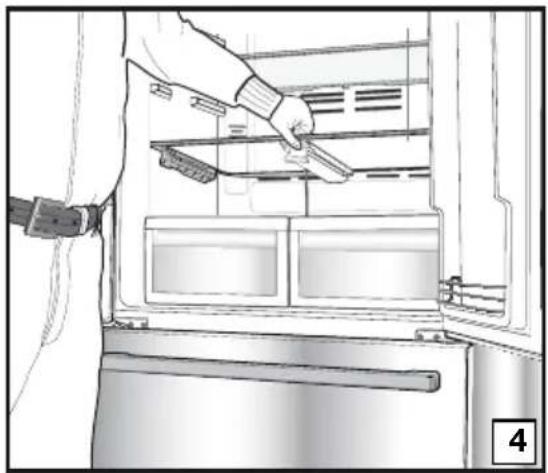
natural_image
Line drawing of a refrigerator interior showing hand holding a knife, with no visible text or symbols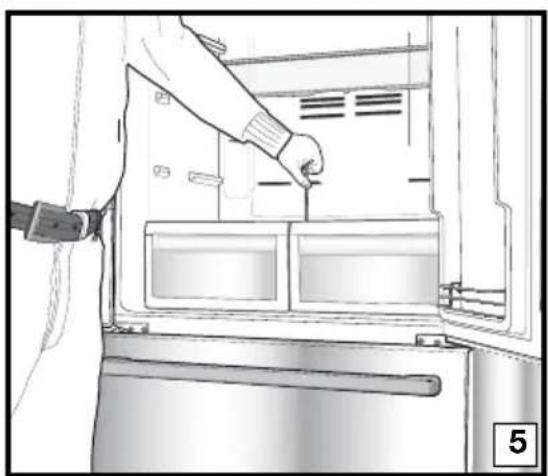
natural_image
Line drawing of a person inserting a component into a refrigerator (no text or symbols)
natural_image
Illustration of a hand inserting a tablet into a refrigerator (no text or symbols visible)
natural_image
Person opening a refrigerator with visible door, handle, and scroll wheel (no text or symbols)natural_image
Line drawing of a room interior with drawers and storage shelves (no text or symbols)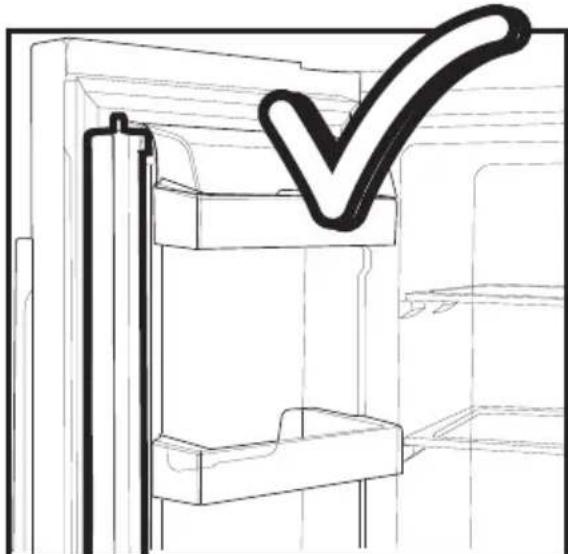
natural_image
Technical line drawing of a refrigerator interior with a checkmark symbol (no text or labels)
natural_image
Technical line drawing of a mechanical assembly with a cross symbol overlay (no text or labels)Uttrekkbar skuff
natural_image
Technical line drawings showing two views of a mechanical device with hands adjusting parts (no text or symbols present)Alarm for åpen dør:
natural_image
Diagram showing a device with a lightning bolt and cable, no text or symbols present
3 Installatie
natural_image
Technical diagram of a computer monitor rear panel with ventilation grilles and mounting holes (no text or labels)
natural_image
Illustration of a hand using a screwdriver to adjust a component on a device (no text or symbols visible)natural_image
Diagram showing a mechanical or structural component with directional arrows indicating motion, no text or symbols present.natural_image
Simple line drawing of a double-door refrigerator with no text or symbolsnatural_image
Technical line drawing of a mechanical component with an upward arrow indicating motion (no text or symbols)natural_image
Technical line drawing of a mechanical component with mounting holes and internal channels (no text or symbols)natural_image
Technical line drawing of a mechanical component with mounting holes and internal channels (no text or symbols)natural_image
Technical diagram of a mechanical assembly with rotating components and a curved arrow indicating motion (no text or symbols)
natural_image
Technical line drawing of a mechanical bracket or bracket component (no text or symbols)natural_image
Line drawing of an open refrigerator interior showing internal compartments and ventilation grilles (no text or symbols)
natural_image
Line drawing of an open refrigerator with visible doors, shelves, and doorways (no text or symbols)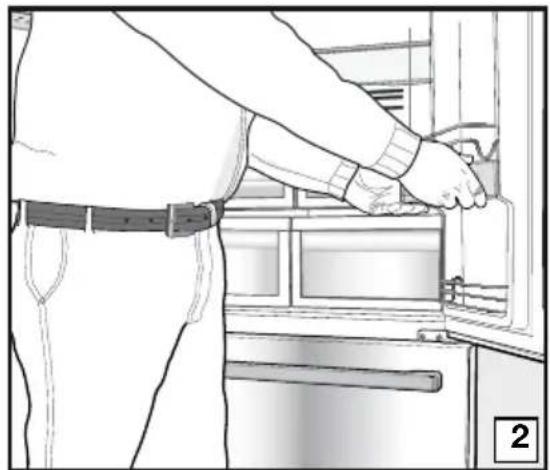
natural_image
Line drawing of a person installing or adjusting a door panel inside a refrigerator (no text or symbols)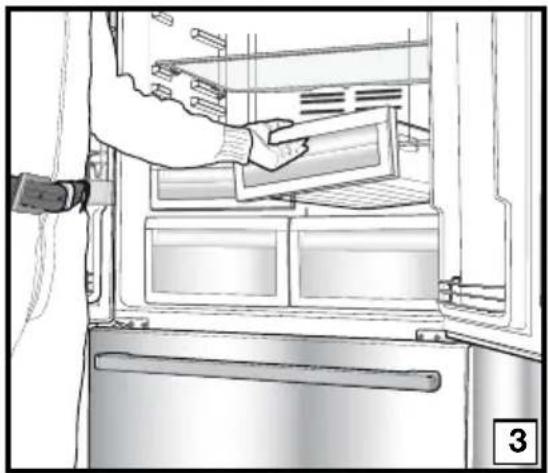
natural_image
Line drawing of a refrigerator interior showing a hand inserting a tray into the door (no text or symbols)
natural_image
Interior view of a refrigerator showing a hand holding a kitchen utensil, with no visible text or symbols.
natural_image
Line drawing of a person inserting a component into a refrigerator (no text or symbols)
natural_image
Illustration of a hand inserting a tray into an oven with a label '6' (no text or symbols on the diagram itself)
natural_image
Person opening a refrigerator with visible door and door panel (no text or symbols)Groentelade
natural_image
Line drawing of a cabinet interior with drawers and doors (no text or symbols)
natural_image
Technical line drawing of a refrigerator interior with a checkmark symbol (no text or labels)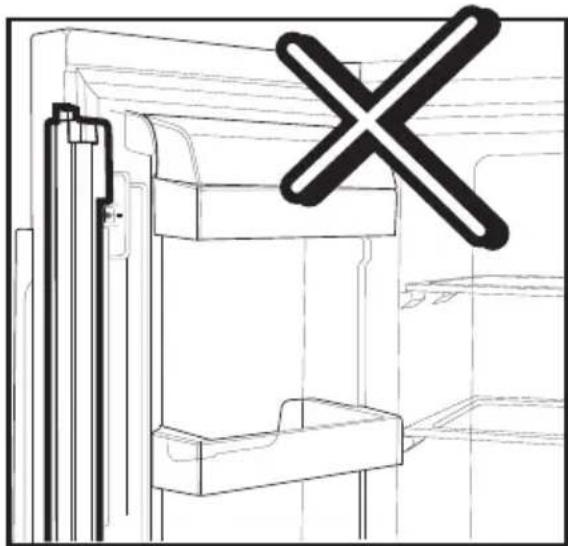
natural_image
Technical line drawing of a mechanical assembly with a cross symbol overlay (no text or labels)Uitschuiflade
natural_image
Technical line drawings showing two views of a vehicle's side table, one with hand positioning and the other with legs (no text or symbols)Deur Open Alarm:
natural_image
Pure electrical circuit lines without any symbols
natural_image
Diagram showing a lightning bolt striking down an electrical plug into a grid-patterned enclosure (no text or symbols)
3 Εγκατάσταση
natural_image
Diagram of a computer monitor rear panel showing internal compartments and mounting points (no text or labels)
natural_image
Illustration of a hand using a screwdriver to adjust or install a component on a device panel (no text or symbols visible)natural_image
Diagram showing a mechanical or structural component with directional arrows indicating motion, no text or symbols present.natural_image
Simple line drawing of a refrigerator with double doors and side drawers (no text or symbols)natural_image
Technical line drawing of a mechanical component with an upward arrow indicating motion (no text or symbols)natural_image
Technical line drawing of a mechanical component with mounting holes and internal channels (no text or symbols)
natural_image
Technical line drawing of a mechanical component with multiple cylindrical features and mounting brackets (no text or symbols)natural_image
Technical diagram of a mechanical assembly with rotating components and directional arrows (no text or labels)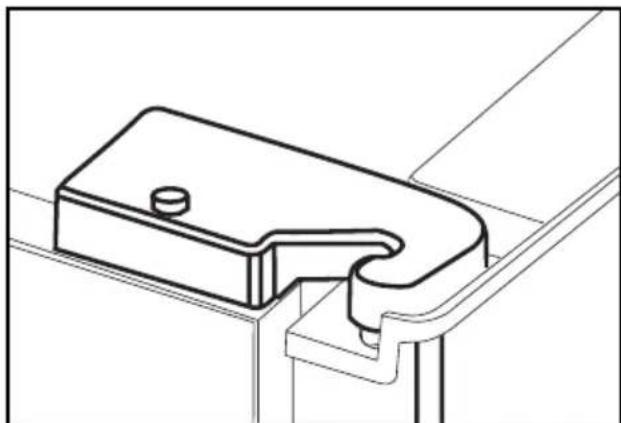
natural_image
Technical line drawing of a mechanical bracket or clamp component (no text or symbols)natural_image
Line drawing of an open refrigerator interior showing front and side views (no text or symbols)
natural_image
Line drawing of an open refrigerator with visible doors, shelves, and doorways (no text or symbols)
natural_image
Line drawing of a person installing or adjusting a door panel inside a refrigerator (no text or symbols)
natural_image
Line drawing of a refrigerator interior showing a hand inserting a tray into the door (no text or symbols)
natural_image
Interior view of a refrigerator showing a hand holding a kitchen utensil, with no visible text or symbols.
natural_image
Line drawing of a person inserting a component into a refrigerator (no text or symbols visible)
natural_image
Illustration of a hand inserting a tray into an oven with a label '6' (no text or symbols on the diagram itself)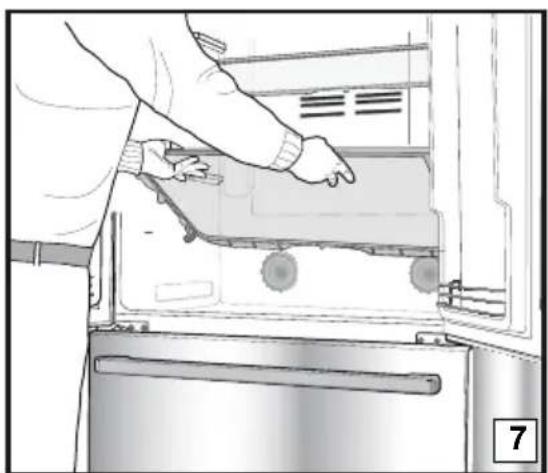
natural_image
Person opening a refrigerator with visible door, handle, and scroll wheel (no text or symbols)Συρτάρι λαχανικών
natural_image
Line drawing of a cabinet interior with drawers and doors (no text or symbols)
natural_image
Technical line drawing of a refrigerator interior with a checkmark symbol (no text or labels)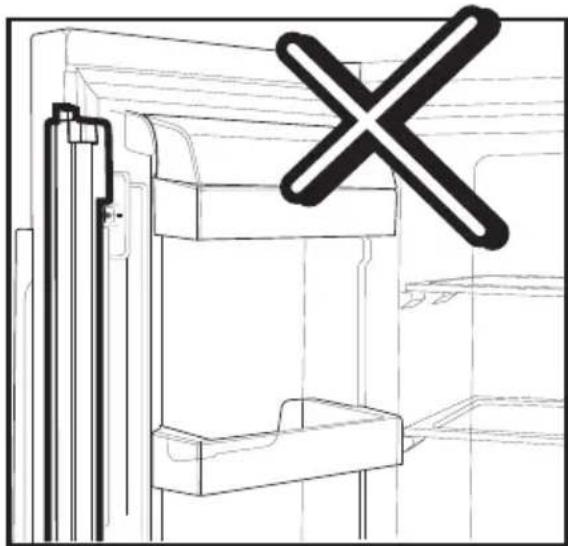
natural_image
Technical line drawing of a mechanical assembly with a cross symbol overlay (no text or labels)Τηλεσκοπικό συρτάρι
natural_image
Technical line drawings showing two views of a vehicle's side table, one with hand positioning and the other with foot (no text or symbols)natural_image
Diagram showing a lightning bolt striking down on a wall-mounted device, with wiring and plug (no text or symbols)- Ne uključujte hladnjak ako je električna utičnica labava.

3 Instalacija
⚠ Molimo imajte na umu da se proizvođač neće smatrati odgovornim ukoliko se ne budete pridržavali informacija navedenih u korisničkom priručniku.
Stvari kojih se treba pridržavati kod ponovnog transporta vašeg hladnjaka
natural_image
Diagram of a computer monitor rear panel with ventilation grilles and mounting holes (no text or labels)3.

natural_image
Hand holding a screwdriver inserted into a device panel, with an arrow indicating direction (no text or symbols present)natural_image
Diagram of a mechanical or electrical component with directional arrows indicating motion, no text or symbols presentnatural_image
Line drawing of a double-door refrigerator with double doors and side drawers, no text or symbols presentnatural_image
Technical line drawing of a mechanical component with an upward arrow indicating motion (no text or symbols)Pomoću odvijača uklonite vijak poklopca gornje šarke vrata koja želite podesiti.
natural_image
Technical line drawing of a mechanical component with mounting holes and internal channels (no text or symbols)i Podesite vrata po želji otpuštanjem vijaka.

natural_image
Technical line drawing of a mechanical component with mounting holes and internal channels (no text or symbols)natural_image
Technical diagram of a mechanical assembly with rotating components and directional arrows (no text or labels)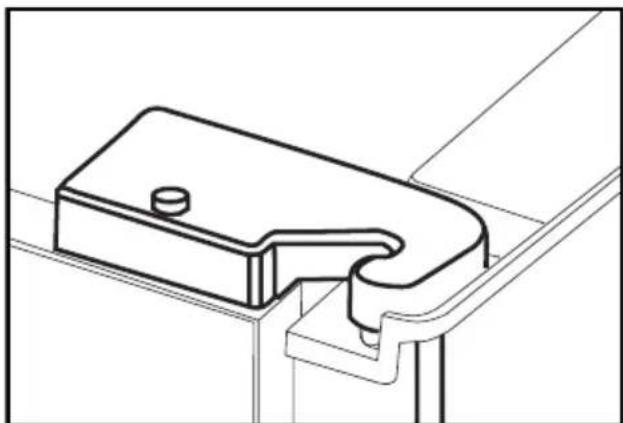
natural_image
Technical line drawing of a mechanical bracket or clamp component (no text or symbols)i Vratite poklopac šarke i pričvrstite vijkom.
4 Priprema
i Vaš hladnjak se treba postaviti najmanje 30 cm od izvora topline kao što su plamenici, pećnice, grijalice i štednjaci i najmanje 5 cm dalje od električnih pećnica te se ne smiju stavljati na direktnu sunčevu svjetlost.
i Sobna temperatura u prostoriji u koju postavite hladnjak treba biti najmanje 10°C. Rad vašeg hladnjaka u hladnijim uvjetima od navedenih se ne preporuča vezano za učinkovitost.
i Pazite da se unutrašnjost vašeg hladnjaka temeljito čisti.
Ako se dva hladnjaka trebaju instalirati jedan do drugog, između njih treba postojati razmak od najmanje 2 cm.
i Kada prvi put uključite hladnjak, molimo pridržavajte se sljedećih uputa tijekom prvih šest sati.
- Vrata se ne smiju često otvarati.
- Mora raditi prazan, bez ikakve hrane u njemu.
natural_image
Line drawing of an open refrigerator interior showing internal compartments and ventilation grilles (no text or symbols)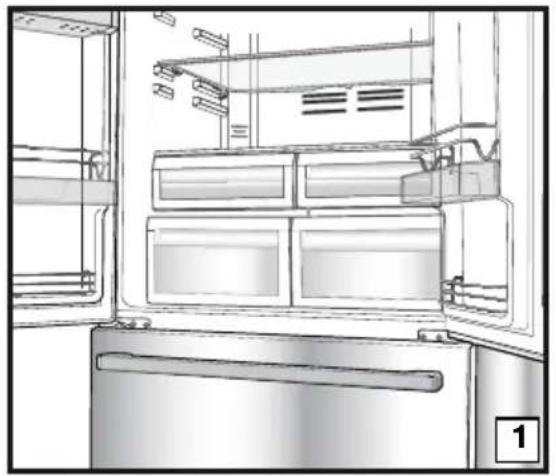
natural_image
Interior view of a refrigerator showing open doors, shelves, and doorways (no text or symbols visible)
natural_image
Line drawing of a person installing or adjusting an appliance into a kitchen (no text or symbols)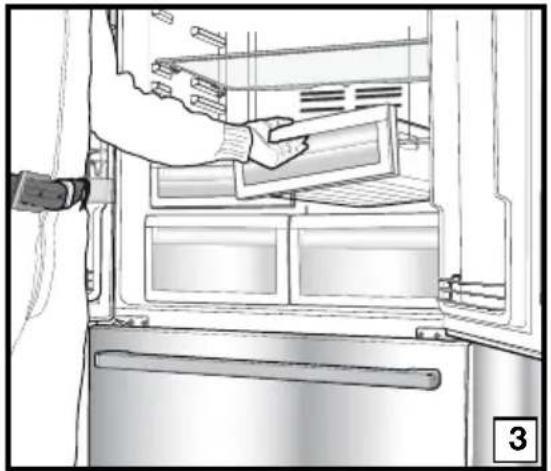
natural_image
Interior view of a refrigerator showing a hand inserting a tray into the refrigerator (no text or symbols visible)
natural_image
Line drawing of a refrigerator interior showing hand cleaning the door panel (no text or symbols)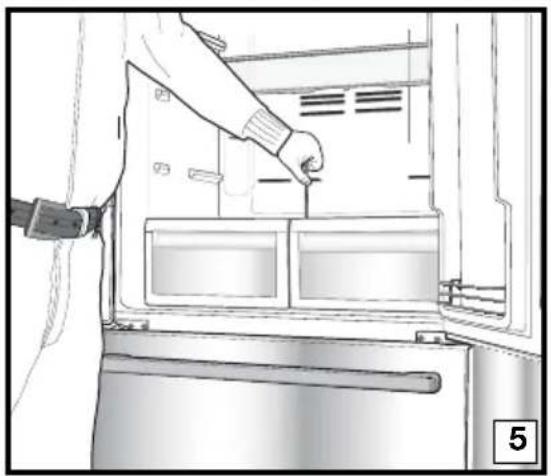
natural_image
Line drawing of a person inserting a refrigerator into a door, showing internal compartments and a handle (no text or symbols)
natural_image
Illustration of a hand inserting a tablet into a microwave oven (no text or symbols visible)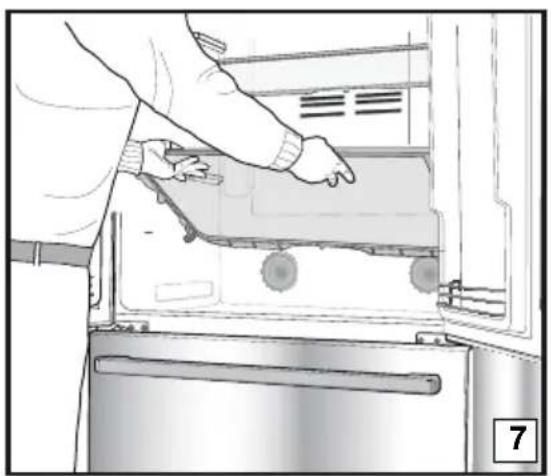
natural_image
Person opening a refrigerator with visible door, handle, and scroll (no text or symbols)Odjeljak za povrće
natural_image
Line drawing of a room interior with drawers, storage cabinets, and bookshelves (no text or symbols)
natural_image
Technical line drawing of a refrigerator interior with a checkmark symbol (no text or labels)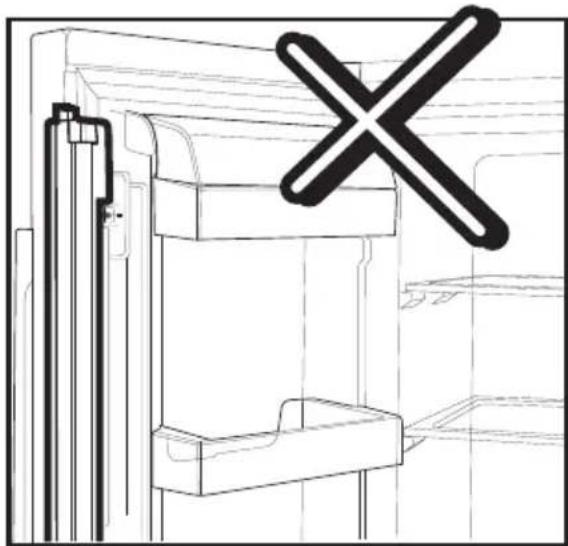
natural_image
Technical line drawing of a mechanical assembly with a cross symbol overlay (no text or labels)Teleskopska ladica
Pazite da ne zgnječite bilo kakve dijelove vašeg tijela, kao što su ruke, noge, itd. između pokretnih dijelova dok se koristi ladica da biste izbjegli svaku ozljedu.
natural_image
Technical line drawings showing two views of a mechanical device with hands adjusting parts (no text or symbols present)Alarm za otvorena vrata:
Kad vrata odjeljka hladnjaka ostanu otvorena 1 minutu, uključuje se i čuje alarm za otvorena vrata. Za utišavanje alarma, samo pritisnite bilo koju tipku na indikatoru ili zatvorite otvorena vrata.
natural_image
Diagram showing a lightning bolt striking down on a wall-mounted device with wiring and plug (no text or symbols)
3 Irengimas
natural_image
Technical diagram of a computer monitor rear panel with mounting holes and ventilation slots (no text or labels)
natural_image
Hand holding a screwdriver inserted into a device panel, with an arrow indicating direction (no text or symbols present)natural_image
Diagram showing a mechanical or structural component with directional arrows indicating motion or force (no text or symbols)natural_image
Diagram of a double-door refrigerator with double doors and side drawers, no text or symbols presentnatural_image
Technical line drawing of a mechanical component with an upward arrow indicating motion (no text or symbols)natural_image
Technical line drawing of a mechanical component with mounting holes and internal channels (no text or symbols)i Tinkamai pareguliuokite dureles, atsukdami varžtus.
natural_image
Technical line drawing of a mechanical assembly with mounting holes and internal components (no text or symbols)natural_image
Technical diagram of a mechanical assembly with rotating components and a curved arrow indicating motion (no text or symbols)
natural_image
Technical line drawing of a mechanical bracket or clamp assembly (no text or symbols)natural_image
Line drawing of a refrigerator interior showing front and side views (no text or symbols)
natural_image
Interior view of a refrigerator showing open doors, shelves, and doorways (no text or symbols visible)
natural_image
Line drawing of a person installing or adjusting an appliance into a kitchen (no text or symbols)
natural_image
Interior view of a refrigerator showing a hand inserting a tray into the refrigerator (no text or symbols visible)
natural_image
Line drawing of a refrigerator interior showing hand cleaning the door panel (no text or symbols)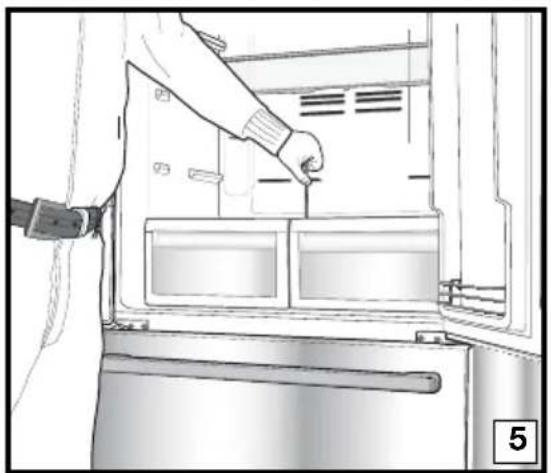
natural_image
Line drawing of a person inserting a component into a refrigerator (no text or symbols visible)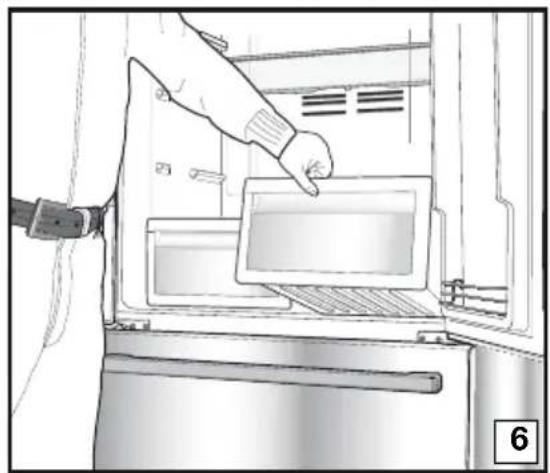
natural_image
Illustration of a hand inserting a tablet into a microwave oven (no text or symbols visible)
natural_image
Person opening a refrigerator with visible door, handle, and scroll wheel (no text or symbols)Daržovių dėtuvė
natural_image
Line drawing of a room interior with drawers and storage shelves (no text or symbols)
natural_image
Technical line drawing of a refrigerator interior with a checkmark symbol (no text or labels)
natural_image
Technical line drawing of a mechanical assembly with a cross symbol overlay (no text or labels)natural_image
Technical line drawings showing two views of a mechanical device with hands adjusting parts (no text or symbols present)natural_image
Diagram showing a lightning bolt striking a component inside a refrigerator with wiring and plug (no text or symbols)
3 Установка
natural_image
Technical diagram of a computer monitor rear panel showing internal compartments and mounting points (no text or labels)
natural_image
Illustration of a hand using a screwdriver to adjust or install a component, with an arrow indicating direction (no text or symbols present)natural_image
Diagram showing a mechanical or structural component with directional arrows indicating motion, no text or symbols present.natural_image
Simple line drawing of a refrigerator with double doors and side drawers (no text or symbols)natural_image
Technical diagram of a mechanical component with an upward arrow indicating motion or force (no text or symbols present)natural_image
Technical line drawing of a mechanical component with mounting holes and internal channels (no text or symbols)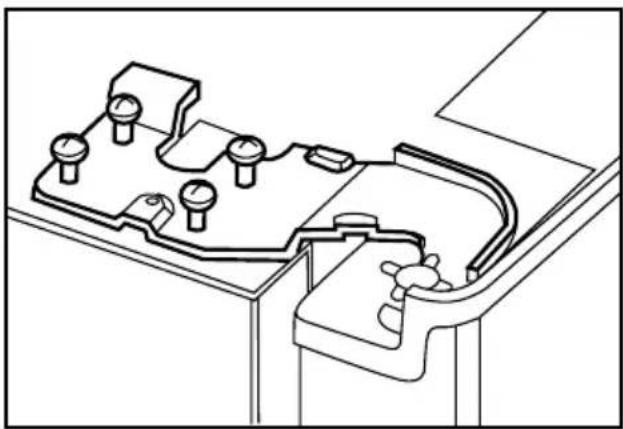
natural_image
Technical line drawing of a mechanical assembly with no visible text or symbolsnatural_image
Technical diagram of a mechanical assembly with pressure gauge and housing (no text or labels)
natural_image
Technical line drawing of a mechanical bracket or clamp assembly (no text or symbols)natural_image
Line drawing of an open refrigerator interior showing internal compartments and ventilation grilles (no text or symbols)
natural_image
Interior view of a refrigerator showing open doors, shelves, and storage compartments (no text or symbols visible)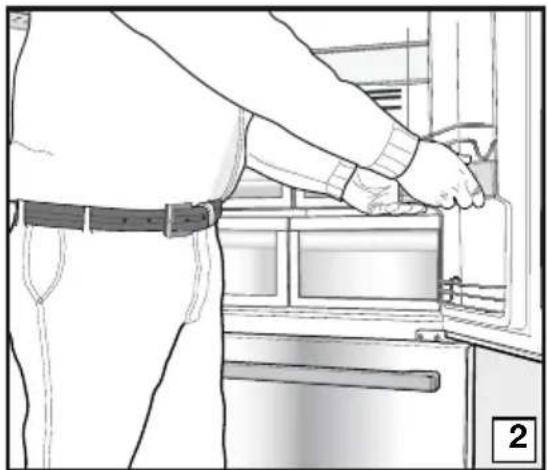
natural_image
Line drawing of a person installing or adjusting a door panel in an appliance (no text or symbols visible)
natural_image
Line drawing of a refrigerator interior showing hand placement on the door (no text or symbols)
natural_image
Interior view of a refrigerator showing a hand holding a kitchen utensil, with no visible text or symbols.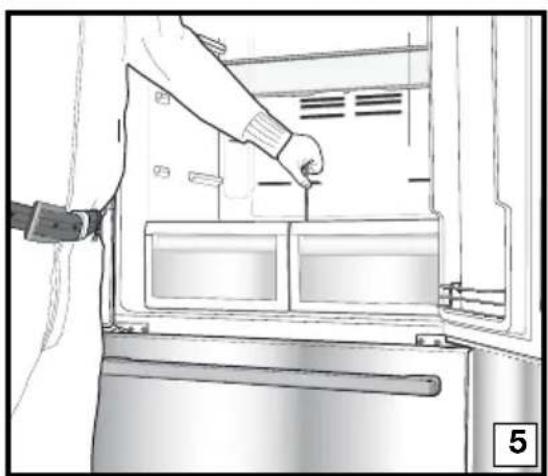
natural_image
Line drawing of a person inserting a component into a refrigerator (no text or symbols)
natural_image
Illustration of a hand inserting a tray into an oven with a label '6' (no text or symbols on the diagram itself)
natural_image
Person opening a refrigerator with visible door and door panel (no text or symbols)natural_image
Line drawing of a cabinet interior with drawers and storage racks (no text or symbols)
natural_image
Technical line drawing of a door frame with a checkmark overlay (no text or symbols)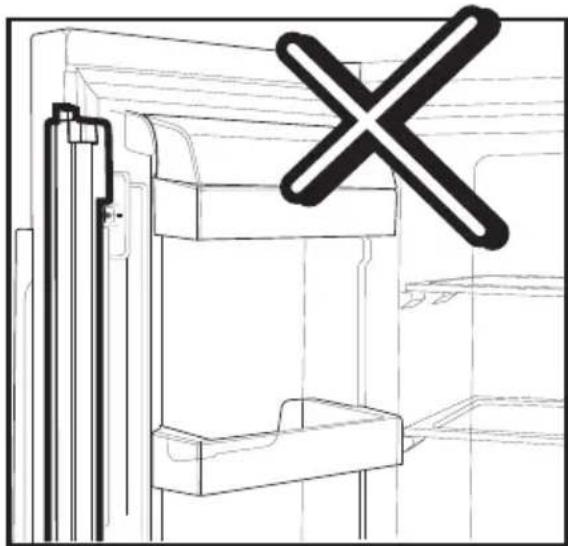
natural_image
Technical line drawing of a mechanical assembly with a cross symbol overlay (no text or labels)Выдвижной контейнер
natural_image
Technical line drawings showing two views of a mechanical device with hands adjusting parts (no text or symbols present)natural_image
Diagram showing a person using a tool to interact with a device inside a room, no text or symbols present
natural_image
Technical diagram of a computer chassis back panel with mounting holes and ventilation slots (no text or labels)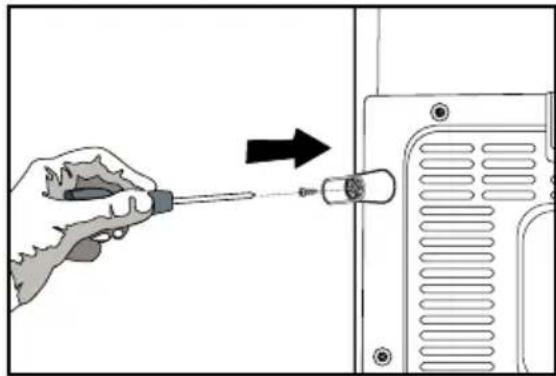
natural_image
Illustration of a hand using a screwdriver to adjust or install a component, with an arrow indicating the process (no text or symbols present)natural_image
Diagram showing a mechanical or structural component with directional arrows indicating motion, no text or symbols present.natural_image
Technical line drawing of a mechanical component with no visible text or symbolsnatural_image
Diagram of a double refrigerator with front panels and side drawers, no text or symbols present
natural_image
Technical diagram of a mechanical assembly with pressure gauge and housing (no text or labels)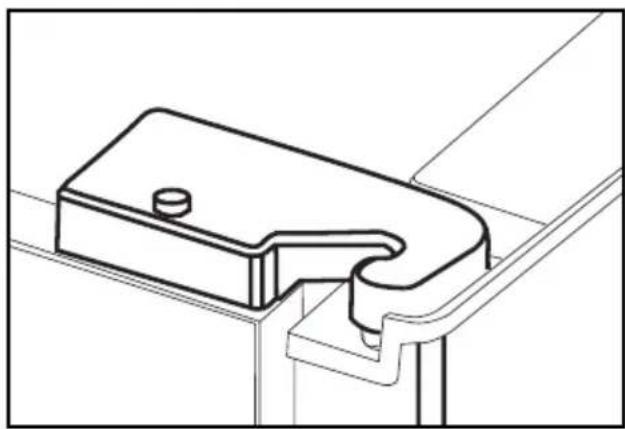
natural_image
Technical line drawing of a mechanical bracket or bracket assembly (no text or symbols)natural_image
Technical line drawing of a mechanical component with an upward arrow indicating motion (no text or symbols)natural_image
Technical line drawing of a mechanical component with mounting holes and internal channels (no text or symbols)natural_image
Line drawing of a refrigerator interior showing front and side views (no text or symbols)natural_image
Line drawing of an open refrigerator with visible doors, shelves, and doorways (no text or symbols)
natural_image
Line drawing of a person installing or adjusting a door panel in an appliance (no text or symbols visible)
natural_image
Line drawing of a refrigerator interior showing a hand inserting a tray into the door (no text or symbols)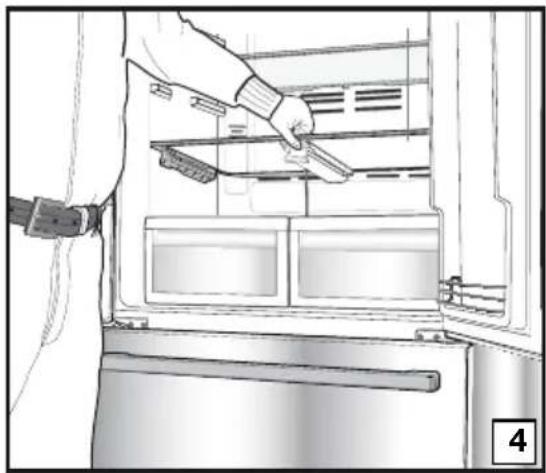
natural_image
Interior view of a refrigerator showing a hand holding a kitchen utensil, with no visible text or symbols.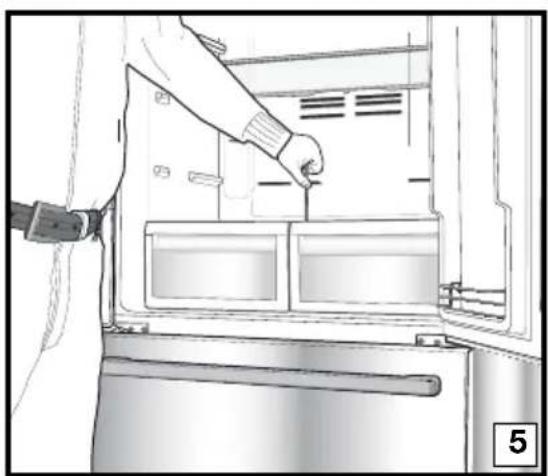
natural_image
Line drawing of a person inserting a component into a refrigerator (no text or symbols)
natural_image
Illustration of a hand inserting a tray into an oven with a label '6' (no text or symbols on the diagram itself)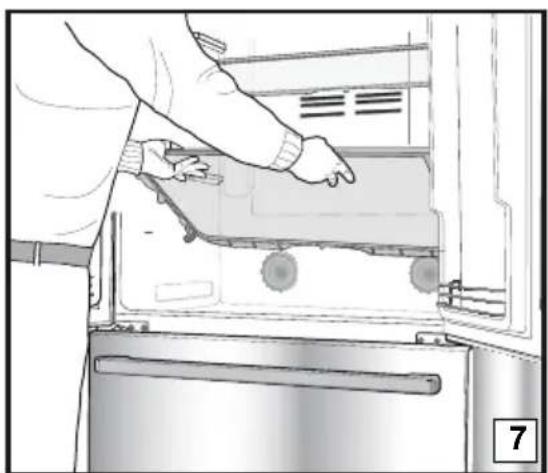
natural_image
Person opening a refrigerator with visible door, handle, and scroll wheel (no text or symbols)الدرج
natural_image
Technical line drawing of a refrigerator with a checkmark overlay (no text or symbols)
natural_image
Technical line drawing of a mechanical assembly with a cross symbol overlay (no text or labels)الجزء الدوار الأوسط
natural_image
Line drawing of a room interior with furniture and storage racks (no text or symbols)تنبيه فتح الباب:
natural_image
Technical line drawings of a vehicle interior showing hand positioning and mounting bracket (no text or symbols)
natural_image
Diagram showing a lightning bolt striking down an electrical plug into a grid-patterned enclosure (no text or symbols)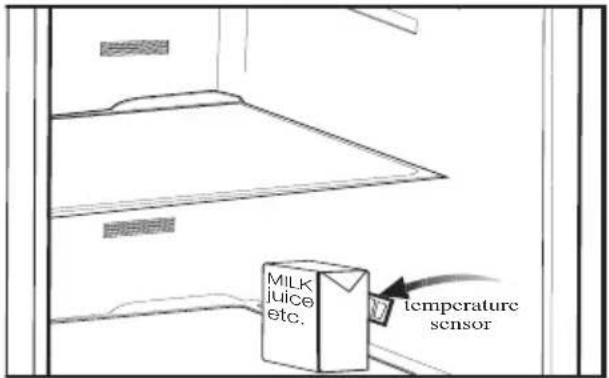
HCA هشدار
natural_image
Technical line drawing of a computer monitor rear panel with mounting holes and ventilation slots (no text or symbols)
natural_image
Illustration of a hand using a screwdriver to adjust or install a component on a device (no text or symbols visible)natural_image
Diagram of a mechanical or electrical component with directional arrows indicating motion, no text or symbols presentnatural_image
Technical line drawing of a mechanical component with no visible text or symbolsnatural_image
Technical diagram of a mechanical assembly with pressure gauge and housing (no text or labels)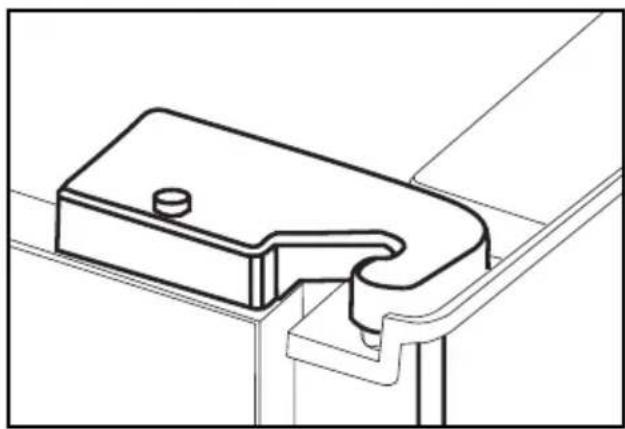
natural_image
Technical line drawing of a mechanical bracket or bracket assembly (no text or symbols)natural_image
Diagram of a double-door refrigerator with double doors and side drawers, no text or symbols presentnatural_image
Technical line drawing of a mechanical component with an upward arrow indicating motion (no text or symbols)natural_image
Technical line drawing of a mechanical component with mounting holes and internal channels (no text or symbols)natural_image
Line drawing of a refrigerator interior showing front and side views (no text or symbols)سینی تخم مرع
natural_image
Line drawing of an open refrigerator with visible doors, shelves, and doorways (no text or symbols)
natural_image
Line drawing of a person installing or adjusting a door panel in an appliance (no text or symbols visible)
natural_image
Line drawing of a refrigerator interior showing a hand inserting a tray into the door (no text or symbols)
natural_image
Interior view of a refrigerator showing a hand holding a kitchen utensil, with no visible text or symbols.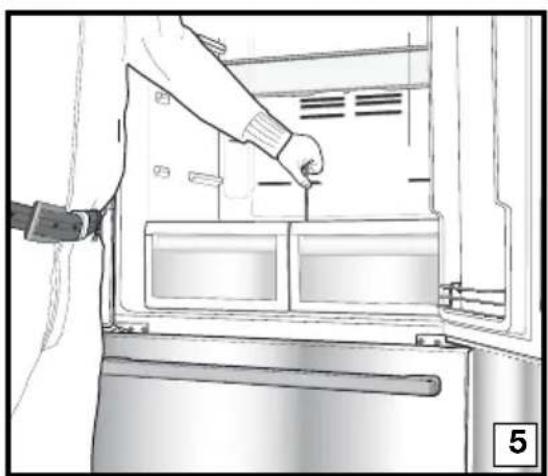
natural_image
Line drawing of a person inserting a component into a refrigerator (no text or symbols visible)
natural_image
Illustration of a hand inserting a tray into an oven with a label '6' (no text or symbols on the diagram itself)
natural_image
Person opening a refrigerator with visible door and drawer (no text or symbols)natural_image
Technical line drawing of a refrigerator interior with a checkmark overlay (no text or symbols)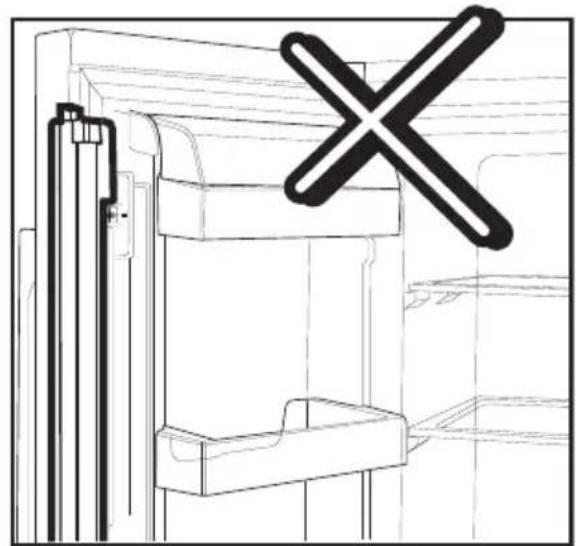
natural_image
Technical line drawing of a mechanical assembly with a cross symbol overlay (no text or labels)بخش ميانى متحرك
natural_image
Line drawing of a room interior with furniture and storage racks (no text or symbols)هشدار باز بودن درب
natural_image
Technical line drawings showing two views of a vehicle door frame, one with hand positioning and the other with foot (no text or symbols)
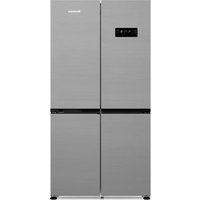
- Please read this manual first!
- This manual
- Symbols and their descriptions
- The refrigerator 3
- Important Safety Warnings 4
- Installation 8
- Preparation 12
- Using your refrigerator 13
- Maintenance and cleaning 22
- Recommended solutions for the problems 23
- The refrigerator
- Important Safety Warnings
- Intended use
- General safety
- For products with a water dispenser;
- Child safety
- HCA Warning
- If your product's cooling system contains R600a:
- Ignore this warning if your product's cooling system contains R134a.
- Things to be done for energy saving
- Reccomendations for freshfood compartment \* OPTIONAL
- Installation
- Points to be considered when re-transporting your refrigerator
- i Always remember...
- Before operating your refrigerator
- Electric connection
- Disposing of the packaging
- Disposing of your old refrigerator
- Placing and Installation
- Floor balance adjustment
- Adjusting the gap between the upper door
- Preparation
- Using your refrigerator
- Indicator Panel
- 1- Fridge Compartment Temperature Setting Button
- 2- Eko-Ekstra Button
- 3- Freezer Compartment Temperature Setting Button
- Quick CoolButton
- 5- Vacation Button
- 6- Fast Freeze Button
- 7- Fridge Compartment Temperature Indicator
- 8- Eco Extra Function Indicator
- 9- Freezer Compartment Temperature Indicator
- 10- Quick Cool Function Indicator
- 11- Vacation Function Indicator
- 12- Quick Freeze Function Indicator
- 13- Economy Mode Indicator
- 14- Error Status Indicator
- 15- Key Lock Indicator
- 16- Ionizer Indicator Light
- 17- Humidity Indicator
- Egg tray
- Sliding Body Shelves
- Chiller compartment
- Crisper
- Movable Middle Section
- Blue light
- Telescopic Drawer
- Door Open Alarm:
- Dual cooling system:
- Freezing fresh food
- Recommendations for preservation of frozen food
- Defrosting
- Deep-freeze information
- WARNING!
- Maintenance and cleaning
- Protection of plastic surfaces
- Recommended solutions for the problems
- Gemüsefach
- Teleskopschublade
- Tür-offen-Warnung
- Bac à légumes
- Tiroir télescopique
- Installatie
- Groentelade
- Uitschuiflade
- Deur Open Alarm
- Grøntsagsrum
- Teleskopisk skuffe
- Alarm for åben dør:
- Installazione
- Asennus
- Vihanneslokero
- Jatkettava lokero
- Ovi auki -hälytys:
- Installasjon
- Klargjøring
- Uttrekkbar skuff
- Alarm for åpen dør:
- Deur Open Alarm:
- Εγκατάσταση
- Συρτάρι λαχανικών
- Τηλεσκοπικό συρτάρι
- Instalacija
- Stvari kojih se treba pridržavati kod ponovnog transporta vašeg hladnjaka
- Priprema
- Odjeljak za povrće
- Teleskopska ladica
- Alarm za otvorena vrata:
- Irengimas
- Daržovių dėtuvė
- Установка
- Выдвижной контейнер
- تنبيه فتح الباب:
- HCA هشدار
Brand : BLOMBERG
Model : KFD 9950 XA
Category : Refrigerator