
IF30 SLX - Cooker FAGOR - Free user manual and instructions
Find the device manual for free IF30 SLX FAGOR in PDF.
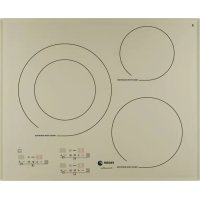


| Product type | Mixed hob (induction and ceramic) |
| Brand | Fagor |
| Model | IF30 SLX |
| Power supply | Electric, 220-240 V, connection with 3, 5 or 8-wire cable |
| Maximum power | Not specified in the manual |
| Number of cooking zones | Multiple zones (models a, b, c...) |
| Main functions | Ignition, power selection, timer, dual zone, zone area, direct access, Total, Booster, delayed programming, quick warm-up, lock, audible signal |
| Zone type | Induction and radiant ceramic |
| Pan detection | Yes, induction zones only work with suitable pans |
| Care and cleaning | Clean with damp cloth, specific ceramic cleaner, scraper; do not use steam or abrasives |
| Automatic shut-off | Yes, after 1 to 10 hours depending on power level |
| Child lock | Yes, press and hold lock key for 3 seconds |
| Overflow protection | Yes, automatic shut-off and audible warning |
| Residual heat indicator | Yes, symbol H displayed |
| Dimensions (approx.) | Not specified, probably 30 cm wide (model IF30) |
| Weight | Not specified |
| Pan compatibility | Induction: ferromagnetic base; ceramic: all types except aluminium (stains) |
| Installation | Built-in, requires ventilation, minimum 40 mm gap from walls |
| Safety instructions | Do not use if glass is cracked, unplug immediately; keep children away; pacemaker wearers: check compatibility |
Frequently Asked Questions - IF30 SLX FAGOR
User questions about IF30 SLX FAGOR
0 question about this device. Answer the ones you know or ask your own.
Ask a new question about this device
Download the instructions for your Cooker in PDF format for free! Find your manual IF30 SLX - FAGOR and take your electronic device back in hand. On this page are published all the documents necessary for the use of your device. IF30 SLX by FAGOR.
USER MANUAL IF30 SLX FAGOR
Important! Read the entire manual before using the hob.
The texts in the manual correspond to the numbered diagrams.
Identification

Identify the model of your hob ("a", "b", "c", "d", "e", "f", "g", "h", "i", "j", "k", "l") by comparing the number and arrangement of the rings on your hob with those shown in the illustrations.
1
Installation
1.1 Unpacking the hob. Remove all the protective elements. 1.2 Recess-mounting in a kitchen fitting.
Always take into account the reference plate data (1.2.1), the ventilation areas (1.2.2) and the dimensions of the kitchen fitting in which you are to recess-mount the plate (1.2.3). Stick the foam seal all around the hob perimeter for good impermeability (1.2.4). Turn the hob around and fit it into the space (1.2.5). Fix it to the kitchen fitting with the four clips supplied (1.2.6). Make sure air can circulate from the rear of the hob, exiting from the front (1.2.7).
1.3 Mains connection. The hob is supplied with a power cable. Check which type of cable the hob is provided with, according to the number and colours of the wires: 3-wire cable (1.3.1) a) yellow and green, b) blue, c) brown. 5-wire cable (1.3.2) a) yellow and green, b) blue, c) brown, d) black, e) grey.
8-wire cable (1.3.3) a) yellow and green, b) blue, c) brown, d) black, e) grey.
Recommendation: The hob must be installed by an authorised installer following the manufacturer's instructions and diagrams. If an oven of another brand is installed, it must be insulated from the hob. The induction hob must not be installed on top of a dishwasher, washing machine, refrigerator or freezer. Do not use non-removable materials such as silicone. The distance between the edge of the hob and the side or rear wall must be at least 40 mm.
2
Using the hob
Before using your new hob for the first time, remember that induction is a technology whereby heat is transmitted directly to the pan. All the pans you use must therefore have a ferromagnetic base.
2.1 Choosing a pan. It is very important to choose the type of pan so that the best possible hob performance and cooking results are obtained. In principle, any pan is suitable for induction cooking if a magnet sticks to its base. (2.1.1). Place the food to be cooked in the pan. Never heat up an empty pan on the hob. (2.1.2). For radiant vitro-ceramic rings, ceramic, copper and stainless steel pans can also be used. Aluminium pans are not advisable as they could stain the hob glass. 2.2 Choosing a ring. There are several rings you can place the pan on. Choose the best one according to the size of the pan. If the base of the pan is too small, the power indicator will flash and the ring will not switch on, even though the pan is suitable for induction cooking. Make sure you are not using pans with a smaller base diameter than those shown on the chart.
| ring ∅ min. pan base ∅ | |
| 16 cm 10 cm | |
| 18 cm 12 cm | |
| 21 cm 18 cm | |
| 28 cm 12 cm | |
| Zone section 12 cm | |
| Complete zone 18 cm | |
Recommendation: Do not drag the pans along the hob glass, as this could cause scratches.
Do not place any metal objects such as knives, forks or pan lids on the hob surface, as they could heat up.
2.3 Switching on the ring. Press ①, ⑧ will start to flash.
2.4 Selecting a power setting. Adjust the power setting by pressing + or -. 2.5 Selecting a cooking time. You can choose how long you wish the ring to function for. Choose the time by pressing + or - on the clock icon. When the selected time has elapsed, the ring will switch off automatically and a beep will sound.
SPECIAL RINGS
2.6 Double vitro-ceramic ring: Switch on the main zone at the maximum power setting (2.6.1). If you press again, it will activate the double zone (2.6.2) and a beep will sound and a dot will appear on the display to confirm your instruction. You can now adjust the power setting as required +, -. To switch off the double ring zone, press stop and then start ① and adjust the power +, -. 2.7 Zone Ring: This can be used independently as two separate rings, or the two can be used together as a single ring. Press the button for the ring you wish to use and follow the steps in point (2.4) to select the power setting and point (2.5) to choose the duration.
SPECIAL FUNCTIONS
2.8 Direct access function ▷. This enables direct access to a selected power setting. With the ring switched on, press to access power setting which is the manufacturer's default setting (2.8.1). To change it, with the ring switched off (without pressing), press and hold it down for a few seconds until you hear a beep and starts to flash. Choose the new desired power setting by pressing. Validate it by pressing again (2.8.2, 2.8.3, 2.8.4). 2.9 Total Function 念. This enables you to access a power setting change within a selected time. With the ring switched on ① and a determined power setting +, press (R). Choose the new power setting using the + (2.9.2) buttons (2.9.2) and choose the time using +, on the symbol (2.9.3). Validate by pressing the button again, and the new power setting will appear on the display with a dot after it (2.9.4). When
the selected time has elapsed, the power setting will return to its initial position and the dot will disappear (2.9.5).
2.10 Booster Function Booster: This enables the maximum temperature to be rapidly reached, which is useful for heating up or boiling liquids quickly. With the ring switched on ① press Booster. will appear on the display (2.10.1). When the liquid starts to boil, choose the desired power setting by pressing - (2.10.2).
Important note: With Booster activated, the maximum power setting you can use on an adjacent ring is 6.
2.11 Delayed programming: This enables the cooking end time and duration to be adjusted. Only one ring can be used at a time.
With the ring switched on ①, press (2.11.1). The current time will appear on the display. If the time is not correct, adjust it using the + and power setting buttons for the two hour digits (2.11.2) and the + and - buttons on the symbol for the two minute digits (2.11.3). Validate the time by pressing the button (2.11.4). Then use the same process to adjust the cooking end time (2.11.5, 2.11.6) and validate by pressing (2.11.7). Adjust the cooking duration using the + and - buttons on the symbol (2.11.8) and validate by pressing (2.11.9). Select the power setting by pressing + and - (2.11.10) and validate by pressing (2.11.11). A u h o will appear on the display, and it will then switch off and only a red dot will remain (2.11.12).
Important note: The delayed programming function cannot be used simultaneously on more than one ring. The end time, duration and power setting values must be adjusted while the digits are flashing.
OTHER FUNCTIONS
2.12 Quick heat function (P dot) P. This enables a higher power setting to be obtained for a certain time. Press until you reach P (2.12.1). Release the button and the P will flash (2.12.2). Press again and it will go to maximum power setting (2.12.3). Press and select the desired power setting (2.12.4). P will appear on the display (2.12.5). When the set time has
elapsed it will return to the power setting selected.
Recommendations: After selecting power setting P, if no final working power setting is chosen the ring will switch off.
While P is shown on the display, if you press any power control this will cancel the function.
2.13 Child lock function: To prevent children from changing the settings, press the button and hold it down for 3 seconds. To unblock it again, repeat the process. 2.14 Beeper: To deactivate the beeper, the hob must be switched off. Press the power setting and time buttons of the lower right ring simultaneously until BE EP appears on the display. Hold the buttons down until the digits disappear (2.14.1). To activate it again, repeat the process.
Recommendations: You should preferably use the cooking zones on two opposite sides.
Prevent any pans from knocking against the glass.
Use suitable pans for induction cooking.
Use pans with a thick, flat base.
Warnings: If you leave any objects on the sensors, a beep will sound and the hob will switch off.
The hob switches off automatically after an estimated safety time has elapsed. This time will vary depending on the power setting selected (1 - 10 hours).
If you are boiling liquids at high power settings, you will hear a buzzing noise. This is due to the ring frequency coupling and it is normal.
On mixed models with radiant rings, do not touch these zones as it could cause burns.
3
Maintenance and cleaning

As the glass does not heat up much on induction hobs, they are easy to clean. However, you should clean up any spills or splashes as soon as possible with a damp cloth or a piece of laminated paper. For more resistant stains, use specific vitro-ceramic cleaning products. For mixed models with radiant rings, the glass reaches a very high temperature. You should clean it as quickly as possible, without letting the spills dry on the glass. To clean heated up stains, use a sponge and soapy water and a special scraper for glass.
Do not use a steam cleaner.
The use of abrasive cleaning products or hard metal scouring pads for cleaning the hob can cause surface scratches and may cause the glass to break.
Remove any sugar stains or residues immediately, as they could damage the hob surface.
4
Troubleshooting

The hob does not switch on. Check it is connected to the mains and check the differential switches.
The differential switches trip. Check the connection.
An indicator light comes on when the hob is plugged in. This is normal. The message disappears after 30 seconds.
A smell is produced when the hob is used for cooking the first few times. Heat up a pan of water on each ring for 1/2 an hour.
The hob does not switch on and a message appears. Call the technical service.
The hob does not switch on and 一 appears on the display. Remove the child lock (4.1.1).
The hob does not switch on or F! appears on the display and a beep sounds. Clean the hob or remove any objects on the sensors (4.1.2).
or F appears. The electronic circuits have overheated (4.1.3).
The pilot lights flash during functioning. An unsuitable pan is being used.
At low power settings, a clacking noise is heard during cooling. This is normal. The hob switches on and off, self-adjusting the selected power setting.
When the hob is switched off, the fan continues running. This is normal. It helps the electronic circuits to cool down.
5
Safety

- The mains circuit supplying the hob must have a single-pole cut-off switch with a separation between contacts of at least 3 mm.
- The installation must be dimensioned to the maximum power indicated on the reference plate and the electrical socket must have a regulatory earth connection.
- If the cable is damaged, it must be replaced by your after-sales service or by similar qualified staff, to avoid hazard.
- The induction rings have a pan detection system. They only heat up if there is a pan on them. After each use, switch off the ring at the control panel. Do not leave it to the pan detector.
- If the surface of the glass should crack or break, unplug the appliance from the mains immediately to avoid risk of electric shock. Do not use the hob again until the glass has been replaced.
- Keep small children away from the hob and use the child lock system to prevent them from playing with the controls.
- This appliance is not designed to be used by persons with reduced capacities.
- The hob must be installed by an authorised installer following the manufacturer's instructions and diagrams.
After intensive use, the cooking zone may remain hot and the letter H will appear. Do not touch these zones (5.1.1). - Spill-over protection: If any liquids should boil over, or if any objects should be placed on the sensors or cover them, will appear on the display, a beep will sound and the hob will switch off. Clean the glass or remove the object and switch on the hob again (5.1.2, 5.1.3). Automatic switch-off: If you forget to switch off the ring, it will switch off automatically after a time lapse of 1 - 10 hours, depending on the power setting selected.
Important! Attention users with pacemakers and active implants: The hob functions in accordance with the current electromagnetic disturbance regulations (2004/108/EC directive). It is designed not to interfere with the functioning of other electrical appliances if they comply with this standard. The induction hob generates magnetic fields in its surrounding environment. To prevent any interference between the hob and a pacemaker, the pacemaker must have been designed in accordance with the corresponding regulation. Consult the manufacturer or your doctor with regard to the pacemaker and its conformities.

The environment

The hob is designed with environmental preservation in mind.
Respect the environment. Use the most suitable power settings for each type of cooking. If you wish, on radiant ring models, you can put another pan in the same place as the previous one to use the accumulated heat, as this will save energy. Use a pan lid whenever you can to reduce heat loss by evaporation.
Electrical and electronic equipment waste management.
Do not dispose of these appliances together with general domestic waste.
Take your hob to a special collection centre. Recycling domestic appliances prevents negative consequences for health and the environment and enables savings on energy and resources. For further information, please contact your local authorities or the shop where you bought the hob.
Recommendation: Do not move the cookware over the glass surface of the hob to avoid scratching it. Do not place metal objects such as knives, forks, or lids on the working surface of the hob, as they may heat up.
2.3 Turning on the hob. Press the button to turn it on. 2.4 Selecting the power level. Set it by pressing + or -. 2.5 Setting the cooking time. You can set the duration of the hob's operation by pressing + on the time display. When the time is up, the hob will switch off automatically, emitting a sound.
Special cooking zones
2.6 Cooktop zones with pan detection. Set the front zone to maximum power (2.6.1). Additional pressing on the front zone (2.6.2), and an audible signal and additional indicator on the display will confirm this function; you can now adjust the power as desired. To switch off the zone, press the stop button, then turn on ① and adjust the power + - 2.7 Zone. We can use this zone independently as two separate zones or together as one zone. Press the zone key you want to use, and act according to point (2.4) for power selection (2.5) for cooking time selection.
SPECIAL FUNCTIONS
2.8 Function Pause allows you to set the power directly. With the zone on, press ① and the power, which is the power set by the manufacturer, appears (2.8.1). To change it, tilt the zone (without pressing ①), and keep it pressed for a few seconds until a signal sounds and it starts blinking. Select the new desired power, press to confirm, press again on the key ①. (2.8.2, 2.8.3, 2.8.4). 2.9 Function Total. Allows you to change the power during the selected time. With the zone on at a certain power +, press the Total symbol (2.9.1). Select the new power
using the keys + (2.9.2) and the time using + in the symbol window (2.9.3). Confirm the data by pressing again on the key with the symbol indicating the new power (2.9.4). After the selected time has elapsed, the power value decreases to the initial one and the symbol disappears. (2.9.5)
2.10 Function Boost allows you to quickly reach the maximum temperature, which is necessary for rapid heating of food or boiling liquids. With the zone on ①, press Boost and the symbol BO appears (2.10.1). As soon as the liquid boils, select the desired power by pressing (2.10.2).
Important note: When Boost is pressed, the maximum power that can be used on the shared zone is 6.
2.11 Programming by time allows you to set the duration and end of cooking. It cannot be used simultaneously on more than one zone.
With the zone on ①, press (2.11.1), and the current time appears on the display. If the time is incorrect, set it using the + and - keys for setting the two hour digits (2.11.2) and using the + and - keys on the symbol for setting the two minute digits (2.11.3). Confirm the time by pressing the key (2.11.4). Then set the end of cooking time in the same way (2.11.5, 2.11.6) and confirm by pressing (2.11.7). Set the cooking duration using the + and - keys on the symbol (2.11.8) and confirm by pressing (2.11.9). Select the power by pressing + - (2.11.10) and confirm by pressing (2.11.11). The symbol A will appear and remain for the cooking duration (2.11.12).
Important note: Time programming cannot be applied simultaneously to more than one zone. It is necessary to set the desired values of end time, duration, and power at the moment when the digits are blinking.
OTHER FUNCTIONS
2.12 Function Rapid Heating (symbol P) allows you to set high power
Set the desired time. Press + until the desired power level appears (2.12.1). Stop pressing the button (2.12.2). Press + again to set maximum power (2.12.3). Press - to set the desired power (2.12.4). The power level P appears (2.12.5). When the corresponding time has elapsed, the selected power is set.
Recommendation: After selecting the power level P, do not set the final working power, the knob will go out.
While the symbol P is displayed, any actions to change the power cancel the function.
2.13 Child lock: To lock the controls, press and hold the key for three seconds. To unlock, repeat the operation. 2.14 Acoustic signal: To turn off the acoustic signal, press the knob. On the right side of the control panel, press the power and time buttons simultaneously until the symbols disappear (2.14.1). To turn it on, repeat the operation.
Recommendation: Preferably use cooking zones located on different sides. Avoid impacts of cookware on the glass surface. Use cookware suitable for induction heating. Use cookware with a thick and flat base.
Warning: If you place any metal objects on the sensors, the hob will not emit acoustic signals and will go out. The hob will switch off automatically after a permissible safety time, which varies depending on the selected power (from 1 to 10 hours). During cooking liquids at high power, a humming sound may be heard due to the interaction of the frequencies of the zones. This is normal. On models with induction zones, do not touch these zones, as you may burn yourself.
3 Cleaning and maintenance
If the glass on the induction hob heats up unevenly, it can be cleaned quite simply. However, as soon as possible, wipe off spilled or splashed surfaces with a damp cloth or paper towel. To remove serious stains, use special cleaning products for glass-ceramic surfaces. On models with induction zones, the glass heats up strongly, so try to clean it as soon as possible to avoid "baked-on" stains. To remove stains that have been subjected to repeated heating, use a sponge with soapy water and a special spatula for cleaning glass-ceramic surfaces. Do not use steam cleaners. The use of abrasive cleaning agents or metal scouring pads for cleaning the hob may damage its surface and cause destruction of the glass surface. Immediately remove stains and residues of sugar, as they can damage the surface of the hob.
4 Troubleshooting
It does not function. Check whether the hob is connected and the condition of the fuses.
The zones switch off. Check the connection.
When switching on, an acoustic signal sounds.
This is normal, the signal disappears after 30 seconds.
During the first cooking, a smell appears. Heat a pan filled with water on each zone for half an hour.
The hob does not work, an inscription appears.
The appliance must be serviced by qualified technical personnel.
It does not function and the symbol 7 appears.
Disconnect the appliance from children (4.1.1).
It does not work and the symbol F7 or an audible signal appears. Clean or remove items located on the sensors (4.1.2).
The electronic circuits appear to be overloaded (4.1.3).
Symbols light up during operation. The cookware used is not suitable.
During cooking at low power, clicking sounds may occur. This is normal; it means that the self-regulation of the selected power is switching on and off.
After switching off, the fan continues to operate. This is normal; it means that the electronic circuits are being cooled.
5
Safety

The electrical network that powers the hob must have a single-phase circuit breaker with a contact gap of at least 3 mm. - Connection must be made in accordance with the maximum power specified in the plate characteristics, and into a socket with mandatory grounding. - If the cable is damaged, it must be replaced by the warranty service or a qualified specialist to avoid danger. - The induction zones are equipped with a cookware detection system. They heat up only when cookware is placed on them. - After each use, turn off the zone using the switch. Do not rely on the cookware detection system. - If the glass surface cracks or breaks, immediately disconnect the appliance from the power supply to avoid electric shock. Do not use the hob until the glass is replaced. Do not allow small children near the hob or use the locking system so that children cannot play with the switches. This appliance is not intended for use by persons with limited capabilities. - Installation of the hob must be carried out by a specialist installer, who must comply with all requirements provided by the instructions and diagrams of the manufacturer.
- After intensive use of the hob, the cooking zone may remain hot and the symbol H appears. Do not touch these zones (5.1.1). Protection in case the pan "boils over"; in these cases or when any objects are on the sensors, the symbol appears, a signal sounds, and the hob turns off. Clean or remove foreign objects from its surface and turn the hob on again (5.1.2, 5.1.3).
- Automatic shutdown: If you forget to turn off the zone, it will turn off automatically within a period of 1 to 10 hours depending on the selected power.
Warning to users of cardiac pacemakers and active implants: The operation of the hob is carried out in accordance with the standards of electromagnetic interference (Directive 2004/108/EC). The hob was designed in such a way as not to disrupt the operation of other electrical devices, meeting the requirements of these standards. The induction hob creates a magnetic field in its immediate surroundings. To avoid interference caused by the operation of the hob, the pacemaker wearer must be designed in accordance with the standards provided for it. As for the stimulator and possible inconveniences, you can consult the manufacturer or your doctor.

Surrounding environment

The hob was designed with consideration for environmental protection.
Environment. Use the appropriate power for cooking. After cooking, if you wish, you can place another dish on the hot burner to use the residual heat and thus save electricity. Use the lid whenever you can to reduce heat loss due to evaporation.
Measures for the disposal of electrical and electronic devices. Do not dispose of devices with regular household waste. Take your hob to special collection points. Recycling of electrical appliances helps avoid negative consequences for health, the environment, and allows saving electricity and resources. For more detailed information, contact local authorities or the store where the hob was purchased.
Instructions for use
Very important: Read these instructions completely before using the hob.
40 1
1.2.1.1.1.2
Jgall Jg 128 g aegill g cgl l jg 129
Jgall
cGgai gai gai jy
JLaeiouu 100
le jia jia y cie gall jia jia gai (2.1.1)
(2.1.2)
jill, jollil, jilll lal jol jolll
1
aieeallglcclb jgj jSao
2.2
e 1
a 1
gai jaiui 2 iiaill gai Jaa
a a a a a a a a a a a a a a
∴ S ΔAPQ = S ΔAOB + SΔQPH
| الله��,%رطمن 0 | الله��,%رطمن |
| \( {}^{\text{الله��}}10 \) | \( {}^{\text{الله��}}16 \) |
| \( {}^{\text{الله��}}12 \) | \( {}^{\text{الله��}}18 \) |
| \( {}^{\text{الله��}}18 \) | \( {}^{\text{الله��}}21 \) |
| \( {}^{\text{الله��}}12 \) | \( {}^{\text{الله��}}28 \) |
| \( {}^{\text{الله��}}12 \) | \( {}^{\text{الله��}}\epsilon \) |
| \( {}^{\text{الله��}}18 \) | \( {}^{\text{الله��}}\epsilon \) |
j j 1 j k, g y:
aal lio iio 0i jaoai oia
∴ ab = 12
jir jin, aiina aie gllaii jao jil oia
1 1
Jaaaiy
(2.5) 2.4
alol cyloxl
J. 8.2
a g a Ljul Jgdl
(2.8.1).
(0)
Gaaia jil jill jll baiol
jillabwbyjzjjll jall jil
- D. is independent of SU, and S S, S S,
(2.8.2,2.8.3,2.8.4)
Total 91 Jaa9 9.2
Jia 1
It is separable, y = 1 or y = -1,
+jll jll (2.9.1) 一 _ 一 Total
aJg+ +abgl 2.9.2)
j(2.9.3)
abill abw yddydl sall rTotal
aagaae aee
(2.9.5)
Boester
Jinui Jie 10.2
a
aee
Boster
biol, @
Bolster Jlll lioic bo (2.10.1).
5.2 111111111111111111111111
Bostert (2.10.2)
:aagai
Jaa
6.6
11.2
aill 1
a 1
j(2.11.6,2.11.5)
j 2.117)
(2.11.8)
+jzjjb2j0jgl (2.11.9)
j (2.11.10)
a 2.11.11
.(2.11.12) aabaiyAo
: aagai
wai gellaxial Jay 2 aielzall
J 1
∴ a + b = 11, a + b = 11
3
aaii Jgj,1Jgaiiaai 0
- SPECIAL RINGS
- SPECIAL FUNCTIONS
- OTHER FUNCTIONS
- MAINTENANCE AND CLEANING
- TROUBLESHOOTING
- SAFETY
- THE ENVIRONMENT
- THE HOB IS DESIGNED WITH ENVIRONMENTAL PRESERVATION IN MIND
- ELECTRICAL AND ELECTRONIC EQUIPMENT WASTE MANAGEMENT
- SPECIAL COOKING ZONES
- CLEANING AND MAINTENANCE
- SURROUNDING ENVIRONMENT
- THE HOB WAS DESIGNED WITH CONSIDERATION FOR ENVIRONMENTAL PROTECTION
- INSTRUCTIONS FOR USE
Brand : FAGOR
Model : IF30 SLX
Category : Cooker