
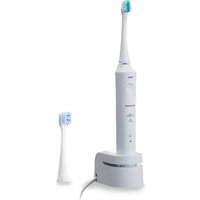
EWDS90P - Toothbrush PANASONIC - Free user manual and instructions
Find the device manual for free EWDS90P PANASONIC in PDF.
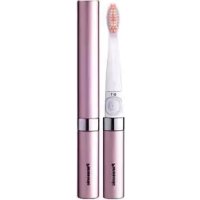



| Brand | Panasonic |
| Model | EWDS90P |
| Product type | Battery-powered electric toothbrush |
| Power supply | 1 LR03 (AAA) alkaline battery (not included) |
| Approximate battery life | 90 days (1 use of 2 minutes per day) |
| Included brush head | Triple-height brush (type WEW0965) |
| Available replacement heads | WEW0965 (triple height, pack of 2) and WEW0957 (double height, pack of 2) |
| Replacement frequency | Every 3 months |
| Usage | Household use only |
| Cleaning the main unit | Running water at max 40°C, do not immerse |
| Cleaning the brush head | Running water at max 80°C |
| Important safety instructions | Do not use if you have serious dental problems, do not press too hard, keep out of reach of young children |
| Repairability | Do not disassemble, modify, or repair yourself |
Frequently Asked Questions - EWDS90P PANASONIC
User questions about EWDS90P PANASONIC
0 question about this device. Answer the ones you know or ask your own.
Ask a new question about this device
Download the instructions for your Toothbrush in PDF format for free! Find your manual EWDS90P - PANASONIC and take your electronic device back in hand. On this page are published all the documents necessary for the use of your device. EWDS90P by PANASONIC.
USER MANUAL EWDS90P PANASONIC
Before operating this unit, please read these instructions completely and save them for future use.
Operating Instructions
(Household) Battery-Powered Toothbrush
Thank you for choosing a Panasonic Battery-Powered Toothbrush. Please read all instructions before use.
Safety Precautions
Warning
- Keep out of the reach of toddlers and infants.
- Failure to do so may result in accidents or accidental ingestion of the accessories or removable small parts.
Caution
- People who have severe periodontal disease should consult a doctor before use. Failure to do so may cause damage to teeth and gums.
- Do not use the brush in combination with toothpaste that contains a lot of abrasive, such as toothpaste for removing tar or for whitening.
- Do not force the bristles hard against the teeth or gums, or apply the bristles to one area for prolonged periods.
- Do not apply the solid part of the brush head to teeth.
- Toddlers, infants, people who are unable to operate
and people with weak oral senses should not use this appliance.
- If you have oral health problems such as teeth undergoing dental treatment or unstable dentures, avoid using the brush on those parts as doing so may cause damage to teeth and gums.
- Never modify, disassemble, or repair the appliance yourself as doing so may cause unexpected accidents or trouble.
- Use a mild detergent for cleaning.
- Never use thinners, benzine, or alcohol to clean the toothbrush since it may cause malfunction or cracking/discolouration of the parts.
- A guardian should provide guidance to a child on how to use the product. Make sure that the appliance is used as instructed. Failure to do so may cause damage to teeth or gums.
- Do not use for any purpose other than dental care.
- Do not drop or handle roughly.
Parts identification (Fig. 1)
A Main unit
① Power switch [0/1] ② Battery cover
Attachments
Triple-edged brush (x1) ③ Bristles Cap
Attaching and removing the cap
Attach and remove the cap as illustrated in (Fig. 2).
Attaching the brush head (Fig. 3)
Align the mark on the brush head with the mark on the main unit, and rotate it in the direction of the arrow until it clicks.
Caution
- Inserting the brush head without aligning the mark on the brush head with the mark on the main unit may damage the brush head or the main unit.
- Tightening it too much may cause deformation and damage to the main unit and the brush head.
Removing the brush head (Fig. 4)
- Rotate the brush head and align the marks.
- Pull to remove the brush head.
Caution
- Pulling the brush head while it is fastened may damage the brush head or the main unit.
Note
- When toothpaste gets hard and makes it difficult to remove the brush head, place it in water or warm water for a while and then remove.
Replacing the battery
When the battery is low, there is less vibration and a weaker brushed feeling. Please replace the alkaline battery with a new one.
- Remove the battery cover by rotating it. (Fig. 5)
- Insert LR03 (AAA alkaline battery). (Fig. 6)
- It is possible to use the toothbrush for approximately 90 days using a Panasonic LR03 (AAA alkaline battery) (using the toothbrush once a day for 2 minutes).
- Attach the battery cover by rotating it. (Fig. 7)
Caution
- Always follow the cautions printed on the battery.
- Check the polarities (+ and -) of the battery and install it correctly.
- Remove the battery when not using the appliance for an extended period of time.
- Please dispose of used battery appropriately.
- Do not disassemble the battery or throw it into a fire. Do not short-circuit the battery.
Notes
- Batteries are not supplied. Please purchase separately.
- Before replacing the alkaline battery, ensure the unit is thoroughly dry to prevent water drops entering the main unit.
- Always use alkaline batteries. Use of non-alkaline batteries may result in a drastically reduced operating time.
- Use only LR03 (AAA alkaline battery).
Using the toothbrush
- Remove the cap. (Fig. 2)
- Confirm that the brush head is fixed firmly. (Fig. 8)
- Place the toothbrush in your mouth.
- When using the toothbrush, especially with toothpaste applied, place the brush head in the mouth before operating to prevent splattering.
- Press the power switch firmly to operate the toothbrush.
- Press the power switch firmly. If you press the power switch lightly, the toothbrush may operate only while you are pressing.
- Press the power switch with the ball of the finger.
- Do not press with a fingernail. Doing so may tear the rubber of the power switch.
- Brush your teeth by moving the main unit by hand.
- Brush by moving the toothbrush in the same way as when you brush by hand. Just applying the toothbrush to teeth cannot fully remove plaque, so it is recommended that you move the toothbrush.
- Do not apply the brush head to teeth or gums too strongly.
- When finished brushing, stop the motion by
pressing the power switch firmly.
- In order to prevent splattering of saliva, etc., turn off the toothbrush while it is still in the mouth.
Tips on usage
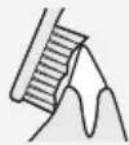
Boundary between the tooth surfaces or teeth and gums
- Press the bristles at a 45° angle.
- Place the brush so that the bristles can fit into the hard-to-reach spaces between teeth.
- Place the brush so that the sides of the bristles can fit between the teeth and gums.

Tips on usage
At the back of the front teeth or misaligned teeth
- Press the brush vertically.
- Place the brush according to the angle of the teeth.
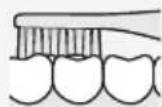
Bite (back teeth)
- Apply the brush to the teeth at a 90° angle from the top.
Note
- Please be careful not to get hair products, hand cream, etc. on the main unit because it may ruin the appearance of the toothbrush.
After use
Washing the brush head
Wash the brush head under running water.
Caution
- Do not wash with water hotter than 80°C (176 F).
- Do not pull the bristles of the brush. (Doing so may cause bristles to come out.)
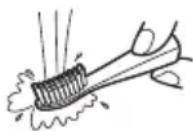
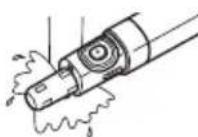
Washing the main unit
- Make sure that the battery cover is closed.
- Wash the main unit under running water.
Caution
- Do not wash with water hotter than 40°C (104 F).
- Do not immerse the main unit under water. (Otherwise water may get inside.)
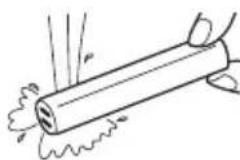
Washing the cap
Wash the cap under running water.
Caution
- Do not wash with water hotter than 40°C (104 F).
Caution
- Shake the cap and brush head well to drain off water, and dry them using a dry towel, etc. After this, put the cap on the main unit. Leaving them wet may dirty or damage the pouch or bag.
Changing the brush head (Sold separately)
Replacing the brush head every 3 months is recommended.
If the bristles are bent to one side or worn, the toothbrush is not effective for brushing.
| Part number | Replacement Brush for EW-DS90 | Quantity |
| WEW0965 | (Triple-edged Brush) | 2 |
| WEW0957 | (Dual-edged Brush) | 2 |
- Only Replacement Brush for EW-DS90 can be used.
Specifications
| Model No. EW-DS90 | |
| Power source | LR03 (AAA alkaline battery) x 1 (sold separately) |
This product is intended for household use only.
FOR YOUR CONVENIENCE, WE HAVE ESTABLISHED A TOLL-FREE (IN USA ONLY) NATIONAL ACCESSORY PURCHASE HOT LINE AT 1-800-332-5368. IN CANADA, CONTACT PANASONIC CANADA INC. AT THE ADDRESS OR TELEPHONE NUMBER ON THE BACK PAGE.
Panasonic Corporation of North America
One Panasonic Way, Secaucus, NJ 07094
IN CANADA CONTACT:
AU CANADA, COMMUNIQUEZ AVEC:
Panasonic Canada Inc.
5770 Ambler Drive, Mississauga, Ontario L4W 2T3
(905)624-5010
EN MEXICO CONTACTE CON:
Panasonic de Mexico S.A. de C.V.
Felix Cuevas No. 6 Piso 2 y 3
Col. Tlacoquemecatl Del Valle
Del. Benito Juarez
Mexico, D.F. C.P.03200
01(55)5488-1000
EN, CA, ES, BR
IN PANAMA CONTACT:
Panasonic Latin America. S.A.
P.O.Box 0816-03164
Panama, Republic of Panama
(507) 229-2955
IN BRAZIL CONTACT:
Panasonic do Brasil Limitada.
Rua Cubatao, 320 - 8th floor
Paraiso
CEP: 04013-001
São Paulo - SP
+551138894000
Service · Assistance · Accessories
Service · Assistance · Accessories
Call 1-800-338-0552 (In USA)
http://www.panasonic.com/consumersupport/
Call 1-800-561-5505 (In Canada)
Call 1-800-561-5505 (In Canada)
http://www.panasonic.ca/
Manufactured for
Panasonic Corporation
33, Okamachi, Hikone, Shiga, Japan
Printed in China
Printed in China
Printed in China
Printed in China


- SAFETY PRECAUTIONS
- WARNING
- CAUTION
- PARTS IDENTIFICATION (FIG. 1)
- ATTACHMENTS
- ATTACHING AND REMOVING THE CAP
- ATTACHING THE BRUSH HEAD (FIG. 3)
- REMOVING THE BRUSH HEAD (FIG. 4)
- NOTE
- REPLACING THE BATTERY
- NOTES
- USING THE TOOTHBRUSH
- TIPS ON USAGE
- BOUNDARY BETWEEN THE TOOTH SURFACES OR TEETH AND GUMS
- AT THE BACK OF THE FRONT TEETH OR MISALIGNED TEETH
- BITE (BACK TEETH)
- AFTER USE
- WASHING THE BRUSH HEAD
- WASHING THE MAIN UNIT
- WASHING THE CAP
- CHANGING THE BRUSH HEAD (SOLD SEPARATELY)
Brand : PANASONIC
Model : EWDS90P
Category : Toothbrush