ManualGo.com
Philishave HQT764 - Beard trimmer PHILIPS - Free user manual and instructions
Find the device manual for free Philishave HQT764 PHILIPS in PDF.



Download the instructions for your Beard trimmer in PDF format for free! Find your manual Philishave HQT764 - PHILIPS and take your electronic device back in hand. On this page are published all the documents necessary for the use of your device. Philishave HQT764 by PHILIPS.
USER MANUAL Philishave HQT764 PHILIPS
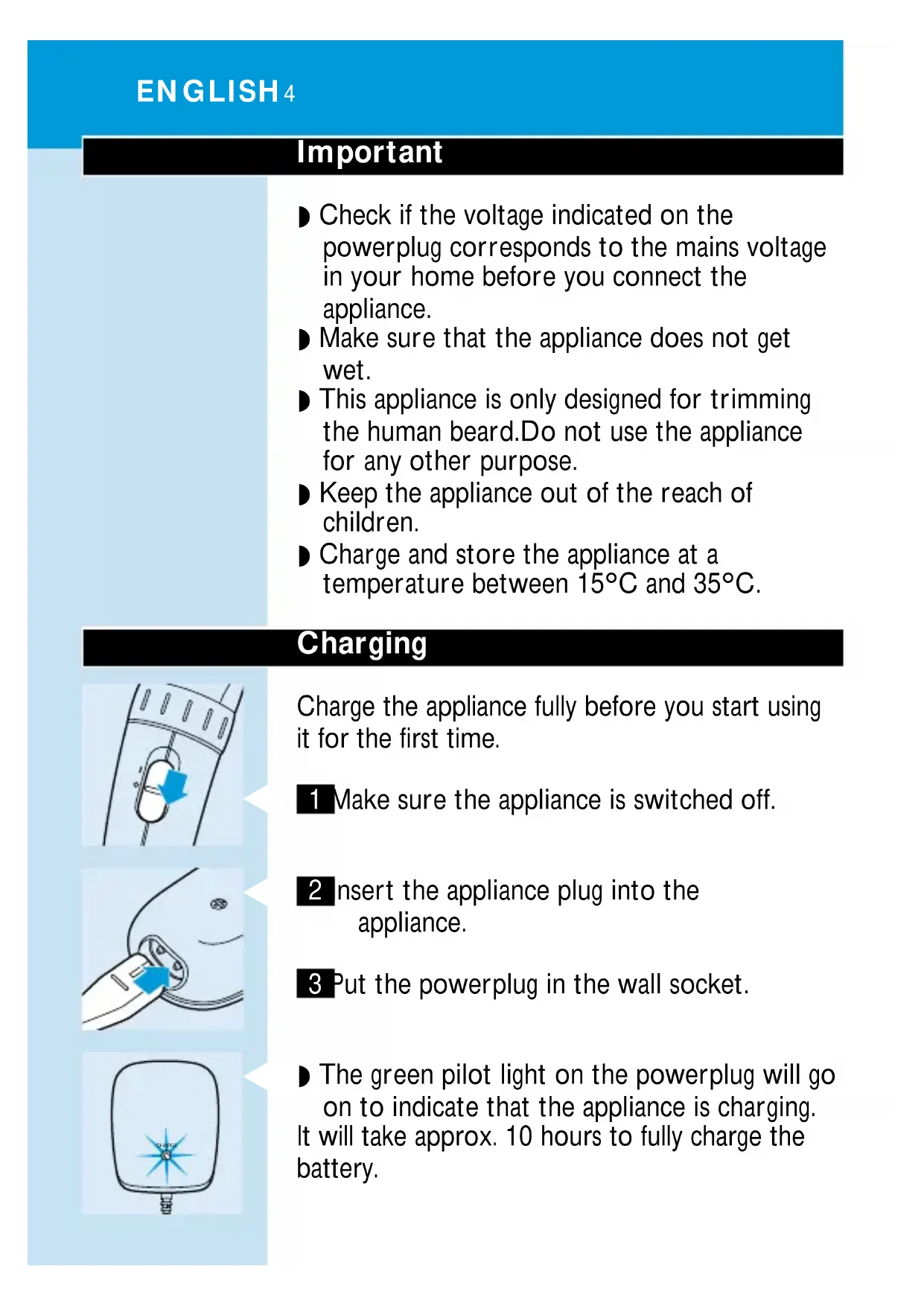
HQT764 3Important ◗ Check if the voltage indicated on the powerplug corresponds to the mains voltage in your home before you connect the appliance. ◗ Make sure that the appliance does not get wet. ◗ This appliance is only designed for trimming the human beard.Do not use the appliance for any other purpose. ◗ Keep the appliance out of the reach of children. ◗ Charge and store the appliance at a temperature between 15cC and 35cC. Charging Charge the appliance fully before you start using it for the first time.
1 Make sure the appliance is switched off.
2 Insert the appliance plug into the appliance. 3 Put the powerplug in the wall socket.
◗ The green pilot light on the powerplug will go on to indicate that the appliance is charging. It will take approx. 10 hours to fully charge the battery. ENGLISH4 CHARGEDo not charge the appliance for more than 24 hours. A fully charged appliance has a cordless trimming time of up to 40 minutes. ◗ The appliance does not run from the mains. When the battery is empty, charge it as described above. Optimise the lifetime of the rechargeable battery When the appliance has been charged for the first time, we advise you to use it until the battery is completely empty. Do not recharge the appliance in between the trimming sessions. Continue using the appliance until the motor almost stops running during a session.Then recharge the battery. Follow this procedure at least twice a year. Trimming Always comb the beard and/or moustache with a fine comb before you start trimming. If you are trimming for the first time, be careful Do not move the trimmer too fast. Make smooth and gentle movements. ENGLISH 5Trimming with comb attachment
1 Turn the Precision Zoom Lock`to the desired trimming length setting (see table). The setting will appear in the window below the Precision Zoom Lock`.
If you are trimming for the first time, start by using the maximum trimming length setting: setting 9. 2 Switch the appliance on.
3 To trim in the most effective way, move the trimmer against the direction of hair growth. Make sure the surface of the comb always stays in contact with the skin.
4 If a lot of hair has accumulated in the comb,remove the comb attachment and blow and/or shake the hair out of the comb.The selected trimming length setting will not change when you do this. ENGLISH6
9Trimming length settings table Trimming with the unique 'stubble look' setting
◗ Using setting 1 will result in a 'stubble look'. Trimming without comb attachment Full beards and single hairs
1 Remove the comb attachment by pulling it off the appliance. Never pull at the flexible top of the comb attachment.Always pull at the bottom part. 2 Switch the appliance on.
3 Make well-controlled movements.Touch the hair lightly with the trimmer. ENGLISH 7 resulting beard length
9Cleaning Do not use abrasives, scourers or liquids such as alcohol, petrol or acetone to clean the appliance. 1 Make sure the appliance is switched off and disconnected from the mains before you start cleaning it. 2 Remove the comb attachment.
3 Open the cutting unit.
4 Clean the cutting unit and the inside of the appliance with the brush supplied.
5 Close the cutting unit by pushing it back onto the appliance until you hear a click. The appliance does not need any lubrication. Replacing the cutting unit A worn or damaged cutting unit should only be replaced with an original Philishave cutting unit, available from authorised Philips service centres. 1 Open the cutting unit.
2 Remove the old cutting unit by pulling it upwards. ENGLISH8C 3 Place the two lugs of the new cutting unit into the guiding slots. 4 Push the cutting unit back onto the appliance until you hear a click. Environment The built-in rechargeable battery contains substances that may pollute the environment. Remove the rechargeable battery when you discard the appliance. Do not throw the battery away with the normal household waste but hand it in at an official collection point. You can also take the appliance to a Philips service centre, where the staff will be happy to help you remove the battery and dispose of it in an environmentally safe way. 1 Disconnect the appliance from the mains and let the appliance run until the motor stops.
2 Undo the screw in the housing of the trimmer.
3 Separate the 2 housing parts by means of a screwdriver. ENGLISH 9C 4 Insert the screwdriver into the small slot in the printed circuit board marked with an arrow. Push the screwdriver down until parts of the printed circuit board break off.
5 Remove the battery-holder including the rechargeable battery.
7,5 mm 9,5 mm 12,0 mm 15,0 mm 18,0 mm Position