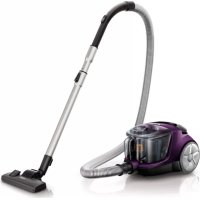
USER MANUAL PowerPro Compact FC8472 PHILIPS
Register your product and get support at
www.philips.com/welcome


PHILIPS






English 4
Danish 7
German 10
Spanish 14
French 18
Italian 22
Dutch 26
Norwegian 30
Portuguese 33
Finnish 37
Swedish 40
Greek 43
4 English
Introduction
Congratulations on your purchase and welcome to Philips! To fully benefit from the support that Philips offers, register your product at www.philips.com/welcome.
Read this important information carefully before you use the appliance and save it for future reference.
Danger
- Never vacuum up water or any other liquid, flammable substances or hot ashes.
Warning
- Check if the voltage indicated on the appliance corresponds to the local mains voltage before you connect the appliance.
- Do not use the appliance if the plug, the mains cord or the appliance itself is damaged.
- If the mains cord is damaged, you must have it replaced by Philips, a service center authorized by Philips or similarly qualified persons in order to avoid a hazard.
- This appliance can be used by children aged from 8 years and above and persons with reduced physical, sensory or mental capabilities or lack of experience and knowledge if they have been given supervision or instruction concerning use of the appliance in a safe way and understand the hazards involved. Children shall not play with the appliance. Cleaning and user maintenance shall not be made by children without supervision.
- The plug must be removed from the socket-outlet before cleaning or maintaining the appliance.
- Do not point the hose, the tube or any other accessory at the eyes or ears nor put it in your mouth.
Caution
- Never use the appliance without any of the filters. This could damage the motor and shorten the life of the appliance.
- Always clean all parts as shown in the user manual. Do not clean any parts with water and/or cleaning agents if this is not particularly shown in the user manual.
- If you clean a washable filter with water, make sure it is completely dry before you put it back into the appliance. Do not dry the filter in direct sunlight, on a radiator or in a tumble dryer. Replace a washable filter if it can no longer be cleaned properly or if it is damaged.
- To guarantee optimal dust retention and performance of the vacuum cleaner, always replace the filters with original Philips filters of the correct type (see chapter 'Ordering accessories').
- If your vacuum cleaner has a remote control, always replace the batteries of the remote control with batteries of the correct type.
- If your vacuum cleaner has a remote control, remove the batteries of the remote control if you are not going to use the appliance for one month or more.
- Maximum noise level: Lc = 84 dB (A)
Electromagnetic fields (EMF)
- This Philips appliance complies with all applicable standards and regulations regarding exposure to electromagnetic fields.
Ordering accessories
To buy accessories or spare parts, visit www.shop.philips.com/service or go to your Philips dealer. You can also contact the Philips Consumer Care Center in your country (see the international warranty leaflet for contact details).
Warranty and support
If you need information or support, please visit www.philips.com/support or read the international warranty leaflet.
Recycling
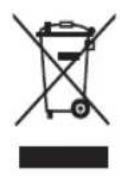
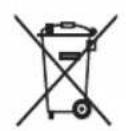
- This symbol means that this product shall not be disposed of with normal household waste (2012/19/EU) (Fig. 1).
- This symbol means that this product contains disposable batteries which shall not be disposed of with normal household waste (2006/66/EC) (Fig. 2).
- Follow your country's rules for the separate collection of electrical and electronic products and batteries. Correct disposal helps prevent negative consequences for the environment and human health.
Removing disposable batteries
To remove disposable batteries, see the instructions for placing and/or removing batteries in the user manual.
Troubleshooting
This chapter summarizes the most common problems you could encounter with the appliance. If you are unable to solve the problem with the information below, visit www.philips.com/support for a list of frequently asked questions or contact the Consumer Care Center in your country.
| Problem | Possible cause Solution |
| The suction power is insufficient. | The dust container is full. Empty the dust container. |
| The filters are dirty. Clean or replace the filters. |
| The suction power is set to a low setting. | Increase the suction power with the regulator on the appliance or on the handgrip. |
| The nozzle, tube or hose is blocked up. | To remove the obstruction, disconnect the blocked-up item and connect it (as far as possible) the other way around. Switch on the vacuum cleaner to force the air through the blocked-up item in opposite direction. |
| When I use my vacuum cleaner I sometimes feel electric shocks. | Your vacuum cleaner builds up static electricity. The lower the air humidity, the more static electricity the appliance builds up. | Discharge the appliance by frequently holding the tube against other metal objects in the room (for example the legs of a table or chair, a radiator etc.). You can also raise the air humidity level in the room. |
| For models with remote control: The remote control does not work. | The batteries do not make full contact or have not been inserted properly. | Remove the lid of the battery compartment and insert the batteries correctly. Make sure the - and + poles point in the right direction. |
| The batteries are empty. Replace the batteries. You can continue to vacuum but you cannot use the remote control to increase or decrease the suction power or to switch off the appliance. To switch off the appliance, press the on/off button on the appliance. |
Introduction
Ordering accessories
75% recycled paper >75% papier recyclé