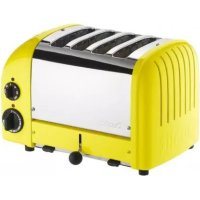
42245 - Toaster DUALIT - Free user manual and instructions
Find the device manual for free 42245 DUALIT in PDF.



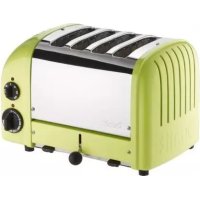
| Product Type | Electric Toaster |
| Brand | Dualit |
| Model | 42245 |
| Housing Material | Stainless Steel |
| Number of Slots | 4 |
| Heating Element Type | Patented ProHeat |
| Power | 2000 W |
| Voltage | 220-240 V |
| Frequency | 50/60 Hz |
| Timer | Adjustable mechanical 1.5 to 3.5 |
| Defrost Function | Yes, via special cycle |
| Reheat Function | Yes, setting 0.5 |
| Automatic Shut-off | Yes, when timer reaches zero |
| Adjustable Slots | Yes, for thick or thin bread |
| Crumb Tray | Yes, removable for daily cleaning |
| Adjustable Foot | Yes, at rear for uneven surfaces |
| Included Accessories | Sandwich cage (depending on model) |
| Warranty | 1 year + 1 additional year on ProHeat elements |
| Dimensions (W x D x H) | 30 x 25 x 20 cm |
| Weight | 3.5 kg |
| Maintenance | Clean crumb tray daily, wipe exterior with a soft cloth |
| Safety | Must be earthed, fuse, do not immerse, do not leave unattended |
| Repairability | Heating elements replaceable by a Dualit-authorized technician |
Frequently Asked Questions - 42245 DUALIT
User questions about 42245 DUALIT
0 question about this device. Answer the ones you know or ask your own.
Ask a new question about this device
Download the instructions for your Toaster in PDF format for free! Find your manual 42245 - DUALIT and take your electronic device back in hand. On this page are published all the documents necessary for the use of your device. 42245 by DUALIT.
USER MANUAL 42245 DUALIT
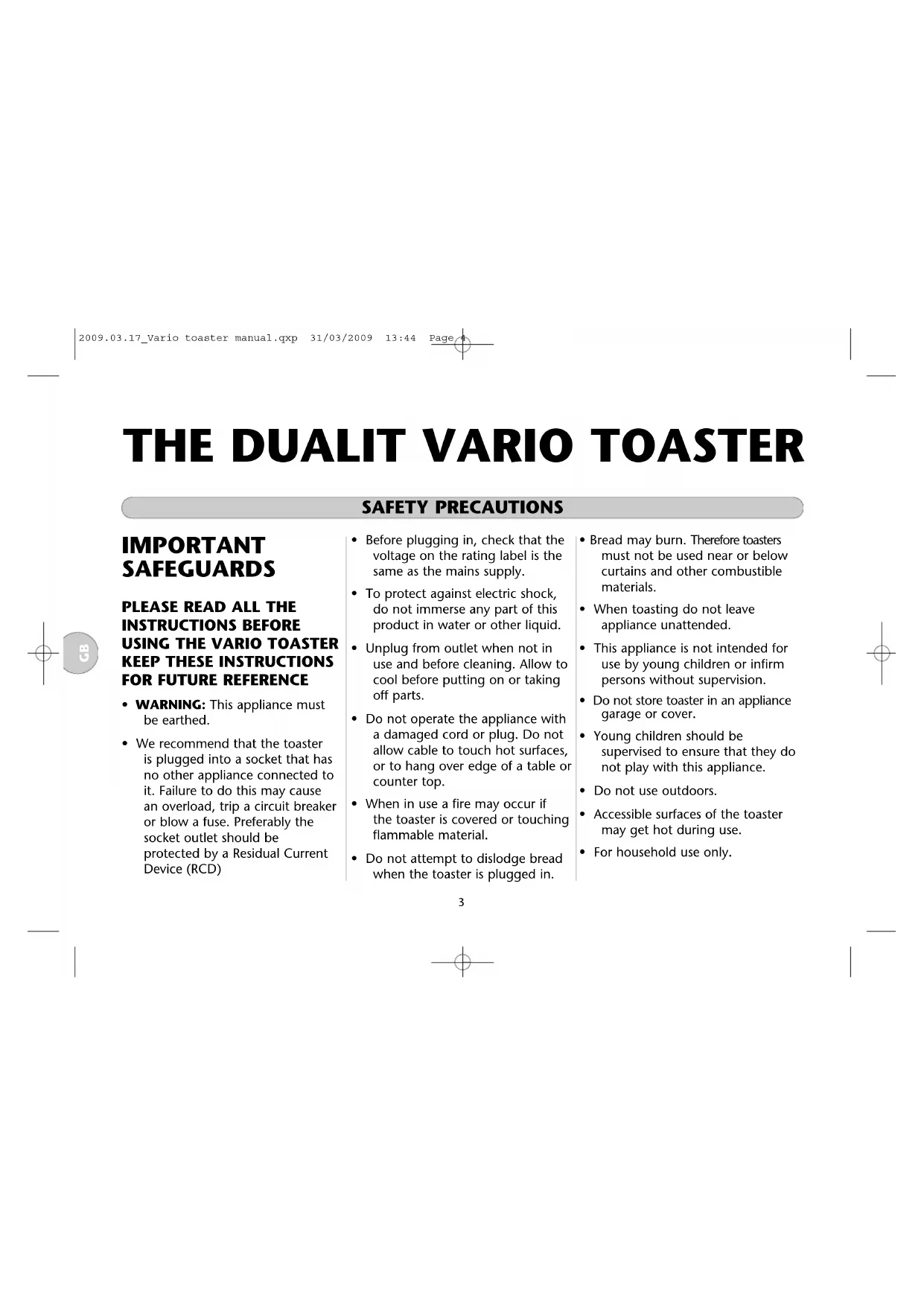
SAFETY PRECAUTIONS. 3/4
PARTS & CONTROLS. 4
USING YOUR TOASTER. 5/6
SERVICING. 7/8
CLEANING & MAINTENANCE GUARANTEE

MESURES DE SECURITE 9/10
PIECES ET COMMANDES. 10
UTILISATION DE VOTRE GRILLE-PAIN... 11/13
ENTRETIEN. 14/15
GARANTIE
- WARNING: This appliance must be earthed.
-
We recommend that the toaster is plugged into a socket that has no other appliance connected to it. Failure to do this may cause an overload, trip a circuit breaker or blow a fuse. Preferably the socket outlet should be protected by a Residual Current Device (RCD)
-
Before plugging in, check that the voltage on the rating label is the same as the mains supply.
- To protect against electric shock, do not immerse any part of this product in water or other liquid.
- Unplug from outlet when not in use and before cleaning. Allow to cool before putting on or taking off parts.
- Do not operate the appliance with a damaged cord or plug. Do not allow cable to touch hot surfaces, or to hang over edge of a table or counter top.
- When in use a fire may occur if the toaster is covered or touching flammable material.
-
Do not attempt to dislodge bread when the toaster is plugged in.
-
Bread may burn. Therefore toasters must not be used near or below curtains and other combustible materials.
- When toasting do not leave appliance unattended.
- This appliance is not intended for use by young children or infirm persons without supervision.
- Do not store toaster in an appliance garage or cover.
- Young children should be supervised to ensure that they do not play with this appliance.
- Do not use outdoors.
- Accessible surfaces of the toaster may get hot during use.
- For household use only.
SAFETY PRECAUTIONS
NOTE: Any plug cut from power supply cord should be disposed of immediately. Inserting any cut off Plug into a 13A socket-outlet is hazardous.
- Never use the plug without the fuse cover fitted. Ensure replacement fuse is the same current value as original.
- Replacement fuses are available from Dualit and should be ASTA approved to BS 1362.
- Do not operate any appliance with a damaged lead or plug, or after the appliance malfunctions, or has been damaged in any manner.
If the mains lead is damaged, it must be replaced by a special cordset available from Dualit helpline: +44 (0) 1293 652 500
SAVE THESE INSTRUCTIONS
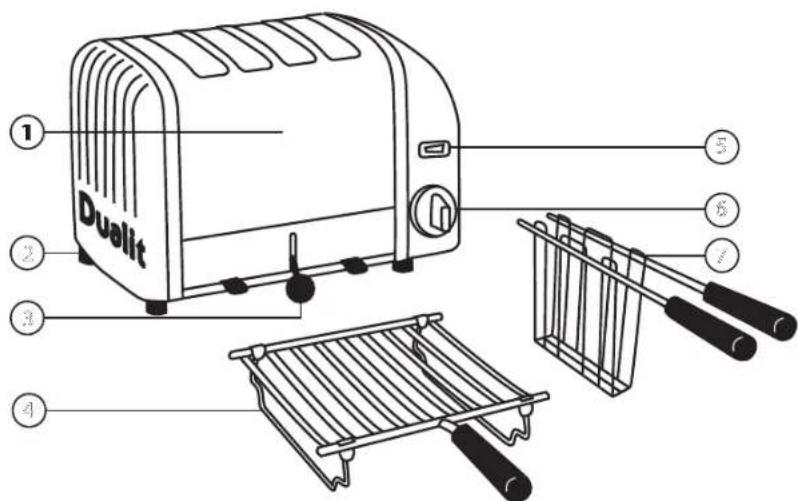
PARTS AND CONTROLS
- Stainless steel cover.
- Slide out crumb tray.
- Ejector knob.
-
Warming racks (optional extra).
-
Slot selector switch.
- Time switch knob.
- Sandwich cage (optional extra).
USING YOUR TOASTER
BEFORE FIRST USE
- Your Dualit toaster has new patented ProHeat elements.
- To condition the elements before toasting for the first time, preheat an empty toaster with all slots turned on for three minutes. Slight smoking may occur, this is perfectly safe.
- When the toaster is used there may be a slight popping crinkling sound, this is due to heat expansion of the element surface and is NOT a fault.
- Select the number of slices to be toasted on the slot selector switch. Lift the round black Ejector Knob to the up position. Starting from left to right, insert bread into all slots brought into operation by the selector switch.
- Turn the Time Switch Knob clockwise to the required number on the dial.
1.5 = Lightly browned toast
2.0 = Medium toast
2.5 = Well done toast.
If using brown bread slightly increase time setting.
- The Dualit toaster can accommodate very large and thick slices. However, if the bread protrudes out of the top of the toaster, you can turn the bread upside down midway through the toasting process.
- When the toaster is cold and being used for the first time set the Time Switch Knob to 2.5 because the metal body will absorb some heat.
After the toaster has warmed up, reduce the toasting time to give consistent results.
- As the Time Switch is rotated the automatic timing will start and the red neon light will illuminate.
TOASTING BREAD
- The timer will click off from 0.5 to 0 position with a clicking sound, the neon light and heating elements will switch off automatically.
- The timer can be rotated off at any time during the toasting process by manually rotating the timer knob to the 0 position.
- The toast will not pop up, but will keep warm inside the toaster. Press down the round Ejector Knob and the toast will pop up ready for serving.
- To toast frozen bread, set timer to the defrost symbol. Let the timer run to 0 position, wait 20 seconds then continue to toast as normal.
CAUTION: Heating up a slot that has not been loaded with bread may damage the elements and cause uneven toasting. Do not use the toaster if the crumb tray or base plate are missing or are incorrectly fitted.
USING YOUR TOASTER
ADJUSTABLE SLOTS
- This toaster has adjustable wire guards that will adjust to the thick bread and to accommodate the sandwich cage. (available as an accessory)
It may be more convenient to toast buns and crumpets in a sandwich cage, as they will be easier to remove from the toaster.
TOASTING SANDWICHES
- The Combi Toasters are supplied with Sandwich cages.
Additional cages can be purchased as an accessory for any Dualit adjustable wire slot toaster.
Prepare the sandwich with medium sliced bread, lightly butter one side of each slice and place filling between un-buttered sides. Do not overfill the sandwich.
TOASTING SANDWICHES
- Place the sandwich in the cage and insert into the toaster.
- Select the number of slots on the selector switch. Set time switch to between number 2.5 and 3.5 according to the brownness required.
Suggested fillings: Thinly sliced ham and thinly sliced cheese. Tomato and cheese or any similar combination.
We recommend using pre-cut processed slices of cheese.
Always lightly butter the OUTER sides of the sandwich as this will make the filling hotter.
- We recommend the use of 1 or 2 day old sliced bread. Slices should be cleanly cut and not ragged edged.
- Very thinly sliced bread may produce uneven toasting.
- Do not force in thick slices of bread as you may experience difficulty in ejecting them. Never insert broken pieces of bread.
- If heated slots are left empty the adjacent slots will toast unevenly.
CAUTION: Heating up slots that have not been loaded with bread may damage the elements and will cause uneven toasting. Do not use the toaster if the crumb tray or base plate are missing or are incorrectly fitted and never cover the top of the toaster or use as a hot plate.
Always unplug the toaster when not in use.
ADJUSTABLE FOOT
- Your toaster is fitted with one adjustable rear foot which may be hand turned, to raise or lower the toaster, to compensate for uneven work surfaces.
SERVICING
CLEANING
- Unplug the toaster and allow to cool down before cleaning.
- Remove the crumb tray and clean daily.
- Crumbs should be carefully brushed off the elements (using only a soft brush), the toaster turned upside down and shaken out.
- Never insert a fork or other sharp instrument to remove torn pieces of bread as the heating elements may be damaged.
- Use a damp cloth to wipe off the outside surfaces of the toaster. A stainless steel polish can be used to restore shine but this must not an aggressive cleaner or contain ammonia and should only be used on the stainless steel cover.
- This appliance must not be immersed in water or cleaned with a water jet.
UK GUARANTEE
See enclosed guarantee card for full details of the Dualit Guarantee.
Keep these instructions and purchase receipt in a safe place, you will need this if your toaster requires repair under the guarantee.
This guarantee does not affect the purchaser's statutory rights.
Further advice on using your Dualit Vario, or other products in the Dualit range, is available from:
Dualit customer care line on +44(0)1293 652 500
Alternatively e-mail Dualit on info@dualit.com or www.dualit.com
REPLACING ELEMENTS
Servicing must only be carried out by a Dualit authorised service agent or a competent qualified electrician.
For your own protection only use original Dualit spares in your toaster.
- When replacing Pro Heat elements, only use genuine Dualite elements (stamped "DUALIT").
- The safety and the performance of the toaster cannot be guaranteed if inferior elements are used.
- Fitting of non Dualit parts will also invalidate the guarantee.
SERVICING
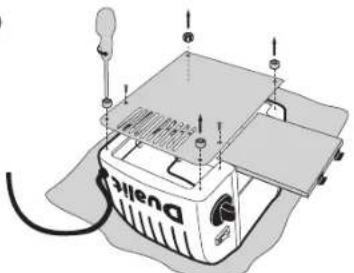
PROCEDURE FOR REPLACING ELEMENTS
1
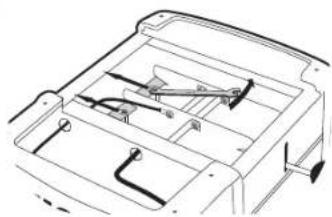
Unplug and place toaster on a soft cloth. Remove crumb tray and unscrew feet to remove the base plate
2
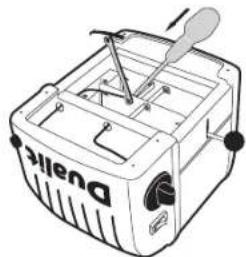
Loosen locking nuts on retaining plate using a 6.5mm spanner and slide back
3
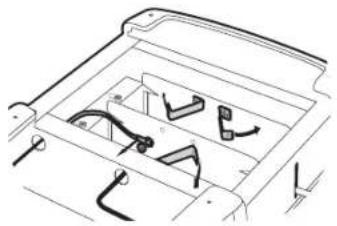
Unscrew brass links and wires.
4
Bend brass links and wires away from the element
5
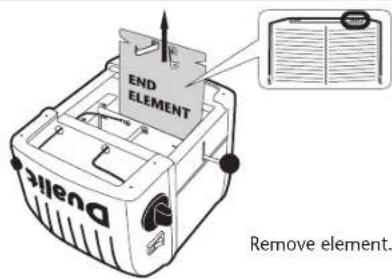
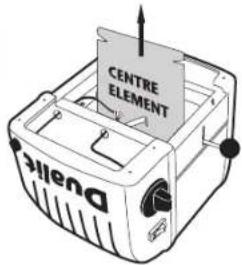
To re-assemble, reverse procedure ensuring wires and parts are correctly positioned. Ensure new element is marked the same as the one removed and is seated correctly in the channels either side. PAT test before use.
GRILLE PAIN CLASSIC VARIO DUALIT
MESURES DE SECURITE

- SAFETY PRECAUTIONS
- SAVE THESE INSTRUCTIONS
- PARTS AND CONTROLS
- USING YOUR TOASTER
- BEFORE FIRST USE
- TOASTING BREAD
- ADJUSTABLE SLOTS
- TOASTING SANDWICHES
- ADJUSTABLE FOOT
- SERVICING
- CLEANING
- UK GUARANTEE
- REPLACING ELEMENTS
- PROCEDURE FOR REPLACING ELEMENTS
- GRILLE PAIN CLASSIC VARIO DUALIT
- MESURES DE SECURITE
Brand : DUALIT
Model : 42245
Category : Toaster