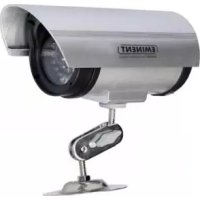
EM6050 - Surveillance Camera Eminent - Free user manual and instructions
Find the device manual for free EM6050 Eminent in PDF.



| Product type | Fake surveillance camera (imitation) |
| Brand | Eminent |
| Model | EM6050 |
| Usage | Indoor and outdoor, deterrent effect |
| Power supply | 2 AA batteries (not included) |
| Battery type | Alkaline or rechargeable (AA size) |
| Indicator LED | Flashing red LED (1 flash every 5 seconds) |
| Material | Plastic |
| Color | Black and white |
| Rotation angle | Adjustable with wing nuts (swivel arm) |
| Mounting | Wall or ceiling with included mount |
| Package contents | Imitation camera, mounting bracket, 2 wing nuts, 2 attachment brackets, 3 screws |
| Warranty | 5 years (excluding accessories and batteries) |
| Maintenance and cleaning | Clean with a soft, dry cloth. Do not use harsh chemicals. |
| Safety | Do not open the housing. Any repairs must be carried out by authorized Eminent personnel. |
| Spare parts and repairability | Contact Eminent support for spare parts. Repairs only by authorized technicians. |
| Compliance | Declaration of conformity available on request |
Frequently Asked Questions - EM6050 Eminent
User questions about EM6050 Eminent
0 question about this device. Answer the ones you know or ask your own.
Ask a new question about this device
Download the instructions for your Surveillance Camera in PDF format for free! Find your manual EM6050 - Eminent and take your electronic device back in hand. On this page are published all the documents necessary for the use of your device. EM6050 by Eminent.
USER MANUAL EM6050 Eminent
Eminent Computer Supplies
Postbus 276
6160 AG Geleen
Nederland
Warnings and points of attention
Opening of the product and/or products can lead to severe injuries! Repairing of the product should be done by qualified Eminent staff!
Table of contents
1.0 Warranty conditions 5
2.0 Introduction 5
2.1 Functions and features 5
2.2 Package contents 6
3.0 Mounting the camera 6
4.0 Frequently asked questions 6
5.0 Service and support 6
1.0 Warranty conditions
The five-year Eminent warranty applies for all Eminent products unless mentioned otherwise before or during the moment of purchase. When having bought a second-hand Eminent product the remaining period of warranty is measured from the moment of purchase by the product's first owner. The Eminent warranty applies to all Eminent products and parts indissolubly connected to and/or mounted on the main product. Power supply adapters, batteries, antennas and all other products not integrated in or directly connected to the main product and/or products of which, without reasonable doubt, can be assumed that wear and tear show a different pattern than the main product are not covered by the Eminent warranty. Products are not covered by the Eminent warranty when exposed to incorrect/improper use, external influences and/or when opened by parties other than Eminent.
2.0 Introduction
Congratulations on your purchase of this high-quality Eminent product! This product has undergone extensive testing by Eminent's technical experts. Should you experience any problems with this product, you are covered by a five-year Eminent warranty. Please keep this manual and the receipt in a safe place.
Register this product now on www.eminent-online.com and receive product updates!
2.1 Functions and features
The EM6050 is a dummy camera for indoors and outdoors with realistic looking design thanks to the power cable and recording LED. The EM6050 has a convenient swivel
arm with wing nuts to determine the correct angle. Because of the apparently recording LED and the cable the camera looks like a real security camera. Therefore, assemble the camera at a place where it certainly will be spotted.
2.2 Package contents
The following parts need to be present in the packing:
- EM6050 dummy camera
- Mounting set, consisting of 1x mounting stand, 2x wing nuts, 2x clamp brackets
- 3x screws to mount the camera
3.0 Mounting the camera
The EM6050 is designed to keep unwanted people of your property. When the camera is spotted, people will think twice before entering your property. Follow these steps to mount the camera properly for use.
- Take the camera, mounting stand and mounting set out of its package.
- Use the mounting stand to draw three holes on the location where you want to mount the camera.
- Drill 3 holes and attach the camera stand with 3 screws to the ceiling or wall.
- To get the red LED to work you will need to place batteries (2xAA) in the camera. Slide the solar vigor to the back and open the battery compartment. Here you can place the batteries. (Batteries are not included).
- The LED light will be lit every 5 seconds.
- Close the compartment and place the vizor back.
- Mount the camera back on the stand.
- Adjust the camera with the wing nuts so the camera will be aimed at the area you want to 'observe'.
- The 'power cable' can be placed in the wall or ceiling so the camera will look even more real.
- The installation is now complete.
4.0 Frequently asked questions
V: There are no batteries supplied, is this correct?
A: This is correct. Batteries are not supplied with this product.
5.0 Service and support
This users manual has been carefully written by Eminent's technical experts.
If you have problems installing or using the product, please fill out the support form at the website www.w.eminent-online.com/support.
Declaration of Conformity
To ensure your safety and compliance of the product with the directives and laws created by the European Commission you can obtain a copy of the Declaration of Conformity concerning your product by sending an e-mail message to: info@eminentonline.com. You can also send a letter to:
Eminent Computer Supplies
P.O.Box 276
6160 AG Geleen
The Netherlands
Clearly state 'Declaration of Conformity' and the article code of the product of which you would like to obtain a copy of the Declaration of Conformity.
5.0 Service et support
Eminent Computer Supplies
Postbus 276
6160 AG GELEEN
Pays-Bas
Eminent Computer Supplies
Postbus 276
6160 AG GELEEN
Holanda
Eminent Computer Supplies
Postbus 276
6160 AG GELEEN
The Netherlands
The following parts need to be present in the packing:
Eminent Computer Supplies
P.O.Box 276
6160 AG Geleen
The Netherlands
Eminent Computer Supplies
P.O.Box 276
6160 AG Geleen
The Netherlands
Tel. +31 46 436 21 56
Trademarks: all brand names are trademarks and/or registered trademarks of their respective holders.
The information contained in this document has been created with the utmost care. No legal rights can be derived from these contents. Eminent cannot be held responsible, nor liable for the information contained in this document.
Eminent is a member of the Intronics Group
CE


Brand : Eminent
Model : EM6050
Category : Surveillance Camera