ManualGo.com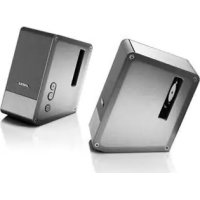
MusicMonitor 43331 - Haut-parleur BOSE - Free user manual and instructions
Find the device manual for free MusicMonitor 43331 BOSE in PDF.


Download the instructions for your Haut-parleur in PDF format for free! Find your manual MusicMonitor 43331 - BOSE and take your electronic device back in hand. On this page are published all the documents necessary for the use of your device. MusicMonitor 43331 by BOSE.
USER MANUAL MusicMonitor 43331 BOSE
Notice d’utilisationEnglish
Please read this owner’s guide
Please take the time to follow the instructions in this owner’s guide carefully.
It will help you set up and operate your system properly and enjoy all of its
advanced features. Please save this owner’s guide for future reference.
WARNING: To reduce the risk of re or electrical shock, do not expose
the product to rain or moisture.
WARNING: The apparatus shall not be exposed to dripping or splashing,
and objects lled with liquids, such as vases, shall not be placed on the
apparatus. As with any electronic products, use care not to spill liquids into
any part of the system. Liquids can cause a failure and/or a re hazard and
will void the warranty.
WARNING: No naked ame sources, such as lighted candles, should be
placed on or near the apparatus.
CAUTION: Make no modications to the system or accessories.
Unauthorized alterations may compromise safety, regulatory compliance,
and system performance, and will void the warranty.
CAUTION: During normal use, the power supply may get hot.
Avoid placing it on heat-sensitive surfaces.
The product label is located on the bottom of the product.
Where the mains plug or appliance coupler is used as the disconnect device,
such disconnect device shall remain readily operable.
The product must be used indoors. It is neither designed nor tested for use
outdoors, in recreation vehicles, or on boats.
This product is intended to be used only with the power supply provided.
Please dispose of a used or damaged battery promptly and properly,
following all local regulations. Do not incinerate.
This product conforms to the EMC Directive 89/336/EEC and to the Low
Voltage Directive 73/23/EEC. The complete Declaration of Conformity can
be found at www.Bose.com/static/compliance/index.html.
Additional safety information
See the additional instructions on the Important Safety Instructions sheet (North
America only) enclosed in the shipping carton.
©2007 Bose Corporation. No part of this work may be reproduced, modified, distributed, or otherwise used without prior written permission.
Information about products that generate
If applicable, this equipment has been tested and found to comply with the limits
for a Class B digital device, pursuant to Part 15 of the FCC rules. These limits
are designed to provide reasonable protection against harmful interference in a
residential installation. This equipment generates, uses, and can radiate radio
frequency energy and, if not installed and used in accordance with the instruc-
tions, may cause harmful interference to radio communications. However, this
is no guarantee that interference will not occur in a particular installation. If this
equipment does cause harmful interference to radio or television reception,
which can be determined by turning the equipment off and on, you are encour-
aged to try to correct the interference by one or more of the following measures:
Reorient or relocate the receiving antenna.
Increase the separation between the equipment and receiver. Connect the
equipment to an outlet on a different circuit than the one to which the receiver
Consult the dealer or an experienced radio/TV technician for help.
♪ Note: Unauthorized modification of the system could void the
user’s authority to operate this equipment and will void the
This product complies with the Canadian ICES-003 Class B specications.
For future reference
For convenience, enter the serial number (S/N located on the bottom of the
right speaker) below and on the Customer Warranty card.
Serial number: ___________________________________________________
Purchased on: ___________________ From dealer: _____________________
We suggest that you keep your purchase receipt and the limited warranty
agreement with this guide.
Congratulations on your purchase of the Bose
With these high-quality speakers, you can enjoy:
The precision of full-range sound reproduction.
The impact of wide sound stage performance.
The convenience of compact speakers that outperform
many larger speakers.
The freedom of movement you gain with the supplied
The angled style that fits on your desktop and directs
the sound where you sit.
The confidence provided by solid construction and
The experience of proprietary Bose
bring you all of this.
Caring for your speakers 8
To clean the speakers 8
To replace the remote control battery 8
Using the three cables 4
Caring for your speakers 8 To clean the speakers 8To replace the remote control battery 8 troubleShootIng 9
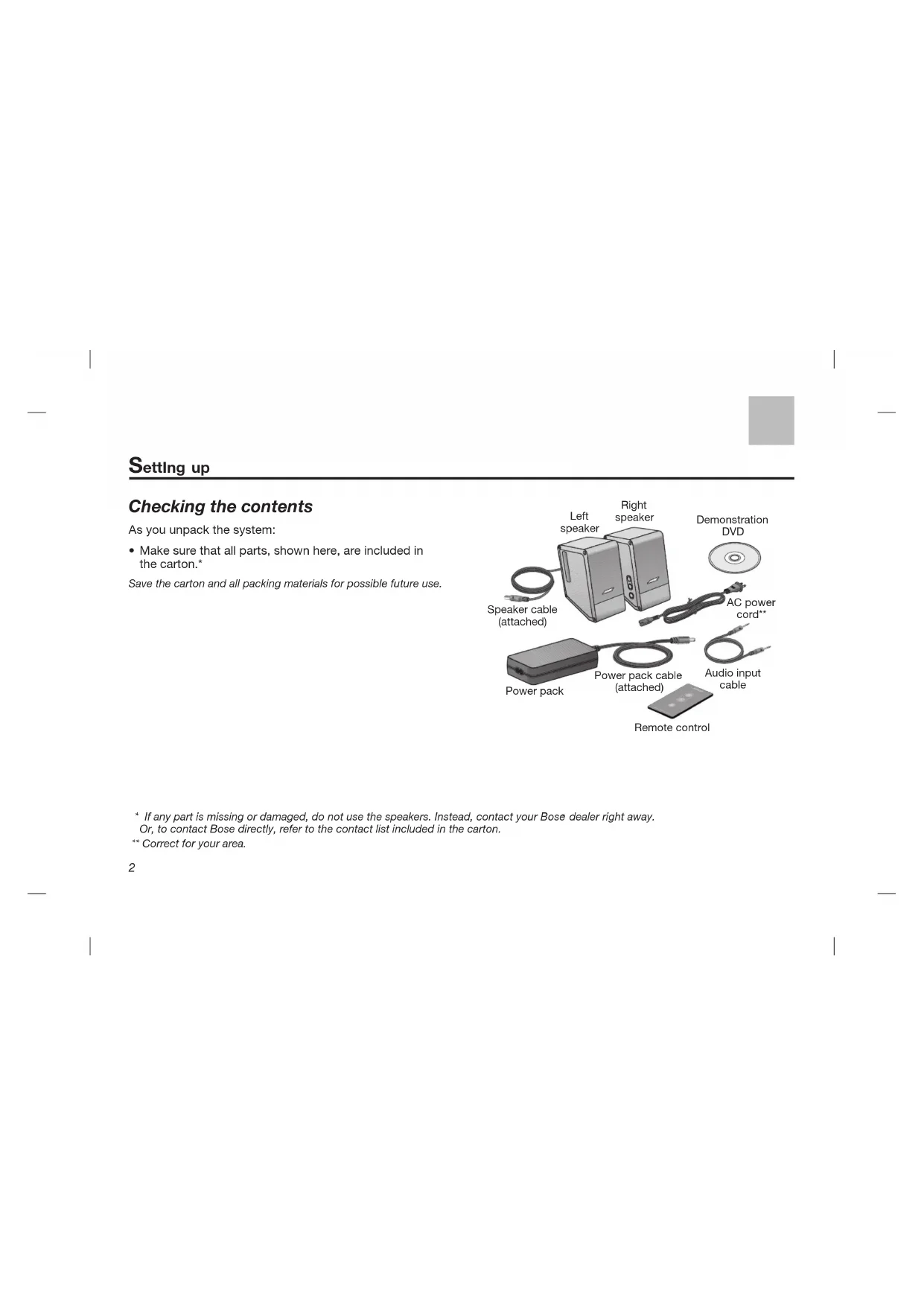
Checking the contents
As you unpack the system:
Make sure that all parts, shown here, are included in
Save the carton and all packing materials for possible future use.
* If any part is missing or damaged, do not use the speakers. Instead, contact your Bose
Or, to contact Bose directly, refer to the contact list included in the carton.
** Correct for your area.
Positioning the speakers
The size and shape of these speakers make it easy to
position them directly next to your computer. For proper
performance, place the right speaker to the right and the
left speaker to the left of your computer. Make sure there
is equal distance on either side. This provides an accurate
Be sure not to place any object in front of the
speakers, which could block the sound or any
signals from the remote control.
CAUTION: Avoid inserting any objects (such as a cable,
finger, pencil, or screwdriver) into the vent on the side of
each speaker. Such items can damage the speaker and
degrade performance, and may void the warranty.
46 cm — 92 cmEnglish 4
Using the three cables
Use the three provided cables and the power pack to
make the connections shown on page 5.
CAUTION: Do not plug in the AC power cord until all
other connections are completed.
Speaker cable ( ): Insert the free end into the To Left
Speaker connector on the right speaker.
Audio input cable ( ): Insert one end into the Audio
Input connector on the right speaker. Insert the other
end into the Headphone or Speaker connector (the
labels and positions of these connectors vary) on
♪ Note: To use these speakers with a different sound
source (such as an MP3 or portable CD player), make
this connection to the Audio Out connector on that
Power pack cable ( ): Insert the free end into the DC Power connector on the back of the right speaker.
AC Power cord: Connect the small end to the power
pack and the large end to an AC (mains) outlet.
♪ note: Bose recommends using a safety agency-approved surge protector with all electronics equipment.
of computerEnglish 6
Insert the provided demonstration disc into your computer
disc drive and set it to play. This is one way to enjoy the
full impact of the sound.
To turn on the speakers, press the power button on the
side of the right speaker. Or press the power button on
the remote control while aiming it at the right speaker. The
indicator light on the front of the right speaker turns on.
Controlling the volume
Press the + and – buttons on the side of the right speaker
or on the remote control.
The indicator light blinks each time you press + or –.
The indicator light blinks more than once when the
volume reaches its highest or lowest setting.
Be sure your computer is turned on and EACH of its
volume controls is turned up to at least
IMPORTANT: Low volume settings (less than
on your computer reduce its output and unnaturally limit
Computer volume controls often include:
External buttons, which may operate independent of
the onscreen controls (examples A and B, below).
Onscreen controls, provided on the computer
(examples C, D, and E).
Various media player controls (example F).
If you use a control on your computer to mute the
speakers, be sure to unmute them before turning off
Or you can use the power button on the right speaker or
the remote control to turn off both speakers. Press this
button again to resume play at your previous volume.
Tips on using the remote control:
Some conditions, such as room lighting, furniture that
blocks the signal path, or direct sunlight, can affect
If the remote does not work as it should:
Point the remote more directly at the right speaker,
which receives the remote control signals.
Dim the room lights or move the speakers away from
Move closer to the system when you use the remote.
If the problem persists, replace the remote control
Caring for your speakers
The only maintenance necessary is replacing the remote
control battery when necessary. You may also want to
clean the speakers, as needed.
To clean the speakers
Wipe each speaker carefully, using a soft, dry cloth only.
Do not allow liquids to spill on the speakers or to enter
the vent on the side of each speaker.
Do not use abrasives, liquids, or sprays on the speakers
To replace the remote control battery
instructions for types of battery to be
Replace the remote control battery when the remote stops
operating (normally every year or two) or its range seems
Use only a Duracell, Eveready, Energizer, Maxell, Toshiba,
WARNINGS: Keep the remote control battery away from children. It may cause a fire or chemical burn if mishandled. Do not recharge, disassemble, heat above 140ºF (60ºC), or incinerate.Dispose of used batteries promptly. Replace only with a battery of the correct type and model number.Danger of explosion if battery is incorrectly replaced. Replace only with Duracell, Eveready, Energizer, Maxell, Toshiba, or Shun Wo CR2032 or DL2032 3-volt lithium battery. •
Problem What you can do
No sound • Make sure the speakers are turned on as indicated by the light on the front of the right speaker.
• Make sure the speaker volume is not set to the minimum. Press the + button on the right speaker for
2 seconds to raise the volume enough.
Make sure the computer is plugged in and turned on, mute is turned off, and all volume controls are turned
up. Refer to “Controlling the volume” on page 6.
• Be sure the power pack is securely plugged into the right speaker and into a power outlet or surge protector.
• Be sure the AC power outlet is working. When using a computer surge protector or power strip, be sure it is
• Be sure the speaker cable is securely plugged into the right speaker.
Be sure that both ends of the audio input cable, one to the speaker and the other to the computer, are
plugged in securely.
Make sure the computer provides stereo sound. It if has one channel only, connect a mono-to-stereo adapter
(not supplied) to send the sound to both speakers.
control the speakers
Check the battery to be sure it is installed correctly. Refer to the image on page 8.
Refer to “Tips on using the remote control” on page 7.
• Turn off the monitor or TV for 15 to 30 minutes, then turn it on again.
• Move the speakers away from the monitor or TV.
troubleShootIngEnglish
product detaIlS Customer Service
For further information or additional help in solving problems, contact your authorized Bose
dealer. Or to contact Bose
directly, refer to the contact list included in the carton.
This product is covered by a transferable limited warranty.
Details of the limited warranty are provided on the Product Registration Card that came with your system. Please fill out
the information section on the card and mail it to Bose. To register online instead, visit: www.Bose.com/register. Failure to
register will not affect your limited warranty rights.
Technical information
Full-range, magnetically shielded drivers
with Bose proprietary technology
Right speaker: 1.3 lb (0.6 kg)
Left speaker: 1.2 lb (0.5 kg)
www.Bose.com/static/compliance/index.html.
instructions for types of battery to be
instructions for types of battery to be
Français©2007 Bose Corporation, The Mountain,