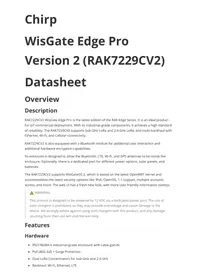
RAK7229CV2 - IoT product RAK - Free user manual and instructions
Find the device manual for free RAK7229CV2 RAK in PDF.


| Product Type | LoRaWAN Concentrator Module for IoT |
| Brand | RAK |
| Model | RAK7229CV2 |
| Category | IoT Product |
| Operating Frequency | 868 MHz / 915 MHz |
| Protocol | LoRaWAN |
| Interface | SPI |
| Power Supply | 5 V DC |
| Typical Consumption | ~1 W |
| Dimensions | 60 × 40 × 10 mm |
| Weight | 20 g |
| Operating Temperature | -40 °C to +85 °C |
| Operating Humidity | 10% to 90% non-condensing |
| Certifications | Compliant with CNR Canada, FCC, CE |
| Minimum Usage Distance | 40 cm from body |
| Installation | By a qualified professional |
| Main Functions | LoRa data reception and transmission, multi-channel concentrator |
| Maintenance and Cleaning | Clean with a soft, dry cloth, avoid moisture |
| Safety | Do not expose to extreme temperatures, respect RF distances |
| Spare Parts and Repairability | Not available, device not repairable |
| Warranty | 2 years |
Frequently Asked Questions - RAK7229CV2 RAK
User questions about RAK7229CV2 RAK
0 question about this device. Answer the ones you know or ask your own.
Ask a new question about this device
Download the instructions for your IoT product in PDF format for free! Find your manual RAK7229CV2 - RAK and take your electronic device back in hand. On this page are published all the documents necessary for the use of your device. RAK7229CV2 by RAK.
USER MANUAL RAK7229CV2 RAK
RAK7229CV2 WisGate Edge Pro is the latest edition of the RAK Edge Series. It is an ideal product for IoT commercial deployment. With its industrial-grade components, it achieves a high standard of reliability. The RAK7229CV2 supports Sub-GHz LoRa and 2.4 GHz LoRa, and multi-backhaul with Ethernet, Wi-Fi, and Cellular connectivity.
RAK7229CV2 is also equipped with a Bluetooth module for additional user interaction and additional hardware encryption capabilities.
Its enclosure is designed to allow the Bluetooth, LTE, Wi-Fi, and GPS antennas to be inside the enclosure. Optionally, there is a dedicated port for different power options, solar panels, and batteries.
The RAK7229CV2 supports WisGateOS 2, which is based on the latest OpenWRT kernel and accommodates the latest security updates like IPv6, OpenSSL 1.1 support, multiple accounts access, and more. The web UI has a fresh new look, with more user-friendly information tooltips.

WARNING
This product is designed to be powered by 12 VDC via a dedicated power port. The use of solar chargers is prohibited, as they may provide overvoltage and cause damage to the device. We strongly advise against using such chargers with this product, and any damage resulting from their use will void the warranty.
Features
Hardware
- IP67/NEMA-6 industrial-grade enclosure with cable glands
- PoE (802.3af) + Surge Protection
- Dual LoRa Concentrators for Sub-GHz and 2.4 GHz
- Backhaul: Wi-Fi, Ethernet, LTE
GPS
Supports DC 12 V or solar power supply with electricity monitoring (Solar Kit optional)
- Internal antenna for Wi-Fi, GPS, LTE, and Bluetooth
External antenna for LoRa
- Dying-gasp (optional)
- Bluetooth
- Hardware encryption
Software
Built-in Network Server (full LoRaWAN support V 1.0.3)
- OpenVPN
- Software and UI sit on top of OpenWRT
Full LoRaWAN Stack support with Semtech SX1303
- LoRa Frame filtering (node whitelisting)
- MQTT v3.1 bridging with TLS encryption
- Buffering of LoRa frames in Packet Forwarder mode in case of NS outage (no data loss)
- Listen Before Talk (optional)
- Fine timestamping (optional)
Specifications
Overview
The overview presents the block diagram for the RAK7229CV2 that shows the internal architecture of the board and the main specifications.
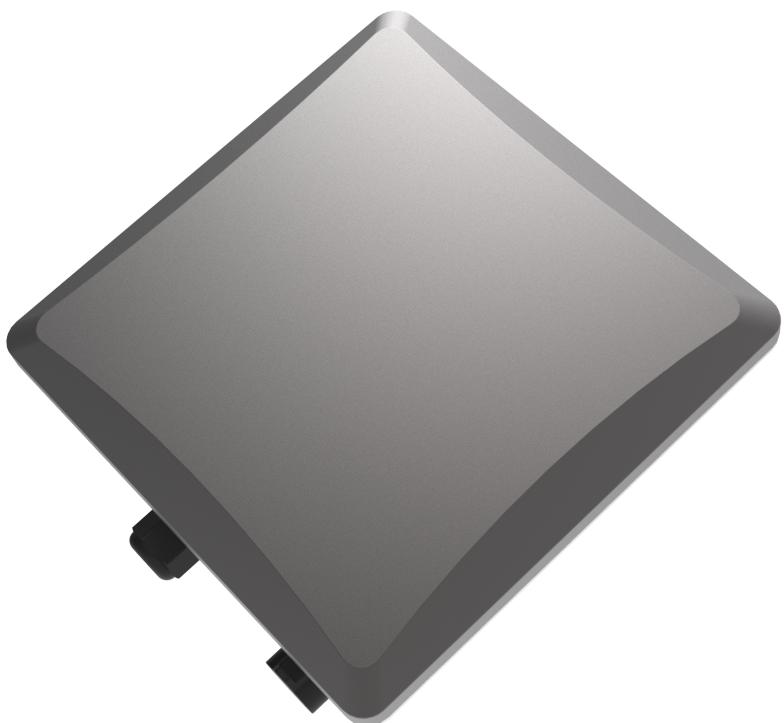
Figure 1: Overview
Main Specifications
| Feature | Specifications |
| Computing | MT7628, DDR2 RAM 128 MB |
| Wi-Fi feature | Frequency: 2.4 GHz (802.11b/g/n) 2x2 MIMO RX Sensitivity: -95 dBm (Min) TX Power: 20 dBm (Max) Operation channels: 2.4 GHz: 1-13 |
| Sub-GHz LoRa feature | SX1303 mini PCIe card 8 channels RX Sensitivity: -139 dBm (Min) TX Power: 27 dBm (Max) Listen Before Talk |
| 2.4 GHz LoRa feature | SX1280 mini PCIe card 8 channels RX Sensitivity: -132 dBm (SF12 BW 203 kHz); -110 dBm (SF7 BW 1625 kHz) TX Power: 27 dBm (Max) |
| Bluetooth feature | BLE5.0 (Tx power -20 to +4 dBm in 4 dB steps) |
| Hardware encryption feature | ECC608A |
| Frequency | EU433/CN470/EU868/US915/AS923/AU915/IN865/KR920 2.4 GHz LoRa |
| Cellular feature | Supports Quectel EG95-E/EG95-NA (IoT/M2M -optimized LTE Cat 4 Module) EG95-E for EMEA Region (Europe, Middle East, and Africa) LTE FDD: B1/B3/B7/B8/B20/B28A WCDMA: B1/B8 GSM/EDGE: B3/B8 EG95-NA for North America Region LTE FDD: B2/B4/B5/B12/B13 WCDMA: B2/B4/B5 |
| Power supply | PoE (IEEE 802.3af) - 37~57 VDC |
| ETH | RJ45 (10/100 M) |
| Antenna | LoRa: 1 or 2 N-Type connectors LTE: Internal antenna Wi-Fi: Internal antenna |
| Ingress protection | IP67 |
| Enclosure material | Aluminium and plastic |
| Operating temperature | -30 °C to +55 °C |
| Installation method | Pole or wall mounting |
Hardware
The hardware specification covers the interfacing of the RAK7229CV2 and its corresponding functionalities. It also presents the parameters and the standard values of the gateway.
RF Specifications
Wi-Fi Radio Specifications
| Parameter | Value |
| Wireless standard | IEEE 802.11b/g/n |
| Operating frequency | ISM band: 2.412~2.472 GHz |
| Operation channels | 2.4 GHz: 1-13 |
| Transmit power (The max power may be different depending on local regulations) - per chain | 802.11b 19 dBm @1 Mbps 19 dBm @11 Mbps 802.11g 18 dBm @6 Mbps 16 dBm @54 Mbps 802.11n (2.4 G) 18 dBm @MCS0 (HT20) 16 dBm @MCS7 (HT20) 17 dBm @MCS0 (HT40) 15 dBm @MCS7 (HT40) |
| Receiver sensitivity (Typical) | 802.11b -95 dBm @1 Mbps -88 dBm @11 Mbps 802.11g -90 dBm @6 Mbps -75 dBm @54 Mbps 802.11n (2.4 G) -89 dBm @MCS0 (HT20) -72 dBm @MCS7 (HT20) -86 dBm @MCS0 (HT40) -68 dBm @MCS7 (HT40) |
LoRa Sub GHz Radio Specifications
| Parameter | Value |
| Operating Frequency | EU433/CN470/EU868/US915/AS923/AU915/IN865/KR920 |
| Transmit Power | 27 dBm (Max) |
| Receiver Sensitivity | -139 dBm (Min) |
LoRa 2.4 GHz Radio Specifications
| Parameter | Value | Condition |
| Tx power | Max: 27 dBm | - |
| Receiver sensitivity | -132 dBm | SF12 BW 203 kHz |
| -110 dBm | SF7 BW 1625 kHz |
Interfaces
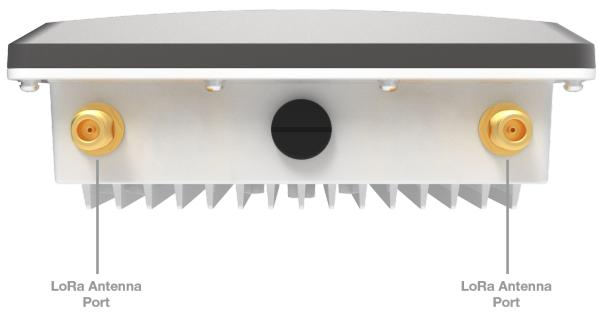
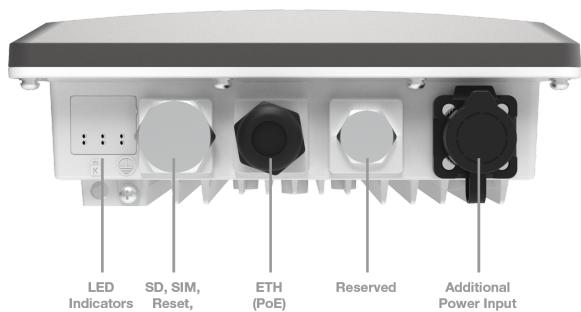
Figure 3: Interfaces
- The function of the Reset key is as follows:
Short press: Restart the gateway.
Long press (5s and above): Restore factory settings.
- LEDs status description:
| LEDs | Status indication description |
| LED 1 (PWR) | Power indicator - The LED is on when device power is on |
| LED 2 (ETH) | ON - Linkup OFF - Linkdown Flicker - Data transmitting and receiving |
| LED 3 (LoRa 1) | ON - LoRa 1 is working OFF - LoRa 1 is not working Flicker - Indicate LoRa 1 Packet receiving and sending |
| LED 4 (WLAN) | AP Mode: - ON - The AP is up - Flicker - Data receiving and sending STA Mode: - Slow flicker (1 Hz) - Disconnected - ON - Connected - Flicker - Data receiving and sending |
| LED 5 (LTE) | Slow Flicker (1800 ms High / 200 ms Low) - Network searching Slow flicker (200 ms High / 1800 ms Low) - Idle Fast flicker (125 ms High / 125 ms Low) - Ongoing data transfer ON - Voice is working |
| LED 6 (LoRa 2 for 2.4 GHz LoRa) | ON - LoRa 2 is working OFF - LoRa 2 is not working Flicker - Indicate LoRa 2 Packet receiving and sending |
Dimensions
Enclosure Dimensions
- Enclosure body
- Enclosure lid
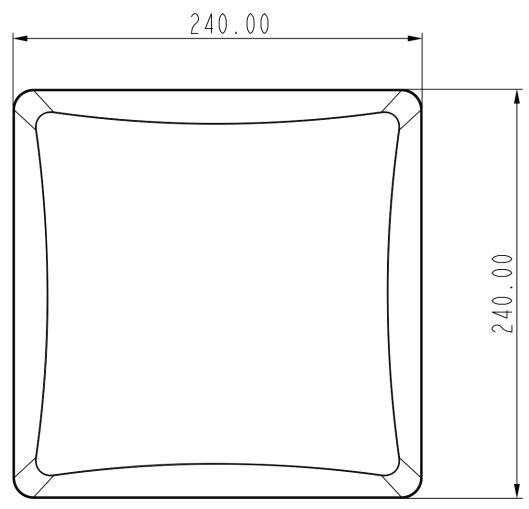
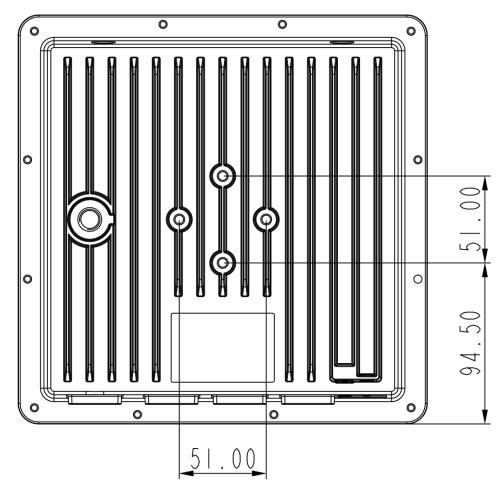
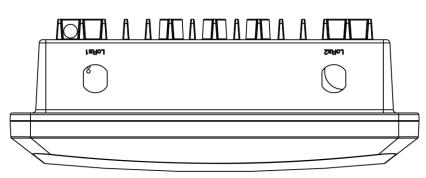
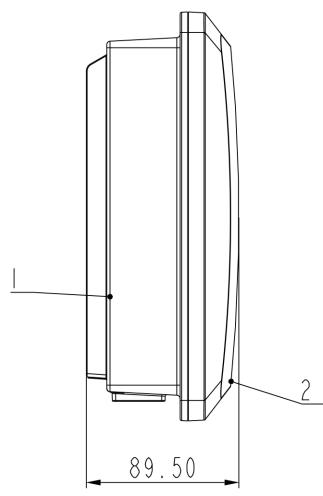
Figure 4: Enclosure dimensions
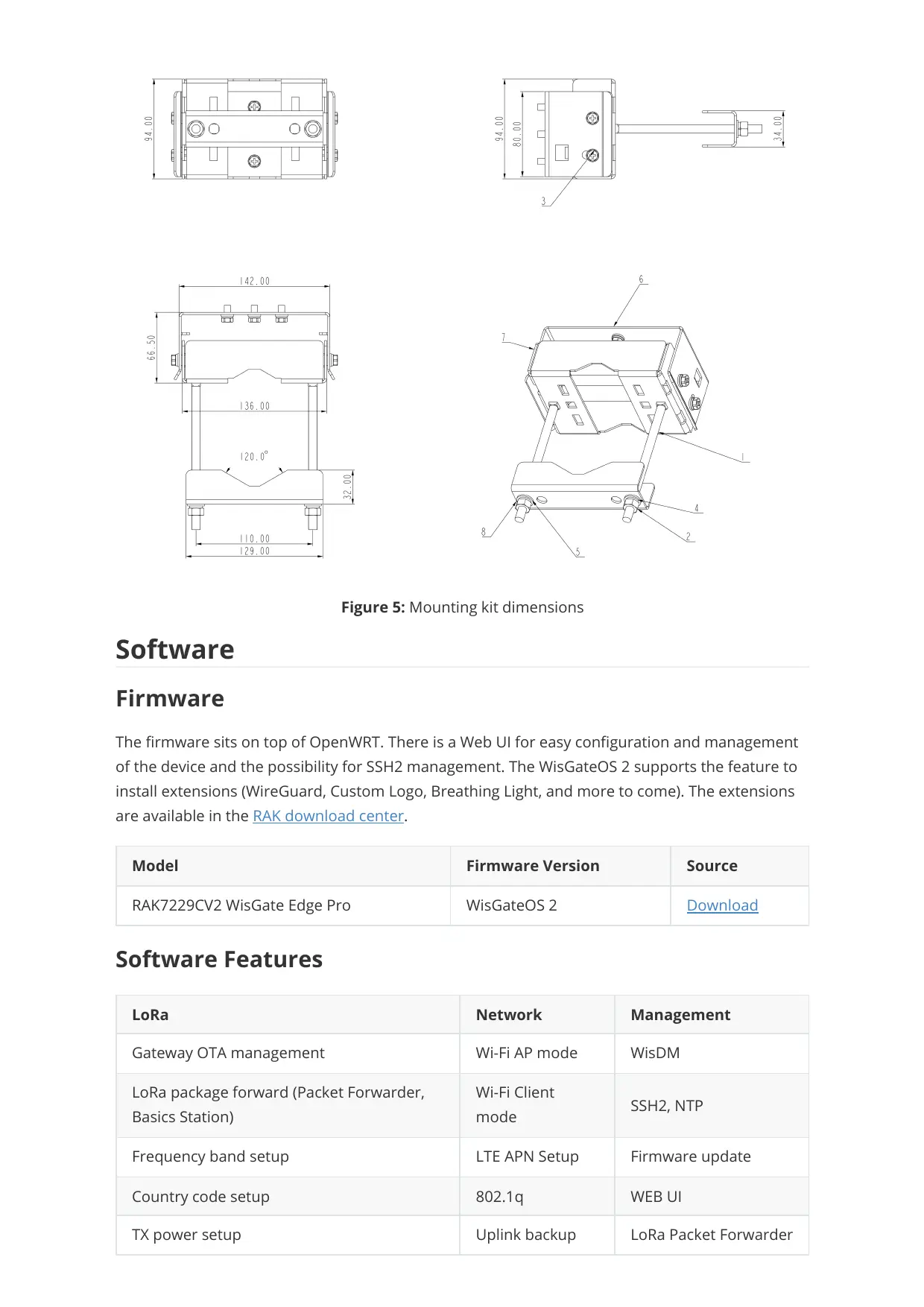
Mounting Kit Dimensions
1.2x Bolt M8x140
2.8x Nut M8
3.6x Screw M6x12
4.2x Spring washer M8
5.2x Flat washer M8
6. 1x Mounting plate
7. 1x Mounting bracket
8. 1x Pole mount bracket
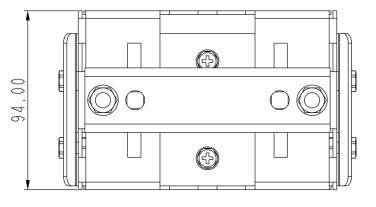
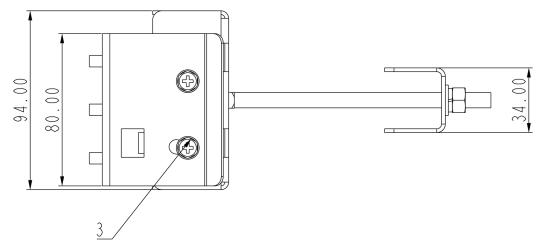
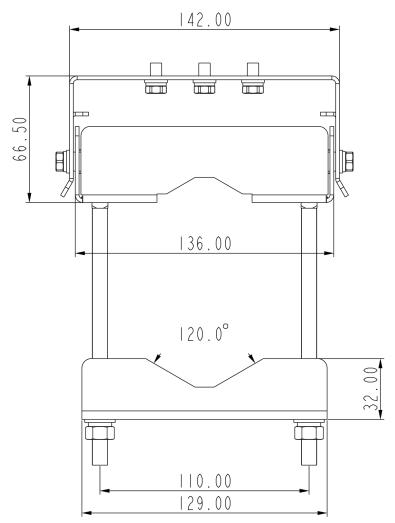
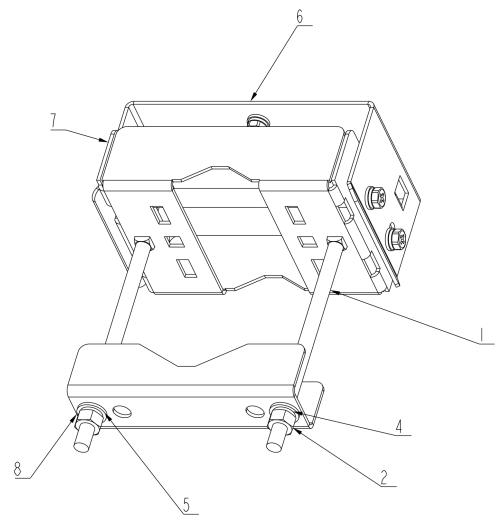
Figure 5: Mounting kit dimensions
Software
Firmware
The firmware sits on top of OpenWRT. There is a Web UI for easy configuration and management of the device and the possibility for SSH2 management. The WisGateOS 2 supports the feature to install extensions (WireGuard, Custom Logo, Breathing Light, and more to come). The extensions are available in the RAK download center.
| Model | Firmware Version | Source |
| RAK7229CV2 WisGate Edge Pro | WisGateOS 2 | Download |
Software Features
| LoRa | Network | Management |
| Gateway OTA management | Wi-Fi AP mode | WisDM |
| LoRa package forward (Packet Forwarder, Basics Station) | Wi-Fi Client mode | SSH2, NTP |
| Frequency band setup | LTE APN Setup | Firmware update |
| Country code setup | 802.1q | WEB UI |
| TX power setup | Uplink backup | LoRa Packet Forwarder |
| Data logger | Support 802.1q | Built-in Network Server |
| Location setup | Firewall | MQTT Bridge |
| Statistic | DHCP Server/Client | OpenVPN, Ping Watch Dog |
| Supports class A, B, C | ||
| Server address and port setup |
FCC:
This device complies with Part 15 of the FCC Rules. Operation is subject to the following two conditions: (1) this device may not cause harmful interference, and (2) this device must accept any interference received, including interference that may cause undesired operation.
FCC Caution:
Changes or modifications not expressly approved by the part responsible for compliance could void the user's authority to operate the equipment.
This equipment has been tested and found to comply with the limits for a Class B digital device, pursuant to part 15 of the FCC Rules. These limits are designed to provide reasonable protection against harmful interference in a residential installation. This equipment generates, uses and can radiate radio frequency energy and, if not installed and used in accordance with the instructions, may cause harmful interference to radio communications. However, there is no guarantee that interference will not occur in a particular installation. If this equipment does cause harmful interference to radio or television reception, which can be determined by turning the equipment off and on, the user is encouraged to try to correct the interference by one or more of the following measures:
—Reorient or relocate the receiving antenna.
—Increase the separation between the equipment and receiver.
—Connect the equipment into an outlet on a circuit different from that to which the receiver is connected.
—Consult the dealer or an experienced radio/TV technician for help.
FCC RF Radiation Exposure Statement:
This equipment complies with FCC radiation exposure limits set forth for an uncontrolled environment. This equipment should be installed and operated with a minimum distance of 40cm between the radiator and any part of your body.
ISED:
This device contains licence-exempt transmitter(s)/receiver(s) that comply with Innovation, Science and Economic Development Canada's licence-exempt RSS(s). Operation is subject to the following two conditions:
- This device may not cause interference.
- This device must accept any interference, including interference that may cause undesired operation of the device.
The device complies with RF exposure guidelines, users can obtain Canadian information on RF exposure and compliance. The minimum distance from the body to use the device is 40~cm .
The device must be installed by a trained professional (training in RF Exposure) to ensure that the device is installed correctly with all safeguards in place.
Brand : RAK
Model : RAK7229CV2
Category : IoT product