USER MANUAL CB2542 Okin
| OKIN
REFINED
A Phoenix Mecano Company | Issue department: Bedding Division | Date: | 2017-08-23 |
| Product Function
instruction | Author: | Kyle |
| No: CB2542 |
| CB.2542 | Version: | 1.0 |
| Page 1 of 4 |
Control Box
Function instruction
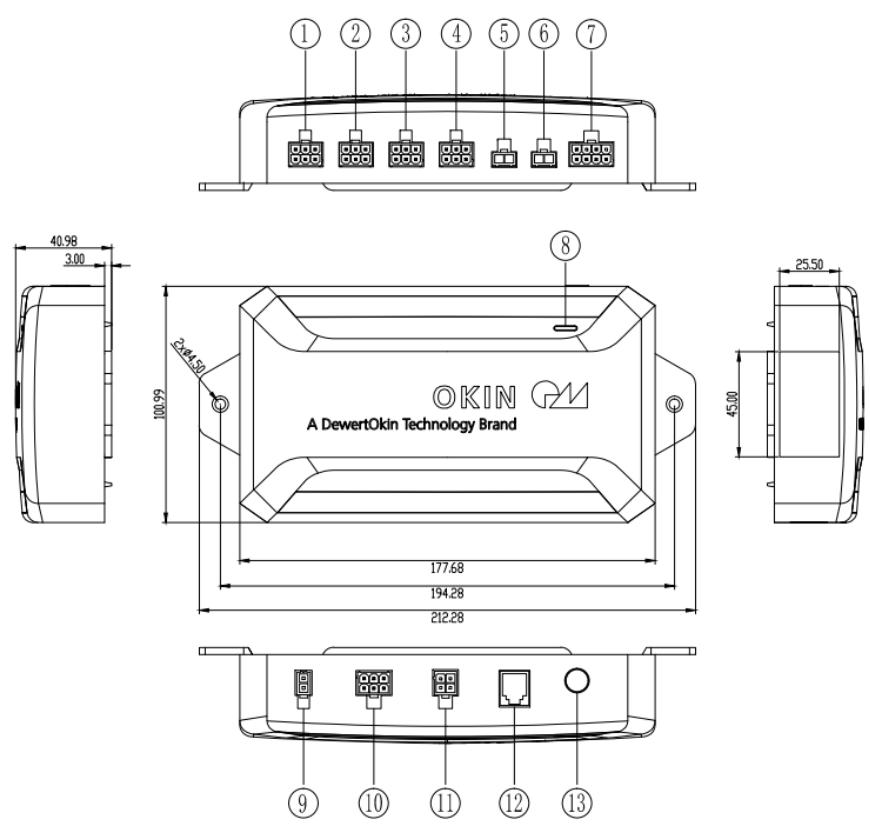
1. Function Picture
1. Process of test
1.1. HEAD
Connect to head actuator,control by remote single:
Click head up button on the remote, head actuator moves out, stop when released;
Click head down button, head actuator moves in, stop when released;
This function takes effect only by pressing the corresponding button on the remote.
Connect to foot actuator,control by remote single:
Click foot up button, foot actuator moves out, stop when released;
Click foot down button, foot actuator moves in, stop when released;
This function takes effect only by pressing the corresponding button on the remote.
1.3. Lumbar
Connect to foot actuator,control by remote single:
Click Lumbar up button, foot actuator moves out, stop when released;
Click Lumbar down button, foot actuator moves in, stop when released;
This function takes effect only by pressing the corresponding button on the remote.
1.4. Tilt
Connect to foot actuator,control by remote single:
Click Tilt up button, foot actuator moves out, stop when released;
Click Tilt down button, foot actuator moves in, stop when released;
This function takes effect only by pressing the corresponding button on the remote.
1.5. Massage
Connect to head & Foot massage,control by remote:
Click head massage + button,head massage strengthens by one level;
Click head massage - button,head massage weakenby one level;
This function takes effect only by pressing the corresponding button on the remote.
1.6. Massage
Connect to head & Foot massage,control by remote:
Click foot massage + button,head massage strengthens by one level;
Click foot massage - button,head massage weakenby one level;
This function takes effect only by pressing the corresponding button on the remote.
1.7.MFP2
Connect to WIFI box or Bluetooth or anyother device。
1.8. Power LED & PAIRING LED
Power supply for control box, PAIRING LED of control box is blue, POWER LED is green.
1.9. Power
Connect to the 29V DC;
1.10.MFP1
Connect to slideshow
1.11.underbed light
Click button of underbed light, turns on( or turns off ) the underbed light, switch the status once when click once; This function takes effect only by pressing the corresponding button on the remote.
1.12.SYNC port
Connect with the same other Control box or Other accessories;
Press and hold the Pair button, the Head, Foot actuators will move to lower position.
1.14. Pair Function
Double click Pair button, pairing LED turns on, the control box enters into mode of code paring;
Press and hold the paring LED of Remote, the backlight of paring LED flashes, the backlight of remote flashes, the remote enters into mode of code paring;
The backlight of paring LED of remote stops flashing, and the paring led of control box turns off, it indicates that the code paring is successful;
If fails, repeat all the processes above;
FCC Warning:
This equipment has been tested and found to comply with the limits for a Class B digital device, pursuant to part 15 of the FCC Rules. These limits are designed to provide reasonable protection against harmful interference in a residential installation. This equipment generates, uses and can radiateradio frequency energy and, if not installed and used in accordance with the instructions, maycause harmful interference to radio communications. However, there is no guarantee that interference will not occur in a particular installation. If this equipment does cause harmful interference to radio or television reception, which can be determined by turning the equipmentoff and on, the user is encouraged to try to correct the interference by one or more of the following measures:
- Reorient or relocate the receiving antenna.
- Increase the separation between the equipment and receiver.
- Connect the equipment into an outlet on a circuit different from that to which the receiver is connected.
- Consult the dealer or an experienced radio/TV technician for help.
Caution: Any changes or modifications to this device not explicitly approved by manufacturer could void your authority to operate this equipment.
This device complies with part 15 of the FCC Rules. Operation is subject to the following two conditions:
(1) This device may not cause harmful interference, and (2) this device must accept any interference received, including interference that may cause undesired operation.
This equipment complies with FCC radiation exposure limits set forth for an uncontrolled environment. This equipment should be installed and operated with minimum distance 20cm between the radiator and your body.
ISED Statement
- English: This device complies with Industry Canada license-exempt RSS standard(s). Operation is subject to the following two conditions: (1) This device may not cause interference, and (2) This device must accept any interference, including interference that may cause undesired operation of the device.
The digital apparatus complies with Canadian CAN ICES-3 (B)/NMB-3(B).
This device meets the exemption from the routine evaluation limits in section 2.5 of RSS 102 and compliance with RSS 102 RF exposure, users can obtain Canadian information on RF exposure and compliance.
This equipment complies with Canada radiation exposure limits set forth for an uncontrolled environment.
This equipment should be installed and operated with minimum distance 20cm between the radiator & your body.