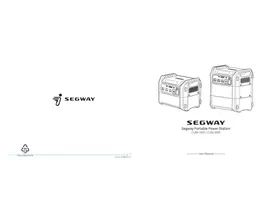
CUBE-1000 - Portable power station SEGWAY - Free user manual and instructions
Find the device manual for free CUBE-1000 SEGWAY in PDF.


| Product Type | Portable Power Station |
| Brand | Segway |
| Model | CUBE-1000 |
| Dimensions (L × W × H) | 354 × 289 × 284 mm (13.9 × 11.3 × 11.1 in) |
| Net Weight | 16.2 kg (35.7 lbs) |
| Battery Type | LFP (LiFePO4) |
| Nominal Capacity | 1024 Wh |
| Nominal Voltage | 51.2 V= |
| Max AC Output Power | 2200 W (Pure Sine Wave) |
| Max DC Output Power | 384 W |
| AC Outputs | 3 × 120 V~ 20 A 60 Hz (2200 W max) |
| USB Outputs | 4 × USB Type-A (18 W max), 2 × USB Type-C (100 W max) |
| Car Output | 1 × 13.6 V=10 A (136 W max) |
| DC5525 Output | 2 × 13.6 V=5 A (68 W max) |
| AC Input | 120 V~ 8 A 60 Hz 1250 W max |
| Solar Input | 12-60 V= 800 W max (up to 4 panels) |
| Car Input | 12/24 V= 8 A (200 W max) |
| UPS Function | Yes (automatic switchover < 30 ms) |
| R-Drive | Yes (up to 4400 W for resistive loads) |
| IP Rating | IPX3 (station), IP56 (battery) |
| Discharge Temperature | 10 °C to 45 °C |
| Charge Temperature | 5 °C to 45 °C |
| Connectivity | Bluetooth (Segway-Ninebot app) |
| Box Contents | CUBE-1000 Station, AC charging cable, car charging cable, 3 mm Allen key |
Frequently Asked Questions - CUBE-1000 SEGWAY
User questions about CUBE-1000 SEGWAY
0 question about this device. Answer the ones you know or ask your own.
Ask a new question about this device
Download the instructions for your Portable power station in PDF format for free! Find your manual CUBE-1000 - SEGWAY and take your electronic device back in hand. On this page are published all the documents necessary for the use of your device. CUBE-1000 by SEGWAY.
USER MANUAL CUBE-1000 SEGWAY
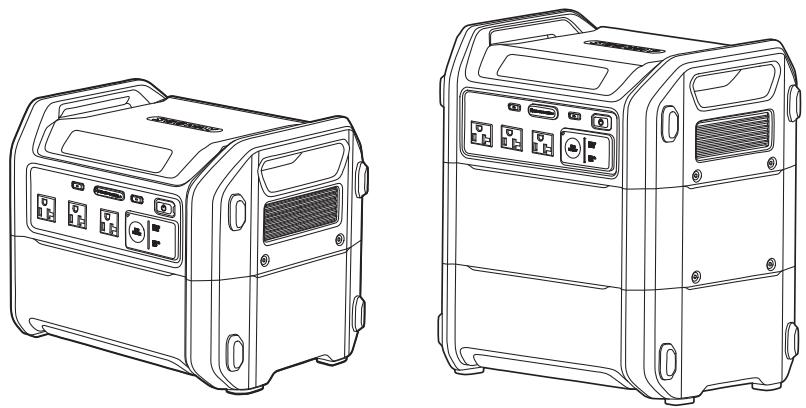
Segway Portable Power Station
CUBE-1000 / CUBE-2000

Raccolta Carta
XX CE.04.00.0833.01-A
User Manual
Contents
- Safety Instructions 01
2.Packing List 04
3.Product Overview 05
4.How to Use the Power Station 09
5.How to Recharge the Power Station 12 - Settings 15
7.AppUserGuide 17 - Specifications 19
9.Troubleshooting 20 - Certification 21
- Trademark and Legal Statement 23
Appendix: Battery Expansion 25
1 Safety Instructions
IMPORTANT SAFETY INSTRUCTIONS
- WARNING - When using this product, basic precautions should always be followed, including the following:
- Read all the instructions before using the product.
- To reduce the risk of injury, close supervision is necessary when the product is used near children.
- Do not put fingers or hands into the product.
- Use of an attachment not recommended or sold by power pack manufacturer may result in a risk of fire, electric shock, or injury to persons.
- To reduce risk of damage to the electric plug and cord, pull the plug rather than the cord when disconnecting the power pack.
- Do not use a battery pack or appliance that is damaged or modified. Damaged or modified batteries may exhibit unpredictable behavior resulting in fire, explosion or risk of injury.
- Do not operate the power pack with a damaged cord or plug, or a damaged output cable.
- Do not disassemble the power pack, take it to a qualified service person when service or repair is required. Incorrect reassembly may result in a risk of fire or electric shock.
- To reduce the risk of electric shock, unplug the power pack form the outlet before attempting any instructed servicing.
- When charging the internal battery, work in a well ventilated area and do not restrict ventilation in any way.
- Under abusive conditions, liquid may be ejected from the battery; avoid contact. If contact accidentally occurs, flush with water. If liquid contacts eyes, additionally seek medical help. Liquid ejected from the battery may cause irritation or burns.
- Do not expose a power pack to fire or excessive temperature. Exposure to fire or temperature above 265^ ( 130^ ) may cause explosion.
- Have servicing performed by a qualified repair person using only identical replacement parts. This will ensure that the safety of the product is maintained.
- Do not expose the product to sources of ignition or high temperatures, such as high heat vehicles or direct sunlight.
- Keep the product dry and do not immerse it in water or subject it to moisture. Do not use the product in rainy or humid environments.
- Avoid using the product in a strong static/magnetic field environment.
- When using the product, please follow the operating ambient temperature specified in the user manual. If the temperature is too high, it may cause a fire or explosion; if the temperature is too low, it may seriously degrade the performance of the product or stop the product from working.
-
When storing the product for a long time, place it in a dry and ventilated place.
-
Avoid obstructing the fan or placing the product in an unventilated or dusty area.
- Do not disassemble the product or pierce the product with sharp objects.
- Avoid impact, falling or violent vibration. If a serious impact occurs, please turn off the power and stop using the product immediately.
- Avoid using wires or other metal objects that may cause a short circuit.
- Do not use damaged cords, plugs or output cables to connect this product to avoid electric shock.
- Do not use unofficial components or accessories. If you need to replace any component or accessory, consult the official Segway channel.
- Do not stack heavy objects on the product.
- Do not place the product on an unstable surface to prevent the product from tipping over or falling.
- Ensure that the product is kept out of the reach of children and pets.
- This product is not recommended for powering medical emergency equipment related to personal safety, including medical grade ventilators and artificial lungs. If you need to power this product, follow your doctor's instructions and consult the manufacturer. If used for general medical equipment, make sure the power supply is in proper condition.
- When using this product, the power supply generates electromagnetic fields that may interfere with the proper operation of medical implants or personal medical devices such as pacemakers, cochlear implants, hearing aids, defibrillators, etc. If these devices are being used, please contact the manufacturer for restrictions on the use of these devices to ensure that medical implants are kept at a safe distance from this product during use.
- Risk of Electric Shock. Never use power pack to supply power tools to cut or access to live parts or live wirings, or materials that may contain live parts or live wirings inside, such as building walls, etc.
SAVE THESE INSTRUCTIONS
GROUNDING INSTRUCTIONS
This product must be grounded. If it should malfunction or breakdown, grounding provides a path of least resistance for electric current to reduce the risk of electric shock. This product is equipped with a cord having an equipment grounding conductor and a grounding plug. The plug must be plugged into an outlet that is properly installed and grounded in accordance with all local codes ordinances.
WARNING - Improper connection of the equipment grounding conductor is able to result in a risk of electric shock. Check with a qualified electrician if you are in doubt as to whether the product is properly grounded. Do not modify the plug provided with the product - if it will not fit the outlet, have a proper outlet installed by a qualified electrician.

Daily Maintenance
If the product is not in use for over 30 days, please fully charge it and place it in a cool and dry place for storage. If not charged maximum in 6 months, there are enough chances that battery might be damaged.
Battery Disposal Guidelines
- When disposing of the battery, make sure that it is fully discharged and place it in the designated battery recycling bin.
- The battery of this product contains chemical substances and is strictly prohibited to be disposed of in the general trash. Please follow local laws and regulations for battery recycling and disposal.
- If the battery cannot be fully discharged due to product failure, please do not dispose of the battery directly in the battery recycling bin. Please contact a professional battery recycling company for further disposal.
Safety Precautions When Charging
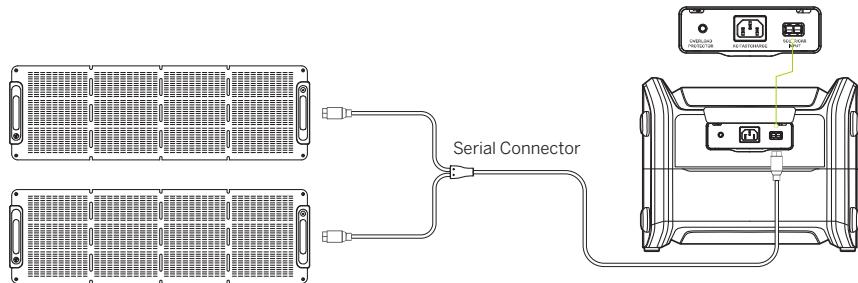
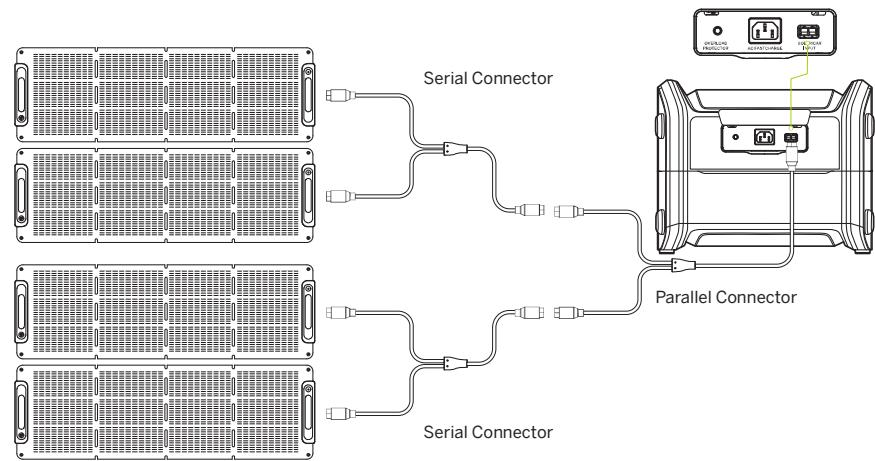
- When using two or more solar panels to recharge the product, please use the same type of solar panel. The product can be connected with one, two, or four solar panels. When using four solar panels to recharge the product, make sure the connection between the solar panels is two in series and two in parallel.
- Do not recharge the product with car charging cables and solar panels at the same time, which may damage the fuse.
- It is recommended to use Segway Accessories - Segway Solar Panel SP for solar charging. Use of other brands of solar panels may cause damage for which we are not responsible.
High Temperature Warning
The product temperature may be too high for powering high-power electric appliances for a long time, and the high-temperature protection may be triggered. For battery safety, the product will automatically limit the output power to lower the temperature. If the limit was reached, the output will be cut off and the charge function will be unavailable. Please stop using the high power loads immediately if this warning appears, cool down the product, then try to use it again.
We take your safety and the protection of our products very seriously. If you have any questions or suggestions, please contact Segway Customer Service.

2 Packing List
Segway Portable Power Station:
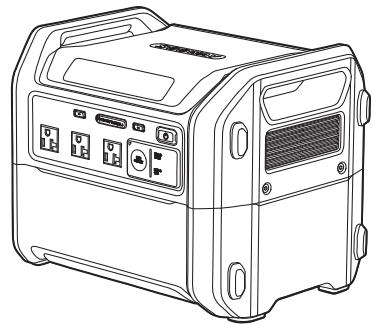
CUBE-1000x1
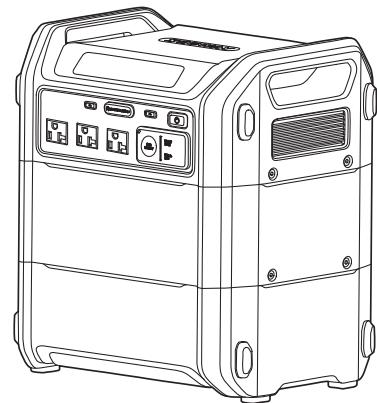
CUBE-2000 x1
Accessories:
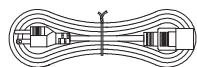
AC Charging Cable x 1

Car Charging Cable x 1

(7/64)* 3mm Allen Wrench × 1

User Manual x 1

Warranty Policy × 1
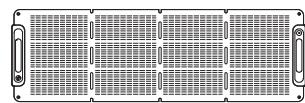
For CUBE-2000 only
Separately Sold Accessories
Segway Solar Panel SP
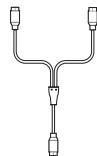
Serial Connector
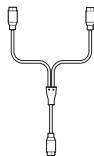
Parallel Connector

Segway Cube Expansion Battery

3 Product Overview
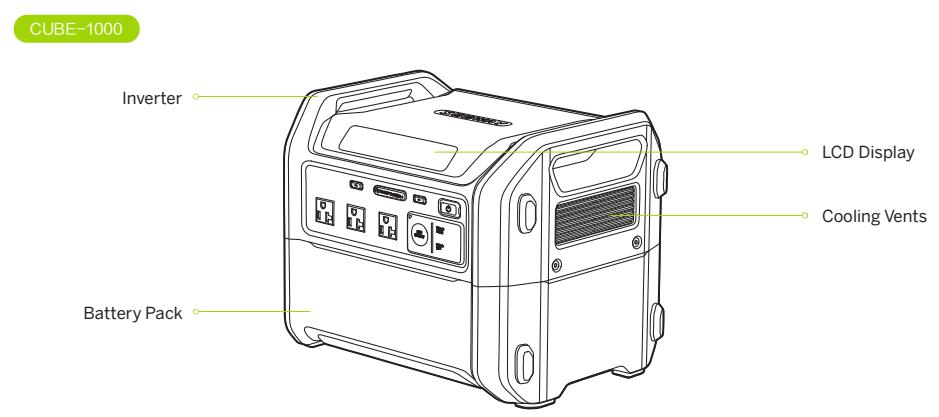
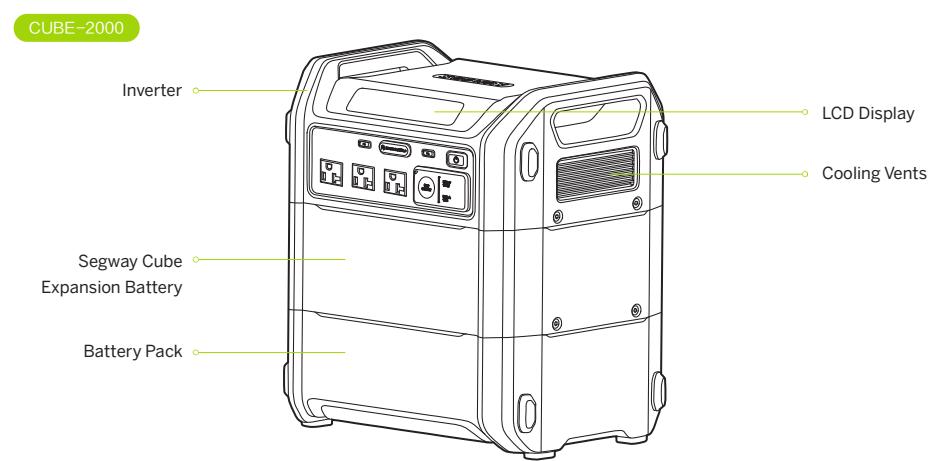


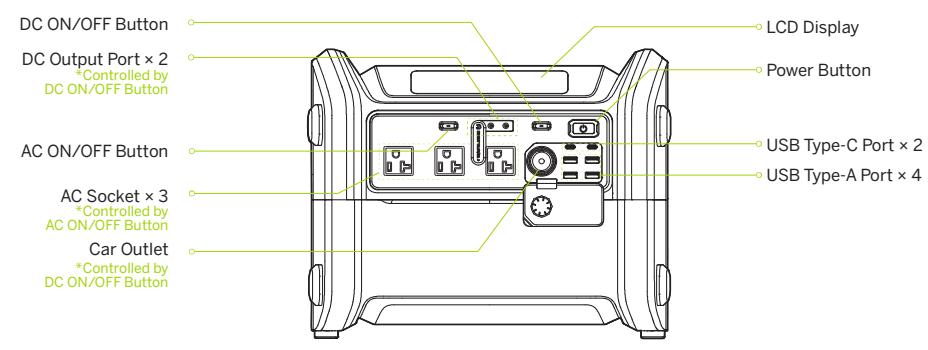
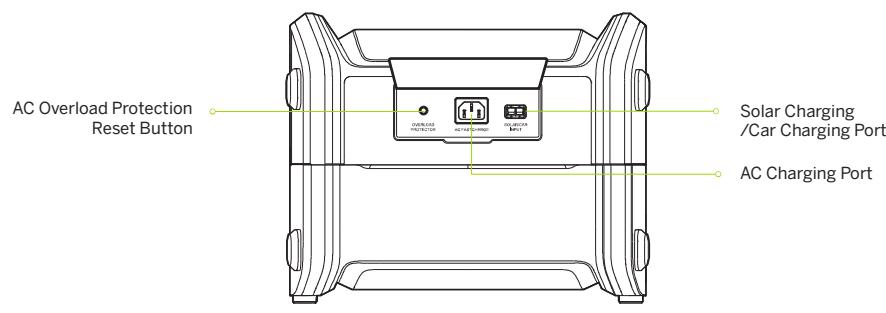


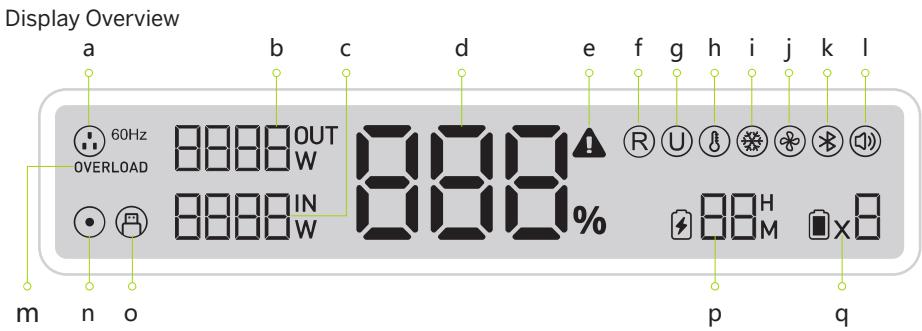


60Hz
AC Output
The plug icon displayed as AC Output, the output frequency is 60Hz


Output Power


Input Power


Battery Power


Warning
When the icon lights up, it means high temperature protection, low temperature protection or AC overload protection is triggered.


R-Drive
Intelligently adjust the operating power of electric appliances and ensure them work at the rated power of the inverter. Support up to 4400 W loads.


UPS (Uninterruptible Power Supply)
Automatically switch to inverter-powered if AC input was cut off by power grid failure and make sure electric appliances work normally.


High Temperature Protection
Partial input/output power will be decreased automatically when the device temperature is too high.


Low Temperature Protection
Partial input/output power will be decreased automatically when the device temperature is too low.


Cooling Fan
The icon indicates that the fan is working


Bluetooth
The icon flashes while paring, and it stays on when the device is connected successfully.


Button Tone

OVERLOAD
AC Output Overload


DC Output/Car Outlet


USB Output


Remaining Discharge/Charge Time


Battery Pack Quantity
CUBE-1000
CUBE-2000


4 How to Use the Power Station
- Illustrated with CUBE-1000

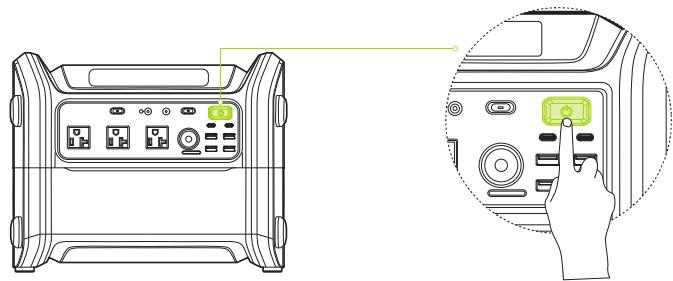
Turn on/off
Press and hold the Power Button for more than 1 second to turn it on/off. Press the power button to wake up the screen when the power station is on.
Turned on: The power station beeps once and the button indicator lights white.
Turned off: The power station beeps once and the button indicator goes off.

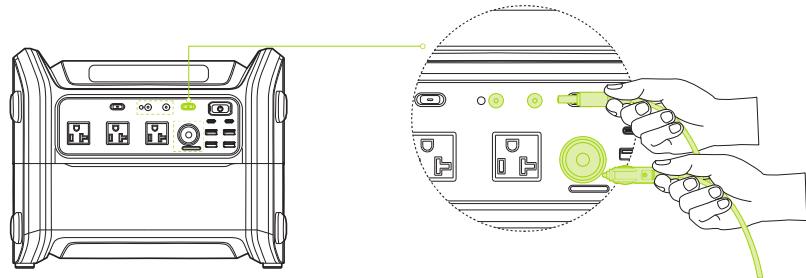
DC Output
- DC output port × 2/Car outlet × 1
a) When the power station is on, press the DC ON/OFF Button to turn on DC output, connect the device to DC output port.


b) Press the DC ON/OFF Button to turn on car outlet. Car outlet supports constant current output, and can use the specific cable to charge the car battery. (only for charging, can not be used to jump-start the vehicle.)
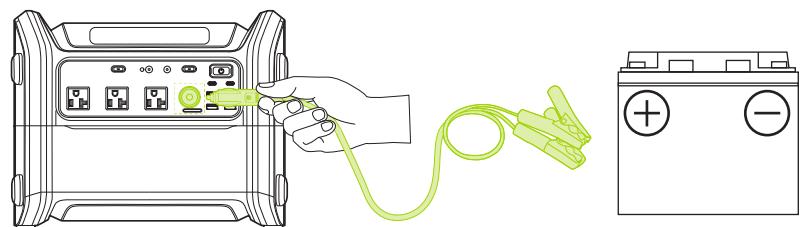
* Sold separately

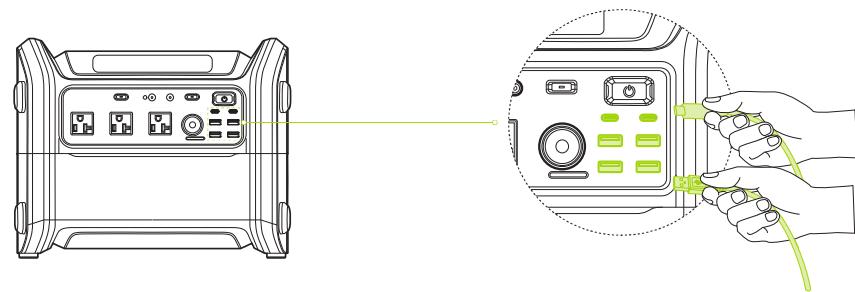
USB Output
Connect the device to the USB output port.


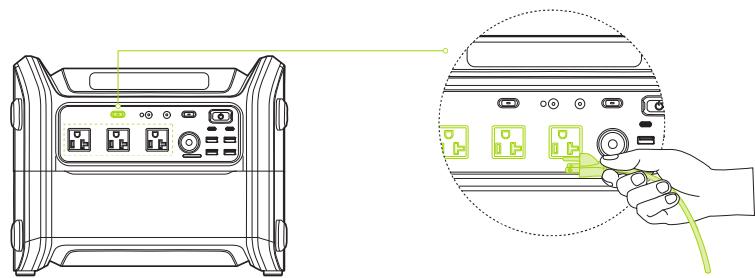
4 AC Output
When the power station is on, press the AC ON/OFF Button to turn on AC output, connect the device to the AC socket.
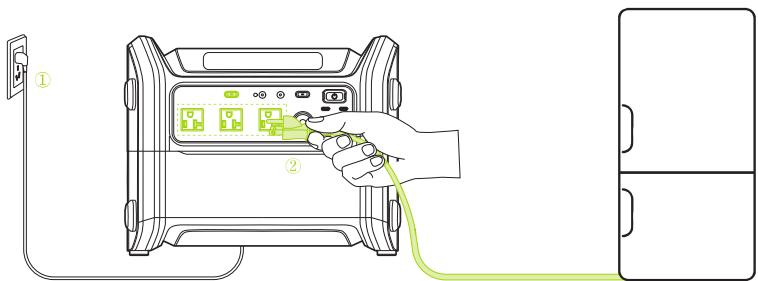
UPS Function
When the UPS function is turned on:
① Plug the AC charging cable into the wall outlet and connect the other end to the AC charging port of the power sation.
② Press the AC ON/OFF Button to turn on the AC output, connect the AC device to the AC socket.
- At this point, UPS function is activated, and the power station will automatically switch to inverter-powered when the power grid fails.

EN
5 How to Recharge the Power Station


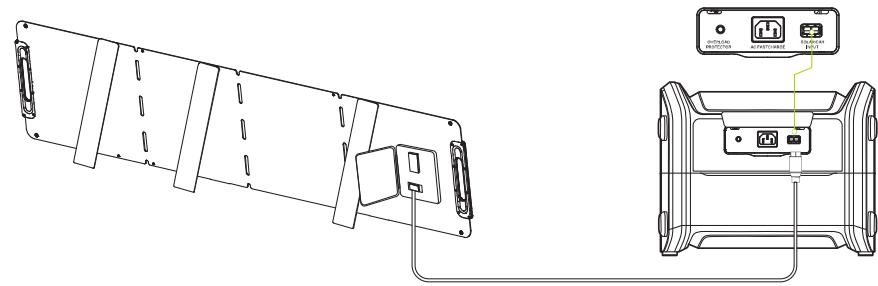
The power station has two charging ports, AC charging port and solar/car charging port. When recharging the power station, the display will show the charging status. There are five charging methods as below, dual-charging is also available.
AC charging
2 Car charging
3 Solar charging
4 AC and solar charging
5 AC and car charging
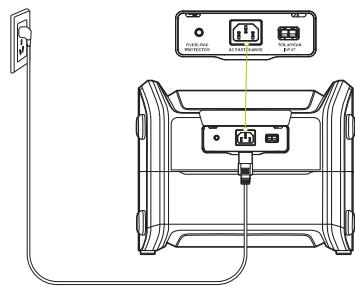
AC charging
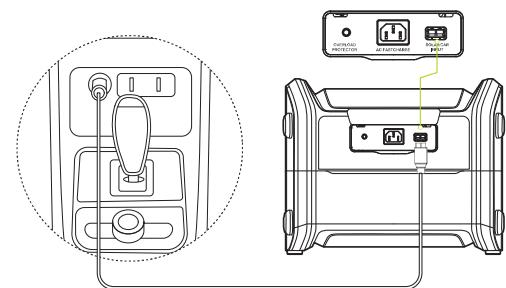
Car charging


Solar Charging
a. Single solar panel
b. Multiple solar panels
In series


In parallel
- Up to 4 panels/Max 800 W


6 Settings
When the power station is off, press and hold the DC ON/OFF Button and Power Button for 2 seconds at the same time to go to settings.
Note: Charging and discharging are not available during setting.
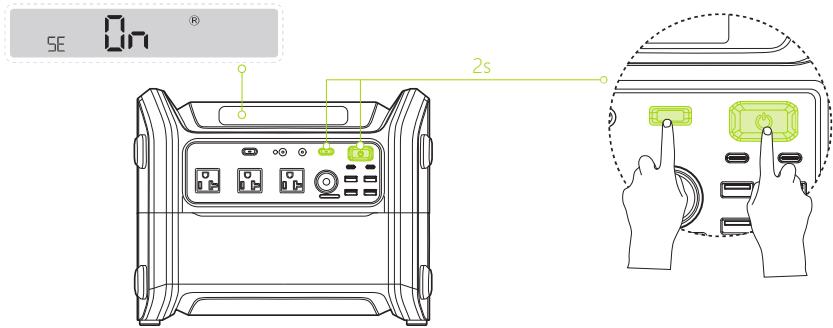
Basic operations of buttons
Power Button: Press to save and exit settings.
AC ON/OFF Button: Go to the next setting.
DC ON/OFF Button: Switch between the options of the current setting.
Settings
Note: It is recommended to customize these settings directly via Segway-Ninebot App.
| Icon | Setting | Display | Options |
| R | R-Drive[1] | SE On® SE OFF® | The default setting is on. The function can be turned on/off. * This function is applicable to resistive appliances only. Turn off this function immediately if the appliances can not work normally. |


| Icon | Setting | Display | Options |
| U | UPS (Uninterruptible Power Supply)[2] | SE ON ① SE OFF ① | The default setting is on. The function can be turned on/off. |
| Fan Mode | SE HI ② SE LO ③ | Two modes are available. Active cooling mode: The fan works automatically and keeps the power station maintained at a relatively low temperature. Silent mode: The fan works automatically and runs at a relatively low speed and frequency. | |
| Button Tone | SE ON ⑧ SE OFF ⑧ | The default setting is on. The button sound can be turned on/off. |
Features
1 R-Drive
This function is not applicable to all electric appliances but for resistive appliances only, such as hair dryers and electric kettles. Please test the compatibility before use. High-power appliances like air conditioners, coffee makers, dryers, electric stoves, large refrigerators, microwave ovens, lawnmowers, ovens, and washing machines are not compatible.
UPS (Uninterruptible Power Supply)
When you connect the power station to the AC power source, and then connect the appliances to the AC socket of the power station, the appliances will get power from the AC power source, not the power station. When the AC power source fails, the power station will automatically switch to inverter-powered for the appliances in 20-30 millisecond. The UPS function is the offline type and does not support Oms-switch. Do not use the power station to charge devices that require a continuous power supply. Please test the compatibility before use.


7 App User Guide
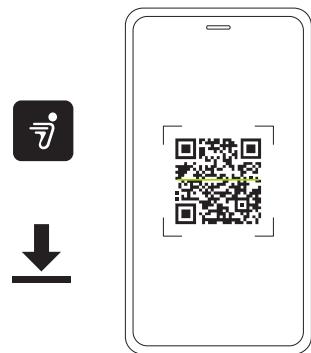
1 Scan the QR code to download the Segway-Ninebot App to register or log in.
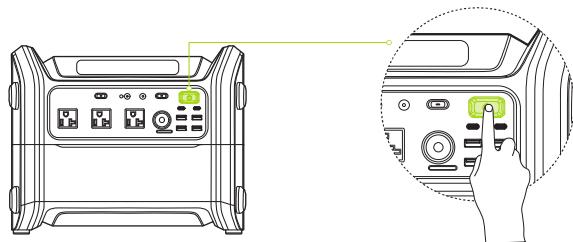
Press the power button to turn on the power station.


3 Tap "Add device" and follow the instructions to connect to the power station via Bluetooth.
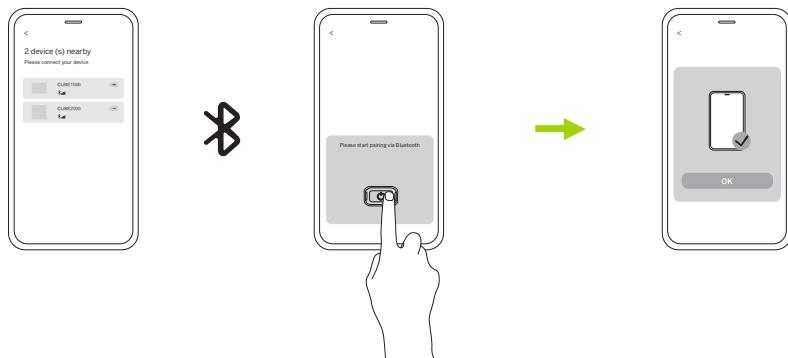
4 Customize the settings directly via the App. Check the real-time information of the remaining battery, temperature, input/output power of each input/output ports, etc.
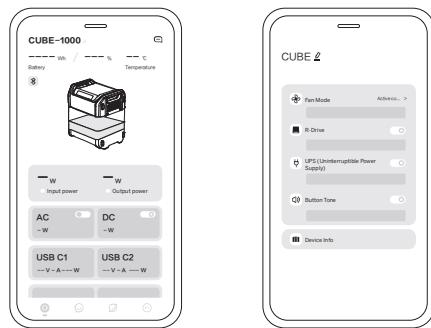

8 Specifications
| Power Station | Product Name | Segway Portable Power Station Cube | |
| Model | CUBE-1000 | CUBE-2000 | |
| L × W × H* | 13.9 × 11.3 × 11.1 in(354 × 289 × 284 mm) | 13.9 × 11.3 × 15.7 in(354 × 289 × 399 mm) | |
| Net Weight* | 35.7 lbs (16.2 kg) | 57.5 lbs (26.1 kg) | |
| Inverter Model | CUBE-IV-2200 | ||
| Included Battery Pack Model | CUBE-BT-1000 | CUBE-BT-1000, CUBE-BTX-1000 | |
| IP Rating | IPX3 | ||
| Rated Frequency | 60 Hz | ||
| Max. Power of Output in Total | 2200 W | 2584 W | |
| AC Max. Output Power | 2200 W | ||
| DC Max. Output Power | 384 W | ||
| AC Input | 120V~8A 60Hz 1250W Max | ||
| Car Input | 12V/24V=8A 200W Max | ||
| Solar Panel Input | 12-60V=800W Max | ||
| AC Output (× 3) | 120V~20A 60Hz 2200W Max (inverter mode, pure sine wave) /120V~60Hz 12A Max. (bypass mode) | ||
| Car Outlet | 13.6V=10A 136W Max | ||
| DC5525 Output (× 2) | 13.6V=5A 68W Max | ||
| USB Type-A Output (× 4) | 5/9/12V=3A 18W Max | ||
| USB Type-C Output (× 2) | 5/9/12/15/20V=5A 100W Max | ||
| Discharge Temperature | 14°F~113°F (-10°C~45°C) | ||
| Charge Temperature | 41°F~113°F (5°C~45°C) | ||
| Battery Pack | Model | CUBE-BT-1000 | CUBE-BTX-1000 |
| L × W × H* | 13.9 × 11.3 × 5.9 in(354 × 289 × 152 mm) | 13.9 × 11.3 × 5.3 in(354 × 289 × 135 mm) | |
| Net Weight* | 22 lbs (10 kg) | 21.8 lbs (9.9 kg) | |
| Name | LFP (LiFePO4) Battery | ||
| Nominal Capacity | 20 Ah | ||
| Nominal Energy | 1024 Wh | ||
| Nominal Voltage | 51.2 V== | ||
| Max. Charging Voltage | 576 V== | ||
| IP Rating | IP56 | ||
| Battery Management System | Protection against over temperature, over current, over voltage. | ||
- It may slightly differ from the actual value due to different measuring tools and methods.
9 Troubleshooting
| Error code | Possible causes | Solution |
| E01 | Battery over temperature protection | Please cool down the battery |
| E02 | Battery low temperature protection | Please make the battery back to the normal temperature. |
| E03 | Battery undervoltage protection | Please charge immediately! |
| E04 | Battery communication error 1 | 1. Turn off the power station and check if the battery pack is connected properly. 2. Restart the power station. Note: if the error code still exists after operating with the above methods, the battery pack might have been damaged. |
| E05 | Battery communication error 2 | |
| E06 | Over temperature protection during charging | 1. Please cool down the power station. 2. Check the fan and cooling vents, and apply heat dissipation for the power station. |
| E07 | Over temperature protection during discharging | |
| E08 | Solar charging abnormality | 1. Check the solar panel type (80V/20A). If matched, the hardware circuit of the solar panel might have been damaged, please contact the after-sales service for support. 2. If not, please disconnect the solar panel. |
| E09 | AC Input error | AC Input abnormality caused by unstable power grid, please disconnect the AC charging cable. |
| E10 | Car output overload or short-circuit | Disconnect the loads. Turn off the DC output after 5 seconds and try again later. |
| E11 | USB output overload or short-circuit | Disconnect the USB devices. |
| E12 | AC output overload protection | Disconnect the loads. Turn off the AC output after 5 seconds and try again later. |
| E13 | AC output short-circuit protection | |
| E14 | Inverter malfunction | Disconnect the AC devices. Turn off the AC output after 5 seconds and try again later. |
| E15 | Battery malfunction | Keep the power station stand still and restart it. |
| E16 | Internal wires malfunction | Disconnect all the input/output devices and restart the power station. |
- For the error code from E09 to E16, if the error code still exists after operating with the above methods, please contact the after-sales service for support.

10 Certification
Federal Communications Commission (FCC) Compliance Statement for USA
This device complies with part 15 of the FCC rules. Operation is subject to the following two conditions: (1) This device may not cause harmful interference, and (2) this device must accept any interference received, including interference that may cause undesired operation.
Any Changes or modifications not expressly approved by the party responsible for compliance could void the user's authority to operate the equipment.
NOTE
This equipment has been tested and found to comply with the limits for a Class B digital device, pursuant to part 15 of the FCC Rules. These limits are designed to provide reasonable protection against harmful interference in a residential installation. This equipment generates, uses and can radiate radio frequency energy and, if not installed and used in accordance with the instructions, may cause harmful interference to radio communications. However, there is no guarantee that interference will not occur in a particular installation. If this equipment does cause harmful interference to radio or television reception, which can be determined by turning the equipment off and on, the user is encouraged to try to correct the interference by one or more of the following measures:
—Reorient or relocate the receiving antenna.
—Increase the separation between the equipment and receiver.
-Connect the equipment into an outlet on a circuit different from that to which the receiver is connected.
- Consult the dealer or an experienced radio/TV technician for help.
This equipment complies with FCC radiation exposure limits set forth for an uncontrolled environment. This equipment should be installed and operated with minimum distance 20cm between the radiator & your body. Cetieurment est conforme aux limites d'exposition aux radiations de la IC definiennes pour un environnement non controlled. Cetieurment doit ettre installed et utilise aune distance minimale de 20cm entre le radiateur et voire corps.
Industry Canada (IC) Compliance Statement for Canada This device complies with Industry Canada license-exempt RSS standard (s). Operation is subject to the following two conditions: (1) this device may not cause interference, and (2) this device must accept any interference, including interference that may cause undesired operation of the device. CAN ICES-3(B)/NMB-3(B).
11 Trademark and Legal Statement
Segway, Rider Design are trademarks of Segway Inc.; Ninebot is the trademark of Ninebot (Beijing) Tech Co., Ltd.; App Store® and Apple logo® are registered trademarks of Apple Inc.; The Bluetooth® word mark and logos are registered trademarks owned by Bluetooth SIG, Inc. and any use of such marks by Segway-Ninebot is under license. Other trademarks and trade names are those of their respective owners.
Due to the constant improvement of products, this manual and the actual products may be slightly different in color, appearance, etc. Actual products shall prevail when there is a discrepancy between the actual products and the manual.
©2023 Ninebot (Beijing) Technology Co., Ltd. All rights reserved.
Legal Statement
- Before using the Segway Portable Power Station ("Product"), please carefully read the user manual to ensure proper usage after full comprehension. After reading, please keep the user manual safely for future reference. Failure to operate this product correctly may result in severe personal injuries to yourself or others, as well as product damage and property loss.
- By using the Product, it is deemed that you fully understand, acknowledge, and accept all the terms and contents of this document. The user undertakes responsibility for their actions and all consequences arising from the use of the Product. Segway shall not be liable for any claim, liability, and loss related to such consequences if it is due to the user's assumption of risk.
- Please do not allow individuals who have not carefully read this manual or are unfamiliar with the proper usage and safety precautions of the Product to use it.
- Upon receiving the Product, please immediately inspect whether the product and its accessories are intact and complete. All accessories must be used as required by the instruction manual.
- Warning: Any battery performance degradation or inability to function properly caused by the user's failure to use and maintain the battery properly is not covered under Limited Warranty.
- To the extent permitted by law, Segway reserves the right to provide the final interpretation and explanation of this statement.
This Legal Statement shall be governed by the laws of the state where your Product is installed, except to the extent inconsistent with or pre-empted by federal law. Segway shall not be liable for any claims, liabilities, or losses resulting from the consumer's violation of the above statement.
You may choose to accept the above terms and use the product accordingly, or proceed with the return process according to the Limited Warranty. When returning the Product, please ensure the Product and packaging are intact to avoid affecting resale.

If you intend to resell or gift the Product, please remember to include this legal statement as it is an integral part of the Product.
If you have any questions or need assistance, Segway is pleased to be at your service.
Once again, we thank you for choosing and trusting our Product.

Appendix: Battery Expansion
1 Loosen the four screws with the (7/64") 3 mm Allen Wrench.
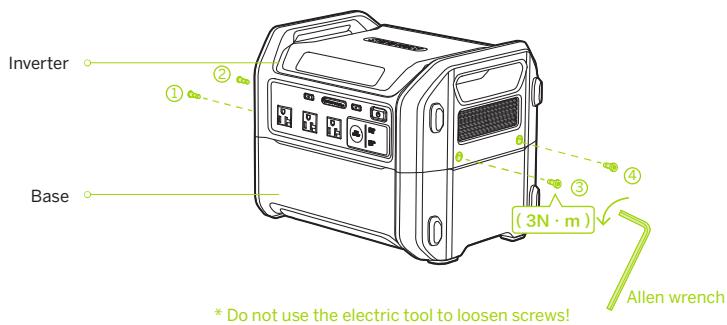
2 Seperate the inverter and the base.
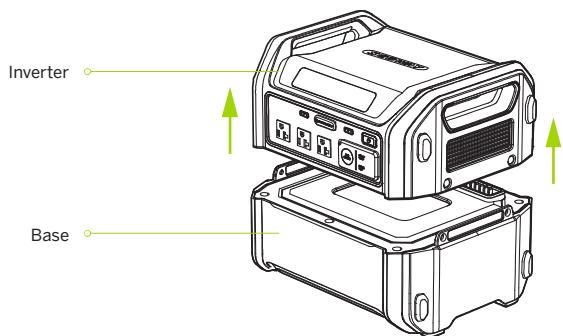


Place the battery pack on the base.
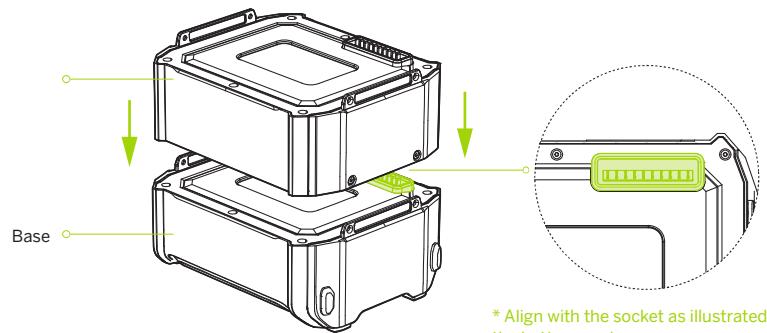
* Align with the socket as illustrated and place the battery pack.
4 Tighten the four screws.
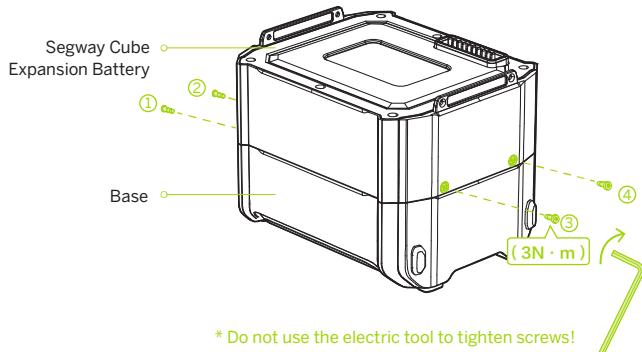


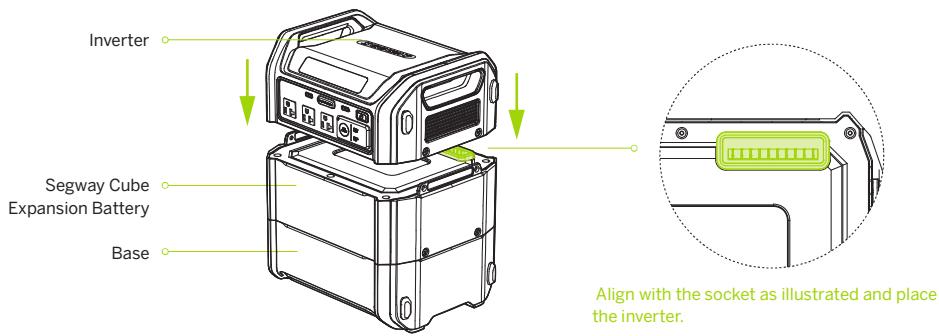
Place the inverter on the battery pack.
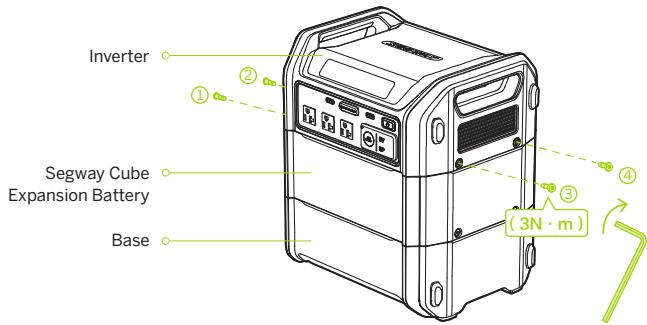
6 Tighten the four screws.
* Do not use the electric tool to tighten screws!
SEGWAY
Station d'alimentation portable Segway CUBE-1000/CUBE-2000
UPS (alimentation sans interruption)
UPS (alimentation sans interruption)
- Contents
- Safety Instructions
- IMPORTANT SAFETY INSTRUCTIONS
- GROUNDING INSTRUCTIONS
- Daily Maintenance
- Battery Disposal Guidelines
- Safety Precautions When Charging
- High Temperature Warning
- Packing List
- How to Use the Power Station
- Turn on/off
- DC Output
- USB Output
- AC Output
- UPS Function
- How to Recharge the Power Station
- Solar Charging
- Settings
- Basic operations of buttons
- Settings
- Features
- R-Drive
- UPS (Uninterruptible Power Supply)
- App User Guide
- Certification
- Federal Communications Commission (FCC) Compliance Statement for USA
- NOTE
- Trademark and Legal Statement
- Legal Statement
- Appendix: Battery Expansion
- SEGWAY
- UPS (alimentation sans interruption)
Brand : SEGWAY
Model : CUBE-1000
Category : Portable power station