 ManualGo.com
 2191-20 - Headphones MILWAUKEE - Free user manual and instructions
Find the device manual for free 2191-20 MILWAUKEE in PDF.


Download the instructions for your Headphones in PDF format for free! Find your manual 2191-20 - MILWAUKEE and take your electronic device back in hand. On this page are published all the documents necessary for the use of your device. 2191-20 by MILWAUKEE.
USER MANUAL 2191-20 MILWAUKEE
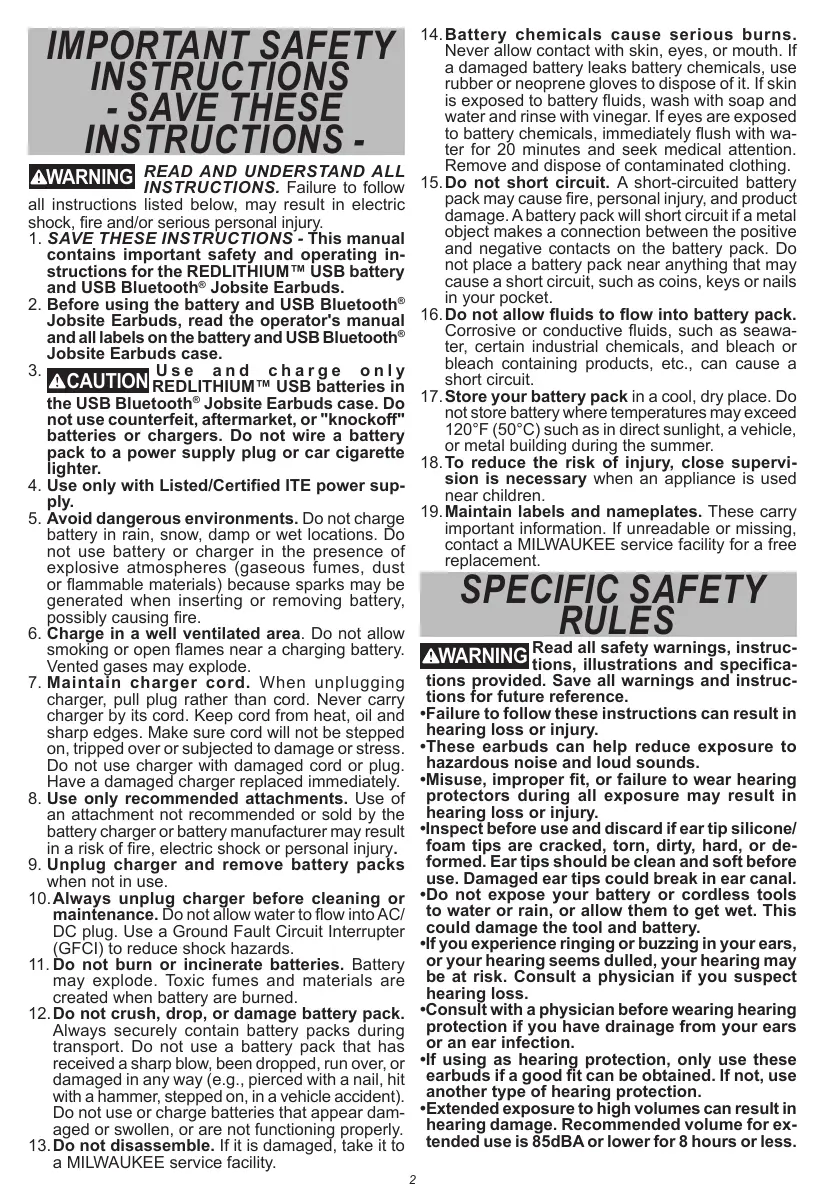
WARNING To reduce the risk of injury, user must read and understand operators manual.
all instructions listed below, may result in electric shock, fire and/or serious personal injun 1. SAVE THESE INSTRUCTIONS - This manual contains important safety and operating in- structions for the REDLITHIUM ” USB battery and USB Bluetooth® Jobsite Earbuds. Before using the battery and USB Bluetooth® Jobsite Earbuds, read the operator's manual andall labels on the battery and USB Bluetooth® Jobsite Earbuds case.
ER RE dLTHIUMN USB Batteries in the USB Bluetooth® Jobsite Earbuds case. Do not use counterfeit, aftermarket, or "knockoff" batteries or chargers. Do not wire a battery pack to a power supply plug or car cigarette fighter.
Use only with Listed/Certiied ITE power Sup-
ply. Avoid dangerous environments. Do not charge battery in rain, snow, damp or wet locations. Do not use battery or charger in the presence of explosive atmospheres (gaseous fumes, dust or flammable materials) because sparks may be generated when inserling or removing battery, possibly causing fire. Charge in a well ventilated area. Do not allow smoking or open flames near a charging battery. Vented gases may explode. Maintain charger cord. When unplugging charger, pull plug rather than cord. Never carry charger by its cord. Keep cord from heat, oil and sharp edges. Make sure cord will not be stepped on, tripped over or subjected to damage or stress. Do not use charger with damaged cord or plug Have a damaged charger replaced immediately. Use only recommended attachments. Use of an attachment not recommended or sold by the battery charger or battery manufacturer may result in a risk of fire, electric Shock or personal inju Unplug charger and remove battery packs when not in use. 10.Always unplug charger before cleaning or maintenance. Do not allow water to flow into AC/ DC plug. Use a Ground Fault Circuit Interrupter (GFCI) to reduce shock hazards. 11.Do not burn or incinerate batteries. Battery may explode. Toxic fumes and materials are created when battery are burned. 12.Do not crush, drop, or damage battery pack. Always securely contain battery packs during transport. Do not use a batterÿ pack that has received a sharp blow, been dropped, run over, or damaged in any way (e.g., pierced with a nail, hit with a hammer, stepped on, in a vehicle accident) Do not use or charge batteries that appear dam- go0d or suollen. of are not funcioniné proper 13.Do not disassemble. If it is damaged, take it {o à MILWAUKEE service facility.
14.Battery chemicals cause serious burns. Never allow contact with skin, eyes, or mouth. If a damaged battery leaks battery chemicals, use rubber or neoprene gloves to dispose ofit. If skin is exposed to battery fluids, wash with soap and water and rinse with vinegar. Ifeyes are exposed to battery chemicals, immediately flush with wa- ter for 20 minutes and seek medical attention. Remove and dispose of contaminated clothing.
15.Do not short circuit. À short-circuited battery pack may cause fire, personal injury, and product damage. A battery pack will short circuit if a metal object makes a connection between the positive and negative contacts on the battery pack. Do not place a battery pack near anything that may cause a short circuit, such as coins, keys or nails in your pocket.
16.Do not allow fluids to flow into battery pack. Corrosive or conductive fluids, such as seawa- ter, certain industrial chemicais, and bleach or bleach containing products, etc., can cause a short circuit.
17.Store your battery pack in a cool, dry place. Do not store battery where temperatures may exceed 120°F (50°C) suchas in direct sunlight, a vehicle, or metal building during the summer.
18.To reduce the risk of injury, close supervi- sion is necessary when an appliance is used near children.
19.Maintain labels and nameplates. These carry important information. If unreadable or missing, contact a MILWAUKEE service facility for a free replacement
SPECIFIC SAFETY RULES PATATE Read all safety warnings, instruc-
tions, illustrations and specifica-
ions provided. Save all warnings and instruc-
tions for future reference.
+Failure to follow these instructions can result in hearing loss or injury.
+These earbuds can help reduce exposure to hazardous noise and loud sounds.
-Misuse, improper fit, or failure to wear hearing protectors during all exposure may result in hearing loss or injury.
-Inspect before use and discard if ear tip silicone/ foam tips are cracked, ton, dirty, hard, or de- formed. Ear tips should be clean and soft before use. Damaged ear tips could break in ear canal.
+Do not expose your battery or cordiess tools to water or rain, or allow them to get wet. This could damage the tool and battery.
-f you experience ringing or buzzing in your ears, or your hearing seems dulled, your hearing may be at risk. Consult a physician if you suspect hearing loss.
-Consult with a physician before wearing hearing protection if you have drainage from your ears or an ear infection.
If using as hearing protection, only use these earbuds if a good fit can be obtained. If not, use another type of hearing protection.
+Extended exposure to high volumes can result in hearing damage. Recommended volume for ex- tended use is 854BA or lower for 8 hours or less.
-Do NOT use earbuds in situations that require
special attention SA
Ê CHOKING HAZARD - EMULE Small parts. Keep away Ean
from infants and small children.
-Wash hands before use. Ear tips should bè before fitting.
*Always use common sense and be cautious when using tools. It is not possible to anticipate every situation that could result in a dangerous outcome. Do not use this tool if you do not understand these operating instructions or you feel the work is beyond your capabiliy; contact Milwaukee Tool or a trained professional for additional information or training.
Pursuant to part 15.21 ofthe FCC Rules, you are cau- tioned that changes or modifications not expressly approved by the party responsible for compliance could void your authority to operate the product. NOTE: This equipment has been tested and found to comply with the limits for a Class B digital device, pursuant to part 15 of the FCC Rules. These limits are designed to provide reasonable protection against harmful interference in a residential instal- lation. This equipment generates, uses and can radiate radio frequency energy and, if not installed and used in accordance with îhe instructions, may cause harmful interference to radio communications. However, there is no guarantee that interference will not occur in a particular installation. If this equipment does cause harmful interference to radio or televi- sion reception, which can be determined by tuning the equipment off and on, the user is encouraged to try to correct the interference by one or more of the following measures: +Reorient or relocate the receiving antenna. “Increase the separation between the equipment and receiver. -Connect the equipment into an outlet on a circuit different from that to which the receiver is connected. -Consult the dealer or an experienced radio/TV technician for help. This device complies with part 15 of the FCC Rules and ISED-Canada’'s license exempt RSS standards. Operation is subject to the following two conditions: 1) This device may not cause harmful interference, and 2) This device must accept any interference received, including interference that may cause undesired operation.
SPECIFICATIONS Cat. No. USB Input Voits USB Input Current Output Volts IC/FCC ID : Bluetooth® ID... REDLITHIUM” USB Batteries Volts. Operating Temperature
Battery and Charge ..32°F to 104°F (0°C to 40°C)
Battery and Tool. 4°F to 140°F (-20°C to 60°C)
4DC FUNCTIONAL DESCRIPTION Charging case latch Battery bay
Ear wings/bands Right earbud button Earbud charge indicator light
Left earbud button Foam tip
Silicone tip 10.USB-C port
11. Case charge indicator light
C2 Fiashing red: Low battery E2 Slow pulsing red: Charging EE Siov puising yellow: Approaching full charge BB Soid green: Charging is complete Flashing red/green: Battery and/or charger is too hot — charging will begin when battery and or charger reach correct charging temperature BE Fashing red/green: Damaged, faulty or missing or cold battery pack and/or charger
Read Operator's Manual Universal Serial Bus Type-C (USB-C)
Properly Recycle Batteries
BFP 8ackieed Protected us UL Listing for Canada and U.S.
BATTERY AWARNINGH reduce the risk of fire, personal
injury, and product damage due to a short circuit, never immerse your tool, battery pack or charger in fluid or allow a fluid to flow inside them. Corrosive or conductive fluids, such as seawater, certain industrial chemicals, and bleach or bleach containing products, etc:, can cause a short circuit.
Maintenance and Storage
Do not expose your battery or cordless iools to water or rain, or allow them to get wet. This could damage the tool and battery. Do not use oil or solvents to clean or lubricate your battery. The plastic casing will become brittle and crack, causing a risk of injury. Store batteries at room temperature away from mois- ture. Do not store in damp locations where corrosion of terminals may occur. Às with other battery types, permanent capacity loss can result if the pack is Stored for long periods of time at high temperatures (over 120°F). MILWAUKEE Li-lon batteries maintain their charge during storage longer than other battery types. After about a year of storage, charge the bat- tery as normal.
To reduce the risk of injury or ex- EU Sion, never burn or incinerate a battery pack even if it is damaged, dead or com- pletely discharged. When burned, toxic fumes and materials are created.
Disposii g of MILWAUKEE Li-fon Battery
MILWAUKEE Li-lon batteries are more environmen- tally friendly than some other types of power tool batteries. Always dispose of your battery according to federal, state and local regulations. Contact a recycling agency in your area for recycling locations. Even discharged battery packs contain some energy. Before disposing, use electrical tape to cover the terminals to prevent the battery pack from shorting, which could cause a fire or explosion.
RBRC Battery Recycling Seals
The RBRC" Battery Recycling Seals (see "Symbol- ogy") on your batteries indicate that MILWAUKEE has arranged for the recycling of that battery with the Rechargeable Battery Recycling Corporation {RBRC). At the end of your battery's useful life, return the battery pack to a MILWAUKEE Branch Office/ Service Center or the participating retailer nearest you. For more information, visit the RBRC web site at www.rbre.org.
Charge only REDLITHIUM" USB EN siteries in the REDLITHIUM USB charger. Other types of batteries may cause
personal injury and damage.
Installing/Removing Battery Pack 1. To install, remove the cap by twisting counter- clockwise to unlock the battery compartiment.
2. Align battery pack arrow with the arrow on the charger.
3. Insert battery pack.
4. Install the cap by aligning the dots and twisting clockwise towards the lock to secure the battery.
5. To remove, reverse the procedure.
Charging the Battery Pack 1. plugaour USB cable into a power source such as an AC wall adapter, computer or car port. 2. To expose the USB port, pull the cover back and insert the USB cable into the USB port. Always close the USB cover when LUS initié not charging to maintain dust and moisture protection. Ifthe case charge light indicator does not illuminate, verify the battery is fully seated into the bay. Remove the battery and reinsert. If the light continues to not illuminate, the battery may be extremely hot or cold, or wet. Allow the battery to cool down, warm Up, or dry out and then reinsert. If the problem persists, contact a MILWAUKEE service facility.
Charging the Earbuds
Earbuds will charge if properly seated in the case and a charged REDLITHIUM USB battery pack is inserted. The earbuds indicator lights will illuminate when proper contact for charging has occured.
If case is plugged into a power source without a bat- ty pack, the earbuds will cparge and case charge indicator light will iluminate flashing red/green. NOTE: Misaligned ear wings/bands may cause the earbuds to shift in the case. Always ensure proper charging contact to the earbuds before closing the case.
The earbuds indicator lights while charging will
display: Red Solid: 0 to 5% charged Yellow Solid: 6 to 53% charged Green Solid: 54 to 100% charged
ASSEMBLY AWARNING Recharge only with the charger
specified for the battery. For spe- cific charging instructions, read the operator’s manual supplied with your charger and battery.
Removing/inserting the Battery from Case To remove, twistthe cap counterclockwise away from the lock @. Remove the case battery pack. Twist the cap on toward the lock position. To insert the battery, twist the cap counterclockwise away from the lock . Insert the battery pack lining Up the arrows on the case. Twist the cap on toward the lock position. NOTE: Éarbud batteries are non-removeable and non-replaceable.
Only use accessories specifically PME ecommended for this tool. Others may be hazardous.
Installing/Removing Ear Wings/Bands Ear wings/bands help provide a secure fit. Ear wings/ bands are optional.
To install ear wings/bands:
Make sure to put ihe re- Et
spective side on the cor-| (der ati
rect earbud. Each ear| INdentatio
wing/band has a L'or R engraved to match the earbud engraving. The notch indentation on the earbud corresponds to the notch on the ear wing/ band.
To remove ear wings/bands:
Pull ear wing/band off the earbud.
Only use accessories specificall
ENT ecèmmended for this too. Others
Misuse, improper fit, or failure to wear hearing
protectors during all exposure may result in
hearing loss or injury.
Rapid removal may damage the eardrum. For
greater control and safety, remove ear tip slowly
with twisting motion to gradually break the seal.
Inspect before use and discard if ear tip siliconel
foam tips are cracked, ton, dirty, hard, or de-
formed. Earbuds should be ciean and soft before use. Damaged earbuds could break in ear canal.
Wash hands before use. Use clean earbuds.
Before first use, remove the adhesive film from the
earbud charging contacts.
1. To remove ear tips, gently pull the tip away from the earbud. To install éar tips, push tip onto éarbud until snug.
2. Inspect ear tips before use.
For silicone banded tip:
: Position ear tip in the desired wearing position.
+ While pulling ear outward and upward with opposite hand, insert ear lip into ear canal. Adjust for best noise reduction.
+ Gently roll the foam tip between thumb and fingers slowy increasing pressure until earbud is compressed into a thin, smooth cylinder.
* Pull the outer ear up and back with one hand, and insert he ear tip into the éar canal with thé other hand.
- Hold he earbud in place for at least 40 seconds, allowing the ear plug to expand down into the car canal.
Check fit: When this device is wel-itled, your
voice should sound louder, deeper and hollow
WARNING! Rapid removal may damage the ear-
drum. For greater control and safety, remove
ear tip slowly with twisting motion to gradually break the seal.
. Remove earbuds slowly with a twisting motion to
gradually break the seal.
Wash ear tips with only mild soap and warm water
as needed. Look for lears or cracks under any of
îhe silicone banded tip flanges/foam tips.
Replace if ear tips are damaged or no longer hold
ear ps firmiy in place when worn, if ear lips are
daméged or ea lips are not so and pile:
WARNING! Rapid removal may damage the car-
drum. For greater contral and safety, remave
ear tip slowly with twisting motion to gradually break the seal.
If you cannot obtain a good fit, try a different size or
Turning Earbuds ON/OFF Once earbuds are removed from the case they au- tomatically turn on. Pushing the left or right earbud buttons for 3 seconds will turn the earbuds ON or OFF. A tone will play and the LED on the earbuds will show status of charge. See "Charging the battery pack and Charging the earbuds" section for status of charge. Removing the earbuds from the case or turning the earbuds on will automatically put them in Bluetooth® pairing mode. Turning the earbuds OFF or placing them back in the case will disconnect Bluetooth®. Placing the earbuds in the case turns the earbuds OFF.
Auto-off mode-The earbuds will turn off after 30 minutes if earbuds are disconnected from Bluetooth”, music is not playing, or jobsite aware mode is turned off. Connecting to Bluetooth®or turning jobsite aware mode on will reset the 30 minutes for auto-off mode. Low battery- A tone will play 10 minutes before shut down of the earbuds. Once battery is dead a tone will play and shut off the earbuds.
Pairing with Bluetooth® }
-The first time the earbuds are removed from the case, the earbuds will go into pairing mode.
-If no Bluetooth® device is connected, Bluetooth® pairing will begin automatically and the blue LED earbud indicator light will flash on the earbud that was first removed from the case.
«To manually pair after earbuds are OFF, press and hold for 3 seconds on both earbud buttons to turn ON. Continue holding for 5 seconds to connect to a device. À 3-chime tone will sound when earbuds activate pairing mode.
-The earbuds will continue to search for a signal for 3 minutes.
-While the blue LED light is flashing, select "REDLITHIUM USB Jobsite Earbuds” on the Bluetooth® capable device.
-Atone will play in the earbuds to confirm the devices are paired successfully.
«After first time use, the earbuds will attempt to pair With the previous connected Bluetooth® device.
-If connection is lost between the earbuds and the Bluetooth® device, the earbuds will try to reconnect automatically to the last connected device for up t0 3 minutes.
-If no connection is made after 3 minutes, a discon- nect tone plays and Bluetooth® is shut off.
-If Bluetooth” is off, push one of the earbud buttons to turn on Bluetooth®.
Pushthe rightearbud button once to Play/Pause music. “Next track-Push right earbud button twice to skip to the next track. Next track tone will play then next track.
+Previous Track-Push right earbud button three times to replay the track. Previous track tone will play then previous track.
Use the paired Bluetooth® device to turn up or down the music volume. Recommended volume for extended use is 85dBA or lower. Refer to your Bluetooth® device manufacturers instructions. To reach the recommended volume for extended use tum volume to 60% or lower.
Phone call ring will sound in right earbud to notify of the incoming call. To answer, push the right earbud button, this Wil pause music if playing and take the call.
To reject a call, push the right earbud button twice. To hang up the call, push the right earbud button. If music was previously playing it will resume playing from the pause.
Jobsite Aware mode uses an auxiliary microphone to let you listen to the noises around you. When surrounding noises reach loud levels, the mode actively reduces volume to decrease the intensity of those noises. Audio will continue to play while using this feature.
To turn ON, push the left earbud button once. À tone Will play indicating jobsite aware mode is activated. To turn OFF, push the left earbud button once again. À tone will play indicating jobsite aware mode is deactivated.
Once jobsite aware mode is activated, to change the volume settings push the left earbud button twice. Keep pushing left earbud button twice rapidly to cycle through low, medium and high volume setting.
Troubleshooting Earbuds
A factory reset must be performed before re-pairing
a lostnew earbud. If problems persist with audio or
phone call quality, perform a factory reset.
The charging case must be charged before starting
To factory reset earbuds:
1. Place both earbuds into the charging case. Both earbuds will illuminate and recognize the connec- tion with the case.
2. Rapidly press the button on each earbud 4 times.
3. The earbuds will flash quickly, indicating they are reset to factory settings.
1. After performing a factory reset, take both earbuds out of the charging case and set them close to each other. The earbuds will pair automatically.
2. The earbuds have been successfully factory reset and re-paired when the earbuds charging light indicator turns off and flashes blue.
NOTE: If the earbuds flash red and green, the factory reset was unsuccessful. Repeat a factory reset and re-pairing instructions.
MAINTENANCE AWARNING To reduce the risk of injury, always
unplug the charger and remove the battery from the charger before performing any maintenance. The charger and battery have no internal serviceable parts. Never disassemble the battery or charger.
Storage and Cleaning Store your charger in a cool, dry place. As a general practice, it is best to unplug battery chargers and remove batteries when not in use. No battery damage will occur, however, if the charger and battery are left plugged in. Gently clean the earbuds after each use.Remove ear tips and wipe earbuds using a soft damp cloth. Do notimmerse. Do not remove mesh. Never use sharp objects to clean the earbud inlet, as damage may occur. Keep case clean of debris to ensure proper earbud charging connection. If charge indicator lights do notilluminate when earbuds are inserted in case, ensure case is clean of dirt/debris and ear wings/ bands (if used) are properly attached.
Repairs For repairs, return the tool, battery pack and charger to the nearest authorized service center.
Noise Reduction Rating PERTE Rapid removal may damage the
eardrum. For greater control and safet, remove eartip siowly With twisting motion to gradually break the seal. The level of noise entering a person's ear, when a hearing protector is worn as directed, is closely ap- proximated by the difference between Îhe A-weighted environmental noise level and the NRR. Example: 1. Thé environmental noise level as measured at the ear is 92 dBA. 2. The NRR is 22 decibels (dB). 3. The level of noise entering the earis approximately equal to 70 dBA. For noise environments dominated b} FEI séquences below 900 Hz, the ©, weighted environmental noise level should be used. Improper fit or inconsistent use of this device will reduce its effectiveness attenuating noise. Consult the enclosed instructions for proper fit. Although hearing protectors can be recommended for protection against the harmful effects of impulsive noise, the noise reduction rating (NRR) is based on the attenuation of continuous noise and may not be an accurate indicator of the protection attainable against impulsive noise such as gunfre. For example, gunfire exposure depends on the weapon lype, number of rounds fired, proper selec- tion, fi and use of earplugs, proper care of hearing protection, etc. The US ÉPA specifies the NRR as the measure of hearing protector noise reduction. However, MILWAUKEE makes no warranties as to the suit: ability of the NRR for this purpose. Research sug- gests that many users will receive less noise reduc- ion than indicated by the NRR due to variation in earplug ft, earplug fiting skil and motivation of the user. IE is recommended that the NRR be reduced by 50% to better estimate typical workplace protec- tion.
ACCESSORIES AWARNING Use only recommended accesso-
ries. Others may be hazardous. For a complete listing of accessories, go online to www.milwaukeetool.com or contact a distributor.
WIRELESS COMMUNICATION For products provided with wireless communication features, including ONE-KEY 1:
Pursuant to part 15.21 of the FCC Rules, do not modify this product. Modification could void your authority to operate the product. This device complies with part 15 of the FCC Rules and ISED-Canada's license exempt RSS standards. Operation is subject to the following two conditions: 1) This device may not cause harmful interference, and 2) This device must accept any interference received, including interference that may cause undesired operation.
SERVICE - UNITED STATES 1-800-SAWDUST (1.800.729.3878) Monday-Friday, 7:00 AM - 6:30 PM CST or visit www.milwaukeetool.com Contact Corporate After Sales Service Technical
Support with technical, service/repair, or warranty questions.
Email: metproductsupport@milwaukeetool.com
Become a Heavy Duty Club Member at www.milwaukeetool.com to receive important notifications regarding your tool purchases. SERVICE - CANADA Milwaukee Tool (Canada) Ltd 1.877.948.2360
Monday-Friday, 7:00 AM - 4:30 PM CST or visit www.milwaukeetool.ca
LIMITED WARRANTY USA & CANADA This MILWAUKEE power lool" is warranted to the original purchaser from an authorized MILWAUKEE distibutor only to be free from defects in material and workmanship. Subject to certain exceptions, MILWAUKEE wil repair or replace any part on this power too which, after examination, is determined by MILWAUKEE lo be defective in material or workmanship for a period of one (1) year after the date 9f purchase unless otherwise noted, Relum of ie power 1od! to a MILWAUKEE factory Service Center location or MILWAUKEE Autho- fzed Service Stalon fight prepaid andnsure6 is required À à the proof of purchase should be included with thé retum product. This warranty does not apply to damage nat MILWAUKEE determines to be from repairs made or attempled by anyone other than MILWAUKEE authorized personnel, misuse, alterations, abuse, normal wear and fear, lack of maintenance, or accidents, Normal Wear: Many power tools need periodic parts replacement and service to achieve best performance. This warranty does not cover repair when normal use has exhausied the lfe of à part including, but not limited to, chucks, brushes, cords, saw shoes, blade clamps, o-rings, seals, bumpers, driver blades, pistons, strkers, lfters, and bumper cover washers. *This warranty doës no cover battery packs or all power ools Refer to the separale and distinct warranties avallable for those products. The warant period for (ne LED in ie LED Work Lignt (49-24-0171) and the LED Upgrade Bulb (49-81-0090) is the lfetime of he product subject t the limitations above. If during normal use the LED or LED Upgrade Bulb fall, the part wil be replaced free of charge. Warranty Registration is not necessary to obtain the applicable war- ranty on a MILWAUKEE power lool product. The manufacuring date ofthe product will be used to determine the warranty period if no proof of purchase is provided at ine time warranty service Is requested ACCEPTANCE OF THE EXCLUSIVE REPAIR AND REPLACEMENT REMÉDIES DESCRIBED HÉREIN IS À CONDITION OF THE CON- TRACT FOR THE PURCHASE OF EVERY MILWAUKEE PRODUCT. IF YOU DO NOT AGREE TO THIS CONDITION, YOU SHOULD NOT. PURCHASE THE PRODUCT. IN NO EVENT SHALL MILWAUKEE BE LIABLE FOR ANY INCIDENTAL, SPECIAL, CONSEQUENTIAL, OR PUNITIVE DAMAGES, OR FOR ANY COSTS, ATTORNEY FÉES, EXPENSES, LOSSES OR DELAYS ALLEGED TO BE AS A CON- SEQUENCE OF ANY DAMAGE TO, FAILURE OF. OR DEFECT IN ANY PRODUCT INCLUDING, BUT NOT LIMITED FO, ANY CLAIMS FORLOSS OF PROFITS. SOME STATES DO NOT ALLOW THE EX- CLUSION OR LIMITATION OF INCIDENTAL OR CONSEQUENTIAL DAMAGES, SO THE ABOVE LIMITATION OR EXCLUSION MAY NOT. APPLY TO YOU. THIS WARRANTY IS EXCLUSIVE AND IN LIEU OF ALL OTHER EXPRESS WARRANTIES, WRITTEN OR ORAL. TO THE EXTENT PERMITTED BY LAW, MILWAUKEE DISCLAIMS ANY IMPLIED WARRANTIES, INCLUDING WITHOUT LIMITATION ANY IMPLIED WARRANTY OF MERCHANTABILITY OR FITNESS. FOR À PARTICULAR USE OR PURPOSE; TO THE EXTENT SUCH DISCLAIMER IS NOT PERMITTED BY LAW, SUCH IMPLIED WAR- RANTIES ARE LIMITED TO THE DURATION OF THE APPLICABLE EXPRESS WARRANTY AS DESCRIBED ABOVE. SOME STATES DO NOT ALLOW LIMITATIONS ON HOW LONG AN IMPLIED WAR- RANTY LASTS, SO THE ABOVE LIMITATION MAY NOT APPLY TO YOU, THIS WARRANTY GIVES YOU SPECIFIC LEGAL RIGHTS, AND YOU MAY ALSO HAVE OTHER RIGHTS WHICH VARY FROM STATE TO STATE. This warranty applies to product sold in the U.S.A. and Canada only. Please consult the Service Center Search'inthe Parts & Service sec- tion of MILWAUKÉE s website www miwaukeelool com or call 1.800. SAWDUST (1.800.729.3878) to locale your nearest service facil or warranty and non-warranty service on a MILWAUKEE power Lool
INSTRUCTIONS DE SECURITE IMPORTANTES
5814295244 04/23 Printed in