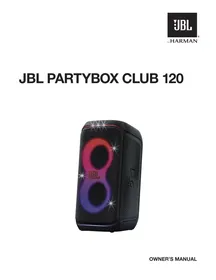
PARTYBOX CLUB 120 - Powered speaker JBL - Free user manual and instructions
Find the device manual for free PARTYBOX CLUB 120 JBL in PDF.

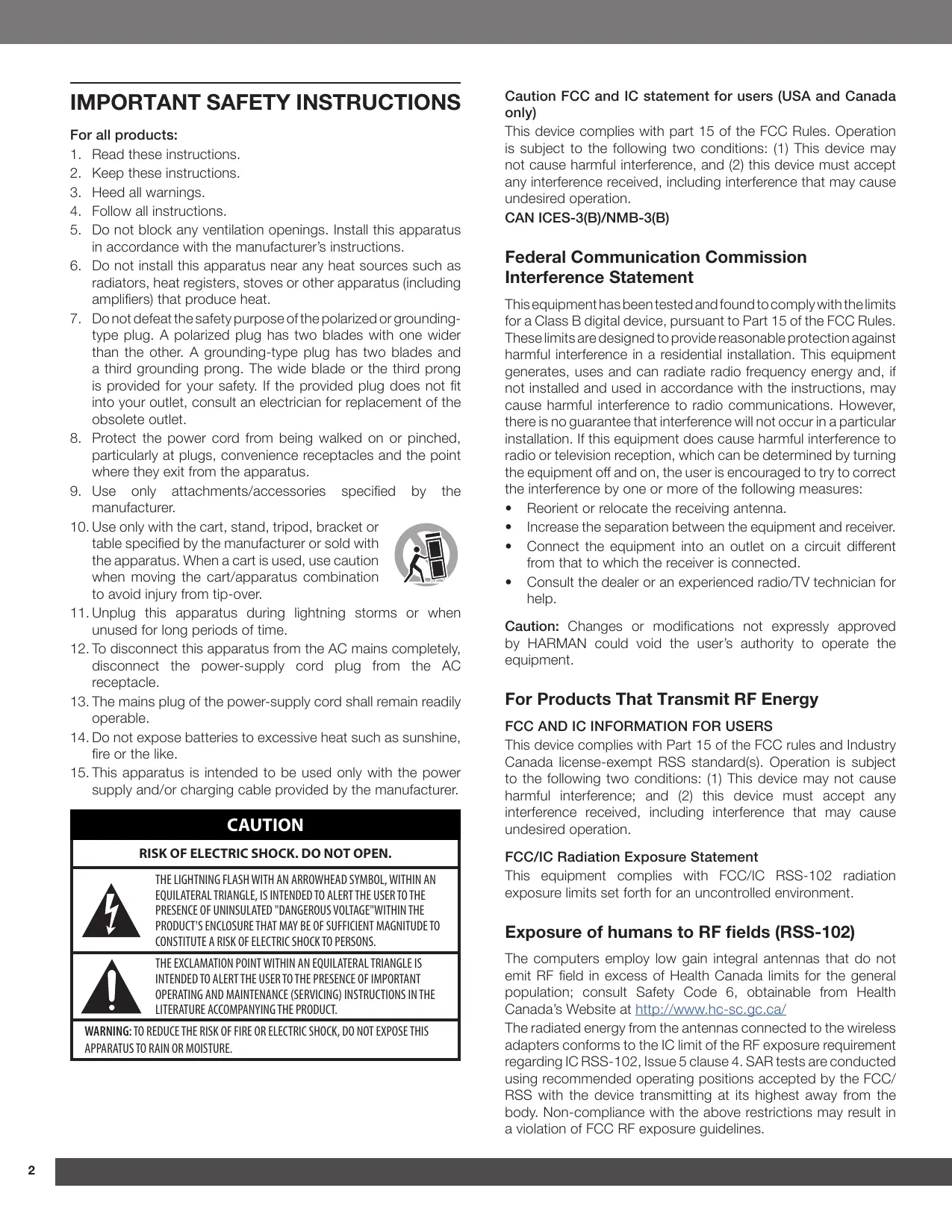

| Product type | Amplified speaker |
| Brand | JBL |
| Model | PARTYBOX CLUB 120 |
| Dimensions (W x H x D) | 288.4 x 570 x 297 mm |
| Net weight | 11.05 kg |
| Power supply | 100-240 V, 50/60 Hz |
| Output power | 160 W RMS (IEC60268) |
| Frequency response | 40 Hz - 20 kHz (-6 dB) |
| Signal-to-noise ratio | > 80 dB |
| Wireless technology | Bluetooth 5.4 |
| Ports and inputs | USB (FAT16/FAT32), AUX 3.5 mm, microphone/guitar inputs (2), Daisy chain |
| Battery | Li-ion 34 Wh (JBL BATTERY200) |
| Battery life | Up to 12 hours (depending on volume) |
| Charging time | 3.5 hours (when off) |
| Water resistance | IPX4 (splash-proof) |
| Lighting functions | LED with patterns: NEON, LOOP, BOUNCE, TRIM, SWITCH, FREEZE, stroboscope |
| Spare parts | Replaceable battery (JBL BATTERY200) |
| Care and cleaning | Soft, dry cloth |
| Included accessories | Power cable, quick start guide, safety sheet |
Frequently Asked Questions - PARTYBOX CLUB 120 JBL
User questions about PARTYBOX CLUB 120 JBL
0 question about this device. Answer the ones you know or ask your own.
Ask a new question about this device
Download the instructions for your Powered speaker in PDF format for free! Find your manual PARTYBOX CLUB 120 - JBL and take your electronic device back in hand. On this page are published all the documents necessary for the use of your device. PARTYBOX CLUB 120 by JBL.
USER MANUAL PARTYBOX CLUB 120 JBL
IMPORTANT SAFETY INSTRUCTIONS
For all products:
-
Read these instructions.
-
Keep these instructions.
-
Heed all warnings.
-
Follow all instructions.
-
Do not block any ventilation openings. Install this apparatus in accordance with the manufacturer's instructions.
-
Do not install this apparatus near any heat sources such as radiators, heat registers, stoves or other apparatus (including amplifiers) that produce heat.
-
Do not defeat the safety purpose of the polarized or grounding-type plug. A polarized plug has two blades with one wider than the other. A grounding-type plug has two blades and a third grounding prong. The wide blade or the third prong is provided for your safety. If the provided plug does not fit into your outlet, consult an electrician for replacement of the obsolete outlet.
-
Protect the power cord from being walked on or pinched, particularly at plugs, convenience receptacles and the point where they exit from the apparatus.
-
Use only attachments/accessories specified by the manufacturer.
-
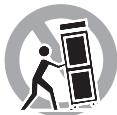
Use only with the cart, stand, tripod, bracket or table specified by the manufacturer or sold with the apparatus. When a cart is used, use caution when moving the cart/apparatus combination to avoid injury from tip-over.
- Unplug this apparatus during lightning storms or when unused for long periods of time.
- To disconnect this apparatus from the AC mains completely, disconnect the power-supply cord plug from the AC receptacle.
- The mains plug of the power-supply cord shall remain readily operable.
- Do not expose batteries to excessive heat such as sunshine, fire or the like.
- This apparatus is intended to be used only with the power supply and/or charging cable provided by the manufacturer.
CAUTION
RISK OF ELECTRIC SHOCK. DO NOT OPEN.
THE LIGHTNING FLASH WITH AN ARROWHEAD SYMBOL, WITHIN AN EQUILATERAL TRIANGLE, IS INTENDED TO ALERT THE USER TO THE PRESENCE OF UNINSULATED "DANGEROUS VOLTAGE"WITHIN THE PRODUCT'S ENCLOSURE THAT MAY BE OF SUFFICIENT MAGNITUDE TO CONSTITUTE A RISK OF ELECTRIC SHOCK TO PERSONS.

THE EXCLAMATION POINT WITHIN AN EQUILATERAL TRIANGLE IS INTENDED TO ALERT THE USER TO THE PRESENCE OF IMPORTANT OPERATING AND MAINTENANCE (SERVICING) INSTRUCTIONS IN THE LITERATURE ACCOMPANYING THE PRODUCT.
WARNING: TO REDUCE THE RISK OF FIRE OR ELECTRIC SHOCK, DO NOT EXPOSE THIS APPARATUS TO RAIN OR MOISTURE.
Caution FCC and IC statement for users (USA and Canada only)
This device complies with part 15 of the FCC Rules. Operation is subject to the following two conditions: (1) This device may not cause harmful interference, and (2) this device must accept any interference received, including interference that may cause undesired operation.
CANICES-3(B)/NMB-3(B)
Federal Communication Commission Interference Statement
This equipment has been tested and found to comply with the limits for a Class B digital device, pursuant to Part 15 of the FCC Rules. These limits are designed to provide reasonable protection against harmful interference in a residential installation. This equipment generates, uses and can radiate radio frequency energy and, if not installed and used in accordance with the instructions, may cause harmful interference to radio communications. However, there is no guarantee that interference will not occur in a particular installation. If this equipment does cause harmful interference to radio or television reception, which can be determined by turning the equipment off and on, the user is encouraged to try to correct the interference by one or more of the following measures:
Reorient or relocate the receiving antenna.
- Increase the separation between the equipment and receiver.
- Connect the equipment into an outlet on a circuit different from that to which the receiver is connected.
- Consult the dealer or an experienced radio/TV technician for help.
Caution: Changes or modifications not expressly approved by HARMAN could void the user's authority to operate the equipment.
For Products That Transmit RF Energy
FCC AND IC INFORMATION FOR USERS
This device complies with Part 15 of the FCC rules and Industry Canada license-exempt RSS standard(s). Operation is subject to the following two conditions: (1) This device may not cause harmful interference; and (2) this device must accept any interference received, including interference that may cause undesired operation.
FCC/IC Radiation Exposure Statement
This equipment complies with FCC/IC RSS-102 radiation exposure limits set forth for an uncontrolled environment.
Exposure of humans to RF fields (RSS-102)
The computers employ low gain integral antennas that do not emit RF field in excess of Health Canada limits for the general population; consult Safety Code 6, obtainable from Health Canada's Website at http://www.hc-sc.gc.ca/
The radiated energy from the antennas connected to the wireless adapters conforms to the IC limit of the RF exposure requirement regarding IC RSS-102, Issue 5 clause 4. SAR tests are conducted using recommended operating positions accepted by the FCC/ RSS with the device transmitting at its highest away from the body. Non-compliance with the above restrictions may result in a violation of FCC RF exposure guidelines.
FOR ALL EU COUNTRIES
For products that include audio out
Prevention of hearing loss
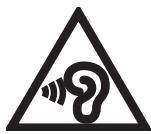
Caution: Permanent hearing loss may occur if earphones or headphones are used at high volume for prolonged periods of time.
For France, the products have been tested to comply with Sound Pressure Level requirement laid down in the applicable NF EN 50332 L.5232-1.
Note:
- To prevent possible hearing damage, do not listen to high volume levels for long periods.
WEEE Notice
The Directive on Waste Electrical Equipment (WEEE), which entered into force as European law on 14/02/2014, resulted in a major change in the treatment of electrical equipment at end-of-life.
The purpose of this Directive is, a first priority, the prevention of WEEE, and in addition, to promote the reuse, recycling and other forms of recovery of such wastes as so as to reduce disposal.
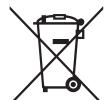
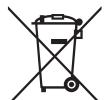
The WEEE logo on the product or on its box indicating collection for electrical and electronic equipment consists of the crossed-out wheeled bin, as shown below.
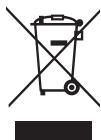
This product must not be disposed of or dumped with your other household waste. You are liable to dispose of all your electronic or electrical waste equipment by relocating over to the specified collection point for recycling of such hazardous waste. Isolated collection
and proper recovery of your electronic and electrical waste equipment at the time of disposal will allow us to help conserving natural resources. Moreover, proper recycling, and collection points, please contact your local city center, household waste disposal service, shop from where you purchased the equipment, or manufacturer of the equipment.
RoHS Compliance
This product is in compliance with Directive 2011/65/EU of the European Parliament and of the Council of 8 June 2011 on the restriction of the use of certain hazardous substances in electrical and electronic equipment.
For Products that includes Batteries
EU Batteries Directive 2013/56/EU
A new battery directive 2013/56/EU on Battery and Accumulator replacing directive entered into force on the 01/07/2015. The directive applies to all types of batteries and accumulator (AA, AAA, button cells, rechargeable packs) including those incorporated into appliances except for military, medical and power tool applications. The directive sets out rules for collection, treatment, recycling and disposal of batteries, and aims to prohibit certain hazardous substances and to improve environmental performance of batteries and all operators in the supply chain.
Instructions for Users on Removal, Recycling and Disposal of Batteries
To remove the batteries from your equipment or remote control, reverse the procedure described in the owner's manual for inserting batteries. For products with a built-in battery that lasts for the lifetime of the product, removal may not be possible for the user. In this case, recycling or recovery, it becomes necessary to replace such a battery, this procedure must be performed by authorized services centers. In the European Union and other locations, it is illegal to dispose of any battery with household trash. All batteries must be disposed of in an environmentally sound manner. Contact your local waste-management officials for information regarding the environmentally sound collection, recycling and disposal of used batteries.
WARNING: Danger of explosion if battery is incorrectly replaced. To reduce risk of fire or burns, don't disassemble, crush, puncture, short external contact, expose to temperature above 60°C ( 140°F ), or dispose of in fire or water. Replace only with specified batteries. The symbol indicating 'separate collection' for all batteries and accumulators shall be crossed-out wheeled bin shown below:
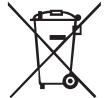
In case of batteries, accumulators and button cells containing more than 0.0005 mercury, more than 0.002% cadmium or more than 0.004% lead, shall be marked with the chemical symbol for the metal concerned: Hg,Cd or Pb respectively. Please Refer to the below symbol:
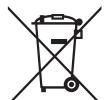
Hg
Cd
Pb
WARNING: DO NOT INGEST BATTERIES, CHEMICAL BURN HAZARD [the remote supplied with] This product contains a coin/ button cell battery. If the coin/button cell battery is swallowed, it can cause severe international burns in just 2 hours and can lead to death. Keep new and used batteries away from children. If you think batteries might have been swallowed or placed inside any part of body, seek immediate medical attention.
For All Products Except Those with Wireless Operation
HARMAN International hereby declares that this equipment is in compliance with EMC 2014/30/EU Directive, LVD 2014/35/EU Directive. The declaration of conformity may be consulted in the support section of our Web Site, accessible from www.jbl.com.
For All Products with Wireless Operation
HARMAN International hereby declares that this equipment is in compliance with the essential requirements and other relevant provisions of Directive 2014/53/EU. The declaration of conformity may be consulted in the support section of our Web Site, accessible from www.jbl.com.
EPILEPSY
WARNING
A few people may experience epileptic seizures when viewing flashing lights.
Precautions
Stand Mounting Safety Precautions
Always follow instruction and precaution advice from speaker stand manufacturer.
This speaker contains a 36 mm receptacle cup to allow mounting on tripod stands or on a pole over subwoofoers. When using stands or poles, be sure to observe the following precautions:
- Check the stand or pole specification to be certain the device is designed to support the weight of the speaker. Observe all safety precautions specified by the manufacturer.
- Always verify that the stand (or subwoofer/pole) is placed on a flat, level and stable surface and be able to fully extend the legs of tripod type stands. Position the stand so that the legs do not present a trip hazard.
- Use this floor stand only on a flat, solid surface. Once the support (extended leg) has been placed and adjusted, carefully tighten the screws and use the safety pin. After placing the speaker on the stand, check for stability: When tilting each direction to 10 degrees (for the surface), the speaker should not turn off. If necessary, reduce the height of the speakers and extend the base of the stand.
- Route cables so that performers, production crew, and audience will not trip and topple the speakers over.
- Inspect the stand (or pole and associated hardware) before each use and do not use equipment with worn, damaged or missing parts.
- Do not attempt to place more than one PARTYBOX series speaker on a stand or pole.
- Always be cautious in windy, outdoor conditions. It may be necessary to place additional weight (i.e. sandbags) on the base of the stand to improve stability. Avoid attaching banners or similar items to any part of a speaker system. Such attachments could act as a sail and topple the system.
- Unless you are confident that you can handle the weight of the speaker, ask another person to help you get it onto the tripod stand or pole.
TABLE OF CONTENTS
IMPORTANT SAFETY INSTRUCTIONS 2
1. INTRODUCTION 6
2. WHAT'S IN THE BOX 6
3.PRODUCT OVERVIEW 7
3.1 Top panel 7
3.2 Back panel 8
4. PLACEMENT 8
5. POWER ON 9
6. USING YOUR PARTYBOX 9
6.1 Bluetooth connection 9
6.2 USB connection 10
6.3 Music control 10
6.4 AUX connection 10
6.5 Mixing sound with a microphone and / or guitar 11
6.6 Charging your mobile device 12
6.7 Replace battery (JBL BATTERY200) 12
9.1 JBL PARTYBOX app 13
9.2 Light effect 13
9.3Sound effect 13
9.4 Multi-speaker connection 14
9.5 Daisy chain 14
9.6 Factory reset 14
9.7 IPX4 14
10. SPECIFICATIONS 15
11. TROUBLESHOOTING 15
12.COMPLIANCE 16
13. TRADEMARK 16
1. INTRODUCTION
Congratulations on your purchase! This manual includes information about the JBL PARTYBOX CLUB 120 speaker. We encourage you to take a few minutes to read this manual, which describes the product and includes step-by-step instructions to help you to set up and get started. Read and understand all the safety instructions before using your product.
If you have any questions about this product, its installation or operation, please contact your retailer or customer service, or visit us at www.jbl.com.
2. WHAT'S IN THE BOX
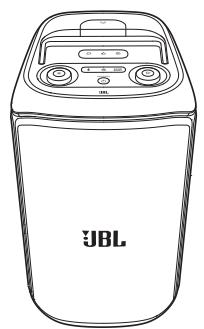
①
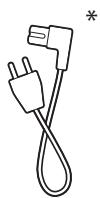
②
(3)
1) Main unit
2) Power cord*
3) Quick Start Guide, Safety Sheet, Warranty Card
*Power cord quantity and plug type vary by regions.
3. PRODUCT OVERVIEW
3.1 Top panel
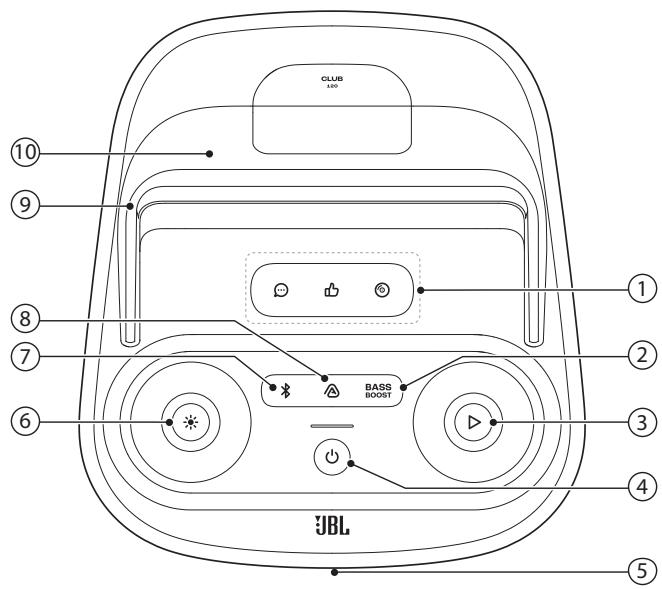
1) Sound effect panel
- Select a special sound effect.
2) BASS BOOST
Enhances the bass level: level 1, level 2, or off.
3)
- Play, pause or resume.
- Rotate clockwise / counterclockwise to increase / decrease the main volume.
4) 0
- Turn the power on or off.
5) LED ring
6)
- Press to turn light effect on or off.
- Hold for more than 2 seconds to turn strobe and starry light on or off.
- Rotate clockwise / counterclockwise to switch between different light patterns.
7)
- Press to enter Bluetooth pairing mode.
8)
- Press to enter multi-speaker connection.
9) Handle
10) Mobile device dock
Caution:
- Do not look directly at the light-emitting parts when the speaker lights are turned on.
LED behavior
| ○ Solid white | Power on |
| ○ Dim white | Standby |
| ○ Off | Power off |
| ○ Flashing white quickly | Pairing |
| ○ Solid white | Connected |
| ○ Off | Not connected |
| ○ Solid white | Level 2 |
| ○ Dim white | Level 1 |
| ○ Off | Off |
| ○ Flashing red quickly | Low battery |
| ○ Flashing white slowly | Charging |
| ○ Solid white | The speaker is fully charged when the entire light stripe turns solid white. |
3.2 Back panel
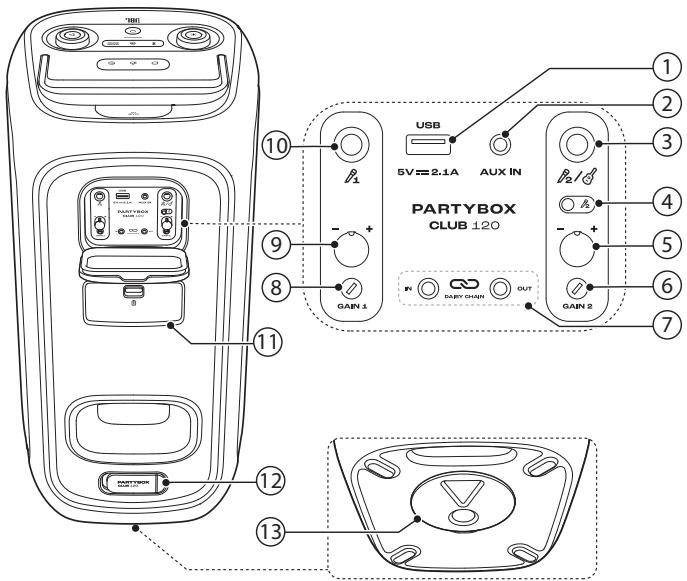
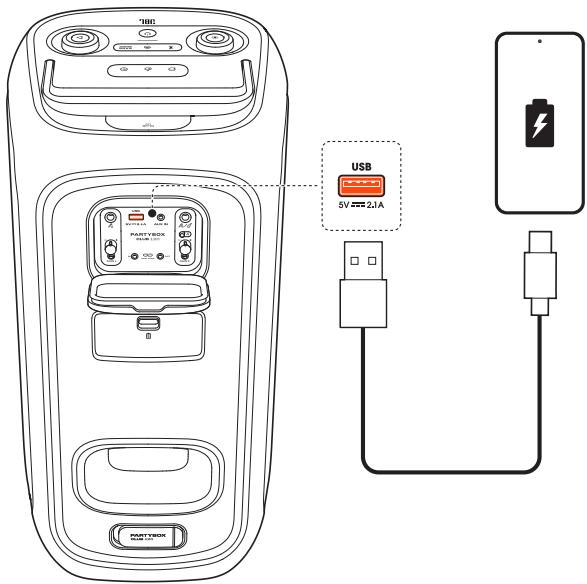
1) USB
- Connect to a USB storage device.
- Charge your mobile device.
2) AUX IN
- Connect to an external audio device through a 3.5 mm audio cable (not supplied).
3)
- Connect to a microphone or guitar.
4) Microphone 2/guitar slider switch
5) Microphone 2/guitar volume knob
- Adjust volume of the corresponding microphone (2) or guitar input.
6) GAIN 2
- Adjust gain of the corresponding microphone (2) or guitar input.
7) DASY CHAIN IN/OUT
- Daisy-chain multiple PARTYBOX speakers through 3.5 mm audio cables (not supplied).
8) GAIN 1
- Adjust gain of the corresponding microphone (1) input.
9) Microphone 1 volume knob
- Adjust volume of the corresponding microphone (1) input.
10) 1
- Connect to a microphone.
11) Battery compartment
Pull down the latch to open the battery compartment.
12) AC
- Connect to AC power supply.
13) Pole-mounting your PARTYBOX
4. PLACEMENT
Caution:
- Do not sit or lean on the speaker or push it sideways to avoid tip-over and possible damages.
Place the speaker on a flat, stable surface and ensure that the rubber feet side is down.
5. POWER ON
Cautions:
Use the provided power cord only.
- You can use either AC power or the built-in battery as power supply to the speaker.
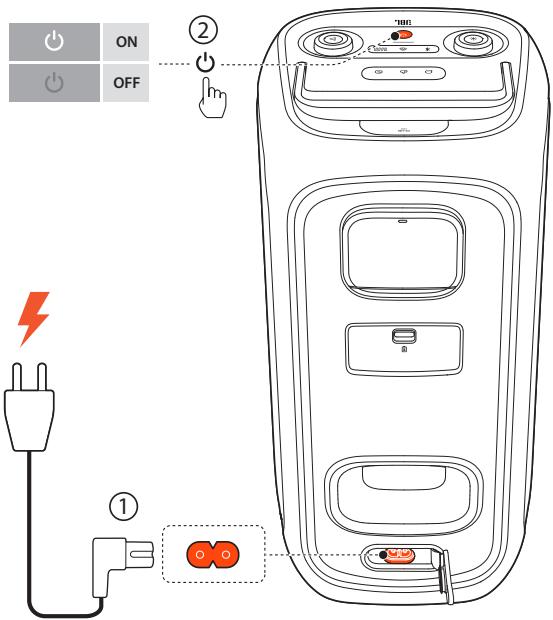
- Connect AC power.
- To use the built-in battery, disconnect the AC power after charging the speaker.
- Press to power on.
Tips:
- Fully charge the speaker before first-time use to prolong the lifespan of the built-in battery.
- You can check the battery level by pressing any button on the speaker.
- The speaker switches to standby mode automatically after 20 minutes of inactivity. You can press on the speaker to switch to normal operation.
6. USING YOUR PARTYBOX
Notes:
Only one sound source can be played at a time.
- Starting playback from another source will always interrupt the current source.
6.1 Bluetooth connection
You can use the speaker with your Bluetooth enabled smartphone or tablet.
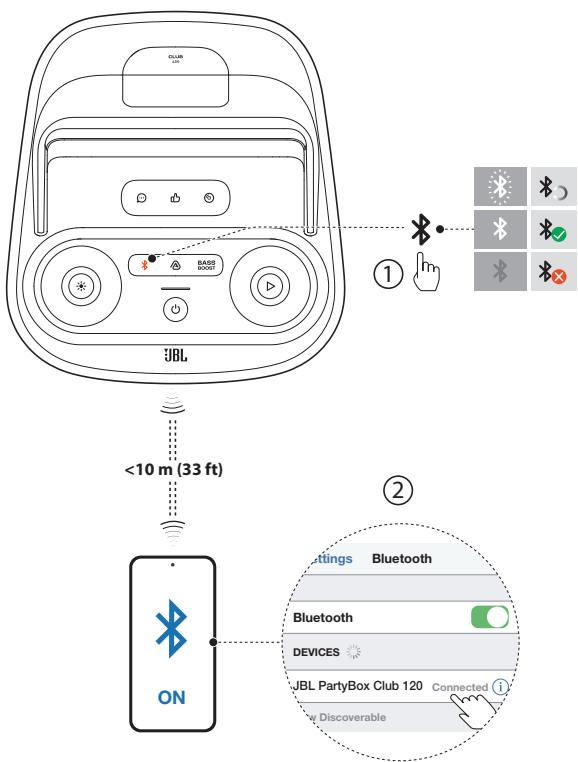
- Press on the speaker to enter Bluetooth pairing mode.
- Choose JBL PartyBox Club 120 on your Bluetooth device to connect.
- Once successfully connected, you can stream audio from your Bluetooth device to this speaker.
Notes:
This speaker can memorize a maximum of 8 paired devices. The ninth paired device will replace the first one.
- Enter "0000" if a PIN code is requested for connection to a Bluetooth device.
- Bluetooth performance can be affected by the distance between this product and your Bluetooth device and the environment of operation.
To terminate the Bluetooth-enabled device:
- Turn off this speaker, or
- Disable Bluetooth on your device.
To reconnect the Bluetooth enabled device:
- When you turn on this speaker next time, it tries to reconnect the last connected device automatically.
- If not, manually select JBL PartyBox Club 120 on your Bluetooth device to connect.
6.2 USB connection
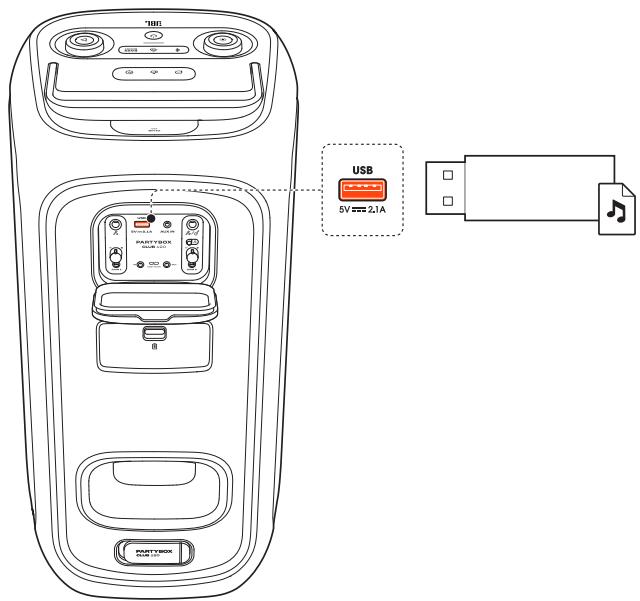
Plug a USB storage device that contains playable audio contents into the USB port of the speaker.
→ The speaker switches to the USB source automatically.
→ Audio playback will start automatically.
Tip:
- The speaker plays audio files on the USB storage device from the root folder to the last level of sub folders in alphabetical sequence. Up to 8 levels of sub folders are supported.
Supported audio formats
| Extension | Codec | Sample rate | Bitrate |
| MP3 | MP1 | 16K/22K/24K/44.1K/48K | 32-448kbps |
| MP2 | 16K/22K/24K/44.1K/48K | 8-384kbps | |
| MP3 | 16K/22K/24K/44.1K/48K | 8-320kbps | |
| WAV | IMA-ADPCM | 16K/22K/24K/44.1K/48K | 32-384kbps |
| MS-ADPCM | |||
| a-law | |||
| u-law | |||
| PCM | 16K/22K/24K/44.1K/48K | 128-1536kbps | |
| FLAC | flac | 16K/22K/24K/44.1K/48K | 600-1300kbps |
| WMA | WMA standard | 16K/22K/24K/44.1K/48K | 5~384kbps |
6.3 Music control
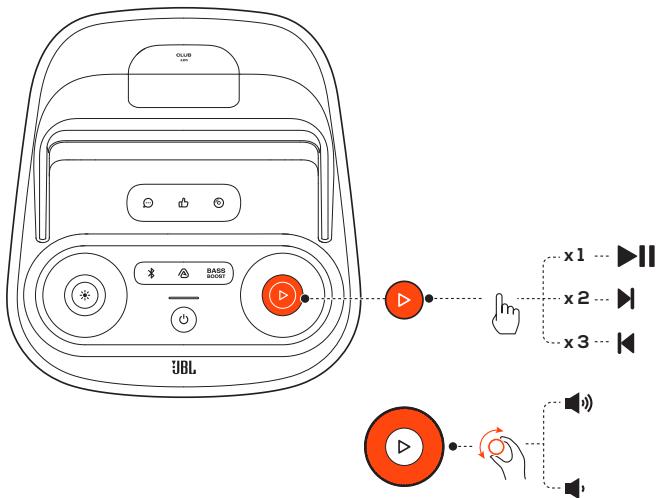
- Press once to pause or resume playback.
- Press twice to skip to the next track.
- Press three times to skip to the previous track.
- Rotate the volume knob clockwise or counterclockwise to increase or decrease the main volume.
Press BASS to enhance the bass level: level 1, level 2, or off.
Note:
- The skip operation is unavailable in AUX mode.
6.4 AUX connection
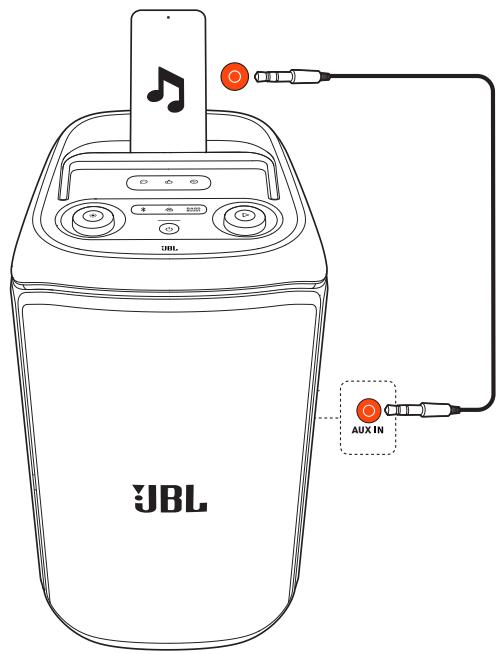
-
Connect an external audio device to the speaker through a 3.5 mm audio cable (not supplied).
→ The speaker switches to the AUX source automatically. -
Start audio playback on the external device.
6.5 Mixing sound with a microphone and / or guitar
By using a microphone or electric guitar (not supplied), you can mix sound with an audio source.
Notes:
Always set the guitar or microphone volume to the minimum level before guitar or microphone connection / disconnection.
- Always disconnect the guitar or microphone when you are not using them.
6.5.1 Connecting a microphone
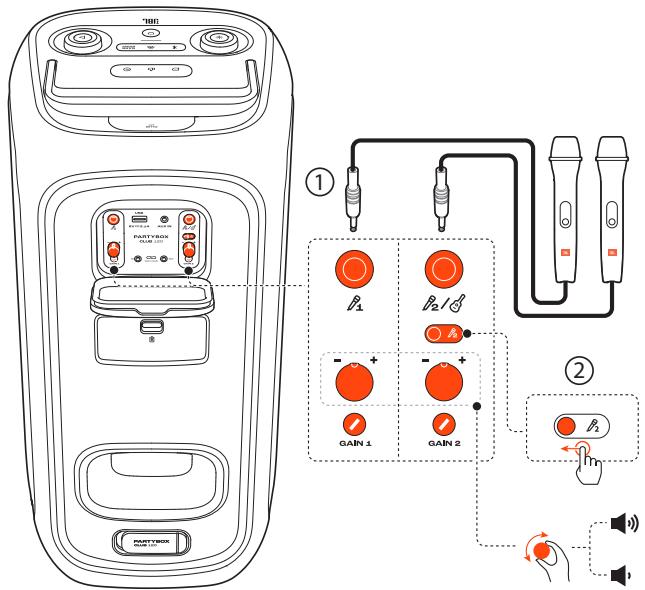
- Connect a microphone to the 1 or 2/ socket.
- When connecting a microphone to the 2 / socket, switch the slider to show 2 .
6.5.2 Connecting a guitar
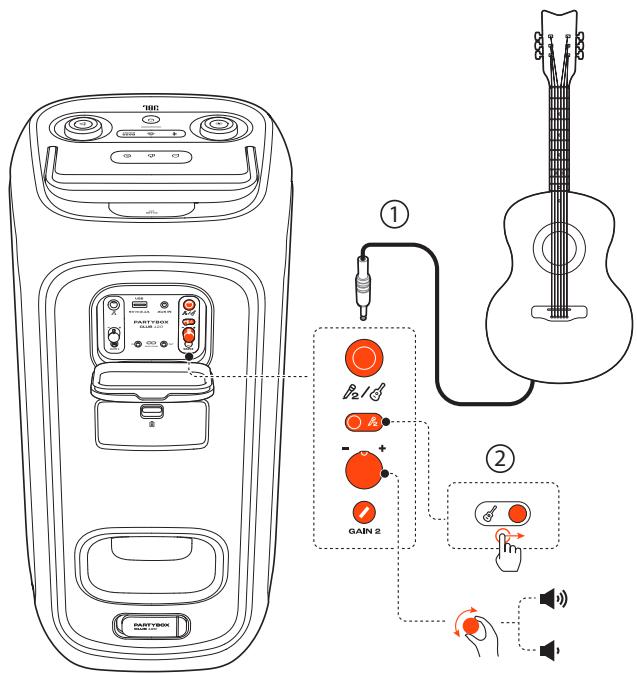
- Connect a guitar to the 2 / socket.
- Switch the slider to show .
6.5.3 Mixing sound
Sing through the microphone or play the guitar.
- To adjust the volume of the audio source, rotate the volume knob on the top panel clockwise or counterclockwise.
- To adjust the volume of the microphone, rotate the - / + volume knob beside the corresponding microphone ( 1 or 2 ) socket on the back panel. To adjust the volume of the guitar, rotate the - / + volume knob beside the 2 / 3 socket on the back panel.
- To adjust the gain of the microphone or guitar, rotate the GAIN 1 or GAIN 2 knob on the back panel respectively.
6.6 Charging your mobile device
6.7 Replace battery (JBL BATTERY200)
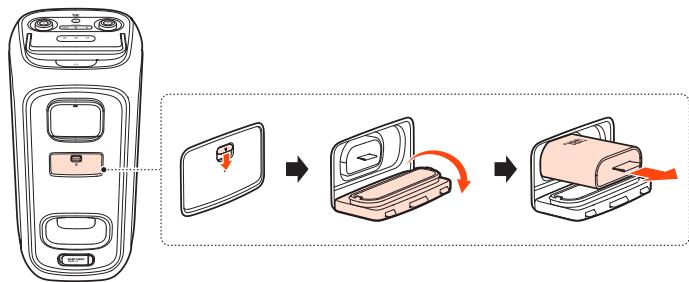
- Pull down the latch to open the battery compartment, and then remove the old battery.
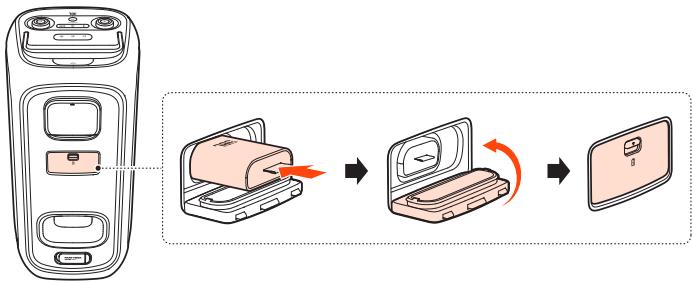
- Insert a new battery of the same type (JBL BATTERY200) with the metal contacts facing down, and then close the battery cover.
Before carrying the speaker, ensure that all the cords are disconnected.
- To avoid personal injury and/or property damage, hold the product firmly while carrying.
Lift up the handle and hold it firmly to move the speaker around.
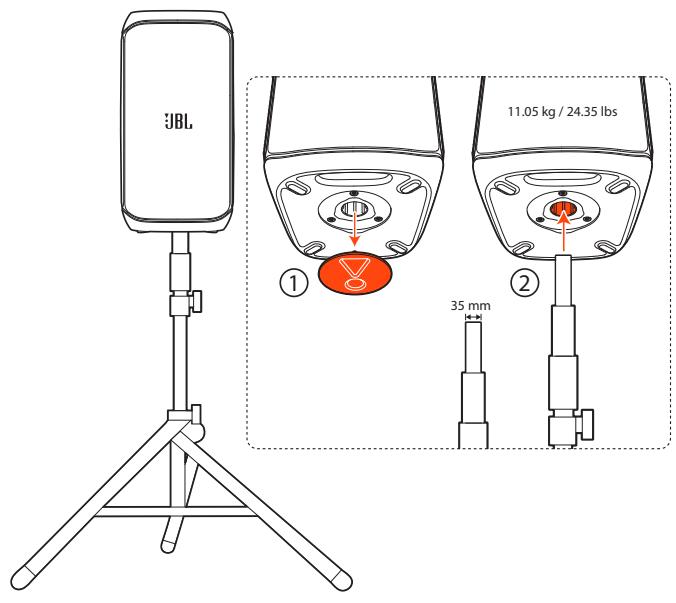
8. POLE-MOUNTING YOUR PARTYBOX
Cautions:
- Installation must be done by qualified persons using safe rigging standards.
- The installer is responsible for proper selection and use of mounting hardware, to properly and safely pole-mount the speaker.
9. ADVANCED USAGE
9.1 JBL PARTYBOX app
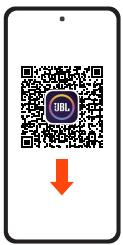



JBL PARTYBOX
Download and install the JBL PARTYBOX app to get more from the product.
9.2 Light effect
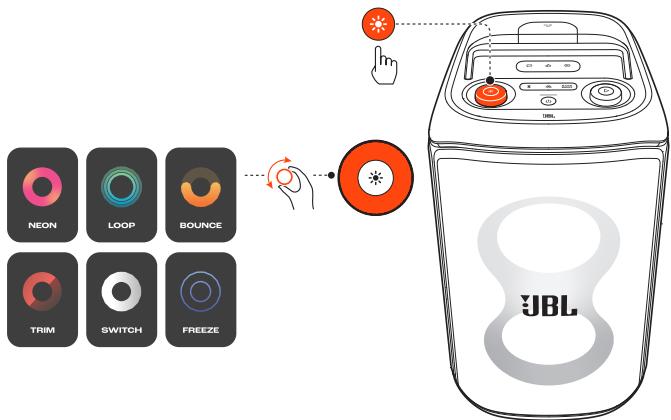
- Press to turn light effect on or off.
- Hold for more than 2 seconds to turn strobe and starry light on or off.
- Rotate the knob clockwise / counterclockwise to switch between different light patterns: NEON, LOOP, BOUNCE, TRIM, SWITCH, or FREEZE.
9.3 Sound effect
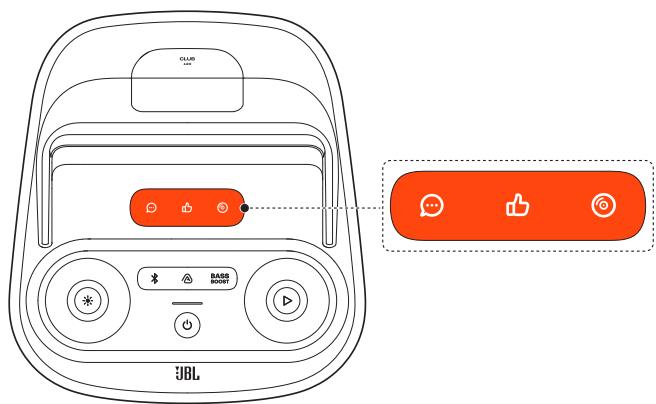
Press , or to select a special sound effect.
9.4 Multi-speaker connection
You can connect two or more PARTYBOX speakers together for even bigger sound.
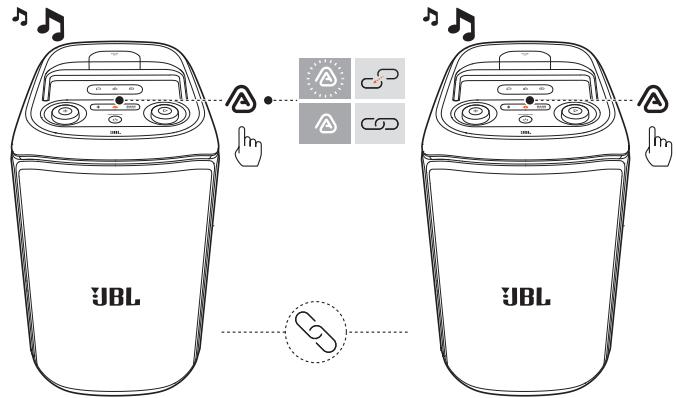
Press on both speakers.
To disconnect:
Power off or press on either speaker.
TIP:
- By default, the speaker connected to your Bluetooth device acts as the primary speaker.
9.5 Daisy chain
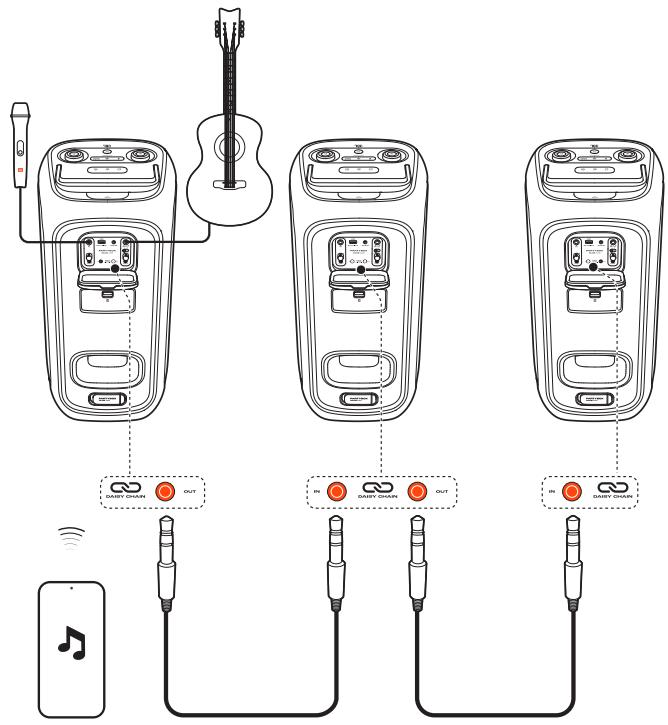
9.6 Factory reset
To restore the factory settings, hold and for more than 10 seconds.
9.7 IPX4
Cautions:
Always keep the charging port dry before connecting AC power.
- To ensure splash resistance, always keep the protective covers closed securely.
The speaker is IPX4 splash resistant.
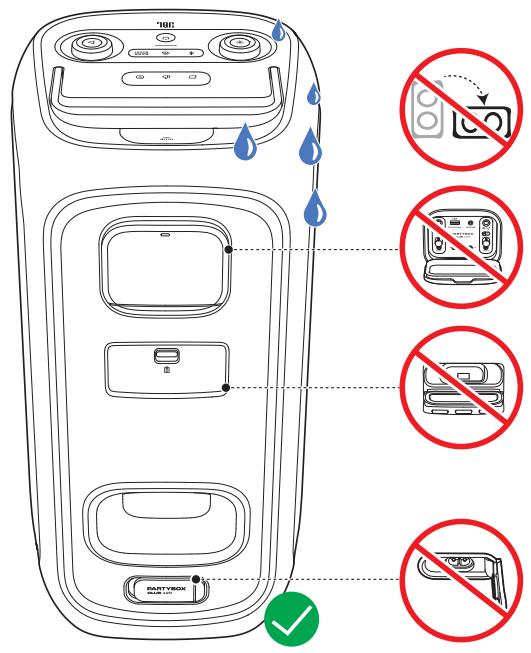
10. SPECIFICATIONS
Transducers: 2 × 5.25 inch (133 mm) woofers, 2 × 2.25 inch (57 mm) tweeters
Output power: 160 W RMS (IEC60268)
Power input: 100 - 240V 50 / 60Hz
Frequency response: 40 Hz - 20kHz( -6 dB)
- Signal-to-noise ratio: > 80 dB
- Battery type: JBL BATTERY200, Li-ion 34 WH (equivalent to 7.2V / 4722mAh )
Battery charge time: 3.5 hours (speaker off mode)
- Music play time: up to 12 hours (varies by volume level and audio content)
- Cable type: AC power cable (type varies by regions)
- Cable length: 2.0m / 6.6 ft
- USB charge out: 5V / 2.1A (Max) (speaker off mode)
- USB format: FAT16, FAT32
- Bluetooth® version: 5.4
- Bluetooth® profile: A2DP V1.4, AVRCP V1.6
- Bluetooth® transmitter frequency range: 2.4 GHz - 2.4835 GHz
- Bluetooth® transmitter power: ≤ 18 dBm (EIRP)
- Bluetooth® transmitter modulation: GFSK, π /4 DQPSK, 8DPSK
Supported formats: .MP3, .WAV, .WMA, .FLAC
- Input sensitivity:
Aux-In: 370 mV RMS (3.5 mm connector)
- Mic-In: 20mV RMS
- Guitar-In: 100 mV RMS
- Bluetooth/USB input: -9 dBFS
Product dimensions (W x H x D): 288.4 mm x 570 mm x 297 mm / 11.35" x 22.44" x 11.69"
Net weight: 11.05kg / 24.35 lbs
- Packaging dimensions (W x H x D): 340 mm x 617 mm x 369 mm / 13.4" x 24.3" x 14.5"
- Gross weight: 14.1 kg/31 lbs
11. TROUBLESHOOTING
Caution:
- Never try to repair the product by yourself. If you have any problems while using this product, check the following points before you request service.
System
The speaker will not turn on.
- Ensure that the speaker battery is not drained. If not, use the AC power instead.
No response from some buttons
- The product may be in demo mode. In demo mode, all the input sources and buttons, except / BASS and the volume and light pattern knobs, are disabled. With AC power connected, hold and simultaneously for more than 10 seconds to exit.
Sound
No sound from the speaker.
- Ensure that the speaker is powered on.
- Adjust volume.
- Ensure that a sound source is active and not muted.
Bluetooth
A device cannot connect with the speaker.
- Ensure that the Bluetooth function of the device is enabled.
- The speaker is already connected with another Bluetooth device. Hold on the speaker for more than 10 seconds to disconnect and pair with a new device.
Poor audio quality from a connected Bluetooth device
- The Bluetooth reception is poor. Move the device closer to the speaker, or remove any obstacle between the device and speaker.
12.COMPLIANCE
The product is in compliance with the European Union energy legislation.
Bluetooth connection mode
The product is intended to be used for streaming music via Bluetooth connection. A consumer can stream Bluetooth audio to the speaker. When the product is connected through Bluetooth, the Bluetooth connection must remain active at all times to ensure proper operation.
The product will enter sleep mode (networked standby) after 20 minutes without operation. The power consumption in sleep mode is less than 2.0 Watts, after which it can be re-activated via Bluetooth connection.
Bluetooth disconnection mode
The product will enter standby mode after 20 minutes without operation. The power consumption in standby mode is less than 0.5 Watts.
13. TRADEMARK

Bluetooth®
The Bluetooth® word mark and logos are registered trademarks owned by Bluetooth SIG, Inc. and any use of such marks by HARMAN International Industries, Incorporated is under license. Other trademarks and trade names are those of their respective owners.

HARMAN International Industries, Incorporated 8500 Balboa Boulevard, Northridge, CA 91329 USA www.jbl.com
© 2024 HARMAN International Industries, Incorporated.
All rights reserved.
JBL is a trademark of HARMAN International Industries, Incorporated, registered in the United States and/or other countries. Features, specifications and appearance are subject to change without notice.
- IMPORTANT SAFETY INSTRUCTIONS
- FOR ALL PRODUCTS
- CAUTION
- RISK OF ELECTRIC SHOCK. DO NOT OPEN
- FEDERAL COMMUNICATION COMMISSION INTERFERENCE STATEMENT
- FOR PRODUCTS THAT TRANSMIT RF ENERGY
- FCC AND IC INFORMATION FOR USERS
- FCC/IC RADIATION EXPOSURE STATEMENT
- EXPOSURE OF HUMANS TO RF FIELDS (RSS-102)
- FOR ALL EU COUNTRIES
- FOR PRODUCTS THAT INCLUDE AUDIO OUT
- PREVENTION OF HEARING LOSS
- NOTE
- WEEE NOTICE
- ROHS COMPLIANCE
- FOR PRODUCTS THAT INCLUDES BATTERIES
- EU BATTERIES DIRECTIVE 2013/56/EU
- FOR ALL PRODUCTS EXCEPT THOSE WITH WIRELESS OPERATION
- FOR ALL PRODUCTS WITH WIRELESS OPERATION
- EPILEPSY
- WARNING
- A FEW PEOPLE MAY EXPERIENCE EPILEPTIC SEIZURES WHEN VIEWING FLASHING LIGHTS
- PRECAUTIONS
- STAND MOUNTING SAFETY PRECAUTIONS
- TABLE OF CONTENTS
- IMPORTANT SAFETY INSTRUCTIONS 2
- INTRODUCTION 6
- WHAT'S IN THE BOX 6
- 3.PRODUCT OVERVIEW 7
- PLACEMENT 8
- POWER ON 9
- USING YOUR PARTYBOX 9
- SPECIFICATIONS 15
- TROUBLESHOOTING 15
- 12.COMPLIANCE 16
- TRADEMARK 16
- INTRODUCTION
- WHAT'S IN THE BOX
- PRODUCT OVERVIEW
- 3.1 TOP PANEL
- SOUND EFFECT PANEL
- BASS BOOST
- 3)
- 0
- LED RING
- 6)
- 7)
- 8)
- HANDLE
- MOBILE DEVICE DOCK
- 3.2 BACK PANEL
- PLACEMENT
- POWER ON
- CAUTIONS
- TIPS
- USING YOUR PARTYBOX
- NOTES
- 6.1 BLUETOOTH CONNECTION
- TO TERMINATE THE BLUETOOTH-ENABLED DEVICE
- TO RECONNECT THE BLUETOOTH ENABLED DEVICE
- 6.2 USB CONNECTION
- TIP
- 6.3 MUSIC CONTROL
- 6.4 AUX CONNECTION
- 6.5 MIXING SOUND WITH A MICROPHONE AND / OR GUITAR
- 6.5.1 CONNECTING A MICROPHONE
- 6.5.2 CONNECTING A GUITAR
- 6.5.3 MIXING SOUND
- 6.6 CHARGING YOUR MOBILE DEVICE
- 6.7 REPLACE BATTERY (JBL BATTERY200)
- POLE-MOUNTING YOUR PARTYBOX
- ADVANCED USAGE
- 9.1 JBL PARTYBOX APP
- 9.2 LIGHT EFFECT
- 9.3 SOUND EFFECT
- 9.4 MULTI-SPEAKER CONNECTION
- TO DISCONNECT
- 9.5 DAISY CHAIN
- 9.6 FACTORY RESET
- 9.7 IPX4
- SPECIFICATIONS
- TROUBLESHOOTING
- SYSTEM
- THE SPEAKER WILL NOT TURN ON
- NO RESPONSE FROM SOME BUTTONS
- SOUND
- NO SOUND FROM THE SPEAKER
- BLUETOOTH
- A DEVICE CANNOT CONNECT WITH THE SPEAKER
- POOR AUDIO QUALITY FROM A CONNECTED BLUETOOTH DEVICE
- 12.COMPLIANCE
- BLUETOOTH CONNECTION MODE
- BLUETOOTH DISCONNECTION MODE
- TRADEMARK
- BLUETOOTH®
Brand : JBL
Model : PARTYBOX CLUB 120
Category : Powered speaker