 ManualGo.com
 75UM7110 - TV 4K LG - Free user manual and instructions
Find the device manual for free 75UM7110 LG in PDF.


Download the instructions for your TV 4K in PDF format for free! Find your manual 75UM7110 - LG and take your electronic device back in hand. On this page are published all the documents necessary for the use of your device. 75UM7110 by LG.
USER MANUAL 75UM7110 LG
ÿ RISQUE D'ÉLECTROCUTION ( NE PAS OUVRIR =
NE Covered by Patents at patentlist hevcadvance.com
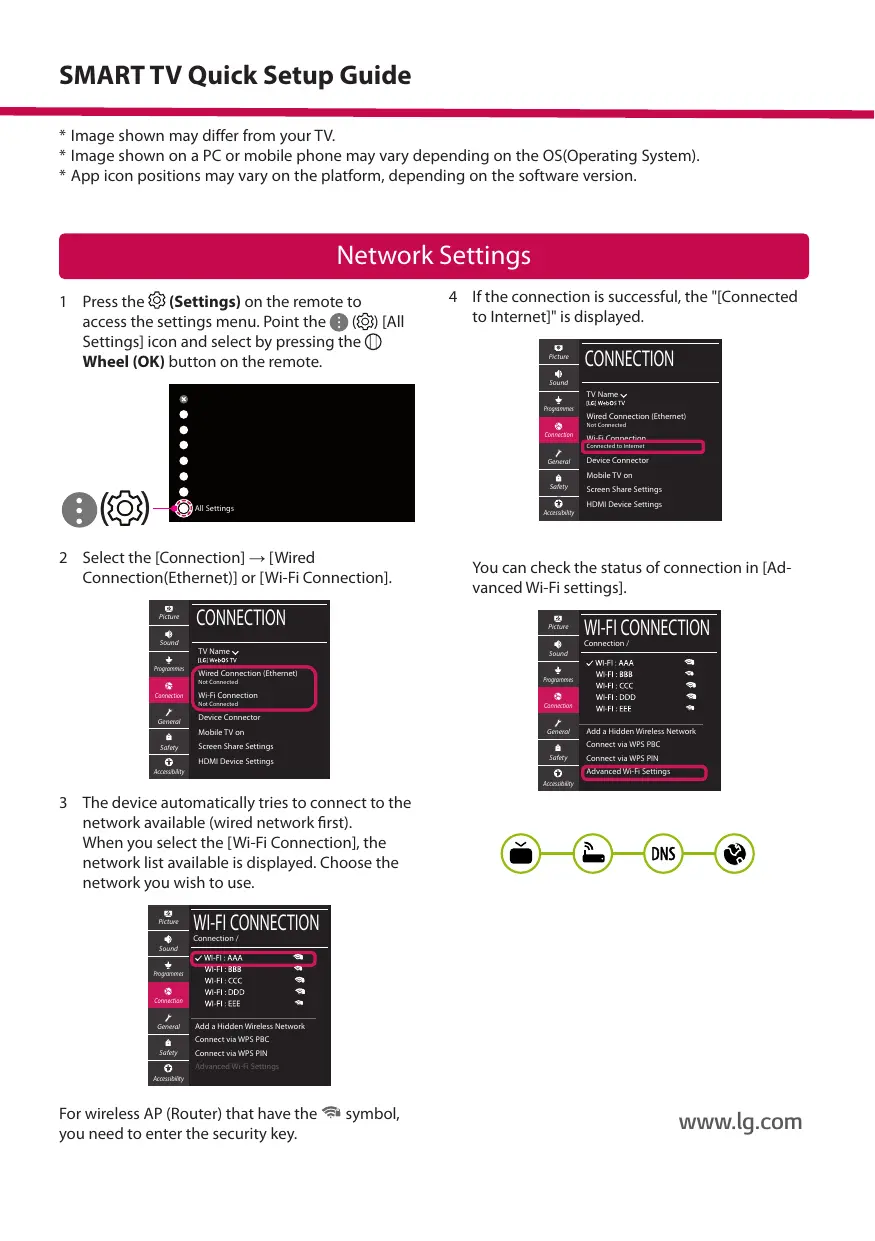
1 Press the {3 (Settings) on the remote to 4 _Ifthe connection is successful, the "[Connected access the settings menu. Point the @ () [AII to Internetl" is displayed. Settings] icon and select by pressing the ©)
Wheel (OK) button on the remote. ce» CONNECTION
2 Select the [Connection] — [Wired Connection(Ethernet)] or [Wi-Fi Connection].
CONNECTION You can check the status of connection in [Ad- vanced Wi-Fi settings].
3 The device automatically tries to connect to the network available (wired network first).
When you select the [Wi-Fi Connection], the network list available is displayed. Choose the
network you wish to use.
For wireless AP (Router) that have the Fi symbol,
you need to enter the security key. www.lg.com
oubleshooting Network Problems
1 Press the & (Settings) on the remote to access the settings menu. Point the @ (63 [AII Settings] icon and select by pressing the () Wheel (OK) button on the remote.
2 Select the [Connection] — [Wired Connection (Ethernet)] or [Wi-Fi Connection] — [Advanced Wi-Fi Settings].
CONNECTION Follow the instructions below that correlate to your network status.
Check the AP (Router) or consult your Internet service provider.
[ Checkthe TV orthe AP (Router).
OROKOLO When X appears next to TV:
© Check the connection status of the TV, AP (Router).
@ Power off and power on the TV, AP (Router).
© ff you are using a static IP. enter the IP directly.
@ Contact internet service provider or AP (Router) company.
When X appears next to Gateway:
© Unplug the power cord of the AP (Router) and try to connect after 5 seconds.
@ Initialize (Reset) the AP (Router).
© Contact internet service provider or AP (Router) company.
OROACRO When X appears next to DNS:
© Unplug the power cord of the AP (Router) and try to connect after 5 seconds.
@ Initialize (Reset) the AP (Router).
© Check that the MAC address of the TV/AP (Router) is registered with your Internet service provider. (The MAC address displayed on the right pane of the network status window should be registered with your Internet service provider.)
@ Check the AP (Router) manufacturer's website to make sure your router has the latest firmware version installed.
mart e Connection to S Check that Wi-Fi is enabled on your smartphone. To use SmartShare, both devices must on the same local network.
Install/run the app for sharing content on your smartphone (It called LG TV Plus on LG phones). Enable your smartphone to share content iles with other devices.
Select the file type you want to play (movie, audio or photo).
Select a movie, music or photo file to play on the TV.
ou 8 w NN Play the media file to view and enjoy it on your TV.
Updating the TV Firmware
* Ifthe TV is turned on for the first time after it was shipped from the factory, initialization of the TV may take a few minutes.
1 (Settings) — @ (AI Settings] > @ [General] —+ [About This TV] — [CHECK FOR UPDATES]
2. After checking the version ofthe software, update it. If you check the "[Allow Automatic Updates|', you can update the software automatically.
GENERAL ss ABOUT THIS TV Please call LG Customer Service if you experience any problems.
Kurzanleitung zur Einrichtung des SMART TV