Power 3G - Mobile ECHO - Free user manual and instructions
Find the device manual for free Power 3G ECHO in PDF.


| Product Type | Mobile (smartphone) |
| Brand | ECHO |
| Model | Power 3G |
| Network | 3G, HSPA+, EDGE, GPRS, Wi-Fi, Bluetooth, GPS |
| SIM Cards | Dual SIM (two slots) |
| Memory Card | MicroSD up to 32 GB |
| Screen | Touchscreen |
| Camera | Yes |
| Battery | Removable, rechargeable via micro-USB port |
| Charger | Power adapter + micro-USB cable included |
| Operating System | Android (compatible with Google NOW) |
| Connectivity | Micro-USB, 3.5mm headphone jack |
| Box Contents | Phone, power adapter, micro-USB cable, hands-free kit, quick start guide, removable battery |
| Maintenance | Clean with a dry cloth; do not use solvent (benzene, alcohol) |
| Safety | Do not expose to water, do not disassemble, use approved accessories, respect temperature 0°C to 45°C |
| SAR (head) | 0.345 W/kg |
| SAR (body) | 0.922 W/kg (at 5 mm) |
| Warranty | Manufacturer's warranty (terms at www.echomobiles.com) |
| Repairability | Repair by authorized technician only |
| Recycling | Follow selective sorting (crossed-out bin) |
| Certifications | Compliant with R&TTE directive, CE marking |
Frequently Asked Questions - Power 3G ECHO
User questions about Power 3G ECHO
0 question about this device. Answer the ones you know or ask your own.
Ask a new question about this device
Download the instructions for your Mobile in PDF format for free! Find your manual Power 3G - ECHO and take your electronic device back in hand. On this page are published all the documents necessary for the use of your device. Power 3G by ECHO.
USER MANUAL Power 3G ECHO
The contents of this manual may differ in certain respects from the description of your phone depending on its software version and your telephone operator.
CONGRATULATIONS!
You have just purchased your Echo POWER mobile phone. This guide contains all the information needed to use the phone so that you can quickly familiarise yourself, we hope, with the world of Echo.
Copyright © 2015 ECHO
The information contained in this manual may not be disclosed to third parties or reproduced in any form whatsoever without the express written consent of ECHO.
ECHO is a registered trademark of Modelabs Mobiles SAS.
Disclaimer
This manual has been prepared with the utmost care and attention and is designed to guide you through the functions and features of your device. However, the information and recommendations
contained herein do not constitute a guarantee under the Applicable law. ECHO reserves the right to change or modify the information contained in this manual at any time.
Limitation of Liability
All content and services accessible through this device are the exclusive property of third parties and are protected by the relevant laws (copyright, patent, licence and/or other intellectual property laws). These services are for your own personal non- commercial use. It is not permitted to use any content or services without prior written permission of the content owner. You may not copy, publish, transfer, sell, create derivative works or exploit in any manner or medium any content or services displayed through this device.
THIRD PARTY CONTENT AND SERVICES ARE PROVIDED "AS IS." ECHO DOES NOT GUARANTEE THE CONTENT OR SERVICES SO PROVIDED, EITHER EXPRESSLY OR IMPLIEDLY, FOR ANY PURPOSE WHATSOEVER. ECHO EXPRESSLY DISCLAIMS ANY WARRANTYIES OF MERCHANTABILITY OR FITNESS FOR A PARTICULAR PURPOSE. ECHO DOES NOT GUARANTEE THE ACCURACY, VALIDITY, LEGALITY, OR COMPLETENESS OF ANY CONTENT OR SERVICES MADE AVAILABLE THROUGH THE DEVICE.
ECHO has no control over the content and services provided by third parties via networks or transmission devices. Moreover, third-party services may be terminated or interrupted any time without notice. Therefore, ECHO makes no representation or warranty whatsoever as to the availability of any third party content or service and expressly declines any responsibility for such termination or interruption.
ECHO cannot in any way be held responsible for the processing and/or monitoring of third party content and services accessible through this device. Any question or request relating to the content or services should be addressed directly to the respective content or service provider.
An independent third party operator provides the SIM card and the network or system (mobile or other) on which this device operates. ECHO expressly declines any responsibility in respect of the function, availability, coverage, services, or network or system capacity (mobile or other).
If your SIM card isn't at the proper format, you are advised to ask your operator for a micro one. The responsibility of ECHO and its authorised after-sales service is limited only to the cost of repair and/or replacement of the unit during the warranty period.
ECHO IS NOT LIABLE IN THE CASE OF NEGLI-GENCE, WHETHER CONTRACTUAL OR BASED ON TORT, FOR ANY DIRECT, INDIRECT, INCIDENTAL OR SPECIAL DAMAGE, LEGAL FEES, EXPENSES, OR ANY OTHER DAMAGES RESULTING FROM THE USE BY YOU OR ANY THIRD PARTY OF THE CONTENT OR SERVICES ACCESSIBLE THROUGH THIS DEVICE. JURISDICTIONS MAY NOT ALLOW THE EXCLUSION OF IMPLIED WARRANTYES OR THE LIMITATION OF THE CONSUMER'S LEGAL RIGHTS, THEREFORE THIS STATEMENT MAY NOT APPLY TO YOU.
What's in the Box:
- ECHO POWER mobile phone
- AC adaptor
- Micro USB cable
- Hands-free kit
- User guide
- Removable battery
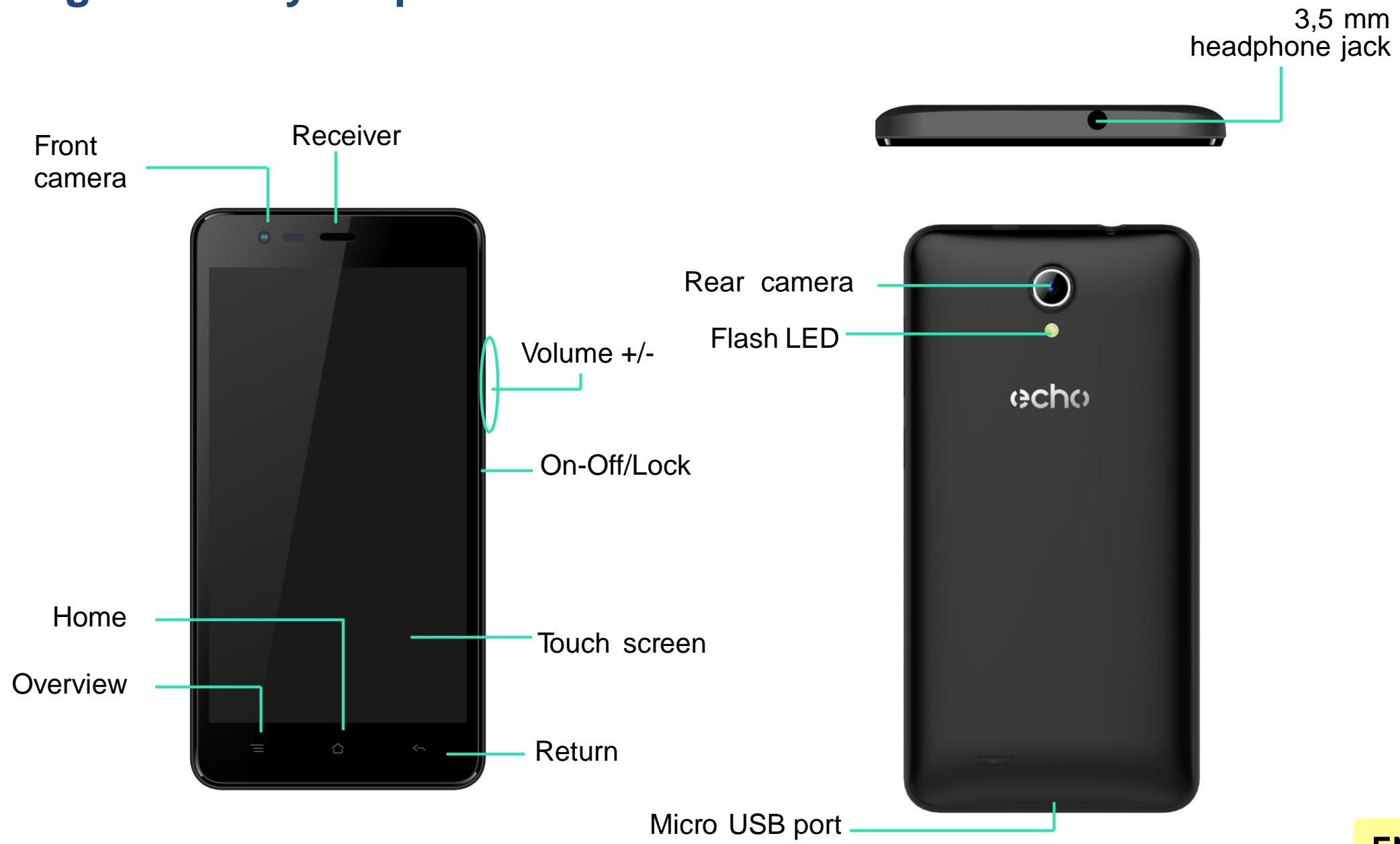
Getting to know your phone
EN
The buttons on your phone
| Button | Function |
| On/Off | Press and hold the button to turn the phone on/off. Press the button lightly to lock the touch screen. |
| Home | Returns to the home screen and opens Google NOW (press and hold the button). |
| Overview | Opens the list of recent applications. |
| Return | Returns to the previous screen. Closes the onscreen keyboard. |
| VOLUME +/- | Increases or decreases the call volume, the ringtone, music, games and other audio functions. Switch the ringtone to silent mode when the phone rings. Press and hold on Volume- to enable the meeting profile. |
Getting Started
Inserting the SIM cards
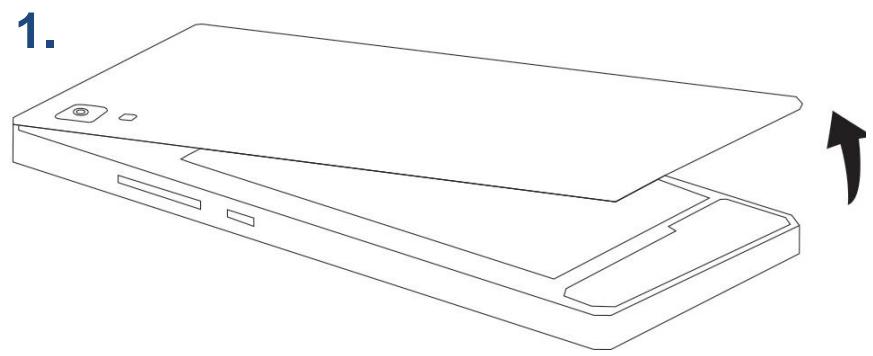
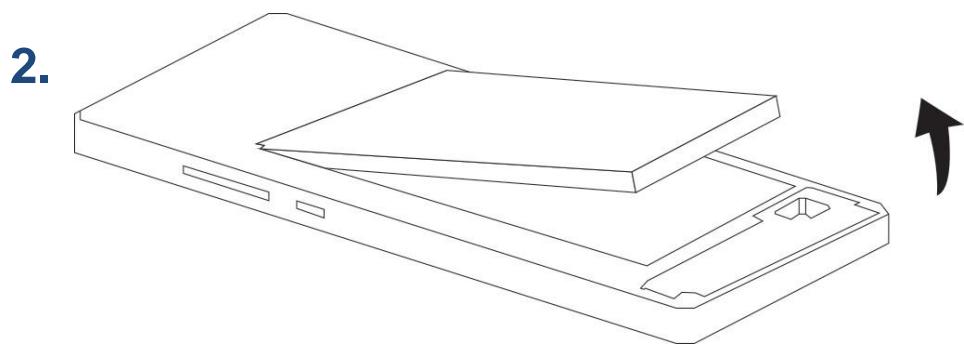
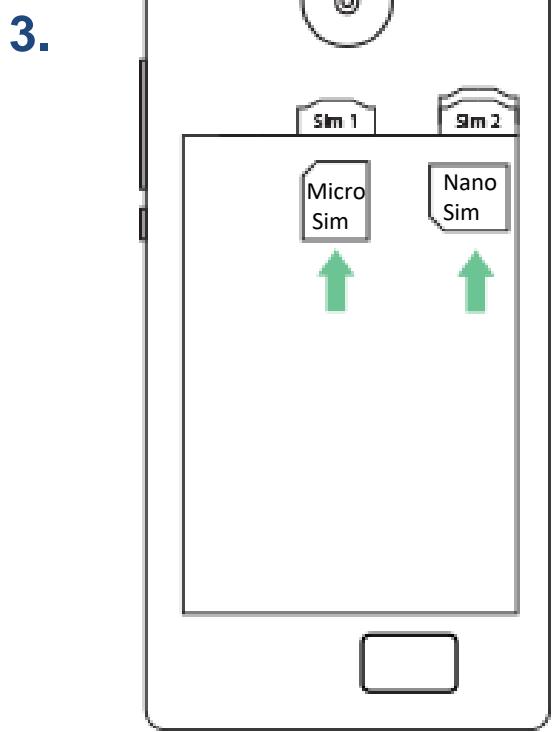
In order to use your telephone, you need to insert your SIM Card. The back cover of the phone is clipped on. Please unclip it using the notch on the cover, following the contour of the phone. Insert the SIM cards following the diagrams below, the micro SIM needs to be inserted vertically, the nano SIM needs to be inserted horizontally.
Installing Memory Card
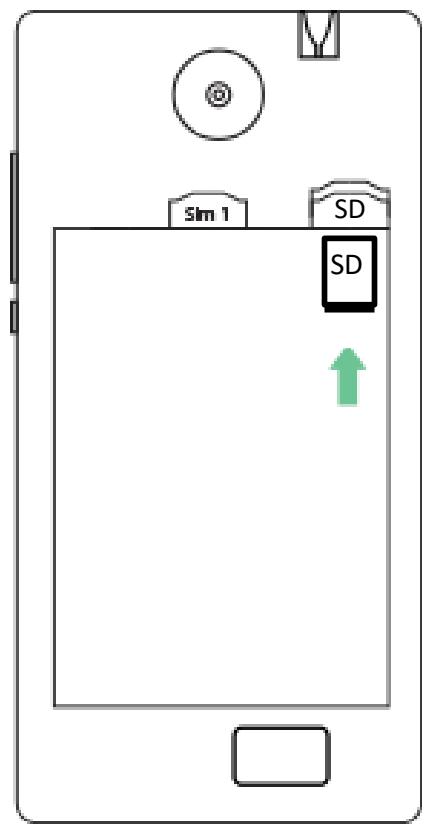
Your phone takes a MicroSD memory card of up to 32 GB.
Insert the microSD memory card following the diagram below, if a Nano SIM is installed you will have to Power it out in order to insert the microSD memory card.
Charging the Battery
A flashing red light indicates that the battery level is very low: the battery should be recharged because, if the level is too low, it may shorten the life of the battery.
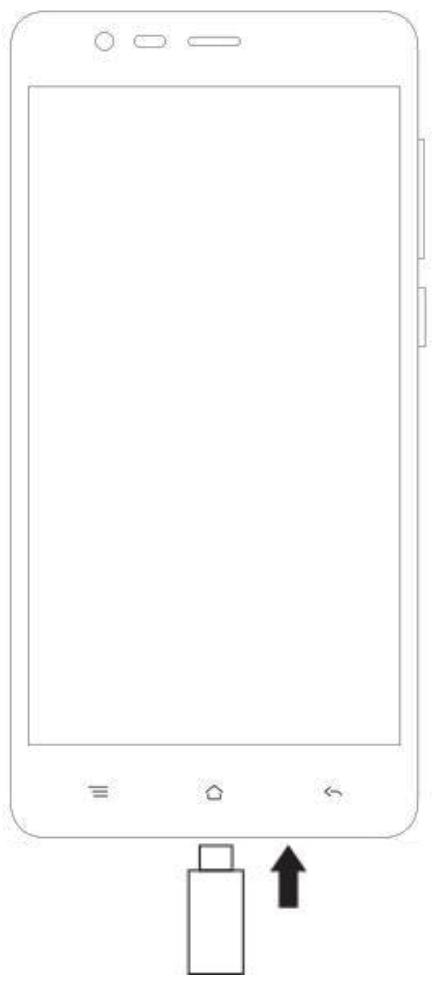
Connect the charger to a power outlet and the micro USB connector to the phone's USB port. The phone's status indicator changes to red, indicating that the device is charging.
Once the phone has finished charging, the status indicator changes to green and you should unplug the charger.
For more information, refer to the Safety Information section.
Turning the Phone On and Off
To turn the phone on, press on the ON/OFF button and hold it down until the phone begins to vibrate.
If your SIM card is locked, you must enter the correct PIN code to unlock the SIM card when the phone is powered up. Your PIN is supplied by your operator; if you did not receive it or have lost it, please contact them.
When the PIN is entered incorrectly three times, the mobile phone is blocked and has to be unblocked using your PUK (this is supplied with the SIM card; if this is not the case, you should contact your phone operator). To turn the phone off, press and hold the ON-OFF button until the menu opens, then press on Power Off. Now press OK to confirm. The phone vibrates when it is shut down completely.
Notifications
Notification icons on the status bar

Signal strength

Connected to HSPA+ (3G++)

Connected to HSPA (3G+)

Connected to 3G

Connected to EDGE

Connected to GPRS

No signal

Roaming
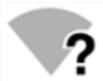
Wi-Fi available

Connected to Wi-Fi

Bluetooth enabled

GPS in use

Voice call in progress

Call waiting
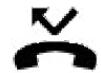
Missed call
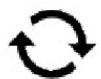
Synchronising

New mail

Alarm on
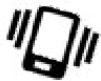
Silent mode on

New voicemail
Downloading
Connected to computer
Battery level
New SMS or MMS
Airplane mode on
SIM card modified

No SIM card
Depending on the application, notifications may be accompanied by a beep, vibration or a flashing LED.
Notifications Panel
Drag the status bar downwards to see details of all your notifications. Information about new messages received, upcoming calendar events, download status, etc. will then be displayed.
Press on E to clear all temporary notifications (applications that are running are still listed).
Drag a notification to the left or right to clear it.
To close the panel, drag it upwards or press on RETURN .
To access the settings panel, press on
Shortcut: pull the notification downwards with two fingers.
Using the Menu
The menus on your phone take the form of a contextual menu or an options menu.
Contextual Menu
To bring up a contextual menu, press and hold on an item on the screen: the contextual menu then suggests various actions associated with the item. For example, if you press and hold on an SMS, the options for the message are displayed.
Note: not all items have a contextual menu. When you press and hold on an item that does not have a menu, nothing will happen.
Options Menu
To bring up an options menu, press on the icon.
The options menu suggests actions or settings for the current screen or application but not for a specific item as it is the case for the contextual menu.
Safety Information
Please read this safety information carefully so that you can use your phone in complete safety:
- Children: Be very careful with children and your phone.
A mobile phone contains a number of spare parts. Exercise great care when children are in close proximity to the phone. The phone contains small parts that could be swallowed or cause choking. If your phone is equipped with a camera or lighting device, do not use it too near children or animals. - Hearing: Prolonged listening at full power using a lightweight headset or headphones can damage your hearing. Reduce the volume to the lowest possible level when listening to music or conversations. Avoid high volumes over extended periods.
- Driving: Exercise care when driving. Driving requires maximum attention at all times in order to
minimise the risk of accidents. Using a mobile phone can distract the user and result in an accident. You must fully comply with the local regulations and laws in force regarding the use of cell phones whilst driving. You are not allowed to use the phone whilst driving. A hands-free kit should not be regarded as an alternative solution.
Turn your phone off when flying.
Remember to turn your phone off when you are in a plane (GSM + Bluetooth) as it may cause interference.
- Hospitals: Turn your phone off near any medical devices. It is extremely dangerous to leave a phone switched on near medical devices as it may cause interference. You must observe any instructions or warnings in hospitals and treatment centres.
Remember to turn your phone off in service stations. Do not use your device in a petrol station near fuel. It is dangerous to use your phone inside a professional garage.
- Electronic implants and pacemakers: Users who wear a pacemaker or who are fitted with an electronic implant must hold the phone on the opposite side to their implant as a precaution when making a call. If you notice that your phone is causing interference with a pacemaker, switch it off immediately and contact the manufacturer of the pacemaker for advice on what action to take.
- Fire hazard: Do not leave your device near heat sources such as radiators or cookers.
Do not leave your phone charging near flammable materials as there is a real risk of fire. - Contact with liquid: Do not expose the phone to liquid or touch it with wet hands: any damage caused by water may be irreparable.
- Use only ECHO-approved accessories. The use of unauthorised accessories may damage your
Phone or cause a safety risk.
-
Do not destroy the batteries and chargers. Never use a battery or charger that has been damaged. Keep batteries away from magnetic objects as the latter might cause a short-circuit between the positive and negative terminals of your batteries and permanently destroy the battery or phone. As a general rule, you should not expose the batteries to very high or low temperatures (below 0°C or above 45°C ). Differences in temperature may reduce battery autonomy and service life. Do not let your phone charge more than 48 hours in row.
-
Shocks and impact: Handle and use your phone with the utmost care. Protect your phone: shocks and impact may damage it. Some parts of your phone are made from glass and might break if the phone is dropped or is subject to severe impact. Avoid dropping your phone. Do not touch the screen with sharp objects.
-
Electric shock: Do not try to dismantle your phone as there is a very real risk of electric shock.
- Maintenance: If you want to clean your handset, use a dry cloth (do not use a solvent, such as benzene, or alcohol).
- Recharge your phone in a well ventilated area. Do not recharge your device when it is resting on a soft surface.
-
Damage to magnetic strips: Keep your phone away from credit cards as they may damage the data on the magnetic strips.
-
Do not use the mobile phone in an environment at too high or too low temperature, never expose the mobile phone under strong sunshine or too wet environment. The suitable temperature for the phone is 0°C to +40°C , the maximum charging temperature declared by the manufacturer is +40°C .
- The power adapter is the disconnect device for this equipment. The socket-outlet shall be near the equipment and easily accessible.
-
This charger is for indoor use only
-
Electric shock: Do not try to dismantle your phone as there is a very real risk of electric shock.
- Maintenance: If you want to clean your handset, use a dry cloth (do not use a solvent, such as benzene, or alcohol).
- Recharge your phone in a well ventilated area. Do not recharge your device when it is resting on a soft surface.
-
Damage to magnetic strips: Keep your phone away from credit cards as they may damage the data on the magnetic strips.
-
Do not use the mobile phone in an environment at too high or too low temperature, never expose the mobile phone under strong sunshine or too wet environment. The suitable temperature for the phone is 0° C to +40° C , the maximum charging temperature declared by the manufacturer is +40° C .
- The power adapter is the disconnect device for this equipment. The socket-outlet shall be near the equipment and easily accessible.
- This charger is for indoor use only
Important operating guidelines
Batteries - SIM - Emergency calls - SAR - Repairs
- To increase the life of your battery, only use ECHO chargers and batteries. Replacing the battery with a non-compliant model may result in the latter exploding.
- Never throw batteries on a fire and follow the guidelines in force for recycling used batteries and phones.
- Be careful not to crush or damage the battery, as this could cause an internal short circuit and overheating.
- The battery can be recharged several hundred times before needing to be replaced. When it shows signs of losing its power, it can be replaced.
- If you do not use your mobile phone for an extended period, remember to recharge the battery to optimise its use time.
- Do not throw batteries away with household waste: recycle them in accordance with the
manufacturer's guidelines. If the battery is damaged, contact the after-sales service or the nearest authorized ECHO dealer.
- Unplug the charger from the wall socket when the battery is fully charged in order to reduce your energy consumption.
- Do not leave the battery being charged for more than a week as this might result in an overload and reduce the life of the product.
- Handle the SIM cards with care: wipe them with a soft cloth if they appear dirty.
- Emergency calls: the emergency numbers may not be accessible on all mobile telephone networks, in isolated areas or areas where there is no coverage; check first with your operator.
- Radio Frequency Exposure: Your mobile phone has been designed and manufactured in accordance with the international.
guidelines (ICNIRP 1 ) on exposure to radio frequencies. These guidelines, which are based on various studies and research, have been developed by independent scientific organisations to ensure the safety of everyone who uses a mobile phone.
The safety information on exposure to radio waves uses a unit of measurement known as SAR (Specific Absorption Rate). The international guidelines have set this limit at 2W/kg^* . The phone is used in standard operating positions when being tested for its SAR.
1International Commission on Non-Ionising RadiationProtection
Although the SAR is determined using the highest power level, the phone's real rate of specific absorption whilst in operation may be well below the maximum value.
A phone is designed to operate at different power levels so that it only uses the power it needs to be connected to the network.
In addition, all models of phone must undergo tests before being marketed to ensure compliance with the European R&TTE directive.
This directive publishes strict rules for guaranteeing the safety of users and for preventing any risks to health.
The maximum SAR value tested on this device when used in its normal position at the ear is 0.345W/K and 0.922W/kg when used close to the body, at a minimum distance of 5 mm. The device complies with RF specifications when used near your ear or at a distance of 5mm from your body. The device uses a high-quality network connection for transmitting files, data and messages. On occasion, the transmission of files or messages may be delayed until the connection is available. When this is the case, be sure to follow the instructions regarding the separation distance for establishing the transmission. If you use a case,
belt-clip or holder for carrying the phone, it must not contain any metal and should be kept at a minimum distance of 5 mm from your body.
*The SAR limit for mobile devices is 2.0 watts / kilogram (W/kg) averaged over ten grams of body tissue. SAR values may vary according to the standards for reporting information that are in force in different countries.
Tips for Reducing Exposure levels:
We recommend that you use your phone in good reception conditions in order to reduce the amount of radiation received. It is advisable to limit the amount of time you use the phone in underground car parks and when travelling by car or train, etc.
Reception conditions are indicated by the bars that are displayed on your phone: the more bars there are, the better the reception quality.
We recommend that you use the hands-free kit to reduce exposure to radiation.
To reduce the adverse effects of prolonged radiation exposure, we advise teenagers to hold the phone away from their lower abdomen, and that pregnant women hold the phone at a distance from their stomach.
- Only qualified service personnel should repair your device. If you give your device to non-qualified personnel for repair, the phone will not be covered by ECHO's warranty.
-
The IMEI code is the serial number used to identify your device and for After-Sales support. There are several ways of finding your IMEI code:
-
Type * # 06 # on your mobile telephone's keypad.
- Refer to the packaging box that your telephone came in.
- Remove the battery from your device: on the back, you will see a label with your IMEI code. (For non-removable batteries, refer to the IMEI engraved on the telephone's rear casing).
NOTE:
ECHO's warranty does not cover normal wear and tear (batteries, screens, keyboards, camera lenses, etc.).
Recycling
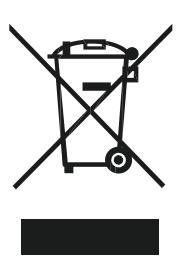
The symbol of a crossed-out wheelie-bin, as found in this manual, indicates that the item is subject to European Directive 2002/96/EC, which states that electrical and electronic equipment, batteries,
accumulators and accessories must undergo selective waste management.
Make sure that, when your phone is no longer usable, you put it in a suitable waste bin or return it to a mobile phone retailer. In this way you will help to reduce environmental and health hazards.
Local councils, retailers and national manufacturing associations will give you the necessary information on how to dispose of your old device.
Replaceable battery:
CAUTION
RISK OF EXPLOSION IF BATTERY IS REPLACED BY AN INCORRECT TYPE.
DISPOSE OF USED BATTERIES ACCORDING TO THE INSTRUCTIONS
Charger and battery :
Charger Model : MSH-TR-219
Charger Supplier : Mei Shun He Electronic Limited
Battery Model : POWER
Battery Cell Model : 365276AR 1950mAh 3.8V
Battery Supplier : ShenZhen Yi Mi Electronic CO.,LTD
SAR :
The Highest SAR value for this ECHO POWER mobile phone when tested at the ear is 0.345W / Kg , when properly worn on the body is 0.922W / kg , and when tasted at hands is 2,11W / kg , for ICNIRP recommendation. SAR is measured against head and with the device at a separation of 5mm to the body, while transmitting at the highest certified output power level in all frequency bands of the mobile device.
STATEMENT OF COMPLIANCE
We, Modelabs Mobiles SAS, here by declare that the POWER mobile phone complies with the standards and provisions of the Directives.
"This product is in compliance with the essential requirements and other relevant provisions of the EU Council Radio and
Telecommunications Terminal Equipment (R&TTE) Directive, 1999/5/EC.
C€0560
The full text of the device's Statement of Compliance is available online at: https://www.echomobiles.com/assistance/
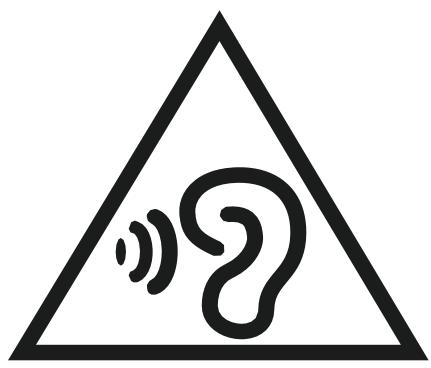
"To prevent possible hearing damage, do not listen at high volume levels for long periods"
"Fully understand user manual before use" "Ensure your player at low volume levels or power off before you leaving"
EN
Replaceable battery:
CAUTION
RISK OF EXPLOSION IF BATTERY IS REPLACED BY AN INCORRECT TYPE. DISPOSE OF USED BATTERIES ACCORDING TO THE INSTRUCTIONS
Charger and battery :
Charger Model : MSH-TR-219
Charger Supplier : Mei Shun He Electronic Limited
Battery Model : POWER
Battery Cell Model : 365276AR 1950mAh 3.8V
Battery Supplier : ShenZhen Yi Mi Electronic CO.,LTD
SAR :
The Highest SAR value for this ECHO POWER mobile phone when tested at the ear is 0.345 W / Kg , when properly worn on the body is 0.922 W / kg , and when tasted at hands is 2,11 W / kg , for ICNIRP recommendation. SAR is measured against head and with the device at a separation of 5 mm to the body, while transmitting at the highest certified output power level in all frequency bands of the mobile device.
echo
POWER
Guide utiliseur
CSTC Standards Technical Services Co, Ltd.
C€0560




- CONGRATULATIONS
- DISCLAIMER
- LIMITATION OF LIABILITY
- WHAT'S IN THE BOX
- GETTING TO KNOW YOUR PHONE
- THE BUTTONS ON YOUR PHONE
- GETTING STARTED
- INSERTING THE SIM CARDS
- INSTALLING MEMORY CARD
- CHARGING THE BATTERY
- TURNING THE PHONE ON AND OFF
- NOTIFICATIONS
- NOTIFICATION ICONS ON THE STATUS BAR
- NOTIFICATIONS PANEL
- USING THE MENU
- CONTEXTUAL MENU
- OPTIONS MENU
- SAFETY INFORMATION
- IMPORTANT OPERATING GUIDELINES
- TIPS FOR REDUCING EXPOSURE LEVELS
- NOTE
- RECYCLING
- REPLACEABLE BATTERY
- CHARGER AND BATTERY
- SAR
- STATEMENT OF COMPLIANCE
- C€0560
- ECHO
- POWER
- GUIDE UTILISEUR
Brand : ECHO
Model : Power 3G
Category : Mobile