8 Pro - Cellphone ONEPLUS - Free user manual and instructions
Find the device manual for free 8 Pro ONEPLUS in PDF.


| Product type | Mobile phone |
| Brand | OnePlus |
| Model | 8 Pro |
| Dimensions (approx.) | 165.3 x 74.3 x 8.5 mm |
| Weight (approx.) | 199 g |
| Power | Battery 4510 mAh, Warp Charge 30T fast charging (5V/6A), 30W wireless charging, reverse charging |
| Display | 6.78 inches, Fluid AMOLED, 120 Hz, QHD+ resolution |
| Processor | Qualcomm Snapdragon 865 |
| RAM | 8 GB / 12 GB LPDDR5 |
| Internal storage | 128 GB / 256 GB UFS 3.0 |
| Rear camera | Quad: 48 MP (main) + 8 MP (telephoto) + 48 MP (ultrawide) + 5 MP (color sensor) |
| Front camera | 16 MP |
| Connectivity | 5G, Wi-Fi 6, Bluetooth 5.1, NFC, USB-C |
| Sensors | In-display fingerprint, accelerometer, gyroscope, proximity, compass, barometer |
| Operating system | Android 10 with OxygenOS |
| Care and cleaning | Clean with a soft, dry cloth. Do not use alcohol or harsh chemicals. |
| Safety | Eye protection (reading mode, blue light filter), safe charging, SAR compliant, fingerprint/face unlock |
| Spare parts and repairability | Repairs by qualified personnel only. Use OnePlus approved accessories. |
| Warranty | Limited warranty depending on country of purchase (see terms at oneplus.com/support) |
Frequently Asked Questions - 8 Pro ONEPLUS
User questions about 8 Pro ONEPLUS
0 question about this device. Answer the ones you know or ask your own.
Ask a new question about this device
Download the instructions for your Cellphone in PDF format for free! Find your manual 8 Pro - ONEPLUS and take your electronic device back in hand. On this page are published all the documents necessary for the use of your device. 8 Pro by ONEPLUS.
USER MANUAL 8 Pro ONEPLUS
Parallel applications
Picture-in-picture
FileDash
Hide
99
100
101
101
102
102
103
104
104
105
RESTART, UPDATE,
FCC Regulatory Conformance 126
FCC Statement 126
FCC Caution 128
RF Exposure Information (SAR) 128
Hearing Aid Compatibility (HAC) regulations for Mobile phones 130
Industry Canada Conformance 132
IC Statement 132
Restrictions in 5GHz band 133
RF Exposure Information (SAR) 134
India Regulatory Conformance 135
E-waste Information 135
Languages & Input 136
Parallel applications
FCC Regulatory Conformance
FCC Statement
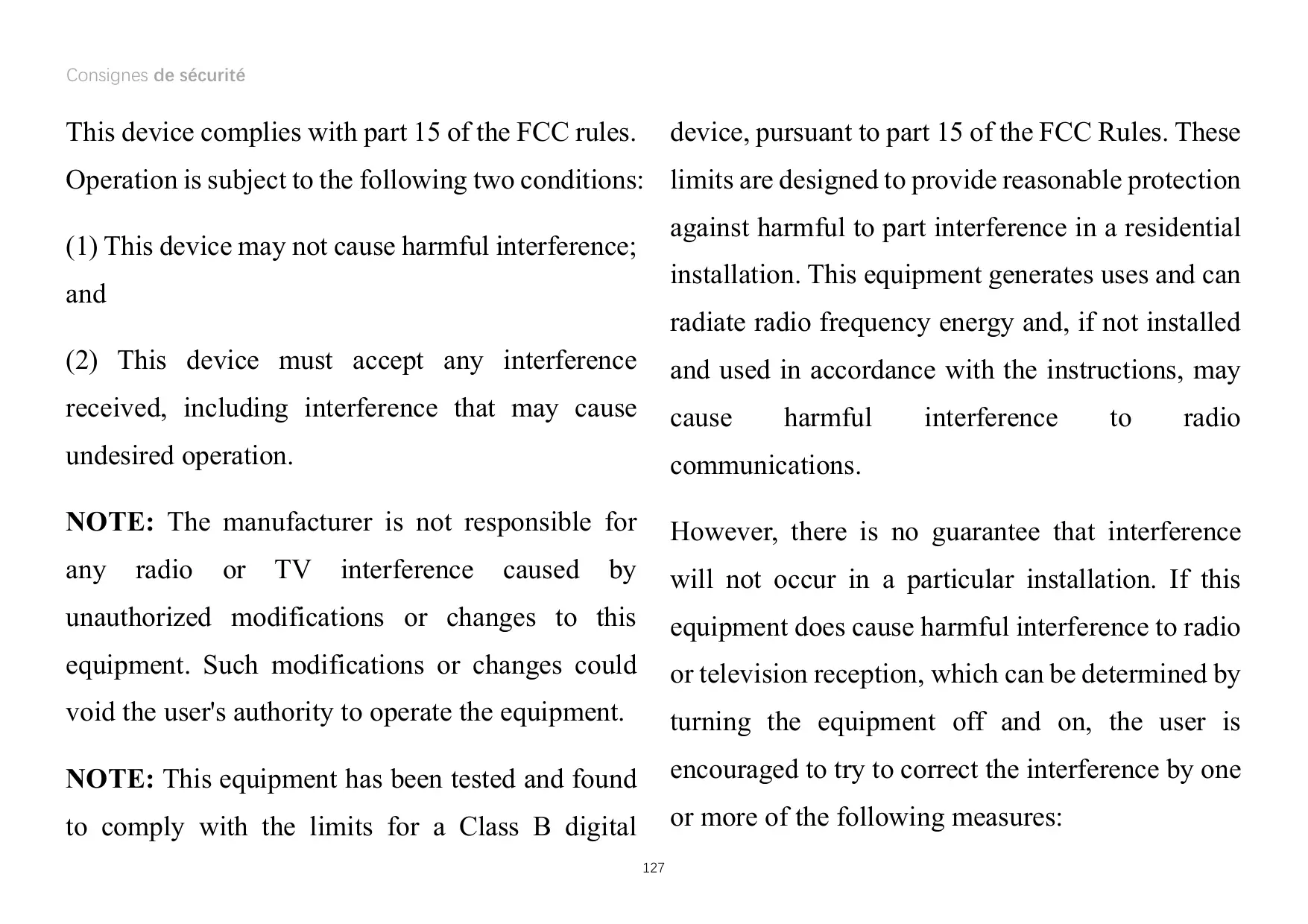
This device complies with part 15 of the FCC rules. Operation is subject to the following two conditions:
(1) This device may not cause harmful interference; and (2) This device must accept any interference received, including interference that may cause undesired operation.
NOTE: The manufacturer is not responsible for any radio or TV interference caused by unauthorized modifications or changes to this equipment. Such modifications or changes could void the user's authority to operate the equipment.
NOTE: This equipment has been tested and found to comply with the limits for a Class B digital
device, pursuant to part 15 of the FCC Rules. These limits are designed to provide reasonable protection against harmful interference in a residential installation. This equipment generates, uses, and can radiate radio frequency energy and, if not installed and used in accordance with the instructions, may cause harmful interference to radio communications.
However, there is no guarantee that interference will not occur in a particular installation. If this equipment does cause harmful interference to radio or television reception, which can be determined by turning the equipment off and on, the user is encouraged to try to correct the interference by one or more of the following measures:
- Reorient or relocate the receiving antenna.
- Increase the separation between the equipment and receiver.
- Connect the equipment into an outlet on a circuit different from that to which the receiver is connected.
- Consult the dealer or an experienced radio/TV technician for help.
FCC Caution
- Any changes or modifications not expressly approved by the party responsible for compliance could void the user's authority to operate the equipment.
- The antenna(s) used for this transmitter must not be collocated or operate in conjunction with any other antenna or transmitter.
- The country code selection is for non-US models only and is not available for all US models. Per FCC regulation, all Wi-Fi products marketed in the US must be fixed to US operation channels only.
RF Exposure Information (SAR)
- This device is designed and manufactured not to exceed the emission limits for exposure to radio frequency (RF) energy set by the Federal Communications Commission of the U.S. Government.
- The SAR limit set by the FCC is 1.6 W/kg. The highest SAR value of this device type complies with this limit. And please see the "Quick Start Guide" to find the highest SAR value reported to FCC.
- Tests for SAR are conducted using standard operating positions accepted by the FCC with the device transmitting at its highest certified power level in all tested frequency bands.
- Although the SAR is determined at the highest certified power level, the actual SAR level of the device while operating can be well below the maximum value. This is because the device is designed to operate at multiple power levels so as
to use only the power required to reach the network. In general, the closer you are to a wireless base station antenna, the lower the power output.
- While there may be differences between the SAR levels of various devices and at various positions, they all meet the government requirement.
- This device has also been tested and meets the FCC RF exposure guidelines for use with an accessory that contains no metal and positions the handset a minimum of 15 mm from the body. Use of other accessories may not ensure compliance with FCC RF exposure guidelines. Position the handset a minimum of 15 mm from your body when the device is switched on.
- Choose belt clips, holsters, or other similar body-worn accessories that do not contain metallic components to support the minimum distance for body-worn operation. Cases with metal parts may change the RF performance of the device, including its compliance with RF exposure guidelines, in a manner that has not been tested or certified, and such accessories should be avoided.
Hearing Aid Compatibility (HAC) Regulations for Mobile Phones
- Your phone is compliant with the FCC Hearing Aid Compatibility requirements.
- The FCC has adopted HAC rules for digital wireless phones. These rules require certain phones to be tested and rated under the American National Standard Institute (ANSI) C63.19-2011 hearing aid compatibility standards.
- The ANSI standard for hearing aid compatibility contains two types of ratings.
- M-Ratings: Rating for less radio frequency interference to enable acoustic coupling with hearing aids.
- T-Ratings: Rating for inductive coupling with hearing aids in tele-coil mode.
- Not all phones have been rated. A phone is considered hearing aid compatible under FCC rules
if it is rated M3 or M4 for acoustic coupling and T3 or T4 for inductive coupling. These ratings are given on a scale from one to four, where four is the most compatible. Your phone meets the M3/T3 level rating.
- However, hearing aid compatibility ratings do not guarantee that interference to your hearing aids will not happen. Results will vary, depending on the level of immunity of your hearing device and the degree of your hearing loss. If your hearing device happens to be vulnerable to interference, you may not be able to use a rated phone successfully. Trying out the phone with your hearing device is the best way to evaluate it for your personal needs.
- This phone has been tested and rated for use with hearing aids for some of the wireless technologies that it uses. However, there may be some newer wireless technologies used in this phone that have not been tested yet for use with hearing aids. It is important to try the different features of this phone thoroughly and in different locations, using your hearing aid or cochlear implant, to determine if you hear any interfering noise. Consult your service provider or the manufacturer of this phone for information on hearing aid compatibility. If you have questions about return or exchange policies, consult your service provider or phone retailer.
- Hearing devices may also be rated. Your hearing device manufacturer or hearing health professional
may help you find this rating. For more information about FCC
Hearing Aid Compatibility, please go to http://www.fcc.gov/cgb/dro.

Industry Canada Conformance
IC Statement
This device complies with Industry Canada's license exempt RSSs. Operation is subject to the following two conditions:
(1) This device may not cause interference; and (2) This device must accept any interference, including interference that may cause undesired
operation of the device.
This device complies with the Canadian ICES-003 Class B specifications. CAN ICES-3(B)/ NMB-3(B).
Restrictions in 5GHz band
The device could automatically discontinue transmission in case of absence of information to transmit, or operational failure. Note that this is not intended to prohibit transmission of control or signaling information or the use of repetitive codes where required by the technology. The device for operation in the band 5150-5250 MHz is only for indoor use to reduce the potential for harmful interference to co-channel mobile satellite systems;
In addition, high-power radars are allocated as primary users (i.e. priority users) of the bands 5250-5350 MHz and 5650-5850 MHz and that these radars could cause interference and/or damage to LE-LAN devices.
RF Exposure Information (SAR)
The SAR limit set by the ISED is 1.6W / kg . The highest SAR value of this device type complies with this limit. And please see the "Quick Start Guide" to find the highest SAR value reported to the IC.
This device has also been tested and meets the ISED RF exposure guidelines for use with an accessory that contains no metal and positions the handset a minimum of 15mm from the body.
Use of other accessories may not ensure
compliance with ISED RF exposure guidelines. Position the handset a minimum of 15mm from your body when the device is switched on.
India Regulatory Conformance
E-waste Information
The products manufactured by OnePlus comply with the E-waste Rules 2016 and its amendments. Considering the exemption listed in SCHEDULE II of the E-waste Rules, the content of hazardous substances is as follows:
- Lead (Pb) – not over 0.1% by weight;
- Cadmium (Cd) – not over 0.01% by weight;
- Mercury (Hg) – not over 0.1% by weight;
- Hexavalent chromium (Cr6+) – not over 0.1% by weight;
- Polybrominated biphenyls (PBBs) – not over 0.1% by weight;
- Polybrominated diphenyl ethers (PBDEs) – not over 0.1% by weight.
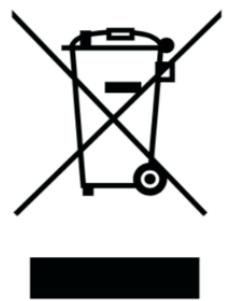
For the purpose of recycling and reducing the effect of the environment, the Electrical & Electronic Equipment should not be disposed of with other household waste, please separate these items from other types of waste and recycle them to the authorized e-waste company. As a part of E-waste recycling initiative, OnePlus has partnered with two authorized E-waste companies named AS Attero and Exigo. You can contact AS Attero or Exigo to recycle your E-waste product. For further information about the OnePlus E-waste partner, you can contact at
Attero:
Website: www.attero.in
Email: info@attero.in
Phone: 1800-103-6328
Exigo:
Website: www.exigorecycling.com
Email: info@exigorecycling.com
Toll Free: 1800-102-5018
Languages & Input
You can choose your language according to the following steps:
Settings > System > Languages & input > Languages > Choose your preferred language.
The mobile phone supports all the below-mentioned Indian Official Languages for readability test as per IS 16333(Part-3):2017.
ASSAMESE, BANGLA, BODO, DOGRI, GUJARATI, HINDI, KANNADA, KASHMIRI, KONKANI, MAITHILI, MALAYALAM, MANIPURI (BENGALI), MANIPURI (MEETEI MAYEK), MARATHI, NEPALI, ODIA (ORIYA), PANJABI (PUNJABI), SANTHALI (OI CHIKI), SANTHALI (DEVANAGRI), SANSKRIT, SINDHI (DEVANAGARI), TAMIL, TELUGU, URDU, ENGLISH.
This mobile supports inputting for the below-mentioned Indian Official Languages as per IS 16333(Part-3):2017.
HINDI, MARATHI, ENGLISH.
OnePlus Customer Support
For support information and assistance, go to:
www.oneplus.com/support
Download manuals:
https://www.oneplus.com/support/manuals
DE
OnePlus Customer Service
www.oneplus.com/it/support
Download manuals:
https://www.oneplus.com/it/support/manuals
PT
www.oneplus.com/pt/support
Download manual:
https://www.oneplus.com/pt/support/manuals
SE
OnePlus Customer Support
www.oneplus.com/se/support
Download manuals:
https://www.oneplus.com/se/support/manuals

OnePlus Customer Support
Support information and assistance go to:
www.oneplus.in/support
Download manuals:
https://www.oneplus.in/support/manuals

OnePlus Customer Support
www.oneplus.com/lt/support
Download user manuals:
www.oneplus.com/lt/support/manuals
RO
https://www.oneplus.com/ro/support
Download manuals:
https://www.oneplus.com/ro/support/manuals

- FCC REGULATORY CONFORMANCE 126
- INDUSTRY CANADA CONFORMANCE 132
- INDIA REGULATORY CONFORMANCE 135
- PARALLEL APPLICATIONS
- FCC REGULATORY CONFORMANCE
- FCC STATEMENT
- FCC CAUTION
- RF EXPOSURE INFORMATION (SAR)
- HEARING AID COMPATIBILITY (HAC) REGULATIONS FOR MOBILE PHONES
- INDUSTRY CANADA CONFORMANCE
- IC STATEMENT
- RESTRICTIONS IN 5GHZ BAND
- INDIA REGULATORY CONFORMANCE
- E-WASTE INFORMATION
- LANGUAGES & INPUT
- ONEPLUS CUSTOMER SUPPORT
- ONEPLUS CUSTOMER SERVICE
Brand : ONEPLUS
Model : 8 Pro
Category : Cellphone