USER MANUAL CCE4T618EB CANDY
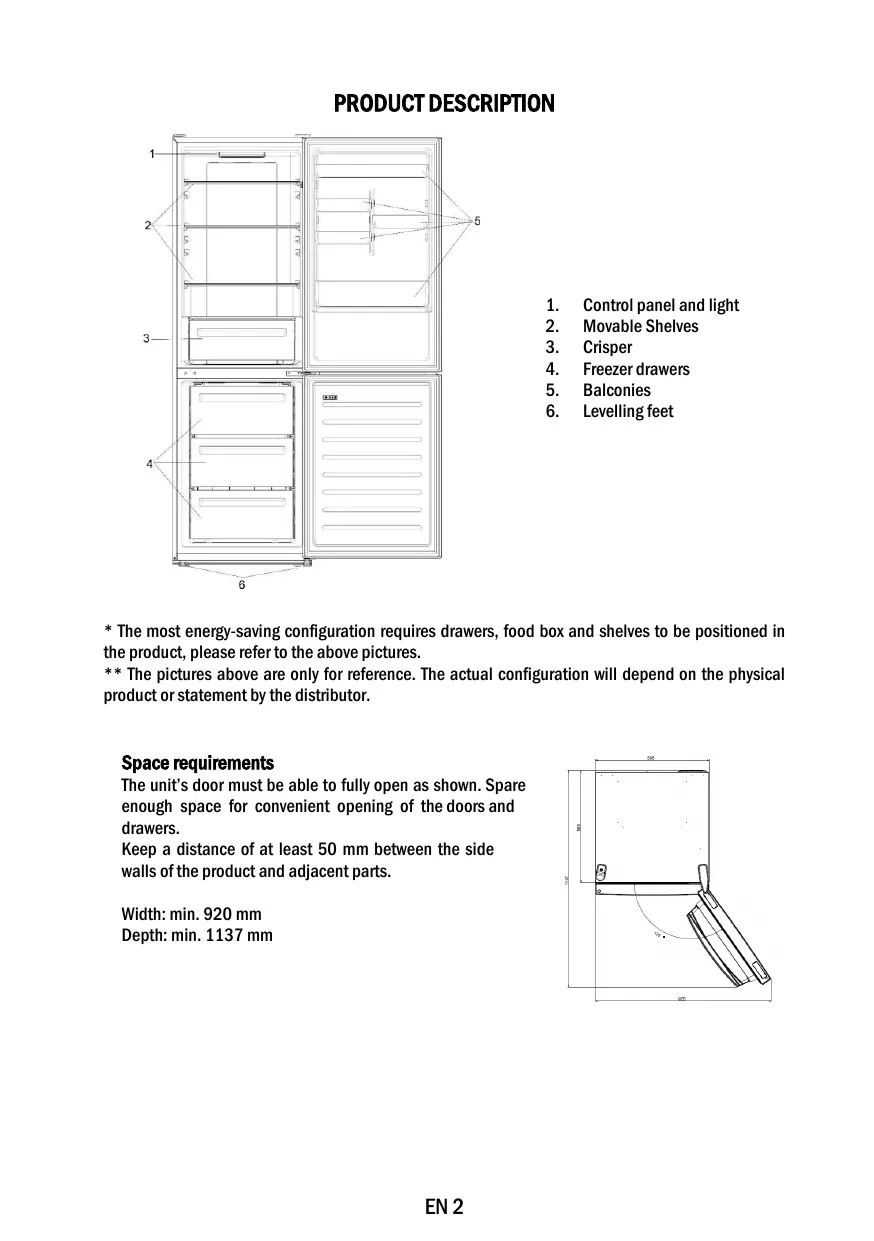
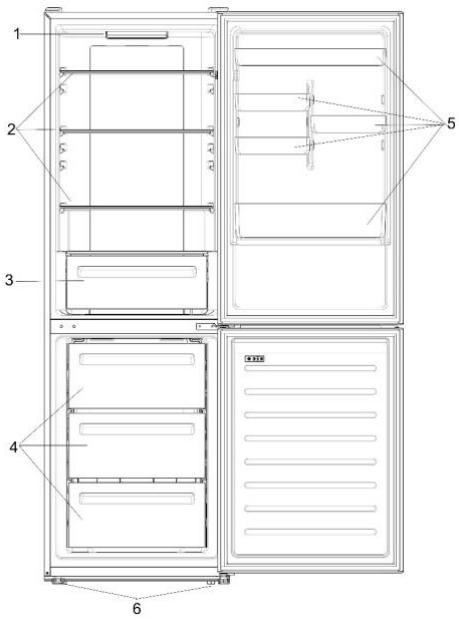
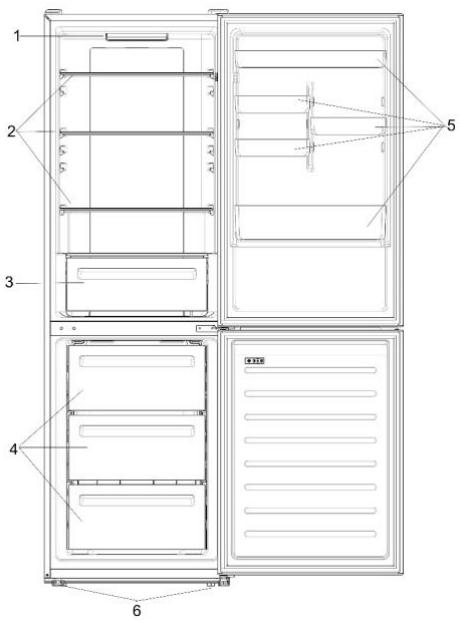
- Control panel and light
- Movable shelves
- Crisper
- Freezer drawers
- Balconies
- Levelling feet
- The most energy-saving configuration requires drawers, food box and shelves to be positioned in the product, please refer to the above pictures. ** The pictures above are only for reference. The actual configuration will depend on the physical product or statement by the distributor.
Space requirements
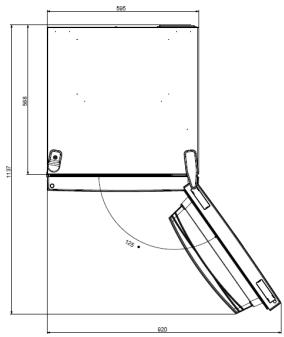
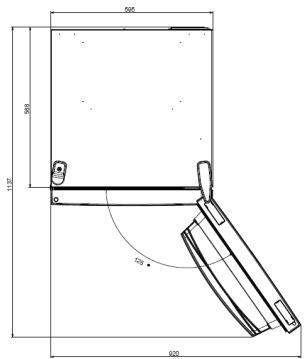
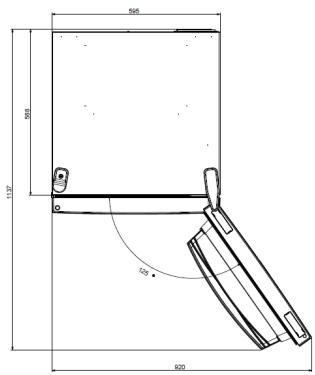
The unit's door must be able to fully open as shown. Spare enough space for convenient opening of the doors and drawers.
Keep a distance of at least 50 mm between the side walls of the product and adjacent parts.
Width: min. 920 mm
Depth: min. 1137 mm
USE
① ON/OFF key, used to switch on/off the appliance. ② Mode key, used to select the fridge temperature or the special functions like. ③ WiFi Icon, shows if the appliance is connected to the app. ④ Super Cool Icon, shows if the function is activated. ⑤ Temperature levels, show which is the selected temperature.
Use
Plug on the appliance. The appliance will turn on automatically. The temperature will automatically set at 4°C in the fridge and -18°C in the freezer. - To change the temperature, with the fridge door open, press the mode key. When the setting increases, the corresponding LED light will turn on. An acoustic signal is made every time the mode key is pressed and the temperature is changed. In case of power loss, the last cooling level set will be restored. - To restore the default setting, at the screen lit, keep pressed the TEMP button, and then press ON/OFF button 5 times in 5 seconds. - Under the normal operating condition (in spring and autumn), it is recommended to set the temperature at 4°C. In summer when the ambient temperature is high, it is recommended to set temperature at 6~8°C, so as to guarantee the fridge and freezer temperatures and reduce the refrigerator continuous running time; and in winter when the ambient temperature is low, it is recommended to set temperature at 2~4°C to avoid frequent start/stop of the refrigerator.
Customized temperature
From the app, it is possible to customize the temperature of the fridge compartment. The temperature can be set with 1°C sensitivity and it is possible to select a temperature from 2°C to 8°C in the fridge. An acoustic signal is made every time the temperature is changed. When the temperature is selected by the app, there is no indication on the control panel, all the temperature LED lights are turned off, while only the WiFi icon is turned on.
Fine Tuning
The fine tuning selection mode gives to possibility to set the temperatures by sublevels; each temperature level has three sublevels.
How to use the fine tuning function:
- Press the mode key for 8 seconds to enter fine tuning selection mode. When the appliance enters the mode, an acoustic signal is made and the LED of currently selected cooling level blinks.
- By short pressing the mode key within 5 seconds, the fine tuning setting increases and, at each pressing, an acoustic signal is made. During fine tuning, the LED of the selected cooling level is fixed, while the LED of the selected sublevel blinks.
- If no key is pressed for 5 seconds, the system automatically exits from fine tuning selection mode. The fine tuning setting is saved and the LED of the selected fridge temperature is fixed. If the fine tuning is activated again, the setting will start from the previously stored level.
Super Cool function
It is suggested to switch on the Super Cool function if a large quantity of food should be stored (for example after the purchase). The Super Cool function accelerates the cooling of fresh food and protects the goods already stored from undesirable warming. When the function is activated, the temperature of the fridge is automatically set at 2°C.
How to use the Super Cool function:
- The function can be activated by pressing the mode key many times until the Super Cool LED is turned ON, or by selecting it from the app. If the function is activated, the corresponding icon on the control panel will be turned on. To exit the Super Cool function, press the mode key again. The Super Cool function automatically ends after 30 hours of running.
- When the Super Cool ends, the corresponding icon on the control panel turns off and the previously set cooling level is restored.
Super Freeze function
The Super Freeze function accelerates the freezing of fresh food and protects the goods already stored from undesirable warming. If a large amount of food has to be frozen, it is recommended to set the Super Freeze function on 24 hours before the usage. When the function is activated, the temperature is automatically set at -25°C.
How to use the Super Freeze function:
- The function can be launched only by selecting it from the app. If the function is activated, it will be shown by the app; there is no indication on the control panel.
- To exit the Super Freeze function, turn it off from the app.
- The Super Freeze function automatically ends when the function has lasted for more than 50 hours.
Eco mode
The Eco mode can be activated to optimize the performance of the appliance, while obtaining the best food storage. When the function is activated, the temperature is automatically set at 5°C in the fridge, and at -18°C in the freezer.
How to use the Eco mode:
- The function can be activated only by selecting it from the app. If the function is activated, it will be shown by the app; there is no indication on the control panel. To exit the Eco mode, turn it off from the app; the previously selected temperature will be restored. The Eco mode automatically ends when another function is chosen from the control panel.
Holiday function
The Holiday function can be used to reduce the energy consumption of the appliance when it is not used regularly. The function will turn off the LED lights (even if the door is open) and the fridge will work on low power consumption mode, whereas the freezer will keep working normally.
How to use the Holiday function:
- The function can be activated only by selecting it from the app. If the function is activated, it will be shown by the app; there is no indication on the control panel.
- To exit the Holiday function, turn it off from the app; the previously selected temperature will be restored. The Holiday function automatically ends when another function is chosen from the control panel.
Defrosting
The defrosting of the refrigerator and freezer compartments is done automatically: no manual operation is needed.
Slider
Near the vegetable basket there is a slider that allows you to adjust the humidity inside it: moving it to the right decreases the humidity, moving it to the left increases the humidity.
Demo mode
Keep the refrigerated door open, press and hold the on/off key, and click the set key five times. The refrigerator will enter the Demo mode. To exit the mode, keep pressed the door switch and press again the SET key for 5s.
Error codes
If the -6°C LED light is flashing, it means there has been a fan error. Please contact the technical assistance to help solve the problem.
APP CONNECTION (Content only)
IN APP PAIRING PROCEDURE
Step 1
Download the hOn app from the app stores.


Step 2
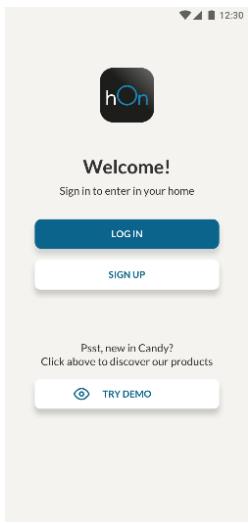
Create your account on the hOn App or log in if you already have an account.
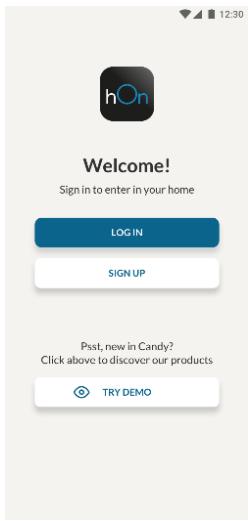
Step 3
- Follow the pairing instructions in the hOn App.
WiFi Use
To activate the Wi-Fi, long press the mode key for 2 seconds. The Wi-Fi icon will turn on and an acoustic signal will be emitted.
If the Wi-Fi has not been configured yet, when the refrigerator turns on, it will automatically enter configuration mode and remain in this state for 30 minutes. To use the configuration mode:
- Press the mode key for 2 seconds but less than 8 seconds. The refrigerator enters Wi-Fi configuration mode and an acoustic signal is emitted. The Wi-Fi icon starts blinking.
- Follow the instructions in the app to configure the Wi-Fi (see above).
- Once the Wi-Fi is configured and the connection is established, the Wi-Fi icon is on and steady. After 30 minutes without any operation, the Wi-Fi will automatically exit configuration mode.
- If the Wi-Fi has already been configured, it will automatically reconnect according to the configuration information.
Radio-module - Technical data
| Frequency rate (OFR) | 2400 MHz-2843.5 MHz |
| Channel frequencies | 2412...2472 MHz(step size 5 MHz) |
| Maximum power(EIRP) | 100 mW |
The radio equipment type complies with Directive 2014/53/EU.
DOOR REVERSIBILITY
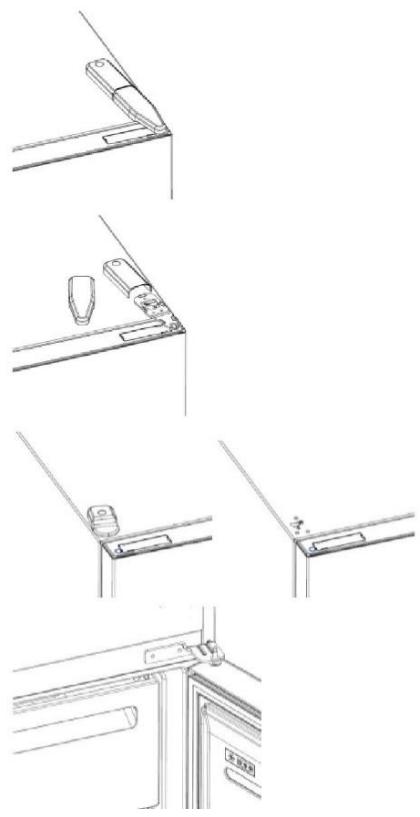
Tools needed: screwdriver
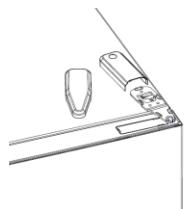
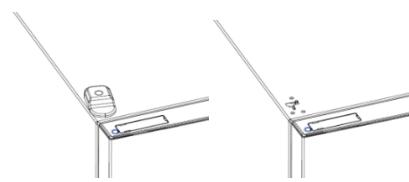
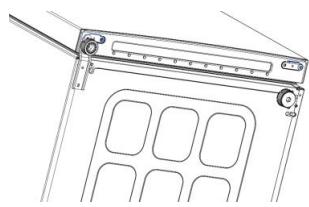
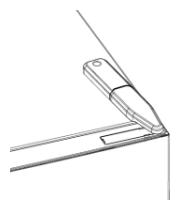
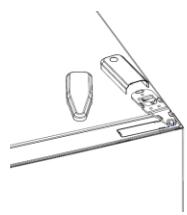
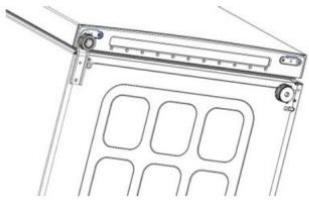
- Remove the top hinge cover
- Unscrew the top hinge
- Remove the top hinge cover (left)
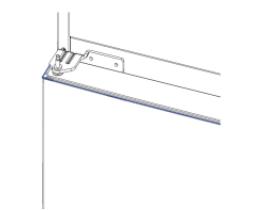
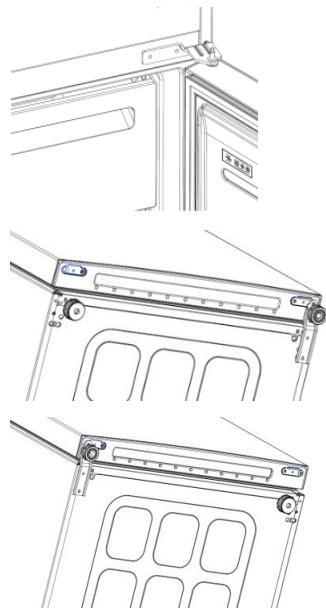
- Remove middle hinge
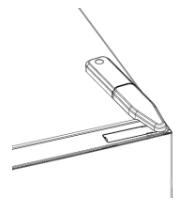
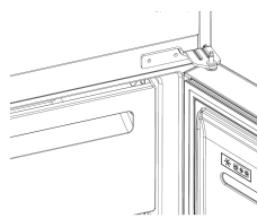
- Remove lower hinge
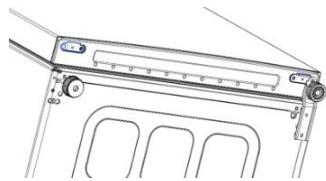
- Mount hinge foot
- Mount middle hinge
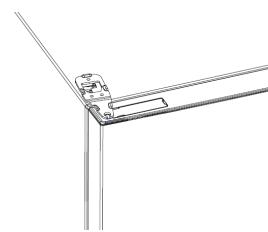
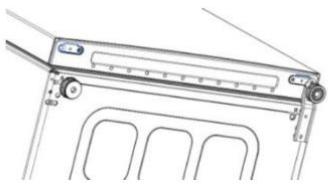
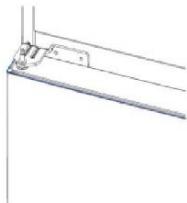
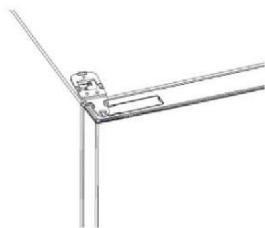
- Mount the upper hinge plate
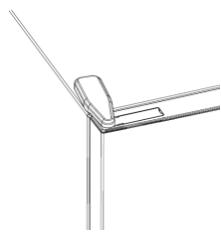
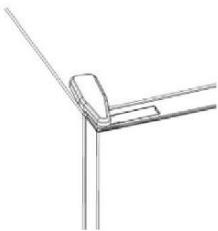
- Mount the upper hinge cover
PRODUCT DESCRIPTION 10 SPACE REQUIREMENTS 10 USE. 11 USE 11 TEMPERATURE ADJUSTMENT. 11 FINAGASTYUKA 12 FUNCTION "SUPER COOL" 12 FUNCTION "SUPER FREEZE" 12 ECO MODE 13 FUNCTION "HOLIDAY" 13 DEFROSTING 13 DEMONSTRATION MODE.. 13 DOOR REVERSAL 14 CONNECTION TO THE APPLIANCE (SELF FOR FREEZING).....15 PROCEDURE FOR DOOR REVERSAL......15 JOINT 1. 15 JOINT 2. 15 JOINT 3 15 USE OF WI-FI. 16
OPENING AND CLOSING 17
PRODUCT DESCRIPTION
- CONTROL PANEL AND LIGHTING
- Refrigerator shelves
- Storage of fresh food
- Refrigerator compartment
- Shelves
- Door shelves
- The energy consumption of the appliance depends on the configuration, the purchased food and the shelves, and the products should be arranged in the refrigerator. The images are for reference only. The actual configuration depends on the physical product or the declaration of the distributor.
Space requirements
The door of the appliance must be able to open fully, as shown. Leave sufficient space for easy opening of the door and the appliance. Keep a distance of at least 50 mm between the side walls of the product and adjacent parts.
Width: min. 920 mm Depth: min. 1137 mm
USE

① The "ON/OFF" button is used to turn the appliance on/off. ② The "Mode" button is used to select the temperature of the refrigerator and the special functions. ③ The Wi-Fi icon indicates that the device is connected to the router. ④ The "Super Cool" icon shows that the function is activated. ⑤ The temperature display shows the selected temperature.
Use
Plug the appliance into the socket. The appliance will turn on automatically. The temperature of the refrigerator will automatically be set to 4°C. To change the temperature while the door is open, press the "Mode" button. When the setting is confirmed, the corresponding LED light turns on. With each press of the "Mode" button, a sound signal is emitted and the temperature changes. In case of a power failure, the last setting of the cooling level will be restored. To restore the setting after a power failure, with the screen lit, press and hold the "TEMP" button, and then press the "ON/OFF" button 5 times within 5 seconds. - For normal operating conditions (in spring and autumn) it is recommended to set the temperature to 4°C. In summer, when the ambient temperature is high, it is recommended to set the temperature to 6~8°C to guarantee the temperatures of the refrigerator and freezer and to reduce the operating time of the refrigerator. In winter, when the ambient temperature is low, it is recommended to set the temperature to 2~4°C to avoid frequent switching on/off of the refrigerator.
- Slide the upper belt
- Pull the upper belt
- Slide the upper belt (left)
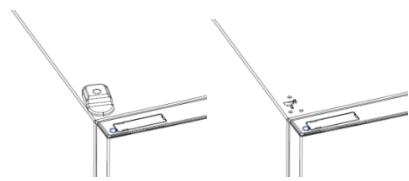
- Tighten the middle belt
- Tighten the lower belt
- Mount the ends of the belt
- Mount the middle belt
- Mount the upper plate of the belt
- Mount the upper slide of the belt
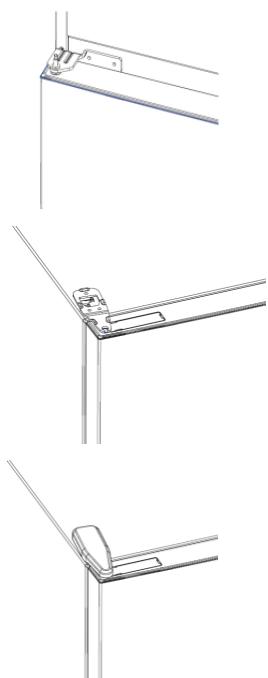
Summary
Step 1
- Install the middle door hinge
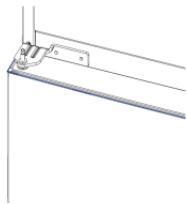
- Install the upper door hinge plate
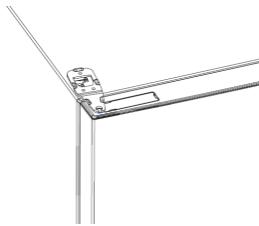
- Install the upper door hinge lock
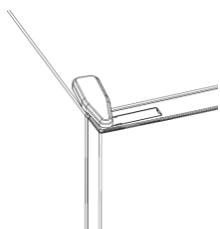
Summary
PRODUCT DESCRIPTION 149 Space requirements 149 USE 150 Use 150 Adjusted temperature 150 Fine tuning 151 Super Cool function 151 Super Freeze function 151 Eco mode 152 Holiday function 152 Defrosting 152 Alarm codes 152 APP CONNECTION (content only) 153 IN APP PAIRING MODE 153 Step 1. 153 Step 2. 153 Step 3. 153 Using Wi-Fi 154 DOOR REVERSIBILITY 155
PRODUCT DESCRIPTION
CONNECTING THE APP (content only)
PROCEDURE FOR CONNECTING THE APP
Step 1
Download the app


GET IT ON
Google Play

Download on the
App Store

EXPLORE IT ON
AppGallery
Step 2
Create an account in the app or log in to the system if you already have an account.
Kpok 3
- DotpimyIeCBAk3iBOK i3 noEHaHHB DoaAtky hOn
BukopncTaHnWi-Fi
Ioo6 akTnBvBaTn cyHKzio Wi-Fi, haTnCHiTb Ta yTpMpyTe KhoNky Mode npoTgrom 2 cekyHd, nicra Yoro BBiIMKHeTbcra NiKTOrpama Wi-Fi i 6yde noDaHO 3ByKOBn cnHan.
JaKuo Wi-Fi ige He halaTobaHo, nicra BBIMKHeHHXoJOnuNbHnK aBTOMaTuHOBBiJe y pexm KOHphiIpyBaHHi 3aJIuINbCBy B cBomy cTaHi Ha 30 xBnInn. Uo6CKOpNCtATncrpexmOM KOHphiIpyBaHH:
- Hatackai Te Khoi Ky Mode npotrarom 2 cekynd, ane MeHsE 8 cekyHxOIOaIbHnK yBiJe B pexim HanaU TyBaHHr Wi-Fi i BuJaactb 3ByKObNcHnAnPiKTorgamaWi-Fi noue He 6nMaTn
- IotpMvntecBkazIOK V DOaTky, 0o6 HanaHTyBaTu Wi-Fi (DnB, Bnue). -Писнанлалувань Wi-Fi Ta BCTaHOBNeHHN 3'EDHaHHN nIKTorpama Wi-Fi BBIMKHeTbCЯ Ta CBITNTIMeTbCЯ HenepePBHO.
- Yepe3 30 xBnIiN 6e3dIajnbHocTi φ yHKciJ Wi-Fi aBTOMaTNUHO BInDe 3 peXIMy HalaStyBaHHr.
- Ykso Wi-Fi Bxe HanaTObaHo, 3'6dHaHHa bTOMaTnHb BiHOBtbcB iDNOBIDHO Do daHnx KOHphiirypBuHHa.
Papiomodylb - TexhniHa
aallll lllllllllllllllllllllllllllllllllllllllllllllllllllllllllllll
g jall jn jll jall gall gall jll yill aaiu. laii o oai i all
yill
Caiy
J 50 J 1
Super Cool 4
1
5 5 SET
J 6 LED


A
30 30
Wi-Fi 8 n 8 8
Wi-Fi jRjRjRjRjRj
(0x1y)Wi-Fi a#i##gaiill gai#gall
Wi-Fi jurjwi-Fi
Wi-Fi 30
.
4 1
| 嚥臘(OFR) | 2400 MHz-2843.5 MHz |
| يرادتالجعاني | 2412...2472 MHz(5ööööööMHz) |
| النباتالجعاني(EIRP) | 100 mW |
2014/53g jg all gj yj yj yj yj yj yj yj yj yj yj yj yj yj yj yj yj yj yj yj yj yj yj yj yj yj yj yj yj yj yj yj yj yj yj yj yj yj yj yj yj yj yj yj yj yj yj yj yj yj yj
a
gj y jia: a gialal
aall aal all j1
2
(j)yallalalalulblljpa 3
all all jy 4
aallll alalil all jpa .5
aalall aaiy 6
gawalalaiial 7
8.
ailllalaiie 9