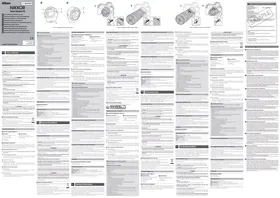
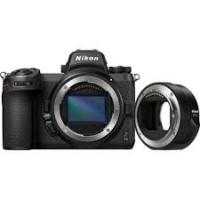
Z6II+24-70MM - Mirrorless Camera NIKON - Free user manual and instructions
Find the device manual for free Z6II+24-70MM NIKON in PDF.

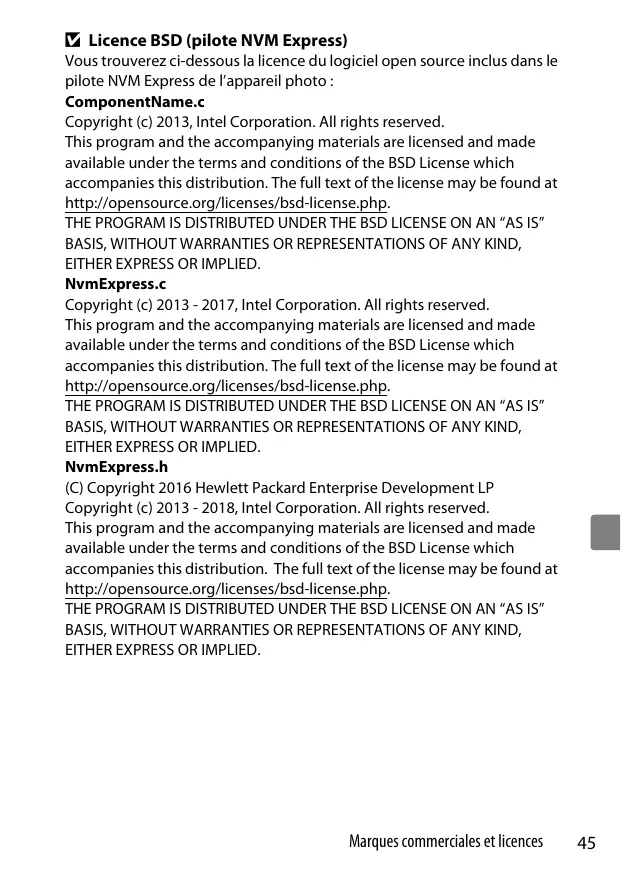

| Product Type | Mirrorless camera with 24-70mm f/4 lens |
| Brand | NIKON |
| Model | Z6II + NIKKOR Z 24-70mm f/4 S |
| Lens Mount | Nikon Z |
| Image Sensor | Full-frame (FX) CMOS 24.5 MP |
| Focal Length Range (lens) | 24-70 mm (FX) / 61-22° 50' (DX) |
| Maximum Aperture (lens) | f/4 |
| Power Source | Rechargeable Li-ion battery EN-EL15c via MH-25a charger or EH-7P USB adapter |
| Dimensions (body) | Approx. 134 × 100.5 × 69.5 mm |
| Weight (body) | Approx. 705 g (with battery and memory card) |
| Dimensions (lens) | Approx. 77.5 mm diameter × 88.5 mm (retracted) |
| Weight (lens) | Approx. 500 g |
| Storage | Two slots: 1x CFexpress / XQD + 1x SD / SDHC / SDXC |
| Viewfinder | Electronic OLED 3.69M dots |
| Screen | Tilting touchscreen LCD monitor 8 cm (3.2 in), 2.1M dots |
| Key Features | Hybrid autofocus, burst up to 14 fps, 4K UHD video, 5-axis stabilization, built-in Wi-Fi and Bluetooth |
| Maintenance and Cleaning | Dust blower, dry soft cloth, ethanol or optical cleaner for fluorine-coated lenses. Do not use organic solvents. |
| Safety | Do not disassemble, keep dry, out of reach of children, avoid high temperatures, do not point at the sun. |
| Spare Parts and Repairability | Original Nikon accessories (battery, charger, lenses, strap, etc.). Repair by Nikon authorized service center. |
| General Information | One-year worldwide warranty. Manual available in PDF. Compatible with FTZ adapter for F-mount lenses. |
Frequently Asked Questions - Z6II+24-70MM NIKON
User questions about Z6II+24-70MM NIKON
0 question about this device. Answer the ones you know or ask your own.
Ask a new question about this device
Download the instructions for your Mirrorless Camera in PDF format for free! Find your manual Z6II+24-70MM - NIKON and take your electronic device back in hand. On this page are published all the documents necessary for the use of your device. Z6II+24-70MM by NIKON.
USER MANUAL Z6II+24-70MM NIKON
Select minimum aperture (the highest f/-number) before attaching CPU lenses equipped with aperture rings.
Incompatible Lenses and Accessories
The following lenses and accessories cannot be used. Attempting to forcibly attach any of this equipment could damage the adapter or the lens. Individual variation may render lenses other than those listed below incompatible, but should be considered carefully when using them.
Printed in Japan S8B102(A8) 7MMA12A8-02
- NAMOROS
- DCT 40
- Lenses that
- Fisheye fovea
recoverer
quate the AL-1 focusing lens (ES 5.7, Seem 5.6, Rym)
at 400mm for 4 weeks.
600mm/5.6,800mm/8,1200 s)
Manufacturer/Manufacturer/Manufacturer
NIKONCORPORATION
Shinagawa Intercity Tower C, 2-15-3, Konan, Minato-ku.
Tokyo 108-6290 Japan
This mount adapter allows Nikon F mount NIKKOR lenses to be mounted on Nikon Z mount mirrorless cameras. It cannot be mounted on F mount (Nikon digital SLR) or 1 mount cameras (Nikon 1 advanced cameras with interchangeable lenses) or used with 1 NIKKOR lenses. Before using this product, please carefully read both these instructions and the camera and lens manuals.
Note that depending on the lens, the adapter may limit autofocus or other camera features. For more information, visit the Nikon website.
For Your Safety
To prevent damage to property or injury to yourself or to others, read "For Your Safety" in its entirety before using this product.
Keep these safety instructions where all those who use this product will read them.
WARNING: Failure to observe the precautions marked with this icon could result in death or severe injury.
A. CAUTION: Failure to observe the precautions marked with this icon could result in injury or property damage.
WARNI
- Do not disassemble or modify this product.
Do not touch internal parts that become exposed as the result of a fall or other accident.
Failure to observe these precautions could result in electric shock or other injury.
- Should you notice any abnormalities such as the product producing smoke, heat, or unusual odors, immediately disconnect the camera power source.
Continued operation could result in fire, burns or other injury.
- Keep dry.
Do not handle with wet hands.
Failure to observe these precautions could result in fire or electric shock.
- Do not use this product in the presence of flammable dust or gas such as propane, gasoline or aerosols.
Failure to observe this precaution could result in explosion or fire.
- Keep this product out of reach of children.
Failure to observe this precaution could result in injury or product malfunction. In addition, note that small parts constitute a choking hazard. Should a child swallow any part of this product, seek immediate medical attention.
- Do not handle with bare hands in locations exposed to extremely high or low temperatures.
Failure to observe this precaution could result in burns or frostbite.
CAUTION
- Do not leave the product where it will be exposed to extremely high temperatures, for an extended period such as in an enclosed automobile or in direct sunlight.
Failure to observe this precaution could result in fire or product malfunction.
- Do not transport mount adapters with tripods or similar accessories attached.
Failure to observe this precaution could result in injury or product malfunction.
Notices for Customers in Europe
This symbol indicates that electrical and electronic equipment is to be collected
The following apply only to users in European countries:
-
This product is designated for separate collection at an appropriate collection point. Do not dispose of as household waste.
-
Separate collection and recycling helps conserve natural resources and prevent negative con sequences for human health and the environment that might result from incorrect disposal.
- For more information, contact the retailer or the local authorities in charge of waste management
The Mount Adapter
Parts of the Adapter (Figure 1)
A Lens Mount B Camera Mount
⑥ Adapter mounting man
⑦ Nikon Z mount (attaches to camera)
⑧ CPU contacts
Attachment and Removal
Turn the camera off before attaching the adapter to or removing it from the camera or attaching lenses to or removing lenses from the adapter. Choose a location out of direct sunlight and be careful to prevent dust from entering the devices. While attaching lenses, avoid pressing the camera or adapter lens release.
Attaching the Adapter and Lens (Figure 2)
1 Remove the body and rear lens caps from the adapter and the body cap from the camera.
2 Attach the adapter to the camera.
Keeping the adapter mounting mark aligned with the mounting mark on the camera body (a-①), position the adapter on the camera and then rotate it counterclockwise until it clicks into place (a-②).
3 Remove the rear lens cap.
4 Attach the lens to the adapter.
Keeping the lens mounting mark aligned with the lens mounting mark on the adapter (b-①), position the lens on the adapter and then rotate it counterclockwise until it clicks into place (b-②).
Detaching the Lens and Adapter (Figure 3)
1 Detach the lens.
Press and hold the adapter lens release (a-1) while turning the lens clockwise (a-(2)). Attach the front and rear caps to the lens after removal.
2 Detach the adapter.
Press and hold the camera lens release button (b - 1) while turning the adapter clockwise (b - 2) . After removing the adapter, attach the body and rear caps to the adapter and the body cap to the camera.
·2.1cmf/4
K2 Extension Ring
180-600mm f/8 ED (serial numbers 174041-174180)
360-1200mm f/11 ED (senal numbers 174031-174127) 360-1200 mm f/11 ED (senal numbers 174031-174127)
200-600mm/1/3 14.5mm for the
A1E
PC 35mm f/2.8 (serial number: 851001-906700)
PC 35mm f/3.5 (old type)
-
Reflex 1000mm f/6.3 (old type)
-
NIKKOR-H Auto 2.8cm f/3.5 (28mm f/3.5) lenses with serial numbers below 36200
NIKKOR-S Auto 3.5cm f/2.8 (35mm f/2.8) lenses with serial numbers below 928000
NIKKOR-S Auto 5cm f/2 (50mm f/2)
-
NIKXOR-Q Auto 13.5cm f/3.5 (135mm f/3.5) lenses with serial numbers below 753000
-
Micro-NIKKOR 5.5cm t/3.5
- Market-Wide 400*400
A:NIWWOT1:7:705:35
AutoNIKORTelephoto-200mm83-250mm14/4.5 AutoNIKORTelephoto-700mm 200-600mm f/0.5-10.5
Using the Mount Adapt
- Autofocus may not function as expected when the adapter is used with an F mount.
NIKKOR lens. If the camera has trouble focusing, set the AF-area mode to single point and select the center focus area as focus manually. - With some lenses, the camera vibration reduction feature may not function as expected or may cause vignetting or a drop in peripheral illumination.
Precautions for Use
- When using the adapter with lenses weighing over 1300g (2 lb 13.9 oz), support the lens
when holding the camera and do not use the camera strap. Failure to observe these precautions could damage the camera lens mount.
-
When using telephoto lenses equipped with a tripod collar, attach the tripod to the lens in the middle of the frame so that the lens can be mounted.
-
Keep the CPU and lens signal contacts clean.
-
Keep the adapter dry. Rusting of the internal mechanism can cause irreparable damage.
-
Leaving the adapter in extremely hot locations could damage or warp parts made from reinforced plastic
Caring for the Adapter
-
Do not touch the interior of the mount adapter. Use a blower or soft brush to remove dust, being careful not to rub or scratch the inside of the adapter.
-
When cleaning the adapter, use a blower to remove dust and lint and then wipe the adapter gently with a soft, dry cloth.
-
Never use organic solvents such as paint thinner or benzene to clean the adapter.
In the adapter will not be used for an extended period, store it in a cool, dry location to prevent mold and rust. Do not store in direct sunlight or with naphthac or camphor moth balls
Accessories
C. b 管的结果
Supplied Accessories Body Cap RF-18
- Bear Lens Cap LF
Specifications
Type Mountadapter
Supported cameras Nikon Z mount mitroless cameras
Dimensions Approx. 70 mm diameter (excluding projections) × 80 mm
Weight Approx. 135 g (4.8 oz)
Nikon reserves the right to change the appearance, specifications, and performance of this product at any time and without prior notice.
De
Benutzerh
Retirez I'adaptateur
Warranty Terms . Nikon Worldwide Service Warranty
Nikon Worldwide Service Warranty
Your Nikon equipment is guaranteed against any manufacturing defects for one full year from the datepurchase . During this period , repair of divestments will be made free of charge only upon presentation of it
Nikon Worldwide Service Warranty Card together with the sales slip or other evidence of purchase any authorized Nikon service facility. Establishing the original purchase date should be made by the originator and not the owner.
The warranty does not cover damage caused by accident, misuse or unauthorized repair, damage caused by dropping, improper care or storage, or damage resulting from sand or water. It is only valid at authorized Nike products.
The warranties are in lieu of all other express or implied warranties and of any other obligation on the part of the manufacturer and distributor except for the obligations provided by applicable law.
For information on authorized Nikon service facilities, visit http://imaging.nikon.com/support/index.htm
original but can be used in any case. The guarantee cannot be transferred, and it is never delivable anymore. The guarantee cannot covow the
bivt durinrnnn nn rnrnne eer lrrn n aenrnnn rnrnnn rnrnnn rnrnnn rnrnnn rnrnnn rnrnnn rnrnnn rnrnnn rnrnnn rnrnnn rnrnnn rnrnnn rnrnnn rnrnnn rnrnnn rnrnnn rnrnnn rnrnnn rnrnnn rnrnnn rnrnnn rnrnnn rnrnnn rnrnnn rnrnnn rrrr
Garantibetingense erstattter alle andere utrtykkeige uber underfasserte garantier og alle and
forplitkelter for produsentens og distributoren del, med unntak av lovestete forplitkelter. Besik http://imogina.nikon.com/support/index.htm for information on autorisierte Nikon servicefasilitet.
Nikponelalbelcavvss
D. Nikos glóusda serie gaurit. Din Nikos-utrustnir ār garanterod mot alla tilverkningsfel i eht helt ár after inköpsdatumet. Under den
Manufacturer/Hersteller/Fabricant/Fabricant/Produttore/Fabricante/Fabricante
NIKON CORPORATION
Shinagawa Intercity Tower C, 2-15-3, Konan, Minato-ku, Tokyo 108-6290 Japan

User's Manual
Before using this product, please carefully read both these instructions and the camera manual.
Note: This lens is intended exclusively for use with mirrorless cameras featuring a Nikon Z mount.
For Your Safety
To prevent damage to property or injury to yourself or to others, read 'For Your Safety in its entirety before using this product.'
Keep these safety instructions where all those who use this product will read them.
WARNING: Failure to observe the precautions marked with this icon could result in death or severe injury.
CAUTION: Failure to observe the precautions marked with this icon could result in injury or property damage.
WARNING
- Do not disassemble or modify this product
Do not touch internal parts that become exposed as the result of a fall or other accident.
Failure to observe these precautions could result in electric shock or other injury. - Should you notice any abnormalities such as the product producing smoke, heat, or heating in the building's heating system?
Unusual odors, immediately disconnect the camera power source. Continued operation could result in fire, burns or other injury. - Keep dry
Do not handle with wet hands.
Failure to observe these precautions could result in fire or electric shock. - Do not use this product in the presence of flammable dust or gas such as propane, gasoline or aerosols.
Failure to observe this precaution could result in explosion or fire. - Do not directly view the sun or other bright light source through the lens or camera.
Failure to observe this precaution could result in visual impairment. - Keep this product out of reach of children.
Failure to observe this precaution could result in injury or product malfunction. In addition, note that small parts constitute a choking hazard. Should a child swallow any part of this product, seek immediate medical attention. - Do not handle with bare hands in locations exposed to extremely high or low temperatures.
Failure to observe this precaution could result in burns or frostbite.
CAUTION
- Do not leave the lens pointed at the sun or other strong light sources.
-
Light focused by the lens is a source of fire and damage to the products (internal parts)
-
Do not leave the product where it will be exposed to extremely high temperatures, for an extended period such as in an enclosed automobile or in direct sunlight.
Failure to observe this precaution could result in fire or product malfunction. - Do not transport cameras or lenses with tripods or similar accessories
attached. Failure to observe this precaution could result in injury or product malfunction.
Notices for Customers in Europe
This symbol indicates that electrical and electronic equipment is to be collected separately.
The following apply only to users in European countries:
- This product is designated for separate collection at an appropriate collection point. Do not dispose of as household waste.
- Separate collection and recycling helps conserve natural resources and prevent negative consequences for human health and the environment that might result from incorrect disposal.
- For more information, contact the retailer or the local authorities in charge of waste management.
Using the Lens
Parts of the Lens: Names and Functions
Refer to the diagram on the left edge of this s
| ① Lens hood mounting mark | Use when attaching the lens hood. | See ⑥ |
| ② Zoom ring | Rotate to zoom in or out. Be sure to extend the lens before use. | See ③ |
| ③ Focal length scale | Determine the approximate focal length when zooming the lens in or out. | — |
| ④ Focal length mark | ||
| ⑤ Control ring | Autofocus mode selected: In autofocus mode, you can rotate this customizable ring to form a function selected with the camera (see the camera manual for details). | — |
| Manual focus mode selected: Rotate to focus. | — | |
| ⑥ Lens mounting mark | Use when mounting the lens on the camera. | See ④ |
| ⑦ Rubber lens-mount gasket | — | — |
| ⑧ CPU contacts | Used to transfer data to and from the camera. | — |
| ⑨ Focus-mode switch | Choose A for autofocus, M for manual focus. Note that regardless of the setting chosen, focus must be adjusted manually when manual focus mode is selected using camera controls. | — |
| ⑩ Lens hood | Lens hoods block stray light that would otherwise cause flare or ghosting. They also serve to protect the lens. | See ⑥ |
| ⑪ Lens hood lock mark | Use when attaching the lens hood. | |
| ⑫ Lens hood alignment mark | ||
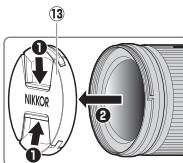
| ⑬ Front lens cap | — | — |
| ⑭ Rear lens cap | — | — |
A Attachment and Removal
Attaching the Lens
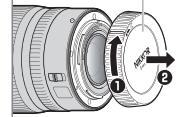
1 Turn the camera off, remove the body cap, and detach the rear lens cap.
Position the lens on the camera body, keeping the mounting mark on the lens aligned with the mounting mark on the camera body, and then rotate the lens counterclockwise until it clicks into place.
Removing the Lens
1 Turn the camera off
2 Press and hold the lens release button while turning the lens clockwise.
Before Use
The lens is retractable and must be extended before use. Rotate the zoom ring as shown until the lens clicks into the extended position. Pictures can only be taken when the focal length mark points to positions between 24 and 70 on the focal length scale.
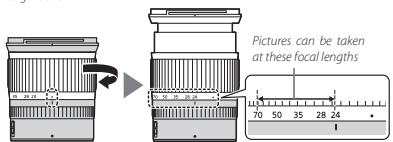
To retract the lens, rotate the zoom ring in the opposite direction, stopping when you reach the () position on the focal length scale.
If the camera is turned on with the lens retracted, a warning will be displayed. Extend the lens before use.
Attaching and Removing the Lens Hood
Align the lens hood mounting mark with the lens hood alignment mark () and then rotate the hood () until the mark is aligned with the lens hood () .
To remove the hood, reverse the above steps
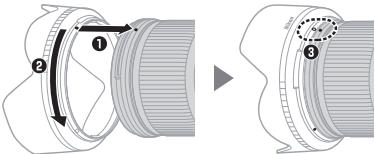
When attaching or removing the hood, hold it near the symbol on its base and avoid gripping it too tightly. The hood can be reversed and mounted on the lens when not in use.
When the Lens Is Attached
The focus position may change if you turn the camera off and then on again after using. Refocus before shooting. If you have focused on a pre-selected location while editing for your subject to appear, we recommend that you do not turn the camera off till the picture is taken.
Precautions for Use
Do not pick up or hold the lens or camera using only the lens hood.
Keep the CPU contacts clean.
Should the rubber lens-mount gasket be damaged, cease use immediately and take the lens to a Nikon-authorized service center for repair.
Replace the front and rear lens caps when the lens is not in use.
To protect the interior of the lens, store it out of direct sunlight. Keep the lens dry. During the internal mechanics can cause
- Keep the lens dry, rusting of the internal mechanism can cause irreparable damage.
- Leaving the lens in extremely hot locations could damage or warp parts made from reinforced plastic.
Rapid changes in temperature may cause damaging condensation inside and outside the lens. Before taking the lens from a warm to a cold environment or vice versa, place it in its case or a plastic bag to slow the change in temperature.
We recommend that you place the lens in its case to protect it from scratches during transport.
Lens Care
Removing dust is normally sufficient to clean the glass surfaces of the lens.
- Stigmedges and fingerprints can be removed from silicone-coated lens elements using a soft, clean cotton cloth or lens cleaning tissue; clean from the center outwards using a circular motion. To remove stubborn stains, wipe gently using a soft cloth lightly dampened with a small amount of distilled water, ethanol, or lens cleaner. Any drop-shaped marks left from this process on the water- and oil-repellent surface can subsequently be removed with a dry cloth.
- When cleaning lens elements that are not fluorine-coated, remove smudges and fingerprints using a soft, clean cotton cloth or lens cleaning tissue lightly dampened with a small amount of ethanol or lens cleaner. Wipe gently from the center outwards in a circular motion, taking care not to leave smears or touch the lens with your fingers.
- Never use organic solvents such as paint thinner or benzene to clean the lens.
- Neutral Color (NC) filters (available separately) and the like can be used to protect the front lens element.
- If the lens will not be used for an extended period, store it in a cool, dry location to prevent mold and rust. Do not store in direct sunlight or with naphtha or camphor moth balls.
Accessories
Supplied Accessories
LC-72B 72 mm snap-on Front Lens Cap
LF-N1 Rear Lens Cap
HB-85 Bayonet Hood 6161
CL-CT Lens Case
Using the Lens Case The lens is internally
The case is intended to protect the lens from scratches, not from tails or other physical shocks. The case is not water resistant.
- The material used in the case may fade, bleed, shrink, or change color when rubbed or wet.
- Remove dust with a soft brush.
- Water and stains can be removed from the surface with a soft, dry cloth. Do not use alcohol, benzene, thinner, or other volatile chemicals.
-
Do not store in locations exposed to direct sunlight or high temperatures or humidity.
-
Do not use the case to clean the monitor or lens elements.
-
be careful that the lens does not fall from the case during transport.
Material: Polyester
Compatible Accessories
72 mm screw-on filters
V Filters
Use only one filter at a time. Remove the lens hood before attaching filters or rotating circular polarizing filters
Specifications
Mount Nikon Z mount
Focal length 24 - 70 mm
Maximum aperture f/4
14 elements in 11 groups (including 1 ED lens element, 1 aspherical ED ele
Cells construction: 1) Elements in 11 groups (including 20 led elements, 1 aspherical element, 3 aspherical elements, elements with Nano Crystal Coat, and a fluorine-coated
front lens element)
Angle of view FX format: 84irc - 34irc20
DX format: 61irc - 22irc50
Focal length scale Graduated in millimeters (24, 28, 35, 50, 70)
Focusing system Internal focusing system
Minimum focus
Distance 0.3 m (0.99 ft) from focal plane at all zoom positions
Diaphragm blades 7 (rounded diaphragm opening)
Aperture range f/4-22
Filter-attachment size: 72 mm (P = 0.75 mm)
Inter attachment size 72 mm ( = 0.93mm )
Dimensions Approx. 77.5 mm maximum diameter x 68.5 mm (distance from camera lens mount flange when lens is retracted)
Weight Approx 500 g (1 lb.1.7 oz)
Nikon reserves the right to change the appearance, specifications, and performance of this product at any time and without prior notice.
Furization of the biotite
Accessories compatible:
Use of the Made for Apple badge means that an accessory has been designed to connect specifically to the Apple products identified in the badge, and has been certified by the developer to meet Apple performance standards. Apple is not responsible for the operation of this device or its compliance with safety and regulatory standards. Please note that the use of this accessory with an Apple product may affect wireless performance.
License FreeType (FreeType2)
Copyright © 1991-2020 Unicode, Inc. All rights reserved.
Distributed under the Terms of Use in
https://www.unicode.org/copyright.html.
Permission is hereby granted, free of charge, to any person obtaining a copy of the Unicode data files and any associated documentation (the "Data Files") or Unicode software and any associated documentation (the "Software") to deal in the Data Files or Software without restriction, including without limitation the rights to use, copy, modify, merge, publish, distribute, and/or sell copies of the Data Files or Software, and to permit persons to whom the Data Files or Software are furnished to do so, provided that either
(i) this copyright and permission notice appear with all copies of the Data Files or Software, or
(ii) this copyright and permission notice appear in associated Documentation.
THE DATA FILES AND SOFTWARE ARE PROVIDED "AS IS", WITHOUT WARRANTY OF ANY KIND, EXPRESS OR IMPLIED, INCLUDING BUT NOT LIMITED TO THE WARRANTY OF MERCHANTABILITY, FITNESS FOR A PARTICULAR PURPOSE AND NONINFRINGEMENT OF THIRD PARTY RIGHTS. IN NO EVENT SHALL THE COPYRIGHT HOLDER OR HOLDERS INCLUDED IN THIS NOTICE BE LIABLE FOR ANY CLAIM, OR ANY SPECIAL INDIRECT OR CONSEQUENTIAL DAMAGES, OR ANY DAMAGES WHATSOEVER RESULTING FROM LOSS OF USE, DATA OR PROFITS, WHETHER IN AN ACTION OF CONTRACT, NEGLIGENCE OR OTHER TORTIOUS ACTION, ARISING OUT OF OR IN CONNECTION WITH THE USE OR PERFORMANCE OF THE DATA FILES OR SOFTWARE.
Except as contained in this notice, the name of a copyright holder shall not be used in advertising or otherwise to promote the sale, use or other dealings in these Data Files or Software without prior written authorization of the copyright holder.
AVC Patent Portfolio License
CE PRODUIT EST SOUS LICENCE CONFORMÉMÉNT À L'AVC PATENT PORTFOLIO LICENSE POUR USAGE PERSONNEL ET NON COMMERCIAL DE LA PART DU CONSOMMATEUR DANS LE BUT DE (i) L'ENCODAGE VIDEO CONFORMÉMÉNT À LA NORME AVC (« VIDEO AVC ») ET/OU (ii) DU DÉCODAGE D'UNE VIDEO AVC PREALABEMENT ENCODEE PAR UN CONSOMMATEUR ENGAGÉ DANS UN ÉCAVITÉ PERSONNELLE ET NON COMMERCIALE ET/OU OBTENUE D'UN FOURNISSEUR DE VÉDÉOS HABILITE À FOURNIR DE LA VIDEO AVC. AUCUNE LICENCE N'EST ACCORDÉE DE MANIÈRE EXPLICITE OU IMPLICITE POUR TOUT AUTRE USAGE. VOUS POUVEZ OBTENIR DES INFORMATIONS SUPPLEMENTAIRES AUPRÉS DE MPEG LA, L.I.C. CONSULTEZ https://www.mpegla.com
Licence BSD (pilot NVM Express)
Copyright (c) 2013, Intel Corporation. All rights reserved.
This program and the accompanying materials are licensed and made available under the terms and conditions of the BSD License which accompanies this distribution. The full text of the license may be found at http://opensource.org/licenses/bsd-license.php.
THE PROGRAM IS DISTRIBUTED UNDER THE BSD LICENSE ON AN "AS IS" BASIS, WITHOUT WARRANTY OR REPRESENTATIONS OF ANY KIND, Either EXPRESS OR IMPLIED.
NvmExpress.c
Copyright (c) 2013 - 2017, Intel Corporation. All rights reserved.
This program and the accompanying materials are licensed and made available under the terms and conditions of the BSD License which accompanies this distribution. The full text of the license may be found at http://opensource.org/licenses/bsd-license.php.
THE PROGRAM IS DISTRIBUTED UNDER THE BSD LICENSE ON AN "AS IS" BASIS, WITHOUT WARRANTY OR REPRESENTATIONS OF ANY KIND, Either EXPRESS OR IMPLIED.
NvmExpress.h
(C) Copyright 2016 Hewlett Packard Enterprise Development LP
Copyright (c) 2013 - 2018, Intel Corporation. All rights reserved.
This program and the accompanying materials are licensed and made available under the terms and conditions of the BSD License which accompanies this distribution. The full text of the license may be found at http://opensource.org/licenses/bsd-license.php.
THE PROGRAM IS DISTRIBUTED UNDER THE BSD LICENSE ON AN "AS IS" BASIS, WITHOUT WARRANTY OR REPRESENTATIONS OF ANY KIND, Either EXPRESS OR IMPLIED.
NvmExpressBlocklo.c
Copyright (c) 2013 - 2018, Intel Corporation. All rights reserved.
This program and the accompanying materials are licensed and made available under the terms and conditions of the BSD License which accompanies this distribution. The full text of the license may be found at http://opensource.org/licenses/bsd-license.php.
THE PROGRAM IS DISTRIBUTED UNDER THE BSD LICENSE ON AN "AS IS" BASIS, WITHOUT WARRANTY OR REPRESENTATIONS OF ANY KIND, Either EXPRESS OR IMPLIED.
NvmExpressBlocklo.h
Copyright (c) 2013 - 2016, Intel Corporation. All rights reserved.
This program and the accompanying materials are licensed and made available under the terms and conditions of the BSD License which accompanies this distribution. The full text of the license may be found at http://opensource.org/licenses/bsd-license.php
THE PROGRAM IS DISTRIBUTED UNDER THE BSD LICENSE ON AN "AS IS" BASIS, WITHOUT WARRANTY OR REPRESENTATIONS OF ANY KIND, Either EXPRESS OR IMPLIED.
NvmExpressDiskInfo.c
Copyright (c) 2013, Intel Corporation. All rights reserved.
This program and the accompanying materials are licensed and made available under the terms and conditions of the BSD License which accompanies this distribution. The full text of the license may be found at http://opensource.org/licenses/bsd-license.php.
THE PROGRAM IS DISTRIBUTED UNDER THE BSD LICENSE ON AN "AS IS" BASIS, WITHOUT WARRANTY OR REPRESENTATIONS OF ANY KIND, Either EXPRESS OR IMPLIED.
NvmExpressDiskInfo.h
Copyright (c) 2013, Intel Corporation. All rights reserved.
This program and the accompanying materials are licensed and made available under the terms and conditions of the BSD License which accompanies this distribution. The full text of the license may be found at http://opensource.org/licenses/bsd-license.php
THE PROGRAM IS DISTRIBUTED UNDER THE BSD LICENSE ON AN "AS IS" BASIS, WITHOUT WARRANTY OR REPRESENTATIONS OF ANY KIND, Either EXPRESS OR IMPLIED.
NvmExpressDxe.inf
Copyright (c) 2013 - 2018, Intel Corporation. All rights reserved.
This program and the accompanying materials are licensed and made available under the terms and conditions of the BSD License which accompanies this distribution. The full text of the license may be found at http://opensource.org/licenses/bsd-license.php.
THE PROGRAM IS DISTRIBUTED UNDER THE BSD LICENSE ON AN "AS IS" BASIS, WITHOUT WARRANTY OR REPRESENTATIONS OF ANY KIND, EITHER EXPRESS OR IMPLIED.
NvmExpressDxe.uni
Copyright (c) 2013 - 2014, Intel Corporation. All rights reserved.
This program and the accompanying materials are licensed and made available under the terms and conditions of the BSD License which accompanies this distribution. The full text of the license may be found at http://opensource.org/licenses/bsd-license.php.
THE PROGRAM IS DISTRIBUTED UNDER THE BSD LICENSE ON AN "AS IS" BASIS, WITHOUT WARRANTY OR REPRESENTATIONS OF ANY KIND, EITHER EXPRESS OR IMPLIED.
NvmExpressDxeExtra.uni
Copyright (c) 2014 - 2018, Intel Corporation. All rights reserved.
This program and the accompanying materials are licensed and made available under the terms and conditions of the BSD License which accompanies this distribution. The full text of the license may be found at http://opensource.org/licenses/bsd-license.php
THE PROGRAM IS DISTRIBUTED UNDER THE BSD LICENSE ON AN "AS IS" BASIS, WITHOUT WARRANTY OR REPRESENTATIONS OF ANY KIND, EITHER EXPRESS OR IMPLIED.
NvmExpressHci.c
Copyright (c) 2013 - 2018, Intel Corporation. All rights reserved.
This program and the accompanying materials are licensed and made available under the terms and conditions of the BSD License which accompanies this distribution. The full text of the license may be found at http://opensource.org/licenses/bsd-license.php.
THE PROGRAM IS DISTRIBUTED UNDER THE BSD LICENSE ON AN "AS IS" BASIS, WITHOUT WARRANTY OR REPRESENTATIONS OF ANY KIND, EITHER EXPRESS OR IMPLIED.
NvmExpressHci.h
(C) Copyright 2016 Hewlett Packard Enterprise Development LP
Copyright (c) 2013 - 2015, Intel Corporation. All rights reserved.
This program and the accompanying materials are licensed and made available under the terms and conditions of the BSD License which accompanies this distribution. The full text of the license may be found at http://opensource.org/licenses/bsd-license.php.
THE PROGRAM IS DISTRIBUTED UNDER THE BSD LICENSE ON AN "AS IS" BASIS, WITHOUT WARRANTY OR REPRESENTATIONS OF ANY KIND, Either EXPRESS OR IMPLIED.
NvmExpressPassthru.c
(C) Copyright 2014 Hewlett-Packard Development Company, L.P.
Copyright (c) 2013 - 2018, Intel Corporation. All rights reserved.
This program and the accompanying materials are licensed and made available under the terms and conditions of the BSD License which accompanies this distribution. The full text of the license may be found at http://opensource.org/licenses/bsd-license.php.
THE PROGRAM IS DISTRIBUTED UNDER THE BSD LICENSE ON AN "AS IS" BASIS, WITHOUT WARRANTY OR REPRESENTATIONS OF ANY KIND, Either EXPRESS OR IMPLIED.
Mentions légales
Federal Communications Commission (FCC) Radio Frequency Interference Statement
Nikon Inc., 1300 Walt Whitman Road, Melville, New York 11747-3064, U.S.A.
Tel.: 631-547-4200
Nikon Inc., 1300 Walt Whitman Road, Melville, New York 11747-3064, U.S.A.
Tél. 631-547-4200
Compression NEF (RAW) 259
Tailledimage/cadence 360
b: Mesure/exposition 387
Informations de copyright. 469
Photograph/Copyright 469
Joindre lesinfos de copyright 469
Options de signal sonore 471
Wireless Transmitter Utility 536
ANIN DYINGUO
JONIK NIKI
DYINGYUN UO
JONIK NIKI
| Option | |
| [α] | [AF zone réduite] |
| [β] | [AF point sélectif] |
| [∅] | [AF zone dynamique] |
| [RED/NE] | [AF zone large (S)] |
| [RED/NE] | [AF zone large (L)] |
| Option | |
| [AF zone large (West) | [AF zone large (L-personnes)] |
| [AF zone large (West) | [AF zone large (L-animaux)] |
| [==] | [AF zone automatique] |
| [==] | [AF zone automatique (personnes)] |
| [==] | [AF zone automatique (animaux)] |
| Option | |
| [13] | [AF point sélectif] |
| [EBWIDE-S] | [AF zone large (S)] |
| [EBWIDE-L] | [AF zone large (L)] |
| [EBWIDE-L] | [AF zone large(L-personnes)] |
| Option | |
| [AF zone large (WKT-L] | [AF zone large (L-animaux)] |
| [■] | [AF zone automatique] |
| [■] | [AF zone automatique (personnes)] |
| [■] | [AF zone automatique (animaux)] |
Compression NEF (RAW)
| [Nombre de prises de vues] | Indicateur de bracketing de la balance des blancs | Nb de prises de vues | Incrementede labalancedes blancs | Sens dubracketing |
| 0F | +··········.0·········+ | 0 | 1 | 0 |
| B3F | +············.0·········+ | 3 | 1B | 0/B1/B2 |
| A3F | +············.0·········+ | 3 | 1A | 0/A2/A1 |
| B2F | +············.0·········+ | 2 | 1B | 0/B1 |
| A2F | +············.0·········+ | 2 | 1A | 0/A1 |
| 3F | +············.0·········+ | 3 | 1A, 1B | 0/A1/B1 |
| 5F | +············.0·········+ | 5 | 1A, 1B | 0/A2/A1/B1/B2 |
| 7F | +············.0·········+ | 7 | 1A, 1B | 0/A3/A2/A1/B1/B2/B3 |
| 9F | +············.0·········+ | 9 | 1A, 1B | 0/A4/A3/A2/A1/B1/B2/B3/B4 |
Photopropane/Copyright
Activer/désactiver cdes tactiles
Association (Bluetooth)
Wireless Transmitter Utility
Application SnapBridge
Premiere association
Use of the Made for Apple badge means that an accessory has been designed to connect specifically to the Apple products identified in the badge, and has been certified by the developer to meet Apple performance standards. Apple is not responsible for the operation of this device or its compliance with safety and regulatory standards. Please note that the use of this accessory with an Apple product may affect wireless performance.
Licence FreeType (FreeType2)
Copyright © 1991-2020 Unicode, Inc. All rights reserved.
Distributed under the Terms of Use in
https://www.unicode.org/copyright.html.
Permission is hereby granted, free of charge, to any person obtaining a copy of the Unicode data files and any associated documentation (the "Data Files") or Unicode software and any associated documentation (the "Software") to deal in the Data Files or Software without restriction, including without limitation the rights to use, copy, modify, merge, publish, distribute, and/or sell copies of the Data Files or Software, and to permit persons to whom the Data Files or Software are furnished to do so, provided that either
(i) this copyright and permission notice appear with all copies of the Data Files or Software, or
(ii) this copyright and permission notice appear in associated Documentation.
THE DATA FILES AND SOFTWARE ARE PROVIDED "AS IS", WITHOUT WARRANTY OF ANY KIND, EXPRESS OR IMPLIED, INCLUDING BUT NOT LIMITED TO THE WARRANTY OF MERCHANTABILITY, FITNESS FOR A PARTICULAR PURPOSE AND NONINFRINGEMENT OF THIRD PARTY RIGHTS. IN NO EVENT SHALL THE COPYRIGHT HOLDER OR HOLDERS INCLUDED IN THIS NOTICE BE LIABLE FOR ANY CLAIM, OR ANY SPECIAL INDIRECT OR CONSEQUENTIAL DAMAGES, OR ANY DAMAGES WHATSOEVER RESULTING FROM LOSS OF USE, DATA OR PROFITS, WHETHER IN AN ACTION OF CONTRACT, NEGLIGENCE OR OTHER TORTIOUS ACTION, ARISING OUT OF OR IN CONNECTION WITH THE USE OR PERFORMANCE OF THE DATA FILES OR SOFTWARE.
Except as contained in this notice, the name of a copyright holder shall not be used in advertising or otherwise to promote the sale, use or other dealings in these Data Files or Software without prior written authorization of the copyright holder.
AVC Patent Portfolio License
CE PRODUIT EST SOUS LICENCE CONFORMÉMÉNT À L'AVC PATENT PORTFOLIO LICENSE POUR USAGE PERSONNEL ET NON COMMERCIAL DE LA PART DU CONSOMMATEUR DANS LE BUT DE (i) L'ENCODAGE VIDEO CONFORMÉMÉNT À LA NORME AVC (« VIDEO AVC ») ET/OU (ii) DU DÉCODAGE D'UNE VIDEO AVC PREALABEMENT ENCODEE PAR UN CONSOMMATEUR ENGAGÉ DANS UNE ACTIVÉ PERSONNELLE ET NON COMMERCIALE ET/OU OBTENUE D'UN FOURNISSEUR DE VIDEOS HABILITE À FOURNIR DE LA VIDEO AVC. AUCUNE LICENCE N'EST ACCORDÉE DE MANIÈRE EXPlicitÉ OU IMPLICITE POUR TOUT AUTRE USAGE. VOUS POUVEZ OBTENIR DES INFORMATIONS SUPPLEMENTAIRES AUPRÉS DE MPEG LA, L.I.C. CONSULTEZ https://www.mpegla.com
Licence BSD (pilot NVM Express)
https://imaging.nikon.com/support/pdf/LicenseNVMe.pdf
Mentions légales
Federal Communications Commission (FCC) Radio Frequency Interference Statement
Nikon Inc., 1300 Walt Whitman Road, Melville, New York 11747-3064, U.S.A.
Tel.: 631-547-4200
Nikon Inc., 1300 Walt Whitman Road, Melville, New York 11747-3064, U.S.A.
Tél. 631-547-4200
AF zone large (L) 79
AF zone large (L-animaux) 79
AF zone large (L-personnes) 79
AF zone large (S) 79
AF zone réduite 77
AF-C (AF continu) 75
AF-F (AF permanent) 75
Dosage flash/ambiance.....154,614
Dossier de stockage 247
Histogramme 25, 26, 183
Mode infrastructure. 538, 545
Tailledimage/cadence.166,360
Teinte (Regler le Picture Control) 142
Wireless Transmitter Utility 536
WR-R10 474,626
WT-7 485,589,701
Z
Zone pondedere centrale 388
Zoom 201
- Incompatible Lenses and Accessories
- For Your Safety
- WARNI
- CAUTION
- Notices for Customers in Europe
- The Mount Adapter
- Parts of the Adapter (Figure 1)
- Attachment and Removal
- Detaching the Lens and Adapter (Figure 3)
- Using the Mount Adapt
- Precautions for Use
- Caring for the Adapter
- Accessories
- De
- Benutzerh
- Retirez I'adaptateur
- Warranty Terms . Nikon Worldwide Service Warranty
- Nikon Worldwide Service Warranty
- User's Manual
- WARNING
- Using the Lens
- Parts of the Lens: Names and Functions
- A Attachment and Removal
- Attaching the Lens
- Removing the Lens
- Before Use
- When the Lens Is Attached
- Lens Care
- Supplied Accessories
- CL-CT Lens Case
- Using the Lens Case The lens is internally
- Material: Polyester
- Compatible Accessories
- Specifications
- Accessories compatible:
- License FreeType (FreeType2)
- AVC Patent Portfolio License
- Licence BSD (pilot NVM Express)
- NvmExpress.c
- NvmExpress.h
- NvmExpressBlocklo.c
- NvmExpressBlocklo.h
- NvmExpressDiskInfo.c
- NvmExpressDiskInfo.h
- NvmExpressDxe.inf
- NvmExpressDxe.uni
- NvmExpressDxeExtra.uni
- NvmExpressHci.c
- NvmExpressHci.h
- NvmExpressPassthru.c
- Mentions légales
- Federal Communications Commission (FCC) Radio Frequency Interference Statement
- Photopropane/Copyright
- Activer/désactiver cdes tactiles
- Association (Bluetooth)
- Wireless Transmitter Utility
- Application SnapBridge
- Premiere association
- Licence FreeType (FreeType2)
- Z
Brand : NIKON
Model : Z6II+24-70MM
Category : Mirrorless Camera