
PL 200 F EU - Speaker PROLINE - Free user manual and instructions
Find the device manual for free PL 200 F EU PROLINE in PDF.


| Product type | Audio speaker with iPod dock, FM radio and auxiliary input |
| Brand | PROLINE |
| Model | PL 200 F EU |
| Dimensions (W x D x H) | 115 x 115 x 115 mm |
| Weight | 840 g |
| Mains power supply | Adapter 100-240 V, 50 Hz, output 5 V / 1.2 A |
| Battery operation | 4 AA 1.5 V batteries |
| Clock backup battery | 1 CR2025 lithium battery 3 V |
| Maximum output power | 4 W (2 x 2 W) |
| Frequency response | 300 Hz – 15 kHz (±3 dB) |
| Signal-to-noise ratio | ≥ 50 dB |
| Speakers | 2 inches / 4 Ω |
| Audio inputs | iPod/iPhone dock, 3.5 mm jack socket (AUX) |
| FM frequency | 87.5 – 108.0 MHz |
| Functions | Clock with backup, standby mode, automatic FM scan, 20 FM presets |
| Maintenance | Unplug before cleaning; use a soft slightly damp cloth; no solvents |
| Safety | Do not expose to water or moisture; do not open; use the supplied adapter |
| Repairability | Do not attempt to repair yourself; contact a qualified service |
| Use | Domestic use only |
Frequently Asked Questions - PL 200 F EU PROLINE
User questions about PL 200 F EU PROLINE
0 question about this device. Answer the ones you know or ask your own.
Ask a new question about this device
Download the instructions for your Speaker in PDF format for free! Find your manual PL 200 F EU - PROLINE and take your electronic device back in hand. On this page are published all the documents necessary for the use of your device. PL 200 F EU by PROLINE.
USER MANUAL PL 200 F EU PROLINE
IMPORTANT SAFETY INSTRUCTIONS
Mains supply
This equipment is designed to operate from a 100-240 Volt, 50Hz AC mains supply. Other power sources may damage it. Check that the rating label on the back of the mains adapter states 100-240V AC before you plug it in.
Mains lead
We have the fitted this equipment with a mains adapter with a standard plug fitting.
If the mains adapter or its lead becomes damaged it must be replaced with an adapter of the same type and rating.
Safe use and care of your equipment
We have designed and made this product to meet European safety standards.
Protect the mains lead. You must ensure the mains lead cannot be walked on, crushed, chafed or cut.
Avoid harsh conditions such as wet or damp places, high humidity, strong vibration, extremely high or low temperatures, strong sunlight and places which are very dusty.
Never push objects into holes and ventilation slots.
To save power, switch off mains power or pull out the mains power adapter when you are not using the equipment.
Don't continue to use this equipment if you have spilt liquids in it, if it is damaged in any way or if it does not work normally, immediately unplug the equipment and seek expert advice.
This product is designed for domestic use only. Commercial or any other use may invalidate the guarantee and might be dangerous.
Cleaning
Disconnect the mains supply and use only a lightly dampened soft cloth.
Do not use chemical solvents or strong detergents as these may damage the cosmetic finish.
Important Safety warnings
To prevent electric shock, do not remove any cover.
If anything goes wrong, don't try and fix it yourself, get a qualified service agent to look at the product.
Do not expose this equipment to dripping or splashing or place any objects filled with liquids, such as vases, on the equipment.
Never put a naked flame source such as lighted candles on or near this equipment.
Small parts: Do not let young children play with the equipment.
Properties Key
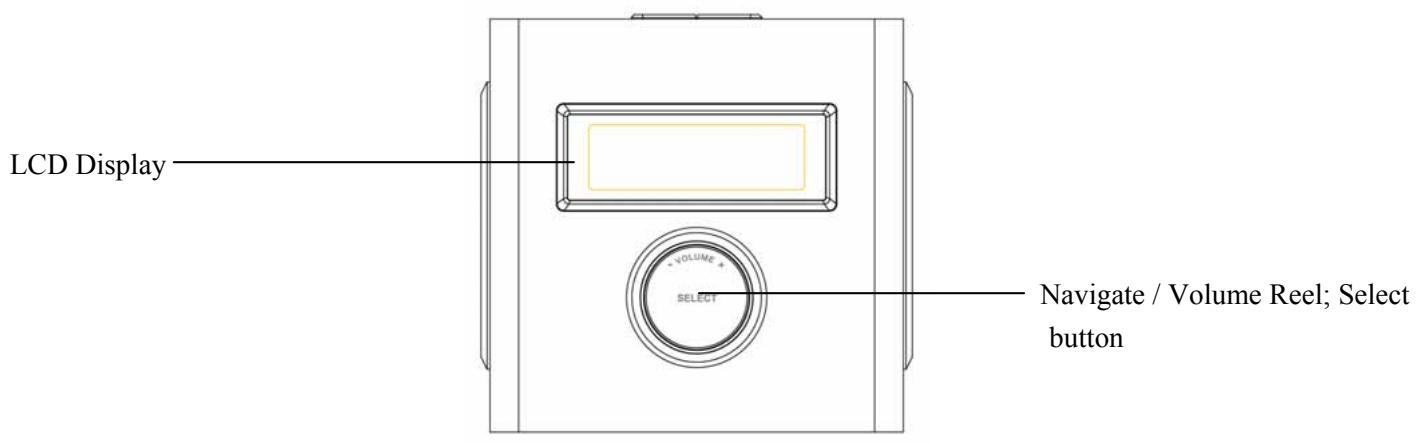
Front
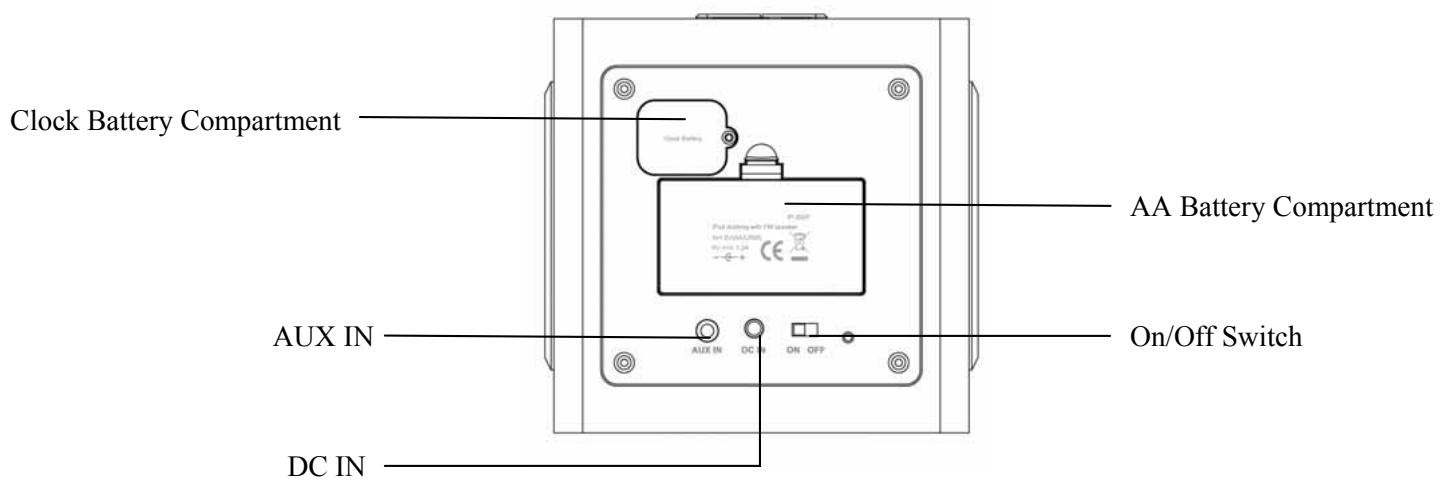
Back
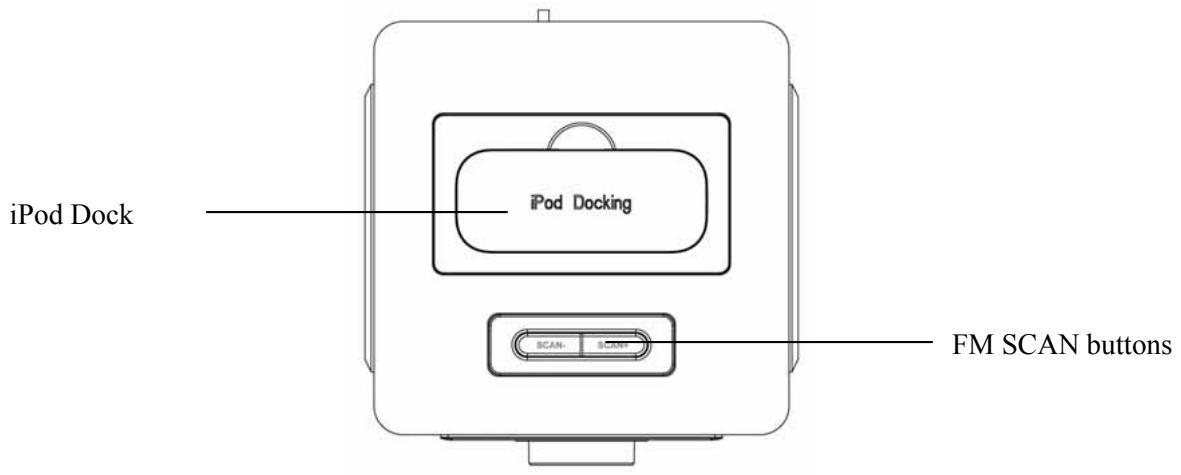
Top
Technical Specifications
| Product | PL 200F |
| Maximum Power Output | 4W (2 x 2W) |
| Frequency Response | 300Hz – 15kHz (±3dB) |
| Signal-Noise Ratio | ≥50dB |
| Driver Units | 2inch / 4Ω |
| Audio Signal Input | iPod docking slot, 3.5mm stereo jack |
| FM frequency | 87.5 – 108.0 MHz |
| Power Supply | 4 x AA battery or 5V/1.2A power adaptor 100 – 240 Volts |
| Weight | 840g |
| Dimensions | 115mm (L) x 115mm (D) x 115mm (H) |
OPERATION
This unit is intended to run from a mains supply of 100-240V 50Hz using the power adapter or 4X AA 1.5V and 1X CR2025 3V Lithium Cell or equivalent batteries.
The PL 200F can be operated by batteries or by power adaptor. Install four AA batteries or insert the power adaptor DC 5Volt lead into the DC IN socket on the back panel of the unit and plug the power adapter into the mains supply. When inserting the batteries, make sure you observe the battery polarity marking inside the battery compartment. The battery compartment is located on the back of the main unit.
Switch the unit on with the ON/OFF switch on the back panel of the main unit.
WARNING: Do not mix old and new or different types / makes of batteries, remove all batteries if the unit is not to be used for an extended period to avoid electrolyte leakage which will damage the unit invalidating the warranty. Do not dispose of batteries in a fire, danger of explosion.
Standby mode
When PL 200F is switched on, it will enter standby mode. The display will show 00:00 without backlight.
To turn off standby mode (i.e. turn on PL 200F), press SELECT (Press the knob). Press and hold SELECT to enter standby mode.
The backlight will light when the unit is switched on by pressing SELECT. If no button pressed within 3 seconds, the display shows the current time with no backlight
Clock Setting
Press SCAN + , the hour digits will flash, turn the knob to set the hour, then press SCAN + again, the seconds digits will flash, turn the knob again to set the seconds. Complete the clock setting, by pressing SCAN + again.
The clock backlight can be turned on by rotating the control knob.
There is a backup battery for the clock. In case of a power cut, the clock is still running internally (there will be no display). Replace battery when necessary, battery type - CR2025 3V Lithium Cell. The clock backup battery compartment is located on the back of the unit. You'll need a small cross head screwdriver to remove the screw holding the clock backup battery cover in place. Remove the screw and replace the battery then replace the battery cover and retaining screw.
Operation modes - iPod, AUX, FM
In any mode, press SELECT and then rotate the reel clockwise to select the modes.
iPod AUX FM iPod...
iPod
Dock the iPod on the top slot of the speaker, control music playback from the iPod. To adjust the volume, press SELECT and rotate the knob to set the required sound level..
PL 200F also supports the iPhone - however, during iPhone music playback, it automatically stops the music when receiving a call.
AUX
Connect an external sound source using the 3.5mm stereo jack cable. Rotate the knob to adjust volume. Also adjust the volume of the audio source device if necessary.
Caution: Do not set the Volume of the input source too high as distortion will occur,
FM
When PL 200F is displaying the frequency, press SCAN- or SCAN+ to manually tuning the frequency (0.1MHz for 1 step). Press and hold SCAN- or SCAN+ to scan the next FM station, PL 200F stops scanning when it finds a station.
Rotate the reel to adjust volume.
When the display shows FM (pressed SELECT on FM mode, or turn the knob clockwise to FM during mode selection), immediately, rotate the knob anticlockwise one step and press SELECT to do FM auto scanning. PL 200F stores the scanned station automatically.
To view the stored station list (from auto scan), rotate the reel turn the knob clockwise two steps to enter when the display shows FM. Rotate the reel to choose saved stations (from P-01 to P-20).
Precaution
- Do not scratch the speaker diaphragm as it is thin and soft.
- Power off and remove the batteries or DC supply after use.
- Do not expose the speaker to liquid, moisture or humidity as it is not waterproof.
- Do not use abrasive cleaning solvents to clean the speaker.
- Do not expose the speaker to the contact with sharp objects as this will cause scratches or damages.
- Do not attempt to disassembly the speaker as it does not contain serviceable components.
- Keep the speaker out from extreme temperatures or dust.
- Only use the DC adaptor comes with the speaker.
Troubleshooting
- Sound Distortion or Trembling
| Reason | Solution |
| Power output is out of the THD range | 1. Lower the volume of PL 200F 2. Lower the volume of the connected source device (AUX mode) |
- Left/Right output Deviation or Unstable
| Reason | Solution |
| Dirty stereo jack | Clean the jack |
| Poor source signal | 1. Replace the connected source device (AUX mode) 2. Re-dock the iPod or iPhone (iPod mode) |
- No Sound
| Reason | Solution |
| Volume is set too low | 1. Increase the volume of PL 200F 2. Increase the volume of the connected source device (AUX mode) |
| Line-in is not properly connected | 1. Replace the connected source device (AUX mode) 2. Re-dock the iPod or iPhone (iPod mode) |
| Adapter is not properly connected | Reconnect the adapter |
- Weak FM signal
| Reason | Solution |
| Location is not suitable for FM receipt | Remove the PL 200F from the current location |
| FM antenna | 1. Prolong the FM antenna 2. Place FM antenna pointing direction 3. Touch the FM antenna or attach the end of the FM antenna to any metal surface |
IMPORTANT DISPOSAL INSTRUCTIONS
As a responsible retailer we care about the environment.

As such we urge you to follow the correct disposal procedure for your product, batteries and packaging materials.
This will help conserve natural recourses and ensure that it is recycled in a manner that protects health and the environment.
You must dispose of this product and its packaging according to local laws and regulations. Because this product contains electronic components, theproduct and its accessories must be disposed of separately from household waste when the product reaches its end of life.
To remove the batteries open the battery compartment and remove the 4 AA batteries, remove the screw holding the battery compartment cover in place and remove the lithium cell.
Contact your local authority to learn about disposal and recycling.
The product and packaging should be taken to your local collection point for recycling.
Some collection points accept products free of charge.
We apologise for any inconvenience caused by minor inconsistencies in these instructions, which may occur as a result of product improvement and development.
Kesa Electricals© UK: EC1N 6TE 13-01-2012
- IMPORTANT SAFETY INSTRUCTIONS
- Mains supply
- Mains lead
- Safe use and care of your equipment
- Cleaning
- Important Safety warnings
- Properties Key
- Technical Specifications
- OPERATION
- Standby mode
- Clock Setting
- Operation modes - iPod, AUX, FM
- iPod
- AUX
- FM
- Precaution
- Troubleshooting
- IMPORTANT DISPOSAL INSTRUCTIONS
Brand : PROLINE
Model : PL 200 F EU
Category : Speaker