DENON DBT3313UD - Universal audio/video player

DBT3313UD - Universal audio/video player DENON - Free user manual and instructions

Find the device manual for free DBT3313UD DENON in PDF.

📄 80 pages English EN Download 💬 AI Question 10 questions ⚙️ Specs
Notice DENON DBT3313UD - page 78
View the manual : Français FR English EN
Pick your language and provide your email: we'll send you a specifically translated version.
Product type Universal audio/video player (Blu-ray, DVD, Super Audio CD, CD, DVD-Audio)
Brand DENON
Model DBT3313UD
Supported formats BD-Video, DVD-Video, Super Audio CD, CD, DVD-Audio, files (DivX, MPEG, AVI, WMV, AVCHD, MP3, WMA, AAC, LPCM, FLAC, JPEG, PNG)
Connectivity 2 HDMI outputs (one audio, one video), Denon Link HD, USB (front), Ethernet (LAN), analog audio output 2 channels
Network functions YouTube, Netflix, BD-Live, DLNA (Media Player)
Special functions 3D playback, HDMI control, Pure Direct (AV Pure Direct, Pure Direct 1/2), Image adjustment (Picture Control), Dimmer
Power supply AC 100-240 V, 50/60 Hz, Consumption 25 W
Standby power consumption 0.3 W (eco mode), 0.5 W (normal), 14 W (quick start)
Weight 7.9 kg
Supplied accessories Remote control (RC-1161), batteries, HDMI cable, Denon Link HD cable, power cord, CD-ROM manual, safety instructions, after-sales network list
Safety Do not expose to water, do not block ventilation openings, unplug during thunderstorms, etc.
Maintenance and cleaning Wipe with a soft cloth. Do not use benzene, thinners or insecticides.
Installation conditions Provide ventilation space of at least 0.1 m around the device. Do not place in a confined space.
Internal memory Yes, for BD-Live (capacity not specified). External USB memory support for additional data.

Frequently Asked Questions - DBT3313UD DENON

How to connect the player to the Internet?
Connect an Ethernet cable (CAT-5 or higher) from the player to your router. Then, in the SETUP menu, go to General Settings > Network and run a Connection Test. The device automatically configures the IP address via DHCP. For manual configuration, set DHCP to Manual and enter the parameters provided by your ISP.
What to do if no image appears on the screen?
First check that the TV is set to the correct HDMI input. Make sure the Pure Direct function is not activated (set to Off). Press VIDEO RESOLUTION to select a resolution compatible with your TV. If the image is in black and white, the disc may have a different region code (this player supports codes B for BD-Video and 2 or ALL for DVD-Video).
How to play audio/video files from a USB flash drive?
Plug the USB flash drive into the front USB port of the player. Press HOME then select MEDIA PLAYER. Choose the USB device, then browse the folders to select the file to play. Supported formats are listed in the manual (DivX, MPEG, AVI, WMV, MP3, WMA, AAC, FLAC, JPEG, PNG, etc.).
How to use the Pure Direct function to improve audio quality?
Press the PURE button on the remote to switch between modes. AV Pure Direct transmits video (HDMI MONITOR) and audio (HDMI AMP) separately. Pure Direct 1 cuts the display and video output. Pure Direct 2 cuts only the video output. Set to Off to disable.
How to watch 3D videos with this player?
Make sure your TV is 3D compatible and connected to the HDMI OUT MONITOR(VIDEO) terminal with a high-speed HDMI cable. Insert a 3D Blu-ray disc. 3D playback activates automatically. To adjust settings, go to the SETUP menu > Video settings > 3D output. Refer to precautions in the manual before watching 3D videos.
The remote control does not work, what to do?
Check that the batteries are correctly inserted respecting polarity. Point the remote at the player's infrared sensor from less than 7 meters. Remove any obstacles. If the problem persists, try resetting the remote code: in the SETUP menu, go to Others > Compatible remote signal and set to Off or re-pair.
How to update the player's software?
Connect the player to the Internet via Ethernet. Press SETUP, go to General Settings > Software Update and select Update via Internet. If an update is available, follow the on-screen instructions. You can also enable update notifications in the Update Notification menu.
How to set up parental control?
Press SETUP, go to General Settings > Parental Control. You can change the password (default 0000), set the lock level for Blu-ray (Blu-ray parent key) and DVD (DVD parent key), and choose the country code via Country Code Setting. Discs with a rating higher than the set level will require the password.
How to clean the player?
Turn off the device and unplug the power cord. Wipe the cabinet and front panel with a soft, dry cloth. Never use benzene, thinners or insecticides, as they may discolor or damage the surface. For the laser lens, use a commercially available lens cleaner (without brush).
What types of discs are compatible with this player?
The player supports the following formats: Blu-ray Disc (BD-Video), DVD-Video (region codes 2 or ALL), Super Audio CD, Audio CD, DVD-Audio, as well as files on discs or USB media (DivX, MPEG, AVI, WMV, AVCHD, MP3, WMA, AAC, LPCM, FLAC, JPEG, PNG). Hybrid BD discs and finalized DVD+R/RW, DVD-R/RW discs are also supported.

User questions about DBT3313UD DENON

0 question about this device. Answer the ones you know or ask your own.

Ask a new question about this device

The email remains private: it is only used to notify you if someone responds to your question.

No questions yet. Be the first to ask one.

Download the instructions for your Universal audio/video player in PDF format for free! Find your manual DBT3313UD - DENON and take your electronic device back in hand. On this page are published all the documents necessary for the use of your device. DBT3313UD by DENON.

USER MANUAL DBT3313UD DENON

There are five steps to the setup process.

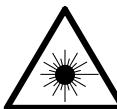
PRODUITS LASER CLASSE 1

CLASS 1 LASER PRODUCT

ADVARSEL: USYNLIG LASERSTRÁLING VED ÅBNING, NÁR SIKKERHEDSAFBRYDERE ER UDE AF FUNKTION. UNDGÅ UDSAETTELSE FOR STRÁLING.

VAROITUS! LAITTEEN KAYTTÄMINEN MUULLA KUIN TÄSSÄ KAYTTOOHJEESSA MAINITULLA TAVALLA SAATTAA ALTISTAA KAYTTÄJÄNTURVALLISUUSLUOKAN 1 YLITTÄVALLE NAKYMÄMTTÖMÄLLE LASERSATEILLYL.

VARNING: OM APPARATEN ANVÄNDS PÅ ANNAT SÄTT ÅN I DENNA BRUKSANVISNING SPECIFICERATS, KAN ANVÄNDAREN UTSÄTTAS FÖR OSYNLIG LASERSTRÄLNING SOM ÖVERSKRIDER GRÄNSEN FÖR LASERKLASS 1.
DENON DBT3313UD - PRODUITS LASER CLASSE 1 - 1

Division of D&M Germany GmbH

Précautions relatives aux manipulations

Selection d/images fixes

[Types de Super Audio CD]

DHCP (Dynamic Host Configuration Protocol)

Dolby Digital (5.1-ch Surround)

JPEG (Joint Photo graphic Experts Group)

LAN (Local Area Network)

Blu-ray Disc (BD) 16, 51, 57, 59

BNR 29

Bonus View 32, 59

C

Cable

Cable audio 5

Cable Denon Link HD 5,8

Cable Ethernet 5

Cable HDMI 5,7

CD 17,51,54,57

CD-R/-RW 51,54

Changer le mot de passer 40

Chapitre 53, 59

Clé parent Blu-ray 40

Clé parent DVD 40

Code regional 51, 59

Commande HDMI 34, 38

Commentaire audio 32,59

DTS Digital Surround 57

DTS-HD 57, 59

DVD-Audio 18,51,54,57

DVD-R/-RW/+R/+RW 51,54

DVD-Video 16,51,53,57

DVI-D 8

E

Super Audio CD 17, 51, 54, 57

Système 38

道T

Tailledecran 42

Télécommande 48

Manual assistant
Powered by Anthropic
Waiting for your message
Product information

Brand : DENON

Model : DBT3313UD

Category : Universal audio/video player