GYROPODEKS16SBLANC - Electric hoverboard KINGSONG - Free user manual and instructions
Find the device manual for free GYROPODEKS16SBLANC KINGSONG in PDF.


User questions about GYROPODEKS16SBLANC KINGSONG
0 question about this device. Answer the ones you know or ask your own.
Ask a new question about this device
Download the instructions for your Electric hoverboard in PDF format for free! Find your manual GYROPODEKS16SBLANC - KINGSONG and take your electronic device back in hand. On this page are published all the documents necessary for the use of your device. GYROPODEKS16SBLANC by KINGSONG.
USER MANUAL GYROPODEKS16SBLANC KINGSONG
www.kingsong.com / www.kingsong-europe.com
5 Precautions and preparation 37
5.1 Precautions 37
5.2 How to control the balance 37
5.3 Practice 37
5.4 How to use 38
5.5 Turning 39
6 Battery and Recharging 39
6.1 Temperature effect on battery 39
6.2 Charging 40
7 Care and Maintenance 41
7.1 Conservation 41
8 Warranty 42
8.1 Limited warranty 42
8.2 Exclusion from warranty 42
8.3 Aftersales service 42
1 Introduction
The EUC designed for out-door sports and auxiliary transportation, PLEASE RIDE UNDER LOCAL LAW&RISTRICTION.SAFETY IS ALWAYS THE FIRST! PLEASE RIDE SAFELY, YOU ARE AT YOUR OWN RISK OF ANY DANGER OR INJURY WHICH MAY OCCUR DURING RIDDING OR PRACTICE WITH THIS DEVICE.
www.kingsong.com / www.kingsong-europe.com
Thanks for purchasing KingSong Self-Balancing Electric Unicycle(EUC). The user manual below is a quick and convenient guide of safety & item functions/features to end user. We could not ensure all types of situation&emergency are covered. Therefore, we STRONGLY remind you to read this guide very carefully, and ride with attention to ensure your safety.
Product Package:
Electric Unicycle x 1
Charger x 1
User manual x 1
EN 2 Product details
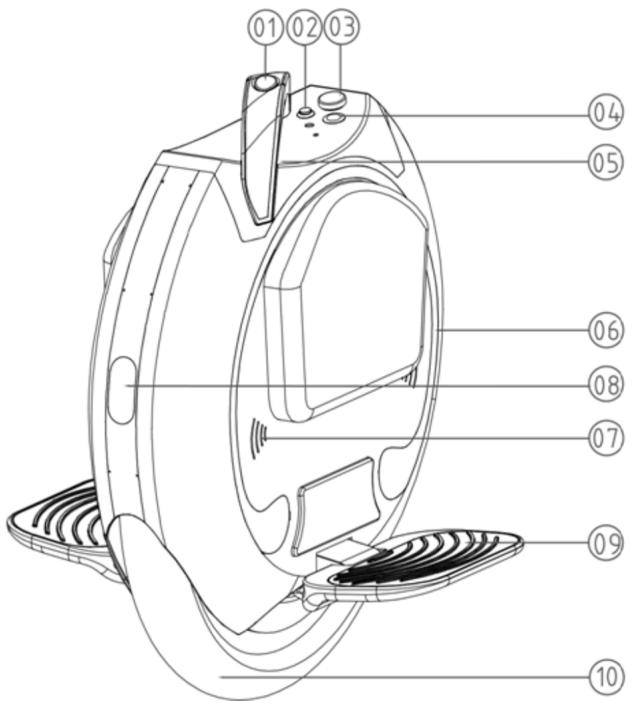
2.1 Diagram KS16 / KS16S
- Trolley bar
- Auxiliary button
- Charging port
- Power On/Off button
- Light sensor
- RGB light
- Speaker
- Front/Rear light
- Pedal
- Tire
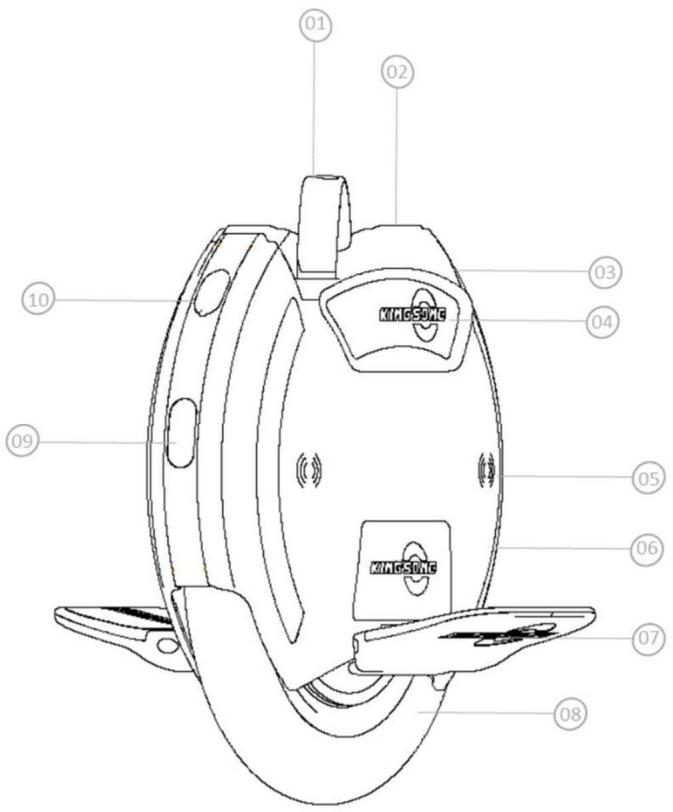
2.2 Diagram KS14D
- Trolley bar
- Power On/Off button
- Charging port
- Pad
- Speaker
- RGB light
- Pedal
- Tire
- Front/Rear light
- Port USB / Fuse
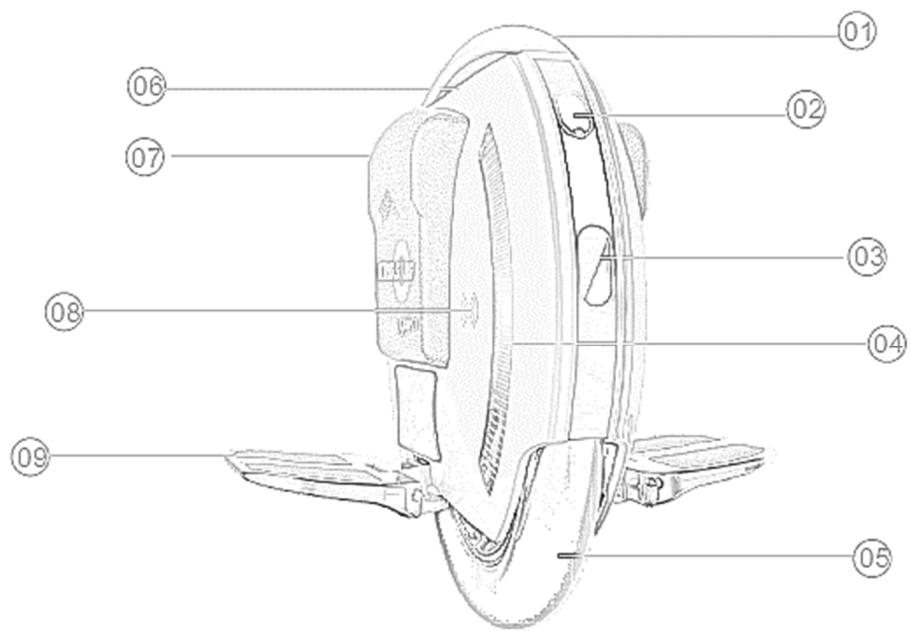
- Trolley bar
- Port USB / Fuse
- Front/Rear light
- RGB light
- Tire
- Power On/Off button
- Pad
- Speaker
- Pedal
2.4 Spécifications
| Product performance | ||||
| Model | KS-16 | KS-16S | KS-14D | KS-14S |
| Top speed | 25 km/h | |||
| Mileage | 340Wh 20-30km 420Wh 30-40km 680Wh 40-60km 840Wh 60-80km | 680Wh 50-60km 840Wh 60-80km | 340Wh 20-30km 420Wh 30-40km | 680Wh 50-60km 840Wh 60-80km |
| Climbing | ~30° | |||
| Temperature | -10°C/+60°C | |||
| Maximum upload | 100 Kg | |||
| Charger Voltage | AC 80~240 V, Output DC 67.2V、2A | |||
| Charging time | 340Wh ~2.5h 420Wh ~3.5h 680Wh ~5.5h 840Wh ~6h | 680Wh ~5.5h 840Wh ~6h | 340Wh ~2.5h 420Wh ~3.5h | 680Wh ~5.5h 840Wh ~6h |
| Rated power | 800W | 1200W | 800W | 800W |
| Wheel Size | 506 x 463 x 196mm | 506 x 463 x 196mm | 475 x 437 x 400mm | 475 x 437 x 400mm |
| Distance from ground | 120mm | 120mm | 125mm | 125mm |
| Tire Size | 16” Φ417mm | 16” Φ417mm | 14” Φ295mm | 14” Φ295mm |
| Net weight | 14.8kg-16.8kg | 17.2kg | 12.5kg | 14,5kg |
| Standard Accessory | Charger x1 ; User manuel x 1 | |||
2.5 Main functions
Light sensor: Detecting light intensity, Lights on when it is dark, otherwise, it keeps off.
- BT/ Speaker: Data BT makes users can access to riding information in app like mileage etc.; Audio BT is activated automatically when power on, you can enjoy music during riding
- Integrated trolley bar: wheels can be pushed to move rather than lift up with this integrated trolley bar, make the wheel easier to be carried on.
- USB port (only for KS-14D):Portable electrics can be charged by this USB.
- RGB light: Shinning during riding, indicates the battery level while it is on and stop.
Over side lean protection: When the lean angle of wheel exceeds 45, motor will stop running and will recovery automatically when back it vertically.
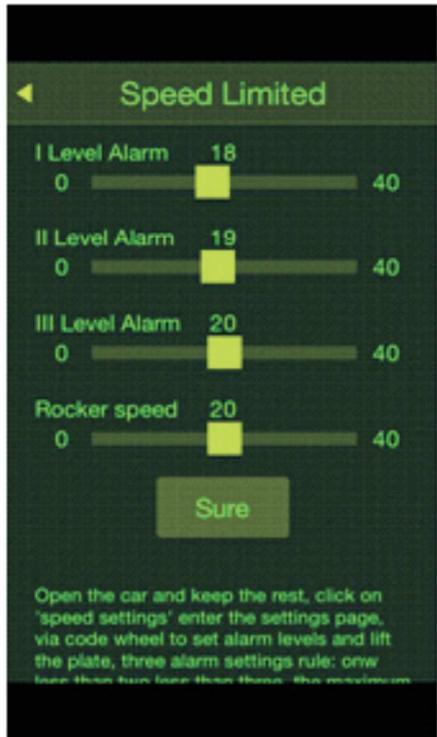
- Buzzer and voice prompt: To ensure safety, there will have voice prompt to alert rider: over-voltage, overpower, low battery etc. Voice prompt can be shut off through app, but buzzer beeps can't be.
- Tilt-back protection: When over-speed, low-battery, high temperature, the pedal will tilt back to prevent further acceleration.
EN 3 Safety
As an out-door sports and auxiliary transportation device, serious injury may occur any time during ridding, PLEASE BE CAUTIOUS ALL THE TIME, LEARN AND PRACTISE STEP BY STEP BEFORE YOU REGULARLY RIDE IT, READ THE INSTRUCTIONS THROUGHLY AND CARFULLY to control the risk.
3.1 Important
- Do not make rapid acceleration or deceleration or over incline forward or lean backwards.
- Do not use The EUC if there are any risks in accidental falls...
- When there is alarm of over power, over voltage, low battery, please decelerate at once.
Please keep in mind deeply: Most of accidents are caused by rapid acceleration or deceleration, so please operate EUC properly to protect both the device and rider.
3.2 Attention:
- Please wear helmet, gloves, elbow/knee pads or other protection garments.
- Please check the device before every ride, to make sure no parts are loose or damaged.
- When there is crowded pedestrians, please slow down to match their walking speed.
- When carry the device, please make sure the power is off.
- Do not put your fingers around the tire, to avoid injuries caused by the tire running.
- Do not ride on highways or any other prohibited places.
- Do not ride on rough or bumpy surfaces, such as muddy or pebbled roads.
- Do not ride on wet, slippery surfaces, especially snowy roads.
- Any person under 12 is STRICTLY PROHIBITED to use the EUC.
- Do not ride in bleak winter conditions.
- Countermarch riding is dangerous. Try to avoid countermarch unless safety guaranteed.
Other sudden unpredictable risks may occur during use, please ride with care. King Song electric unicycle will not be responsible for any injuries caused by improperly operations of the device.
4 Main Features
- Integrated trolley bar
Automatic light sensor.
Colorful RGB light - Front illuminating &Rear Braking Lights
- BT HiFi-Speaker: Activate the BT function of the electric unicycle, search available BT on your mobile phone, find and match the BT named "King Song", then you can play music freely after connected successfully
4.1 APP Download
For Android apk: Please access to our official website: www.kingsong.com, android apk can be download in App download section under "Support" list.
For IOS app: Please download from apple store, "kingsong-New" is the exact one.
4.2 Basic Information
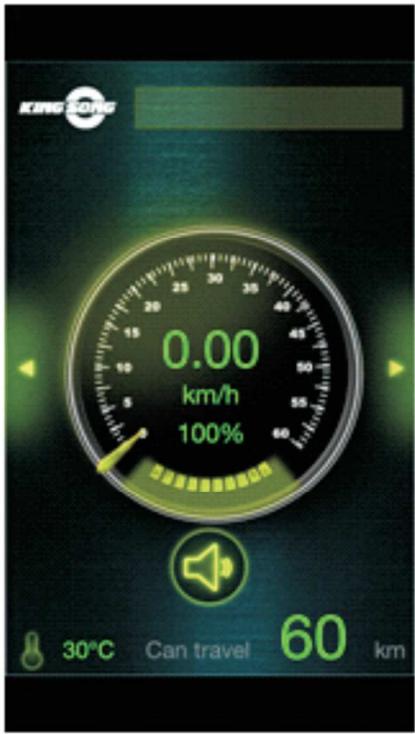
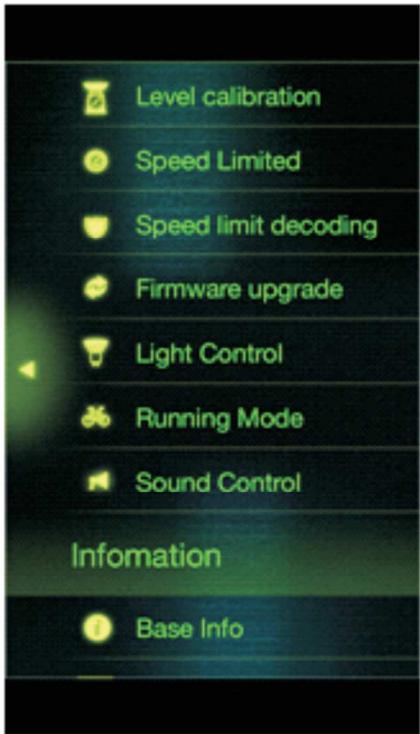
Users can check all the detailed information on APP like temperature, mileage, speed, voltage and so on, which will help you get a better idea of the electric unicycle's running status.
4.3 Riding Mode
Riding mode refers to the ration mode during start-off and breaking. Under play mode, the pedal will keep still when starting off or breaking. While, under learning mode, the pedal will slant a longing with the gravity center, that is, leaning forward for starting off, leaning backward for braking.
The main difference of the two modes lies on : learning mode is suitable for long distance travel, which provide a more comfortable riding experience, relieve the leg's fatigue. Play mode is more flexible, can satisfy the group who wants to perform skills like aerial jumping, also it can avoid pedal scraping when climbing or down steep hills.
You can select the corresponding riding mode in the "Cycling mode setting" menu. Theoretically, learning mode is more power saving than aggressive mode.
4.4 Calibration alignment
Firstly, Swicth on the EUC and keep it stand still, connect your mobile phone with the EUC, back to the "Basic Function" Menu, Select "Level Calibration", you will hear continual beeping. Then place the unicycle vertically on the ground, restart it, the calibration is done if you hear long beeping after 5 times continual beeping. If another 5 times continual beeping followings, it indicates calibration failed.
EN 5 Precautions and preparation
5.1 Precautions
Use the auxiliary belt to ensure safety driving especially at the learning level.
As beginners, can use the auxiliary belt to prevent the unicycle from scraping (Tie the belt to the handle of the EUC, step one foot on the pedal, adjust the belt to a proper length. Once losing the balance & have to jump off from the unicycle, you can drag the EUC with the belt to protect it from sudden fall & broken.
5.2 How to control the balance
The self-balancing EUC achieves balancing by versus of the gyroscope.
Rider leaning forward, the unicycle will accelerate; oppositely leaning forward, the unicycle will decelerate to keep the balance between the driver and the device itself.
Like riding bicycle, you must keep left or right balancing by your body and the riding speed Do not ride on slippery or bumpy surfaces, friction between the tire and the ground is essential to keep the balance
5.3 Practice
Find a proper ground please don't ride in the highway or anywhere there are a lot of cars and peoples, should not ride on the bumpy, gravel roads.
Warm up your body and be equipped with helmets, elbow, knee supporters if needed.
Check the battery level, shack the unicycle to avoid potential unsafe factors like looseness, abnormal sound, push the unicycle by hand to check whether it exists frictions between the tire and body shell.
Find a friend to assist you if needed.
Tie the auxiliary belt to the handle, adjust it to a proper length.
Please don't speed up and reduce suddenly in order to keep good maintenance. Don't lean too much and too fast to avoid sudden speed up & down, even rider's injury., Speeding is STRICTLY prohibited. In case of falling, give the priority to rider's body safety.
Refer to the following driving steps to start learning.
5.4 How to use
4. Start the unicycle
Grasp the handle with one hand, place the unicycle vertically on the ground, and unfold the two treadles. If the unicycle tilts either forward or backwards after power is switched on, then wait until it reverts to upright position before riding.
Press the power key to turn on the unicycle, the battery level will illuminate and buzzer will beep, then the vehicle is ready to use.
We suggest that you push the unicycle forward and backward to get an idea of the intensity of acceleration and deceleration.
5. Try to stand on the unicycle
Stand on the center of the treadle with your preferred foot, so that you can learn your gravity center to the foot. Stand up, use the foot on the treadle to control the forward and backward balancing, and lean your shank on the rubber plate tightly...
Gradually lean your gravity center to the foot on the treadle, a triangle support is required with your shank, foot and the balancing unicycle otherwise the it's very difficult to transfer the gravity center to the unicycle. If you failed to transfer the gravity center, further riding is not suggested.
6. Go forward
For novice, like riding bicycle, transfer your gravity center to the unicycle, tread the pedal forward slightly, meanwhile, kick the other foot backward slightly, the unicycle will go forward, try to keep balance during riding, and gradually put the other foot on the treadle.
For intermediate learner, pay more attention to the following two points: keep at a certain speed, control the speed through leaning forward and backward. Try to extend the riding distance by repeated exercises.
5.5 Turning
Beginner tends to rotate the upper torso to turn, to improve the efficiency, we suggest you to make it by adjusting the tilt of treadles.
6 Battery and Recharging
6.1 Temperature effect on battery
Battery power will vary with the temperature, mileage per charge will have slight difference under different temperature, following table is just for your reference.
| Temperature (℃) | -20 | -10 | 0 | 10 | 20 | 30 | 40 | 50 |
| 174Wh using ratio | 40% | 60% | 80% | 90% | 95% | 100% | 105% | 110% |
| Mileage/Charge (Km) | 8 | 12 | 16 | 18 | 19 | 20 | 21 | 22 |
6.2 Charging
The device has a built-in lithium battery, No extra battery installation is required, just charge the device when it indicates "low battery".
Plug in the power source after inserting the charger plug, this can prevent potential risk to ensure a safer charger.
When the red lights turn into green, indicating the charging is completed.
If not in urgent need, please wait until charging complete before unplugging, because after charging, the protection circuit will perform flow equilibrium.
Battery level: RGB indicator is used to indicate battery level, will go off one by one with the level decreases. Please check power level before use to ensure there is enough power for the return trip.
Battery level of KS-16 and KS-16S is shown in 9 levels, corresponding battery levels are shown as following:
| Niveau RVB | 9 | 8 | 7 | 6 | 5 | 4 | 3 | 2 | 1 |
| Voltage | >64V | >62V | >60V | >59V | >58V | >56V | >54V | >52V | Clignotement |
Battery level of KS14D shown in 7 levels, corresponding battery levels are shown as following:
| Niveau RVB | 7 | 6 | 5 | 4 | 3 | 2 | 1 |
| Voltage | >64V | >62V | >59V | >57V | >54V | >52V | >50V |
EN 7 Care and Maintenance
7.1 Conservation
Don't place the unicycle in a wet condition.
If left unused for long time, recharge the battery at least once a month to avoid the battery exhausted and maintain longevity of the battery. Meanwhile, the battery can't be dismantled arbitrarily, in case of changing, please contact us, we will provide you with professional services.
Please clean the unicycle with wet cloths and detergent, gasoline, solvent or any other chemical reagent are forbidding.
Use the inflation tube to inflate the tire. Without the tube, you will not be able to pump air into the wheel. The rated tire pressure is 2.5Pa .
8 Warranty
8.1 Limited warranty
Manufacturer, Shenzhen King Song Intelligence Technology Co., Ltd warrants the EUC by following limits.
Motor, Mother board for 2 years since the item departure from factory. Battery package for 1 year since the item departure from factory.
8.2 Exclusion from warranty
Above limited warranty DOSE not include failure, damage or lose not caused item's defectives (i.e warranty only covers manufacturer defectives, Does not cover any damage, unauthorized modification, improper operation, disassembly etc...).
8.3 Aftersales service
All the aftersales service, please contact your local dealer, distributor for assistant.