
AKZ96490IX - Built-in WHIRLPOOL - Free user manual and instructions

Find the device manual for free AKZ96490IX WHIRLPOOL in PDF.

WHIRLPOOL AKZ96490IX - Built-in
📄 24 pages English EN Download 💬 AI Question 5 questions
Notice WHIRLPOOL AKZ96490IX - page 1
Pick your language and provide your email: we'll send you a specifically translated version.

User questions about AKZ96490IX WHIRLPOOL

5 questions about this device. Answer the ones you know or ask your own.

Ask a new question about this device

Your email remains private: it is only used to notify you if someone answers your question.

How to start the pyrolysis cycle of the WHIRLPOOL AKZ96490IX oven?
Frequently Asked Questions - 05/23/2026
Response Notice-Facile

Accessing Pyrolysis

Press and hold the Time button for at least 5 seconds when the oven is off to access special functions. Then use the selection knob to navigate to the PYRO function.

Starting the Cycle

Once pyrolysis is selected, you have two options:

  • Immediate Start - press to start the cycle right away
  • Delayed Start - use the knob to set a finish time or a delay before starting

Available Cycles

  • Full Cycle - intensive cleaning for very dirty ovens
  • ECO Cycle - shorter, recommended at regular intervals

Before Starting

Remove all accessories from the oven. Ensure that the burners of the stove are off. The door will automatically lock during the cycle - do not attempt to open it.

During and After the Cycle

Ventilate the room during and after the operation. Keep children and pets away from the appliance. The duration and temperature of the cycle cannot be changed.

Respond (be the first)
How to access the special functions of the WHIRLPOOL AKZ96490IX oven?
Frequently Asked Questions - 05/21/2026
Response Notice-Facile

The WHIRLPOOL AKZ96490IX oven has a menu of special functions accessible via the control panel. Here’s how to access it:

Access Steps

  1. Make sure the oven is completely off
  2. Press and hold the Time button for at least 5 seconds
  3. The settings menu appears on the screen
  4. Use the selector knob (6TH SENSE) to navigate through the available options
  5. Press the knob to confirm your choice
  6. To return to the previous menu, use the Back button

Available Special Functions

Once the special functions menu is open, you can access:

  • Pyrolytic cleaning (full or ECO cycles)
  • Temperature probe for meat
  • Delayed start and end cooking programming
  • Control lock

Display System

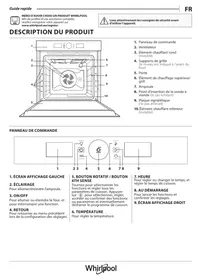
Your oven has two distinct screens: the left screen displays the main functions, while the right screen shows the sub-functions and settings. This allows you to easily navigate through the available modes and settings.

Respond (be the first)
How to effectively clean the WHIRLPOOL AKZ96490IX built-in oven?
Frequently Asked Questions - 02/01/2026
Response Notice-Facile

To effectively clean your WHIRLPOOL AKZ96490IX built-in oven, follow these simple and safe steps:

1. Preparation

  • Make sure the oven is turned off and completely cool.
  • Unplug the appliance to avoid any electrical risk.

2. Removing accessories

  • Remove all racks, trays, and other removable accessories.
  • Wash them by hand with soapy hot water or, if compatible, in the dishwasher.

3. Cleaning the inside of the oven

  • Avoid cleaning the heating elements directly.
  • Use a special oven cleaner or prepare a paste made of baking soda and water.
  • Apply the paste to the interior walls and let it sit for 15 to 30 minutes.
  • Then wipe with a damp non-abrasive sponge to remove residues.

4. Cleaning the door

  • For the glass, use a glass cleaner or a mixture of white vinegar and water.
  • Wipe with a soft cloth to avoid scratches.

5. Cleaning the exterior

  • Use a soft cloth and a product suitable for stainless steel surfaces.
  • Avoid abrasive products that could damage the finish.

6. Reassembly and checking

  • Replace the accessories once they are clean and dry.
  • Plug the oven back in and check its operation.

These tips will help you keep your WHIRLPOOL AKZ96490IX oven clean and in good condition for optimal use.

Respond (be the first)
How to remove the door of the built-in Whirlpool AKZ96490IX oven?
Frequently Asked Questions - 01/17/2026
Response Notice-Facile

To remove the door of the built-in Whirlpool AKZ96490IX oven, start by fully opening the door and then lower the latches located on each side of the door until they are completely unlocked. This is an essential step that releases the hinges.

Close the door as much as possible while holding it firmly with both hands. Important: do not hold it by the handle, as this would not provide sufficient support and could damage the door. Hold it firmly on both sides of the structure.

While keeping it closed, pull the door upwards while gradually continuing to close it until it completely releases from its supports. Once removed, gently lay the door on its side resting it on a soft surface to avoid any risk of scratching or breaking.

Keep the latches in a safe place as you will need them to reinstall the door correctly. To put the door back in place, lower the latches to their original position ensuring they click into place completely with a slight 'click'. Then check that the door is properly aligned with the control panel before using it normally.

Respond (be the first)
How to set the temperature on the WHIRLPOOL AKZ96490IX built-in oven?
Frequently Asked Questions - 12/24/2025
Response Notice-Facile

To set the temperature of your WHIRLPOOL AKZ96490IX built-in oven, follow these simple steps:

  1. Turn on the oven by pressing the power button.
  2. Select the desired cooking mode using the selection button (for example, fan heat, grill, etc.).
  3. Set the temperature by turning or pressing the temperature adjustment button until the desired value appears on the screen.
  4. Confirm the setting if necessary, either by pressing a confirmation button or waiting a few seconds for the setting to be automatically accepted.
  5. Wait during preheating: the oven will start heating until it reaches the selected temperature. The preheating indicator will turn off to let you know that the temperature has been reached and you can insert your dishes.

These steps will allow you to easily set the temperature for your cooking with this WHIRLPOOL oven model.

Respond (be the first)

Download the instructions for your Built-in in PDF format for free! Find your manual AKZ96490IX - WHIRLPOOL and take your electronic device back in hand. On this page are published all the documents necessary for the use of your device. AKZ96490IX by WHIRLPOOL.

USER MANUAL AKZ96490IX WHIRLPOOL

Manual assistant
Powered by Anthropic
Waiting for your message
Product information

Brand : WHIRLPOOL

Model : AKZ96490IX

Category : Built-in