Frequently Asked Questions - VP-D93I SAMSUNG
How to insert a Mini DV cassette into the camcorder?
Slide the TAPE EJECT button forward to open the compartment. Insert the cassette with the transparent side facing out and the protection tab facing up, then gently press on the area marked PUSH until it clicks. Close the cover until it 'clicks'.
How to charge the lithium-ion battery pack?
Attach the battery to the camcorder, connect the AC adapter to the power cord and then to the DC jack of the camcorder. Turn off the device: the charging indicator blinks. Charging is complete when the indicator stays lit without blinking. Charging time varies by battery model.
How to use the built-in flash?
Set the camcorder to CAM or M.REC. Press MENU, select CAMERA then FLASH SELECT. Choose the desired mode: AUTO, forced flash, or red-eye reduction. Confirm with MENU SELECTOR. Note: the flash does not work with certain modes (Program AE, Slow Shutter, etc.).
How to perform audio dubbing on a pre-recorded tape?
Set the switch to PLAYER. Insert the tape recorded in SP mode. Optionally connect an external microphone. Set AV IN/OUT to AV IN in the A/V menu. Locate the scene with playback buttons, press A.DUB on the remote control, then press PLAY to add sound. Dubbing is not possible in LP or 16-bit mode.
How to transfer still images to a PC?
Use the supplied USB cable. Connect the camcorder to the PC (mode selector on MEMORY STICK, switch on M.PLAY). Install the included DVC Media 6.0 software from the CD. Transfer can be done via USB or DV (IEEE1394). For MJPEG files, use a player like Windows Media Player.
What to do in case of condensation (DEW display)?
Eject the cassette, turn off the camcorder, remove the battery and leave the device in a dry place at room temperature for at least two hours. Do not use the device until the DEW symbol disappears.
How to clean the video heads?
Set the switch to PLAYER. Insert a dry type cleaning cassette. Press PLAY for 10 seconds then STOP. Check image quality with a normal cassette. Repeat if necessary. Do not use a wet cassette.
How to use the EASY (beginner) mode?
Set the switch to CAM. Press the EASY.Q button. The EASY.Q indicator appears. All settings are automatic. Press START/STOP to record. To exit EASY mode, press EASY.Q again while in standby.
Why is the image blurry during autofocus?
Autofocus may be difficult in certain conditions: subjects with high contrast, through glass, in snow or fog. Then use manual focus: press MF/AF to switch to M.FOCUS and turn the MF dial until the image is sharp.
How to protect a cassette from accidental erasure?
Slide the protection tab on the side of the cassette to the SAVE position to uncover the opening. To re-record, push the tab back to the REC position. A protected cassette cannot be recorded or erased.
USER MANUAL VP-D93I SAMSUNG
AF Auto Focus
CCD Charge Coupled Device
LCD Liquid Crystal Display
Mode d'emploi
(VP-D93i/D97i/D99i unquiemet) 77
Interface USB 78
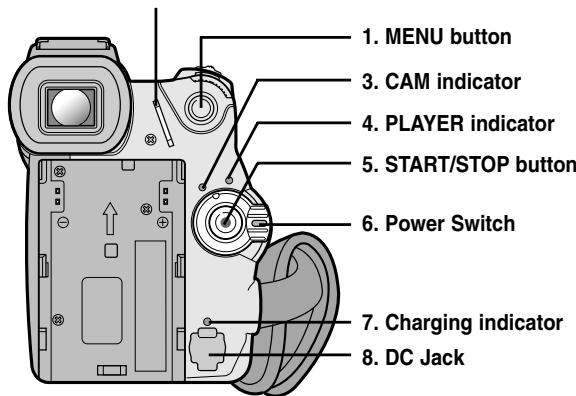
2. Hook for shoulder strap

10. Tripod receptacle
| MENU | SOTTOMENU | Modalityà disponibili |
| CAMERA | PLAYER | Memory REC | Memory PLAY |
| INITIAL | CLOCK SET | ✓ | ✓ | ✓ | ✓ |
| WL.REMOTE | ✓ | ✓ | ✓ | ✓ |
| BEEP SOUND | ✓ | ✓ | ✓ | ✓ |
| SHUTTER SOUND | ✓ | ✓ | ✓ | |
| DEMONSTRATION | ✓ | | | |
| CAMERA | PROGRAM AE | ✓ | | ✓ | |
| WHT. BALANCE | ✓ | | | |
| D. ZOOM | ✓ | | | |
| EIS | ✓ | | | |
| DSE SELECT | ✓ | | | |
| MEMORY MIX | ✓ | | | |
| FLASH SELECT | ✓ | | ✓ | |
| A/V | REC MODE | ✓ | ✓ | | |
| PHOTO SEARCH | ✓ | | | |
| PHOTO COPY | | ✓ | | |
| AUDIO MODE | ✓ | ✓ | | |
| AUDIO SELECT | | ✓ | | |
| WIND CUT | ✓ | ✓ | | |
| AV IN/OUT | ✓ | ✓ | | |
| (solo VP-D93i/D97i/D99i) | | | | |
| MEMORY | PHOTO QUALITY | | ✓ | ✓ | |
| IMAGE SIZE | | ✓ | ✓ | |
| MJPEG SIZE | | ✓ | ✓ | |
| CONTINUOUS SHOT | | ✓ | ✓ | |
| PRINT MARK | | | | ✓ |
| PROTECT | | | | ✓ |
| FILE NO. | | ✓ | ✓ | |
| DELETE | | | | ✓ |
| FORMAT | | | | ✓ |
| VIEWER | LCD ADJUST | ✓ | ✓ | ✓ | ✓ |
| DATE/TIME | ✓ | ✓ | ✓ | ✓ |
| TV DISPLAY | ✓ | ✓ | ✓ | ✓ |
| INITIAL | OCCLOCK SET |
| CAMERA | WL,REMOTE |
| A/V | OBEEP SOUND |
| MEMORY | O SHUT SOUND |
| VIEWER | O DEMO |
CAM MODE
| INITIAL SET |
| CLOCK SET |
| •WLREMOTE • |
| •BEEP SOUND • |
| •SHUTTERT SOUND • |
| •DEMONSTRATION • |
- Affichage (TV DISPLAY)

Press the FADE button
Gradual appearance

a. FADE OUT
b. FADE IN

Gradual disappearance
Release the FADE button
a. FADE OUT
(ca. 4 secondi)
b. FADE IN
(ca. 4 secondi)
MEMORY SET
CONTINUOUS SHOT

SPLIT 6
SPLIT 9

OIMAGE SIZE 1280X960
OMJPEG SIZE 320X240
CONTINUOUS SHOT
PRINT MARK 000
PROTECT
OFILE NUMBER SERIES
DELETE
FORMAT
Nota
INDICE ANALITICOINDEX
-M-
Marquage des impressions (PRINT MARK) 96