
VLUU L201 - Camera SAMSUNG - Free user manual and instructions
Find the device manual for free VLUU L201 SAMSUNG in PDF.



| Product type | Compact digital camera |
| Resolution | 10.2 effective megapixels (1/2.33" CCD sensor) |
| Lens | 3x optical zoom, 35-105 mm focal length (35 mm equivalent), aperture F3.0 (W) - F5.6 (T) |
| Digital zoom | Up to 5x |
| LCD screen | 2.7" color TFT, 230,000 dots |
| Focus | Automatic TTL (multi-zone, center, face detection) |
| Shutter speed | 1 to 1/1500 sec (manual: 8 to 1/1500 sec) |
| ISO sensitivity | Auto, 80, 100, 200, 400, 800, 1600 |
| Flash | Built-in, modes: auto, red-eye reduction, slow sync, off; range 0.4-3.0 m (W), 0.5-2.5 m (T) |
| Shooting modes | Auto, Program, Manual, DIS, Photo Help, Portrait, Scene (10 modes: Night, Children, Landscape, Close-up, Text, Sunset, Dawn, Backlight, Fireworks, Beach & Snow) |
| Video | 640x480 or 320x240, 30/15 fps, with or without sound, max 2 hours |
| Storage | Internal memory 16 MB, SD/SDHC/MMC card (SD up to 2 GB, SDHC up to 8 GB, MMC up to 1 GB) |
| File formats | Image: JPEG (DCF, EXIF 2.2, DPOF 1.1); Video: AVI (MJPEG); Audio: WAV |
| Power source | Rechargeable Li-ion battery SLB-0837(B) 3.7 V, 800 mAh; charger SAC-47 |
| Interface | USB 2.0, video output NTSC/PAL, DC input 20-pin |
| Weight | Approx. 110 g (without battery and card) |
| Operating temperature | 0 °C to 40 °C |
| Operating humidity | 5% to 85% |
| Safety | Do not use near flammable products; avoid contact with flash; keep out of reach of children |
| Maintenance | Clean with a soft cloth; avoid moisture, extreme temperatures and shocks |
Frequently Asked Questions - VLUU L201 SAMSUNG
User questions about VLUU L201 SAMSUNG
0 question about this device. Answer the ones you know or ask your own.
Ask a new question about this device
Download the instructions for your Camera in PDF format for free! Find your manual VLUU L201 - SAMSUNG and take your electronic device back in hand. On this page are published all the documents necessary for the use of your device. VLUU L201 by SAMSUNG.
USER MANUAL VLUU L201 SAMSUNG
Thank you for buying a Samsung Camera.
This manual has basic instructions for quick and easy picture taking.
For more information, refer to the user manual included in the supplied CD-Rom.
Contents
Getting to know your camera 1
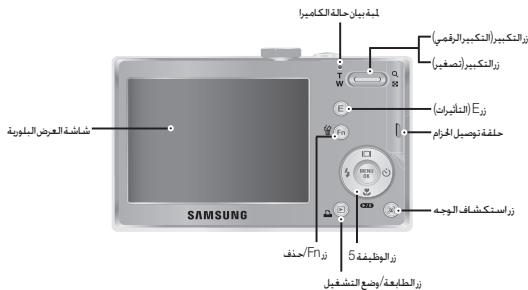
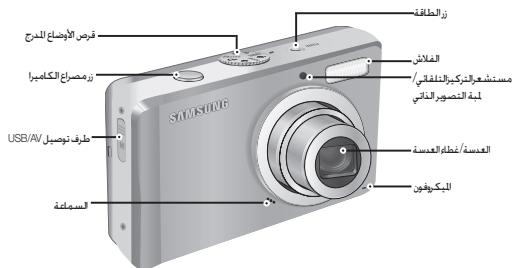
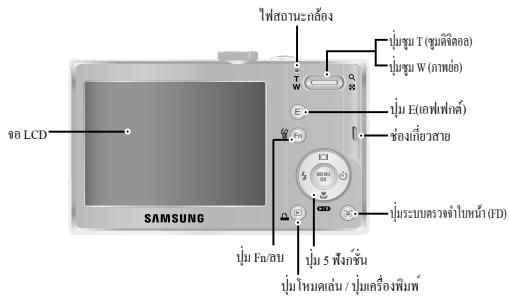
Identification of features / Contents of camera 4
Battery life & Number of shots (Recording time) 5
LCD monitor indicator 6
Mode dial 7
Taking a picture 8
Playing back / Deleting images 9
Downloading images 10
Specifications 11
Getting to know your camera
- Microsoft, Windows and Windows logo are registered trademarks of Microsoft Corporation incorporated in the United States and/or other countries
- All brand and product names appearing in this manual are registered trademarks of their respective companies.
- The contents and illustrations of this manual are subject to change without prior notice for upgrading the camera functions.
Refer to the user manual included on the Software CD for more information. - PDF documents of user manual are included in the Software CD-ROM supplied with this camera. Search the PDF files with Windows explorer. Before opening the PDF files, you must install the Adobe Reader included in the Software CD-ROM.
Getting to know your camera
DANGER
DANGER indicates an imminently hazardous situation which, if not avoided, will result in death or serious injury.

Do not attempt to modify this camera in any way. To do so may result in fire, injury, electric shock or severe damage to you or your camera. Internal inspection, maintenance and repairs should only be carried out by your dealer or Samsung Camera Service centre.

Should any form of liquid or a foreign object enter the camera, do not use it. Switch off the camera, and then disconnect the power source. You must contact your dealer or Samsung Camera Service centre. Do not continue to use the camera as this may cause a fire or electric shock.

Please do not use this product in close proximity to flammable or explosive gases, as this could increase the risk of explosion.

Do not insert or drop metallic or inflammable foreign objects into the camera through access points e.g. the memory card slot and battery chamber. This may cause a fire or electric shock.

Do not operate this camera with wet hands. This could pose a risk of electric shock.
WARNING
WARNING indicates a potentially hazardous situation which, if not avoided, could result in death or serious injury.

Do not use the flash in close proximity to people or animals. Positioning the flash too close to your subject's eyes may cause eyesight damage.

For safety reasons keep this product and accessories out of reach of children or animals to prevent accidents e.g.:
- Swallowing battery or small camera accessories. If an accident should occur, please consult a doctor immediately.
- There is the possibility of injury from the camera's moving parts.

Battery and camera may become hot during prolonged use and it may result in camera malfunction. Should this be the case, allow the camera to sit idle for a few minutes to allow it time to cool.

Do not leave this camera in places subject to extremely high temperatures, such as a sealed vehicle, direct sunlight or other places of extreme variances in temperature. Exposure to extreme temperatures may adversely affect the camera's internal components and could cause a fire.

When in use, do not cover the camera or Charger. This may cause heat to build up and distort the camera body or cause a fire. Always use the camera and its accessories in a well-ventilated area.
Getting to know your camera
CAUTION
CAUTION indicates a potentially hazardous situation which, if not avoided, may result in a minor or moderate injury.

Remove the battery when not planning to use the camera for a long period of time.
Otherwise the battery may leak corrosive electrolyte and permanently damage the camera's components.

Leaking, overheating, or damaged battery could result in fire or injury.
- Use battery with the correct specification for the camera.
- Do not short circuit, heat or dispose of battery in fire.
- Do not insert the battery with the polarities reversed.

Do not fire the flash while it is in contact with hands or objects. Do not touch the flash after using it continuously. It may cause burns.

Take care not to touch the lens or lens cover to avoid taking an unclear image and possibly causing camera malfunction.

Credit cards may be demagnetized if left near a camera case. Avoid leaving magnetic strip cards near the case.

Do not insert the memory card the wrong way round.

Never the connect the 20 pin connector to a USB port of a PC. Doing so is highly likely to cause a computer malfunction.

Be sure to format the memory card if you are using a newly purchased memory for the first time, if it contains data that the camera cannot recognise, or if it contains images captured with a different camera.

Before an important event or going on a trip, you should check the camera condition. Samsung cannot be held responsible for camera malfunctions.
Identification of features / Contents of camera
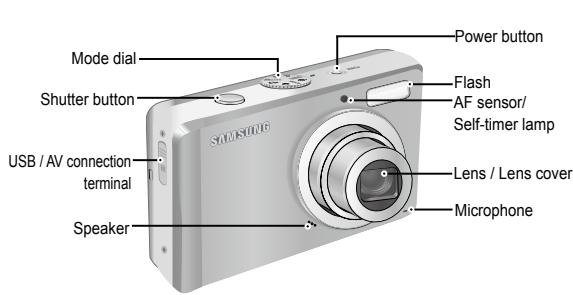
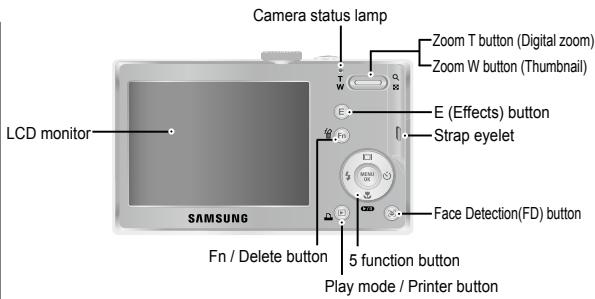
Included items
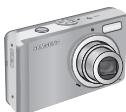
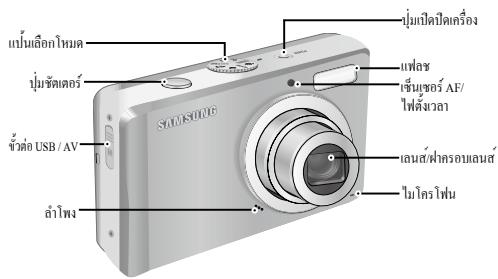
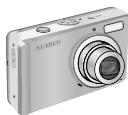
Camera

Rechargeable battery (SLB-0837(B))

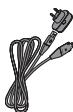
AC adapter (SAC-47)/USB cable (SUC-C3)

AV Cable

Camera strap

Optional items
SD/SDHC memory card/MMC

Camera case
User manual, Product warranty

Software CD
※ Please check that you have the correct contents before using this product. The contents can vary depending on the sales region. To buy the optional equipment, contact your nearest Samsung dealer or Samsung service centre.
Battery life & Number of shots (Recording time)
Number of images and battery life: Using the SLB-0837(B)
| Battery life / Number of images | Conditions | |
| Still image | Approx. 120 MIN / Approx. 240 shots | Using the fully charged battery, Auto mode, 10M image size, Fine image quality, Shot to shot interval: 30Sec. Changing the zoom position between the Wide and the Tele after every shot. Using the flash on every second shot. Using the camera for 5 minutes and then powering it off for 1 minute. |
| Movie | Approx. 120 MIN | Using the fully charged battery 640x480 image size 30fps frame rate |
These figures are measured under Samsung's standard conditions and shooting conditions and may vary depending on the user's methods.
- When using a 1GB SD memory, the specified shooting capacity will be as follows. These figures are approximate as image capacities can be affected by variables such as subject matter and memory card type.
| Recorded image size | Super Fine | Fine | Normal | 30 FPS | 15 FPS | |
| Still image | 10 | About 219 | About 304 | About 507 | - | - |
| 9 | About 241 | About 341 | About 550 | - | - | |
| 7 | About 282 | About 395 | About 619 | - | - | |
| 6 | About 290 | About 412 | About 660 | - | - | |
| 5 | About 366 | About 507 | About 825 | - | - | |
| 4 | About 1089 | About 1458 | About 2204 | - | - | |
| 3 | About 1907 | About 2204 | About 2419 | - | - | |
| *Movie clip | 240 | - | - | - | About 14'15" | About 28'02" |
| 220 | - | - | - | About 51'32" | About 01:41'47" | |
The zoom button doesn't use during the movie recording. The recording times can be changed by the zoom operation. You can record videos of up to 4GB or 2hours each.
LCD monitor indicator
The LCD monitor displays information about the shooting functions and selections.
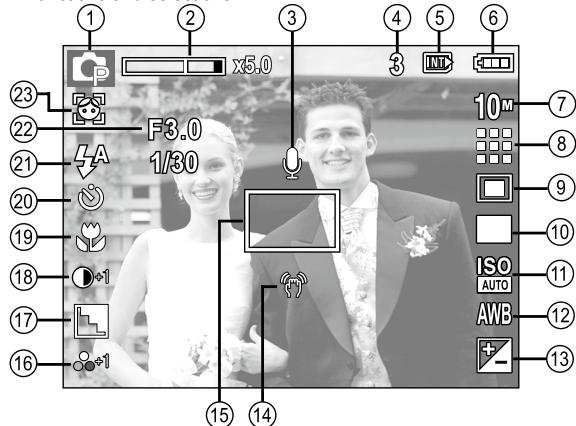
[Image & Full Status]
| No. | Description | Icons |
| 1 | Recording mode |  |
| 2 | Optical / Digital Zoom bar / Digital Zoom rate | \( \square \times {5.0} \) |
| 3 | Voice Memo / Without Sound |  |
| 4 | Number of available shots remaining | 3 |
| Remaining time | 00:00:00 |
| No. | Description | Icons |
| 5 | Memory card icon / Internal memory icon | / INTX |
| 6 | Battery | 11 11 11 11 |
| 7 | Image Size | 10x12x7x5x4x3x2x10 |
| 8 | Image Quality / Frame Rate | / 30 15 |
| 9 | Metering | # 1 1 1 1 1 |
| 10 | Drive mode | AEB |
| 11 | ISO | ISO ISO ISO ISO ISO ISO ISO ISO ISO ISO ISO ISO ISO ISO ISO ISO ISO ISO ISO ISO ISO ISO ISO ISO ISO ISO ISO ISO ISO ISO ISO ISO ISO ISO ISO ISO ISO ISO ISO ISO ISO ISO ISO ISO ISO ISO ISO ISO ISO ISO ISO ISO ISO ISO ISO ISO ISO ISO ISO ISO ISO ISO ISO ISO ISO ISO ISO ISO ISO ISO ISO ISO ISO ISO ISO ISO ISO ISO ISO ISO ISO ISO ISO ISO ISO ISO ISO ISO ISO ISO ISO ISO ISO ISO ISO ISO ISO ISO ISO ISO ISOISO ISO ISO ISO ISO ISO ISO ISO ISO ISO ISO ISO ISO ISO ISO ISO ISO ISO ISO ISO ISO ISO ISO ISO ISO ISO ISO ISO ISO ISO ISO ISO ISO ISO ISO ISO ISO ISO ISO ISO ISO ISO ISO ISO ISO ISO ISO ISO ISO ISO ISO ISO ISO ISO ISO ISO ISO ISO ISO ISO ISO ISO ISO ISO ISO ISO ISO ISO ISO ISO ISO ISO ISO ISO ISO ISO ISO ISO ISO ISO ISO ISO ISO ISO ISO ISO ISO ISO ISO ISO ISO ISO ISO ISO ISO ISO ISO ISO ISOISOISO ISO ISO ISO ISO ISO ISO ISO ISO ISO ISO ISO ISO ISO ISO ISO ISO ISO ISO ISO ISO ISO ISO ISO ISO ISO ISO ISO ISO ISO ISO ISO ISO ISO ISO ISO ISO ISO ISO ISO ISO ISO ISO ISO ISO ISO ISO ISO ISO ISO ISO ISO ISO ISO ISO ISO ISO ISO ISO ISO ISO ISO ISO ISO ISO ISO ISO ISO ISO ISO ISO ISO ISO ISO ISO ISO ISO ISO ISO ISO ISO ISO ISO ISO ISO ISO ISO ISO ISO ISO ISO ISO ISO ISO ISO ISO ISO ISO ISO ☐ |
| 12 | White Balance | AWB |
| 13 | Exposure compensation | + |
| 14 | Camera shake Warning | (1) |
| 15 | Auto Focus Frame | □ |
| 16 | Saturation / Color | ○-2 ○-1 ○+1 ○+2 /○S S R G P C G |
| 17 | Sharpness | ○ |
| 18 | Contrast | ○-2 ○-1 ○+1 ○+2 |
| 19 | Macro | |
| 20 | Self-timer | ○ 2S ○ (心) |
| 21 | Flash | 4A 4S 4S 4S 4S 4S 4S 4S 4S 4S 4S 4S 4S 4S 4S 4S 4S 4S 4S 4S 4S 4S 4S 4S 4S 4S 4S 4S 4S 4S 4S 4S 4S 4S 4S |
| 22 | Aperture Value / Shutter Speed | F3.0, 1/30 |
| 23 | Face Detection / Self Portrait | / |
■ You can select a desired camera mode by using the Mode dial on the top of the camera.

AUTO
Selects this mode for quick and easy picture taking with minimal user interaction.
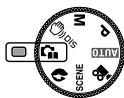
PHOTO HELP GUIDE
Helps the user to learn the correct picture taking method. This includes solutions for potential problems that may occur, and enables the user to practice shooting.
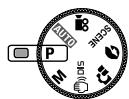
PROGRAM
Selecting the program mode will configure the camera with optimal settings. You can still manually configure all functions except the aperture value and shutter speed.
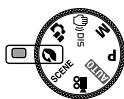
PORTRAIT
Use this menu to take a picture of a person.

MANUAL
You can manually configure all functions with the aperture value and shutter speed.
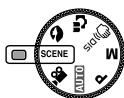
SCENE
Use the menu to easily configure optimal settings for a variety of shooting situations.

DIS
This mode will reduce the effect of camera shake and help you get a well-exposed image in dim conditions.

MOVIE CLIP
A movie clip can be recorded for as long as the available recording time.
Taking a picture
How to take a picture
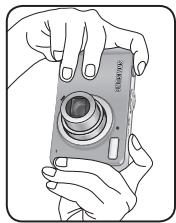
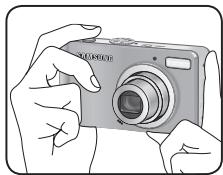
- Turn on the camera and select a camera mode by rotating the mode dial.
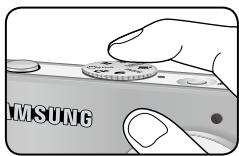
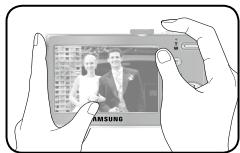
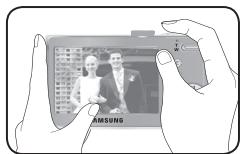
- Hold the camera as shown
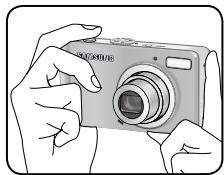
- Confirm the composition
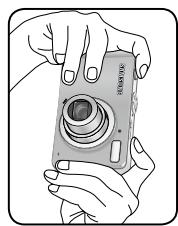
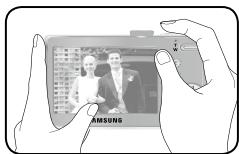
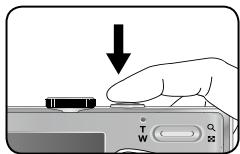
- Take a picture.
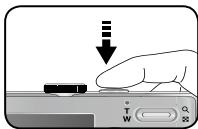
Pressing halfway down Focus and Flash status are checked.
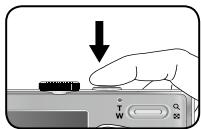
Pressing fully Image is taken
How to record a movie
Rotate the Mode dial and select ( ).
- Confirm the composition
- Start the recording Press the Shutter button and the recording starts and press the Shutter button again to stop the recording.
Playingback the images
- The last image stored on the memory is displayed.
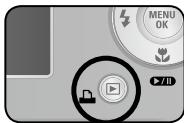
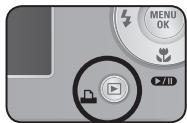
Press the play button (回)。
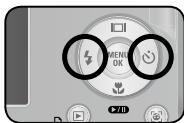
Select an image that you want to play back by pressing the Left/Right button
※Manner mode: Pressing the play mode button for more than 3 seconds changes the buzzer and start-up sound setting to OFF, even though you may have set these to ON.
-
Deleting images
-
This deletes images stored on the memory card.
-
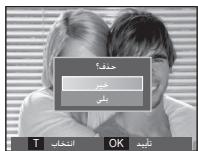
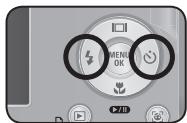
Select an image that you want to delete by pressing the Left / Right button and press the DELETE ( 合 ) button.
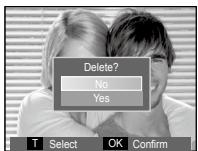
[Single Image]
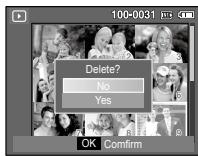
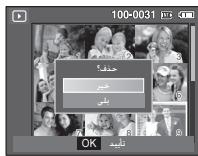
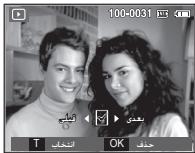
[Thumbnail Image]
-
To add images to delete, press the T button.
-
Left / Right button : Selects images
- T button : Checks for deletion
- OK button : deletes the selected images.
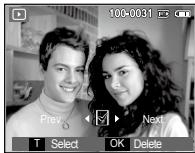
-
Select the submenu values by pressing the Up / Down button and then press the OK button.
-
If [No] is selected : cancels "Delete Image".
- If [Yes] is selected : deletes the selected images.
Downloading images
| For Windows | For Macintosh | |
| USB Connection Specifications | PC with processor better than Pentium III 500MHz (Pentium 800MHz recommended) Windows 2000 / XP / Vista Minimum 256MB RAM (Over 512MB recommended) | Power Mac G3 or later Mac OS 10.3 or later Minimum 256MB RAM (Over 512MB recommended) |
| Software Support Specifications | 200MB of available hard disk space (Over 1GB recommend) 1024x768 pixels, 16bit color display compatible monitor (24bit color display recommended) Microsoft DirectX 9.0C | - |
PC connection mode
- Install the supplied Software.

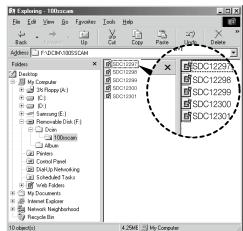
- Download the images
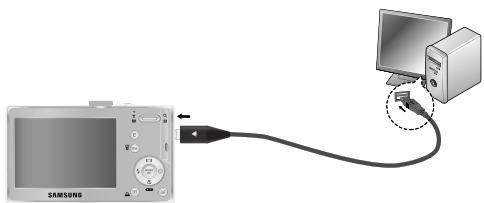
- Connect the camera and Computer with supplied USB cable and download the image on your computer to save them.
Specifications
Image Sensor -Type:1/2.33"CCD
- Effective Pixel : Approx. 10.2 Mega-pixel
- Total Pixel : Approx. 10.3 Mega-pixel
Lens
- Focal Length : SAMSUNG Lens f = 6.3 ~ 18.9mm (35mm film equivalent : 35 ~ 105mm)
-F No.: F3.0(W) ~ F5.6(T) - Digital Zoom : -Still Image mode :1.0X ~ 5.0X -Play mode : 1.0X ~ 11.4X (depends on image size)
LCD Monitor
- 2.7" color TFT LCD (230,000 dots)
Focusing
- Type: TTL auto focus (Multi AF, Center AF, Face Detection AF)
- Range
| Normal | Macro | Auto Macro | |
| Wide | 80cm ~ Infinity | 10cm ~ 80cm | 10cm ~ Infinity |
| Tele | 50cm ~ 80cm | 50cm ~ Infinity |
Shutter
- Control: Program AE, Manual Exposure, Face Detection AE
-Metering:Multi,Spot,Center-Weighted - Compensation: ±2EV (1/3EV steps)
-ISO:Auto,80,100,200,400,800,1600
Flash
- Modes : Auto, Auto & Red-eye reduction, Fill-in flash, Slow sync, Flash off, Red-eye Fix
- Range: Wide: 0.4m ~ 3.0m Tele: 0.5m ~ 2.5m
- Recharging Time : Approx. 4 sec
Sharpness
- Soft+, Soft, Normal, Vivid, Vivid+
Color Effect
- Normal, B&W, Sepia, Red, Green, Blue, Negative, Custom Color
White Balance
- Auto, Daylight, Cloudy, Fluorescent_H, Fluorescent_L, Tungsten, Custom
Voice Recording
- Voice Recording (max. 10 hours)
- Voice Memo in Still Image (max. 10 sec.)
Date Imprinting
- Date, Date & Time, Off (user selectable)
Shooting
- Still Image
Mode: Auto, Program, Manual, DIS, Photo Help Guide, Portrait, Scene
- Scene : Nightscene, Children, Landscape, Close-up, Text, Sunset, Dawn, Backlight, Firework, Beach & Snow
- Shooting : Single, Continuous, AEB, Motion Capture
Self-timer:10sec.,2sec.,Double, Motion Timer
Specifications
| - Movie Clip ·With Audio or without Audio user selectable, recording time : max 2 hours) ·Size : 640x480, 320x240 ·Frame rate : 30 fps, 15 fps ·3X Optical Zoom and Mute in Zooming ·Movie Editing (Embedded): Pause during recording, Still Image Capture | ||||||
| Storage | - Media ·Internal memory : About 16MB flash memory ·External Memory (Optional): MMC card (Up to 1GB guaranteed) SD card (Up to 2GB guaranteed) SDHC card (Up to 8GB guaranteed) - File Format ·Still Image : JPEG (DCF), EXIF 2.2, DPOF 1.1, PictBridge 1.0 ·Movie Clip : AVI (MJPEG) ·Audio : WAV - Image Size | |||||
| 10" | 9" | 7" | 7" | 5" | 2" | 1" |
| 3648X 2736 | 3648X 2432 | 3648X 2056 | 3072X 2304 | 2592X 1944 | 1920X 1080 | 1024X 768 |
- Capacity (1GB Size)
| 10° | 9° | 7° | 5° | 2° | 1° | |
| Super Fine | About 219 | About 241 | About 282 | About 290 | About 366 | About 1089 |
| Fine | About 304 | About 341 | About 395 | About 412 | About 507 | About 1458 |
| Normal | About 507 | About 550 | About 619 | About 660 | About 825 | About 2204 |
| ※ These figures are measured under Samsung standard conditions and may vary depending on shooting conditions and camera settings. | ||||||
| “E” Button | - Effect : Color, Image Adjust (Sharpness, Contrast, Saturation) - Editing : Resize, Rotate, Color, ACB, Red Eye Fix, Image Adjust (Brightness, Contrast, Saturation) | |||||
| Image Play | - Type : Single image, Thumbsails, Multi slide show, Movie Clip | |||||
| Interface | - Digital output connector : USB 2.0 - Audio : Mono - Video output : NTSC, PAL (user selectable) - DC power input connector : 20 pin | |||||
| Power Source | - Rechargeable battery : SLB-0837(B),3.7V (800mAh) - Charger: SAC-47 ※ Included battery may vary depending on sales region. | |||||
Specifications
Dimensions (WxHxD) - 90.2 X 58 X 19.3mm (excluding protrusions)
Weight -Approx.110g (without batteries and card)
Operating Temperature - 0 40^
Operating Humidity -5\~85%
Software - Samsung Master, Adobe Reader
※ Specifications are subject to change without prior notice.
※All trademarks are the property of their respective owners.
Correct disposal of batteries in this product

Correct disposal of batteries in this product (Applicable in the European Union and other European countries with separate battery return systems.)
This marking on the battery, manual or packaging indicates that the batteries in this product should not be disposed of with other household waste at the end of their working life. Where marked, the chemical symbols Hg, Cd or Pb indicate that the battery contains mercury, cadmium or lead above the reference levels in EC Directive 2006/66. If batteries are not properly disposed of, these substances can cause harm to human health or the environment.
To protect natural resources and to promote material reuse, please separate batteries from other types of waste and recycle them through your local, free battery return system.
The rechargeable battery incorporated in this product is not user replaceable. For information on its replacement, please contact your service provider.
Correct Disposal of This Product

Correct Disposal of This Product (Waste Electrical & Electronic Equipment) (Applicable in the European Union and other European countries with separate collection systems)
This marking shown on the product or its literature, indicates that it should not be disposed with other household waste at the end of its working life. To prevent possible harm to the environment or human health from uncontrolled waste disposal, please separate this from other types of waste and recycle it responsibly to promote the sustainable re-use of material resources. Household users should contact either the retailer where they purchased this product, or their local government office, for details of where and how they can take this item for environmentally safe recycling. Business users should contact their supplier and check the terms and conditions of the purchase contract. This product should not be mixed with other commercial waste for disposal.

Samsung Techwin cares for the environment at all product manufacturing stages to preserve the environment, and is taking a number of steps to provide customers with more environment-friendly products. The Eco mark represents Samsung Techwin's will to create environment-friendly products, and indicates that the product satisfies the EU RoHS Directive.
MEMO

battery rechargeable (SLB-0837(B))
Dimensions (L x H x P) - 90,2 X 58 X 19,3mm
| Görüntü Sensörü | - Tür: 1/2,33" CCD - Etkin Piksel: Yaklaşık 10,2 Megapiksel - Toplam Piksel: Yaklaşık 10,3 Megapiksel | ||
| Mercek | - Odak Uzakkışi: SAMSUNG Merçmiş f = 6,3 ~ 18,9mm (35 mm film dengi: 35 ~ 105mm) - F No.: F3,0(W) ~ F5,6(T) - Dijital Yakinlaşkırmı: Düryanın Görüntü modu: 1,0X ~ 5,0X - Oynatma modu: 1,0X ~ 11,4X (görüntü boylutuna®,®,®,®,®,®,®,®,®,®,®,®,®,®,®,®,®,®,®,®,®,®,®,®,®,®,®,®,®,®,®,®,®,®,®,®,®,®,®,®,®,®,®,®,®,®,®,®,®,®,®,®,®,®,®,®,®,®,®,®,®,®,®,®,®,®,®,®,®,®,®,®,®,®,®,®,®,®,®,®,®,®,®,®,®,®,®,®,®,®,®,®,®,®,®,®,®,®,®,®,® | - Tır: 1/2,33" CCD - Etkin Piksel: Yaklaşık 10,2 Megapiksel - Toplam Piksel: Yaklaşık 10,3 Megapiksel | |
| LCD Ekran | - 2,7" renkli TFT LCD (230.000 nokta) | ||
| Odaklama | - Tür: TTL otomatik odaklama (Çoklu AF, Orta AF, Yüz Algilama AF) -Menzil | ||
| Normal | Mako | Oto Makro | |
| Geniş | 80cm ~ Sonsuz | 10cm ~ 80cm | 10cm ~ Sonsuz |
| Tele | 50cm ~ 80cm | 50cm ~ Sonsuz | |
| Obtürator | - Hz 1 ~ 1/1.500 sn. (Manüel: 8 ~ 1/1.500 sn.) | ||
| Poz | - Kontrol: Program AE, Manüel Poz, Yüz Algilama AE - Poz Ölcümü: Çoklu, Nokta, Merkez ağırlikl -Telafi: ±2PD (1/3PD adimi) -ISO: Oto, 80, 100, 200, 400, 800, 1600 | ||
Indicator monitor LCD 6
Tombol mode 7
Mengambil gambar 8
Memutar ulang / Menghapus gambar 9
Men-download gambar 10
Spesifikasi 11
a a a a a a a a a a a a a a a a a a a a a a a a a a a a a a
L
gJgJgJgJgJgJgJgJgJgJgJgJgJgJgJgJgJgJgJgJgJgJgJgJgJgJgJgJgJgJgJgJgJgJgJgJgJgJgJgJgJgJgJgJgJgJgJgJgJg
LJI 1
Joo JgJgAaIabgaiJIaIgaiJIgaiJIgaiJIgai
Logoeoll
.USBJLSSJLsJyJSLsJgSsSsSsSsSsSsSsSsSsSsSsSs
#
aagll aaii iaii jai jai jai iiaic gai jai jai jai jai jai jai jai jai jai jai jai jai jai jai jai jai jai jai jai jai jai jai jai jai jai jai jai jai jai jai jai jai jai jai jai jai jai jai jai jai jai jai jai jai jai jai jai
y

JliljI Jglio jc:alao Log cll lgl: bia 211111111111111111111111111111111111111111111111111111

aLe. 100000000000000000000000000000000000000000000000000000000000000000

a11111111111111111111111 1111111111111111111111 111111111111111 1

LgSllpsslgl Llaolal 1sLg 1sLg 1sLg 1sLg 1sLg 1sLg 1sLg 1sLg 1sLg 1sLg 1sLg 1sLg

k_2
jaiil aaii iai jaii, aic ciw waii jai bai gao ic jai cai aiipu ayas
1.3 ± 0.01 < L < 1.4
a 100

aayy

Jy a Jy 11 11 11 11 11 11 11 11 11 11 11 11 11 11
j 1
+ = 2

a3 = 12a2,a4 = 12a3
jol1110sll 158c11111111111111111111111
sLsLp1sWuLgblal,2sUcLg

aLpIgIpaIgIgIgIgIgIgIgIgIgIgIgIg
1.201511 1.201511 1.201511 1.201511 1.201511

Jyjyjyjyjyjyjyjyjyjyjyjyjyjyjyjyjyjyjyjyjyjyjyjyjyjyjyjyjyjyjyjy
.ahwugiojghawwah
aegll aagbdojI JolSsI pssuuspaa gaiiaic aJbI Jgip

gJbJcJcJcJcJcJcJcJcJcJcJcJcJcJcJcJcJcJcJcJcJcJcJcJcJcJc
.()
- solS11 go a#olgo an anololg ay bpa
Lgaii glggiig,ajlgljygljll jaiia
.1wogSe Jgagill llaig aJbIaJI Jsai 2-

gJUaunuLuljUaunuLuljUaunuLuljU
g 11111111111111111111111111111111


aasagaae aae ae aee
- a , b , c 且 1.2, b , c , d 互不相等

1. solSoll

AV
JSS (SAC-47) 22111111111111111111111111111111111111111

SLB-0837(B)
1. sol
aaiyjolaiell
alogiallcololaijgaw
jill Jolis, pisiil

1. = 1( 1 + 12a)

SD/SDHC/MMC
a. 1,2,3 , 4,5,6 , 8,9
a2s3g 1
G
aaiai plaiioi. laosssjgaww gsw,1GB aew SD aillb plaiwiie
.5111 5111 5111 5111 5111 5111 5111 5111
| 15 FPS | 30 FPS | LcA | LcB | LcC | LcD | LcE |
| - | - | 507LcA | 304LcB | 219LcC | 10+ | S### |
| - | - | 550LcA | 341LcB | 241LcC | 9+ | |
| - | - | 619LcA | 395LcB | 282LcC | 7+ | |
| - | - | 660LcA | 412LcB | 290LcC | 7+ | |
| - | - | 825LcA | 507LcB | 366LcC | 5+ | |
| - | - | 2204LcA | 1458LcB | 1089LcC | 2+ | |
| - | - | 2419LcA | 2204LcB | 1907LcC | 1+ | |
| LcA 28'02" | LcA 14'15" | - | - | - | 640 | ### |
| LcA 01:41'47" | LcA 51'32" | - | - | - | 320 |
J 1 J 1 J 1 J 1 J 1 J 1 J 1 J 1 J 1 J 1 J 1 J 1 J 1 J 1 J 1 J 1 J 1 J 1 J 1 J 1 J 1 J 1 J 1 J 1 J 1 J 1 J 1 J 1 J 1 J 1 J 1 J 1 J 1 J 1 J
(SLB-0837(B) pssss sasssssssssssssssssssssssss
| العربية | العربية/العربية | العربية |
| العربية!العربية/العربية/العربية/العربية/العربية/العربية/العربية/العربية/العربية/العربية/العربية/العربية/العربية/العربية/العربية/العربية/العربية/العربية/العربية/العربية/العربية/العربية/العربية/العربية/العربية/العربية | /العربية/120GLGLGLGLGLGLGLGLGLGLGLGLGLGLGLGLGLGLGLGLGLGLGLGLGLGLGLGLGLGLGLGLGLGLGLGLGLGLGLGLGLGLGLGLGLGLGLGLGLGLGLGLGLGLGLGLGLGLGLGLGLGLGLGLGLGLGLGLGLGLGLGLGLGLGLGLGLGLGLGLGLGLGLGLGLGLGLGLGLGLGLGLGLGLGLGLGLGLGLGL GLGLGLGLGLGLGLGLGLGLGLGLGLGLGLGLGLGLGLGLGLGLGLGLGLGLGLGLGLGLGLGLGLGLGLGLGLGLGLGLGLGLGLGLGLGLGLGLGLGLGLGLGLGLGLGLGLGLGLGLGLGLGLGLGLGLGLGLGLGLGLGLGLGLGLGLGLGLGLGLGLGLGLGLGLGLGLGLGLGLGLGLGLGLGLGLGLGLGLGLGGLGLGLGLGLGLGLGLGLGLGLGLGLGLGLGLGLGLGLGLGLGLGLGLGLGLGLGLGLGLGLGLGLGLGLGLGLGLGLGLGLGLGLGLGLGLGLGLGLGLGLGLGLGLGLGLGLGLGLGLGLGLGLGLGLGLGLGLGLGLGLGLGLGLGLGLGLGLGLGLGLGLGLGLGLGLGLGLGLGLGLGLGLGLGLGLGLGLGLgl 480×640 | /العربية/120GLGLGLGLGLGLGLGLGLGLGLGLGLGLGLGLGLGLGLGLGLGLGLGLGLGLGLGLGLGLGLGLGLGLGLGLGLGLGLGLGLGLGLGLGLGLGLGLGLGLGLGLGLGLGLGLGLGLGLGLGLGLGLGLGLGLGLGLGLGLGLGLGLGLGLGLGLGLGLGLGLGLGLGLGLGLGLGLGLGL GLGLGLGLGLGLGLGLGL GLGLGLGLGLGLGLGLGL GLGLGLGLGLGLGLGL GLGLGLGLGLGLGLGL GLGLGLGLGLGLGL GLGLGLGLGLGL GLGLGLGLGLGL GLGLGLGLGL GLGLGLGLGL GLGLGLGLGL GLGLGLGLGL GLGLGLGLGL GLGLGLGLGL GLGLGLGLGL GLGLGLGLGL GLGLGLGLGL GLGLGLGLGL GLGLGLGLGL GLGLGLGLGL GLGLGLGLGL GLGLGLGLGL GLGLGLGLGL GLGLGLGLGL GLGLGLGLGL GLGLGLGLGL GLGLGLGLGL GLGLGLGLGL Gl 480×640 |
aSjw jno lgsy aayssllg yagssll gglplaoo oio scc
44411 44
| الإستعمال | الترجمة | الترجمة |
| INT/ | /./ | 5 |
| /./ | 6 | |
| 320 640 T 7 12 10 | /./ | 7 |
| 15 30 / | /./ | 8 |
| /./ | 9 | |
| AEB | /./ | 10 |
| ISO 1000 ISO 1000 1000 1000 1000 | ISO | 11 |
| AWB | /./ | 12 |
| /./ | 13 | |
| /./ | 14 | |
| /./ | 15 | |
| +2 +1 -2 | /./ | 16 |
| /./ | 17 | |
| +2 +1 -1 -2 | /./ | 18 |
| /./ | 19 | |
| /./ | 20 | |
| F3.0, 1/30 | /./ | 22 |
| /./ | 23 |
USB JLSJxj000000000000000000000000000000000000000
1gka 1jagc
| Macintosh Power Mac G3 (Apple Mac OS 10.3) | Windows Mac OS | |
| - | Pentium III 500 mhz Pentium 800 plnssuusy (jog) Windows 2000 / XP / Vista (Apple Mac OS 512 mhz) | USB USB |
aiiiaoi juii iiai jilaijglslallaiai jai:lcogll
dolalblllcl
ρ2.5~0.5:1;ρ3.0~ρ0.4:ωg:
Lj4:Joo
+ S5 > > S3 > > S4 > > S1 > > S_6 = 2 : 1
J 1
jaiy jaiy jaiy cui yjLcui yjLjgjLai - jayaijgo
(clc1w 10g
(jg10 )
(gjyjyjyjyjyjyjyjyjyjyjyjyjyjyjyjyjyjyjyjyjyjyjyjyjyjyjyjyjyjyjy
iiLiog
L. J. L. J. L. J. L. J. L. J. L. J. L. J. L. J. L. J. L. J. L. J. L. J. L. J. L. J. L. J. L. J. L. J. L. J. L. J. L. J. L. J. L. J. L. J. L. J. L. J. L. J. J. J. J. J. J. J. J. J. J. J. J. J. J. J. J. J. J. J. J. J. J. J. J. J. J. J. J. J. J. J. J. J. J. J. J. J. J. J. J. J. J. J. J. J. J. J. J. J. J.
L.2:JwS;L.10.3 Approx:JwS,JI L.
(105-35;35cJg).18.9-6.3=SHD awwd:jJJJ
(800mAh) 3.7V,SLB-0837(B):JL
SAC-47: -
gaiiaibio 1iXiaiaialaillaiix
( x + 2) ( x + 3) = 4
gugg
(cIcLw 2 g)
240x320.480x640:
a111 15. a111 30:
pjjllcaglllglg aee
yellglofofofofofofofofofofofofofofofofofofofofofofofofofofofofofofofofofofofofofofofofofofofofofofofofofofofofofofofofofofofofofofofofofofofofofo
glial 1234567890101123456789010112345678901011234567890101123456789010112345678901011234567890101123456789010112345678
aagg21JgJgJgJgJgJgJgJgJgJgJgJgJgJgJgJgJgJgJgJgJgJgJgJgJgJgJgJgJgJgJgJgJgJgJgJgJgJgJgJgJgJgJg
Icoggallaoellaiosigalaoiaogaaolokjohay
aaiia aiee iieae
aalal alal aol oLoo, 5yll jll lall yoolo alllly
y
LgjgJgJgJgJgJgJgJgJgJgJgJgJgJgJgJgJgJgJgJgJgJgJgJgJgJgJgJgJgJgJgJgJgJgJgJgJgJgJgJgJgJgJgJg
Jluu21 a juii jaij i0j o j 21 jaoos uo Lg ioo Js uo slg uolpssu wos
Jusll Jusll jssll sll aog 531 sccg jiaiaiaol gjai jai jai
Jus aiaolj 1aagaiy j8 Jus yllllo jaoalss l aagb0g Jgdo
g j 1 g j 11 g j 11 j 11 j 11 j 11 j 11 j 11 j 11 j 11 j 11 j 11 j 11 j 11 j 11 j 11 j 11 j 11 j 11 j 11 j 11 j 11 j 11 j 11 j 1
.11111111111111111111
Laicl i ail l bLi Samsung Techwin ad
aaiiaaiiie iieiie aiee iieae iieae iieae
yLjicuiee eae 1gjjjglhbsccjjlgjlc
LJc Samsung Techwin aLc Eco aLc Jia 1a1
.EU RoHSolg

eco
RoHS compliant


4∠
a
1
nannnnnnn / nnnnnnnnnnnnnn 4
ynnnnaaannn (naunnn) 5
nnnnaaayaae LCD 6
ununun 7
mnnn 8
nnaaannnnn 9
mnnnnn 10
yoyanwnw 11
Microsoft, Windows 10 Windows 10 Windows 10 Microsoft Corporation
a
- 1
-
PDF PDF Explorer Windows iouw PDF
#
a

wulwawwawwawwawwawwaw
nnaaannnnnnaanrnnnne nnnnne nnnnne nnnnne

2017年1月14日星期一

nannnnnnnnnnnnnnnnnnnnnnnnnnnnnnnnnnnnnnnnnnnnnnnnnnnnnnnnnnnnnnnnnnnnnnnnnnnnnnnnnnnnnnnnnnnnnnnnnnnnnnnnnnnnnnnnnnnnnnnnnnnnnnnnnn

y

WuWuWuWuWuWuWuWuWuWuWuWuWuWuWuWuWuWuWuWuWuWuWuWuWuWuWuWuWuWuWuWuWuWuWuWuWuWuWuWuWuWuWuWuWuWuWuWuWuWuWw

oaiwosumnniinannnnnng 1 nwnnnnnnnnnnnnnnnnnnnnnnnnnnnnnnnnnnnnnnnnnnnnnnnnnnnnnnnnnnnnnnnnnnnnnnnnnnnnnnnnnnnnnnnnnnnnnnnnnnnnnnnnnnnnnnnnnnnnnnnnnnnnnnnnnnnnnnnnnnn

nannnnnnnnnnnnnnnnnnnnnnnnnnnnnnnnnnnnnnnnnnnnnnnnnnnnnnnnnnnnnnnnnnnnnnnnnnnnnnnnnnnnnnnnnnnnnnnnnnnnnnnnnnnnnnnnnnnnnnnnnnnnnnnnnnnnnnnnnn
nauuuiy / 1auusznauaun
aunss
na

nunr (SLB-0837(B))

zunlunlAC (SAC-47) 1uSB (SUC-C3)

AV

a

y
SD/SDHC/MMC

yon
nng 1uusununna
W
Samsung
| Wide | 80mm.~50mm | 10mm.~80mm. | 10mm.~50mm |
| Tele | 50mm.~80mm. | 50mm.~50mm |
| - 0.75mm21 - 1/1,500 (mm) | - 0.75mm21 - 1/1,500 (mm) |
| - 0.75mm21 - 1/1,500 (mm) | - 0.75mm21 - 1/1,500 (mm) |
| - 0.75mm21 - 1/1,500 (mm) | - 0.75mm21 - 1/1,500 (mm) |
| - 0.75 mm21 - 1/1,500 (mm) | - 0.75mm21 - 1/1,500 (mm) |
| - 0.75mm21 - 1/1,500 (mm) | - 0.75mm21 - 1/1,500 (mm) |
| - 0.75mm21 - 1/1.500 (mm) | - 0.75mm21 - 1/1.500 (mm) |
| - 0.75mm21 - 1/1.500 (mm) | - 0.75mm21 - 1/1.500 (mm) |
| - 0.75mm21 - 1/1.500 (mm) | - 0.75mm21 - 1/1.500 (mm) |
| ### | - ###: ###: ###: ###: ###: ###: Slow sync: ### |
| - ###: Wide: 0.4 u.. - 3.0 u.. | |
| Tele: 0.5 u.. - 2.5 u.. | |
| - ###: ###: ###: 15:25 pm | |
| ### | - ###: ###: +, ###: ###: , ###: ###: , ###: ###: + |
| ### | - ###: wide: - , wide: ###, wide: , wide: , wide: , wide: , wide: |
| ### | - ###: wide: wide: wide: wide: wide: wide: wide: wide: wide: wide: wide: wide: wide: wide: wide: wide: wide: wide: wide: wide: wide: wide: wide: wide: wide: wide: wide: wide: wide: wide: wide: wide: wide: wide: wide: wide: wide: wide: wide: wide: wide: wide: wide: wide: wide: wide: wide: wide: wide: wide: |
| ### | - ###: ###: (###: 10:###) |
| - ###: ###: ###: ###: ###: ###: (###: 10:###) | |
| ### | - ###: ###: ###: ###: ###: ###: ###: |
| ### | - ###: ###: ###: ###: ###: ###: ###: ###: |
| - ###: ###: ###: ###: ###: ###: ###: ###: ###: | |
| - ###: ###: ###: ###: ###: ###: ###: ###: ###: | |
| - ###: ###: ###: ###: ###: ###: ###: ###: | |
| - ###: ###: ###: ###: ###: ###: ###: ###: |
- unuiuazuiuidus (aiaonlaanunssnnn: 2
:u:640x480,320x240
wunwnu:30 wnu,15 wnu
yooonnoaogaa 3Xuaiaouanun
nannnnnnaa (nannnnn) nanaananaananaananaananaananaananaananaananaananaananaananaananaananaananaananaananaananaananaananaananaananaananaananaananaananaananaananaananaananaananaananaananaananaananaananaananaananaananaananaananaananaananaananaananaananaananaananaananaananaanana an
ouuun
- ·nunnnnuuulu:wnannn16MB
- :mMMC(5unzunqug 1GB) mSD (5unzunqug 2GB) mSDHC (5unzunqug 8GB)
- wuwenwla
:JPEG(DCF),EXIF2.2,DPOF1.1,
·nauwau:AVI(MJPEG)
:WAV
-
| 10 | 9 | 7 | 6 | 5 | 2 | 1 |
| 3648X | 3648X | 3648X | 3072X | 2592X | 1920X | 1024X |
| 2736 | 2432 | 2056 | 2304 | 1944 | 1080 | 768 |
-(1GB)
| 10 | 9 | 7 | 6 | 5 | 4 | 1 | |
| a_n | 1/5 2/2 2/1 2/8 2/4 | 1/5 2/2 2/1 2/8 2/4 | 1/5 2/2 2/1 2/8 2/4 | 1/5 2/2 2/1 2/8 2/4 | 1/5 2/2 2/1 2/8 2/4 | 1/5 2/2 2/1 2/8 2/3 | 1/5 2/2 2/1 2/8 2/3 |
| b_n | 1/5 2/2 3/4 3/4 3/4 3/4 3/4 3/4 3/4 3/4 3/4 3/4 3/4 3/4 3/4 3/4 3/4 3/4 3/4 3/4 3/4 3/4 3/4 3/4 3/4 3/4 3/4 3/2 3/2 3/2 3/2 3/2 3/2 3/2 3/2 3/2 3/2 3/2 3/2 3/2 3/2 3/2 3/2 3/2 3/2 3/2 3/2 3/2 3/2 3/2 3/2 3/2 3/4 3/4 3/4 3/4 3/4 3/4 3/4 3/4 3/4 3/4 3/4 3/4 3/4 3/4 3/4 3/4 3/4 3/4 3/4 3/4 3/4 3/4 3/4 3/4 2/2 2/2 2/2 2/2 2/2 2/2 2/2 2/2 2/2 2/2 2/2 2/2 2/2 2/2 2/2 2/2 2/2 2/2 2/2 2/2 2/2 2/2 2/2 2/2 2/2 2/4 2/4 2/4 2/4 2/4 2/4 2/4 2/4 2/4 2/4 2/4 2/4 2/4 2/4 2/4 2/4 2/4 2/4 2/4 2/4 2/4 2/4 2/4 2/4 2/4 2/2 2/2 2/2 2/2 2/2 2/2 2/2 2/2 2/2 2/2 2/2 2/2 2/2 2/2 2/2 2/2 2/2 2/2 2/2 2/2 2/2 2/2 2/2 2/2 3/4 3/4 3/4 3/4 3/4 3/4 3/4 3/4 3/4 3/4 3/4 3/4 3/4 3/4 3/4 3/4 3/4 3/4 3/4 3/4 3/4 3/4 3/4 3/2 3/4 3/4 3/4 3/4 3/4 3/4 3/4 3/4 3/4 3/4 3/4 3/4 3/4 3/4 3/4 3/4 3/4 3/4 3/4 3/4 3/4 3/4 3/4 3/2 2/2 2/2 2/2 2/2 2/2 2/2 2/2 2/2 2/2 2/2 2/2 2/2 2/2 2/2 2/2 2/2 2/2 2/2 2/2 2/2 2/2 2/2 2/2 2/2 3/2 3/2 3/2 3/2 3/2 3/2 3/2 3/2 3/2 3/2 3/2 3/2 3/2 3/2 3/2 3/2 3/2 3/2 3/2 3/2 3/2 3/2 3/2 3/2 2/2 2/2 2/2 2/2 2/2 2/2 2/2 2/2 2/2 2/2 2/2 2/2 2/2 2/2 2/2 2/2 2/2 2/2 2/2 2/2 2/2 2/2 2/2 2/4 3/4 3/4 3/4 3/4 3/4 3/4 3/4 3/4 3/4 3/4 3/4 3/4 3/4 3/4 3/4 3/4 3/4 3/4 3/4 3/4 3/4 3/4 3/4 3/4 4/4 4/4 4/4 4/4 4/4 4/4 4/4 4/4 4/4 4/4 4/4 4/4 4/4 4/4 4/4 4/4 4/4 4/4 4/4 4/4 4/4 4/4 4/4 4/4 4/4 5/4 5/4 5/4 5/4 5/4 5/4 5/4 5/4 5/4 5/4 5/4 5/4 5/4 5/4 5/4 5/4 5/4 5/4 5/4 5/4 5/4 5/4 5/4 5/4 5/4 4/4 4/4 4/4 4/4 4/4 4/4 4/4 4/4 4/4 4/4 4/4 4/4 4/4 4/4 4/4 4/4 4/4 4/4 4/4 4/4 4/4 4/4 4/4 4/4 1/2 1/2 1/2 1/2 1/2 1/2 1/2 1/2 1/2 1/2 1/2 1/2 1/2 1/2 1/2 1/2 1/2 1/2 1/2 1/2 1/2 1/2 1/2 1/2 1/2 1/4 1/4 1/4 1/4 1/4 1/4 1/4 1/4 1/4 1/4 1/4 1/4 1/4 1/4 1/4 1/4 1/4 1/4 1/4 1/4 1/4 1/4 1/4 1/4 1/4 1/2 1/2 1/2 1/2 1/2 1/2 1/2 1/2 1/2 1/2 1/2 1/2 1/2 1/2 1/2 1/2 1/2 1/2 1/2 1/2 1/2 1/2 1/2 1/2 2/2 2/2 2/2 2/2 2/2 2/2 2/2 2/2 2/2 2/2 2/2 2/2 2/2 2/2 2/2 2/2 2/2 2/2 2/2 2/2 2/2 2/2 2/2 2/2 1/2 1/2 1/2 1/2 1/2 1/2 1/2 1/2 1/2 1/2 1/2 1/2 1/2 1/2 1/2 1/2 1/2 1/2 1/2 1/2 1/2 1/2 1/2 1/2 2/4 2/4 2/4 2/4 2/4 2/4 2/4 2/4 2/4 2/4 2/4 2/4 2/4 2/4 2/4 2/4 2/4 2/4 2/4 2/4 2/4 2/4 2/4 2/4 1/2 1/2 1/2 1/2 1/2 1/2 1/2 1/2 1/2 1/2 1/2 1/2 1/2 1/2 1/2 1/2 1/2 1/2 1/2 1/2 1/2 1/2 1/2 1/2 3/4 3/4 3/4 3/4 3/4 3/4 3/4 3/4 3/4 3/4 3/4 3/4 3/4 3/4 3/4 3/4 3/4 3/4 3/4 3/4 3/4 3/4 3/4 3/4 1/2 1/2 1/2 1/2 1/2 1/2 1/2 1/2 1/2 1/2 1/2 1/2 1/2 1/2 1/2 1/2 1/2 1/2 1/2 1/2 1/2 1/2 1/2 1/2 5/4 5/4 5/4 5/4 5/4 5/4 5/4 5/4 5/4 5/4 5/4 5/4 5/4 5/4 5/4 5/4 5/4 5/4 5/4 5/4 5/4 5/4 5/4 5/4 5/5 5/5 5/5 5/5 5/5 5/5 5/5 5/5 5/5 5/5 5/5 5/5 5/5 5/5 5/5 5/5 5/5 5/5 5/5 5/5 5/5 5/5 5/5 5/5 5/5 5/4 5/4 5/4 5/4 5/4 5/4 5/4 5/4 5/4 5/4 5/4 5/4 5/4 5/4 5/4 5/4 5/4 5/4 5/4 5/4 5/4 5/4 5/4 5/4 5/6 5/6 5/6 5/6 5/6 5/6 5/6 5/6 5/6 5/6 5/6 5/6 5/6 5/6 5/6 5/6 5/6 5/6 5/6 5/6 5/6 5/6 5/6 5/6 5/6 5/5 5/5 5/5 5/5 5/5 5/5 5/5 5/5 5/5 5/5 5/5 5/5 5/5 5/5 5/5 5/5 5/5 5/5 5/5 5/5 5/5 5/5 5/5 5/5 5/6 5/6 5/6 5/6 5/6 5/6 5/6 5/6 5/6 5/6 5/6 5/6 5/6 5/6 5/6 5/6 5/6 5/6 5/6 5/6 5/6 5/6 5/6 5/6 5/8 5/8 5/8 5/8 5/8 5/8 5/8 5/8 5/8 5/8 5/8 5/8 5/8 5/8 5/8 5/8 5/8 5/8 5/8 5/8 5/8 5/8 5/8 5/8 5/8 5/6 5/6 5/6 5/6 5/6 5/6 5/6 5/6 5/6 5/6 5/6 5/6 5/6 5/6 5/6 5/6 5/6 5/6 5/6 5/6 5/6 5/6 5/6 5/6 5/7 5/7 5/7 5/7 5/7 5/7 5/7 5/7 5/7 5/7 5/7 5/7 5/7 5/7 5/7 5/7 5/7 5/7 5/7 5/7 5/7 5/7 5/7 5/7 5/7 5/6 5/6 5/6 5/6 5/6 5/6 5/6 5/6 5/6 5/6 5/6 5/6 5/6 5/6 5/6 5/6 5/6 5/6 5/6 5/6 5/6 5/6 5/6 5/6 5/16 5/16 5/16 5/16 5/16 5/16 5/16 5/16 5/16 5/16 5/16 5/16 5/16 5/16 5/16 5/16 5/16 5/16 5/16 5/16 5/6 5/6 5/6 5/6 5/6 5/6 5/6 5/6 5/6 5/6 5/6 5/6 5/6 5/6 5/6 5/6 5/6 5/6 5/6 5/6 5/6 5/6 5/6 5/6 5 /6 5 /6 5 /6 5 /6 5 /6 5 /6 5 /6 5 /6 5 /6 5 /6 5 /6 5 /6 5 /6 5 /6 5 /6 5 /6 5 /6 5 /6 5 /6 5 /6 5 /6 5 /6 5 /6 5 /6 5 /6 5/6 5/6 5/6 5/6 5/6 5/6 5/6 5/6 5/6 5/6 5/6 5/6 5/6 5/6 5/6 5/6 5/6 5/6 5/6 5/6 5/6 5/6 5/6 5/6 5 |
Samsung 100000000000000000000000000000000000000000000000000
j“E” -wun:a,u(nwnnna,nnnna)
- nuiu: uunua, u, ACB, uunua, u
-
1520 : 17400000000000000000
-
1000000000000000000000000000000000000000000000000000000000
-ssnnn:
- mngnnn: NTSC, PAL (
- wD: 20pin
wW - SLB-0837(B), 3.7V (800mAh) - SAC-47 ※ wW
WxHxD 90.2X58X19.3n.()
-110n.()
-0~40℃
-5\~85%
Samsung Master, Adobe Reader
yoyoooyouoyouoyouoyouoyouoyouoyouoyouoyouoyou
nntnnnnaaannnnnnaaennnn

nntnnnne nnnnnnnnnnnnnnnnnnnnnnnnnnnnnnnnnnnnnnnnnnnnnnnnnnnnnnnnnnnnnnnnnnnnnnnnnnnnnnnnnnnnnnnnnnnnnnnnnnnnnnnnnnnnnnnnnnnnnnnnnnn
(1)
wnnnnnsnnnnnnnnnnnnnnnnnnnnnnnnnnnnnnnnnnnnnnnnnnnnnnnnnnnnnnnnnnnnnnnnnnnnnnnnnnnnnnnnnnnnnnnnnnnnnnnnnnnnnnnnnnnnnnnnnnnnnnnnnnnnnnnnnnnnnnnn
y


RoHS compliant
Samsung Techwin 1500000000000000000000000000000000000000000000000000000000000000000000000000000000000000000

#
1 二
4 a.s.o.s.o.s.o./c.u.vogvai
5 usc 212g gJbL aao Jc Jg
6 LCD
7 ② a5 = a1 + 3d a_5 = 13
8
9 Lusc 1
10 LwscgLi
11 class
gLiJg>g<01L
LgJ,2cLwgsLo cLsWdGgJgJgJgJgJgJgJgJgJgJgJgJgJgJgJgJgJgJgJgJgJgJgJgJgJgJgJgJgJgJgJgJgJgJgJgJgJgJgJgJgJgJgJgJgJgJgJgJgJgJg
ii 1000000000000000000000000000
44444444444444444444444444444444444444444444444444444444444444444444444444444444444444444444444444
..Apple
i jglic 1000000000000000000000000000000000000000000
.iiiaaleio slo .s.02
J 1 J 1 J 1 J 1 J 1 J 1 J 1 J 1 J 1 J 1 J 1 J 1 J 1 J 1 J 1 J 1 J 1 J 1 J 1 J 1 J 1 J 1 J 1 J 1 J 1 J 1 J 1 J 1 J 1 J 1 J 1 J 1 J 1 J 1 J
J 1 J 1 1 1 1 1 1 1 1 1 1 1 1 1 1 1 1 1 1 1 1 1 1 1 1 1 1 1 1 1 1 1 1 1 1 1 1 1 1 1 1 1 1


m = 311
jIiI pIe iJy, oI aI IaI JIy, jIy, jIy, jIy, jIy, jIy
y

aaiiui j j i yj k l j k l k l k l k l k l k l k l k l k l k l k l k l k l k l k l k l k l k l k l k l k l k l k l k l k l k l k l k l k l k l k l k l k l k l k l k l k l k l k l k l k l k l kl

aL aL aL aL aL aL aL aL aL aL aL aL aL aL aL aL aL aL aL aL aL aL aL aL aL aL aL aL aL aL aL aL aL a L a L a L a L a L a L a L a L a L a L a L a L a L a L a L a L a L a L a L a L a L a L a L a L a L a L a L a L a L a L a L a L a L a L a L a L a L a L a L a L a L a L a L a L a L a L a L a L a L a L a

Jtio jg 1j tio Jtio Jtio Jtio Jtio Jtio Jtio Jtio Jtio Jtio Jtio Jtio Jtio Jtio Jtio Jtio Jtio Jtio Jtio Jtio Jtio Jtio Jtio Jtio Jtio Jtio Jtio Jtio Jtio

cui 10000000000000000000000000000000000000000000000000000

bl
go jlc hui . 1j jil aos
jLgJgJgJgJgJgJgJg
aag aegio h.1
.3is wuli, wolobii.3
LoJusc
aSg a 100000000000000000000000000000000000000000000000000000000
aii
[1]
[
1.2
1jzgai:1,405
S
S AOB = S COD + S BOC - S BOC
1000000000000000000000000000000000000000000000000000
.
LsI 1000000000000000000000000000000000000000000
.():g
Sg 100000000000000000000000000000000000000000000
aaiy 5gwsc
000000000000000000000000000000000000000
中 1()中
10045 1
gjy 3j y 4aS J
a + b = 3
Jolal oJy jyio ay 1 Jj yai Jl Jj yai Jl Jai Jai Jai Jai Jai Jai Jai Jai Jai Jai Jai Jai Jai Jai Jai Jai Jai Jai Jai Jai Jai Jai Jai Jai Jai Jai Jai Jai Jai Jai Jai Jai Jai Jai Jai Jai Jai Jai Jai Jai Jai Jai Jai Jai Jai Jai Jai Jai Jai Jai Jali jay jay jay jay jay jay jay jay jay jay jay jay jay jay jay jay jay jay jay jay jay jay jay jay jay jay jay jay jay jay jay jay jay jay jay jay jay jay jay jay jay jay jay jay jay jay jay jay jay jay j


Please refer to the warranty that came with the product you purchased, or go to our website http://www.samsungcamera.com/ for after-sales service or inquiries.
Internet address - http://www.samsungcamera.com

The CE Mark is a Directive conformity mark of the European Community (EC)
AD68-03111A
- Contents
- Getting to know your camera
- DANGER
- WARNING
- CAUTION
- Identification of features / Contents of camera
- Battery life & Number of shots (Recording time)
- LCD monitor indicator
- AUTO
- PHOTO HELP GUIDE
- PROGRAM
- PORTRAIT
- MANUAL
- SCENE
- DIS
- MOVIE CLIP
- Taking a picture
- How to take a picture
- Downloading images
- PC connection mode
- Specifications
- Correct disposal of batteries in this product
- Correct Disposal of This Product
- MEMO
- #
- k_2
- 44
- a
- nauuuiy / 1auusznauaun
- nntnnnnaaannnnnnaaennnn
- gLiJg>g<01L
- m = 311
- bl
- LoJusc
Brand : SAMSUNG
Model : VLUU L201
Category : Camera