
BEJUBLAD (403.319.08) - Shelf IKEA - Free user manual and instructions
Find the device manual for free BEJUBLAD (403.319.08) IKEA in PDF.



| Product type | Built-in oven |
| Brand | IKEA |
| Model | BEJUBLAD (403.319.08) |
| Interior dimensions (L x H x P) | 437 x 328 x 401 mm |
| Usable volume | 57 L |
| Power source | Electric, 240 V, 50 Hz |
| Total power | 2515 W |
| Number of functions | 10 |
| Main functions | Convection, Natural convection, Grill, Ventilated grill, Bottom heat, Defrosting, Pyrolysis, etc. |
| Heating elements | Top 800 W, Bottom 1000 W, Grill 1650 W, Fan 2000 W |
| Energy consumption (natural convection) | 0.79 kWh |
| Energy consumption (convection) | 0.78 kWh |
| Cleaning | Pyrolysis (high-temperature self-cleaning) |
| Safety | Child lock, automatic shut-off, safety thermostat |
| Included accessories | Metal rack, baking tray, dripping pan, meat probe, telescopic slides (2 sets) |
| Warranty | 5 years IKEA (except LAGAN: 2 years) |
| Repairability | IKEA after-sales service, spare parts available |
| Country of manufacture | Not specified |
| Repairability index | Not communicated |
Frequently Asked Questions - BEJUBLAD (403.319.08) IKEA
User questions about BEJUBLAD (403.319.08) IKEA
0 question about this device. Answer the ones you know or ask your own.
Ask a new question about this device
Download the instructions for your Shelf in PDF format for free! Find your manual BEJUBLAD (403.319.08) - IKEA and take your electronic device back in hand. On this page are published all the documents necessary for the use of your device. BEJUBLAD (403.319.08) by IKEA.
USER MANUAL BEJUBLAD (403.319.08) IKEA
| Safety information | 4 | Additional functions | 13 |
| Safety instructions | 5 | Helpful hints and tips | 14 |
| Installation | 7 | Care and cleaning | 15 |
| Product description | 8 | What to do if... | 18 |
| Before first use | 8 | Technical data | 20 |
| Daily use | 9 | Environment concerns | 21 |
| Clock functions | 11 | IKEA GUARANTEE | 21 |
| Using the accessories | 12 |
Subject to change without notice.
Safety information
Before the installation and use of the appliance, carefully read the supplied instructions. The manufacturer is not responsible if an incorrect installation and use causes injuries and damages. Always keep the instructions with the appliance for future reference.
Children and vulnerable people safety
Warning! Risk of suffocation, injury or permanent disability.
- This appliance can be used by children aged from 8 years and above and persons with reduced physical, sensory or mental capabilities or lack of experience and knowledge if they are supervised by an adult or a person who is responsible for their safety.
- Do not let children play with the appliance.
- Keep all packaging away from children.
- Keep children and pets away from the appliance when it operates or when it cools down. Accessible parts are hot.
- If the appliance has a child safety device, we recommend that you activate it.
- Cleaning and user maintenance shall not be made by children without supervision.
General Safety
- Internally the appliance becomes hot when in operation. Do not touch the heating elements that are in the appliance. Always use oven gloves to remove or put in accessories or ovenware.
- Do not use a steam cleaner to clean the appliance.
- Before maintenance cut the power supply.
- Do not use harsh abrasive cleaners or sharp metal scrapers to clean the glass door since they can scratch the surface, which may result in shattering of the glass.
- Excess spillage must be removed before the pyrolytic cleaning. Remove all parts from the oven.
- Only use the core temperature sensor recommended for this appliance.
- To remove the shelf supports first pull the front of the shelf support and then the rear end away from the side walls. Install the shelf supports in the opposite sequence.
Safety instructions
Installation
Warning! Only a qualified person must install this appliance.
- Remove all the packaging.
- Do not install or use a damaged appliance.
- Obey the installation instruction supplied with the appliance. Always be careful when you move the appliance because it is heavy. Always wear safety gloves.
- Do not pull the appliance by the handle.
- Make sure that the appliance is installed below and adjacent safe structures.
- The sides of the appliance must stay adjacent to appliances or to units with the same height.
Electrical connection
Warning! Risk of fire and electrical shock.
- All electrical connections should be made by a qualified electrician.
- The appliance must be earthed.
- Make sure that the electrical information on the rating plate agrees with the power supply. If not, contact an electrician. Always use a correctly installed shockproof socket.
- Do not use multi-plug adapters and extension cables.
- Make sure not to cause damage to the mains plug and to the mains cable. Contact the Service or an electrician to change a damaged mains cable.
- Do not let mains cables come in touch with the appliance door, especially when the door is hot.
- The shock protection of live and insulated parts must be fastened in such a way that it cannot be removed without tools.
- Connect the mains plug to the mains socket only at the end of the installation. Make sure that there is access to the mains plug after the installation.
- If the mains socket is loose, do not connect the mains plug.
- Do not pull the mains cable to disconnect the appliance. Always pull the mains plug.
- Use only correct isolation devices: line protecting cut-outs, fuses (screw type fuses removed from the holder), earth leakage trips and contactors.
- The electrical installation must have an isolation device which lets you disconnect the appliance from the mains at all poles. The isolation device must have a contact opening width of minimum 3 mm.
- This appliance complies with the E.E.C. Directives
- Fully close the appliance door before connecting the mains plug to the mains socket.
Use

Warning! Risk of injury, burns, electric shock, or explosion.
- Use this appliance in a household environment.
- Do not change the specification of this appliance.
- Make sure that the ventilation openings are not blocked.
- Do not let the appliance stay unattended during operation.
- Deactivate the appliance after each use.
- Be careful when you open the appliance door while the appliance is in operation. Hot air can release.
- Do not operate the appliance with wet hands or when it has contact with water.
- Do not apply pressure on the open door.
- Do not use the appliance as a work surface or as a storage surface. Always keep the appliance door closed when the appliance is in operation.
- Open the appliance door carefully. The use of ingredients with alcohol can cause a mixture of alcohol and air.
- Do not let sparks or open flames come in contact with the appliance when you open the door.
- Do not put flammable products or items that are wet with flammable products in, near, or on the appliance.

Warning! Risk of damage to the appliance.
- To prevent damage or discoloration to the enamel:
- do not put ovenware or other objects in the appliance directly on the bottom.
- do not put aluminium foil directly on the bottom of the appliance.
- do not put water directly into the hot appliance.
- do not keep moist dishes and food in the appliance after you finish the cooking.
- be careful when you remove or install the accessories.
- Discoloration of the enamel has no effect on the performance of the appliance. It is not a defect in the sense of the warranty law.
- Use a deep pan for moist cakes. Fruit juices cause stains that can be permanent.
Care and Cleaning

Warning! Risk of injury, fire or damage to the appliance.
- Before maintenance, deactivate the appliance and disconnect the mains plug from the mains socket.
- Make sure the appliance is cold. There is the risk that the glass panels can break.
- Replace immediately the door glass panels when they are damaged. Contact the Service.
- Be careful when you remove the door from the appliance. The door is heavy!
- Clean regularly the appliance to prevent the deterioration of the surface material.
- Remaining fat or food in the appliance can cause fire.
- If you use an oven spray, obey the safety instructions on the packaging.
Pyrolytic cleaning
Warning! Risk of fire and burns.
- Before carrying out a Pyrolytic self-cleaning function or the First Use function, please remove from the oven cavity:
- Any excess food residues, oil or grease spills / deposits.
- Any removable objects (including shelves, side rails etc., provided with the product) particularly any non-stick pots, pans, trays, utensils etc.
- Read carefully all the instructions for Pyrolytic cleaning.
- Keep children away from the appliance while the Pyrolytic cleaning is in operation. The appliance becomes very hot.
- Pyrolytic cleaning is a high temperature operation that can release fumes from cooking residues and construction materials, as such consumers are strongly advised to:
- Provide good ventilation during and after each Pyrolytic cleaning.
- Provide good ventilation during and after the first use at maximum temperature operation.
- Remove any pets (especially birds) from the vicinity of the appliance location during and after the Pyrolytic cleaning and first use maximum temperature operation to a well ventilated area.
- Unlike all humans, some birds and reptiles can be extremely sensitive to potential fumes emitted during the cleaning process of all Pyrolytic Ovens.
- Small pets can also be highly sensitive to the localized temperature changes in the vicinity of all Pyrolytic Ovens when the Pyrolytic self cleaning program is in operation.
- Non-stick surfaces on pots, pans, trays, utensils etc., can be damaged by the high temperature Pyrolytic cleaning operation of all Pyrolytic Ovens and can be also a source for low level harmful fumes.
- Fumes released from all Pyrolytic Ovens / Cooking Residues as described are not harmful to humans, including infants or persons with medical conditions.
Internal light
- The type of light bulb or halogen lamp used for this appliance, is only for household appliances. Do not use it for house lighting.
Warning! Risk of electrical shock.
- Before replacing the lamp, disconnect the appliance from the power supply.
- Only use lamps with the same specifications.
Disposal
Warning! Risk of injury or suffocation.
- Disconnect the appliance from the mains supply.
- Cut off the mains cable and discard it.
- Remove the door catch to prevent children and pets from getting closed in the appliance.
Installation
Warning! Refer to the Safety chapters.
Refer to the Assembly Instructions for the installation.
Electrical installation
Warning! Only a qualified person must do the electrical installation.
The manufacturer is not responsible if you do not follow the safety precautions from the chapter "Safety Information".
This appliance is only supplied with a main cable.
Product description
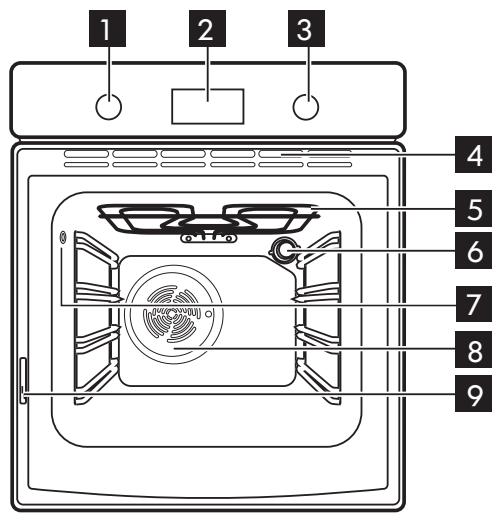
Knob for the oven functions 2 Electronic programmer 3 Knob for the temperature 4 Ventilation openings
5 Grill 6 Oven lamp 7 Socket for the core temperature sensor 8 Fan Rating plate
Oven accessories
- Wire shelf x 1 For cookware, cake tins, roasts.
- Baking tray x 1 For cakes and biscuits.
- Grill- / Roasting pan x 1 To bake and roast or as pan to collect fat.
- Core temperature sensor x 1 To measure how far the food is cooked.
- Telescopic runners x 2 sets For shelves and trays.
Before first use
Warning! Refer to the Safety chapters.
Initial cleaning
- Remove all accessories and removable shelf supports (if applicable).
- Clean the appliance before first use.
Important! Refer to the chapter "Care and cleaning".
Setting the time of day
The display shows hr and 12:00. 12 flashes.
- Press + or - to set the correct hour.
- Press ① to confirm. This is necessary only when you first set the time. Afterwards, the new time value is saved automatically after five seconds. The display shows min and the set hour. 00 flashes.
- Press + or - to set the correct minutes.
- Press the down arrow to confirm. This is necessary only when you first set the time. Afterwards, the new time value is saved automatically after five seconds.
The display shows the new time.
Changing the time of day
You can change the time of day only if the appliance is off.
Press the left/right arrow again and again until the indicator for the time of day flashes in the display. To set the new time, follow the procedure given in "Setting the time of day".
Preheating
Preheat the empty appliance to burn off the remaining grease.
- Set the function and the maximum temperature.
- Let the appliance operate for one hour.
- Set the function and the maximum temperature.
- Let the appliance operate for ten minutes.
- Set the function () and the maximum temperature.
- Let the appliance operate for ten minutes.
Accessories can become hotter than usual. The appliance can emit an odour and smoke. This is normal. Make sure that the airflow is sufficient.
Mechanical child lock
The appliance has the child lock installed and activated. It is below the control panel on the right side.
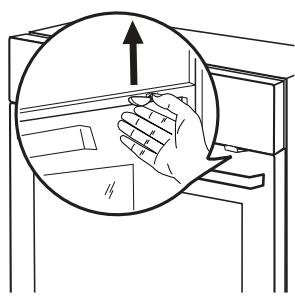
To open the oven door with the child lock installed, pull the child lock handle up as shown in the picture. Close the oven door without pulling the child lock.
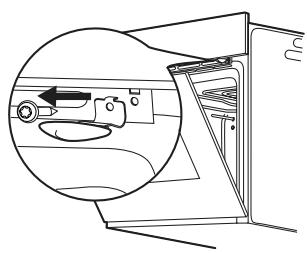
To remove the child lock, open the oven door and remove the child lock with the torx key. The torx key is in the oven fitting bag.
Daily use
Warning! Refer to the Safety chapters.
Activating and deactivating the appliance
- Turn the knob for the oven functions clockwise to an oven function.
- Turn the knob for the temperature to set the temperature. The display shows the set temperature.
Oven functions
| Oven function | Application | |
| 0 | Off position | The appliance is off. |
- To deactivate the appliance, turn the knob for the oven functions to the off position.
| Oven function | Application | |
| Forced Air Cooking | To bake on the maximum temperature on three oven levels at the same time. When you use this function, decrease the oven temperature by 20 - 40 °C from the standard temperatures you use for Conventional Cooking. Also to dry food. | |
| Conventional (Top and Bottom Heat) | To bake and roast on one oven level. | |
| Grilling | To grill flat food in the middle of the grill, and to toast. | |
| Bottom Heat | To bake cakes with crispy or crusty bottoms, and to preserve food. | |
| Grilling with Fan | To roast larger joints of meat or poultry on one level. Also to gratinate, and to brown. | |
| Bread and Pizza Baking | To bake food on one oven level for a more intensive browning and a crispy bottom. When you use this function, decrease the oven temperature by 20 - 40 °C from the standard temperatures you use for Conventional Cooking. | |
| Defrost | To defrost frozen food. The knob for the temperature must be in the off position. | |
| Top Heat | To finish cooked dishes. | |
| Fast Grilling | To grill flat food in large quantities, and to toast. | |
| Pyrolysis | To clean the oven. The high temperature burns off the residual dirt. You can then remove it with a cloth when the appliance is cold. | |
Display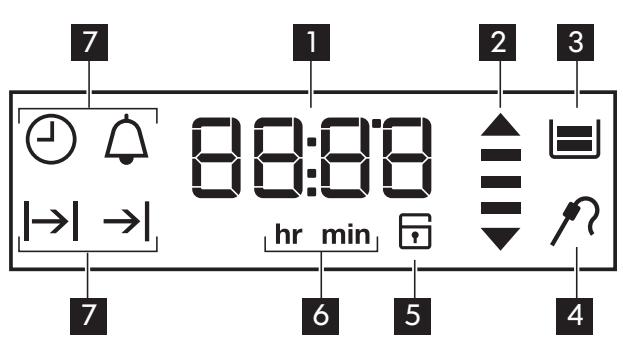
Time and temperature 2 Heat-up and residual heat indicator 3 Water tank (selected models only) 4 Core temperature sensor (selected models only) 5 Door lock (selected models only) 6 Hours / minutes Clock functions
Buttons
| Button | Function | Description |
| ① | Clock | To set a clock function. |
| —, + | Minus, plus | To set the time. |
Heat-up and residual heat indicator
When you activate an oven function, the bars in the display come on one by one. The bars show that the oven temperature increases or decreases.
When you deactivate the appliance, the display shows the residual heat indicator if the temperature in the oven is more than 40°C. Turn the temperature knob left or right to show the oven temperature on the display.
Clock functions
| Symbol | Function | Description |
| △ | Minute Minder | To set a countdown time. |
| ⊕ | Time of day | To set, change or check the time of day. Refer to "Setting the time of day". |
| |→| | Duration | To set how long the appliance must operate. First set an oven function before you set this function. |
| →| | End | To set when the appliance must be deactivated. First set an oven function before you set this function. You can use Duration and End at the same time (Time Delay) to set the time when the appliance must be activated and then deactivated. |
Press again and again to change the clock function. Press to confirm the settings of the clock functions, or wait 5 seconds for the setting to be confirmed automatically.
Setting the Duration or End function
- Press the button again and again until the symbol for Duration or End flashes in the display.
- Press + or - to set the minutes.
- Press to confirm.
- Press + or - to set the hour.
- Press to confirm.
- When the set time ends, the symbol for Duration or End and the set time flash. The acoustic signal sounds for two minutes. The appliance deactivates. Press a button or open the appliance door to stop the signal. If you press the confirm button while setting the time for Duration, the appliance switches to setting the End function.
Setting the Minute Minder
Used to set a countdown time. The maximum time you can set is 2 hours 30 minutes. This function has no effect on the operation of the oven. You can set the Minute Minder at any time, also if the appliance is off.
- Press again and again until and 00 flash in the display.
- Press + or - to set the Minute Minder. At first the time is calculated in minutes and seconds. When the time you set is longer than 60 minutes, the symbol hr comes on in the display. The appliance then calculates the time in hours and minutes.
- The Minute Minder starts automatically after five seconds.
- When the set time ends, the acoustic signal sounds for two minutes. 00:00 and flash in the display. Press a button to stop the signal.
If you set the Minute Minder when the Duration → or End → function operates, the symbol Δ comes on in the display.
Count Up Timer
Use the Count Up Timer to monitor how long the oven operates. Press () again and again until the display shows time without clock symbols.
You cannot use the Count Up Timer when the Duration |→ | or End → | function operates.
Using the accessories

Warning! Refer to the Safety chapters.
Core temperature sensor
The core temperature sensor measures the core temperature of the meat. When the meat is at the set temperature, the appliance deactivates.
There are two temperatures to be set:
- The oven temperature.
- The core temperature. Refer to the values in the table.
| Recommended core temperatures | |
| 50 °C | Rare |
| 60 °C | Medium |
| 70 °C | Well done |
Important! Only use the core temperature sensor supplied with the appliance, or genuine replacement parts.
- Set the oven function and the oven temperature.
- Put the tip of the core temperature sensor into the centre of the meat.
- Put the plug of the core temperature sensor into the socket on the side wall of the oven.
The display shows the symbol of the core temperature sensor and the default core temperature. When you use the core temperature sensor for the first time, the default core temperature is 60°C.
- While the symbol flashes, you can use the knob for the temperature to change the default core temperature.
- Press the button to save the new core temperature setting, or wait 10 seconds for it to be saved automatically. The new default core temperature is displayed during the next use of the core temperature sensor.
- Make sure that the core temperature sensor stays in the meat and in the socket during the cooking.
- When the meat is at the set core temperature, the symbol for the core temperature sensor and the default core temperature flash. An acoustic signal sounds for two minutes. The appliance deactivates automatically. Press a button to stop the signal.
- Remove the plug of the core temperature sensor from the socket. Remove the meat from the appliance.

The Duration and End do not operate with the core temperature sensor.
You can change the core temperature at any time during the cooking:
- Press
- Four times - the display shows the set core temperature which changes every 10 seconds to the current core temperature.
- Five times - the display shows the current oven temperature which changes every 10 seconds to the set oven temperature.
- Six times - the display shows the set oven temperature.
- Use the knob for the temperature to change the temperature.
Telescopic runners
Installing the telescopic runners
You can put the telescopic runners on each level.
Make sure that the two telescopic runners are on the same level.
The stop element (A) that is at one end of the telescopic runner must point up.
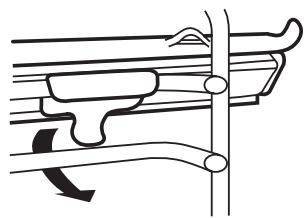
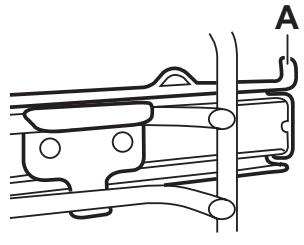
Using telescopic runners
With telescopic runners you can put in and remove the shelves more easily.
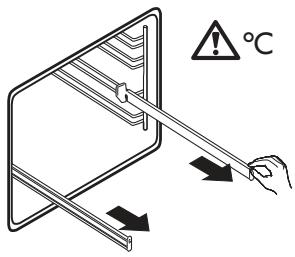
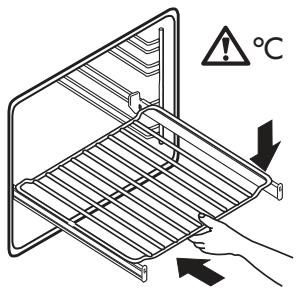
Pull out the right and left hand telescopic runners.
Put the wire shelf on the telescopic runners and carefully push them into the appliance.
You can also use the telescopic runners with the trays or pans supplied with the appliance (refer to "Product description").
Make sure you push back the telescopic runners fully in the appliance before you close the oven door.
Caution! Do not clean the telescopic runners in the dishwasher. Do not lubricate the telescopic runners.
Additional functions
Child Lock
When the Child Lock is on, you cannot operate the oven. This is to make sure that children do not accidentally activate the appliance.
Activating and deactivating the Child Lock function:
- Do not set an oven function.
- Press and hold ① and ^+ at the same time for two seconds.
- An acoustic signal sounds. SAFE and come on or go out in the display (when you activate or deactivate the Child Lock). If the oven has the Pyrolytic cleaning function, the door is locked. SAFE and come on in the display when you turn a knob or press a button.
Automatic switch-off
For safety reasons the appliance deactivates after some time:
- If an oven function operates.
- If you do not change the oven temperature.
| Oven temperature | Switch-off time |
| 30 - 115 °C | 12.5 h |
| 120 - 195 °C | 8.5 h |
| 200 - 245 °C | 5.5 h |
| 250 °C | 3.0 h |
After an automatic switch-off, press a button to activate the appliance again.
Important! The automatic switch-off works with all oven functions, except Duration, End and Core Temperature Sensor.
Cooling fan
When the appliance operates, the cooling fan activates automatically to keep the surfaces of the appliance cool. If you deactivate the appliance, the cooling fan continues to operate until the temperature in the appliance cools down.
Safety thermostat
Incorrect operation of the appliance or defective components can cause dangerous overheating. To prevent this, the oven has a safety thermostat which interrupts the power supply. The oven activates again automatically when the temperature drops.
Helpful hints and tips
- The appliance has four shelf levels. Count the shelf levels from the bottom of the appliance floor.
- The appliance has a special system which circulates the air and constantly recycles the steam. With this system you can cook in a steamy environment and keep the food soft inside and crusty outside. It decreases the cooking time and energy consumption to a minimum.
- Moisture can condense in the appliance or on the door glass panels. This is normal. Always stand back from the appliance when you open the appliance door while cooking. To decrease the condensation, operate the appliance for 10 minutes before cooking.
- Clean the moisture after each use of the appliance.
- Do not put the objects directly on the appliance floor and do not put aluminium foil on the components when you cook. This can change the baking results and cause damage to the enamel.
Baking cakes
- Do not open the oven door before 3/4 of the set cooking time is up.
- If you use two baking trays at the same time, keep one empty level between them.
Cooking meat and fish
- Use a deep pan for very fatty food to prevent the oven from stains that can be permanent.
- Leave the meat for approximately 15 minutes before carving so that the juice does not seep out.
- To prevent too much smoke in the oven during roasting, add some water into the deep pan. To prevent the smoke condensation, add water each time after it dries up.
Cooking times
Cooking times depend on the type of food, its consistency, and volume. Initially, monitor the performance when you cook. Find the best settings (heat setting, cooking time, etc.) for your cookware, recipes and quantities when you use this appliance.
| Weight (kg) | Food | Oven Function | Level | Oven tempera-ture (℃) | Cooking Time (min) |
| 1 | Pork / lamb | ☐ | 2 | 180 | 100 - 110 |
| 1 | Veal / Beef | ☐ | 2 | 190 | 70 - 100 |
| 1,2 | Chicken/Rabbit | ☑ | 2 | 200 | 70 - 80 |
| 1,5 | Duck | ☑ | 1 | 160 | 120 - 150 |
| 3 | Goose | ☑ | 1 | 160 | 150 - 200 |
| 4 | Turkey | ☐ | 1 | 180 | 210 - 240 |
| 1 | Fish | ☐ | 2 | 190 | 30 - 40 |
| 1 | Stuffed Pepperoni Tomatos / Roasted Potatoes | ☑ | 2 | 190 | 50 - 70 |
| Instant cakes | ☑ | 2 | 160 | 45 - 55 | |
| 1 | Pies | ☐ | 2 | 160 | 80 - 100 |
| Biscuits | ☐ | 3 | 140 | 25 - 35 | |
| 2 | Lasagne | ☐ | 2 | 180 | 45 - 60 |
| 1 | White Bread | ☐ | 2 | 190 | 50 - 60 |
| 1 | Pizza | ☑ | 1 | 190 — 200 | 20 - 30 |
Care and cleaning

Warning! Refer to the Safety chapters.
- Clean the front of the appliance with a soft cloth with warm water and a cleaning agent.
- To clean metal surfaces use a usual cleaning agent.
- Clean the oven interior after each use. Then you can remove dirt more easily and it does not burn on.
- Clean stubborn dirt with a special oven cleaner.
- Clean all oven accessories after each use and let them dry. Use a soft cloth with warm water and a cleaning agent.
- If you have nonstick accessories, do not clean them using aggressive agents, sharp-edged objects or a dishwasher. It can destroy nonstick coating.

Stainless steel or aluminium appliances:
Clean the oven door with a wet sponge only. Dry it with a soft cloth.
Do not use steel wool, acids or abrasive materials, as they can cause damage to the oven surface. Clean the oven control panel with the same precautions.
Shelf supports
You can remove the shelf supports to clean the side walls.
Removing the shelf supports
1
2
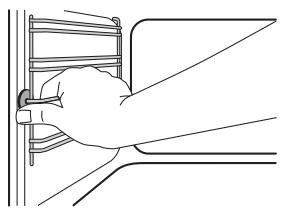
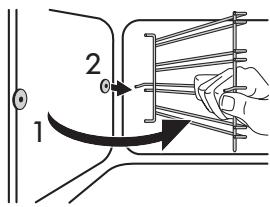
Pull the front of the shelf support away from the side wall.
Pull the rear end of the shelf support away from the side wall and remove it.
Installing the shelf supports
Install the shelf supports in the opposite sequence.

The rounded ends of the shelf supports must point to the front.
Pyrolysis

Warning! The appliance becomes very hot. There is a risk of burns.

Caution! If a hob is installed with the appliance, do not use it at the same time as the Pyrolysis function. It can cause damage to the appliance.
- Remove the removable shelf supports (if applicable) and accessories from the appliance. Refer to "Removing the shelf supports".

Caution! Do not let the removable shelf supports stay in the appliance
during the cleaning procedure. There is a risk of damage.
- Remove the worst dirt manually.
- Fully close the oven door.

The cleaning procedure cannot start if you do not close the oven door.
- Set the function Pyrolysis. Refer to "Oven functions".
- When the display shows P1, press ① to start the procedure. You can use the End function to delay the start of the cleaning.

Pyrolytic procedure takes 2 hours.
Do not open the door before the procedure completes. This will abort the procedure. To prevent risk of burns when the oven reaches a certain temperature the door automatically locks. The display shows the symbol 9 . When the oven cools down, the door automatically unlocks.

To stop Pyrolysis before it is completed, turn the knob for the oven functions to the off position.
When Pyrolysis is completed, the display shows the time of day. The oven door stays locked. When the appliance is cool again, an acoustic signal sounds and the door unlocks.

During the Pyrolysis the oven lamp is off.
Cleaning reminder
To remind you that pyrolysis is necessary, PYR flashes in the display for 10 seconds after each activation and deactivation of the appliance.
The cleaning reminder goes off the display:
After the end of the pyrolysis function, if you press + and - at the same time while PYR flashes in the display.
Oven lamp

Warning! Be careful when you change the oven lamp. There is a risk of electric shock.
Before you change the oven lamp:
- Deactivate the oven.
- Remove the fuses in the fuse box or deactivate the circuit breaker.
Put a cloth on the bottom of the oven to prevent damage to the oven light and glass cover.
Always hold the halogen lamp with a cloth to prevent grease residue from burning on the lamp.
- Turn the glass cover counterclockwise to remove it.
- Clean the glass cover.
- Replace the oven light bulb with a 40 watt, 230V (50Hz), 350°C heat resistant oven light bulb (Connection type: G9).
- Install the glass cover.
Cleaning the oven door
The oven door has four glass panels. You can remove the oven door and the internal glass panels to clean them.
The oven door can close if you try to remove the glass panels before you remove the oven door.
Removing the oven door and the glass panels
1
2
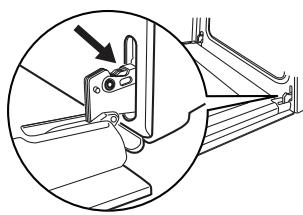
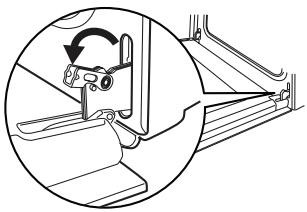
Open the door fully.
Lift and turn the levers on the two hinges.
3
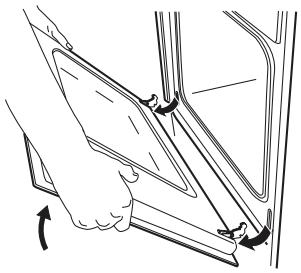
Close the oven door to the first opening position (halfway). Then pull forward and remove the door from its seat.
5
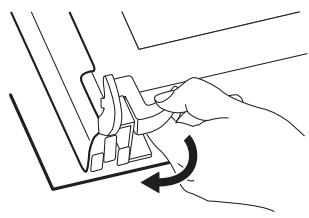
Release the locking system to remove the glass panels.
7

Carefully lift (step 1) and remove (step 2) the glass panels one by one. Start from the top panel.
Clean the glass panels with water and soap. Dry the glass panels carefully.
4
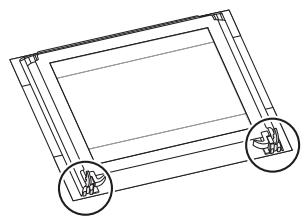
Put the door on a soft cloth on a stable surface.
6
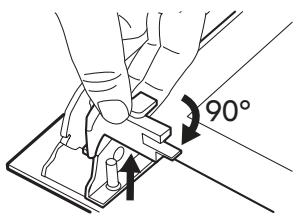
Turn the two fasteners by 90° and remove them from their seats.
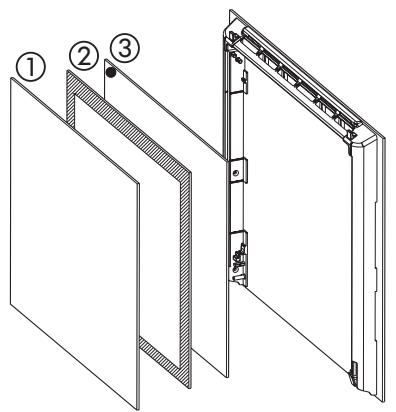
Installing the door and the glass panels When the cleaning is completed, install the glass panels and the oven door. Do the above steps in the opposite sequence. Make sure that you put the glass panels (1, 2 and 3) back in the correct sequence. The middle panel (2) has a decorative frame. The screen-printing zone must face the inner side of the door. Make sure that after the installation the surface of the glass panel frame (2) on the screen-printing zones is not rough when you touch it.
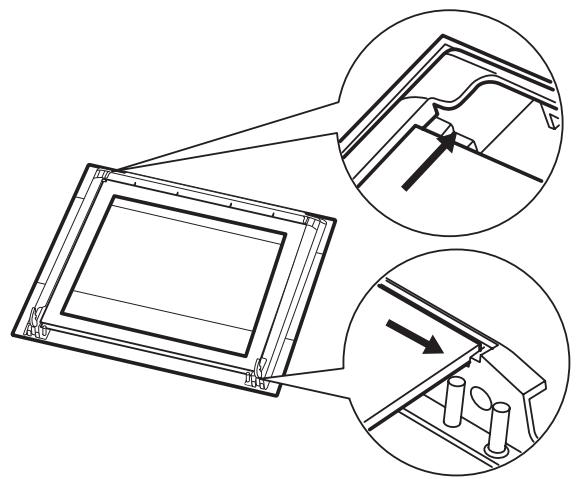
Make sure that you install the top panel in the seats correctly.
What to do if…

Warning! Refer to the Safety chapters.
| Problem | Possible cause | Remedy |
| The oven does not heat up. | The appliance is deactivated. | Activate the appliance. |
| The oven does not heat up. | The clock is not set. | Set the clock. Refer to "Setting the time of day". |
| The oven does not heat up. | The necessary settings are not set. | Make sure that the settings are correct. |
| The oven does not heat up. | The automatic switch-off is on. | Refer to "Automatic switch-off". |
| The oven does not heat up. | The Child Lock is on. | Refer to "Deactivating the Child Lock". |
| The oven does not heat up. | The fuse in the fuse box is released. | Do a check of the fuse. If the fuse is released more than one time, contact a qualified electrician. |
| The oven lamp does not operate. | The oven lamp is defective. | Replace the oven lamp. |
| The Pyrolysis does not start. The display shows C1. | The shelf supports are not removed. | Remove the shelf supports. |
| The Pyrolysis does not start. The display shows C2. | The Pyrolysis or Defrost function is set when the plug of the core temperature sensor is in the socket. | Remove the plug of the core temperature sensor from the socket. |
| The Pyrolysis does not start. The display shows C3. | The door is not fully closed or the door lock is defective. | Fully close the door. |
| The display shows F102. | The door is not fully closed or the door lock is defective. | 1. Fully close the door. 2. Deactivate the appliance with the house fuse or the safety switch in the fuse box and activate it again. 3. If the display shows F102 again, contact the service centre. |
| The oven does not heat up. The display shows Demo. | The demo mode is activated. | 1. Deactivate the appliance. 2. Press and hold the button + 3. When an acoustic signal sounds, turn the knob for the oven functions to the first function. Demo flashes in the display. 4. Turn the knob for the oven functions to the off position. 5. Release the button + 6. Turn the knob for the temperature clockwise three times. The acoustic signal sounds three times. The demo mode is deactivated. |
| The display shows an error code. | There is an electronic fault. | 1. Deactivate the appliance with the house fuse or the safety switch in the fuse box and activate it again. 2. If the display shows the error code again, contact the service centre. |
| Steam and condensation collect on the food and in the oven. | You left the dish in the oven for too long. | Do not keep the dishes in the oven for longer than 15 - 20 minutes after the cooking ends. |
If you cannot find a solution to the problem yourself, contact your dealer or the service centre.
The necessary data for the service centre is on the rating plate. The rating plate is on the front frame of the appliance cavity. Do not remove the rating plate from the appliance cavity.
We recommend that you write the data here:
Model (MOD.)
··
Product number (PNC)
··
Serial number (S.N.)
Technical data
| Dimensions (internal) | Width Height Depth | 437 328 401 |
| Usable volumes | 57 l | |
| Area of baking tray | 1140 cm² | |
| Top heating element | 800 W | |
| Bottom heating element | 1000 W | |
| Grill | 1650 W | |
| Fan | 2000 W | |
| Total rating | 2515 W | |
| Voltage | 240 V | |
| Frequency | 50 Hz | |
| Number of functions | 10 | |
| Energy Consumption with a standard load, Conventional (Top and Bottom Heat) | 0.79 kWh | |
| Energy Consumption with a standard load, Forced Air Cooking | 0.78 kWh | |
Environment concerns
The symbol on the product or on its packaging indicates that this product may not be treated as household waste. Instead it should be taken to the appropriate collection point for the recycling of electrical and electronic equipment. By ensuring this product is disposed of correctly, you will help prevent potential negative consequences for the environment and human health, which could otherwise be caused by inappropriate waste handling of this product. For more detailed information
about recycling of this product, please contact your local council, your household waste disposal service or the shop where you purchased the product.
Packaging material The packaging material is environmentally-friendly and recyclable. Plastic parts are marked with international abbreviations such as PE, PS, etc. Dispose of the packaging material in the containers provided for this purpose at your local waste management facility.
IKEA GUARANTEE
How long is the IKEA guarantee valid?
This guarantee is valid for five (5) years from the original date of purchase of Your appliance at IKEA, unless the appliance is named LAGAN in which case two (2) years of guarantee apply. The original sales receipt is required as proof of purchase. If service work is carried out under guarantee, this will not extend the guarantee period for the appliance,
Which appliances are not covered by the IKEA five (5) years guarantee?
The range of appliances named LAGAN and all appliances purchased in IKEA before 1st of August 2007
Who will execute the service?
IKEA service provider will provide the service through its own service operations or authorized service partner network.
What does this guarantee cover?
The guarantee covers faults of the appliance, which have been caused by faulty construction or material faults from the date of purchase from IKEA. This guarantee applies to domestic use only. The exceptions are specified under the headline "What is not covered under this guarantee?" Within the guarantee period, the costs to remedy the fault e.g. repairs, parts, labour and travel will be covered, provided that the appliance is accessible for repair without special expenditure. On these conditions the EU guidelines (Nr. 99/44/EG) and the respective local regulations are applicable. Replaced parts become the property of IKEA.
What will IKEA do to correct the problem?
IKEA appointed service provider will examine the product and decide, at its sole discretion, if it is covered under this guarantee. If considered covered, IKEA service provider or its authorized service partner through its own service operations, will then, at its sole discretion, either repair the defective product or replace it with the same or a comparable product.
What is not covered under this guarantee?
Normal wear and tear. - Deliberate or negligent damage, damage caused by failure to observe operating instructions, incorrect installation or by connection to the wrong voltage, damage caused by chemical or electro-chemical reaction, rust, corrosion or water damage including but not limited to damage caused by excessive lime in the water supply, damage caused by abnormal environmental conditions. - Consumable parts including batteries and lamps. - Non-functional and decorative parts which do not affect normal use of the appliance, including any scratches and possible color differences. - Accidental damage caused by foreign objects or substances and cleaning or unblocking of filters, drainage systems or soap drawers. - Damage to the following parts: ceramic glass, accessories, crockery and cutlery baskets, feed and drainage pipes, seals, lamps and lamp covers, screens, knobs, casings and parts of casings. Unless such damages can be proved to have been caused by production faults. - Cases where no fault could be found during a technician's visit. - Repairs not carried out by our appointed service providers and/or an authorized service contractual partner or where nonoriginal parts have been used. - Repairs caused by installation which is faulty or not according to specification.
- The use of the appliance in a non-domestic environment i.e. professional use.
- Transportation damages. If a customer transports the product to their home or other address, IKEA is not liable for any damage that may occur during transport. However, if IKEA delivers the product to the customer's delivery address, then damage to the product that occurs during this delivery will be covered by this guarantee.
- Cost for carrying out the initial installation of the IKEA appliance. However, if an IKEA service provider or its authorized service partner repairs or replaces the appliance under the terms of this guarantee, the service provider or its authorized service partner will re-install the repaired appliance or install the replacement, if necessary.
This restriction does not apply to fault-free work carried out by a qualified specialist using our original parts in order to adapt the appliance to the technical safety specifications of another EU country.
How country law applies
The IKEA guarantee gives you specific legal rights, which cover or exceed local demands. However, these conditions do not limit in any way consumer rights described in the local legislation.
Area of validity
For appliances which are purchased in one EU country and taken to another EU country, the services will be provided in the framework of the guarantee conditions normal in the new country. An obligation to carry out services in the framework of the guarantee exists only if the appliance complies and is installed in accordance with:
- the technical specifications of the country in which the guarantee claim is made;
- the Assembly Instructions and User Manual Safety Information;
The dedicated After Sales Service for IKEA appliances:
Please do not hesitate to contact IKEA After Sales Service to:
- make a service request under this guarantee;
- ask for clarification on installation of the IKEA appliance in the dedicated IKEA kitchen furniture. The service won't provide clarifications related to:
- the overall IKEA kitchen installation;
- connections to electricity (if the machine comes without plug and cable), to water, and to gas, since they have to be executed by an authorized service engineer.
- ask for clarification on user manual contents and specifications of the IKEA appliance.
To ensure that we provide you with the best assistance, please read carefully the Assembly Instructions and/or the User Manual section of this booklet before contacting us.
How to reach us if you need our service
Please refer to the last page of this manual for the full list of IKEA appointed contacts and relative national phone numbers.
Important! In order to provide you with a quicker service, we recommend that you use the specific phone numbers listed at the end of this manual. Always refer to the numbers listed in the booklet of the specific appliance you need assistance for.
Before calling us, assure that you have to hand the IKEA article number (8 digit code) for the appliance for which you need our assistance.
Important! SAVE THE SALES RECEIPT! It is your proof of purchase and required for the guarantee to apply. Note that the receipt also reports the IKEA article name and number (8 digit code) for each of the appliances you have purchased.
Do you need extra help?
For any additional questions not related to After Sales of your appliances, please contact our nearest IKEA store call centre. We recommend you read the appliance documentation carefully before contacting us.
| Country | Phone number | Call Fee | Opening time |
| België | 070 246016 | Binnenlandse gespreskosten | 8 tot 20 Weekdagen |
| Belgique | Tarif des appels nationaux | 8 à 20. En semaine | |
| Бълария | 00359 888 16 40 8 | Такca за повиквае отстанатa | От 9 до 18ч в работни дни |
| Česká republika | 246 019721 | Cena za místné hovor | 8 až 20 v pracovnich dnech |
| Danmark | 70 15 09 09 | Landstakst | man.-fre. 09.00-20.00Irl. 09.00-16.001 søndag pr. måned, normalt fsigma søndag i måneden |
| Deutschland | 01803-334532 | (0,09 € / Min.)*aus dem Festnetzder DTAG;Mobilfunkpreise abweichend | 8 bis 20 Werktage |
| Ельда | 211 176 8276 | Утегаоцій клій� | 8media 20 katá tiç ερуáоцьс, пínéрс, |
| Españía | 91 1875537 | Tarifa de llamadas naciales | De 8 a 20 en días laborables |
| France | 0170 36 02 05 | Tarif des appels nationaux | 9 à 21. En semaine |
| Hrvatska | 01 63 23 338 | Lokalna cijena poziva | pon. - pet. 8:00 - 16:00 |
| Ireland | 0 14845915 | National call rate | 8 till 20 Weekdays |
| Îland | 5880503 | Innanlandsgjald fyir sima | 9 til 18. Virka daga |
| Italia | 02 00620818 | Tariffa applicatóalle chiamate nazionali | dalle 8 alle 20 nei giornii feriali |
| Kuṭpoc | 22 030 529 | Yтегаоцій кlій� | 8 media 20 katá tiç ερуáоцьс, пínéрс, |
| Lietuva | 5 230 06 99 | NacionaliniúPokalbiú tarifai | Pr. - Kétv.: 8:00 - 12:00, 12:45 - 17:00Pnkt.: 8:00 - 12:00, 12:45 - 15:45 |
| Magyarország | 061 998 0549 | Belföldi dijszabás | Hétköznap 8 és 10 ora között |
| Nederland | 0900 235 45 32and/or0900 BEL IKEA | 0,10 EUR/min (niet lokaal)Incl. BTW | ma-vr 9.00-21.00zat 9.00-20.00zon 9.00-18.00 |
| Norge | 815 22052 | Takst innland | 8 til 20 ukedager |
| Österreich | 0810 300486 | zum Ortstarif | 8 bis 20 Werktage |
| Polska | 012 297 8787 | Stawka wg taryfy krajowej | Od 8 do 20 w dni robocze |
| Portugal | 211557985 | Chamada Nacional | 9 as 21. Dias de Semana*excepto feriados |
| România | 021 211 08 88 | Tarif apel national | 8 - 20 in zilele lucrátoare |
| Roscia | 8 495 6662929 | Демствюшце телесiónные тariфы | c 8 do 20 no pobóchим ДямВremя мockовскoe |
| Schweiz | 031 5500 324 | Tarif für Anrufe im Bundesgebiet | 8 bis 20 Werktage |
| Suisse | Tarif des appels nationaux | 8 à 20. En semaine | |
| Svizzera | Tariffa applicatóalle chiamate nazionali | dalle 8 alle 20 nei giornii feriali | |
| Slovensko | (02) 3300 2554 | Cena vnútrostátneho hovoru | 8 až 20 v pracovných dnoch |
| Suomi | 030 600 5203 | Lankapuhelinverkostaa 0828€/puhelu+0,032€/minMatkapuhelinverkostaa 0,192€/min | arkipävisin 8.00-20.00lör-sön 9.30-18.00 |
| Sverige | 0775 700 500 | loksamtal (lokal taxa) | män-fre 8.30-20.00lör-sön 9.30-18.00 |
| Türkiye | 212 244 0769 | Ulusal arama ücreti | Hafta;i saat 09:00'dan 18:00'a kadar |
| Урочи | 044 586 2078 | Міжmicьndzieνплathи | 9 - 21 В робочи дни |
| United Kingdom | 020 3347 0044 | National call rate | 9 till 21. Weekdays |


- SAFETY INFORMATION
- CHILDREN AND VULNERABLE PEOPLE SAFETY
- GENERAL SAFETY
- SAFETY INSTRUCTIONS
- INSTALLATION
- ELECTRICAL CONNECTION
- USE
- WARNING! RISK OF INJURY, BURNS, ELECTRIC SHOCK, OR EXPLOSION
- WARNING! RISK OF DAMAGE TO THE APPLIANCE
- CARE AND CLEANING
- WARNING! RISK OF INJURY, FIRE OR DAMAGE TO THE APPLIANCE
- PYROLYTIC CLEANING
- WARNING! RISK OF FIRE AND BURNS
- INTERNAL LIGHT
- WARNING! RISK OF ELECTRICAL SHOCK
- DISPOSAL
- WARNING! RISK OF INJURY OR SUFFOCATION
- WARNING! REFER TO THE SAFETY CHAPTERS
- REFER TO THE ASSEMBLY INSTRUCTIONS FOR THE INSTALLATION
- ELECTRICAL INSTALLATION
- WARNING! ONLY A QUALIFIED PERSON MUST DO THE ELECTRICAL INSTALLATION
- PRODUCT DESCRIPTION
- OVEN ACCESSORIES
- BEFORE FIRST USE
- INITIAL CLEANING
- SETTING THE TIME OF DAY
- CHANGING THE TIME OF DAY
- PREHEATING
- MECHANICAL CHILD LOCK
- DAILY USE
- ACTIVATING AND DEACTIVATING THE APPLIANCE
- OVEN FUNCTIONS
- HEAT-UP AND RESIDUAL HEAT INDICATOR
- SETTING THE DURATION OR END FUNCTION
- SETTING THE MINUTE MINDER
- COUNT UP TIMER
- USING THE ACCESSORIES
- CORE TEMPERATURE SENSOR
- THERE ARE TWO TEMPERATURES TO BE SET
- YOU CAN CHANGE THE CORE TEMPERATURE AT ANY TIME DURING THE COOKING
- TELESCOPIC RUNNERS
- INSTALLING THE TELESCOPIC RUNNERS
- USING TELESCOPIC RUNNERS
- ADDITIONAL FUNCTIONS
- CHILD LOCK
- ACTIVATING AND DEACTIVATING THE CHILD LOCK FUNCTION
- AUTOMATIC SWITCH-OFF
- COOLING FAN
- SAFETY THERMOSTAT
- HELPFUL HINTS AND TIPS
- BAKING CAKES
- COOKING MEAT AND FISH
- COOKING TIMES
- STAINLESS STEEL OR ALUMINIUM APPLIANCES
- SHELF SUPPORTS
- REMOVING THE SHELF SUPPORTS
- INSTALLING THE SHELF SUPPORTS
- PYROLYSIS
- CLEANING REMINDER
- THE CLEANING REMINDER GOES OFF THE DISPLAY
- OVEN LAMP
- BEFORE YOU CHANGE THE OVEN LAMP
- CLEANING THE OVEN DOOR
- REMOVING THE OVEN DOOR AND THE GLASS PANELS
- WHAT TO DO IF
- ENVIRONMENT CONCERNS
- IKEA GUARANTEE
- HOW LONG IS THE IKEA GUARANTEE VALID
- WHICH APPLIANCES ARE NOT COVERED BY THE IKEA FIVE (5) YEARS GUARANTEE
- WHO WILL EXECUTE THE SERVICE
- WHAT DOES THIS GUARANTEE COVER
- WHAT WILL IKEA DO TO CORRECT THE PROBLEM
- WHAT IS NOT COVERED UNDER THIS GUARANTEE
- HOW COUNTRY LAW APPLIES
- AREA OF VALIDITY
- THE DEDICATED AFTER SALES SERVICE FOR IKEA APPLIANCES
- DO YOU NEED EXTRA HELP
Brand : IKEA
Model : BEJUBLAD (403.319.08)
Category : Shelf