 ManualGo.com
TITANIUM CHEF PATISSIER XL KWL90009SI - TITANIUM CHEF PATISSIER XL KWL90034SI - Food processor KENWOOD - Free user manual and instructions
Find the device manual for free TITANIUM CHEF PATISSIER XL KWL90009SI - TITANIUM CHEF PATISSIER XL KWL90034SI KENWOOD in PDF.



Download the instructions for your Food processor in PDF format for free! Find your manual TITANIUM CHEF PATISSIER XL KWL90009SI - TITANIUM CHEF PATISSIER XL KWL90034SI - KENWOOD and take your electronic device back in hand. On this page are published all the documents necessary for the use of your device. TITANIUM CHEF PATISSIER XL KWL90009SI - TITANIUM CHEF PATISSIER XL KWL90034SI by KENWOOD.
USER MANUAL TITANIUM CHEF PATISSIER XL KWL90009SI - TITANIUM CHEF PATISSIER XL KWL90034SI KENWOOD
Egg White Whis… Sponge Cake Dough Kneading To Use The Weighing Function
Unit Unit Zero Zero To Assemble The Creaming Beater
Know Your Kenwood Stand Mixer Congratulations on buying a Kenwood. With such a wide range of attachments available, it is more than just a mixer. It is a state-of-the-art Stand Mixer. We hope you will enjoy it. Robust. Reliable. Versatile. Kenwood. Safety Read these instructions carefully and retain for future reference. O Remove all packaging and any labels. O If the plug or cord is damaged it must, for safety reasons, be replaced by Kenwood or an authorised Kenwood repairer in order to avoid a hazard. O Switch off and unplug before fitting or removing tools/attachments, after use and before cleaning. O Keep your fingers away from moving parts and fitted attachments. O Never leave the Stand Mixer unattended when it is operating. O Never use a damaged appliance. Get it checked or repaired: see ‘Service and Customer Care’ section. O Never operate the Stand Mixer with the head in the raised position. O Never let the cord hang down where a child could grab it. O Never let the power unit, cord or plug get wet. O Never use an unauthorised attachment or more than one attachment at once. O Never exceed the maximum quantities and speeds stated in the Recommended Usage Chart. O When using an attachment, read and follow the safety instructions that are supplied with it. O Take care when lifting this appliance as it is heavy. Ensure the head is correctly latched in the down position and that the bowl, tools, outlet covers and cord are secure before lifting. O When moving the appliance always pick up by the pedestal base and mixer head. Do not lift or carry the appliance by the bowl handle. O Take care when removing bowl tools after extended use as they may get hot. O Children should be supervised to ensure that they do not play with the appliance.
Never operate the appliance in warming mode with the bowl empty. O Never use the splashguard with the 5L bowl. Splashguard only suitable for use with the 7L bowl. O Do not fit a bowl tool to the Stand Mixer when the 5L bowl is stacked in the 7L bowl. O For Kneading bread dough, use the 7L warming bowl only. O Never insert anything through the air vents. O When using this appliance ensure it is positioned on a level surface away from the edge. Make sure it is at least 10cm from walls and ensure the vents are not blocked. Do not position below overhanging cupboards. O Never use the bowl with any other heat source. O The underside of the bowl will remain hot long after the heating has stopped. Use caution when handling and use a work surface protection mat when placing the bowl on heat sensitive surfaces. O The symbol marked on the product indicates a surface that can become hot during use. O Do not move or raise the mixer head with an attachment fitted as the Stand Mixer could become unstable. O Do not operate your appliance near the edge or overhanging the work surface or apply force to an attachment when fitted, as this may cause the unit to become unstable and tip over, which may result in injury. O Appliances can be used by persons with reduced physical, sensory or mental capabilities or lack of experience and knowledge if they have been given supervision or instruction concerning use of the appliance in a safe way and if they understand the hazards involved. O Misuse of your appliance can result in injury. O This appliance shall not be used by children. Keep the appliance and its cord out of reach of children. O The maximum rating is based on the mini chopper/ mill attachment that draws the greatest load. Other attachments may draw less power.
Only use the appliance for its intended domestic use. Kenwood will not accept any liability if the appliance is subject to improper use, or failure to comply with these instructions. O This appliance is not intended to be operated by means of an external timer or separate remotecontrol system.
Before plugging in O Make sure your electricity supply is the same as the one shown on the underside of your appliance. O WARNING: THIS APPLIANCE MUST BE EARTHED. O This appliance conforms to EC Regulation 1935/2004 on materials and articles intended to come into contact with food. Before Using For The First Time Wash the parts: see ‘Care and Cleaning’ section. Note: Spanner shown is for illustration purposes only and is not supplied in pack. Key Attachment outlets Optional Attachments There are a range of optional attachments available to use with your Stand Mixer. See the attachment leaflet included in your pack or visit www.kenwoodworld.com to see the full range and how to buy an attachment not included in your pack. Note: Slow Speed Outlet Attachments The slow speed outlet on your Stand Mixer model features the Twist Connection System. It is designed to accept Twist Connection System attachments. When purchasing new attachments for the slow speed outlet you should check compatibility with your Stand Mixer. All Twist Connection System attachments can be identified by the product code which starts with KAX and also by the Twist logo which is visible on packaging. For more information visit www.kenwoodworld.com/twist. If you own attachments featuring the Bar Connection System you will need to use the KAT002ME adaptor to connect these to the Twist Connection System on your Stand Mixer. For more information visit www.kenwoodworld.com/twist.
High-speed outlet Slow-speed outlet Bowl tool socket Mixer
High speed outlet cover Mixer head Head release lever On/Off switch Display screen Control Dial Power unit a 7L Warming Bowl b 5L Bowl In-bowl illumination 'Bowl Bright™' Slow speed outlet cover Temperature sensor Warming plate Air vent K-beater Creaming beater Whisk Dough tool Spatula Head shield Splashguard Feed chute lid Dough scraper
To Use Your Kitchen Machine - Manual Mode
Refer to Illustrations A – I Make sure the warming plate area, temperature sensor and external surface of the bowl base are clean. Failure to do this will affect the temperature sensor, resulting in poor warming performance. 1 Plug in and press the On/Off switch. 2 Push the head-lift lever down and raise the mixer head until it locks. 3 Fit the bowl, turn clockwise to lock. 4 Place the required tool into the socket. Then push up and turn the tool to lock into position. 5 Lower the mixer head by pushing the head release lever down and lower the mixer head until it locks. 6 Set the required time, speed and warming level. Turn the control dial clockwise to use continuous speeds, turn anticlockwise to use stir intervals and pulse (P). Press and hold the control dial to activate the pulse. 7 Press the control dial to start. 8 To stop/pause the unit at any time press the control dial. 9 Release the tool by turning clockwise to unlock from the tool socket and then remove. Important Ensure that no bowl tools are fitted or stored in the bowl when using other outlets. After Warming
Remove High speed outlet/Slow Speed outlet cover (if applicable). 2 Fit attachment according to specific instructions supplied. 3 Set the required time and speed (refer to illustrations H - I). Press the control dial to start. To stop the unit at any time, press the control dial again. To Remove And Fit Outlet Covers High-Speed Outlet Cover 1 To remove the cover, use the grip on the side and lift upwards. 2 To fit, place the cover over the outlet and drop into place. Slow-speed Outlet Cover 1 To remove the cover, use the grip on the top and pull outwards. 2 To fit, place the cover over the outlet and push into place. Refer to Illustrations J – L
Be careful when handling or touching any part of the appliance when being used in warming mode or after warming, IN PARTICULAR THE BOWL,
WARMING PLATE AND TOOLS
as they will remain HOT long after the appliance has been switched off. Use the two side handles to remove and carry the bowl. Use oven gloves when handling the hot bowl and hot tools. Manual Operation (Attachments) To stop the unit at any time, press the control dial. Take care as the bowl may be hot. Swipe right to access the preset menu. Choose the preset you wish to use. Follow the instructions on the display screen. Press the control dial to start.
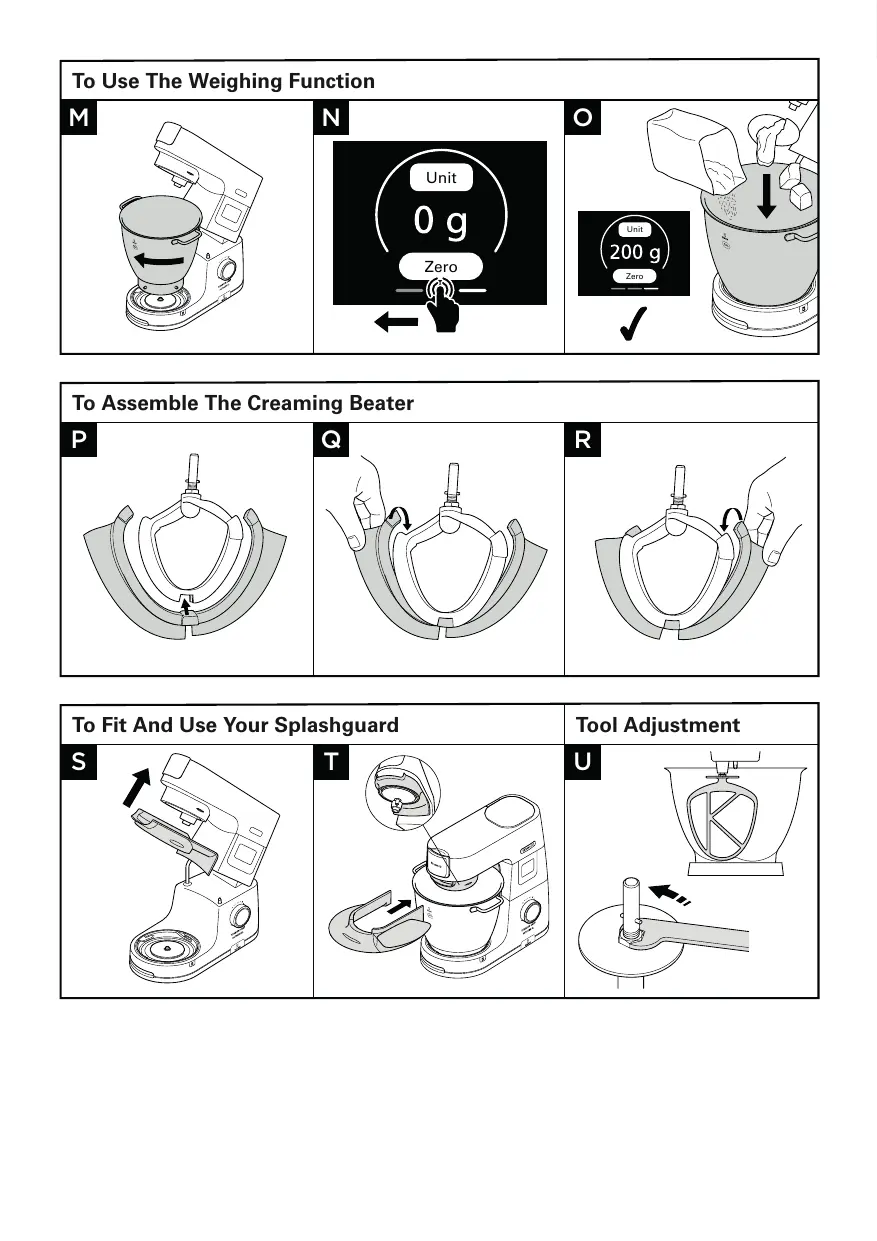
To Use The Weighing Function Note: Always place the appliance on a dry, flat, stable surface prior to weighing. Do not apply pressure to the mixer or bowl whilst weighing as this will affect the accuracy of the scales. The weighing function can be used with the mixer head in either the down or up position. The weighing function is accurate up to 6kg. Refer to Illustrations M – O
Fit the bowl. To select the weighing function, swipe left on the display screen until the weighing screen appears. Zero the scale. Weigh the ingredients. To change between units tap the unit button on the weighing screen. Display Screen Explained Tap this icon to open the settings menu. Shows the time selected in hours (h) and minutes (m). Shows the stir interval selected. If an intermittent speed (2 Æ 4) is selected, the ring will progressively increase and the appliance will stir when it is full. Shows the warming level selected. A pulsing red background indicates the machine is in heating mode. A solid red background indicates the machine has reached the set warming level. A intermittent arrow pointing downwards indicates the appliance is cooling down. Indicates that a setting cannot be adjusted. Turn the control dial anti-clockwise to use intermittent stir intervals and pulse. Turn the control dial clockwise to use continuous speeds.
Warming Hints and Tips Warming Levels
Recommended Usage Softening Prove Swiss Meringues Chocolate Melting Sabayon (P) Pulse - Select for short bursts of maximum speed. Press and hold control dial in to operate pulse setting. Continuous Stir – The mixer will operate at a constant slow speed. Used for folding light ingredients into heavier mixtures, for example meringues, fruit fools and genoese sponges and to slowly incorporate flour and fruit into cake mixtures. Stir interval 2 – Intermittent stir with short pauses. When set to this speed, intermittently operates on a slow speed every 5 seconds. Stir interval 3 – Intermittent stir with medium pauses. When set to this speed, intermittently operates on a slow speed every 15 seconds. Stir interval 4 – Intermittent stir with long pauses. When set to this speed, intermittently operates on a slow speed every 30 seconds. Speed min - max Continuous speeds gradually increasing to max
Recommended Default Settings Tool (adjustable) 1 hrs (5 mins – 2 hrs) OFF Recipe Ideas / Uses
Proving yeasted doughs 2.58kg Total Weight Chocolate Mousse 300g (cut into 2cm pieces) Base for Buttercream frosting 240g egg white 480g caster sugar 80g water
Chocolate Melting Egg White Whisking Egg whites for chocolate mousse Refer to Recommended Usage Chart Victoria Sponge, Cupcakes Refer to Recommended Usage Chart Bread Rolls, Pizza Refer to Recommended Usage Chart OFF Sponge Cake 1 – Max OFF Dough Kneading - Bread Dough (stiff yeasted) Recommended Usage Chart This is for guidance only and will vary depending on the exact recipe and ingredients being processed. K-beater For making cakes, biscuits, pastry, icing, fillings, eclairs and mashed potato. Hints and Tips
- To avoid splashing of ingredients gradually increase the speed.
- To fully incorporate the ingredients, stop mixing and scrape down the bowl with the spatula frequently.
- Use cold ingredients for pastry unless your recipe says otherwise. Recipe/ Process (Max) (Minutes) 5L Bowl 7L Bowl Pastry & Biscuits – rubbing fat into flour Flour Weight 500g 910g All In one cake mixes Total Weight 2kg 4kg
Max 45 – 60 secs Min Min Creaming Beater For creaming and mixing soft ingredients. Hints and Tips
- To avoid splashing of ingredients gradually increase the speed.
- When creaming fat and sugar for cake mixes, always use the fat at room temperature or soften it first. Recipe/ Process (Max) Creaming butter/margarine and sugar 5L Bowl 7L Bowl 1.79kg 4.55kg (Minutes) Min Max Max Min 1 Min Beating eggs into cake mixes Folding in flour, fruit etc Eggs sizes used = medium sized (Weight 53 – 63g)
1–4 30 – 60 secs Recommended Usage Chart This is for guidance only and will vary depending on the exact recipe and ingredients being processed. Whisk For eggs, cream and soufflés. Important
- To avoid splashing of ingredients gradually increase the speed.
- Do not use the whisk for heavy mixtures (all in one cakes and creaming fat & sugar) as you could damage it.
- Best results achieved when eggs are at room temperature. Before whisking egg whites, make sure there is no grease or egg yolk on the whisk or the bowl. Recipe/ Process (Max) Egg Whites (Minutes) 5L Bowl 7L Bowl 8 (280g) 16 (560g) Fatless Sponge 620g 930g Cream 0.5L
- Add flour to the bowl first, followed by the wet ingredients.
- Mix on minimum speed to incorporate ingredients. 250g Flour 500g Milk 200g Eggs Mayonnaise
- For best results scrape down the bowl after the addition of the oil and run for a further 10 secs at max speed. 2 Egg Yolks 10g Mustard 200mls Vegetable Oil Min Max 1½ - 2 4-6 1½-3 Min 10 secs Max 45-60 secs Max 1–1½ Eggs sizes used = medium sized (Weight 53 – 63g) Whipping cream used = Fresh Whipping cream with minimum 38% Fat content
Recommended Usage Chart This is for guidance only and will vary depending on the exact recipe and ingredients being processed. Dough Tool For yeasted dough mixes Hints and Tips Important
- Never exceed the maximum capacities and speeds stated – you may overload the machine.
- If you hear the machine labouring, switch off, remove half the dough and do each half separately.
- The ingredients mix best if you put the liquid in first. Yeast
- Dried Yeast (the type that needs reconstituting): pour the warm water into the bowl. Then add the yeast and sugar and leave to stand for 10 minutes until frothy.
- Fresh yeast: crumble into the flour
- Other types of yeast: follow the manufacturer’s instructions. Recipe/ Process (Max) (Minutes) 7L Bowl Bread Dough (stiff yeasted) Soft yeasted dough (enriched with butter and eggs) Min Max Warm Water 195g 895g Strong White Bread Flour 350g 1.6kg Fast Action Yeast
25g Lard 10g 30g Salt
16g Total Weight 564g 2.56kg Flour Weight 250g – 1.6kg Total Weight 478g – 3.1kg Eggs sizes used = medium sized (Weight 53 – 63g)
60 secs 3-4 Re-knead Speed 1 60 secs Min
60 secs 3-4 Re-knead Speed 1 60 secs To Assemble The Creaming Beater During mixing, ingredients can be added directly to the bowl via the feed chute. 6 To remove the splashguard simply slide it away from the mixer bowl. 7 To remove the head shield, raise the mixer head until it locks. Remove the tool if fitted, then pull the head shield downwards from the underside of the mixer head. Note: Only fit or remove the splashguard when the mixer head is in the locked position. We recommend that the head shield is removed regularly from the mixer head for cleaning.
Refer to Illustrations P – R Fitting The Wiper Blade The wiper blade is supplied already fitted and should always be removed before cleaning. 1 Carefully fit the flexible wiper blade onto the tool by locating the base of the wiper blade into the slot then fit one side into the groove before gently hooking the end in place. Repeat with the other side. To Use Your Bowl Bright™ (In-Bowl Illumination)
Tool Adjustment Your Stand Mixer is fitted with an inbowl illumination feature located on the underside of the mixer head. To turn the in bowl illumination OFF/ON, select BowlBright in the settings menu and select OFF/ON. Refer to Illustration U K-beater, Whisk and Creaming Beater The tools are set to the correct height for the bowl supplied in the factory and should not require adjustment. However, if you wish to adjust the tool use a suitable sized spanner: Refer to Illustrations S – T Then follow the instructions below: Note: The splashguard is suitable for use with the 7L bowl only.
To assemble The splashguard assembly consists of 2 pieces: the head shield )3 and the splashguard )4. The splashguard cannot be fitted to the bowl unless the shield is fitted. 1 Raise the mixer head until it locks. 2 Clip the head shield upwards onto the underside of the mixer head until fully located. 3 Fit the bowl onto the base. 4 Lower the mixer head. 5 Rest the splashguard on the bowl rim and then slide forward until fully located.
Unplug the appliance. Raise the mixer head and insert the whisk or beater. Lower the mixer head. If the clearance needs to be adjusted, raise the mixer head and remove the tool. Ideally the whisk and K-beater should be almost touching the bottom of the bowl. Creaming Beater - Ideally it should be in contact with the bowl surface so that it gently wipes the bowl during mixing. Using a suitable spanner loosen the nut sufficiently to allow adjustment of the shaft. To lower the tool closer to the bottom of the bowl, turn the shaft anti-clockwise. To raise the tool away from the bottom of the bowl turn the shaft clockwise. Recipe
Re-tighten the nut. Fit the tool to the mixer and lower the mixer head. (Check its position see points above). 7 Repeat the above steps as necessary until the tool is set correctly. Once this is acheived tighten the nut securely. Note: Spanner shown is for illustration purpose only. Prune Marinade 200g Clear Runny Honey 40g Soft Prunes 50ml Water
Dough Tool This tool is set at the factory and should require no adjustment. Fast Prove White Bread 280ml Warm Water 500g Strong White Bread Flour 8g Fast Action Yeast 10g Lard 5g Salt Care and Cleaning
Place all ingredients into the mini chopper/mill. Refrigerate overnight. Fit the attachment to the Stand mixer. Switch to pulse for 5 seconds. Use as required. Always switch off and unplug before cleaning. A little grease may appear at the slow speed outlet when you first use it. This is normal – just wipe it off.
Power Unit And Outlet Covers Wipe with a damp cloth, then dry. Never use abrasives or immerse in water.
Bowls Wash by hand, then dry thoroughly or wash in the dishwasher. Never use a wire brush, steel wool or bleach to clean your stainless steel bowl. Use vinegar to remove limescale. Keep away from heat (cooker tops, ovens, microwaves). The 5L bowl can be placed in the 7L bowl for easy storage. (Do not place tools within the 5L bowl when stacked in the 7L bowl).
Tools And Splashguard Wash by hand, then dry thoroughly or wash in the dishwasher. Dishwashing Alternatively see illustrations table at the front for dishwasher safe parts.
Place the ingredients into the warming bowl in the order listed above. Fit the bowl to the machine. Insert the dough tool and lower the mixer head. Knead on minimum speed for 1 minute followed by speed 1 for 9 minutes with the machine set to warming level 3. Remove the dough tool. Fit the splash guard and prove the dough on warming level 3 for 40 mins. Service and Customer Care
If you experience any problems with the operation of your appliance, before requesting assistance refer to the ‘Troubleshooting Guide’ section in the manual or visit www.kenwoodworld.com. Please note that your product is covered by a warranty, which complies with all legal provisions concerning any existing warranty and consumer rights in the country where the product was purchased. If your Kenwood product malfunctions or you find any defects, please send it or bring it to an authorised KENWOOD Service Centre. To find up to date details of your nearest authorised KENWOOD Service centre visit www.kenwoodworld.com or the website specific to your Country. Designed and engineered by Kenwood in the UK. Made in China. IMPORTANT INFORMATION FOR CORRECT DISPOSAL OF THE PRODUCT IN ACCORDANCE WITH THE EUROPEAN DIRECTIVE ON WASTE ELECTRICAL AND ELECTRONIC EQUIPMENT (WEEE) At the end of its working life, the product must not be disposed of as urban waste. It must be taken to a special local authority differentiated waste collection centre or to a dealer providing this service.
The whisk, K-beater or Tool at the wrong height ceaming beater knocks and needs adjusting. against the bottom of the bowl or not reaching the ingredients in the bottom of the bowl. Adjust the height using a suitable spanner – see “Tool Adjustment” section. Slow speed attachment cannot be fitted. Check your attachment is compatible for use with your model. Twist connection system required (Model KAX) Attachment must have the KAX twist connection system fit the outlet. If you own attachments featuring the Bar Connection System you will need to use the KAT002ME adaptor to connect these to the Twist Connection System on your Stand Mixer. For more information visit www.kenwoodworld.com/twist. The Stand Mixer stops during operation. Display shows error message E27. Overload protection or overheat system activated. Maximum capacity exceeded. Unplug and check for obstruction or overloading. If the machine will not operate, remove some of the ingredients to reduce the load and restart. If this still does not resolve the problem, unplug and allow to stand for 45 minutes. Plug in and restart. If the machine does not restart following the above procedure contact “ Customer Care” for further advice. Display screen shows an alpha/numerical error code different from E:27. Appliance not functioning properly. Switch off the appliance, wait 30 seconds, then switch back on. If the problem persists, contact an authorised Kenwood Service Centre. To find up to date details of your nearest Kenwood Service Centre visit www.kenwoodworld.com or the website specific to your country.
Troubleshooting Guide - Continued Problem Cause Solution When melting and mixing chocolate, the motor appears to be struggling. Chunks of chocolate trapped between the edge of the creaming beater and side of bowl. Size of chocolate chunks too large or qty too much. Ensure pieces of chocolate are uniform in size (2cm x 2cm) and quantity does not exceed 300g. Adjust the height of the creaming beater , see ‘Tool Adjustment section’. Unable to adjust warming level, speed and time setting. Selected function will time out after 10 seconds if not adjusted. Normal operation. Press function on touch screen and adjust setting using the control dial. No power to appliance /display screen not coming on. Appliance not plugged in. On/Off switch not operated. Check appliance plugged in. Press the On/Off switch to the On position. Appliance has gone into standby mode. Touch the display screen or rotate the control dial. Appliance not operating. Control dial not pressed. Press the control dial to start. Timer not counting down on display screen. During the heating stage of a preset, the timer will not count down until the correct temperature is reached, or until 5 minutes have passed. Normal operation. Heavy movement or vibrations during operation. Uneven load in bowl causing excessive vibrations. Maximum capacity exceeded. Wrong tool or speed used. Reduce quantity or rearrange food in bowl and restart unit. Display screen shows
The scale is zeroing. Normal operation. Display screen shows a minus reading. Display not zeroed and either ingredients or the bowl has been removed. Ingredients or items are pressed against or underneath the appliance. Either zero the screen, replace the missing ingredients or refit the bowl. Ensure there are no ingredients or items pressed against or underneath the appliance. Ensure there is space between the appliance and any walls. Zero the display before weighing next ingredients. Height of creaming beater not adjusted correctly. Appliance is pressed against a wall.
Refer to the relevant programme and recommended speed charts for correct tool and speed to use. Display screen not registering small quantities. Quantity weighed too small. Use teaspoon or tablespoon measures for very small quantities. Weight changed on display screen. Appliance moved during operation. Always place the appliance on a dry flat stable surface prior to weighing. Ensure that the power cable is not under tension. Do not move the appliance during operation of the weighing function. Zero the display before weighing next ingredients. Mixer head raised or lowered during operation. Unable to switch quickly between metric and imperial units. Appliance is reconfiguring to display previously selected unit and measurement. Wait 5 seconds and try again.
1) Fast single beep.
1) Pressing the control
dial to start or stop the machine or the head is lifted during operation Normal Operation
2) Quick double beep
2) Appliance waiting –
appliance will give a quick double beep 10 minutes and 5 minutes before the end of the keep warm cycle. Normal Operation
3) Triple Beep
3) Signifies the following;
- End of preset programme - End of manual operation - End of keep warm cycle - When appliance is about to stir. Normal Operation
2 mins (15 secs – 5 min) Max 240g eiwit 480g Witte suiker 80g water OFF Sponge cake All-in-one cakemix Totaalgewicht 2 kg 4 kg
Max 45 – 60 sec. Min Min 1 – Max OFF Pétrissage 5 min (5 à 30 min)
3) Triple signal
Pão-deLó Vitória, Cupcakes Check appliance plugged in. Press the On/Off switch to the On position.
2) Quick double
3) Triple Beep
Funcionamento Normal Funcionamento Normal Tarta Victoria Sponge, cupcakes Se illustration M – O
Min. to 1 (min. – 2) OFF
Irøring af mel, frugt osv. Eggs sizes used = medium sized (Weight 53 – 63g)
Se illustration S – T Check appliance plugged in. Press the On/Off switch to the On position. Antingen kan du nollställa vågen, lägga tillbaka de saknade ingredienserna eller ställa tillbaka skålen. Ensure there are no ingredients or items pressed against or underneath the appliance. Ensure there is space between the appliance and any walls. Zero the display before weighing next ingredients.
1) Rask enkelt pip.
Chlebové housky, pizza Min. to 1 (min. – 2)
Min. to 1 (min. – 2) WYŁ.
Sladká poleva (P) ؾؕؾ؛ؔٓ٦صل؞ٓصل
؞٩؞كٛٻصؔ٫٦ٻطؔ*٬ ؔشئٓٹ؎٦ٷ٪دًى ؔڂغ؟درؔ٫٦ؔ٨ٵقٷ
ؔشئٓٹ؎٦ٷ٪دًى ؔڂغ؟درؔ٫٦ؔ٨ٵقٷ
Kenwood Ltd New Lane Havant Hampshire PO9 2NH kenwoodworld.com © Copyright 2021 Kenwood Limited. All rights reserved 5720001873/4