
GSM20FZ - Cellphone LEXIBOOK - Free user manual and instructions
Find the device manual for free GSM20FZ LEXIBOOK in PDF.



| Product type | Mobile phone |
| Brand | Lexibook |
| Model | GSM20FZ |
| Dimensions | 108.4 x 45.1 x 12.6 mm |
| Weight | 58 g |
| Display | 1.77 inches (128 x 160 pixels) |
| Flash memory | 4 MB |
| Memory card | micro SD up to 16 GB |
| Dual SIM | Yes, two SIM slots |
| Network | Quad-band GSM 850/900/1800/1900 MHz |
| Bluetooth | Yes, version 2.1 + EDR (2402-2480 MHz) |
| Camera | 0.08 MP built-in |
| Battery | Lithium-ion 600 mAh, 3.7 V |
| Charging | Via micro USB cable (5 V, 0.5 A) |
| Main functions | Dual SIM, FM radio, audio/video player, torch, calendar, calculator, Bluetooth, voice recorder, games |
| Maintenance and cleaning | Use a soft cloth and specific screen cleaner. Avoid humidity and extreme temperatures. |
| Safety | Do not use near medical devices, while driving, or in explosive areas. Keep away from children. |
| Original parts | Contact Lexibook for approved batteries, chargers, and accessories. |
| Warranty | 2 years, covers manufacturing defects (excluding misuse) |
| Manufacturing | Designed in Europe, made in China |
Frequently Asked Questions - GSM20FZ LEXIBOOK
User questions about GSM20FZ LEXIBOOK
0 question about this device. Answer the ones you know or ask your own.
Ask a new question about this device
Download the instructions for your Cellphone in PDF format for free! Find your manual GSM20FZ - LEXIBOOK and take your electronic device back in hand. On this page are published all the documents necessary for the use of your device. GSM20FZ by LEXIBOOK.
USER MANUAL GSM20FZ LEXIBOOK
natural_image
Black mobile phone with keypad and keypad (no visible text or symbols)MODE D'EMPLOI / INSTRUCTION MANUAL / MANUAL DE INSTRUCCIONES / MANUAL DE INSTRUÇÕES / MANUALE DI ISTRUZIONI / BEDIENUNGSANLEITUNG / GEBRUIKSAANWIJZING
LEXIBOOK®
GSM20series
size: 8 x 10cm

natural_image
Black rounded rectangle with two labeled buttons (11 and 12) above it, no text or symbols present.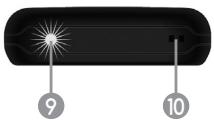
CONTENU DE L'EMBALLAGE
natural_image
Diagram of a smartphone showing internal components and a screen with an arrow pointing to one panel (no text or symbols present)Note :
© 2016 Bluetooth SIG, Inc.
ENTRETIEN ET GARANTIE
DÉCLARATION DE CONFORMITÉ
Nous, Lexibook® S.A.
When unpacking, ensure that the following elements are included:
1 x Cell phone / 1 x micro USB cable / 1 x earphone set / 1 x Instruction manual
WARNING: All packaging materials, such as tape, plastic sheets, wire ties and tags are not part of this product and must be discarded.
OVERVIEW OF YOUR PHONE
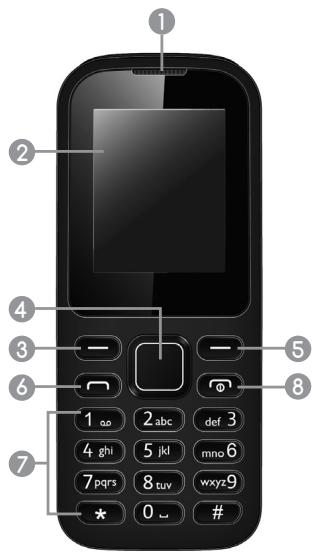
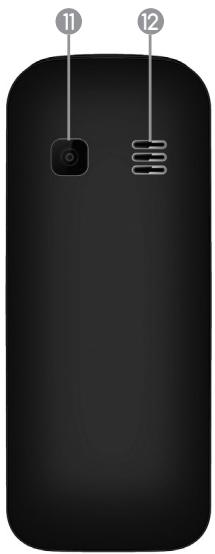
Discover your new cell phone and learn to identify the various features provided using the diagram on the first page of the booklet.
- Receiver 10. Lanyard hole
- Screen 11. Camera
- Main menu / OK key 12. Speaker
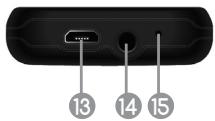
- Navigation key 13. Micro USB / charger port
- Contacts / Back key 14. Headphone plug
- Answer call / Call history 15. Microphone
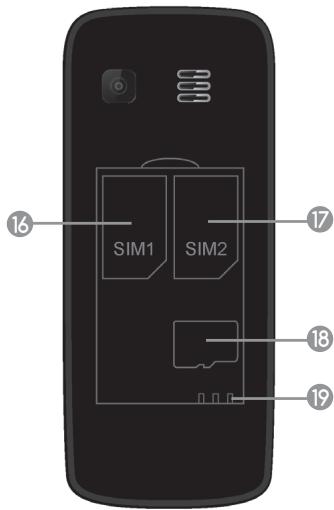
- Keypad 16. SIM1 slot
- Power / End call key 17. SIM2 slot
- Flashlight 18. Micro SD card slot
- Battery connectors
Precautions for Use
- Do not expose the phone to any sources of humidity.
• To prevent any risk of electrical discharge, do not attempt to disassemble the device. - Avoid bringing any metal (e.g. metal clips, keys) into contact between the battery terminals and charging conductors.
- Please read the specifications appearing on the product to verify that the input rating matches that of your adaptor.
- Do not use the cell phone if there is a risk of explosion (e.g. in the event of a gas leak).
- It is recommended to unplug the adaptor/USB cable during lightning storms in order to prevent any risk of electrical problems.
- Ensure that the adaptor/USB cable is not wet. It may be dangerous to use electrical equipment near water.
- Please comply with current legislation on the disposal of the packaging and the phone once it is out of order. Do your utmost to recycle them.
- Keep a minimum distance around the device for sufficient ventilation.
- The openings should never be blocked by newspapers, curtains, tablecloths, etc.
- Do not place the device on open flames such as lighted candles.
- Batteries should be disposed properly. Take them to the collection container in order to protect the environment;
• Device for use in a temperate and/or tropical climate. - Do not expose this product near to dripping or splashing water. No objects filled with liquids such as vases should be placed on the unit.
Warning: Risk of explosion if battery is incorrectly replaced. Please only replace it with an identical or a similar battery.
We recommend that you refrain from using this phone near intensive care medical devices or individuals with a pacemaker.
Safety Notice
If your phone is lost or stolen, please notify your service provider immediately to disable/disconnect your SIM card.
To further secure your phone please take precautionary measures, such as:
- Setting up a phone password.
- Setting up a SIM lock code.
TIPS FOR A RESPONSIBLE USE
Usage recommendations to lower the exposure to radio waves.
Below are some measures you can take to lower your exposure to radio waves produced by this device:
- Only make short calls, and do not use it more than necessary.
- The youngest users should only use mobile phones for essential purposes and keep all calls short.
- Keep your mobile phone away from your body when it is in standby mode.
- Only use your phone when the reception is strong (this is indicated by bars on the top of your phone screen). Weak reception causes the phone to use more energy to communicate with the base station.
- Use the hands-free kit provided to keep your phone as far away from your head as possible.
- Set up your charging station outside of the sleeping room.
Tips for communicating safely
Below are the top tips for communicating safely:
- Don't reply to any nasty or suspicious messages you receive. Block numbers sending them.
- Don't reply to a text from someone you don't know.
- Keep the messages you have been sent so you can show them to a trusted adult and make a note of the time and date of the messages or calls you receive.
- Don't answer calls from withheld numbers or numbers you don't recognise, let them go to voicemail.
- If you are bullied repeatedly, contact your operator to change your number.
- Don't give your mobile number to someone you don't know.
- Don't send pictures to someone you don't know.
- If the problem is serious you can report it to the police or a trusted adult.

- Do not use your mobile phone near medical equipment or on an aircraft without requesting permission. Avoid placing the phone over pacemakers, for example, in your breast pocket.
- Some hearing aids might be disturbed by mobile phones.
- Minor interference may affect TVs, radios, PCs etc.
- Check the laws and regulations on the use of mobile phones in the area when you drive.
- Do not use a hand-held phone while driving.
- Give full attention to driving.
- Pull off the road and park before making or answering a call if driving conditions so require.
- RF energy may affect some electronic systems in your vehicle such as car stereos and safety equipment.
- When your vehicle is equipped with an air bag, do not obstruct with installed or portable wireless equipment. It can cause the air bag to fail or cause serious injury due to improper performance.
- If you are listening to music whilst out and about, please ensure that the volume is at a reasonable level so that you are aware of your surroundings. This is of particular importance when near roads.
- Do not use a headset while driving or riding. Doing so may distract your attention and cause an accident, or may be illegal depending on your region.
- Do not use your phone at a refueling point (petrol stations).
- Do not use near fuel or chemicals.
- Do not transport or store flammable gas, liquid or explosives in the same compartment of your vehicle as your mobile phone or accessories.
- Do not use or store your device in areas with high concentrations of dust or airborne materials. It can cause your device to malfunction and may result in fire or electric shock.
- Turn off the device in potentially explosive environments
- Do not use your device or applications for a while if the device is overheated
- If your device has a camera flash or light, do not use it close to the eyes of people or pets.
Tips for a responsible use
Parents and user are invited to discuss together about:
- The cost of mobile phone use and agreeing on a monthly budget.
- Some 'phone-free' time on a weekly or daily basis.
• Usage at school or at night time. - The primary purpose of having this phone = stay in touch with relatives and/or emergency use.
- Handling the responsibility of caring for a phone (do not lose it and beware of thieves).
GETTING STARTED
SIM card
Before using your phone you must insert a valid SIM card in the slots provided for such purpose (16 and 17).
NOTE: Make sure your SIM cards are installed properly; simply align the grooves of the SIM card to the SIM card slot.
Dual SIM
When powering on the phone with two SIM cards, you will be asked which card you want to use before making a call or sending a message.
Note:
- It is not necessary to have 2 SIM cards inserted at all times. The phone can operate with one SIM card only.
- When travelling to different regions/countries, SIM cards do not switch automatically.
- While using one of the SIM cards for calls, if you receive a phone call on the other SIM card, your correspondent will be notified that your are not available.
Micro SD card
Use approved and compatible micro SD memory cards, up to 16 GB.
- Turn off the phone, slide the back cover downward to remove it and take out the battery.
- Slide the micro SD card clip (18) to the right to unlock it.
- Lift the clip, and insert the card with the metallic contacts facing right.
- Put down the clip and slide it back to the locked position.
- Put the battery back and slide the back cover upward until it "clicks".
Battery
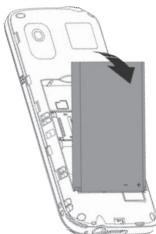
Before using your phone, you need to insert the battery.
- Turn off the phone, remove the back cover.
- Insert the battery and ensure that the metallic contacts are on the lower right, facing the battery connectors of the phone (19).
- Put the back cover.
natural_image
Diagram of a smartphone showing the internal structure and an arrow pointing to a screen (no text or symbols present)
Note:
Always wait at least 5 seconds after having turned off the device before restarting it. Shutting off and immediately turning on the device can damage the electrical circuits. The battery life may vary based on usage patterns of the device. For example, avoid letting the battery discharge completely to prevent abnormal battery drainage.
The lithium battery is intended for use only with this cell phone. Do not disassemble the battery. Do not dispose of the battery in fire or water. To avoid risk of fire, burns or damage to your battery, do not allow a metal object to touch the battery contacts. Handle a damaged or leaking battery with extreme care. If you come in contact with the electrolyte, wash the exposed area with soap and water. If it contacts the eye, flush the eye with water for 15 minutes and seek medical attention. Do not charge the lithium battery pack if the ambient temperature exceeds 45^ C ( 113^ F). When discarding a battery pack, contact your local waste disposal provider regarding local restrictions on the disposal or recycling of batteries. Battery shall not be exposed to excessive heat such as sunshine, fire or the like.
WARNING: Malfunction or loss of memory may be caused by strong frequency interference or electrostatic discharge. Should any abnormal function occur, reset the unit.
POWERING ON AND OFF THE PHONE
To turn ON/OFF your phone, press the Power key (8) for 3 seconds. If you are prompted to input a PIN or UPIN, please enter the required password.
To activate the password when switching on the phone, use the following steps: Go to Menu > Settings > Security settings > enable "Phone locked". The default password is 0000. Then, select "Modify the cellphone password" to modify the password.
LOCKING AND UNLOCKING THE PHONE
When the phone is turned on, press the Main menu / OK key (3) and then press * to switch off the screen and lock the keypad.
If you do not use the phone for a while, it will automatically lock:
- Press any key to turn on the screen.
- Press the Main menu / OK key (3), and then press the * key to unlock the phone.
DISPLAY ICONS AND INDICATORS
The home screen display includes 4 areas:
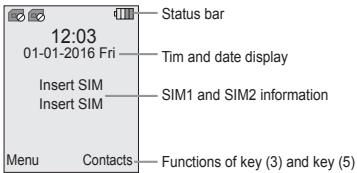
| Icon | Description |
| Signal SIM1/SIM2: Strength of the received signal. The greater number of bars, the better the signal strength. | |
| SIM card missing: Indicates that there is no SIM card inserted. | |
| Missed calls: Indicates that one or several calls were received. | |
| New message: Indicates that one or several text messages are unread. | |
| Battery: Indicates the battery charge level. Full means that battery is completely charged. | |
| Headset: Appears when a wired headset is plugged in. The Earphone profile activates automatically. | |
| Bluetooth®: Appears when Bluetooth® is activated. The Bluetooth profile activates automatically. | |
| Silent mode: Appears when the Silent profile is activated. | |
| Meeting mode: Appears when the Meeting profile is activated. | |
| Indoor mode: Appears when the Indoor profile is activated. | |
| Outdoor mode: Appears when the Outdoor profile is activated. | |
| Alarm On: Appears when an alarm is set |
MAKING CALLS
Calling out
Check the signal strength indicator on home screen. If low, adjust your physical location to be clear of obstructions that may block the signal.
From the home screen, use the keypad to enter the phone number you want to call. Press Answer call/Call history key (6) to call through either SIM 1 or SIM 2.
Answering calls
When you receive an incoming call, by default a ringing tone is played and a call message is displayed. If enabled, your phone also vibrates.
The incoming call phone number appears on the top screen.
Press Answer call/Call history key (6) to answer an incoming call.
Press the Power/End call key (8) to end a call or reject an incoming call.
LANGUAGES AND TEXT INPUT METHOD
The phone supports several languages and various text input methods. When texting, press # to change these options.
| Abc | Sentence case typing. |
| abc | Complete lowercase typing. |
| ABC | Complete uppercase typing. |
| 123 | Number and symbol typing. |
| Writing language | Select a language to be able to type the accents and characters specific to it. |
MAIN MENU INTRODUCTION
Your phone provides various features to the user. Apart from basic phone functions (making and receiving calls, sending and receiving messages), user can use different functions in the main menu to enjoy the most out of the phone.
| Contacts | [0x2x1] | This function allows you to store and edit contact information. |
| Call History | [0x3x1] | The call history will display all incoming, outgoing, and missed calls. |
| Multimedia | [0x7x1] | This function allows you to use the following features: Camera Video recorder, Music player, Image viewer, Video player, FM radio, Sound recorder. |
| Messages | [0x2x1] | The messaging feature will display all of your outgoing and incoming text and picture messages.Note: About 100 SMS can be stored in the phone. For MMS, the user needs to insert the Micro SD card into the phone to receive them given the short capacity of the internal memory. If the memory is full, the user can't receive messages or MMS anymore unless some old/useless files or messages/MMS are deleted. |
| Games | [0x4x1] | Who never dreamed of moving pallets?You won't be bored anymore in the doctor's waiting room, or in the subway, now that you can have fun with the legendary Boxxmania and ,its breathtaking graphics and levels equally difficult! |
| File Manager | [0x3x1] | The File Manager allows you to play music or video files, view photo, copy/move/delete files, rename files and also send the files through the Bluetooth® option. |
| Tools | [4x5x1] | This function allows you to use features like Alarm, Bluetooth®, Calendar, Torch light, Calculator, Stopwatch, World clock and Converter. |
| Settings | [0x3x1] | The settings menu allows you to adjust the following settings:- Call settings: Adjust the call options (SIM cards, call divert, call barring...)System: Adjust the options of your device (date/time, language, shortcuts...)Display: Customize the display (wallpaper, contrast, backlight...)Security: Manage the security settings (password, lock phone...)Profiles: Choose the sound profile you need and adjust options for each profile (ringtones, volume...)Network: Adjust the network options (Internet, GPRS...)Note: Flight mode can be found in "Profiles". |
| Internet | [0x2x1] | The Internet Service allows you to access the Internet (WAP) through mobile websites. |
DATA SERVICE (INTERNET)
To use the MMS and Internet features, you must first enable the GPRS service in Settings > Network.
In “Network settings”, select “Network account”. This menu allows you to check, modify, or delete the data accounts in your phone. Or it can also enable you to surf the internet when you insert a new SIM card and input the APN (access point name) accordingly.
Usually, a list of standard networks is included in your SIM card and will be displayed automatically.
If this is not the case, please follow the instructions below to select an account from an international list or to add an account manually.
- Select "Settings", "Network settings", and "Network account".
- Click on "Options" and choose "Add from list". Tick the networks of your choice to add them to the main menu. If your network is not in this list, follow the steps below.
- In "Options", select "New account" and change the fields according to the instructions of your mobile network provider.
Note: The settings depend on your SIM card and on your provider. For further information, please refer to local providers.
To see the IMEI number of you phone, dial *#06#.
If you cannot send/receive MMS, make sure that the correct network profile is selected in Messages > Options > Settings > MMS > SIM1/2 MMS Account.
You can increase the storage capacity of your phone up to 16 GB with a micro SD card (see chapter "GETTING STARTED").
Adding files
To add or delete files on the micro SD card, connect the phone to a computer with a micro USB cable. Then select "Mass Storage" on the phone's screen.
Charging the battery
If you only want to charge your phone, select "Charging". A sound will alert you when the battery is fully charged.
ORIGINAL PARTS
Contact Lexibook® for supply of original parts.
NOTE: Only use batteries, chargers and accessories approved by the Lexibook®. Use of other types of batteries, chargers and accessories may cause damage to the phone and will result in a voided warranty.
SPECIFICATIONS
• Name: GSM20series
• Quad-band cell phone (850/900/1800/1900)
- Flash Memory: 4MB
- SIM: Dual SIM
- Compact size (108.4 x 45.1 x 12.6 mm) and lightweight (58g)
• 1.77" TFT screen (128 x 160)
• Digital camera 0.08MP
- Lithium battery (included) – 600mAh, 3.7V
Input: 5V = 0.5A
- Charger: micro USB cable
• Frequency range: GSM 900/1800 MHz
Bluetooth: 2402 - 2480 MHz
• Transmitted Power: Max. 2W/Max. 1W
Bluetooth: 4.14 dBm EIRP
IMPORTANT NOTE
Emergency Calls
All mobile cell phones use radio waves, and coverage cannot be guaranteed in every location. As such, you must never exclusively count on your mobile telephone for essential communications (for example, medical emergencies).
Emergency calls may not be possible on all wireless telephone networks, or when certain network services and/or telephone functions are used. You may have to close down these functions in order to make an emergency call. Consult this guide and your network service provider.
To make an emergency call:
- Ensure that your telephone is on, in standby mode and that it is receiving adequate signal. Some networks require that a valid SIM card is installed.
- Dial the emergency number and press Answer call / Call history key (6).
- When making an emergency call, remember to give all of the necessary information as precisely as possible. Remember that your mobile telephone may be the only means of communication at the scene of an accident, and therefore do not hang up until officials indicate that you should do so.
Certification Information (SAR)
THIS PHONE MODEL COMPLIES WITH EU SPECIFICATIONS CONCERNING EXPOSURE TO RADIO WAVES.
Your phone is a radio transceiver. It is designed and manufactured to not exceed exposure limits to radio frequency (RF) recommended by the Council of the European Union. These limits are within the framework of the general directives and set the authorised RF energy levels for the general population. These directives have been formulated by independent scientific bodies following periodic evaluation and detailed scientific studies. These
limits include a considerable safety margin, intended to ensure the safety of everyone, irrespective of their age and health.
The exposure standard for mobile telephones employs a measurement unit called the Specific Absorption Rate, or SAR. The SAR limit recommended by the Council of the European Union is 2.0 W/kg.* SAR test were performed under normal usage conditions, with the telephone transmitting at its highest certified power level on all tested frequency bands. Although the SAR is established at the maximum certified power level, while the telephone is in operation, its actual SAR level may be well below the maximum value. The telephone is indeed designed to operate at different power levels, so as to only use the power required to reach the network. Generally speaking, the closer you are to the base station antenna, the lower the power output.
Before a telephone model is made available for sale to the public, its compliance with the European RTTE Directive must be demonstrated. This directive considers the protection of the health and safety of the user and of any other person to be an essential requirement.
Compliance with the European R&TTE Directive must be proven before a phone model can be sold to the public. This directive includes a basic requirement to protect the health and safety of the user and other people. In tests to prove compliance with the standard, the highest SAR value of this mobile phone when using directly at the body was 0.443 W/kg; and ear was 0.372 W/kg.
There may be differences in the SAR levels of different telephones under different conditions, but they comply with EU requirements for RF exposure.
* The SAR limit for mobile devices used by the public is 2.0 W/kg, averaged over 10 grams of bodily tissue. The directives include a considerable safety margin in order to ensure additional protection for the public and to take into account all measurement differences. SAR values may differ between national information requirements and network bandwidth.
SAR tests have been carried out on this product at 0.5 cm from the body. In order to meet the requirements related to exposure to radiofrequency energy, this device must be kept at least at this distance from the body.
Basic precautions can help reduce the level of exposure to radio frequencies. In order to lower the emission power from your mobile phone, use it when having excellent reception, the signal strength indicator on top of the screen must show a sufficient number of bars. The device usually uses less power when close by a base station. Also ensure the accessories used with your mobile phone (such as casings) do not contain metal compounds.
The current scientific information has not linked mobile phone use with any specific precautions. However, organizations such as the World Health Organization recommend people willing to reduce their exposure to radio frequency to limit the length of use of the device or use hands-free mode as much as possible so it can be kept far from the head or
the body during the use. Under the applicable French law, we are required to inform you that it is recommended to keep the mobile phone away from pregnant women's belly and teenagers' lower belly.
For more information, refer to World Health Organization website (http://www.who.int/emf).
Bluetooth
The Bluetooth® word mark and logos are registered trademarks owned by Bluetooth SIG, Inc. and any use of such marks by Lexibook® is under license. Other trademarks and trade names are those of their respective owners.
© 2016 Bluetooth SIG, Inc.
MAINTENANCE AND WARRANTY
Cell phones, which are made of plastic, are very fragile and sensitive.
- Try to avoid exposing your cell phone to low/high humidity and temperatures, as well as high variations of humidity/temperature. The ideal environment for storing a cell phone is a temperature around 20.5°C (70°F) and a humidity rate between 40% and 50%.
- Remember to keep the phone clean and avoid any dirty or dusty areas.
- To clean the screen, please use approved cell phone screen cleaners.
- Should any abnormal event occur, contact your local electronics shop and ask a qualified technician for assistance.
Note: Please keep this instruction manual, it contains important information.
This product is covered by our 2-year warranty.
For any claim under the warranty or after sale service, please contact your distributor and present a valid proof of purchase. Our warranty covers any manufacturing material and workmanship defect, with the exception of any deterioration arising from the non-observance of the instruction manual or from any careless action implemented on this item (such as dismantling, exposition to heat and humidity, etc.). It is recommended to keep the packaging for any further reference. In a bid to keep improving our services, we could implement modification on the colours and the details of the product shown on the packaging.
Reference: GSM20series
Designed and developed in Europe – Made in China ©Lexibook®
United Kingdom & Ireland
For any further information, please call 0808 100 3015
www.lexibook.com
This product is not a toy.

To prevent possible hearing damage, do not listen at high volume levels for long periods. Ensure your player at low volume levels or power off before you leaving. Fully understand user manual before use.
Warning: Prolonged use at full power of this product might damage the ear of the user
Environmental Protection
Unwanted electrical appliances can be recycled and should not be discarded along with regular household waste! Please actively support the conservation of resources and help protect the environment by returning this appliance to a collection centre (if available).


Correct disposal of batteries in this product
(Applicable in countries with separate collection systems)
This symbol means that the product contains a rechargeable battery covered by European Directive 2013/56/EU which cannot be disposed of with normal household waste.
All batteries should be disposed separately from the municipal waste stream via designated collection facilities appointed by the government or the local authorities.
The correct disposal of your old batteries will help to prevent potential negative consequences for the environment, animal and human health.
Inform yourself about the local separate collection system for electrical and electronic products and rechargeable batteries. Follow local rules and never dispose of the product and rechargeable batteries with normal household waste.
For more detailed information about disposal of your old batteries, please contact your city office or waste disposal service center.
CONFORMITY DECLARATION
We, Lexibook® S.A.
Declare under our sole responsibility that the following product:
Kind of product: Cell Phone
Type designation: GSM20series
Is in compliance with the following standards:
EN60950-1:2006+A11:2009+A1:2010+A12:2011
EN301489-7 V1.3.1
EN 50360:2001+A1:2012
EN301489-17 V2.2.1
EN 50566:2013
EN62479:2010
EN301511 V9.0.2
EN 62209-1:2006
EN300328 V1.9.1
EN 62209-2:2010
EN 301489-1 V1.9.2
We hereby declare that the above mentioned product is in compliance with the R&TTE Directive (1999/5/EC) of the European Commission.
Yiu Wai Man
Product Development Manager
26/09/2016 (Hong Kong)
C €0700
CONTENIDO DEL EMBALAJE
natural_image
Diagram of a smartphone showing internal components and a screen with an arrow pointing to one panel (no text or symbols present)
Notas:
© 2016 Bluetooth SIG, Inc.
26/09/2016 (Hong Kong)
C €0700
CONTEÚDO DA CAIXA
© 2016 Bluetooth SIG, Inc.
26/09/2016 (Hongkong)
C €0700
© 2016 Bluetooth SIG, Inc.
26/09/2016 (Hong Kong)
C €0700
ERPACKUNGSINHALT
Anmerkungen:
DISPLAY ICONS AND INDICATORS
© 2016 Bluetooth SIG, Inc.
26/09/2016 (Hongkong)
C €0700
INHOUD VAN DE VERPAKKING
natural_image
Diagram of a smartphone showing the internal components of a device, with one segment highlighted by an arrow (no text or symbols present)In "Connection" ("Verbinding"), selecteer "Network account" ("Netwerkaccount").
© 2016 Bluetooth SIG, Inc.
ONDERHOUD EN GARANTIE
Type benaming: GSM20series
26/09/2016 (Hong Kong)
C€0700
IM code: GSM20seriesIM1376