
WG-2490 - Electronic scale TOPCOM - Free user manual and instructions
Find the device manual for free WG-2490 TOPCOM in PDF.


| Product type | Electronic baby scale |
| Brand | Topcom |
| Model | WG-2490 |
| Maximum capacity | 20 kg |
| Minimum capacity | 10 g |
| Graduation | 10 g |
| Measurement units | kg, lb, st |
| Display | LCD screen |
| Power supply | 2 AA 1.5 V batteries (non-rechargeable) |
| Operating temperature | 10°C to 40°C |
| Operating humidity | Less than 80% RH |
| Automatic shut-off | After 20 seconds of inactivity |
| Main functions | On/off, tare, unit selection |
| Cleaning | Slightly damp or antistatic cloth |
| Safety | Not waterproof, do not disassemble, use on a flat surface |
| Warranty | 24 months |
Frequently Asked Questions - WG-2490 TOPCOM
User questions about WG-2490 TOPCOM
0 question about this device. Answer the ones you know or ask your own.
Ask a new question about this device
Download the instructions for your Electronic scale in PDF format for free! Find your manual WG-2490 - TOPCOM and take your electronic device back in hand. On this page are published all the documents necessary for the use of your device. WG-2490 by TOPCOM.
USER MANUAL WG-2490 TOPCOM
WG-2490
USER GUIDE / HANDLEIDING / MANUEL D'UTILISATEUR BEDIENUNGSANLEITUNG / MANUAL DE USUARIO MANUAL DO UTILIZADOR / MANUALE D'USO BRUKSANVISNING/ UŽÍVATEL'SKÝ MANUÁL INSTRUKCJA OBSŁUGI / UŽIVATELSKÁ PŘÍRUČKA
V.1.0 - 07/2012
CE
UK The features described in this manual are published with reservation to modifications.
1.1 Intended Purpose
The Digital WG-2490 is the ultimate scale for weighing safely your newborn.
This easy to use, large LCD display scale is battery-operated scale and makes daily weighing very easy.
1.2 Safety advice
• Always read the safety instructions carefully.
- Follow the basic safety precautions for all electronic equipment when using this Scale.
- Keep this User's Manual for future reference.
• This unit is not waterproof. Don't expose this product to rain or moisture.
- Lay this equipment on a reliable flat surface before setting it up.
• If any of the following situation arises, get the equipment checked by a service technician:
- The equipment has been exposed to moisture.
– The equipment has been dropped and damaged.
– The equipment shows signs of breakage. - Do not place the basic unit in a damp room at a distance of less than 1.5m away from a water source.
- Don't disassemble this scale. The scale doesn't contain any parts that can be repaired by the user.
• Use the scale only for its intended purpose.
1.3 Technical specifications
Operation temperature: 10°C \~ 40°C
Environmental humidity: <80% R.H.
Max. capacity: 20kg
Min. capacity: 10g
Graduation: 10g
Power supply: 2 x Non - rechargeable AA batteries (not included)
Unit change: kg, lb or st
2 Installation
Put batteries in the battery compartment to activate the display :
- Open the battery compartment at the bottom of the unit.
- Insert the 2 not enclosed AAA non - rechargeable batteries (1,5V) following the polarity as shown.
- Close the battery compartment.
Do not short-circuit & dispose of in fire. Remove the batteries if this device is not going to be used for a long period.
3 Description
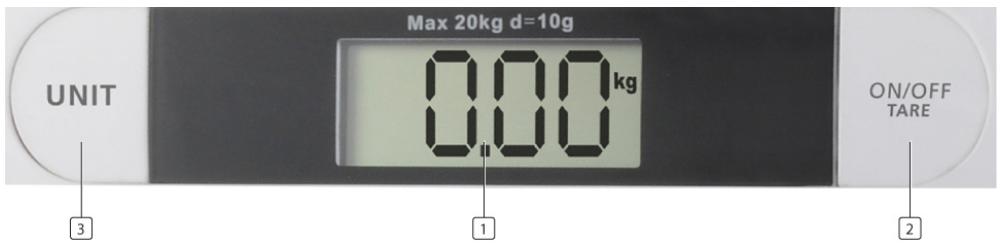
- LCD display
- ON/OFF/TARA-button
- UNIT-button
4 Simple operation
- Press the ON/OFF/TARA-button (2).
- Press the UNIT - button (3) to select 'Kilogram (kg)', 'Stone (st)' or 'Pound (lb)'
• Gently place the baby on the pan.
• The babies weight (maximum 20Kg) flashes on the display after a few seconds.
If you use a towl to lay the baby on, it should be placed on the pan before switching on. If you forgot to do so, press the ON/OFF/TARA-button to eliminate the weight of the towl immediately after you have layed down the towl. If you remove the towl, the scale will display a negative reading.
- Press for a few seconds the ON/OFF/TARA-button (2) to turn the scale Off or it will turn off automatically in idle mode after 20 seconds.
5 Error messages
Lo Low power - Replace the batteries O-Ld Overload. The weight of the baby is over 20kg.
6 Cleaning
Clean the scale with a slightly damp cloth or with an anti-static cloth. Never use cleaning agents or abrasive solvents.
7 Disposal of the device (environment)

At the end of the product lifecycle, you should not throw this product into the normal household garbage but bring the product to a collection point for the recycling of electrical and electronic equipments. The symbol on the product, user guide and/or box indicate this. Some of the product materials can be re-used if you bring them to a recycling point. By re-using some parts or raw materials from used products you make an important contribution
to the protection of the environment. Please contact your local authorities in case you need more information on the collection points in your area.
Batteries must be removed before disposing of the device.
Dispose of the batteries in an environmental manner according to your country regulations.
8 Topcom warranty
8.1 Warranty period
The Topcom units have a 24-month warranty period. The warranty period starts on the day the new unit is purchased.
Consumables or defects causing a negligible effect on operation or value of the equipment are not covered.
The warranty has to be proven by presentation of the original purchase receipt, on which the date of purchase and the unit-model are indicated.
8.2 Warranty exclusions
Damage or defects caused by incorrect treatment or operation and damage resulting from use of non-original parts or accessories not recommended by Topcom are not covered by the warranty.
The warranty does not cover damage caused by outside factors, such as lightning, water and fire, nor any damage caused during transportation.
No warranty can be claimed if the serial number on the units has been changed, removed or rendered illegible.

This product is in compliance with the essential requirements and other relevant provisions of the directive 2004/108/EC.
The Declaration of conformity can be found on:
www.tristar.eu
Alimentation : 2 piles AAA non rechargeables (non fournies)
visit our website www.tristar.eu

Brand : TOPCOM
Model : WG-2490
Category : Electronic scale