GFL40WHT - Fridge GLEM - Free user manual and instructions
Find the device manual for free GFL40WHT GLEM in PDF.



User questions about GFL40WHT GLEM
0 question about this device. Answer the ones you know or ask your own.
Ask a new question about this device
Download the instructions for your Fridge in PDF format for free! Find your manual GFL40WHT - GLEM and take your electronic device back in hand. On this page are published all the documents necessary for the use of your device. GFL40WHT by GLEM.
USER MANUAL GFL40WHT GLEM
Instruction booklet for Installation - Use - Maintenance
FOUR STATIQUE
Before leaving the factory, this appliance was tested and regulated by expert and skilled personnel to give the best operating results. Any repair or regulation that may subsequently be necessary must be carried out with the greatest care and attention. For this reason, we recommend you always contact the Dealer you bought the appliance from or our nearest Service Centre, specifying the type of problem and the model of your appliance. Please remember as well that the original spare parts are available only from our Technical Service Centres. Do not leave the packaging unguarded, both for the safety of children and for the protection of the environment, but dispose of it in a centre for differentiated waste.
The symbol on the product or on the packaging means that the product must not be considered as normal household refuse, but must be taken to the appropriate collection point for the recycling of electric and electronic equipment. The appropriate disposal of this product helps avoid potential negative consequences on the environment and for health, which could be caused by inappropriate disposal of the product. For more detailed information on the recycling of this product, please contact your municipal offices, the local waste disposal service or the store where the product was purchased.
This appliance conforms to the following Directives/Regulations:
- 2006/95/EC (low voltage appliances)
- 2004/108/EC (electromagnetic compatibility)
- 1935/2004 (parts designed to contact food substances)
- 2012/19/UE (WEEE)
- 2009/125/EC (EuP)
- 2011/65/EC (RoHS)
- 1907/2006 (REACH)
TABLE OF CONTENTS
| General warnings | Page | 2 - 3 |
| Instructions for use | Page | 4 - 12 |
| Instructions for cooking | Page | 13 - 15 |
| Cleaning and maintenance | Page | 16 - 18 |
| Instructions for installation | Page | 19 - 20 |
| Technical characteristic | Page | 21 |
GENERAL WARNINGS
Dear Customer,
Thank you for having chosen one of our products. This appliance is easy to use, but you must read this booklet carefully before installing and using it. The booklet contains instructions that will help you to install, use and service the product in the best way.
WARNING: This appliance and its accessible parts become very hot during use. Young children must be kept well away from the appliance. Take care and do not touch the heating elements inside the oven. Unless they are supervised at all times, children younger than 8 years of age must be kept well away from the appliance.
WARNING: This appliance may be used by children from 8 years of age onwards and by persons with reduced physical, sensorial or mental capabilities, or who lack experience and knowledge so long as they are properly supervised or have been trained on how to use the appliance safely and are aware of the risks involved. Children must not play with the appliance. The appliance must not be cleaned or serviced by unsupervised children.
The glass parts must not be cleaned with abrasive products or sharp metal scrapers since these could scratch the surface and cause it to break.
WARNING: To avoid the risk of electric shock, make sure that the appliance has been switched off before you change the light bulb.
The appliance cannot be switched on by an external timer on a separate remote control.
Do not use jets of steam to clean the appliance.
GENERAL WARNINGS
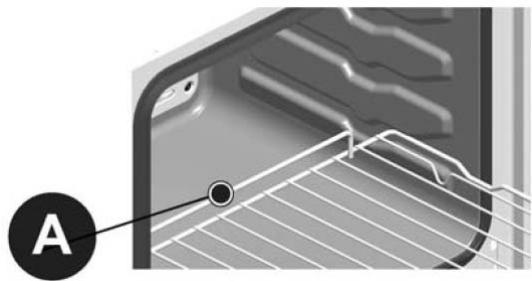
Warning: to ensure that the anti-tipping system functions correctly, first insert part “A” and keep it pointing upwards as shown in the figure.
It is very important for this instruction booklet to be kept with the appliance if it changes hands.
This appliance has been designed for non-professional use by private individuals in their homes and its purpose is to cook and heat food. Do not use it for other purposes.
The appliance must be installed by a skilled and qualified installer who is familiar with the installation rules in force.
Before it is cleaned or serviced, the appliance must be disconnected from the electric power source and allowed to cool.
IMPORTANT: The oven produces hot air or steam during the cooking processes. Take great care when you open the door.
The electric power cable of the appliance must not be replaced by the user. It must only be replaced by a qualified electrician.
Never line the oven with aluminium foil. It could block the slots and prevent regular heat exchanges from taking place, consequently damaging the enamelled surface.
Before you start using the oven for cooking, you must remove the protective film from the oven door and heat the empty oven at maximum temperature for about 45 minutes (this will eliminate the odours and fumes created by manufacturing residues). After this, the oven must be thoroughly cleaned with soapy water and rinsed well, but do not use too much water as this could penetrate and damage the internal components.
Always call an authorized Technical Assistance Center and insist on original spare parts if repairs are required. Repairs made by incompetent persons could cause damage.
INSTRUCTIONS FOR USE
The knobs of switch A and of thermostat B allow selecting the different functions of the oven and choosing the different cooking temperatures most suitable for the food to be cooked. In some models, the knobs are recessed; before making the selection, you must press to make them appear and then press them again to recess them.
When the oven is functioning, the light stays on.
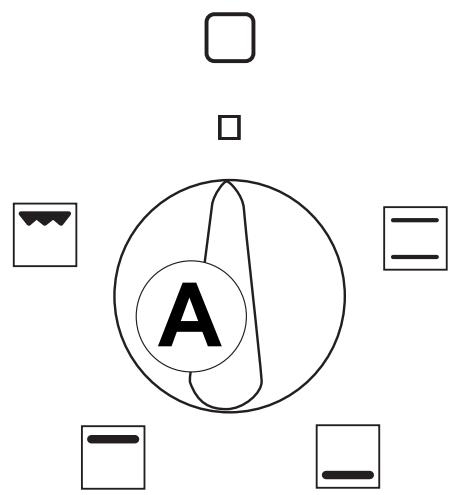
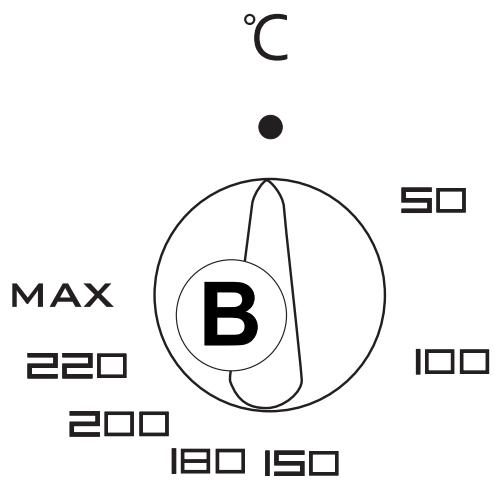
Traditional cooking

The upper and lower heating elements are on. The temperature can be adjusted on the whole scale of the thermostat.

The lower heating element is on. The temperature can be adjusted on the whole scale of the thermostat.

The upper heating element is on. The temperature can be adjusted on the whole scale of the thermostat.
Grilling

The grill heating element and the spit roast motor (if any) are on. Adjust the temperature to 200^ on the thermostat. When used this way, if the thermostat switches off the resistance (because the temperature set has been reached) the spit roast motor will also stop rotating, resuming when the resistance goes on again.
The oven door must always be closed for all types of cooking.
INSTRUCTIONS FOR USE
DEPENDING ON THE MODEL, THE OVEN COULD HAVE ONE OF THE FOLLOWING COMPONENTS:
Programmable clock
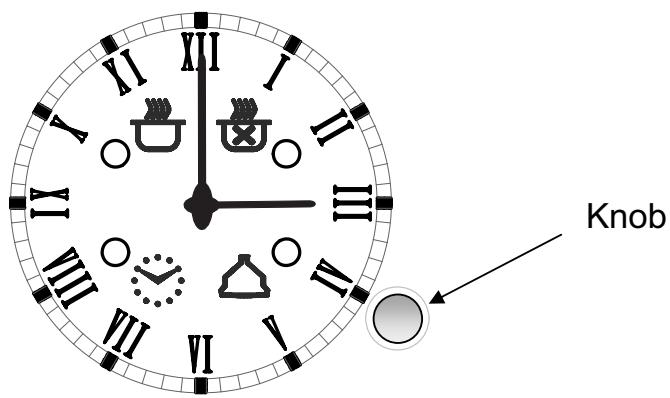
Setting current time
Press the knob until the light flashes and in 10 seconds set the time rotating the knob. Press again to confirm.
General
- if not deactivated (as per the instructions below), the buzzer stops after 1 minute
- to cancel a setting that has been programmed, keep the knob pressed for about 3 seconds and the lights go out
- the minimum programming time is 2 minutes
- if there is a power cut, all the settings programmed stay memorized and when the power returns, the light flashes. Press the knob and, when the setting that has been programmed ends, reset the current time.
Timer buzzer (max 180 minutes)
To use as a simple buzzer, press the knob until the light flashes and set the desired time rotating the knob in less than 10 seconds; the current time will reappear and the light will stay on. To check the setting memorized, press the knob until the light flashes.
To deactivate the buzzer, press the knob for about 3 seconds (the light goes out).
Setting end of cooking time (max 15 hours)
To start cooking immediately and automatically set the cooking time, follow this procedure:
- select the function and temperature desired through the function selector and the thermostat
INSTRUCTIONS FOR USE
- press the knob until the light flashes, rotate it in less than 10 seconds to select the end of cooking time.
- Confirm by pressing the knob. The current time will reappear and the light will stay on.
The end of cooking time can be checked by pressing the knob until the light flashes.
At the end of the cooking time, the buzzer sounds and the oven switches off automatically; to deactivate the buzzer, press the knob, the light goes out and the oven returns to the manual mode.
Setting the start and end of cooking
To set both the start and the end of the cooking time, follow this procedure:
- select the function and desired temperature with the function selector and the thermostat
- press the knob until the light flashes and in less than 10 seconds rotate it to select the start of the cooking time desired (maximum 12 hours from the current time)
- press the knob again until the light flashes and in less than 10 seconds rotate it to select the end of cooking time desired; confirm by pressing the knob.
The current time will reappear and the and lights will stay on.
To check the settings memorized, press the knob once.
With the start of cooking, the light goes off; at the end the buzzer sounds and the oven switches off automatically. To deactivate the buzzer, press the knob, the light goes off and the oven returns to manual mode.
The maximum programming time, i.e. the total of the hours of delay plus the cooking time, is 15 hours (e.g. setting the delay in 12 hours, the maximum cooking time is 3 hours).
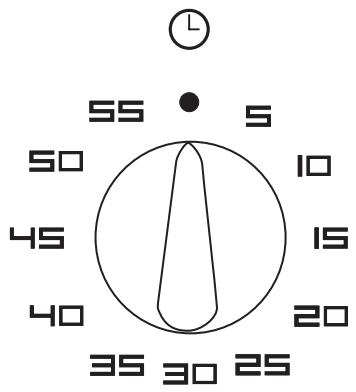
Timer
To use the timer, you have to wind up the buzzer by rotating the knob right round one in a clockwise direction; then, turning back, until the time desired (max. 60 minutes). When the time set has lapsed, the buzzer sounds. This does not switch the oven off.
INSTRUCTIONS FOR USE
End of cooking timer
The end of cooking timer, which can be set from 0 to 120 minutes, programmes the end of cooking and switches off the oven. To use it, first you have to turn the knob clockwise by one notch to the position then, continuing, wind up the buzzer by further rotating the knob for almost one complete turn; lastly, going back, set the desired time.
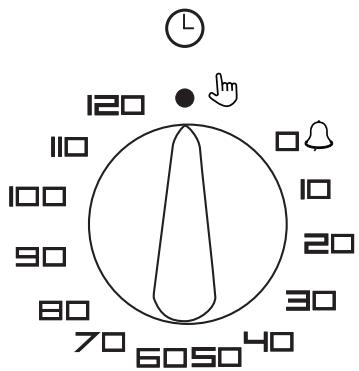
When the time that has been programmed has lapsed, the buzzer sounds and at the same time the oven is automatically switched off. To use the oven with the manual function, excluding the timer, put the knob back to its original position, rotating it in an anticlockwise direction by one notch until the reference of the knob coincides with the symbol on the control panel.
6 button electronic programmer
Setting the current time
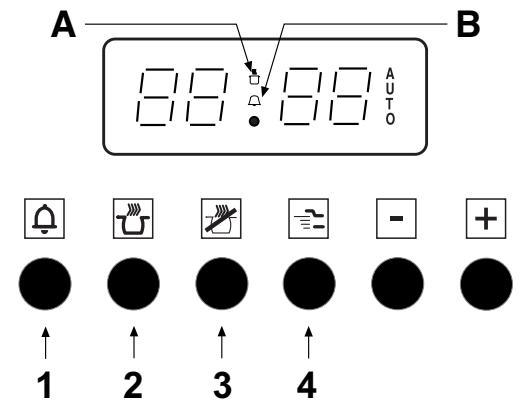
When connected electrically, the display flashes showing 0.00. Press buttons (1) and (2) at the same time and set the current time, pressing the (-) and (+) buttons within 4 seconds; the oven will continue to function manually and can be used without any programming.
General notes
- between 10.00 p.m. and 6.00 a.m. the brightness of the display is automatically reduced.
- if it is not deactivated (as per the instructions below), the buzzer stops after 2 minutes.
- any programming described below is activated about 4 seconds after setting.
- the maximum time of programming is 23 hours 59 minutes.
- if there is a power cut, all the settings programmed are cancelled; when power returns, the display flashes showing 0.00. To restore the functioning of the appliance, reset the current time and any programme.
Timer buzzer
To use it as a simple buzzer, press button (1) and programme the time desired, pressing the (-) and (+) buttons within 4 seconds; the current time will reappear and the symbol (B) will be activated. To deactivate the buzzer, press any of the buttons from (1) to (4); the symbol (B) is deactivated.
INSTRUCTIONS FOR USE
Programming end of cooking
To start cooking immediately and automatically set the duration, proceed as follows:
- select the function and the temperature desired using the function selector and the thermostat
- press button (2) and set the cooking time, pressing the (-) and (+) buttons within 4 seconds.
The current time will reappear and the (A) and (AUTO) lights will stay on. The remaining cooking time can be checked by pressing button (2), or changed by repeating the same procedure.
For any cancellation of the programming set, reset the cooking time to 0.00 and, after the current time has reappeared, press button (4) to restore the manual function. When cooking is finished, the buzzer sounds and the oven is switched off automatically.
To deactivate the buzzer, press any of the buttons from (1) to (4). To return the programmer to the manual function, press button (4).
Setting the start and end of cooking
To programme both the start and the end of cooking, proceed as follows:
- select the function and the temperature desired using the function selector and the thermostat
- press button (2) and set the cooking time, pressing the buttons (-) and (+) within 4 seconds
- press button (3) and set the time when you want the cooking to end in the same way.
The current time will reappear and light (AUTO) and, when cooking starts, light (A), will stay on. To cancel the programming set, put the cooking time back to 0.00 and, after the current time has reappeared, press button (4) to restore the manual function. When the cooking ends, the buzzer sounds and the oven is automatically switched off. To deactivate the buzzer, press any of the buttons from (1) to (4). To restore the programmer to the manual function, press button (4).
Children's safety lock
The programmer has a safety lock which prevents programming cooking and therefore the oven from functioning.
Activating the lock:
– press buttons (1) and (2) at the same time for about 8 seconds
- the display shows "ON"; release the buttons
- press the (+) button; the display shows “OF” and the “…key…” symbol.
At this point, the safety lock is activated and after about 5 seconds the display shows the current time and the "...key..." symbol.
Deactivating the lock:
- press buttons (1) and (2) simultaneously for about 8 seconds
- the display shows “OF”; release the buttons
INSTRUCTIONS FOR USE
- press the (+) button; the display shows “ON”
At this point the safety lock is deactivated and after about 5 seconds the display shows the current time.
2 button electronic end of cooking
Setting the current time
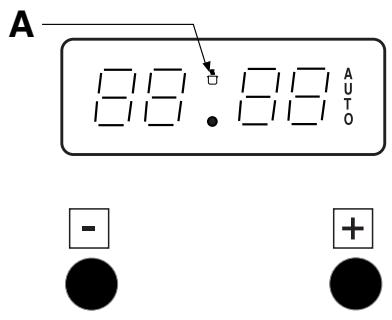
When the electricity has been connected, the display flashes, showing 0.00. Press both buttons at the same time and set the current time, pressing the (-) and (+) buttons within 4 seconds; the oven will continue to function manually and can be used without any programming.
General notes
- If not deactivated (as per instructions below) the buzzer stops after 2 minutes.
- Any programming described below is activated about 4 seconds after setting.
- The maximum programming time is 23 hours and 59 minutes.
- If there is a power cut, all the programmed settings are cancelled; when power returns, the display flashes, showing 0.00. To restore the functioning of the appliance, reset the current time and any programme.
Setting end of cooking
To start cooking immediately and automatically set the cooking time, proceed as follows:
- Select the function and temperature desired through the function selector and the thermostat.
- Set the cooking time, pressing the (-) and (+) buttons.
- The display will show the cooking time set and the symbol (A).
To cancel the programming set, put the cooking time back to 0.00 and, after the current time has reappeared, press any of the buttons to restore the manual function and the symbol (A) is switched off.
When the cooking is finished, the buzzer sounds and the oven is switched off automatically, the current time appears and the symbol (A) flashes. To deactivate the buzzer and bring the oven back to manual functioning, press any one of the buttons and the symbol (A) disappears.
Children's safety lock
The programmer has a safety lock that prevents programming cooking and therefore the functioning of the oven.
Activating the lock:
- press the (-) and (+) buttons at the same time for about 8 seconds
- the display shows "ON"; release the buttons
INSTRUCTIONS FOR USE
- press the (+) button; the display shows “OF” and the “...key...” symbol.
At this point the safety lock is activated and after about 5 seconds the display shows the current time and the "...key..." symbol.
Deactivating the lock:
- press the (-) and (+) buttons at the same time for about 8 seconds
- the display shows “OF”; release the buttons
- press the (+) button; the display shows “ON”
At this point the safety lock is deactivated and after about 5 seconds the display shows the current time.
Electronic touch programmer
Setting the current time
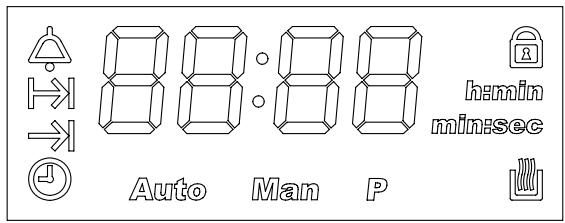
When the power is connected, “12:00” and the symbol flash on the display. By touching any one of the controls (+, - or SELECT), the symbol MAN appears and it is possible to set the time, pressing the - or + buttons within 5 seconds.
Subsequent adjustments of the time can be made by repeatedly touching the SELECT control until the symbol flashes and adjusting the time as described above.

General notes
- Setting the current time whilst an automatic programme is active will cancel the programme.
- The loudness of the buzzer can be modified by repeatedly touching the SELECT control until the level set appears (L1, L2 or L3) and pressing + or -.
- If not deactivated, the buzzer stops automatically after about 7 minutes.
- The maximum programming time is 23 hours 59 minutes.
- If there is a power cut, all the programmed settings are cancelled; when power returns, the display flashes, showing 12:00. To restore the functioning of the appliance, reset the current time and any programme.
Timer buzzer
To use it as a simple timer, touch the SELECT control repeatedly until the symbol flashes, set the time desired, pressing + or -, after about 5 seconds the symbol stops flashing and the time starts to decrease; to modify the time set or zero it, press + or -.
When the time is finished, touch any one of the controls to deactivate the buzzer.
The maximum time that can be set is 99 minutes.
INSTRUCTIONS FOR USE
Setting the end of cooking
To start cooking immediately and set cooking time, proceed as follows:
- put the dishes to be cooked in the oven and select the function and temperature desired using the functions selector and the thermostat
- touch the SELECT symbol repeatedly until the flashing symbol appears and set the cooking time within 5 seconds, pressing + or -.
After a few seconds, the current time will reappear and the and AUTO symbols will stay on.
The remaining cooking time can be checked by pressing the SELECT symbol until the symbol is selected, or modified or zeroed by pressing + or -.
When the cooking is finished, the buzzer sounds and the oven is switched off automatically, the display shows 0.00 and MAN flashes. To deactivate the buzzer, press any of the controls; touch SELECT to put the programmer back to manual, the MAN symbol stops flashing and the oven can be used again.
Setting the start and the end of cooking
To programme both the starting time and the end of cooking, proceed as follows:
- touch the SELECT control until the symbol appears, set the cooking time pressing + or - within 5 seconds;
- touch the SELECT control again until the symbol is selected to set the end of the cooking.
- put the dishes to be cooked into the oven and select the function and the temperature desired through the function selector and the thermostat.
The cooking will start from the end of cooking time minus the cooking time. 5 seconds after the release of the controls the current time will reappear and the AUTO will stay active as will the symbol at the start of cooking.
When the cooking is finished, the buzzer sounds and the oven is switched off automatically. To deactivate the buzzer, press any one of the controls; touch SELECT to bring the programmer back to manual. The MAN symbol stops flashing and the oven can be used again.
To cancel the programme, zero the cooking time.
Safety lock
This electronic programmer has a function that locks the oven or the programmings set.
The lock does not work when the timer is active.
Activation: touch the + control for about 5 seconds then the symbol will appear.
Notes:
- if the lock is activated with the display showing the current time and no programming set (end of cooking or start and end of cooking), the oven is locked
- if it is activated with the oven functioning or a programming selected (end of cooking or start and end of cooking), the lock prevents modifying the programmings.
Deactivation: touch the + control for about 5 seconds.
INSTRUCTIONS FOR USE
NOTE : in the case of a power cut, when the power returns, the lock will still be active.
Thermostat light


This goes on every time the thermostat acts to stabilize the cooking temperature in the oven and it goes off when the oven reaches the pre-set temperature.
Safety thermostat
This interrupts the power supply to avoid excessive overheating due to incorrect use of the appliance or a possible defect of the components. If this device comes into action due to incorrect use, you only have to wait for the oven to cool down before you can use it again. However, if it is due to a defect of the components, you must contact the Technical Assistance Service.
Cooling motor
Some ovens have a motor to cool the internal components. This device goes on automatically however the oven is used.
INSTRUCTIONS FOR COOKING
ROASTING
For perfect roasting, the oven has to be pre-heated to the pre-set cooking temperature. Only very fatty meat can be cooked with the oven starting from cold. Never use shallow pans or the drip-tray as pans for roasts, to dirty the walls of the oven as little as possible, avoid the fat splattering, the juices burning quickly and smoke being produced.
Use deep pans, preferably made from terracotta, placed on the shelf about halfway up the oven.
The table shows you some examples of thermostat settings and cooking times. The cooking times can vary depending on the nature of the foods, its evenness and volume. We are certain that your experience will soon suggest possible variations to the values shown in the cooking times table.
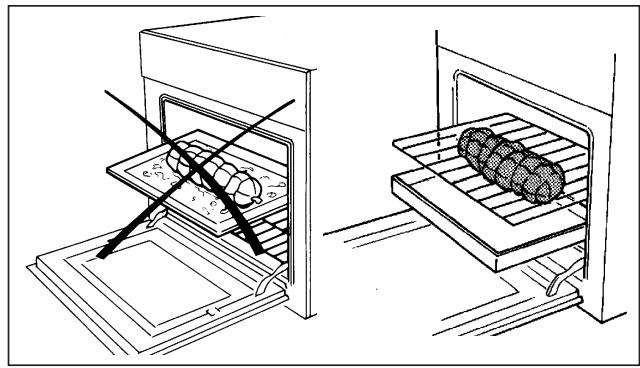
Some practical advice to save energy
The oven can be switched off a few minutes before the end of cooking; the remaining temperature will be sufficient to finish cooking. Open the door of the oven as infrequently as possible; to check the degree of cooking, look through the window (the oven light is always on).
GRILLING
For grilling, the oven should be pre-heated for about 5 minutes. When grilling, the heat comes from above and is based on the irradiation of infrared rays. It is suitable for meat which is not very thick and toast. Meat and fish to be grilled should be lightly brushed with oil and always placed on the shelf, which then slides into the position nearer or further from the grilling element, in proportion to the thickness of the meat; the table shown below gives some examples of cooking times and the position of the food. The cooking times can vary according to the nature of the food, its evenness and volume.
Use of the spit-roast (if any)
Thread the food to be roasted on to the bar, taking care to squeeze it between the two forks, balancing it well to avoid superfluous strain on the spit-roast motor. Place the spit-roast bar into the hole of the motor shaft on the oven wall, ensuring that the rear end is correctly inserted.
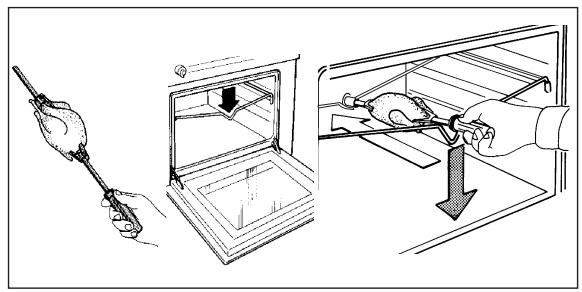
Place it on the support rack using the band on the bar which is near the handle. Put the drip tray on the lower shelf, remove the handle of the bar during cooking. The handle is only to make it easier to remove the food when it is cooked.
INSTRUCTIONS FOR COOKING
COOKING AU GRATIN
This term refers to the change of the surface of food which is generally pre-cooked and when placed in the oven, it becomes crisp and golden in appearance.
"Gnocchi alla romana", "polenta pasticciata", rice, lasagne, pasta and vegetables in bechamel sauce are the typical dishes for this type of cooking.
COOKING TIMES
The table shows some examples of the thermostat setting and cooking time. The cooking times can vary depending on the nature of the food, its evenness and its volume. We are sure that your experience will soon suggest possible variations to the values shown in the table.
Notes:
- For roasts of beef, veal, pork and turkey with bones or rolled roasts, increase the times in the table by about 20 minutes.
- The indication in the table for the use of the shelves is the best one in the case of cooking on several levels.
- The times described in the table refer to the cooking of one food only; for more dishes, the cooking times have to be increased by 5-10 minutes.
INSTRUCTIONS FOR COOKING
Table of oven cooking times
| Kind of food | Shelf no. | Oven temperature °C | Time in minutes |
| FOOD | |||
| Long cooking roast | 2 | 220-MAX | dep. on qty. |
| Short cooking roast | 2 | 225-MAX | 50-60 |
| Poultry (guinea-fowl, duck etc.) | 1 | 210-MAX | 150-180 |
| Chicken | 2 | 225-MAX | 50-60 |
| Game | 1 | 200-225 | dep. on qty. |
| Fish | 1 | 180-200 | 20-25 |
| BAKING | |||
| Christmas cake | 1 | 160-200 | 60-70 |
| Plum-cake | 1 | 170-180 | 90-100 |
| Orange cake | 1 | 170-180 | 80-100 |
| Savoy biscuits | 2 | 200 | 40-45 |
| Croissants | 2 | 215-230 | 35-40 |
| Puff pastry | 2 | 215 | 30-40 |
| Sponge cake | 2 | 200-215 | 30-35 |
| Meringues | 1 | 140 | 60-80 |
| Chou pastry | 2 | 215-230 | 30 |
| Fruit tarts (shortcrust pastry) | 2 | MAX | 30-35 |
| Fruit tarts (yeast pastry) | 2 | 230 | 20-30 |
Table of grilling times
| Nature of food | Quantity Kg | Shelf no. | Oven temperature °C | Pre-heating in minutes | Time in minutes |
| Veal chops | 1 | 3-4 | 200 | 5 | 8-10 |
| Lamb chops | “ | “ | “ | “ | 12-15 |
| Liver | “ | “ | “ | “ | 10-12 |
| Mince rolls | “ | “ | “ | “ | 12-15 |
| Calf's heart | “ | “ | “ | “ | 12-15 |
| Trussed roast | “ | “ | “ | “ | 20-25 |
| Half-chicken | - | “ | “ | “ | 20-25 |
| Fish fillet | - | “ | “ | “ | 12-15 |
| Stuffed tomatoes | - | “ | “ | “ | 10-12 |
CLEANING AND MAINTENANCE

Important: before carrying out maintenance or cleaning the oven, unplug it and wait for it to cool down.
General cleaning
To keep the enamelled part shiny for as long as possible, the oven must be cleaned each time after using it. Leave the oven to cool down and you can easily remove the deposits of fat with a sponge or damp cloth and warm soapy water and, if necessary with a product on the market. Do not use abrasive cloths or sponges that could irreparably damage the enamel. The control panel, handle and knob of white ovens must also be cleaned each time in order to avoid greasy steam turning them yellow in time. After use, rinse the stainless steel parts well with water and then dry them with a soft cloth or chamos leather. For stubborn stains, use normal non-abrasive detergents or specific products for stainless steel or a little warm vinegar. Clean the window of the oven door only with hot water, avoiding the use of rough cloths.
Oven with copper surfaces: the copper surfaces have a special protection. To keep the surfaces intact, we recommend using, when the oven is cold, a soft clean cloth and a neutral detergent for delicate surfaces. Never use abrasive tools.
Do not clean with a jet of steam.
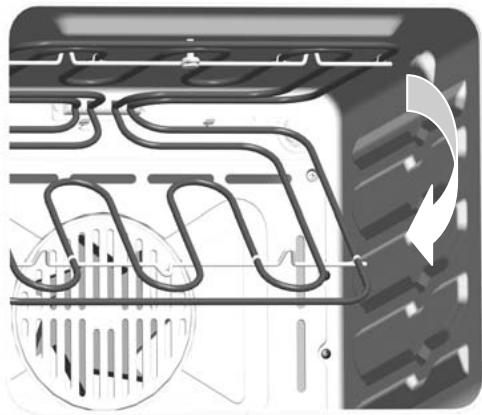
Ovens with a tilting upper resistance for cleaning
1 Important: make sure that all the controls are in the off position and wait for the resistance to cool down
2 Hold the front part of the grill resistance whilst you unscrew the knurled nut of the fixing screws
3 Gently lower the front part of the resistance until it stops.
4 During cleaning, avoid applying excessive strain on the resistance.
5 After cleaning, carefully remove all residue to detergents and water from the resistance.
6 Lift up the front part of the resistance and tighten the knurled nut of the fixing screws.

Do not use the oven with the resistance lowered.
CLEANING AND MAINTENANCE
Cleaning the oven door
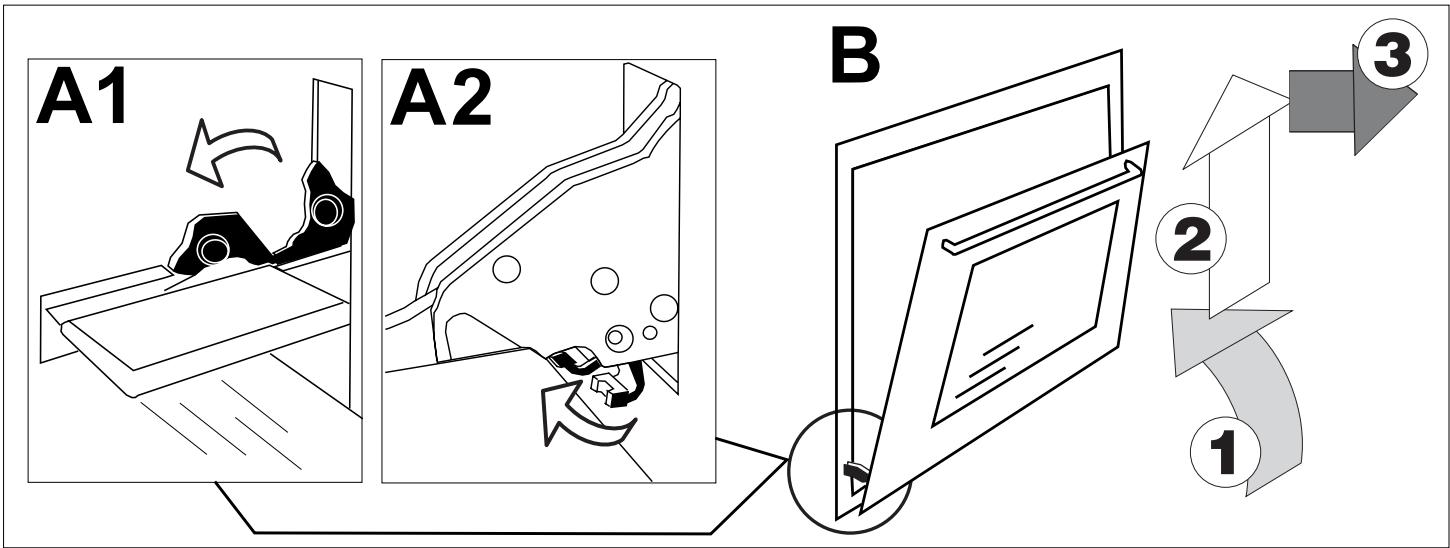
Dismounting the door
- Open the oven door to its full extent
- Move the hinge stops depending on the model, as shown in figure A1 or A2.
- Turn the door towards the closed position until it rests on the stops. This blocks the hinge spring. Continue to close the door so as to remove the hinges from their housings, then raise and lift off the door (fig. B).
Perform the operations described above in reverse order to fit the door back in place.
Dismounting the glass panes of the door

IMPORTANT: for your safety, before dismounting the glass panes, remove the door from the oven.
For easier cleaning, after having removed the door from the oven, the glass panes can be dismounted. You only have to remove the two upper blocks (fig. C) to be able to slide out the windows (fig. D). After cleaning, remount the glass panes by replacing the blocks and checking that all the parts are correctly fixed. Only then remount the door on the oven.
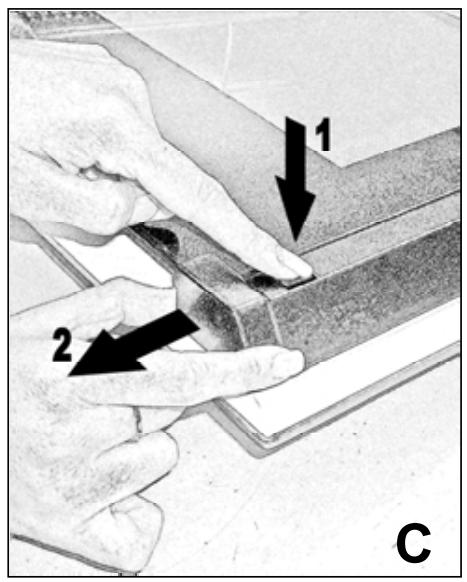
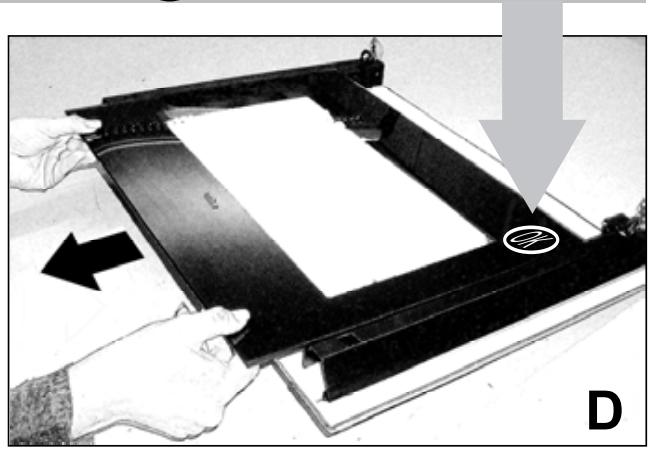
Please keep the OK symbol below on the right.
CLEANING AND MAINTENANCE
All the glass used in this appliance has undergone a special safety treatment. In the case of breakage, the glass shatters into small square and smooth pieces which are not dangerous because they are not sharp.
Please take care and avoid thermal shocks for the glass pane, for example, never start cleaning when it is hot.
Replacing the oven light
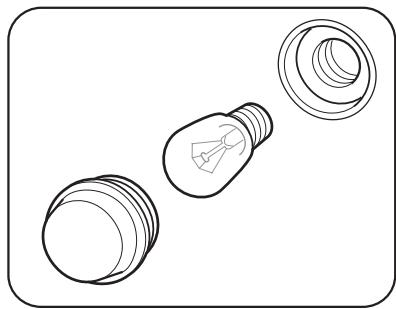
After having disconnected the oven from the power supply, unscrew the glass protection cap and then the bulb and replace it with another one suitable for high temperatures (300°C / E14). Remount the glass cap and reconnect the oven.
Self-cleaning catalytic panels (optional)
Some models of the oven can have self-cleaning panels, covering the walls, mounted in the muffle. If they are not already supplied, you can contact your dealer or Service Centre to purchase them.
These special panels, to be fixed to the side walls and the rear wall, are covered with a special micro-porous catalytic enamel that gradually oxidises and vaporises splattered oil and fat, eliminating them during cooking at over 200^ C. If after cooking very greasy or fatty food, the oven is not clean, switch it on empty at the maximum temperature for the time necessary (max. 1 hour) for it to become clean again. The self-cleaning panels must not be washed or cleaned with abrasive products or products containing acids or alkalis, but only regularly wiped with a cloth soaked in water.
INSTRUCTIONS FOR INSTALLATION
Electrical connection

Disconnect the power supply before every operation
The appliances have a three-pole power supply cable and are ready to work with alternating current, at the voltage shown on the "ratings plate" at the end of the booklet and on the product. The earth conductor of the cable is yellow/green.
Connecting the power supply cable to the mains
Connect a plug suitable for the load shown on the ratings plate of the product to the oven power supply cable. In the case of direct connection to the mains (cable without a plug), an omnipolar switch with an appropriate load must be inserted upstream of the appliance, with a minimum opening of contacts of 3mm . (the earth connecting cable must not be interrupted by the switch).
Before proceeding with the connection to the mains, make sure that:
- the electricity meter, the protection valve, the power line and the socket are sufficient to support the maximum load required (see ratings plate)
- the electricity system is earthed, compliant with current regulations
- the socket or omnipolar switch can easily be reached after the oven has been installed
- after making the electrical connection, check that the power supply cable does not come into contact with parts subject to heating up
- do not use adaptors or shunts as they can heat up or burn.
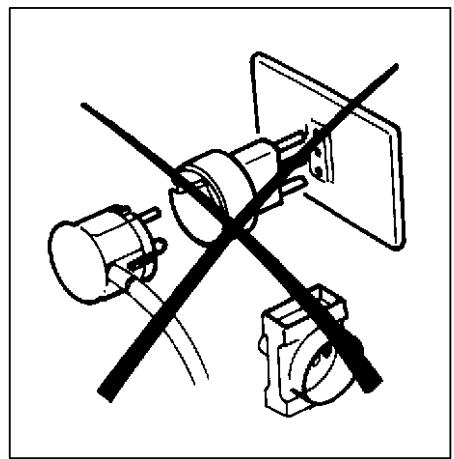
In the cases in which a hob is also installed, the hob and the oven must be connected separately, both for electrical safety reasons and to make extracting the oven easier.
After connection, put the power back on only after the oven has been put into the unit.
The manufacturer is not responsible for direct or indirect damage caused by incorrect installation or connection. All the operations relative to installation and electrical connection must therefore be carried out by trained personnel working according to local and general regulations in force.
INSTRUCTIONS FOR INSTALLATION
Recessing and fixing to unit:
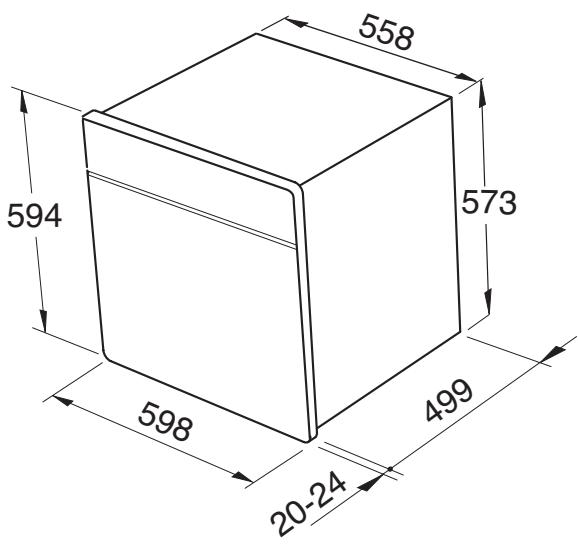
(mm)
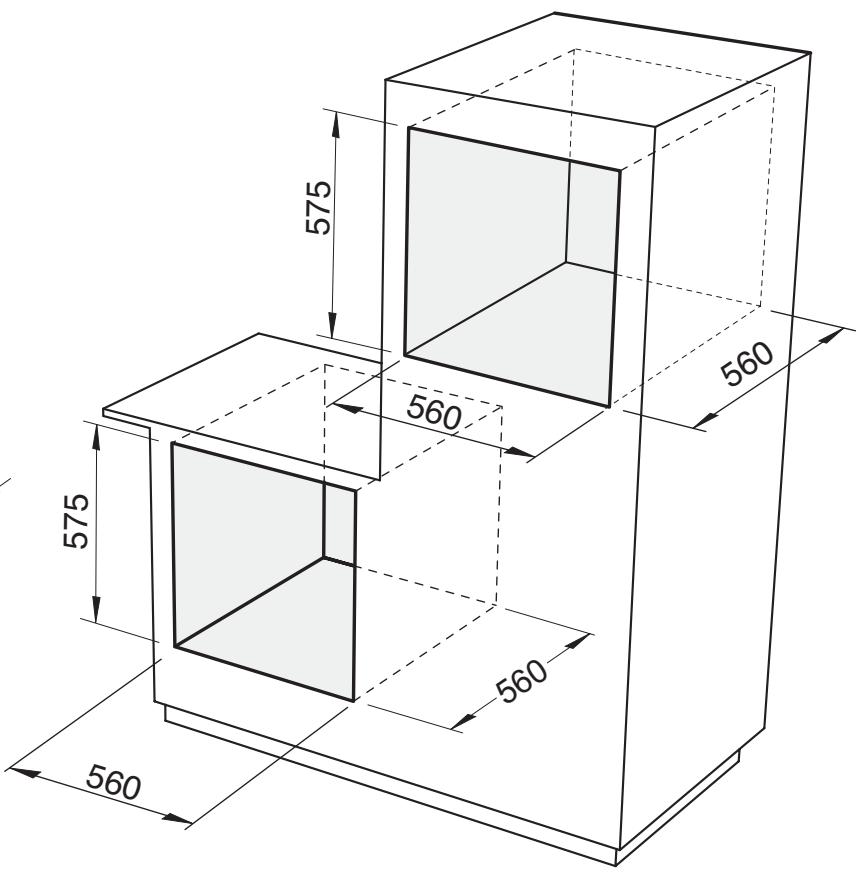
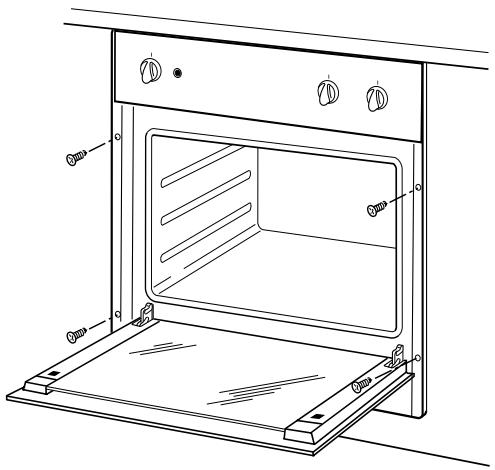
Put the oven into the recess laying it on the base and pushing it until the lateral jambs touch the sides of the unit.
Open the door and fix the oven with four wood screws which must be screwed through the holes in the lateral jambs of the oven.
Ensure that the oven is fixed in a perfectly stable fashion, as shown, and that the electrical parts are isolated so that they do not come into contact with the metal parts. In addition, the adhesive that bonds the laminate to the unit must be resistant to temperatures of not below 90^ to avoid deformation and ungluing of the surface.
TECHNICAL CHARACTERISTIC
Power of possible heating elements:
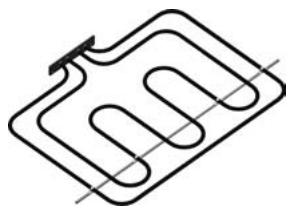
(Upper) 800 + 1800 ~W

(Upper) 1200W
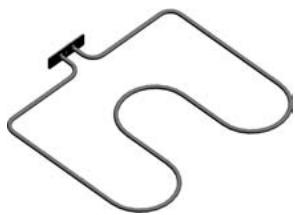
(Lower) 1000W
Light bulb:

25W (max)
Premir o Manipulo até o indicator luminoso ↓ ↓ ↓ ↓ ↓ ↓ ↓ ↓ ↓ ↓ ↓ ↓ ↓ ↓ ↓ ↓ ↓ ↓ ↓ ↓ ↓ ↓ ↓ ↓ ↓ ↓ ↓ ↓ ↓ ↓ ↓ ↓ ↓ ↓ ↓ ↓ ↓ ↓ ↓ ↓ ↓ ↓ ↓ ↓ ↓ ↓ ↓ ↓ ↓ ↓ ↓ ↓ ↓ ↓ ↓ ↓ ↓ ↓ ↓ ↓ ↓ ↓ ↓ ↓ ↓ ↓ ↓ ↓ ↓ ↓ ↓ ↓ ↓ ↓ ↓ ↓ ↓ ↓ ↓ ↓ ↓ ↓ ↓ ↓ ↓ ↓ ↓ ↓ ↓ ↓ ↓ ↓ ↓ ↓ ↓ ↓ ↓ ↓ ↓ ↓ ↑ ↑ ↑ ↑ ↑ ↑ ↑ ↑ ↑ ↑ ↑ ↑ ↑ ↑ ↑ ↑ ↑ ↑ ↑ ↑ ↑ ↑ ↑ ↑ ↑ ↑ ↑ ↑ ↑ ↑ ↑ ↑ ↑ ↑ ↑ ↑ ↑ ↑ ↑ ↑ ↑ ↑ ↑ ↑ ↑ ↑ ↑ ↑ ↑ ↑ ↑ ↑ ↑ ↑ ↑ ↑ ↑ ↑ ↑ ↑ ↑ ↑ ↑ ↑ ↑ ↑ ↑ ↑ ↑ ↑ ↑ ↑ ↑ ↑ ↑ ↑ ↑ ↑ ↑ ↑ ↑ ↑ ↑ ↑ ↑ ↑ ↑ ↑ ↑ ↑ ↑ ↑ ↑ ↑ ↑ ↑ ↑ ↑ ↑ ↑↑
Notas gerais
- o®, o®, o®, o®, o®, o®, o®, o®, o®, o®, o®, o®, o®, o®, o®, o®, o®, o®, o®, o®, o®, o®, o®, o®, o®, o®, o®, o®, o®, o®, o®, o®, o®, o®, o®, o®, o®, o®, o®, o®, o®, o®, o®, o®, o®, o®, o®, o®, o®, o®, o%, o%, o%, o%, o%, o%, o%, o%, o%, o%, o%, o%, o%, o%, o%, o%, o%, o%, o%, o%, o%, o%, o%, o%, o%, o%, o%, o%, o%, o%, o%, o%, o%, o%, o%, o%, o%, o%, o%, o%, o%, o%, o%, o%, o%, o%, o%, o%, o%, o%, o%
- premir simultaneamente as teclas (1) (2) por circa de 8 segundos
- o®, o®, o®, o®, o®, o®, o®, o®, o®, o®, o®, o®, o®, o®, o®, o®, o®, o®, o®, o®, o®, o®, o®, o®, o®, o®, o®, o®, o®, o®, o®, o®, o®, o®, o®, o®, o®, o®, o®, o®, o®, o®, o®, o®, o®, o®, o®, o®, o®, o®, o%, o%, o%, o%, o%, o%, o%, o%, o%, o%, o%, o%, o%, o%, o%, o%, o%, o%, o%, o%, o%, o%, o%, o%, o%, o%, o%, o%, o%, o%, o%, o%, o%, o%, o%, o%, o%, o%, o%, o%, o%, o%, o%, o%, o%, o%, o%, o%, o%, o%, o%
- premir a tecla (+); o主義者 visualizará “ON”
- SeLECTIONAR A FUNÇÃO e a temperatura desejada atraves do selector de funções e o termóstato.
- Programar a duração da cozedura actuando nas teclas (-) e (+).
- O®, o®, o®, o®, o®, o®, o®, o®, o®, o®, o®, o®, o®, o®, o®, o®, o®, o®, o®, o®, o®, o®, o®, o®, o®, o®, o®, o®, o®, o®, o®, o®, o®, o®, o®, o®, o®, o®, o®, o®, o®, o®, o®, o®, o®, o®, o®, o®, o®, o®, o®, or, or, or, or, or, or, or, or, or, or, or, or, or, or, or, or, or, or, or, or, or, or, or, or, or, or, or, or, or, or, or, or, or, or, or, or, or, or, or, or, or, or, or, or, or, or, or, or, or, or, or
Label of ratings plate