
RH8775 01 - Cordless vacuum ROWENTA - Free user manual and instructions
Find the device manual for free RH8775 01 ROWENTA in PDF.



| Product type | Cordless vacuum cleaner |
| Brand | ROWENTA |
| Model | RH8775 01 |
| Battery voltage | 18 V or 24 V (depending on version) |
| Battery type | Nickel-Metal Hydride (NiMH) |
| Dustbin capacity | 0.5 L |
| Runtime (18 V) - Min / Medium / Turbo | up to 35 min / 25 min / 20 min |
| Runtime (24 V) - Min / Medium / Turbo | up to 45 min / 35 min / 25 min |
| Charging time | Approximately 10 hours (first charge) |
| Number of speeds | 3 (Min, Medium, Turbo) |
| Brush type | Rotating power brush integrated in the Delta head |
| Motor filter | Foam filter for motor protection, washable |
| Charge indicator | Blue light: solid when charging, off when charged, flashes when battery low |
| Automatic shutdown | Yes, at end of charge and if battery is discharged |
| Thermal protection | Yes, for the power brush |
| Included accessories | Charger, disassembly tool, spare foam filter |
| Filter maintenance | Monthly cleaning with soapy water, drying at least 12 hours |
| Dustbin cleaning | Washable with lukewarm water |
| Weight (approx.) | Not communicated |
| Dimensions (approx.) | Not communicated |
| Warranty | Manufacturer's warranty under conditions (see manual) |
Frequently Asked Questions - RH8775 01 ROWENTA
User questions about RH8775 01 ROWENTA
0 question about this device. Answer the ones you know or ask your own.
Ask a new question about this device
Download the instructions for your Cordless vacuum in PDF format for free! Find your manual RH8775 01 - ROWENTA and take your electronic device back in hand. On this page are published all the documents necessary for the use of your device. RH8775 01 by ROWENTA.
USER MANUAL RH8775 01 ROWENTA
- Precautions before use 12
- Electric power source 13
- Repairs 13
DESCRIPTION 13
BEFORE FIRST USE 13
- How to assemble the appliance 13
- Charging the battery 14
- Turning on the appliance 14
- Storage 15
CLEANING AND MAINTENANCE 16
- Cleaning the dust tray. 16
- Cleaning the foam rubber motor protection filter 16
- Vacuum cleaner care and maintenance 17
BATTERIES 17
- Battery replacement 17
- 17
ENVIRONMENT 17
REPAIRS 18
GUARANTEE 18
SECURITY ADVICE
For your safety, this appliance complies with applicable rules and regulations (Low Tension Guidelines, Electromagnetic Compatibility, Environmental Regulations...).
This appliance is not designed to be used by individuals (including children) with reduced physical, sensory or mental capacities, nor by individuals lacking experience or knowledge in the use of the appliance, unless they have the benefit of being under the surveillance of a responsible person, or of having received proper instructions. It is advisable to keep an eye on children in order to make sure that they do not use the appliance as a toy.
This appliance may be used by children over eight (8) years old and by individuals with reduced physical, sensory or mental capacities, or lacking experience or knowledge, as long as they are properly supervised by a responsible person, as long as they have received instruction concerning the safe use of the appliance, and as long as all possible risks have been addressed. Children should not play with the appliance. User cleaning and care should not be carried out by children unless they are aged 8 years and over and supervised.
Keep the appliance and its lead out of reach of children under 8 years of age.
1 • Precautions before use
Read the instructions carefully and then store them safely.
- Your vacuum cleaner is an electric appliance: it must always be used under normal conditions. Use and store the appliance away from children's reach. Never leave the appliance on and unattended. Never hold the end of the vacuum tube near your eyes or ears.
- Never vacuum wet surfaces or liquids, no matter what their nature; hot substances; ultra-fine substances such as plaster, cement or ashes; large cutting waste materials such as glass; toxic products such as solvents or paint strippers; aggressive products such as acids or strong cleaners; or gasoline or alcohol-based flammable or explosive materials.
- Never submerge the product or charge it under water or under any other liquid. Never spray water on the appliance or on the charger.
- Do not store the appliance outdoors and keep it in a cool, dry place at all times.
- Do not place the appliance near a heat source (ovens, electric heaters or hot radiators).
- Do not expose the batteries to a room temperature above 104°F ( 40°C ).
- Do not take the vacuum cleaner apart while it is on.
- Never use your vacuum cleaner without the dust tray and the foam rubber motor protection filter.
- Do not use the appliance:
- If it fell and shows visible signs of deterioration or functional anomalies.
- If the charger or the charger cable are damaged.
In any of these cases, do not try to take the appliance apart. Rather, take it to the authorized Rowenta Service Center nearest to your home, because special tools will be needed in order to safely carry out any repairs.
- Repairs must only be carried out by specialists using original replacement parts.
- To attempt the repair of an electronic appliance at home may be hazardous to the user.
- Only use original, guaranteed Rowenta replacement parts (filters, batteries...).
This appliance is intended for domestic use only. In case it is used inappropriately, not following the given instructions, Rowenta will not be subject to any liabilities whatsoever.
2 • Electric power source
- Make sure that the voltage indicated on the rating plate of the charger corresponds to that of your power source.
- Never unplug the charger by pulling the electric cord.
- If the charger cord is damaged or if the charger itself does not function properly, do not use any other charger, different from the model provided by the manufacturer, and contact the Rowenta Consumer Service or go to the authorized Service Center nearest to your home.
3 • Repairs
Repairs must only be carried out by specialists using original replacement parts. To attempt the repair of an electronic appliance at home may be hazardous to the user, and will invalidate the guarantee.
DESCRIPTION
- Ergonomic handle
- Stop/Start button
2.a Stop position -
Light speed signals
3.a « Minimum » position
3.b « Medium » position
3.c « Turbo » position -
Light charge signal
- Neck
- Main body
- Locking screw
- Air outlet grill
- Dust tray
9.a Dust receiver (0,5L)
9.b Dust separator
9.c Foam rubber motor protection filter
9.d Lid
- Connection tube
- Delta vacuum head with integrated electro-brush
11.a Electro-brush
11.b Latches
11.c Trap
12.Wheels
13. Charger
-
18V and 24V: ref. RS-RH5277*
-
Batteries
- 18V:ref.RS-RH5233*
- 24V:ref.RS-RH5278*
- Tool
BEFORE FIRST USE
1 • How to assemble the Appliance
Unpack your appliance and throw away any tags attached. Make sure to keep your guarantee and read the instructions carefully before using the appliance for the first time.
- Remove the screw from the neck and leave the nut in its place.
Fix the neck by carefully inserting it in the upper portion of the main body (fig.1). - Insert the locking screw (7) into the neck and screw it tightly using the tool provided with the appliance (fig.2).
Fix the Delta vacuum head (11) by locking it into place in the lower portion of the main body (fig.3).
Fix the dust tray on the main body of the appliance (fig 19).
Please note : In order to detach the Delta vacuum head, press the ejection button located at the back of the main body (fig.4) and pull to remove.
2 • Charging the battery
IMPORTANT: Use only the original charger provided with the appliance. Do not charge the appliance at temperatures lower than 32°F ( 0°C ) or higher than 104°F ( 40°C ). Using a universal charger will automatically invalidate the guarantee.
EN
Before you use your vacuum cleaner for the first time, you must charge the battery completely (for about 10 hours).
While the battery is being charged, the Stop/Start button must be in the Stop position (2.a)
- Place the vacuum cleaner near an electric power point.
- Plug the charger in and connect it to the vacuum cleaner using the socket located at the back of the neck (fig.5).
- The charge signal (4) located at the front of the main body will light in blue. Leave the vacuum cleaner to charge. Once the charge cycle is completed (after about 10 hours), the light charge signal will turn off automatically.
The vacuum cleaner can stay connected to the charger permanently, without any hazard. Keep in mind, however, that if you decide to keep the charger connected it might become slightly hot. This would be a completely normal phenomenon.
It is advisable to charge the vacuum cleaner immediately after each use in order to always have it available with a fully charged battery. Thus, you will gain the maximum benefit from its cleaning and autonomous performance functions. However, in case you plan to be absent for a long period of time (on vacation, for example), it is advisable to unplug the charger for, in this case, the autonomous performance function could be diminished due to automatic power loss.
3 • Turning on the appliance
Unplug the charger cord from the vacuum cleaner. If the charger remains connected to both the power point and to the appliance, the latter will not function.
Hold the vacuum cleaner by the handle and slide the Stop/Start button downwards, towards one of the following three speeds (fig.6):
- "Minimum": Used to vacuum clean thick or delicate rugs and carpets (3.a), as well as fragile surfaces.
Please note: always make sure that the wheels located at the back of the base are clean. - "Medium": Used for better vacuuming of all floor types, and in case of light dirt marks (3.b).
- "Turbo": Used for optimum vacuum performance on all floor types, and in case of strong dirt marks (3.c).
Vacuum cleaner running times* for each usage speed (with a fully charged battery):
| Speed 1 « Minimum » | Speed 2 « Medium» | Speed 3 « Turbo » | |
| 18 Volts | Up to 35 minutes | Up to 25 minutes | Up to 20 minutes |
| 24 Volts | Up to 45 minutes | Up to 35 minutes | Up to 25 minutes |
Functioning of the light charge signal (4)
- About one (1) minute before running time ends, the light charge signal starts to flicker in blue (4).
- When the brush becomes uncharged, it stops automatically (the light charge signal continues to flicker in blue for about ten (10) seconds). It is now time to recharge your appliance.
-
Before you can use your vacuum cleaner again, you will need to recharge it for at least ten (10) minutes.
-
If the appliance does not turn on after this time, and the light charge signal continues to flicker, it means that the battery is still uncharged. In this case, you will need to charge it.
USING THE ELECTRO-BRUSH
The electro-brush is a rotating, motorized brush that guarantees maximum cleaning effectiveness by allowing the appliance to suck up dirt and clean in depth. The bristles, located all along the brush, remove threads, hair and fur that might be caught on the surface of rugs and carpets.
Please note: If the vacuum head adheres too closely to the surface you are cleaning, change the speed to « Minimum ».
ATTENTION: Do not vacuum large fragments of broken objects, as they could block and damage the brush. Do not use the electro-brush on long hair carpets, on animal fur, or on fringes.
REMOVING AND CLEANING THE ELECTRO-BRUSH
ATTENTION: Always turn off the appliance and unplug it before storing or cleaning.
Using the tool provided with the appliance (15), press in the two latches located on each side of the lower side of the Delta head (fig.7). Lift the trap located on top of the electro-brush (fig.8). Remove the electro-brush and its lateral bearing in order to clean them (fig.9). Carefully remove any threads, hair, fur, etc. from the electro-brush (fig.10). Once clean, replace the electro-brush and its lateral bearing (fig.11), then replace the trap over it (fig.12). Finally, using the tool provided with the appliance, close both latches (fig.13).
FOR YOUR SAFETY
- Do not touch any rotating parts before you turn off and unplug the vacuum cleaner.
- Do not use the appliance on wet surfaces.
- Do not immerse the appliance in water.
ELECTRO-BRUSH MALFUNCTION
The electro-brush does not function properly or makes an unusual sound
- Either the rotating brush or the axis is blocked: turn off the appliance and clean them.
- The brush is worn out: visit an authorized Service Center in order to have the brush changed.
- The belt is worn out: if the belt makes noise, it means that it is slipping because it's worn out. Visit an authorized Service Center in order to have the belt changed.
The electro-brush stops while you are vacuuming
- The thermal security feature has been activated: Turn off the vacuum cleaner by moving the Stop/Start button to the Stop position (2.a) and unplug it. Check to see if any solid object is blocking the rotation of the brush. If this is the case, remove the object and clean the electro-brush (fig.10), then you may keep using the vacuum cleaner.
The electro-brush moves with difficulty
If you find that your vacuum cleaner slides with difficulty along surfaces, progressively reduce the speed until you reach the « Minimum » position (3.a). If the problem persists, take your appliance to the authorized Rowenta Service Center nearest to your home.
See the list of authorized Rowenta Service Centers or contact the Rowenta Consumer Service department.
4 • Storage
After use, turn off your vacuum cleaner by moving the Stop/Start button to the Stop position (2a). Now you may store your appliance vertically wherever you like, thanks to the parking position.
To place the vacuum cleaner in the parking position: Place the neck vertically in order to block the appliance. To continue using the vacuum cleaner: Take it by the handle and make it swing backwards in order to unblock it and leave the parking position.
CLEANING AND MAINTENANCE
IMPORTANT: Always turn off the appliance and unplug it before storing or cleaning.
1 • Cleaning the dust tray (9)
1.a Fast emptying
Whenever the dust tray is full and reaches the "MAX" level, empty it as follows: remove the tray by sliding it downwards (fig.14), place it over a bin and press the "Push" button in order to open the trap and empty the tray's contents (fig.15). Close the trap (fig.16) and replace the dust tray on the main body of your appliance (fig.19).
1.b Complete cleaning procedure
It is advisable to clean the dust tray regularly.
- Remove the dust tray (fig.14), then separate each of its components (9).
- Remove the foam rubber motor protection filter (9c).
- Place the dust receiver (9a), the dust filter (9b) and the lid (9d) under warm water (fig.20); then let them stand to dry or dry them with a dry cloth.
- Wash the foam rubber motor protection filter (see paragraph 2).
- Once the components of the dust tray are all dry, reassemble them; do the same with the extra foam rubber motor protection filter (9c) provided as a supplement with your appliance.
- Close the dust tray and reposition it on the main body of your appliance (fig.19).
2 • Cleaning the foam rubber motor protection filter (9c)
ATTENTION: Never use your vacuum cleaner without the foam rubber motor protection filter.
In order to maintain the high performance level of your appliance, do not vacuum ultra-fine substances such as plaster, cement or ashes, and clean the foam rubber motor protection filter at least once a month. If you perceive that your vacuum cleaner is performing under regular average level, we recommend that you clean the foam rubber motor protection filter more frequently.
- Remove the dust tray lid (9d) and then remove the foam rubber motor protection filter (9c) (fig.21).
- Clean the foam rubber motor protection filter (9c) with warm, soapy water.
Rinse and let dry for at least 12 hours before replacing the filter on the appliance (fig.22).
IMPORTANT: In order to assure optimal motor protection, make sure that the foam rubber filter is completely dry before replacing it on the appliance. You will need to let it dry for at least 12 hours before reinserting it into the dust tray. An extra foam rubber motor protection filter is provided with your vacuum cleaner so that you may use the appliance while the first filter is still drying.
ATTENTION: Never place the dust tray components or the foam rubber motor protection filter in an automatic dishwasher.
3 • Vacuum cleaner care and maintenance
Wipe the main body of the appliance with a soft, damp cloth; then dry it with a dry cloth (fig.23).
IMPORTANT: Do not use detergents, or aggressive or abrasive products. The transparent color of the dust tray and/or of the separator lid may change with time; however, this will not modify the performance of the appliance.
BATTERIES
1 • Battery replacement
This appliance contains nickel-metal hydride (NiMh) accumulators which are, for safety reasons, only accessible to professional engineers. When the battery is no longer capable of retaining its charge, the NiMh block must be removed. In order to replace the accumulators, please visit the authorized Service Center nearest to your home.
2 • Throwing away the appliance
It is important that you remove the batteries before throwing away your appliance. In order to do this, visit an authorized Service Center or proceed as follows: disconnect the appliance from the electricity network, dismount the neck from the main body removing the central screw, and then remove the five (5) assembly screws located at the back of the neck (fig.24). Carefully lift the upper cover of the neck and unscrew the two electric circuit screws, then unplug the battery block by pulling the plug (fig.25). Do not throw the battery bloc into the waste bin; take it to the authorized Rowenta Service Center nearest to your home or to a place specially designated to process such type of waste.
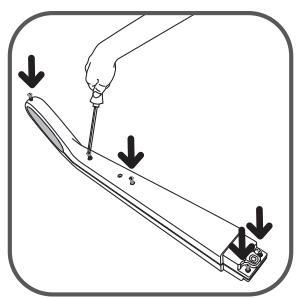
24
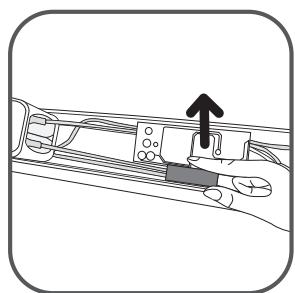
25
ENVIRONMENT
- According to current regulation, any appliance that is out of service must be taken to an authorized Service Center, where it will be safely disposed of.
- Environment: Regulation 2002/95/CE
Warning
Do not place a block of rechargeable batteries with non-rechargeable batteries.
If you wish to change the batteries, visit an authorized Service Center.
The batteries are designed to be used indoors only. Do not immerse them in water. Handle the batteries with care. Do not place the batteries in your mouth. Do not let the batteries come in contact with other metal objects such as rings, nails or screws. Be careful not to provoke internal short-circuits in the batteries by inserting metal objects through their extremities. If a short-circuit does occur, the
temperature of the batteries could rise dangerously, causing serious burns or even catching fire. If the batteries start leaking, do not rub your eyes or mucous membranes. Wash your hands and rinse your eyes with clean water. If irritation persists, consult your physician.
Let's help protect the environment!
① Your appliance contains numerous useful or recyclable materials.
⇔ Take the appliance to a collection spot so that it can be disposed of properly.

REPAIRS
IMPORTANT: If you notice that your vacuum cleaner is not functioning properly, before any revision, turn it off by placing the Stop/Start button in the Stop position.
Repairs should only be carried out by specialists using original replacement parts. To attempt the repair of an electronic appliance at home may be hazardous to the user.
If your vacuum cleaner does not start
Make sure that the charger is completely unplugged from the appliance. If it is, it means that the appliance is not charged, so proceed to charge it.
If the blue light charge signal starts to flicker very rapidly when you plug the charger to the vacuum cleaner, it means that you are not using the appropriate charger or that the one you are using is faulty.
If your appliance does not vacuum
- The electro-brush is dirty: clean it.
- The separator is clogged up: remove the dust tray and clean the separator.
If your vacuum cleaner seems less efficient, makes noise or whistles
- The tube or the hose are partially clogged up: unclog them.
- The dust receiver is full: empty and clean it.
- The dust tray is not well positioned: place it correctly.
- The Delta vacuum head is dirty: demount the electro-brush and clean it.
- The foam rubber motor protection filter is saturated: clean it.
If the separator gets filled with dust
- The separator sometimes accumulates dust. Make sure that nothing is blocking the duct between the separator and the dust tray.
- The dust tray opening is blocked: Remove the dust tray, empty it and clean the opening.
The vacuum head moves with difficulty
Lower the vacuum speed by moving the appropriate switch button.
If the problem persists, take your vacuum cleaner to the authorized Rowenta Service Center nearest to your home. See the list of authorized Rowenta Service Centers or contact the Rowenta Consumer Service department.
GUARANTEE
This appliance is intended for domestic use only. In case it is used inappropriately, not following the given instructions, Rowenta will not be subject to any liabilities whatsoever and the guarantee will be invalidated.
Read the instructions before using the appliance for the first time: using the appliance in any way different from the one indicated here would free Rowenta of all liabilities.
CONTENIDO
Páginaa
UNTKA IN TEXHINUECKOE OBCJIYJXIBAHNE 64
- Ouchstka KOHTeHepa IJIy IIJIN 64
- Ouchka npopoJHOBOrO fIJIbTpA dJa 3aIITbI DBNrataTeIa 64
- YxOnd TeXnueckoe o6cnyKuBaHne nbIeCoca 65
AKKUMYJATOPbl 65
- 3aMeHa aKKyMylTopa 65
- Ytni3aun yctpoNCTBa 65
OXPAHA OKPYKAIOUCEI CPEdbI 66
PEMOHT 66
TAPAHNTY 67
COBETbI NO 6E3OПАСHОCTN
- CBeTOBbIe CNrHaJIbI INHTeHCNBHOCTN
3.aI03nucn(MnH)
3.b POnzunra «CpeHnH» pejxIM
3.c P03nua «Typ6o»
- CBeTOB0 CNrHaI 3apJa aKKymyIaTopa
- Šeinerka
- OCHOBHOI KOpNyc
- CTONOPHbI BnHT
8.Bo3dyxOBbIyncKha peWetKa - KoHTeINHeP dIa IbIa
9.aHaKoOniTeJIbIbII (0,5I)
9.b PacpeJeIntel nbIIN
9.c POpONoHObBi ΦnIbTp DJIa 3aIuNTbI MOTopa
9.d KpbiIka
- CoeinnHtJIbHaT py6a
11.ДeЛьТОВИДнай Насадka Пылесocа C nHTerTpnpOBaHHoN эЛ ekTpoUSeTKoN
11.a 3neKtpoeseKa
11.b 3auneIka
11.c 3aedepekXnBaIOuIeNΦnJIbTp
- Koleca
-
3apdHoe yCTPOcTBO
-
18B u 24B: cm. RS-RH5277*
-
AkkymyIaTOpbl
-
18B: CM. RS-RH5233*
- 24B: CM. RS-RH5278*
15.Ин��псмeHT
3NeKtpo-1eTka DnBxkETcC TpydOM
EcnBbO6hApyKnn, YTO BaI Nblncoc C TpydOM nepemeaetc BdoJI NOBepxHoctn, NOCTepeHHo CHN3bTe nHTeHCNBHOCTb DO No3uIN «MunMaJIbHaJ» (3.a). Ecn np6leMa He yCTpaHeHa, OTHeCtTe Nblncoc B 6nJaAaN bTOpN3OBaHNbI cepBnCHbI cEHTr Rowenta.
Cm. cnncok aBTopn3OBaHHbIX cepBnCHbIX ceHTpOB Rowenta nIi o6paTntecb B OTdeI o6cnyxBaHna KJIeENTOB Rowenta.
4·XpaHeHne
Iocne nCnoJIb3OBAHnA, BblKJIIOUHTe PbIeOC, NpeMeCTN B KHOJKy BkJIIOUHTb/BblKJIIOUHTb Do ynpa (2a). TepeB Bbl MojTe rDe yroDHO xpaHNTb pni6Op C NOMOUsB VepTKaJIbHOrO napKOBOUHO rnoJKeHn. YTO6bl NOCTaBnTb PbIeOC B napKOBOUHoe IonoJKe Hne: NocTaBBte WeiKy BEpTKaJIbHO, YTO6bl 3a6LOKuPobAty cTpoiCTBO. YTO6bl npOdoJXHTb NcNoJIb3OBAHnE PbIeOCa: BO3bMITE eRO 3a pyuKy i KaunHe eRO Ha3ad, YTO6bl pa36LOKupOBaTB N BblTN I3 napKOBOUHO rnoJKeHn.
ЧИСТКА И TEXПИЕСКOE OБСЛУЖИBAHINE
BHMAHHE: Bcerda BbIKHuaTe N OTKHuaTe yCTpoiCTBO OT NHTaHnpeD XpaHeHneM IIN ONUCTKOI.
1•OuNTka KOHTeHepa IJIy IIJI (9)
1a.БыICTpoe onopoxKHeHne KOHTeHepa
Bcayn pa3, KOrda loTOK dIy IblI HAnOJIHReTcI DOCTnIaET yPobHra «MAKC», Onopoxhnte 3TO CLeDyUoIIM o6pa3OM: cHmnte KOHTeHep, cDbHvB ero BHN3 (fig.14), NOMEcTte ero HaMycOPHBIM aIuKOM n HaxMtE Ha KHOpKy "Push", UTo6bl OTKpbTb 3aDepXHBAIOUoiN fNilbTp n Bbl6pocNTb coDepeXHMOe KOHTeHepa (fig.15). 3aKpoIte fNilbTp (fig.16) n NOMEcTte KOHTeHep Ha MeCtO B OCHOBHOJ qAcTI nbJIecOca (fig.19).
1.bIpoueDypaNoJHNOuNCTKn
PekomeHdyeTcpeyIpyrno uNCTnTb KOHTeHep dIa c6opa nbIIn.
- BbITaHInTe KOHTeHep dIa IyIIN (fig.14), NOTOM pa36epnte ero Ha chaTn (9).
- BbTiHnTe nopoJIoHObByi φ nIbTp 3aunTb MoTopa (9c).
- Iorpy3nte HakoOnTeIb nbIIn (9a), pacnpeJeJIteIb nbIIn (9b) n KpbIshky B TeNnyo Body (fig.20); DaITe IM BbICOXHyTb IIIN BbITpIte IN cyXOJ TkaHbIO;
- Промоу Te nopoJOHOb布局ФильТр 3aunTbI DBnraTeЯ (cM. pa3dJIe2).
- KaK TOnbKO DeTaN KOHTeHepa dIy c6opa nbIIN BbICoxHyT, C6epeNTe Ix; CdenaTe To JKe camoe C DOJONHITeNbHbIM NOpOLOHOBbIM fNlbTpOM 3aIuNTbI DvRaTeJIa (9c), KOTOpbI NOCTAbJIeTcR B KaueCTBe DOJONHeHnK BaWemy nbIeCocy.
- 3akpoTe KOHTeHep IJIa c6Opa NbIIN NOCTaBbTe eRO Ha MeCTO B OCHOBHOJ KOpNc IIJIeCOCA (fig.19).
2·OuNCTka nopoloHOBOrO fIbTpa IJIa3aIITbI DvIraTeJIa (9c)
BHIMAHHE: HnKoIgda He nCpOJIb3yIte TbIJIeCoc 6e3 nopOJHOBOrO fNJIbTpa dJa 3aunTbI dBnraTeJIa.
ДяТOrO,TO6bI NOdEprJINBaT BbICOKn yPoBeH npOn3BOaNTeJIbHOCTN nbIeCoca, He nbIeCoSbTe yIbTpTa-TOhKne BeSeCTBa,TakNe KaK rInc,ZeMeHT nIi 30Ja,N npOBoDnte OuNCtky nopOLOHOBOrO fNbIbTpA dIy 3aunTbI dBurataJe, no KpaHne Mepe, pa3B MecaIc. EcnBbI cHTaTe,уTO BaIbIeOC pa6Otae HIXe HopMaJIbHOrO cpeHero yPoBHn,MbI peKOMeHdyem Bam YnCTnTB NOPOLHObY bINbTp dIy 3aunTbI dBurataJe YAse.
- ChIMNTE KpbIshky KOHTeyHepa IJIy IIIN (9d), a 3aTeM BbITAHNTe NOpOLOHOBBI φ NJIbTp 3aUNTbI DBNrATeJIa (9c) (fig.21).
OuHCTnTe NOPoHObBMy OINbTp DIA 3aunTbI DBnraTeJe (9c) C TeNIOmMbIbHO BDOJ. IPONoIoUHTe N DaITe BBICOXHyTB TeueHne, NO KpaHNe Mepe, 12 YacOB npexJe yem NOMEuaTb OINbTp Ha MeTo (fig.22).
BAXHO:ДяТOrOчTo6bl obecneuHbONTImaJIbHyIO 3aIHTy DBnraTeJIa, y6eIITecb,уTO nOpOLOHObBI ΦnIbTp NOJIHOCTbIO BbICOX,пржde Yem CTaBnTB eRO Ha MeCTO.ДaIte emy BbICoxHyTB TceHne,po KpaHNe Mpe,12 YacOB,3aTeM BcTaBbTe eRO B KOHTeHep dJa c6opa nbJIM.C BaIIM nbIleCOCOM NOCTaBIAETcRA DOIpOIHNITeJIbHbI NOPoLOHObBI ΦnIbTp 3aIHTb I DBnraTeJIa,po 3ToMy Bb MoXeTe NcPOnJIb3OBaTb PbInecOC,B TO BpEma KaK IepBbI ΦnIbTp no- npexHHemy cyuNTcra.
BHIMAHNE: HnkOrda He cTaBte DeTaII NKTeHepa dJa c6opa nbln nn NopOJHObIy 0nnbTp dJa 3aunTbI DnRatela B NOcydOMoeHyU MaunHy.
3·Чистka и Тхнисторе облужимане
BAKHO: Ecln Bbl 3aMeTnI, yTo BaI nblncoc He pa6oTaet DoJXhBm O6pa30m, nepeI h6bO npOBepkoB, BblKnUoynteero, noCTabNB KhoNkY BkHouHTb/BblKnIOuyNTb BnoLoxeHne BblKnIOuyNTb.
Pemont Moryt DeIaT ToIbKO CneuJIInCTbl, IcNoIb3yUOJne OpunHaJIbHbIe 3aJuaCTn. POnbITka OTpeMOHTnpOBaT bIeKtpnueCKoe yCTpOJCTBO B DOMaUnHX ycIOBnx MoXeT 6bITb OnaCHOJ dJa POJIb3OBaTeJIa.
Ecnn nblncoc He BKJIIOyaeTcR
y6eintecb, yTO 3aprHoe yCTpoiCTBO NOIHOCTbO OTcoeHNHeHO OT nbilecoca. Ecnn OTKJIueHo, 3NaHT, aKKymJLTop pa3pJxKeH. 3aprNte aKKymJLTop.
Ecn CBeTOBOH HndkaTOp 3apraHaaet Oueh6bCTpo MuraTb, KOrda Bbl NodKlnuHn3apdHOe yctpOCTBO Do nbIeocca, 3To 3NaHT, UTo Bbl nCNoB3yeTe He npabNlbHOe 3apdHOe yctpOCTBO, nn yctpOCTBO, KOtOpoe Bbl nCNoB3yeTe HeNCnPabHoe.
Ecn nIbIeCoc He nbIeCocNT
- Θлектpoшетka 3acopnilacb: почисте ee.
- PacnpedeHnteIb 3a6nt: BbITAHnTe KOHTeHep IJra c6opa nbIIN OOuCTnte paCnpedeJIrTeIb
Ecnn nbilecoc pa6oTaET nIoXO, BbIaet CBNCT nIu shym
Tpy6kn nn nlaHn qactnHO 3acopehbl: npoucnTe nx.
- Hakonntelb nbiln 3aOpJHHe: onopoxhnte n oucntte ero.
- KonTeHep dIa c6opa nbln nIIOxo yCTaHOBLeH: NOMEcTlTe erO npaBnIbHo.
-ДeльТовиднанада Наска nbIlecoаЗагрЯнeca: Демонтуй Te Аль КюшЕ КИ Oчinctite ee.
- Popolohobii Φильтр 3auntbI DBuRaTeJIa 3aRpa3HnIcI: Ouchnte erO.
Ecn paacpeelenTeIb 3arpaHnIcra
- PacnpedeIeIteIb HnOraHa KaAIIINBaE Tblb. Y6eIInTeCb, yTO HnUTo He 6JokpyeT KaHaI MeKdy pacnpedeIeIteIem N KOHTeHepom dJa c6opa Ibln.
3a6IoknpoBaHO OTKpbITne KOHTeHepa IJIy NbILN: BbITAHTe KOHTeHep, ONOPOXHtne n OUcHtne erO.
TolOBka nbIneocOa DbIXeTcA TpydOM
Y6aBbTe INHTeHCNBHOCTb NblIEcOCA C NOMOuH COOTBeTCTBYUoSeK HONKN.
Ecn npo6nema He 6ydt yctpaheha, OTHeCtte nbIeocc Rowenta B 6nJxu aBTOp3OBaHHbI cepBnchbI cHTp. Cm. cnCOK aBTOp3OBaHHbIX cepBnCHbIX ceHTpoB Rowenta nn o6paTntecb V otDen obCnykBaHnKJIneHTOB Rowenta.
「APAHT」
UcTpoIcTB OpeiHa3HaueHO ToJIbKO IJIy IcNoJIb3OBAHnB B DoMaUHnx ycIOBnX. KomnaHnR Rowenta He HeCet OTBeTCTBeHHoCTn 3a UcTpoIcTB O B CInuae HeNpaBnIbHOrO IcNoJIb3OBAHnR, KOTOpoe npOTNbOBepUHT DaHHo INcTpKUnn.
IpoTnTe HNCTpyKcHIO nepeI nepBbIM NcNoIb3OBaHHeM nbIeCocA: NcNoIb3OBaHne yCTpoiCTBa B IIO6bIX dpyrnx ueJx, KpOME kAK yKa3aHHbIX 3deCb, OCbo6OxxaET KOMpaHIO Rowenta OT kaKoI- IIn60 OTBeTCTBeHHOCTn.
3MICT
CTopiHka
IOPaI3 69
- 3anobixhi 3axoDi nepeD BnKOpncTaHHaM 69
2.Джерело eJekTpoeHeprii 70 - PemOHr 70
OINCS 70
OXOPOHA DOBkIIJIa 75
PEMOHT 75
TAPAHTIA 76
ПОРадиЗБЕЗКИ
Дя Baооi 6e3nekn, ue npictpi BiiNobidae diHoum npaBnam Ta noLoxeHHam (IHCTpyKci 3 Hn3bkoI Hanpyr, EneKtpomarHITHOcymichocti, PnpoDOOxOPOHOMy 3aKOHOdABCTBy...).
Пристрий He пиз nauseя винорисань OC6amn (Вклочн 3дым) 3 obmexeHMn φi3nHmN, ceHCOPHmN qn po3yMOBmN 3di6noCTaMn, a TAKoK TImN, B KOrO HeMaE DoCBiyu n Heo6xIDnX 3HaHb CTOCOBHO BInKOpIcTaHHЯ риstpoH, KpIM BUnpaIkIB, KOJI N BOHn 3HaxOJaTBcR pIi HaIgIaOM BiINOBiIaIbHoI OC6n a6o 6yIi npoiHCTpyKTOBaHI HaleJHKm YNHOM.
Ley npncpti moke BnKOpNCTOBvBaTnCra DITbMn, kIM BnIOBnIOc Bicim (8) pOKIB Ta ocO6aMn 3 ObmxeHmN fI3nUHmN, ceHCOPHmN cy P03yMOBmN 3di6HOCTaMn, a TAKoX TmN, B KOrO HeMaE DoCBiDy Ta Heo6xIDnX 3HaHb CTOCOBHO BnKOpNCtAHNr PrnCTpOu NiD BiIDNOBIDHM HaIgIaOM BiIDNoBIaJIbHOI, a6O JkIo BOHn 6yDyTB npoiHCTpykTOBaHI HaleXHm YINHom.
He cnid Do3BOJrTn DiTm 6aBHTncb 3 npncTroeM. Ynctky i o6cnyrobyBaHHra MoKytb npOBoHTn LnIse DiTn BiKOM BiD BOCBMn pOKiB i cTapwe i niD HargJaDom. 36epiraTe npncTpii eJeKtpnHn mHyp BiD HbOTo B Micci HeNoCTyPHOMy dIra DiTei MOJODwe BOCBMn pOKiB.
1·3anobixhi 3axoNi nepei BnKopncTaanHjam
Ybaxho npouhtaTe iHctpykuio i 36epexkItb II B 6e3neuHomy Micci.
- Baш похOTяг -[eleKtpuHnй пистri: noRo Heo6xIDHO 36epiraTn B HopMaJIbHnx yMOBax. BnKOpIcSTOByIte i 36epiraTe npicstpiB HeIOCTynHomy dЯ DiTeM miczi. HikoJn He 3aJIshaTe npicstpiB BBIMKHeHm 6e3 HaIgIaY. He niDnocbTe kiHecz Tpy6n noPOxOTraDo oueY nu Byx.
- Hikoli He nopooxotjTe BOIory NiIIOry uPiINH, He 3aJIeJHO Bi d IxHbO rno IOXoJKeHHr; rapuI peUOBnH; NaTOHKi peOUBHn, Taki JK rInC, ZemeHT u30la; MacNBi BiXODn, Jk HaPnPKlaD cKIo; TOKcNHi peOUBHn, Taki JK POzHNHKn Ta POzHNn DJI BuaJeHHaFap6n; aRpeCBHI peOUBHn, Taki JK KNCLOTn uN CINbHI MNUOci 3acO6n; NaINBO, 3aIMnCTi Ta Bn6yXoHe6e3neuHi peOUBHn Ha OCHOBi CnIpy.
- Hikon He 3aHpyoIte i He 3apJdxJaTe npicTpi NiD BOIOO Ch iHsIMn piINHAMn. He p03npNCKyIte BDOy Ha nopoXOTg N3apJdHn npicTpi.
- He 36epiraTe npicTpii Ha BiiKpntOMy nobiTpi, a 3aBxIu TpMaTe Ioro B npoxoJOnHomy, cyXOMy mci.
- He 3aIIwaIte npicrtpii 6JIЯ dJxpePa TeIIla (dYXOBOK, eJeKtpuHnx oBirpaTOpIB).
- He 36epiratae akymyIaTOp npi KIMHaTHni TeMnepaTypi Bnue 104° F (40°C)
- He po36upaTe nopoXOTaR, KoJIu BiH BBIMKHeHn.
He BnKOpNCToBvIe nopoXOTaR 6e3 KOHTeHepa IJIy NIIy Uu NopoJIOHOBOrO fIbTpa IJIa 3axNCTy MOTopa. - He BvKOpncToBvI Te npncTpi:
-ЯкшоВин Впав i∈Haьи Видимi OЗнaki ушкоДжень abo ФункioHaьи aHOMaJIi. - ykso 3apndn npucptpi nu noro ka6eIb 6yI ni nooKOJxHei.
B 6ydb-jaKOMy 3 uX BnnaKIB He npo6yIe po3i6paTn npicTpiH na cactuHn. BiDneCt b noTo do NaibJxUoro cepBichoro ceHTpy Rowenta, ockilbKn dIpeMOHTy Heo6xIDHi cneuaJIbHI iHCTpymeHTn.
- PeMoHT NOBHHI po6Hr NIIe KBAJIΦIKOBaHI cneuaJIcTn 3 BnKOpNCtAHHЯm OpUriHaJIbHnx 3aIyactnH.
Cnpo6a BiDpeMOHTyBaTn eIeKtpuHn IpnCTpiB DOMaunix yMOBX MoXe 6ytN He6e3neuHOIO dIy KOpNCtYBaUa.
- BvnkopncToBvye Inse opnirhaJIbHI DeTJI Rowenta (fIbTpN, akymyTAOpN...), Ha Jaki nooipuOeTbcra rapaHTi.
Ppncptpi npn3naeHn Inwe dIy BnKOpNCtAHN B Domaunix yMObax. KomnaHia Rowenta He Hece BiDIOBIAJbHOCTi 3a npncptpi y BnPaADky HnnpabINbHOrO BnKOpNCtAHN, aKe cynepeuHTb ci i nCTpykci.
PekomeHdyetbcpepylaepHO ouuSyBaTu KOHTeHep IJIy.
-
Tekerlekler
-
Şarj cihazi
-
18V ve 24V: ref. RS-RH5277*
-
Piller
-
18V: ref. RS-RH5233*
-
24V: ref. RS-RH5278*
-
Alet
ILK KULLANIM ÖNCESİ
18 V i 24 V: ref. oznaka RS-RH5277*
-
Baterije
-
18 V: ref. oznaka RS-RH5233*
-
24 V: ref. oznaka RS-RH5278*
-
Alat
PRE PRVE UPOTREBE
1 • Sastavljanje uredaja
Otpakujte aparat i uklonite sve nalepnice. Čuvajte garanciju i pažljivo pročitajte uputstvo pre prve upotrebe ureðaja.
- Uklonite zavrtanj sa vrata i ostavite navrtanj na svom mestu.
- Pažljivo učvrstite vrat takо da ga umetnete u gornji deo glavnog tela aparata. (sl. 1).
- Umetnite bezbednosni zavrtanj (7) u vrat i uvrnite ga Čvsto uz pomoć alatke isporučene uz ovaj uredaj (sl. 2).
- Usisnu glavu Delta (11) pričvrstite takao da je učvrstite na mestu u donjem delu glavnog tela aparata. (sl. 3).
- Pričvrstite posudu za prasinu na glavnom telu urežaja (sl. 19).
Ne zaboravite: da bi odvojili usisnu glavu Delta, stisnite dugme za izbacivanje na zadnjoj strani glavnog tela (sl. 4) i povucite je da bi je skinuli.
2 • Punjenje baterije
VAŽNO: upotrebiteismooriginalni punjačisporučenuzovaj uredaj. Ne punite uredaj na temperaturama ispod 0°C ili iznad 40°C. Upotreba univerzalnog punjača automatiski ukida garanciju.
Pre prve upotrebe usisivača, potpuno napunite bateriju (otprilike 10 šcasova).
Ieua He Tp6Ba Da cn nrgaT C ypeDa. NocntBaHeTo I NOdPbKkaTa He Tp6Ba Da Ce n3BbPbBaT OT Deua, OCBen aKO Te He Ca Ha Bb3paCT HaD 8 ToDNHn i Ca PoD Na6JIIODeHne.
3A BALIATA 6E30IACHOCT
- He dokocbaite Bbpta ce yactn, npedn da n3knohtpe npaxocmykaKaTa o6ytoHa o NT KOHTa.
- He n3πολ3BaIte ypeIa Bbpxu Mokprn noBbpxHocTn.
- He noTaTnIe ypeJa BbB BOJa.
HEN3ПРABHOCT HA EJEKTPINQUECKATA YETKA
EleKtpueckKaTa cheKa He pa60Tu 3npaBNo IInn 3daBa Heo6uHaen yUm
Bbpttata tka nll octa e 6loknpaHa: n3KJIouTe ypeDa n IIN nouCTe.
- YeTkata e n3HocHe: NOCeTe TE LInCeH3npaH cepBn3e H eHTbp, 3a da 6bJe CmHeHa YeTkata.
- 3aДВИЖБАШИТ рЕмьк e ИЗнOCHeN: aKO peMbКbT ИЗДаВа ШуM, TOBa O3HaЧаВа, Que ToI npINПь3Вa, 3aДОTO e IN3HOCeH. NOcTeTe ЛицЕНИран СервИЗЕн сEHтб, 3a Дa 6Бд cmeHeN peMbKa
EneKtpnueckKaTa YetKa Cnnpa, DOKaTo IN3NON3BaTe npaxOCmyKaUkKaTAt
-Функцят ha TepmuaHaTa 3aunTa ce e akTbnpaJa:ИЗКЛочete npaxocMykaKaTa KaTO npemeCTte 6byToHa 3a cnipaHe/nyckaHe KbM noloxeHne Stop (CnnpaHe) (2.a)иЯ n3KJIIOHTe OT KOHTaKtA.ПрOBepTe,3a da BnInTe daJIHkoTbPd,IpeDMet He e 6IokpAl BbpTeHTo Ha YETkata.AKO TOBa e TaKa,OTCTpaHete npedMeTa INoUcTeTe eJekTpnuceKaTa YETka (Φn.r.10),a CneI ToBa MoKeTe Da npOdbJnxTe DA N3NOL3BaTe npaxocMykaKaTa.
EneKtpnueckKaTa YeTka Ce DnKu Tpydno
Ako KOHCTaTnpaTe,Ye npaxocmykaKaTa Ce nIb3ra CbC 3aTpPydHeHne NO NOBbpXHOCTnTe,IOCTeNEHNO HaMaJIeTe CKOpOCTTa,doKATO He DoCTnIRHeTe Do noLOxKeHne „MInHmAlHa" (3.a). Ako npo6nembT npoDbJkaba,OTHeCeTe ypeDa B Na-6nn3kn IuIeH3npaH cepBn3eH ueTbp Ha Rowenta.
BnKTe CnncbKa C IuIeH3npaHn cepBn3Hn cIeHTpOBe Ha Rowenta nIe Ce CBpXeTe C OTdela 3a O6CnykBaHe Ha KIneHTn Ha Rowenta.
4 • Cьхразнayahe
Cleid ynoTpe6a, n3KIOUeTe npaxOCmyKaUkata KaTO npMeCTnTe 6yToHa 3a CnnpaHe/nyckaHe KbM noLOXeHne Stop (CnpaHe) (2a). Cera moxete da cBxaHbAte ypeDa BvB BeptNKaIHO noLOXeHne HABcKaBde, 6laOdapeHne Ha noLOXeHneTo 3a napKnpaHe.
3a da noCTaBnTe npaxocmykaKaTa B noLoXeHne 3a napKnpaHe: NocTaBeTe ydJIkeHneTo BepTKKaIHo, 3a da 6loKnpaTe ypeJa.
3a da npoDbIknTe da n3nOJI3BaTe npaxOCMyKaUkTa: XbaHeTe 3a pbKOXBtKaTa n 3aBbPTe He3aD, 3a da ce pa36Jokupa n da n3Je3e ot noJoxHne 3a napKupaHe.
ПОЧИСТВАЕ И ПОДДРБЖKA
BAXH0: BinaHn n3KJIIOUbaIte ypeHa ot 6yToHa I OT KOHTaKta Ipei Da fo OCTaBITE 3a cbXpaHeHne nn INTOUCHTBaHe.
He 3aMeHnTe 6Jok c akymlyaTopn 6aTeepn C 6bKnHOBeHn 6aTeepn.
Ako JeaTe da CmeHnte akymylaTopHnte 6aTepnn, NocTeTe IInuEHNpaH cepBn3eH zHeTbp.
AkymylaTopnHte 6aTeepnCa npEHa3NaueHn 3a yNtpe6a cAmo Ha 3akpnto.He rI nOtanayTe BbB BOda.Pa60TeTe C
akymylaTOPHnTE 6aTePnBHNMaTeJIHO. He rI nOTanJaTE B yCTata.. He N03BOJbAaTe akymylaTOPHnTE 6aTePn Da Bnla3AT B KOHTaKT C dpyrMaTn MeTaJIHn PpeDMeTn KaTO PpbCTeHn, INPOHN nn BNHTObE. BHImaBaIte Da He npEdIN3BVkATE BbTpewHO KbCO CbeDNHeHne B akymylaTOPHnTE 6aTePnKATO NOCTABrTe MeTaJIHn PpeDMeTn PO Kpanuata m. Ako Bb3HNKHe KbCO CbeNDHeHne,
TeMnepaTpyaHa akymylaTOpHnTe 6aTePnn MoKe Da Ce NOBuN OnaCHO n Da NpeDn3BnKa TeKKn N3rapnna I DOpn noxap. Ako akymylaTOpHnTe 6aTePnn 3anOuaH a TeKaT, He DoKocBaTe OUnTe Cn nn Lnirabuata. N3mInTe PbUeTe cn n 3nIpaKHeTe OUnTe cn c YnCTa BOda. Ako dpa3HeHTo npoDbJXkaba, NotbpcTe JekapcKa pOMOu.
Heka nOMorHem 3a ona3BaHe Ha OKoJHaTa cpea!
① UpeBbT CbDbPjx MHOr O NOJIe3Hn I N OJdIeJxu H a peUKNlpaHe MaTePnaJI.
3aHecete ypeDa B nyHKT 3a BTOpUHN CypOBHH, 3a Da MoKe ToJ da 6bJe peuKlnpaH nO noDxoJaHaunH.
PEMOHTN
BAxH0: Ako 3a6eJeknte, ye npaxocmykaKaTa He pa6Otn n3npaBHO, npeDn KaKbBTO n da e npereIed, ro n3KJIuOte KaTo NOCTaBtTe 6yToHa 3a CnIPAHe/NyCKaHe B NpOJOKeHne Stop (CnIPAHe).
Pemontte Tpr6ba da ce n3BpWBat cmo OT cneuaJICTn KaTO ce n3noJ3BaT opunHauHn pe3epBHN qactn. Ont 3a peMOHT ha ekeTroHeH ypeD y doma, moKe da ce okake OnaceH 3a notpe6ntela.
Ako npaxocmykaukkata He moke da 6bnde nychata
YBepTe ce, ye 3apAnHTo yCTpOiCTBO e HnblHO n3KlUoyeHO OT ypeJa. Ako e TaKa, TOBa O3HaayBa, ye ypeT He e 3apeDen h 3aTOBa npOdbLkTe da ro 3apeJdaTe.
Ako CnHnT INDnKaTOp 3a 3apeKdahe 3anOHe da npIMrBa MHOro 6bP3O, KOraTO BKlOnHTe 3apdHOTO yCTPOICTBO B npaxOCMykaKata, TOBa O3HaUba, Ye BNe He n3PON3BaTe npabINHOTo 3apdHO yCTPOICTBO nIn Ne 3apdHOTO yCTPOICTBO e HEn3PpABHo.
Ako npaxocmykaKaTa He 3acMyKba
- EneKtpnueckaTa ueTka e 3aMbpeHa: NoouncTe Ta.
- CenapaTopbTe 3aanyuH: cBaIeTe KolekToPA 3a npax I noUcTeTe cenapaTopa.
Ako npaxocmykaqukata pa60tn no-cna6o, n3daBa wum nn BVEHe
- Tpb6ata nll Mapkya ca yactnHo 3aanyseHH: OTnyseTe rN.
KollekTopbT 3a npax e npLeH: n3npa3HeTe ro ng oOnHTe.. - KolekTopbT 3a npax He e nocTaBeH npabuHIO: nocTaBeTe ro npabuHIO.
-ДелТа-нakраинкьт eзambрсен: demOHntupaite eneKtpnueckaTa cheTka nЯ поистe. - 3aunTHnTf nIbP Ha eJelKtpOMOTopa OT nopecK kayuk e 3aIbJIHHe: NOUCTeTe rO.
Ako cenapaTopbT ce HanblHn C npax
- Понякога в сенapatopa ce haTPynBa npax. Ybepete ce, che nHIO He 6Iokupa npaxa mexdy cenapatopa in KOlektopa 3a npax.
- OTbopbT Ha KonekTopa 3a npax e 3aNyueh: CbaIe Te KonekTopa 3a npax, n3npa3HeTe ro n nouCteTe OTbopa.
HakpaHHKbT Ha npaxocmykaKaTa ce DBNKn Tpydno
HaMaIeTe cKOpocTt Ha npaxOcMykaKaTa Upe3 IpemeCTBaHe Na CbOTBeTHn6 ByToH.
Ako npo6IeMbT npoIbIkaBa, OTHeCeTe npaxOcMyKaUkKaTa B Na-6Iu3KJy IuIeH3IpaH cepBn3e H cHTbP Ha Rowenta. BIXte CnIscbKa Ha IuIeH3IpaHn cepBn3Hn cIeHTpOBe Ha Rowenta nn Ce CbIpxTe C OTdJIa 3a 06ClyjXbaHe Ha KIneHTn Ha Rowenta.
OBE3NEUHNE
BG
To3n ypeI e npdeBnuIeH cmo 3a ynoTpe6a B dOmaKInHCTBOTo. B clyaI, ye ce n3IOJI3Ba HnnpaBnIHo, He ce cna3BaT daJeHnte yka3aHnra, Rowenta hMa da Hocn KaKbATO n da e OTROBOPHOCT rapaHcIyTa ige CTaHe HeBaJIuIHa.
Ipooyete yka3aHnra TnpeDn Da n3noJ3BaTe ypeDa 3a npBpN nbT: Rowenta Hma da Hocn KaKbTo n da e OTROBOPHOCT B cnUyah Na n3noJ3BaHe Ha ypeDa no HauH, pa3nueH OT NOCOeHn TYK
172
CUPRINS
Pages
INSTRUCTIONS DE SIGURANTA 174
- Precauţii inainte de prima utiliser 174
- Alimentarea electrica 175
- Reparati 175
DESCRIERE 175
INAINTEA PRIMEI UTILIZÄRi 175
- DESCRIPTION 13
- BEFORE FIRST USE 13
- CLEANING AND MAINTENANCE 16
- BATTERIES 17
- ENVIRONMENT 17
- REPAIRS 18
- GUARANTEE 18
- SECURITY ADVICE
- 1 • PRECAUTIONS BEFORE USE
- 2 • ELECTRIC POWER SOURCE
- 3 • REPAIRS
- DESCRIPTION
- BEFORE FIRST USE
- 1 • HOW TO ASSEMBLE THE APPLIANCE
- 2 • CHARGING THE BATTERY
- 3 • TURNING ON THE APPLIANCE
- USING THE ELECTRO-BRUSH
- REMOVING AND CLEANING THE ELECTRO-BRUSH
- FOR YOUR SAFETY
- ELECTRO-BRUSH MALFUNCTION
- THE ELECTRO-BRUSH STOPS WHILE YOU ARE VACUUMING
- THE ELECTRO-BRUSH MOVES WITH DIFFICULTY
- 4 • STORAGE
- CLEANING AND MAINTENANCE
- 1 • CLEANING THE DUST TRAY (9)
- 1.A FAST EMPTYING
- 1.B COMPLETE CLEANING PROCEDURE
- 2 • CLEANING THE FOAM RUBBER MOTOR PROTECTION FILTER (9C)
- 3 • VACUUM CLEANER CARE AND MAINTENANCE
- BATTERIES
- 1 • BATTERY REPLACEMENT
- 2 • THROWING AWAY THE APPLIANCE
- ENVIRONMENT
- WARNING
- LET'S HELP PROTECT THE ENVIRONMENT
- REPAIRS
- IF YOUR VACUUM CLEANER DOES NOT START
- IF YOUR APPLIANCE DOES NOT VACUUM
- IF YOUR VACUUM CLEANER SEEMS LESS EFFICIENT, MAKES NOISE OR WHISTLES
- IF THE SEPARATOR GETS FILLED WITH DUST
- THE VACUUM HEAD MOVES WITH DIFFICULTY
- GUARANTEE
- CONTENIDO
- UNTKA IN TEXHINUECKOE OBCJIYJXIBAHNE 64
- AKKUMYJATOPBL 65
- OXPAHA OKPYKAIOUCEI CPEDBI 66
- PEMOHT 66
- TAPAHNTY 67
- COBETBI NO 6E3OПАСHОCTN
- 3NEKTPO-1ETKA DNBXKETCC TPYDOM
- 4·XPAHEHNE
- ЧИСТКА И TEXПИЕСКOE OБСЛУЖИBAHINE
- 1•OUNTKA KOHTEHEPA IJIY IIJI (9)
- 1A.БЫICTPOE ONOPOXKHEHNE KOHTEHEPA
- 1.BIPOUEDYPANOJHNOUNCTKN
- 2·OUNCTKA NOPOLOHOBORO FIBTPA IJIA3AIITBI DVIRATEJIA (9C)
- 3·ЧИСТKA И ТХНИСТОРЕ ОБЛУЖИМАНЕ
- ECNN NBLNCOC HE BKJIIOYAETCR
- ECN NIBIECOC HE NBIECOCNT
- ECNN NBILECOC PA6OTAET NIOXO, BBIAET CBNCT NIU SHYM
- ECN PAACPEELENTEIB 3ARPAHNICRA
- TOLOBKA NBINEOCOA DBIXETCA TPYDOM
- 「APAHT」
- 3MICT
- IOPAI3 69
- OINCS 70
- OXOPOHA DOBKIIJIA 75
- PEMOHT 75
- TAPAHTIA 76
- ПОРАДИЗБЕЗКИ
- 1·3ANOBIXHI 3AXONI NEPEI BNKOPNCTAANHJAM
- ILK KULLANIM ÖNCESİ
- PRE PRVE UPOTREBE
- 1 • SASTAVLJANJE UREDAJA
- 2 • PUNJENJE BATERIJE
- 3A BALIATA 6E30IACHOCT
- HEN3ПРABHOCT HA EJEKTPINQUECKATA YETKA
- ПОЧИСТВАЕ И ПОДДРБЖKA
- HEKA NOMORHEM 3A ONA3BAHE HA OKOJHATA CPEA
- PEMOHTN
- AKO NPAXOCMYKAUKKATA HE MOKE DA 6BNDE NYCHATA
- AKO NPAXOCMYKAKATA HE 3ACMYKBA
- AKO NPAXOCMYKAQUKATA PA60TN NO-CNA6O, N3DABA WUM NN BVEHE
- AKO CENAPATOPBT CE HANBLHN C NPAX
- HAKPAHHKBT HA NPAXOCMYKAKATA CE DBNKN TPYDNO
- OBE3NEUHNE
- CUPRINS
- INSTRUCTIONS DE SIGURANTA 174
- DESCRIERE 175
- INAINTEA PRIMEI UTILIZÄRI 175
Brand : ROWENTA
Model : RH8775 01
Category : Cordless vacuum