IFW 5844 CIX - Built-in oven INDESIT - Free user manual and instructions

Find the device manual for free IFW 5844 CIX INDESIT in PDF.

INDESIT IFW 5844 CIX - Built-in oven
📄 8 pages English EN Download 💬 AI Question 2 questions
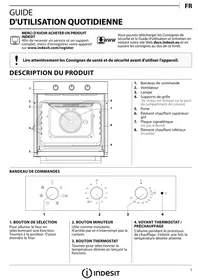
Notice INDESIT IFW 5844 CIX - page 1
Pick your language and provide your email: we'll send you a specifically translated version.

User questions about IFW 5844 CIX INDESIT

2 questions about this device. Answer the ones you know or ask your own.

Ask a new question about this device

Your email remains private: it is only used to notify you if someone answers your question.

Why is my dish not cooking properly on the bottom in my built-in INDESIT IFW 5844 CIX oven?
Frequently Asked Questions - 02/28/2026
Response Notice-Facile

If your dish is not cooking properly on the bottom in your built-in INDESIT IFW 5844 CIX oven, several factors may be the cause. Here are some tips to improve cooking:

1. Check the rack position

Make sure the rack is placed at the correct height. For even cooking, it is often recommended to position the rack in the center or slightly lower depending on the type of dish. A rack that is too high can prevent heat from effectively reaching the bottom of the dish.

2. Use the fan function

If your oven has a fan function, activate it. This function allows for better heat circulation inside the oven, promoting even cooking, especially at the bottom of dishes.

3. Preheat the oven properly

Always make sure to preheat the oven before placing your dish inside. A well-heated oven ensures optimal heat distribution from the start of cooking.

4. Clean the oven

A dirty or obstructed oven can hinder heat distribution. Regularly clean the bottom and walls of the oven to avoid any obstacles to heat.

5. Choose an appropriate dish

Some materials conduct heat better than others. Use dishes designed for oven cooking, preferably made of good quality metal or ceramic, to ensure even cooking.

By applying these tips, you should improve the cooking of the bottom of your dishes in your INDESIT IFW 5844 CIX oven.

Respond (be the first)
What does error code F1 mean on the built-in INDESIT IFW 5844 CIX oven and how can it be resolved?
Frequently Asked Questions - 01/05/2026
Response Notice-Facile

The error code F1 on the built-in INDESIT IFW 5844 CIX oven generally indicates a problem related to the temperature sensor or the thermal probe.

Possible causes of code F1:

  • Fault or disconnection of the temperature probe.
  • Wiring issue between the probe and the electronic board.
  • Defective electronic board.

Recommended solutions:

  1. Check the temperature probe: Ensure it is properly connected and not damaged.
  2. Inspect the cables: Look for any cut, loose, or burned cables between the probe and the electronic board.
  3. Reset the oven: Turn off the power for a few minutes and then turn the appliance back on to see if the code disappears.
  4. Contact a qualified technician: If the problem persists, it is advisable to call a professional to test the probe and the electronic board and carry out the necessary repairs.

Do not attempt to repair it yourself if you do not have the necessary skills, as this can be dangerous.

Respond (be the first)

Download the instructions for your Built-in oven in PDF format for free! Find your manual IFW 5844 CIX - INDESIT and take your electronic device back in hand. On this page are published all the documents necessary for the use of your device. IFW 5844 CIX by INDESIT.

USER MANUAL IFW 5844 CIX INDESIT

MERCI D'AVOIR ACHETER UN PRODUIT INDESIT

Table of contents Click a title to access it
Manual assistant
Powered by Anthropic
Waiting for your message
Product information

Brand : INDESIT

Model : IFW 5844 CIX

Category : Built-in oven