
DED DOP1140X - Dishwasher DE DIETRICH - Free user manual and instructions
Find the device manual for free DED DOP1140X DE DIETRICH in PDF.


| Product type | Built-in dishwasher |
| Brand | DE DIETRICH |
| Model | DED DOP1140X |
| Dimensions (H x W x D) | 81.5 x 59.8 x 57.5 cm |
| Weight | 45 kg |
| Power supply | 220-240 V, 50 Hz, 10 A |
| Power | 2100 W |
| Capacity | 14 place settings |
| Number of programs | 7 |
| Programs | Intensive, Eco, Quick, Glasses, Clean, Auto, Rinse |
| Functions | Delayed start, Child lock, Salt and rinse aid indicator |
| Noise level | 44 dB(A) |
| Water consumption (Eco cycle) | 10 L |
| Energy consumption (Eco cycle) | 1.02 kWh |
| Energy class | A |
| Installation type | Built-in |
| Adjustable height | Yes, adjustable feet |
| Material | Stainless steel |
| Color | Stainless steel |
| Care and cleaning | Regularly clean the filters, spray arms, and door seal |
| Spare parts and repairability | Available from the retailer or authorized after-sales service |
| Warranty | 2 years (according to applicable legislation) |
Frequently Asked Questions - DED DOP1140X DE DIETRICH
User questions about DED DOP1140X DE DIETRICH
0 question about this device. Answer the ones you know or ask your own.
Ask a new question about this device
Download the instructions for your Dishwasher in PDF format for free! Find your manual DED DOP1140X - DE DIETRICH and take your electronic device back in hand. On this page are published all the documents necessary for the use of your device. DED DOP1140X by DE DIETRICH.
USER MANUAL DED DOP1140X DE DIETRICH
1/SAFETYINSTRUCTIONS
- Important warnings 14
2 / INSTALLING YOUR DISHWASHER
- Dimensions for building in appliances 15
List of parts supplied 15 - Connecting to the water supply 16
- Draining away the waste water 17
Electricla connection 18 - Insertion into the niche 19
- Levelling by adjusting the feet 19
Fitting the door panel (Cladding with a single panel) 20
Fitting the door panel (Cladding with two elements) 21 - Appliances built-in under o hob 22
Fixing in the niche 22
Sound-proofing seals 22
Balancing the door (left and right) 22
Refitting the plinth 23
Table for cutting away the plinth 23

Important:
When building in appliances, please use the attached installation diagram.

Important:
Please read this installations manual carefully in order to comply with the instruc for installing and fitting your machine.

NB:
This installations manual covers various models. There may be some slight differences between your appliance and the descriptions shown.
EN
1/ SAFETY INSTRUCTIONS
- IMPORTANT WARNINGS

Important:
After unpacking your appliance, make sure that it has not suffered any damage during transport. Never connect up a damaged appliance. If your appliance is damaged, please contact your dealer.

Danger:
If your appliance operates incorrectly, disconnect it (pull out the plug) or switch off the it concerned and close the water supply tap. Contact our After-Sales Service.

Important:
All the necessary electrical and plumbing work for installing the appliance must respectively be carried out by a qualified electrician and plumber.
- Once you have installed your appliance, ensure that it is not resting on the power cable or the water supply or drain hoses.
- The appliance must be kept disconnected from the mains supply throughout the whole installation process.
- Check that your appliance's Earth circuit complies with the prevailing regulations.
- The electrical connection details on the manufacturer's plate on your machine must match those for the mains power supply.

Important:
For safety's sake, do not leave your dishwasher's door fully open after use.
If your dishwasher is being installed on a carpeted floor, ensure that the feet are set to leave an air space under the appliance.
EN
2 / INSTALLING YOUR DISHWASHER
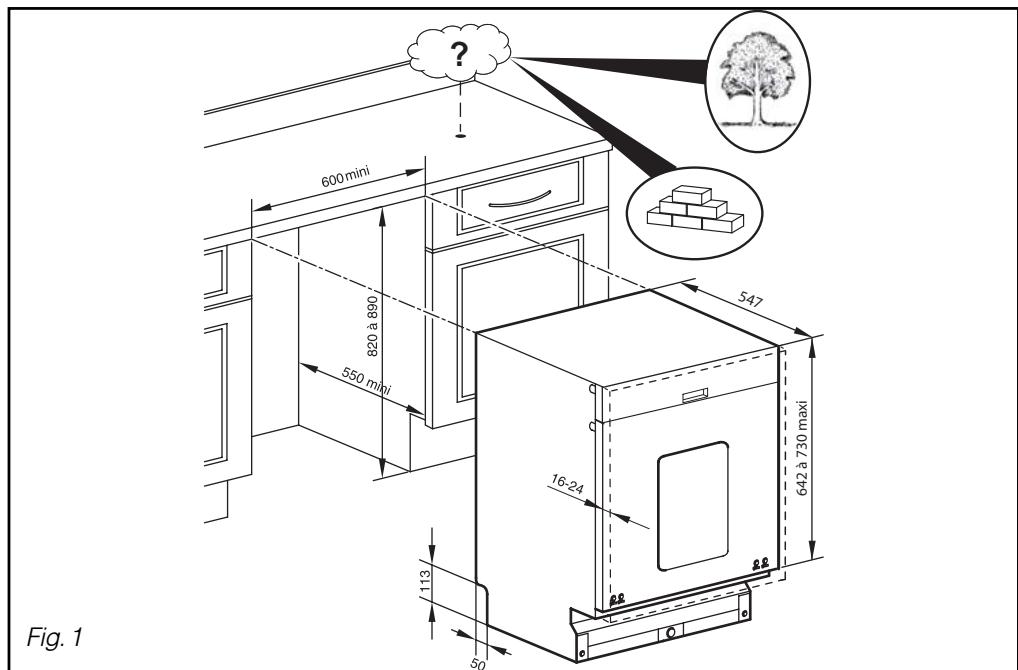
DIMENSIONS FOR BUILDING IN APPLIANCES
You can insert your appliance under an existing worktop provided that the relevant niche corresponds to the dimensions on the sketch below (Fig. 01).
LIST OF PARTS SUPPLIED
| P1 | 3 | Cups for front feet |
| P2 | 1 | Self-adhesive anti-condensation plate |
| P3 | 1 | Foam sound-proofing seal |
| P4 | 1 | Wrench for adjusting the front feet |
| P5 | 2 | Sound-proofing seals + self-adhesive fixing strips (if necessary) |
| P6 | 2 | Lower panel positioning screws |
| P7 | 2 | L=75 Panel fixing screws |
| P8 | 6 | L=40 Panel fixing screws |
| P9 | 2 | Screws for fixing the appliance to the unit |
| P10 | 1 | Drain connection collar |
EN
2 / INSTALLING YOUR DISHWASHER
- CONNECTING TO THE WATER SUPPLY
This dishwasher can be supplied with cold water or hot water up to a maximum of 60^ . When supplying with hot water, check that your original hose allows such connection (red marking on the hose). However, we recommend that you connect to the cold water supply. Your appliance is fitted with a supply hose 1.50m long.
Connect the hose to a tap with a threaded end, diameter 20/27 (3/4" BSP).
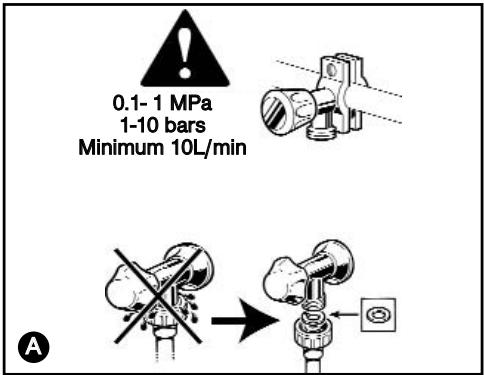
Check that the water pressure does not exceed the values below:
Flow: 10 l/min minimum.
Pressure: 1 to 10 bars (0.1 - 1 MPa) A.
If the water pressure is too high, please fit a pressure regulator. Please contact your local Water Authority for advice on the water pressure in your region.

Warning:
If you use a self-piercing tap, check here is sufficient water flow.
Check that the hose seal is present and that the connection is tight A.
Do not re-use any previously used hoses for making the connection.
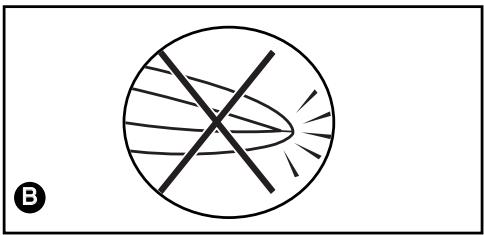
Avoid any kinks or constrictions in the hose, which could prevent the water from passing or slow down its flow, particularly when building in the appliance under the worktop 3
If the appliance is connected to new pipes or pipes that have not been used for a certain length of time, let the water run for a few minutes before connecting the water hose to avoid and deposits of sand or rust that could block the water hose's filter.

Danger:

symbol indicates that th an electrical device
for cutting off the water supply (depending on the model). Do not leave this hose in water and do not cut it.

NB:
Any connection to a water conduit necessarily involves the risk of a leak occurring, whatever the precautions taken. Therefore, always close the water tap when you are not using your machine.
EN
2 / INSTALLING YOUR DISHWASHER
- DRAINING AWAY THE WASTE WATER
You can connect the end of the drain hose to:
-A ventilated U-bend (Fig. 2-1) or
- A sink U-bend (Fig. 2-1)
When connecting to a U-bend, you must remove the flapper from the U-bend. Then fully install the rubber end. If necessary, add a tightening collar P10

NB:
Ensure that the drain hose is held in place with a tie to avoid any potential flooding.
The drain connection must be 0.30m (minimum) to 0.90m (maximum) above the floor (Fig. 2-1).
The drain hose's standard length is 1.50m . If necessary, you can increase the hose's length (up to 3m maximum). In this case, check that the appliance drains correctly. The hose must rest on the floor and only rise vertically close to the drainage system.
For appliances installed in vertical units, the drainage system must not rise higher than the top of the appliance (Fig. 2-2).

Important:
When fitting the hose, pull on it gradually so as not to kink it. B
Avoid any kinks or constrictions in the hose, which could prevent the water from passing or slow down its flow.
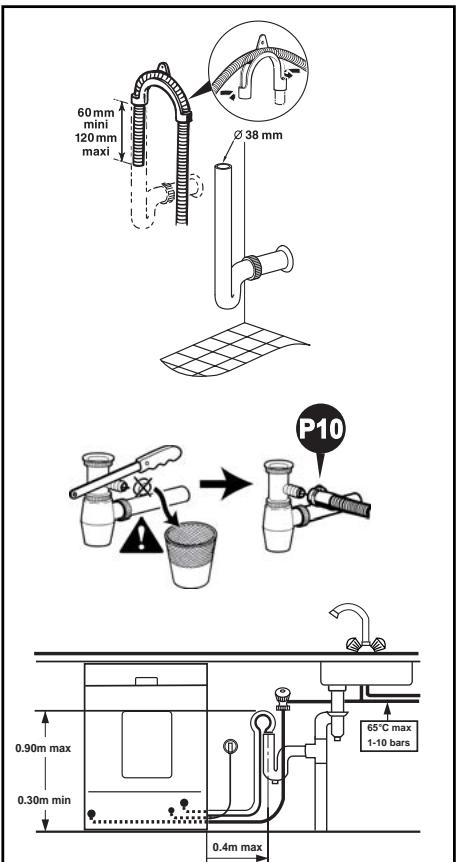
Fig.2-1
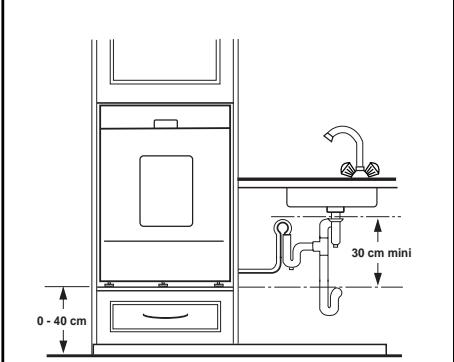
Fig. 2-2
EN
2 / INSTALLING YOUR DISHWASHER
ELECTRICAL CONNECTION
The appliance must be at a standstill when connecting to the electricity supply circuit.
Before connecting your appliance, ensure that:
- The mains voltage indicated on the manufacturer's plate on your machine matches the voltage supplied by your installation.
- Your meter and the fuses can support the current intensity for your dishwasher. A fuse of at least 10A is required.
If you must connect your appliance to a different voltage from that indicated on your machine, connect an appropriate transformer.

NB:
Use the services of a qualified electrician to make the modifications and ensure that your electrical installation complies with the regulations.
This appliance must necessarily be connected directly to an earthed plug and socket. In all cases, it must be connected in accordance with the prevailing regulations in the country concerned and any additional regulations from the local electricity utility.

Warning:
The plug and socket must be accessible even after your appliance has been installed.
The appliance must not be connected via an extension lead, a multiple socket or an electric time delay programmer
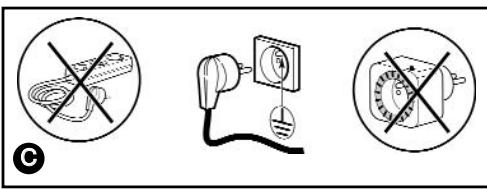
We cannot be held responsible in the event of an accident or an incident caused by the lack of or by a defective Earthing system.
Your dishwasher complies with European Directives 73/23/EEC (Low Voltage Directive) and 89/336/EEC (Electromagnetic Compatibility) as modified by Directive 93/68/EEC.
- Replacing the power cable

Danger:
For your safety's sake, this operation must only be performed by the manufacturer's After-Sales Department or by someone with similar qualifications in order to avoid any risks.
- Appliances delivered without a plug

Danger:
7 The wires in your appliance's power cable are coloured as follows:
- Green & Yellow
- Blue
- Brown
Earth
Neutral
Live
If the cable's colours do not match your plug, proceed as follows:
The wire coloured green and yellow must be connected to the connector in your plug marked with the letter E , the symbol 1± or coloured green and yellow.
The blue-coloured wire must be connected to the connector marked with the letter N or coloured black.
The brown-coloured wire must be connected to the connector marked with the letter L or coloured red.
EN 2 / INSTALLING YOUR DISHWASHER
- INSERTION INTO THE NICHE
Glue on the anti-condensation plate (Fig. 3.1)
- Glue on the foam sound-proofing seal (Fig. 3.1)
- Clip the three cups ⑨ under the feet to make the dishwasher easier to slide (Fig. 3.1).
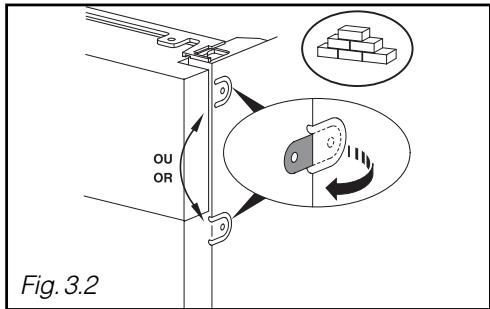
If the worktop is in marble or a similar material, you must fix your dishwasher using the side screws; before inserting it into the niche, you must therefore unfold a flange on each side of the side panels (Fig. 3.2).
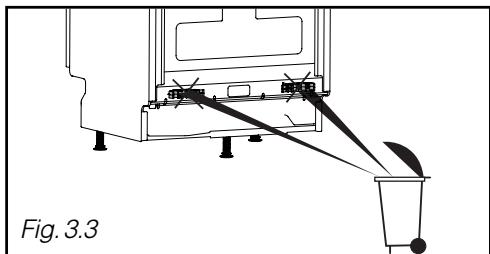
- Remove the hose brackets (Fig. 3.3)
- Slide the appliance into the niche, TAKING SPECIAL CARE NOT TO KINK THE HOSES.
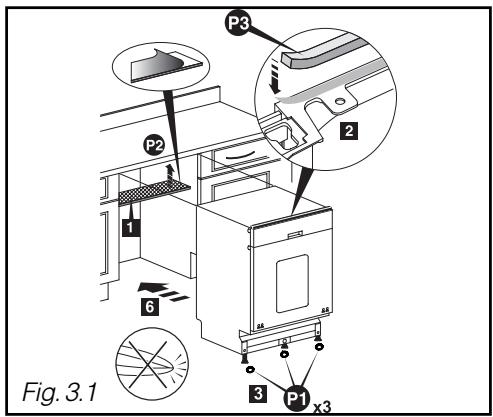
LEVELLING BY ADJUSTING THE FEET
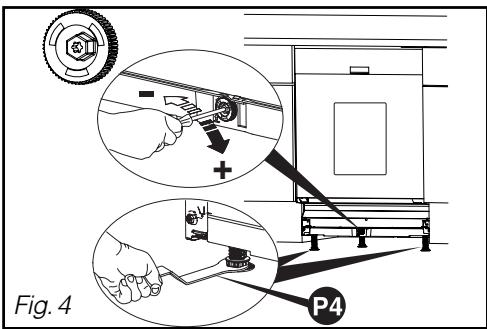
The front feet are adjustable. Use the wrench provided to adjust them, if necessary.
The central foot can be adjusted using the red wheel (screwdriver with No. 8 plug, No. 8 pipe wrench or T20 Torx screwdriver).
The appliance must be correctly levelled so that the door closes and seals perfectly (Fig. 4).
Ensure that the dishwasher's door closes correctly, without catching or rubbing against the sides.
EN
2 / INSTALLING YOUR DISHWASHER
FITTING THE DOOR PANEL (Cladding with a single panel)
-
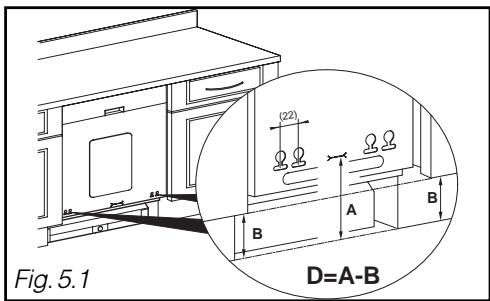
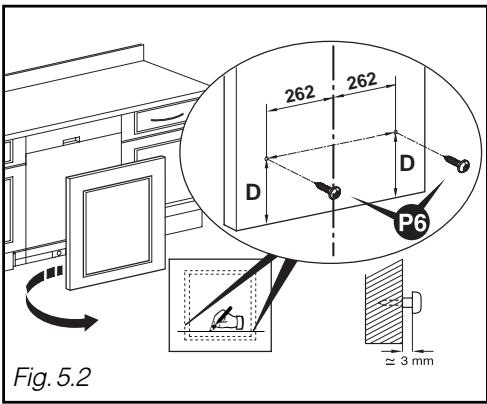
Measure the distance between the floor and the bottom of the door panel on the adjacent unit (Dimension B, Fig. 5.1)
-
Measure the distance between the floor and the marking on the bottom of the door panel (Dimension A)
-
Calculate Dimension D = A - B , and draw a line for Dimension D on the back of the panel at the bottom (Fig. 5.2)
-
Set the positions for the two screws at 262mm from the wood panel's axis and insert two screws (Fig. 5.2)
-
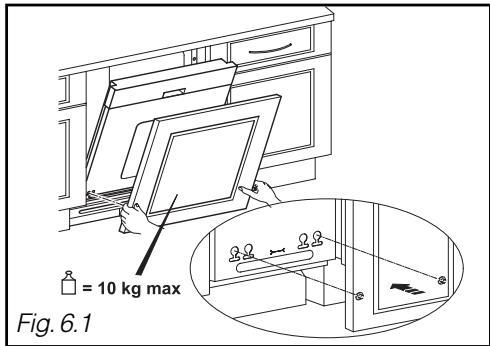
Position your door panel by engaging the 2 screws in the holes in the dishwasher's door (Fig. 6.1)
-
If there is a problem with screwing, offset the screw by 22 mm.
-
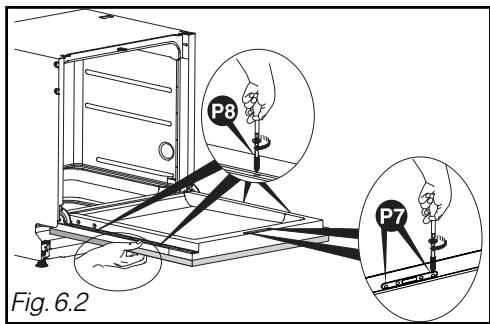
Place the wood panel flat against the door (Fig. 6.2).
-
Open the dishwasher's door while holding the panel flat up against the door. Centre the wood panel at the sides with respect to the control panel, if necessary. Insert the 2 screws and the 4 screws (Fig. 6.2).

Warning :
If the wood panel is very hard, ensure you make a hole in advance before screthe panel on.

NB:
If your appliance is supplied with a sound insulation sheet, glue this on before installing the door panel.
EN
2 / INSTALLING YOUR DISHWASHER
FITTING THE DOOR PANEL (Cladding with 2 elements)
-
To fit the first section, please refer to the previous chapter "FITTING THE DOOR PANEL (Cladding with a single panel) (Figs. 5.1 et 5.2).
-
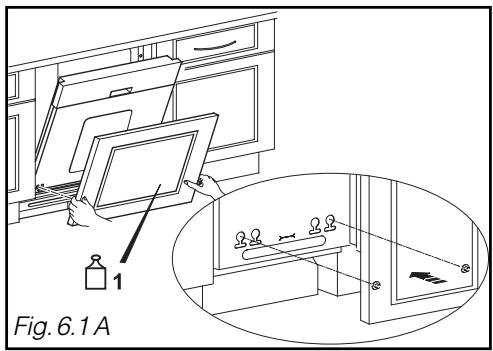
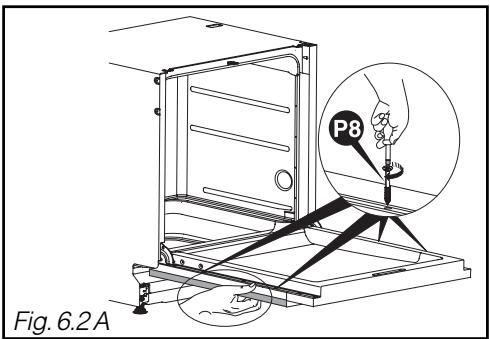
Position your door panel by engaging the 2 screws in the holes in the dishwasher's door (Fig. 6.2 A)
-
If there is any difficulty screwing, move the screw 22 mm.
-
Place the wood panel flat against the door (Fig. 6.2 A).
-
Open the dishwasher's door while holding the panel flat up against the door. Centre the wood panel at the sides with respect to the control panel, if necessary. Insert the 4 screws (Fig. 6.2 A).
-
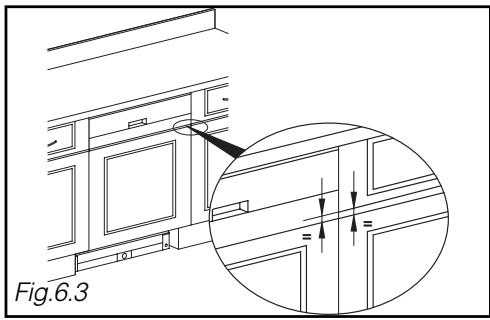
Measure the distance between the drawer and the door panel on the adjacent unit (Fig. 6.3).
-
Place the false drawer front taking into account the distance just measured (using a wedge with a good thickness).
-
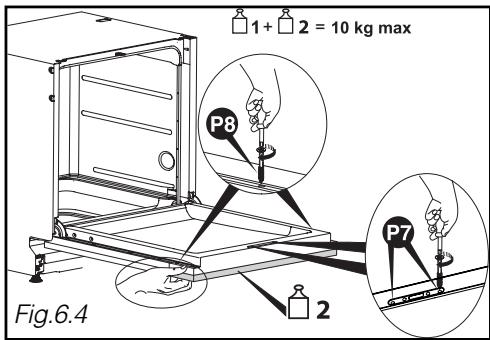
Open the dishwasher's door while holding the false drawer front up against the door. Centre the wood panel at the sides with respect to the door panel. Insert the 2 screws 7 and the 2 screws 8 (Fig. 6.4).

Warning :
If the wood panel is very hard, ensure
that you make an initial hole before screwing it on.

Warning :
Then total weight of the door panel and false drawer front must not exceed 10kg in sum.
EN
2 / INSTALLING YOUR DISHWASHER
APPLIANCES BUILT-IN UNDER A HOB

Danger:
If your worktop has a hob fitted above your dishwasher, you must fit thermal insulation on top of your dishwasher. You can obtain an insulation kit from your dealer. Remember to leave a space between the gas pipe and the top of your dishwasher.
- FIXING IN THE NICHE
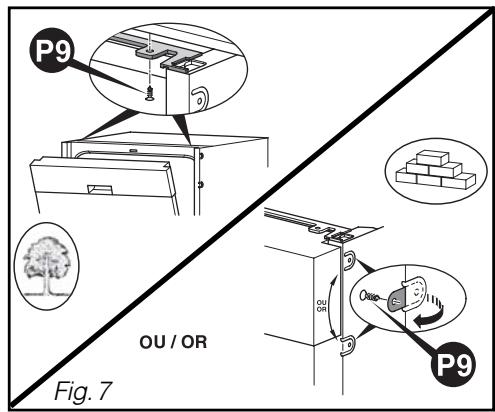
Fasten the dishwasher under the worktop with the screws (see Fig. 7) or using the flanges you have unfolded (Fig. 3.2).

Warning:
The screw provided is intended for a panel at least 16mm thick. If the panel is less than 16mm thick, change the screw or shorten it.
- SOUND-PROOFING SEALS
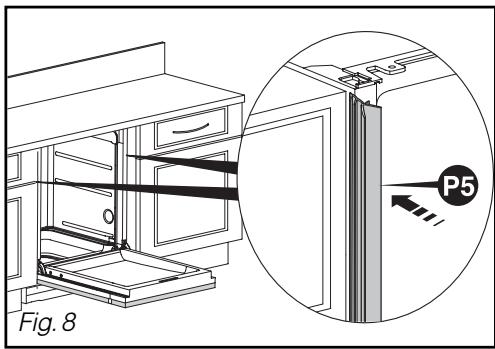
To improve the built-in appliance's soundproofing, fit the sound-proofing seals (depending on the model). (F3 on Fig. 8)
In the case of larger spaces, glue the seal to the panel using the adhesive strips supplied (on Fig. 8)
If the appliance is fixed at the sides, you must cut down the heel of the seals when fitting them to accommodate the fixing lugs (pincers).
BALANCING THE DOOR (LEFT AND RIGHT)
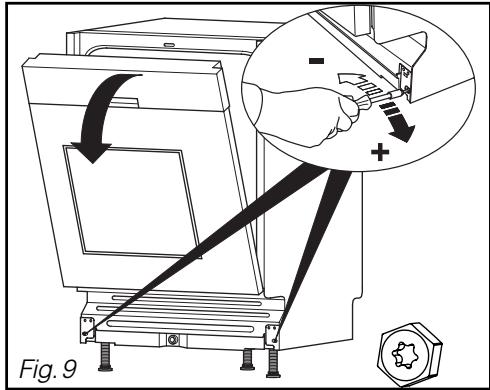
Adjust the tension on the springs, if necessary, to compensate for the weight of the cladding panel. Adjust them identically on the right and the left (Fig. 9).
The door is correctly balanced when it dopes not fall heavily on opening and it remains horizontal in the open position.
EN
2 / INSTALLING YOUR DISHWASHER
- REFITTING THE PLINTH
Refit the plinth, cutting it away if necessary according to Dimension (see table and Fig. 10.1)
Calculate dimension P (Table on last page):
- Take Dimension B from Fig. 6.1 and measure the gap J between the floor and the bottom of the dishwasher. Calculate B - J.
- Measure the plinth depth E (Fig. 10.1) between the unit's plinth and front of the unit. Take the value for P from the table provided by E and B - J (e.g. if E = 100 and B - J = 140 , then P = 23 ).
- Cut away the plinth across a width of 600mm to the depth for the value for P.
If there will be a specific plinth for the dishwasher, you must obtain a separate fixing kit (32X3252) from the After-Sales Department. In this case, the plinth height is H = B - P (Fig. 10.2).
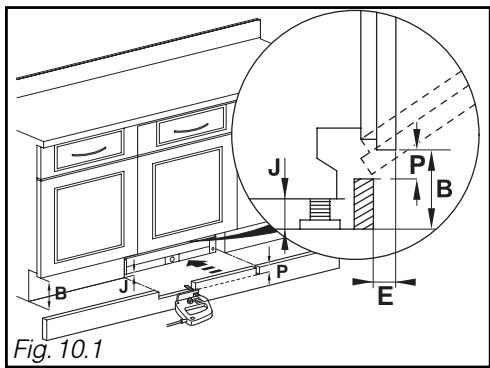
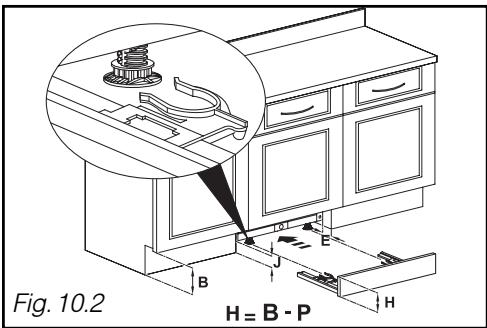
TABLE FOR CUTTING AWAY THE PLINTH
| Cut-away depth P = | |||||||||||||
| B-J E | 10 | 15 | 20 | 25 | 30-75 | 80 | 85 | 90 | 95 | 100 | 105 | 110 | 115 |
| 170 | 46 | 49 | 51 | 52 | 54 | 52 | 50 | 47 | 44 | 41 | 36 | 30 | 23 |
| 165 | 42 | 45 | 47 | 48 | 50 | 48 | 46 | 43 | 40 | 37 | 32 | 27 | 20 |
| 160 | 39 | 41 | 43 | 45 | 46 | 44 | 42 | 40 | 37 | 33 | 29 | 24 | 17 |
| 155 | 35 | 38 | 40 | 41 | 43 | 40 | 39 | 36 | 34 | 30 | 26 | 21 | 15 |
| 150 | 32 | 35 | 37 | 38 | 40 | 37 | 36 | 34 | 31 | 28 | 24 | 19 | 13 |
| 145 | 30 | 32 | 34 | 36 | 37 | 35 | 33 | 31 | 29 | 25 | 22 | 17 | 12 |
| 140 | 28 | 30 | 32 | 33 | 35 | 32 | 31 | 29 | 26 | 23 | 20 | 16 | 11 |
| 135 | 26 | 28 | 30 | 31 | 32 | 30 | 29 | 27 | 24 | 22 | 18 | 14 | 10 |
| 130 | 24 | 26 | 28 | 29 | 30 | 28 | 27 | 25 | 23 | 20 | 17 | 13 | 9 |
| 125 | 23 | 24 | 26 | 27 | 29 | 27 | 25 | 23 | 21 | 19 | 16 | 12 | 8 |
| 120 | 21 | 23 | 25 | 26 | 27 | 25 | 24 | 22 | 20 | 18 | 15 | 11 | 8 |
| 115 | 20 | 22 | 23 | 24 | 26 | 24 | 22 | 21 | 19 | 17 | 14 | 11 | 7 |
| 110 | 19 | 21 | 22 | 23 | 24 | 22 | 21 | 20 | 18 | 16 | 13 | 10 | 7 |
| 105 | 18 | 20 | 21 | 22 | 23 | 21 | 20 | 19 | 17 | 15 | 12 | 10 | 6 |
| 100 | 17 | 19 | 20 | 21 | 22 | 20 | 19 | 18 | 16 | 14 | 12 | 9 | 6 |
| 95 | 16 | 18 | 19 | 20 | 21 | 19 | 18 | 17 | 15 | 13 | 11 | 9 | 6 |
| 90 | 16 | 17 | 18 | 19 | 20 | 18 | 17 | 16 | 15 | 13 | 11 | 8 | 6 |
| 85 | 15 | 16 | 17 | 18 | 19 | 18 | 17 | 15 | 14 | 12 | 10 | 8 | 5 |
| 80 | 14 | 15 | 17 | 17 | 18 | 17 | 16 | 15 | 13 | 12 | 10 | 8 | 5 |
Dishwasher
De Dietrich

Dear Customer,
You have just acquired a DE DIETRICH dishwasher and we would like to thank you.
Our research teams have created this new generation of appliances for you. Their quality, design, features and technological advances make them exceptional products, and reveal our unique know-how.
Your new DE DIETRICH dishwasher will blend harmoniously into your kitchen and will perfectly combine washing and drying performance and ease of use. We wanted to offer you a product of excellence.
In the DE DIETRICH product range, you will also find a wide choice of hobs, ovens, microwaves, hoods, cookers, fridges, freezers, that you can coordinate with your new DE DIETRICH dishwasher.
Visit our website www.dedietrich-electromenager.com, where you will find our latest innovations as well as useful and complementary information.
DE DIETRICH
Setting New Values
As part of our commitment to constantly improving our products, we reserve the right to make changes to them based on technical advances to their technical and functional features and appearance.
Warning : Before installing and using your appliance, please carefully read this Guide to Installation and Use, which will allow you to quickly familiarise yourself with its operation.
www.dedietrich-electromenager.com

EN CONTENTS
1/ FOR THE USER'S ATTENTION
- Safety instructions 4
Protection of the environment 5
Economical, environmentally friendly washing 5
2/ DESCRIPTION OF YOUR APPLIANCE
- General presentation of the dishwasher 6
Presentation of the control panel 7
3/ INFORMATION 8
4/ WHAT TO DO BEFORE FIRST USING THE MACHINE
Measure the water hardness and select the type of detergent 9
Hardness table 9
5/ DETERGENT PRODUCTS AND ADJUSTING THE WATER SOFTENER
For traditional products 10
For multi-purpose products 11
6/ LOADING OF REGENERATING SALT 12
7/ LOADING OF RINSING PRODUCT 13
8/ YOUR DISHWASHER'S EQUIPMENT
The lower basket 14
The upper basket 15
The cutlery basket 16
9/ SETTING THE PARAMETERS 17
10/ WASHING PROGRAMMES TABLE 18
11/ PROGRAMMING 20
12/ YOUR DISHWASHER'S SAFETY SYSTEMS 22
13/ CLEANING YOUR APPLIANCE
- Cleaning the waste filters 23
14/ IF OPERATING ABNORMALITIES OCCUR 25
15/ AFTER-SALES SERVICE 30
16/INDICATIONS FOR THE TESTING LABORATORIES 31
EN 1/ FOR THE USER'S ATTENTION
Important :Keep this up
Keep this user's manual with your appliance. If the appliance is sold or transferred to someone else, ensure that the manual is with it. Please take note of these instructions before installing and using your appliance. They have been drawn up for your own and other people's safety.
- SAFETY INSTRUCTIONS
Installation
- When you receive your appliance, unpack it or have it unpacked immediately. Check that it has not suffered any damage during transport. Express any reservations in writing on the delivery note, of which you keep a copy. Never connect up a damaged machine. If your appliance is damaged, please contact your dealer.
- Before proceeding to connect up your machine, please refer to the instructions in your Installation Guide.
- Your dishwasher must be kept disconnected from the mains supply throughout the whole of the installation process.
- The electrical connection details on your appliance's description plate must comply with those for the mains supply.
- The socket must still be accessible once your appliance has been installed.
- Do not alter or attempt to alter the appliance's characteristics. This could put you at risk.
- If your installation has to be altered, only entrust the electrical and plumbing work to a qualified electrician or plumber respectively.
- Your appliance is designed for normal domestic use. Do not use it for industrial or commercial purposes or for any other purpose than that for which it has been designed.
- The dishwasher's walls must not be pierced under any circumstances.
Children's safety
- This appliance is not intended for use by young children or infirm persons unless they have been adequately supervised by a responsible person to ensure that they can use the appliance safely.
- This appliance must only be used by adults. Ensure that children do not touch it and do not use it as a toy. Ensure that they do not operate the appliance's controls.
- Keep young children away from the appliance when it is operating.
- Detergents contain irritant and abrasive substances. These products can have caustic effects on the eyes, the mouth or the throat. They can be extremely dangerous if ingested. Avoid any contact with the skin and the eyes. Ensure that the appliance's detergent container is empty at the end of the washing cycle.
- Place detergents out of children's reach and do not put any detergent in the machine until just before you start the washing programme.
- The water in your dishwasher is not drinking water; this is why children must not go near the appliance when its door is open.
- Do not let your children play or sit on the door when it is open.
- Once you have unpacked your appliance, place the packaging out of children's reach.
- Keep all the packaging materials (e.g. plastic bags, polystyrene, etc.) out of children's reach because they can be dangerous for children (ie. risk of suffocation).
Use
- When machine is running, do not open door. This may provoke steam leakage or splattering of water.
- Only use products specially designed for your dishwasher (water softening salt, detergent and rinsing products).
- As far as possible, avoid opening the dishwasher's door when it is operating, and in particular during the heating phases, because scalding steam may escape or you may be splashed with hot water. The machine is fitted
EN 1/ FOR THE USER'S ATTENTION
with a safety system that immediately blocks the dishwasher's operation if the door is opened.
- Never use chemical solvents in your appliance because these could cause an explosion.
- Always close your appliance's door after loading or removing your items.
- Do not lean or sit on your appliance's door when it is open.
- You are strongly advised to disconnect the machine after use and turn off the water supply.
- Unplug your machine before carrying out any technical work on it.
- Avoid placing your machine immediately next to a cooking or heating appliance to prevent any risk of heat damage;
- Do not place any items in your machine, which are not certified as dishwasher safe.
- If you have removed an item before the end of the washing programme, it is important to rinse it carefully to remove any residual washing products.
- If your appliance breaks down, never attempt to repair it yourself. Any repairs made by non-qualified personnel can cause significant damage or lack of control.
- The machine complies with applicable safety regulations. Any repairs should be carried out by qualified technicians. Repairs or changes that do not conform may be dangerous for the users. In case of replacement, only use original parts.
- If the machine malfunctions due to other causes than those mentioned in this booklet, disconnect the machine (remove the plug) or break the circuit concerned and contact Kleenmaid's after-sales service.
ENVIRONMENTAL PROTECTION
This appliance's packaging material is recyclable. Help recycle it and protect the environment by dropping it off in the municipal receptacles provided for this purpose.
Broken machines should be taken to the closest recycling centre. Destroy the door closing system so it no longer works (children may close themselves in whilst playing and suffocate). Cut the electric cable after having removed the plug from the socket.
Your appliance also contains a great amount of recyclable material. It is marked with this label to indicate the used appliances that should not be mixed with other waste. This way, the appliance recycling organised by your manufacturer will be done under the best possible conditions, in compliance with European Directive 2002/96/EC on Waste Electrical and
Electronic Equipment. Contact your council for the used appliance collection points closest to your home.
We thank you doing your part to protect the environment.
ECONOMICAL, ENVIRONMENTALLY FRIENDLY WASHING
- Remove any food residue from your crockery (bones, pips, etc.)
- Do not pre-wash your items by hand (useless waste of water).
- Utilise your dishwasher's capabilities to the full for an economical, environmentally friendly wash.
- Always select a washing programme suitable for the crockery type and how dirty they are.
- Avoid overdosing with detergent, regenerating salt and rinsing liquid. Follow the recommendations in this guide (pages 9-10-11) and the instructions on the product packs.
- Ensure that the water softener is correctly set (see pages 10-11).
GENERAL PRESENTATION OF THE DISHWASHER
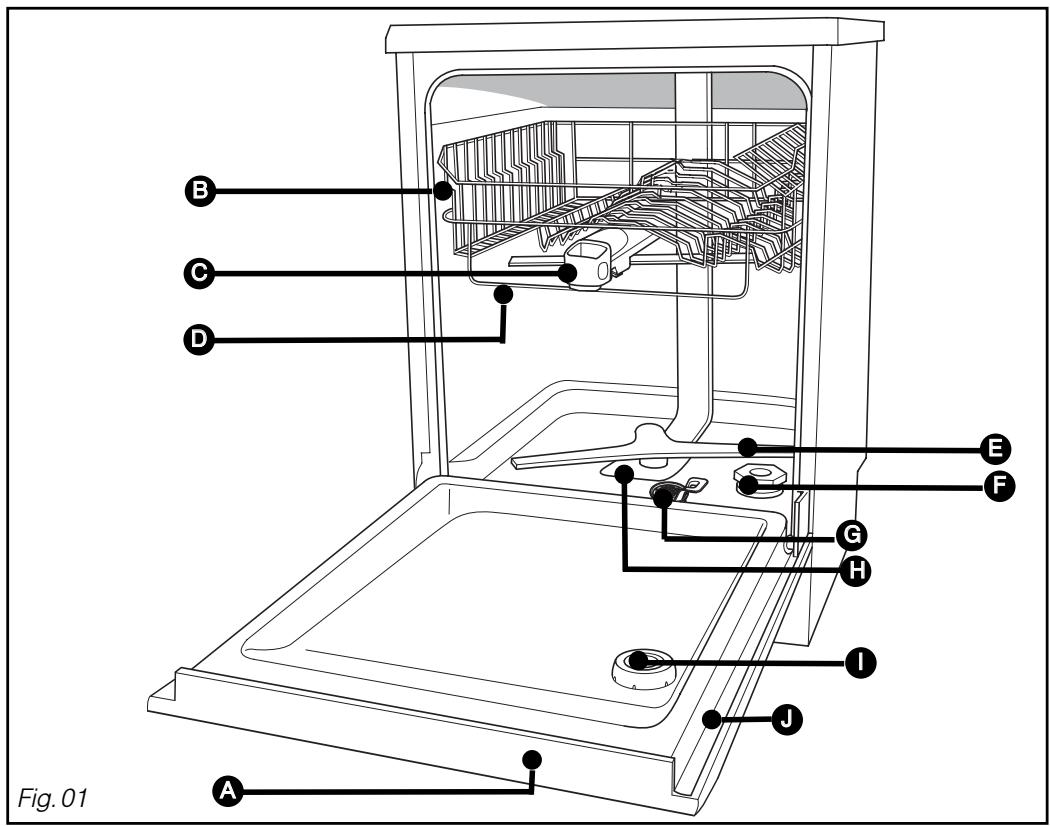
Control panel
Upper basket
Washing products dispenser
Anti-blocking gauge wire
Lower sprinkler arm
F Regenerating salt tank
Waste filter
Main filter
Rinsing product dispenser
Description plate (After-Sales Ref)

Advice:
This user's guide is applicable to several models. There may be some slight differences in the details and the equipment between your appliance and the descriptions provided here.
EN 2/ DESCRIPTION OF YOUR APPLIANCE
- PRESENTATION OF THE CONTROL PANEL

A On/Off:
Press this button to start your dishwasher.
Choosing a programme: briefly press one button or the other in succession to select your programme.
C : Intelligent Control System
press this button to select the Automatic programme.
D Set:
- A long press: Access to the Settings menus:
- Set the current time,
- Set the water softener,
- Activate or deactivate use of "regenerating salt", "rinsing product" or "Washing product" (depending on the water softener setting - see next page).
- Beep at end of programme,
- Set screen brightness.
The screen shows you the current time, the finishing time, the remaining time for the programme and the parameter settings.
Delaying the end of a programme:
Press one of the buttons or the other to select the time for the programme to end.

Advice:
A short audible signal (beep) confirm the button's selection, except for the "On/Off" button.
EN
3/ INFORMATION
Important:
To obtain impeccable washing and drying results from your dishwasher without any marks, you must set it carefully using the water softening system, which utilises regenerating salt.
As rainwater infiltrates into the ground it picks up mineral salts; some minerals are found in solid form and are commonly called 'lime'. This reduces the detergent's washing performance and leaves white marks on the crockery.
The more lime there is in the water, the 'harder' the water is.
- Use the most suitable washing products for the hardness of your town's water supply.
- There are several types of products:
For an impeccable clean, opt for using traditional products together:
① Washing product for a perfect clean (standard powder, liquid or tablets).
② Regenerating salt for your dishwasher's water softener to work correctly.
③ Rinsing liquid to assist drying and eliminate drip marks.
Important:
Never use normal washing-up liquid.
For ease of use and in certain water hardness conditions only (< 35^) , multi-purpose products can make the use of regenerating salt and rinsing liquid unnecessary.
-
"Two-in-one" tablets contain detergents and rinsing liquid or an agent serving the function of the salt.
-
"Three-in-one" tablets contain detergents and rinsing liquid as well as an agent serving the function of the salt.
- "Four-in-one" tablets also contain additives that prevent wear on poor quality glasses or the risk of stainless items corroding.
Important:
Follow the instructions in the user's manual and the recommendations on the multi-purpose detergent's pack.
NB:
If in any doubt, please contact the detergent's manufacturer if the items are very wet at the end of the programme or if chalky deposits appear.
EN 4/ WHAT TO DO BEFORE FIRST USING THE MACHINE
- MEASURE THE WATER HARDNESS AND SELECT THE TYPE OF DETERGENT: TRADITIONAL OR MULTI-PURPOSE
In one simple action, you can test the your water's lime content using the testing strip supplied with your dishwasher. Alternatively, contact your local water utility to ascertain your water's hardness.
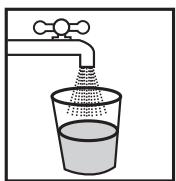
- Let the water run from the tap for a few moments.
- Fill a glass with water.
- Take the test strip from its holder and immerse it for 3 seconds.
- Wait 1 minute, shake it and look at the colours to ascertain your water's hardness.
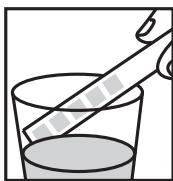
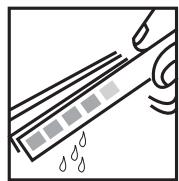
HARDNESS TABLE
| Test strip | □□□□□ | ■□□□□ ■□□□□ | ■□□□□ | ■□□□□ | ■□□□□ | ■□□□□ |
| Hardness | 0-10°F | 10-25°F | 25-40°F | 40-55°F | 55-70°F | >70°F |
| Water | Soft | Slightly hard | Slightly hard | Hard | Hard | Very hard |
| Water softening and use of salt | Optional | Essential if using traditional products | Essential if using traditional products | Mandatory | Mandatory | Mandatory |
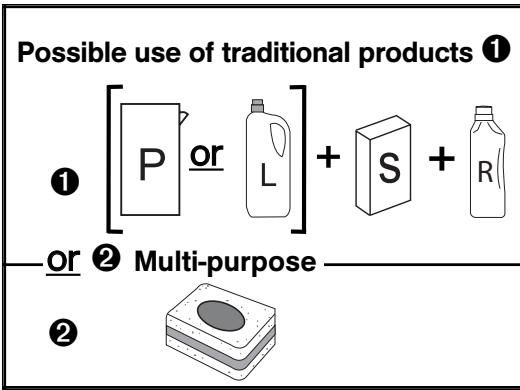
Use only of traditional products 1
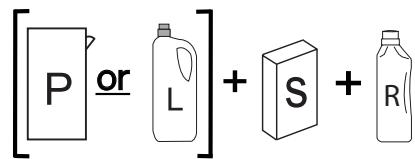
1 Traditional products:
P : Powder detergent or L : Liquid detergent + S : Regenerating Salt + R : Rinsing product
2 Multi-purpose products: Multi-purpose tablets
EN 5/ DETERGENT PRODUCTS AND ADJUSTING THE WATER SOFTENER
FOR TRADITIONAL PRODUCTS
- Your machine must be specially adjusted to use traditional products.
- Proceed as follows to adjust the water softener on the control panel:
- Access setting mode by holding down the "SET" button until you hear a double audible signal (long beep). Then press twice briefly to access the water softener setting.

-
The water softener setting is displayed ont he screen (for example
-
To adjust and alter the setting to suit the water hardness, keep on briefly pressing one of the keys or the other. The screen shows you the setting , , etc...

-
The setting is validated automatically after 10 seconds if the "SET" button in not pressed again.
-
Pressing "SET" enables you to validate the setting and move on to the next parameter.
| Testing strip | □□□□□ | □□□□□ □□□□□ | □□□□□ | □□□□□ | □□□□□ | □□□□□ | |
| Hardness | 0-10°F | 10-25°F | 25-40°F | 40-55°F | 55-70°F | >70°F | |
| Setting | Traditional product | c0 | c1 | c2 | c3 | c4 | c5 |
Factory setting : [3]

Important:
It is very important to set the water softener correctly.
- If the setting is too low, there is the risk of chalky marks appearing.
- if the setting is too high, there is the risk of causing clouding of the glasses.
If you relocate, adjust the water softener setting as required.
- Traditional tablets
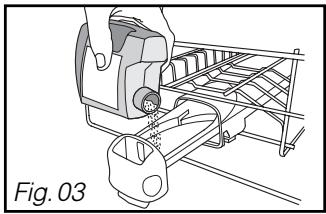
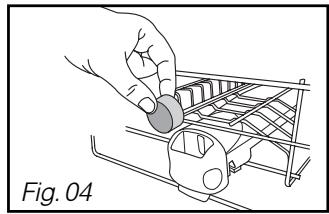
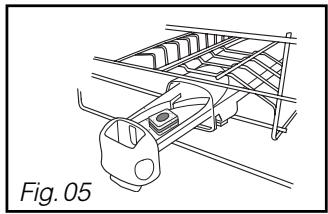
Non-multipurpose tablets should be placed in the external compartment (Fig 04) or, for optimum performance, pull out the dispenser drawer and lay the tablet inside (Fig 05).
- Powders or liquids (Fig 13)
Fill at least up to the minimum mark for slightly dirty crockery and to the maximum mark for dirty crockery. If the crockery is very dirty and for programmes with a pre-wash we recommend that you add 5g of detergent (a dessert spoonful) into your dishwasher's tub in accordance with the programmes table.

Important:
Keep these products out of children's reach and away from dampness.
Only use products specially designed for dishwashers.
EN 5/ DETERGENT PRODUCTS AND ADJUSTING THE WATER SOFTENER
FOR MULTI-PURPOSEPRODUCTS

- Your appliance can be specially set to use multi-purpose if the water hardness is < 25^ F .

Advice:
To provide better coverage of the wide range of multi-purpose products available, your dishwasher's "AUTO 4/1" option has two possible settings, accessible via the "Set" button.
"Extra Dry" improves the drying results in the event of reduced performance from the "2-in-1", "3-in-1" or "4-in-1" types of multi-purpose product.
"Sparkling Clean" enables you to prioritise the sparkle of your crockery whatever the type of multi-purpose product used.
- Proceed to set water softener
- Access setting mode by holding down the "Set" button until you hear a double audible signal (long beep).
- The water softener setting is displayed on the screen (for example c3).
- To use multi-purpose tablets, you must select setting or , depending on the water hardness. To do this, keep on briefly pressing one or other of the keys until you reach the desired setting.
- Proceed to select the "Multi-purpose AUTO [4/7]" option and set it
- OFF: deactivates the "ATo 4/1" option.
- n : corresponds to activation of the "Auto 4/1" option with the "Sparkling Clean" setting. This enables you to prioritise a brilliant finish for your crockery.
- : corresponds to activation of the "Auto 4/1" option with the "Extra Dry" setting. "Extra dry" enhances the drying results if performance is reduced.
- The "Auto 4/1" light then illuminates permanently if this option has been selected.
- The setting is validated automatically after 10 seconds if the "SET" button in not pressed again.
- Pressing "SET" enables you to validate the setting and move on to the next parameter.
| SET | Testing strip | □□□□□ | □□□□□ | ||
| Hardness | 0-10°F | 10-25°F | |||
| Multi-purpose products Function Deactivated | AUTO 4/1 OFF | AUTO 4/1 OFF | |||
| Multi-purpose products Sparkling Clean | AUTO 4/1 On | AUTO 4/1 On | |||
| Multi-purpose products Extra Dry | AUTO 4/1 On | AUTO 4/1 On | |||
![DE DIETRICH DED DOP1140X - - Proceed to select the "Multi-purpose AUTO [4/7]" option and set it - 1](/content/2025/01/188497/images/72b856ebaf2419a1da228f3c72dcc20c6d19ccc2cfca36084f413cc922fd2cbc.jpg)
![DE DIETRICH DED DOP1140X - - Proceed to select the "Multi-purpose AUTO [4/7]" option and set it - 2](/content/2025/01/188497/images/fbb84bfc7ceb7b628d2ce69ac23827ba6db37ac296c013490ba0bf65d2c1647e.jpg)
![DE DIETRICH DED DOP1140X - - Proceed to select the "Multi-purpose AUTO [4/7]" option and set it - 3](/content/2025/01/188497/images/7cf81fefacbff924ddc61d764dc99219f22869abd69430ca748eb3cc6aad55f5.jpg)
![DE DIETRICH DED DOP1140X - - Proceed to select the "Multi-purpose AUTO [4/7]" option and set it - 4](/content/2025/01/188497/images/9f9956c639554cae9ffed95402e757124897ecf4dddda673d588361b22954f46.jpg)
NB:
You can deactivate the "Salt" and "Rinsing" product lights if you are using multi-purpose products; this is done by using the "SET" button (page 17)
- Loading the multi-purpose tablet dispenser
To assist in loading the detergent, the distributor is situated on the front of the upper basket. It is compatible with all the products recommended for dishwashers.
-
Place the tablet in the external compartment (Fig 04 on previous page) or, for optimum results, pull out the distributor's drawer and lay the tablet inside (Fig 05 on previous page).
-
Close the dispenser.
EN 6/ LOADING OF REGENERATING SALT
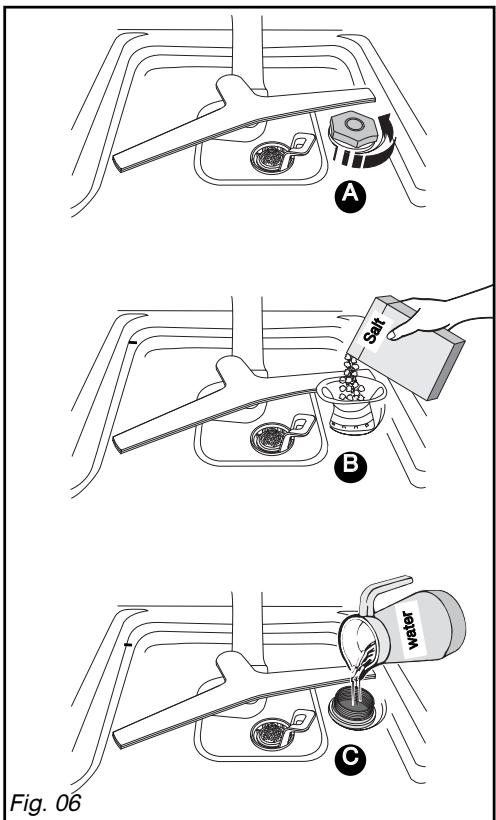
- Loading of regenerating salt (Fig 06)
Filling with salt is essential for providing a good wash without marks. It regenerates the resins that soften the water, by removing its lime content (unless the mains water supply is soft enough). Refer to "Setting the water softener".
Important :
Only use special dishwasher regenerating salt. Do not use table salt or any type of cooking salt, this could damage your appliance's water softener.
A Unscrew and remove the stopper on the salt tank.
Fill the tank with regenerating salt specially designed for dishwashers.
Use the funnel supplied with your dishwasher. The first time, top up with water up to the rim of the tank.
Regenerating salt indicator:
This illuminates when salt must be added. After the tank has been filled with regenerating salt, the indicator light may remain lit until the salt has dissolved sufficiently, usually after one cycle (of if the tank has not been filled completely; for example, when first putting the machine into service using the sample).
This can be deactivated as indicated in the paragraph "For multi-purpose products" setting table.
Important If the salt
If the salt overflows when filling the tank, to avoid oxidation of the tub it is advisable to remove the salt crystals or to run a Prewash programme.
EN 7/ LOADING OF RINSING PRODUCT
- Loading of rinsing product (Fig. 07)
Important :
Only use a rinsing product designed for dishwashers. The rinsing product ensures your items shine and are well dried.
A B When first putting the machine into service, fill the tank until the level is flush with the top of the adjustment lever. Pour in at least all the rinsing product provided.
The tank contains 120 ml (approximately one glass)
The original setting is in the centre (middle position: reference mark 2). If you encounter marks or poor drying after a few cycles, you can adjust the setting using the adjustment lever (fig 07; Reference mark 3 will increase the setting).
- Close the tank lightly
Rinsing liquid indicator light:
This illuminates when rinsing product is required.
It can be deactivated as shown in the paragraph "For multi-purpose products" setting table.
Important : If any of the
If any of the product overflows during filling, sponge up the excess to avoid producing foam.
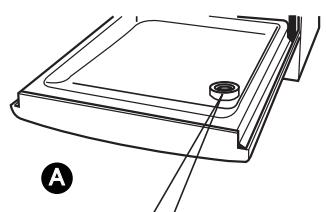
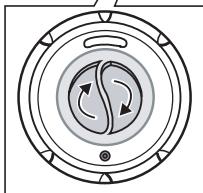
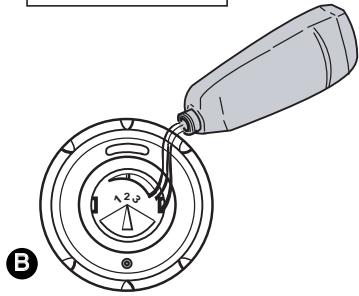
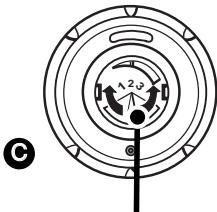
Fig.07 Adjustment lever
EN 8/ YOUR DISHWASHER'S EQUIPMENT
Very important Items not suitable
- Wooden cutting boards
- Stainless steel utensils or plastic utensils that are not heat-resistant
- Copper or pewter items
- Glued crockery and cutlery
- Cutlery with wooden, horn or mother-of-pearl handles
- Antique or hand-painted porcelain
When purchasing crockery, glasses or cutlery, ensure that it is dishwasher-safe
- THE LOWER BASKET
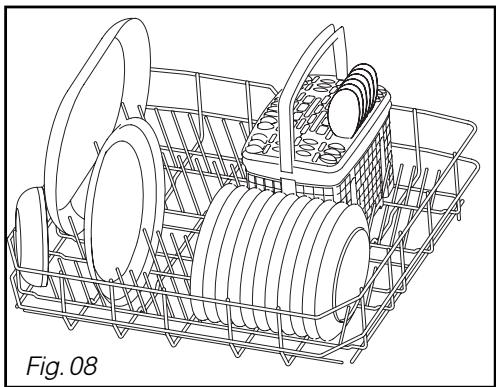
Arrange your items so that the water can circulate freely and spray over all the utensils.
Place large diameter dishes and pans at the sides.
Do not intersperse, jam together or superimpose flat plates and concave dishes (Fig. 08).
The flexible racking spikes makes it easier to arrange your large dishes (Fig. 09).

Advice:
When you re-insert the lower basket, e that nothing catches on the oversize barrier to avoid blocking the rotating arm.
Unloading your items
Empty the lower basket to avoid drips from the upper basket falling onto the lower basket.

EN 8/ YOUR DISHWASHER'S EQUIPMENT
- THE UPPER BASKET
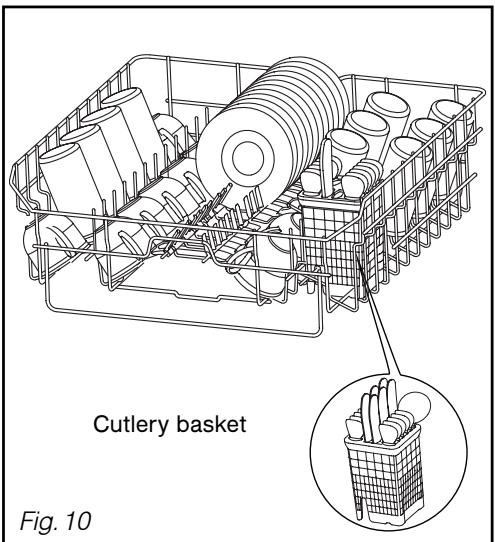
This basket is particularly designed to take glasses, cups, ramekins, small salad bowls, bowls and saucers.
Arrange your items methodically to save on space (arranging glasses, cups or bowls together).
You can also arrange cups, ladles, etc. on the folding cup racks (Fig. 10)

Advice:
Position the cavities of glasses, cups
or bowls facing downwards.
- Adjusting the height of the upper basket
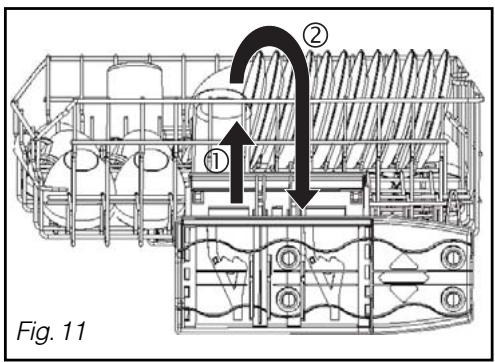
For large dishes to be loaded in the lower basket, the upper basket must be set the to high position. This can be done with the basket fully loaded (Fig. 11)
① Setting in HIGH POSITION:
Gently raise your basket on each side until it engages.
② Setting in LOW POSITION:
Raise your basket completely on both sides to unlock it and then lower it to the low position.
Important :
Check that the two slides are set to the same height and the basket is horizontal.
EN 8/ YOUR DISHWASHER'S EQUIPMENT
- THE CUTLERY BASKET
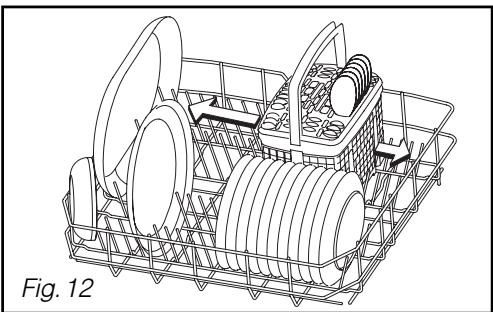
The cutlery basket slides to allow flexible loading.
It can be placed anywhere in the lower basket. You can therefore make a variety of loads depending on the items (Fig. 12).
If your cutlery items or your dishes are too large, alter the height setting for the upper basket.
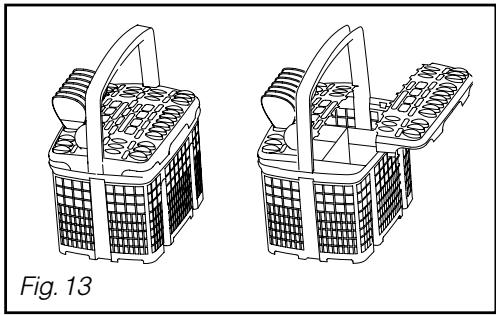
Movable grills are available for if you wish to load your cutlery in an orderly manner (Fig. 13).
For optimum washing and drying, use these separation grills partially or totally.
Point the handles on the cutlery downwards.
Important :
For safety reasons, we recommend that you place knives with pointed ends with the point facing downwards in the cutlery basket (to avoid the risk of an accident).
Long-bladed knives and other sharp kitchen utensils must be placed flat in the upper basket.
Avoid washing cutlery with horn handles in your dishwasher.
Separate silverware from other metals using the separation grill.
EN
9/ SETTING THE PARAMETERS
- SETTINGS POSSIBLE USING THE "SET" AND SELECTION BUTTONS:
- 1 long press on the "SET" button and then a short press enables you to move on to the following parameters.
Set the parameters by pressing one of the programme selection buttons or the other.
Move on to the next parameter by pressing "SET".

Display
1 long press
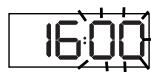
> Setting the clock (hour)
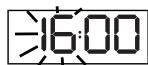
To do this, hold down the "SET" button. When the time starts to flash, press one of the selection buttons or the other until you reach the desired time. Press SET to move on to the next parameter.
Briefly press me "SET"
button onceand thenpress oneor
other of theselectionbuttons
> Setting the clock (minutes)
Proceed in the same way as above; press one of the selection buttons or the other to set the minutes.
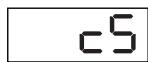
> Setting the water softener
Set to the level corresponding to the hardness of your water: 0 to 5 .
> Product use
You can cancel display of the relevant indicators, depending on the products used:
-
Salt Set to OFF if you do not use salt or f you are using multi-purpose tablets.
-
Rinsing product Set to OFF if you do not use a rinsing product or if you are using multi-purpose tablets.
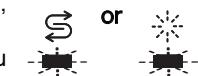


> Multi-purpose tablets: only for c0 or c1 activate the "AUTO 4/1" option
- For optimum product performance (depending on the water softener setting table on page 11), set:
- OFF To deactivate the "4/1" option.
- to select "4/1" with "Extra Dry"
- to select "4/1" with "Sparkling Clean".
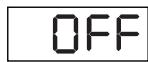
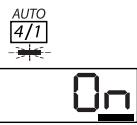
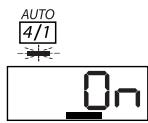
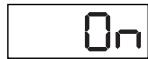
> Beep at the end of the programme
On to activate the function; OFF if you do not wish not to hear the beep at the end of the program.
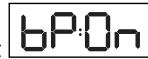

> Screen brightness
Set the screen brightness to suit yourself from Lul minimum to Lu5 maximum.
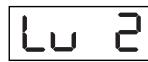
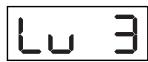

Advice:
The setting is confirmed automatically when you move on to the next parameter or if the button is not pressed again within the next 10 seconds.
EN
10/ WASHING PROGRAMMES
PROGRAMMES TABLE
| ITEM TYPE (corseal, pans, cutlery, glasses) | Resistant | Mixed | Mixed |
| FOOD RESIDUE: Quantity, type and amount | Very dirty A large amount of dried-on residue, baked-on stains, grease, residue from frying, cooked cheese, sauce, etc. | Normally dirty A normal amount of dried-on and greasy residue on everyday items. Faster, but consumes more energy. | Normally dirty A normal amount of dried-on, adhering residue on every-day items. |
| PROGRAMMES | BOOST | Normal | ECO |
| PROGRAMME SEQUENCE | Hot pre-wash Washing at 70°C | Pre-wash Washing at 65°C | Pre-wash Washing at 55°C |
| Rinse Hot rinse | Rinse Hot rinse | Rinse Hot rinse | |
| Air Drying | Air Drying | Air Drying | |
| As an indication only: | |||
| Duration in min | 130' | 90' | 130' |
| Water (L) | 17 | 17 | 15 |
| Energy (Kwh) | 1,7 | 1,5 | 1,3 |
These values refer to normal conditions of use with separate products (detergent, salt, rinsing product). They may vary according to the load, the temperature, if you use combined washing products, the water hardness and the supply voltage.
EN
10/ WASHING PROGRAMMES
Mixed
Normally dirty
Recommended for normally soiled load, less consuming in energy.
WASH
Mixed
Glass or fragile porcelain
Small amount of easy to remove residue.
Fragile

Mixed
Very short 30-minute wash
specially designed for a small amount of daily items with a limited amount of non-greasy residue, not dried on.
Rapid
Mixed
Automatically detects the amount of washing up and the level of soiling.
Normal amount of dried on residue on everyday items.
Faster, but consumes more energy.
ICS
Pre-wash
Washing at 55 / 65^
Rinse
Hot rinse
Air Drying
Washing at 50^
Rinse
Hot rinse
Air Drying
Washing at 45^
Rinse
Hot rinse
Air Drying
140
12
1.05
85
14
0,8
Washing at 45^
Rinse
Hot rinse
Natural drying
30
11
0.8
17-19
1,3-1,5
EN 11/PROGRAMMING


Advice:
Consult the Programmes table on the preceding pages to determine the programme you need for the type of items, the quantity and the amount of food residue.
Starting the appliance
Press the "On/Off" button A to switch the machine on.
Starting a programme immediately
Select your programme by pressing one of the selection buttons B.
- The Auto programme can be accessed by pressing the "ICS" button.
- The button scrolls the programmes to the left (if the "BOOST" programme is selected, pressing this button causes the "Rapid >>" programme to be selected).
- The button scrolls the programmes to the right (if the "Rapid >>" programme is selected, pressing this button causes the "BOOST" programme to be selected).
- When a programme is selected, the relevant indicator light illuminates. The screens show the envisaged time that the programme will end.
Press "Start/C"; the screen shows the remaining time for the programme. Close the door; the programme starts.
Finishing time
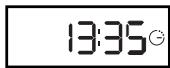
Programme time remaining, progress
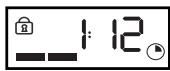
A short audible signal (beep) confirm the button's selection, except for the "On/Off" button.
EN 11/PROGRAMMING
- Delaying the end of a programme
Programme the finishing time, in quarter of an hour stages, by pressing the + or - buttons until you reach the desired time.
Confirm by pressing "Start" G.
The screen counts down hour by hour until the programme starts.
End of the programme
The light flashes 15 minutes before the end of the programme and then lights permanents once the programme has finished.
- Cancelling a programme
Hold down the "Start / Cancel" button for a few seconds.
- Stopping the appliance
When the programme has finished, press the "On/Off" button A.
- Setting the audible signal
The setting enables you to activate or de-activate the beep at the end of the programme.
- Access the setting holding down the "Set" button until you hear a double signal (long beep). Keep on pressing "Set" successively until you have access to the parameter:
The setting is confirmed automatically after 10 seconds or by pressing "SET" (switching to the next parameter "Screen brightness").
Waiting for delayed start
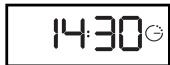
Programme time remaining, progress
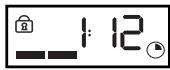
End of programme
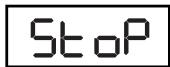
Beep activated
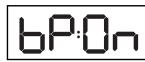
Beep de-activated

EN 12/ YOUR DISHWASHER'S SAFETY SYSTEMS
- SAFETY SYSTEMS
- Door poorly closed
If the door is poorly closed, the confirmed programme is automatically cancelled after 3 minutes. If you open the door during the cycle, the programme light flashes.
Programme access lock
Throughout the period the programme is running, or the full duration of the programme, the programme selector and the buttons are automatically protected from any kind of manipulation. This unlocks automatically at the end of the programme or when the programme is cancelled by holding down the "Start" button for 3 seconds.
- Advice on cleaning the filters

Approximately every month, your dishwasher advises you to proceed to service the filters (see Section "Cleaning the waste filters" - Fig. 14-15).
- Anti-overflow system
This system activates the drain pump automatically if the water in the tank reaches an abnormal level.
- Anti-leak protection system
This system cuts off the water supply if a leak is detected under the appliance.
Total safety
This supply pipe is fitted with a device to cut off the water supply directly at the tap if there is a leak.
Alarm light
For programme errors or incidents (please refer to Section 14 "If an operating abnormality occurs").

NB:
To unlock, hold down the Start / Cancel button for three seconds.
- CLEANING THE WASTE FILTERS
The filtration system consists of several elements:
A - The waste filter
- The large main filter
- The micro filter
The filters are located in the centre of the tub and must be washed regularly to obtain optimum washing results.
Actions :
1 Before removing the filters, remove any waste on the large main filter with a sponge so that the waste does not block the sprinkler arms. Rotate the spray arm as shown in the drawing. (Fig. 14)
② Loosen the waste filter a quarter of a turn and then remove it A
③ Remove the main filter B
4 Remove the micro filter C
Carefully clean filters A, B and C under running water (Fig. 15)
Re-installation:
Proceed in reverse order, inserting filters C and B and then A
Important :
Remember to lock the waste filter in place by pushing it in fully and turning it a quarter turn.
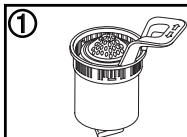
A
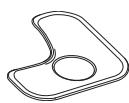
B
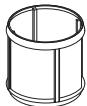
C
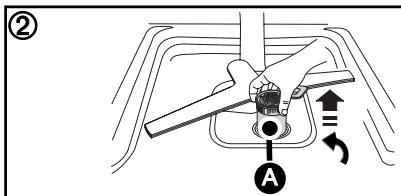
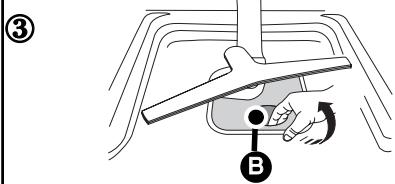
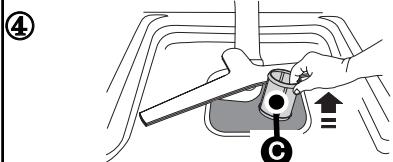
Fig. 14
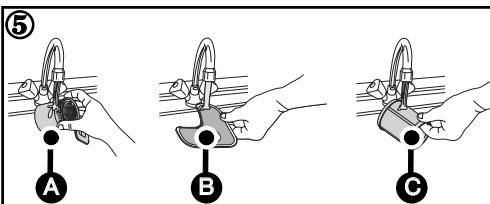
Fig. 15
EN 13/ CLEANING YOUR APPLIANCE
Periodically
Every 3 or 4 months, in order to remove any deposits, run a special maintenance programme, without any items in the machine, using a special dishwasher cleaning product.
Important: Keep this product out of children's reach.
- If not using your dishwasher for a prolonged period:
Clean your dishwasher completely and then unplug it from the electricity supply and close the water tap. Protect your machine from potential frost.

Advice :
Do not use abrasive powders, metal sponges and alcohol-based or thinner-based products.
Use a cloth or a sponge.
If you are moving house, run a soaking programme first of all, in order to avoid any water escaping.
EN
14/ IF OPERATING ABNORMALITIES OCCUR
SUMMARY OF THE FAULTS
| d01: water supply fault (tap) | d07: overflow / anti-leak fault |
| d02: draining fault | d08: sprinkling distribution fault |
| d03: heating fault | d11: pressure sensor fault |
| d04: temperature fault | d12: filling fault (water inlet detection system) |
| d05: fault - motor under load | d13: overheating fault |
| d06: fault - motor overload | d14: pump filling fault |
BEFORE CALLING FOR SERVICE
| Problem | Possible causes | What to do? |
| The door falls heavily when opened (integratable model) | - Door springs not tensioned enough to compensate for the weight of the panel. | - Tighten the two tensioning screws accessible in the bottom section above the front feet. |
| The door does not stay horizontal when open or returns too quickly (integratable model) | - Door springs tensioned too much. | - Loosen the two tensioning screws accessible in the bottom section above the front feet. |
| - No wooden panel. | - Fit a temporary wooden panel on the appliance and adjust the springs. | |
| The door catches when closing | - Appliance not stable | - Adjust the feet. |
| - Door not centred on the tub | - Re-centre by adjusting the rear feet. | |
| The upper basket does not stay in the high position | - Poor manipulation (the basket is being pulled upwards too quickly) | - Act more progressively (see instructions), one side and then the other. |
| Small leak around or under the appliance (move the appliance to locate the leak) | - Leak from the tap. | - Check that a seal is fitted and retighten the nut. |
| - Leak from the appliance. (Cf. table fault d07). | - Close the water tap and call a technician. | |
| Small leak at the door | - Appliance not stable or not level | - Adjust the feet. |
| - Door not centred on the tub. | - Re-centre by adjusting the rear feet. |
EN
14/ IF OPERATING ABNORMALITIES OCCUR
- THE INDICATOR LIGHTS
| Problem | Possible causes | What to do? |
| The salt light does not go out | - No salt or an insufficient quan-tity of salt in the tank to trigger the float. | - Refill the tank and wait for the cycle to end. If you have soft water that requires no salt, the light is constantly lit. |
| The lights all light up one after the other | - Wrong programme. | - Cancel the current program-ming by holding down the Start button for 3 seconds and then re-programme. |
| A light flashes and the pro- gramme does not start | - Programme selector wrongly positioned (between two not-ches) | - Reposition the selector on a programme. |
- RELATING TO PROGRAMMING, DISPLAY
| Problem | Possible causes | What to do? |
| The cycle lasts too long | - The energy-saving program-mes last longer because the agitation and drying times are longer to compensate for the lower washing and drying tem-peratures | - Use these programmes prefer-rably at night when it is not so important how long the pro-gramme lasts or when it ends. |
| The appliance trips the circuit breaker | - Insufficient amperage to sup-ply all the appliances being operated simultaneously.- Internal fault in the appliance. | - Check the socket's amperage (10A minimum) and the meter's capacity.- Call a technician. |
| The appliance does not start | - No mains power to the socket.- Tap closed (Cf. table fault d01).- Water supply hose kinked.- Selection error or programme blocked.- Start button pressed too long (greater than 2 secs).- Appliance in Safety mode (anti-leak) (Cf. table fault d07). | - Check the socket and the fuse- Check the tap is open.- Check the hose line is OK.- Cancel by holding down Start for 3 secs and re-programme.- Just press Start briefly to start the programme.- Call a technician. |
EN
14/ IF OPERATING ABNORMALITIES OCCUR
| Problem | Possible causes | What to do? |
| The appliance will not restart | - Door opened during a washing cycle. | - Wait for the time delay to end (controlled internally by the appliance). |
| The appliance does not drain (Cf. table fault d02). | - The cover has not been removed from the sink's U-bend. - Drain hose kinked. - Filters totally blocked. - Pump blocked. | - Remove the cover. - Check the drain hose line behind the machine is OK. - Remove and clean the filters and the drain. - Initiate a Soaking programme If the fault persists, call a technician. |
- POOR WASHING RESULTS
| Problem | Possible causes | What to do? |
| Food traces and deposits in the glasses | - Items poorly arranged (mas-ked by another larger item or situated underneath it, items nested or jammed together).- Upper spray arm blocked by cutlery or a dish etc.- Filter poorly locked and lifting during washing.- Micro filter screen clogged.- One or more holes in the spray arm blocked. | - Arrange the items properly.Use the most appropriate areas and accessories for each type of item (see instructions).- Check that the spray arm rotates freely. Set the basket in the high position if necessary.- Check the filter's facing and that the filter is locked in place (push it in fully, turning it to the right).- Remove all the filters and clean them (in warm water), including the micro filter's screen (once a month).- Remove the spray arm by turn-ing the lever a quarter of a turn and clean it under the tap (do not use any tool that could damage the holes). Re-install the spray arm. |
| Traces of grease | - Detergent dose too low; ineffi-cient detergent; stale product.- Inappropriate programme (temperature too low; duration too short). | - Increase the dose; try another detergent.- Select a programme with a higher temperature. |
EN
14/ IF OPERATING ABNORMALITIES OCCUR
- POOR WASHING RESULTS...
| Problem | Possible causes | What to do? |
| White marks (identify what type) | - Chalky film (removable with vinegar). | - Check that there is salt in the tank (light unlit = OK). |
| - Traces of salt (items have a salty taste). | - Check the water hardness at the tap and that the water so-tener is set correctly. Adjust it to a higher level if necessary. | |
| - Water too hard for using a “4-in-1” detergent without the addition of salt. | ||
| - Check that the stopper on the salt container is closed correctly. | ||
| White marks (identify what type) | - Glass cloudy because water too soft (cannot be removed). | - Check the water hardness at the tap and that the water so-tener is set correctly. Some detergents in pellet form are more aggressive to glasses and decorations (change the product and use a protective product if necessary). |
| Coloured marks (tea, wine, cofee) | - Items poorly arranged | - Turn the cavities in the items towards the jets. |
| - Detergent dose too low; ineffi-cient detergent | - Increase the dose; try another detergent. | |
| - Programme temperature too low. | - Select a more suitable programme with a higher temperature. | |
| - If you use a multifunction product. | - Use the “4-in-1” option (depending on the model). | |
| Streaks or dried droplets on glasses | - Lack or insufficient amount of rinsing product. | - Check the indicator light and fill the tank completely. Adjust the dispensing unit to a higher position if necessary. |
| - Rinsing product out-of-date or inefficient. | - Use a recent product (a good product dilutes easily and foams in cold water). | |
| - If you use a multifunction product. | - Use the “4-in-1” option with a setting prioritizing drying (parametering from the menu - depending on the model). | |
| Dried-on marks on glasses, dull-ness. | - If you use a multifunction product. | - Use the “4-in-1” option with a setting prioritizing brilliance (parametering from the menu - depending on the model). |
EN
14/ IF OPERATING ABNORMALITIES OCCUR
- POOR OPERATION
| Problem | Possible causes | What to do? |
| Constant filling A lot of waste on the large filter at the end of the cycle. | - Drain hole situated too low for the appliance (Cf. table fault d012). - The filters and drain outlets are blocked with too much residue. | - Drain wand has fallen on the floor. - Remove and clean the filters and the bottom of the drain outlets. Remove large residue from the plates before putting them in the machine. |
| Traces of rust on stainless steel | - Quality of the stainless steel; not dishwasher-safe (knives in particular) | - Use “special dishwasher-safe” cutlery. - Check that the lid on the salt container is closed correctly. |
- POOR DRYING RESULTS
| Problem | Possible causes | What to do? |
| A lot of droplets on the glasses | - Lack or insufficient amount of rinsing product. - The dose has not been distribu- uted. - Positioning of the items. | - Check the indicator light and fill the tank completely. - If the tank is not empty after approximately 60 washings, call a technician. - Arrange the items to restrict water retention as much as possible. Leave the door ajar for a few minutes, if possible |
| Droplets on plastic items, Tefal coatings, etc. | - These items have a low calori- fic mass. | - Arrange the items in the upper basket. |
| Poorer drying on rapid programmes | - On rapid programmes, the drying temperature and drying period are reduced to cut down the duration of the cycle as much as possible. | - Leave the door ajar for a few minutes. |
| Condensation on the wall of the inside door or the tub. | - Condensation may form on the walls, particularly after the appliance has cooled down (sound insulation increases this occurrence) |
EN
15/ AFTER-SALES SERVICE
- INTERVENTION WORK
Any intervention work on your appliance must be performed by a qualified professional approved by the manufacturer. When you call, please mention the full reference for your appliance (model, type and serial number). This information is shown on the description plate (see Fig. 16)
ORIGINAL PARTS
When maintenance is being carried out, ask for only certified original spare parts to be used.
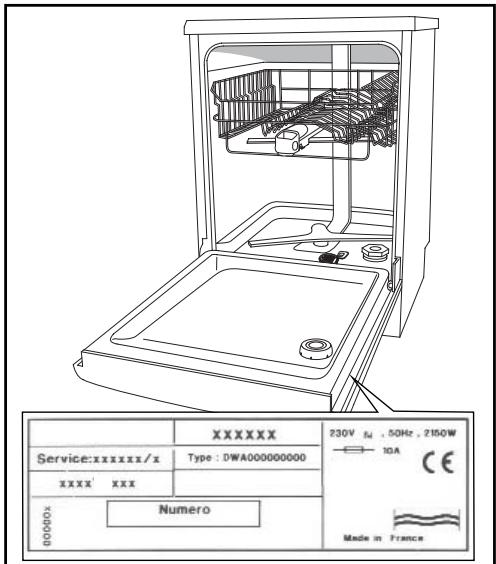
Fig. 16
EN
15/ INDICATIONS FOR THE TESTING LABORATORIES
- Details common to all models
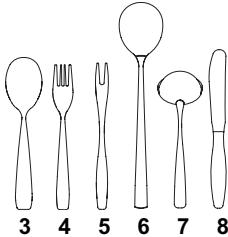
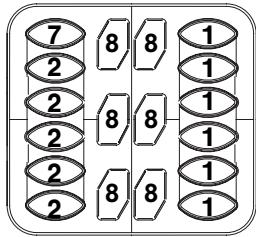
- Washing capacity 12 standard place settings
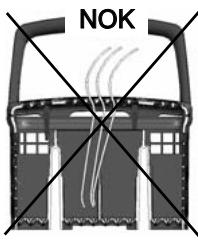
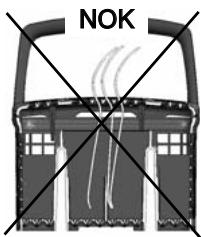
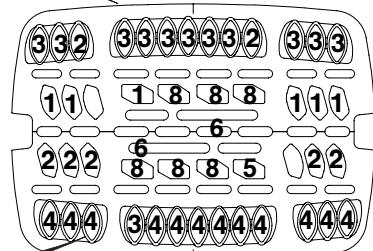
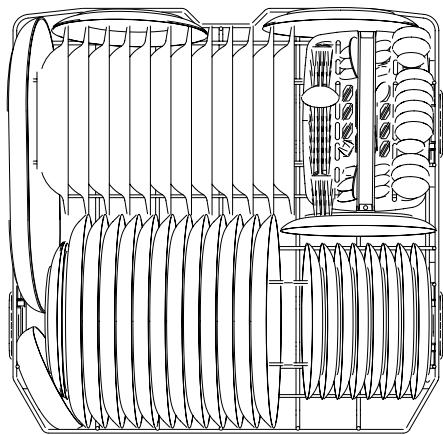
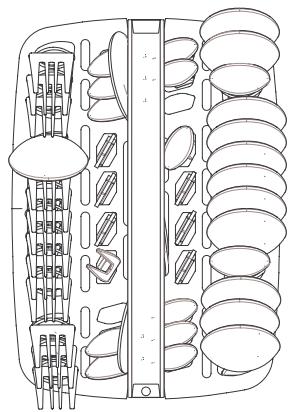
- Arrangement of the items - Figs. A-B-C; see next page
- Loading as per the indications on next page, without side shelves or stemmed glass support, and 5 cup/saucer supports (4 for12 saucers & 1 for 2 cups)
- Setting for upper basket - Low position
- Setting for rinsing product distributor 3
- Adjusting the water softener
For detailed information on the comparison tests regarding the level of soiling, the types of crockery and cutlery, etc., contact the equipment manufacturer before commencing the tests.
Tests to Standard EN 50242:
-Recommendedprogramme WASH
Dosage of detergent 30g of detergent B
- Tests according to the mixed IEC 436/DIN 44990) method
- Recommended programme "Eco"
Dosage of detergent 5+25g of detergent B
NB: When conducting tests using a multi-function tablet:
- Check that the water softener is correctly set for the water hardness
- Pull out the detergent distribution drawer and place the tablet in the interior compartment.
- Select the "4/1" option on the control panel.
- Measuring the noise level in accordance with Standard EN60704-2-3:
- Align the plinth on the housing unit with the door panel.
EN
15/ INDICATIONS FOR THE TESTING LABORATORIES
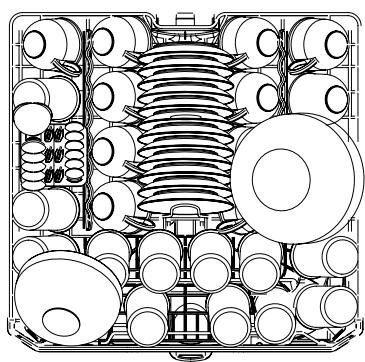
A
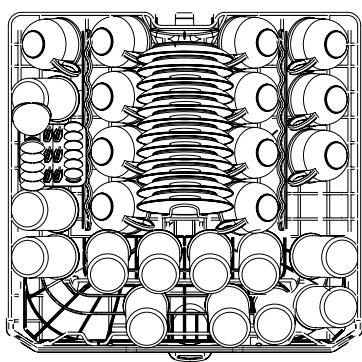
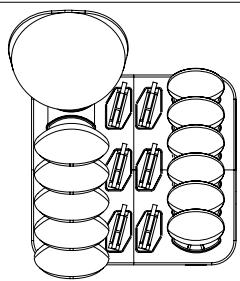
B
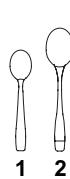
C
EN NOTES
EN NOTES
EN NOTES
EN
After Sales Service:
Any maintenance on your equipment should be undertaken by: - either your dealer,
- or another qualified mechanic who is an authorized agent for the brand appliances.
When making an appointment, state the full reference of your equipment (model, type and serial number). This information appears on the manufacturer's nameplate attached to your equipment.
FR
- 1/SAFETYINSTRUCTIONS
- / INSTALLING YOUR DISHWASHER
- Important:
- NB:
- - IMPORTANT WARNINGS
- Danger:
- DIMENSIONS FOR BUILDING IN APPLIANCES
- - CONNECTING TO THE WATER SUPPLY
- Warning:
- - DRAINING AWAY THE WASTE WATER
- ELECTRICAL CONNECTION
- Earth
- Neutral
- Live
- EN 2 / INSTALLING YOUR DISHWASHER
- LEVELLING BY ADJUSTING THE FEET
- FITTING THE DOOR PANEL (Cladding with a single panel)
- Warning :
- NB:
- FITTING THE DOOR PANEL (Cladding with 2 elements)
- APPLIANCES BUILT-IN UNDER A HOB
- - FIXING IN THE NICHE
- - SOUND-PROOFING SEALS
- BALANCING THE DOOR (LEFT AND RIGHT)
- - REFITTING THE PLINTH
- TABLE FOR CUTTING AWAY THE PLINTH
- Dishwasher
- De Dietrich
- EN CONTENTS
- 1/ FOR THE USER'S ATTENTION
- 2/ DESCRIPTION OF YOUR APPLIANCE
- 3/ INFORMATION 8
- 4/ WHAT TO DO BEFORE FIRST USING THE MACHINE
- 5/ DETERGENT PRODUCTS AND ADJUSTING THE WATER SOFTENER
- 6/ LOADING OF REGENERATING SALT 12
- 7/ LOADING OF RINSING PRODUCT 13
- 8/ YOUR DISHWASHER'S EQUIPMENT
- 9/ SETTING THE PARAMETERS 17
- 10/ WASHING PROGRAMMES TABLE 18
- 11/ PROGRAMMING 20
- 12/ YOUR DISHWASHER'S SAFETY SYSTEMS 22
- 13/ CLEANING YOUR APPLIANCE
- 14/ IF OPERATING ABNORMALITIES OCCUR 25
- 15/ AFTER-SALES SERVICE 30
- 16/INDICATIONS FOR THE TESTING LABORATORIES 31
- EN 1/ FOR THE USER'S ATTENTION
- Important :Keep this up
- - SAFETY INSTRUCTIONS
- Installation
- Children's safety
- Use
- ENVIRONMENTAL PROTECTION
- ECONOMICAL, ENVIRONMENTALLY FRIENDLY WASHING
- GENERAL PRESENTATION OF THE DISHWASHER
- Advice:
- EN 2/ DESCRIPTION OF YOUR APPLIANCE
- - PRESENTATION OF THE CONTROL PANEL
- A On/Off:
- C : Intelligent Control System
- D Set:
- F Delaying the end of a programme:
- EN
- 3/ INFORMATION
- For an impeccable clean, opt for using traditional products together:
- For ease of use and in certain water hardness conditions only (< 35°F) , multi-purpose products can make the use of regenerating salt and rinsing liquid unnecessary.
- EN 4/ WHAT TO DO BEFORE FIRST USING THE MACHINE
- - MEASURE THE WATER HARDNESS AND SELECT THE TYPE OF DETERGENT: TRADITIONAL OR MULTI-PURPOSE
- EN 5/ DETERGENT PRODUCTS AND ADJUSTING THE WATER SOFTENER
- FOR TRADITIONAL PRODUCTS
- - Proceed as follows to adjust the water softener on the control panel:
- - Traditional tablets
- - Powders or liquids (Fig 13)
- FOR MULTI-PURPOSEPRODUCTS
- - Proceed to set water softener
- - Proceed to select the "Multi-purpose AUTO [4/7]" option and set it
- - Loading the multi-purpose tablet dispenser
- EN 6/ LOADING OF REGENERATING SALT
- - Loading of regenerating salt (Fig 06)
- Important :
- Regenerating salt indicator:
- Important If the salt
- EN 7/ LOADING OF RINSING PRODUCT
- - Loading of rinsing product (Fig. 07)
- Rinsing liquid indicator light:
- Important : If any of the
- EN 8/ YOUR DISHWASHER'S EQUIPMENT
- Very important Items not suitable
- - THE LOWER BASKET
- Unloading your items
- - THE UPPER BASKET
- - Adjusting the height of the upper basket
- ① Setting in HIGH POSITION:
- ② Setting in LOW POSITION:
- - THE CUTLERY BASKET
- 9/ SETTING THE PARAMETERS
- - SETTINGS POSSIBLE USING THE "SET" AND SELECTION BUTTONS:
- Display
- long press
- > Setting the clock (hour)
- Briefly press me "SET"
- > Setting the clock (minutes)
- > Setting the water softener
- > Product use
- > Multi-purpose tablets: only for c0 or c1 activate the "AUTO 4/1" option
- > Beep at the end of the programme
- > Screen brightness
- PROGRAMMES TABLE
- Normally dirty
- Glass or fragile porcelain
- Very short 30-minute wash
- Automatically detects the amount of washing up and the level of soiling.
- EN 11/PROGRAMMING
- Starting the appliance
- Starting a programme immediately
- - Delaying the end of a programme
- Confirm by pressing "Start" G.
- End of the programme
- - Cancelling a programme
- - Stopping the appliance
- - Setting the audible signal
- EN 12/ YOUR DISHWASHER'S SAFETY SYSTEMS
- - SAFETY SYSTEMS
- - Door poorly closed
- Programme access lock
- - Advice on cleaning the filters
- - Anti-overflow system
- - Anti-leak protection system
- Total safety
- Alarm light
- - CLEANING THE WASTE FILTERS
- Actions :
- Re-installation:
- EN 13/ CLEANING YOUR APPLIANCE
- Periodically
- Important: Keep this product out of children's reach.
- - If not using your dishwasher for a prolonged period:
- Advice :
- SUMMARY OF THE FAULTS
- BEFORE CALLING FOR SERVICE
- - THE INDICATOR LIGHTS
- - RELATING TO PROGRAMMING, DISPLAY
- - POOR WASHING RESULTS
- - POOR OPERATION
- - POOR DRYING RESULTS
- - INTERVENTION WORK
- ORIGINAL PARTS
- 15/ INDICATIONS FOR THE TESTING LABORATORIES
- - Details common to all models
- Tests to Standard EN 50242:
- - Tests according to the mixed IEC 436/DIN 44990) method
- - Measuring the noise level in accordance with Standard EN60704-2-3:
- After Sales Service:
- FR
Brand : DE DIETRICH
Model : DED DOP1140X
Category : Dishwasher