
ASCENDER ELECTROL - Projection screen DA-LITE - Free user manual and instructions
Find the device manual for free ASCENDER ELECTROL DA-LITE in PDF.

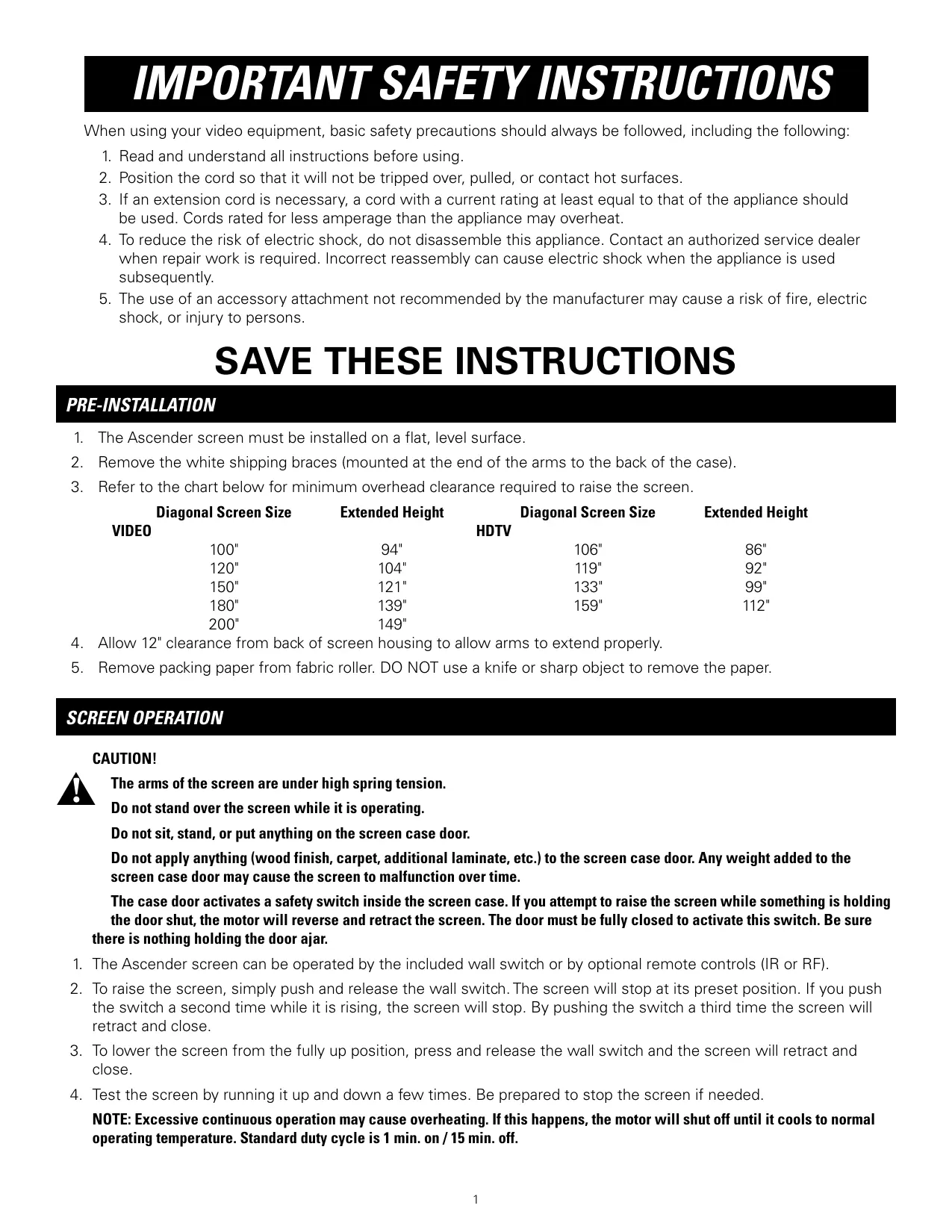

| Product Type | Motorized Projection Screen |
| Brand | DA-LITE |
| Model | ASCENDER ELECTROL |
| Available Screen Size (Diagonal) | 100" to 200" (Video and HDTV models) |
| Minimum Ceiling Clearance | Variable by size: e.g., 94" for 100" Video, 86" for 106" HDTV |
| Power Supply | 120 V or 240 V AC, installer wiring |
| Recommended Wire Gauge | 14-18 AWG for power, 20-24 AWG for switch |
| Operating Cycle | 1 min run / 15 min stop |
| Control Type | Wall switch included; optional IR/RF remote control |
| Stop Adjustments | White stop for height, red stop for descent |
| Keystone Adjustment | Yes, by adjustment nuts on the arms |
| Screen Material | Fabric (projection screen cloth) |
| Safety | Safety switch on cover; motor reverse if obstacle encountered |
| Installation | On flat floor, bolted to floor (6 points minimum, #12 x 2" L screws) |
| Recessed Mounting | Yes, with reinforced fixation |
| Required Rear Clearance | 12" between housing and wall for arm deployment |
| Warranty | 1 year limited (parts and labor) |
| Electrical Standards | Compliant with NEC, CEC and local codes |
| After-Sales Service | Contact: Da-Lite Screen Company, 800-622-3737 |
Frequently Asked Questions - ASCENDER ELECTROL DA-LITE
User questions about ASCENDER ELECTROL DA-LITE
0 question about this device. Answer the ones you know or ask your own.
Ask a new question about this device
Download the instructions for your Projection screen in PDF format for free! Find your manual ASCENDER ELECTROL - DA-LITE and take your electronic device back in hand. On this page are published all the documents necessary for the use of your device. ASCENDER ELECTROL by DA-LITE.
USER MANUAL ASCENDER ELECTROL DA-LITE
The Da-Lite Difference.

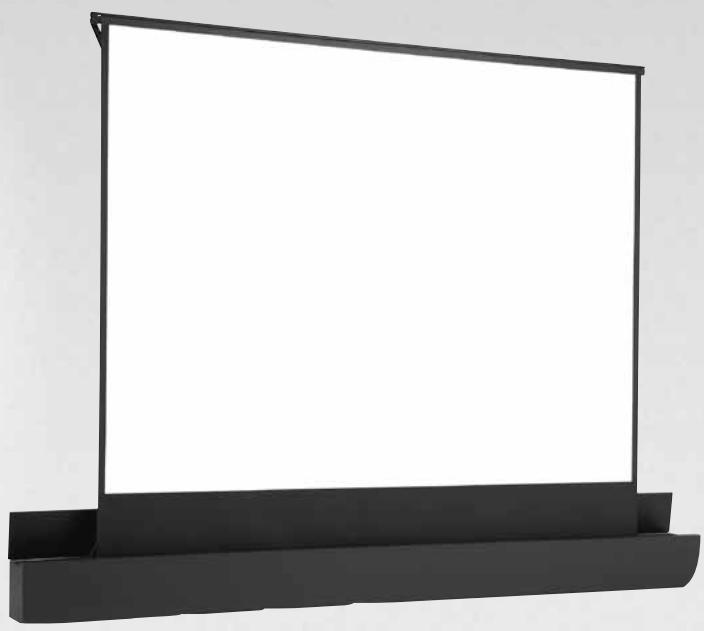
Instruction Book for ASCENDER ELECTROL®

DA-LITE SCREEN COMPANY, INC.
3100 North Detroit Street
Post Office Box 137
Warsaw, Indiana 46581-0137
Phone: 574-267-8101
800-622-3737
Fax: 574-267-7804
Toll Free Fax: 877-325-4832
www.da-lite.com
e-mail: info@da-lite.com
IMPORTANT SAFETY INSTRUCTIONS
When using your video equipment, basic safety precautions should always be followed, including the following:
- Read and understand all instructions before using.
- Position the cord so that it will not be tripped over, pulled, or contact hot surfaces.
- If an extension cord is necessary, a cord with a current rating at least equal to that of the appliance should be used. Cords rated for less amperage than the appliance may overheat.
- To reduce the risk of electric shock, do not disassemble this appliance. Contact an authorized service dealer when repair work is required. Incorrect reassembly can cause electric shock when the appliance is used subsequently.
- The use of an accessory attachment not recommended by the manufacturer may cause a risk of fire, electric shock, or injury to persons.
SAVE THESE INSTRUCTIONS
PRE-INSTALLATION
- The Ascender screen must be installed on a flat, level surface.
- Remove the white shipping braces (mounted at the end of the arms to the back of the case).
- Refer to the chart below for minimum overhead clearance required to raise the screen.
| Diagonal Screen Size VIDEO | Extended Height | Diagonal Screen Size HDTV | Extended Height |
| 100" | 94" | 106" | 86" |
| 120" | 104" | 119" | 92" |
| 150" | 121" | 133" | 99" |
| 180" | 139" | 159" | 112" |
| 200" | 149" |
- Allow 12" clearance from back of screen housing to allow arms to extend properly.
- Remove packing paper from fabric roller. DO NOT use a knife or sharp object to remove the paper.
SCREEN OPERATION
CAUTION!

The arms of the screen are under high spring tension.
Do not stand over the screen while it is operating.
Do not sit, stand, or put anything on the screen case door.
Do not apply anything (wood finish, carpet, additional laminate, etc.) to the screen case door. Any weight added to the screen case door may cause the screen to malfunction over time.
The case door activates a safety switch inside the screen case. If you attempt to raise the screen while something is holding the door shut, the motor will reverse and retract the screen. The door must be fully closed to activate this switch. Be sure there is nothing holding the door ajar.
- The Ascender screen can be operated by the included wall switch or by optional remote controls (IR or RF).
- To raise the screen, simply push and release the wall switch. The screen will stop at its preset position. If you push the switch a second time while it is rising, the screen will stop. By pushing the switch a third time the screen will retract and close.
- To lower the screen from the fully up position, press and release the wall switch and the screen will retract and close.
- Test the screen by running it up and down a few times. Be prepared to stop the screen if needed.
NOTE: Excessive continuous operation may cause overheating. If this happens, the motor will shut off until it cools to normal operating temperature. Standard duty cycle is 1 min. on / 15 min. off.
For installations where the Ascender will be set on the floor, the box must be secured to floor in at least size places (recommended hardware is #12 x 2" L wood screws).
Refer to figure 1.
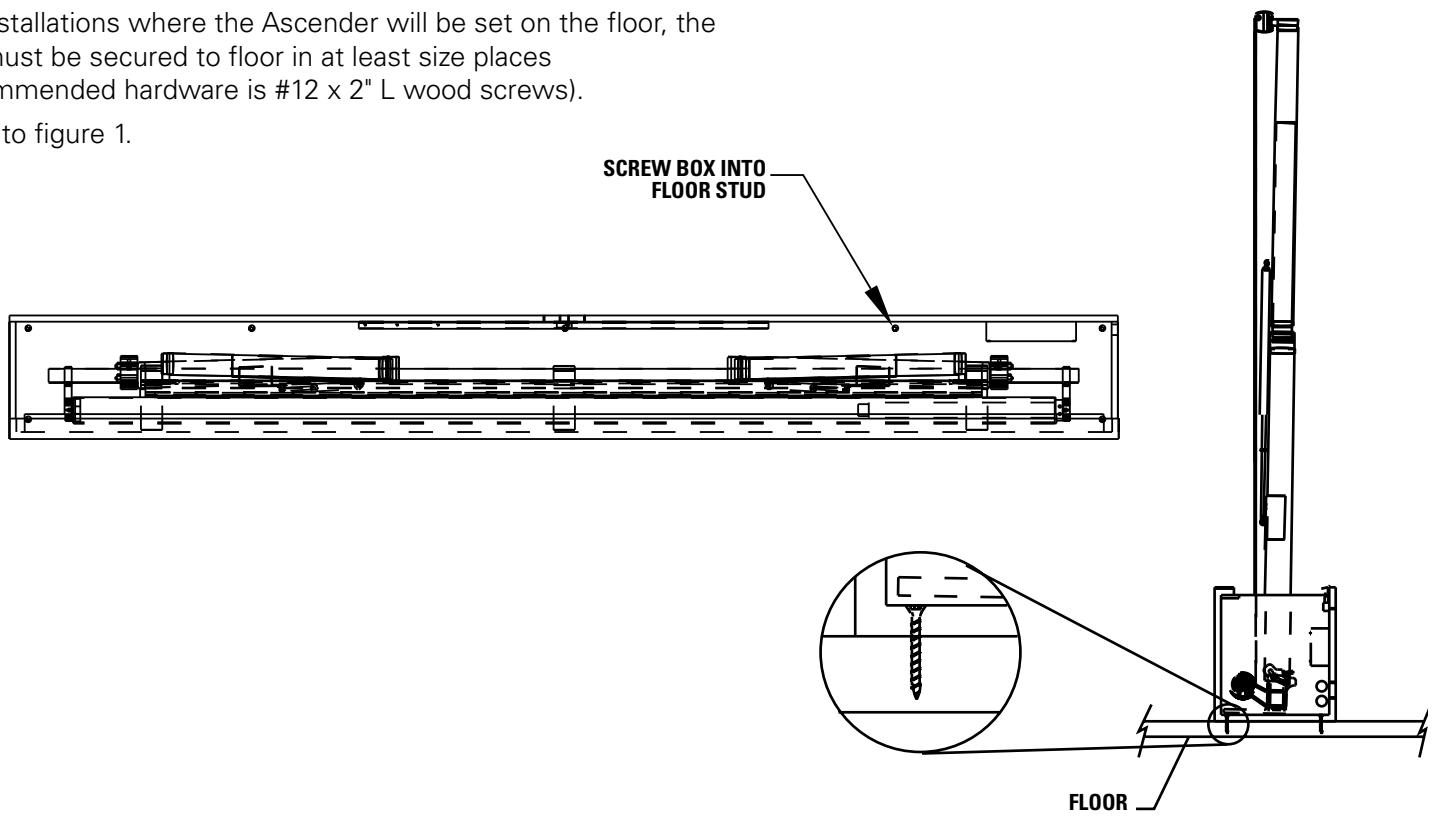
FIGURE 1
For installations where the Ascender will be recessed into the floor, the box must be secured in at least six places (recommended hardware is #12 x 2" L wood screws).
Refer to figure 2.
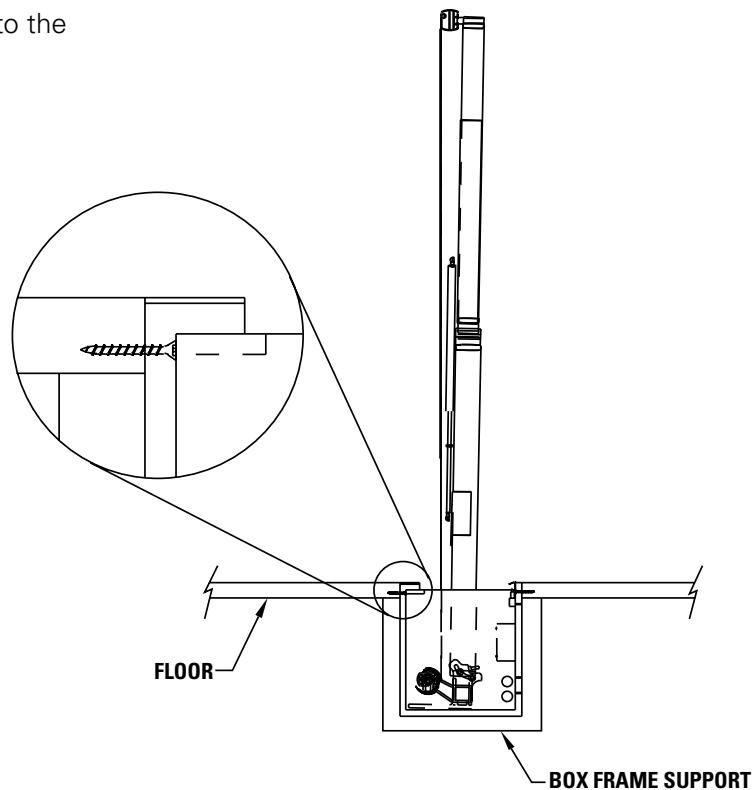
FIGURE 2
ASCENDER ELECTROL INSTALLATION
WARNING: To prevent electrical shock or damage to the low voltage control (LVC), do not apply power to the LVC until all connections are complete. Make sure power is turned off on all wires before making connections.
LOW VOLTAGE CONNECTIONS:
Wall Switch
- Install wall switch where desired.
- Use 2-conductor 20-24 gauge wire to extend the switch wire to the required length.
- Connect the wire from the switch to the wire labeled "wall switch". Refer to figure 3.
CAUTION: Never apply voltage to the wall switch lead or the LVC will be damaged.
Control Panel
A control panel may be connected to the LVC by using the wall switch wire lead. The control panel must provide a momentary, dry contact closure of at least 1/2 second.
- Use 2-conductor 20-24 gauge wire to connect the control panel to the wall switch lead.
- A momentary closure when the screen is down will be an "up" command.
- A momentary closure when the screen is fully extended will be a "down" command.
- A momentary closure while the screen is in motion will be a "stop" command.
CAUTION: Never apply voltage to the wall switch lead or the LVC will be damaged.
120V/240V CONNECTIONS:
AC Power Source
- Refer to figure 3 for electrical connections. Wiring designated as external is to be completed by installer conforming to local and national codes.
NOTE: Must be installed in accordance with the requirements of the Local Building Codes, the Canadian Electrical Code (CEC), CAN/CSA C22.1 and the National Electric Code (NEC), NFPA 70. An appropriate disconnect device shall be provided as part of the building installation.
- Use 14-18 gauge wire to connect power to the LVC wires labeled "AC power input". Refer to figure 3.
- Connect the building ground wire to the ground lug on the metal housing.
OPTIONAL WIRELESS REMOTE CONNECTIONS:
Radio Frequency Remote
- Remove the center cover plate of the LVC box.
- Route the receiver wire through the round plastic bushing and plug it into the onboard socket marked "EYE". Refer to figure 3.
Infrared Remote
- Remove the center cover plate of the LVC box.
- Route the receiver wire through the round plastic bushing and plug it into the onboard socket marked "EYE". Refer to figure 3.
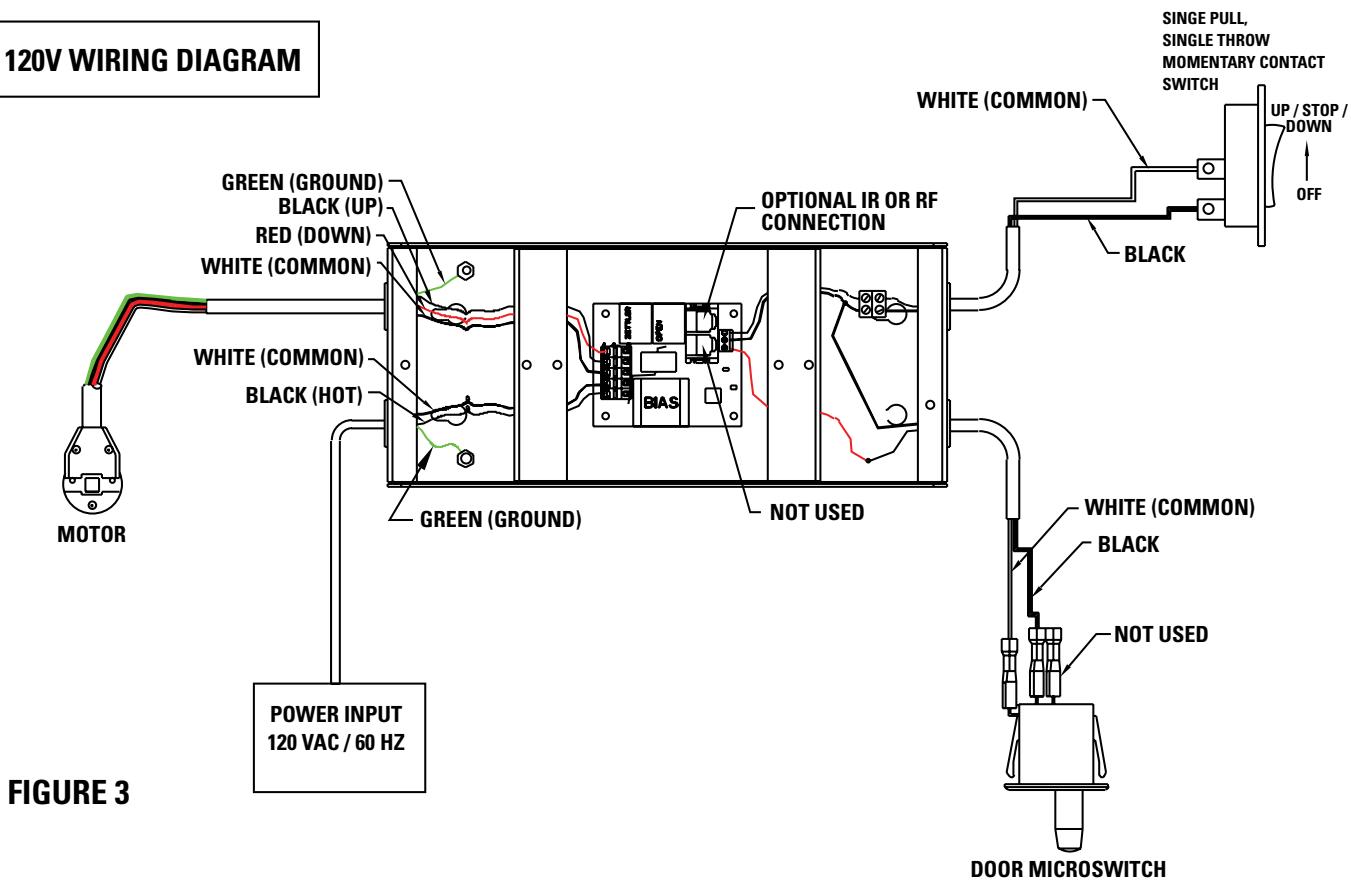
120V WIRING DIAGRAM
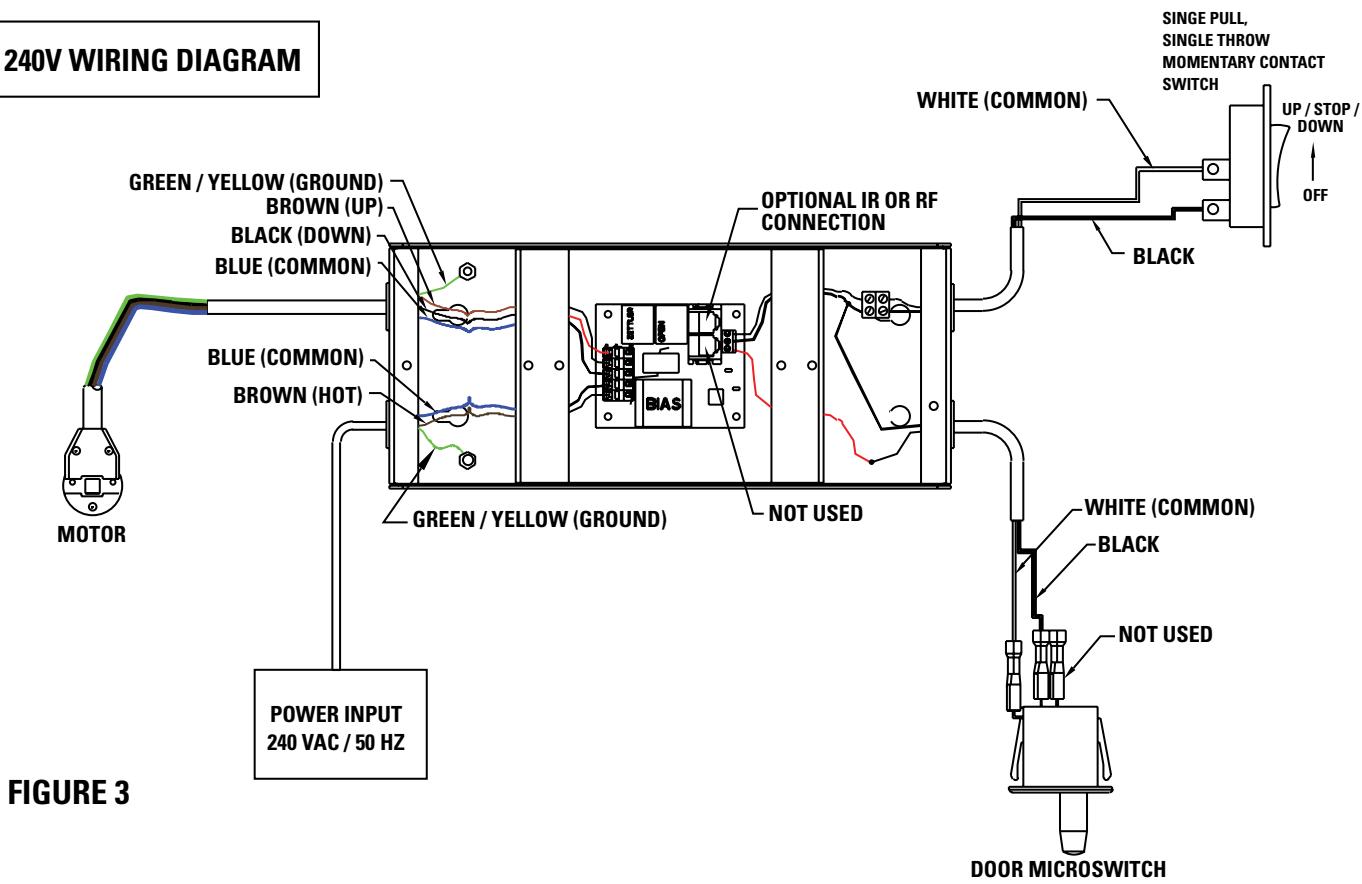
240V WIRING DIAGRAM
SCREEN ADJUSTMENT
The screen stop positions are preset at the factory. Should it be necessary to adjust for more or less travel proceed as follows. Refer to figure 4.
TO INCREASE SCREEN HEIGHT
- Turn the white limit adjuster counterclockwise one-quarter turn at a time. Run the screen down about one foot and then back up to test the stop position. Repeat until the desired position is set.
NOTE: Do not adjust for more height than what was ordered. Adjusting too high may cause the arms to lock and not retract properly. There must be at least 1-1/2 wraps of fabric on the roller at all times.
TO DECREASE SCREEN HEIGHT
- Turn white limit adjuster clockwise one-quarter turn at a time. Run the screen up to test the stop position. Lower the screen about one foot and turn limit adjuster again. Repeat until the desired position is set.
- Raise the screen about one foot and stop. Turn the red limit adjuster counterclockwise one-quarter turn to increase the down travel.
NOTE: Do not adjust the screen down too far. This will strain the motor and screen. The lid of the box should just close when the motor stops.
- Turn the red limit adjuster clockwise one-quarter turn at a time to decrease the amount of down travel. Run the screen down to test the stop position. Repeat until the desired position is set.
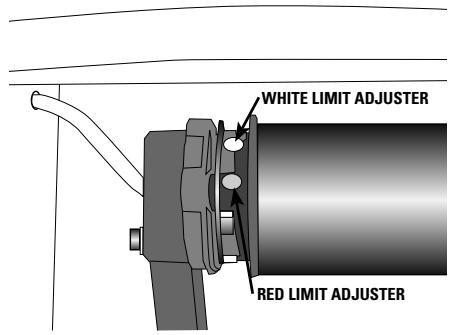
FIGURE 4
KEYSTONE ADJUSTMENT
The Ascender screen can be adjusted to reduce keystoning of the video image.
This procedure requires two people. One to hold the arms and another to make the adjustments.
- Raise the screen to the fully extended position.
- Loosen the two lock nuts on the end of one arm. See figure 5.
- Turn the adjusting nut and carefully push the arm in the required direction.
- Tighten the lock nuts.
- Repeat steps 2 to 4 for the other arm.
NOTE: Make sure that the screen surface does not rub against the edge of the case.
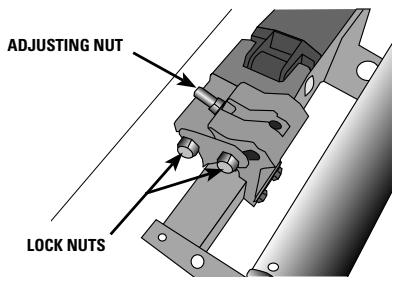
FIGURE 5
TROUBLESHOOTING
| SYMPTOM | CAUSE | SOLUTION |
| 1. Screen will not operate or will not go "down". Motor does not hum. | (a) Tripped circuit breaker.(b) No power to operating switch or junction.Power at junction box(c) Thermal overload tripped.(d) Broken wire in the "down" position.(e) Defective motor, limit switch or capacitor.(f) Capacitor burned out. | (a) Reset circuit breaker.(b) Check above. Tighten all loose wire connections. Correct any improper connections."Down" PositionCheck for power across black and white leads.(c) Let motor cool down for 15 minutes. Try again.(d) Check for continuity. Cut off old splice and reconnect.(e) Replace motor assembly. NOTE: Motor is a sealed assembly.(f) Replace motor assembly. |
| 2. Screen will not move "up"Motor does not hum | (a) Tripped circuit breaker.(b) No power to operating switch or junction.Power at junction box(c) Thermal overload tripped.(d) Broken wire in the "up" position.(e) Defective motor, limit switch or capacitor.(f) Capacitor burned out. | (a) Reset circuit breaker.(b) Check above. Tighten all loose wire connections. Correct any improper connections."Up" PositionCheck for power across red and white leads.(c) Let motor cool down for 15 minutes. Try again.(d) Check for continuity. Cut off old splice and reconnect.(e) Replace motor assembly. NOTE: Motor is a sealed assembly.(f) Replace motor assembly. |
TROUBLESHOOTING
| SYMPTOM | CAUSE | SOLUTION |
| 3. Incorrect stopping position in downward direction. | (a) “Down” limit switch out of adjustment | (a) See installation instructions. |
| 4. Incorrect stopping position in upward direction. | (a) “Up” limit switch out of adjustment | (a) Adjust “up” limit switch. See installation instructions |
| 5. Noise. NOTE: Screen will operate with a low pitched hum. | (a) Grinding due to foreign object in screen rubbing on roller or fabric. (b) Gear noise. | (a) Remove foreign object. (b) Replace motor assembly. |
| 6. Coasting. | (a) Defective brake. | (a) Replace motor assembly. |
LIMITED ONE YEAR WARRANTY ON DA-LITE PRESENTATION PRODUCTS
Da-Lite Screen Company, Inc. warrants its products to the original purchaser only, to be free from defects in materials and workmanship for a period of one (1) year from the date of purchase by the original purchaser provided they are properly operated according to Da-Lite's instructions and are not damaged due to improper handling or treatment after shipment from the factory.
This warranty does not apply to equipment showing evidence of misuse, abuse or accidental damage, or which has been tampered with or repaired by a person other than authorized Da-Lite personnel.
Da-Lite's sole obligation under this warranty shall be to repair or to replace (at Da-Lite's option) the defective part of the merchandise. Returns for service should be made to your Da-Lite dealer. If it is necessary for the dealer to return the screen or part to Da-Lite, transportation expenses to and from Da-Lite are payable by the purchaser and Da-Lite is not responsible for damage in shipment. To protect yourself against damage or loss in transit, insure the product and prepay all transportation expenses.
THIS WARRANTY IS IN LIEU OF ALL OTHER WARRANTYES, EXPRESS OR IMPLIED, INCLUDING WARRANTY AS TO FITNESS FOR USE AND MERCHANT ABILITY. Any implied warranties of fitness for use, or merchantability, that may be mandated by statute or rule of law are limited to the one (1) year warranty period. This warranty gives you specific legal rights, and you may also have other rights, which vary from state-to-state. NO LIABILITY IS ASSUMED FOR EXPENSES OR DAMAGES RESULTING FROM INTERRUPTION IN OPERATION OF EQUIPMENT, OR FOR INCIDENTAL, DIRECT, OR CONSEQUENTIAL DAMAGES OF ANY NATURE.
In the event that there is a defect in materials or workmanship of a Da-Lite product, you may contact our Sales Partners at PO Box 137, Warsaw, IN 46581-0137, (574) 267-8101, (800) 622-3737.
IMPORTANT: THIS WARRANTY SHALL NOT BE VALID AND DA-LITE SHALL NOT BE BOUND BY THIS WARRANTY IF THE PRODUCT IS NOT OPERATED IN ACCORDANCE WITH DA-LITE'S WRITTEN INSTRUCTIONS.
Keep your sales receipt to prove the date of purchase and your original ownership.
- The Da-Lite Difference.
- DA-LITE SCREEN COMPANY, INC.
- IMPORTANT SAFETY INSTRUCTIONS
- SAVE THESE INSTRUCTIONS
- PRE-INSTALLATION
- SCREEN OPERATION
- CAUTION!
- ASCENDER ELECTROL INSTALLATION
- LOW VOLTAGE CONNECTIONS:
- Wall Switch
- Control Panel
- 120V/240V CONNECTIONS:
- AC Power Source
- OPTIONAL WIRELESS REMOTE CONNECTIONS:
- Radio Frequency Remote
- Infrared Remote
- SCREEN ADJUSTMENT
- TO INCREASE SCREEN HEIGHT
- TO DECREASE SCREEN HEIGHT
- KEYSTONE ADJUSTMENT
- This procedure requires two people. One to hold the arms and another to make the adjustments.
- NOTE: Make sure that the screen surface does not rub against the edge of the case.
- TROUBLESHOOTING
- LIMITED ONE YEAR WARRANTY ON DA-LITE PRESENTATION PRODUCTS
Brand : DA-LITE
Model : ASCENDER ELECTROL
Category : Projection screen