CR3988 - Alarm Clock CURTIS - Free user manual and instructions
Find the device manual for free CR3988 CURTIS in PDF.


| Product Type | Clock radio with CD player and remote control |
| Brand | CURTIS |
| Model | CR3988 |
| Power Supply | 120 V ~ 60 Hz, 9 V backup battery (not included) |
| Radio Functions | AM/FM with FM wire antenna, FM stereo indicator |
| CD Player | Compatible with CD, CD-R/RW, up to 74 minutes |
| CD Programming | Up to 20 tracks in memory |
| CD Playback Modes | Single track repeat, all tracks repeat, random play |
| Alarm | Dual alarm with wake-up by radio, CD or buzzer |
| Snooze Function | 6-minute snooze, repeatable |
| Sleep Timer | Adjustable: 15, 30, 60 or 90 minutes |
| Display | LED digital display with dimmer (high/low) |
| Indicators | PM, alarm 1/2, program, repeat, random, FM stereo |
| Remote Control | Included, with buttons: POWER, PLAY/PAUSE, SKIP, STOP, SLEEP, SNOOZE, REPEAT, PROG |
| Maintenance | Clean with a damp cloth; do not use liquid cleaners |
| Safety | Class 1 laser radiation, polarized plug, do not open the casing |
| Included Accessories | Power cord, remote control |
| Backup Battery | 9 V (not included), for time retention up to 30 min |
Frequently Asked Questions - CR3988 CURTIS
User questions about CR3988 CURTIS
0 question about this device. Answer the ones you know or ask your own.
Ask a new question about this device
Download the instructions for your Alarm Clock in PDF format for free! Find your manual CR3988 - CURTIS and take your electronic device back in hand. On this page are published all the documents necessary for the use of your device. CR3988 by CURTIS.
USER MANUAL CR3988 CURTIS
The lightning flash with arrowhead symbol within an equilateral triangle is intended to alert the user to the presence of uninsulated 'dangerous voltage' within the product's enclosure that may be of sufficient magnitude to constitute a risk of electric shock to persons.

The exclamation point within an equilateral triangle is intended to alert the user to the presence of important operating and maintenance (servicing) instructions in the literature accompanying the appliance.
DANGER:
Invisible and hazardous laser radiation when open and interlock failed or defeated. Avoid direct exposure to beam.
FCC WARNING:
This equipment may generate or use radio frequency energy. Changes or modifications to this equipment may cause harmful interference unless the modifications are expressly approved in the instruction manual. The user could lose the authority to operate this equipment if an unauthorized change or modification is made.
LASER SAFETY: This unit employs a laser. Only qualified service personnel should attempt to service this device due to possible eye injury. CAUTION: USE OF CONTROLS, ADJUSTMENTS OR PERFORMANCE PROCEDURE HEREIN MAY RESULT IN HAZARDOUS RADIATION EXPOSURE.
PLEASE KEEP ALL PACKAGING MATERIAL FOR AT LEAST 90 DAYS IN CASE YOU NEED TO RETURN THIS PRODUCT TO YOUR PLACE OF PURCHASE OR CURTIS.
INFORMATION:
This equipment has been tested and found to comply with the limits for a Class B digital device, pursuant to Part 15 of the FCC Rules. These limits are designed to provide reasonable protection against harmful interference in a residential installation. This equipment generates, uses and can radiate radio frequency energy and, if not installed and used in accordance with instructions, may cause harmful interference to radio communications. However, there is no guarantee that interference will not occur in a particular installation. If this equipment does cause harmful interference to radio or television reception, which can be determined by turning the equipment off and on, the user is encouraged to try to correct the interference by one or more of the following measures:
- Reorient or relocate the receiving antenna.
- Increase the separation between the equipment and receiver.
- Connect the equipment into an outlet on a circuit different from that to which the receiver is connected.
- Consult the dealer or an experienced radio/TV technician for help.
IMPORTANT SAFETY INSTRUCTIONS
Before using the unit, be sure to read all operating instructions carefully. Please note that these are general precautions and may not pertain to your unit. For example, this unit may not have the capability to be connected to an outdoor antenna.
- READ INSTRUCTIONS
All the safety and operating instructions should be read before the product is operated.
- RETAIN INSTRUCTIONS
The safety and operating instructions should be retained for future reference.
- HEED WARNINGS
All warnings on the product and in the operating instructions should be adhered to.
- FOLLOW INSTRUCTIONS
All operating and use instructions should be followed.
- CLEANING
Unplug this product from the wall outlet before cleaning. Do not use liquid cleaners or aerosol cleaners. Use a damp cloth for cleaning.
- ATTACHMENTS
Do not use attachments not recommended by the product's manufacturer as they may cause hazards.
- WATER AND MOISTURE
Do not use this product near water- for example, near a bathtub, washbowl, kitchen sink, or laundry tub, in a wet basement, or near a swimming pool.
- ACCESSORIES
Do not place this product on an unstable cart, stand, tripod, bracket, or table. The product may fall, causing serious injury and serious damage to the product. Use only with a cart, stand, tripod, bracket, or table recommended by the manufacturer or sold with the product. Any mounting of the product should follow the manufacturer's instructions, and should use a mounting accessory recommended by the manufacturer.
8A. An appliance and cart combination should be moved with care. Quick stops, excessive force, and uneven surfaces may cause the appliance and cart combination to overturn.
PORTABLE CART WARNING (symbol provided by RETAC)

- VENTILATION
Slots and openings in the cabinet and in the back or bottom are provided for ventilation and to ensure reliable operation of the product and to protect it from overheating. These openings must not be blocked or covered. The openings should never be blocked by placing the product on a bed, sofa, rug, or other similar surface. This product should never be placed near or over a radiator or heat source. This product should not be placed in a built-in installation such as a bookcase or rack unless proper ventilation is provided or the manufacturer's instructions have been adhered to.
- POWER SOURCES
This product should be operated only from the
IMPORTANT SAFETY INSTRUCTIONS (CONTINUED)
type of power source indicated on the marking label. If you are not sure of the type of power supply to your home, consult your appliance dealer or local power company. For products intended to operate from battery power, or other sources, refer to the operating instructions.
- GROUNDING OR POLARIZATION
This product is equipped with a polarized alternating-current line plug (a plug having one blade wider than the other). This plug will fit into the power outlet only one way. This is a safety feature. If you are unable to insert the plug fully into the outlet, try reversing the plug. If the plug should still fail to fit, contact your electrician to replace your obsolete outlet. Do not defeat the safety purpose of the polarized plug.
- POWER-CORD PROTECTION
Power-supply cords should be routed so that they are not likely to be walked on or pinched by items placed upon or against them, paying particular attention to cords at plugs, convenience receptacles, and the point where they exit from the appliance.
- LIGHTNING
To protect your product from a lightning storm, or when it is left unattended and unused for long periods of time, unplug it from the wall outlet and disconnect the antenna or cable system. This will prevent damage to the product due to lightning and power-line surges.
- POWER LINES
An outside antenna system should not be located in the vicinity of overhead power lines or other electric light or power circuits, or where it can fall into such power lines or circuits. When installing an outside antenna system, extreme care should be taken to keep from touching such power lines or circuits as contact with them might be fatal.
- OVERLOADING
Do not overload wall outlets and extension cords as this can result in a risk of fire or electric shock.
- OBJECT AND LIQUID ENTRY
Never push objects of any kind into this product through openings as they may touch dangerous voltage points or short out parts that could result in fire or electric shock. Never spill or spray any type of liquid on the product.
- SERVICING
Do not attempt to service this product yourself as opening or removing covers may expose you to dangerous voltage or other hazards. Refer all servicing to qualified service personnel.
- REPLACEMENT PARTS
When replacement parts are required, be sure the service technician uses replacement parts specified by the manufacturer or those that have the same characteristics as the original part. Unauthorized substitutions may result in fire, electric shock or other hazards.
- SAFETY CHECK
Upon completion of any service or repairs to this product, ask the service technician to perform safety checks to determine that the product is in proper operating condition.
- WALL OR CEILING MOUNTING
The product should be mounted to a wall or ceiling only as recommended by the manufacturer.
- DAMAGE REQUIRING SERVICE
Unplug the product from the wall outlet and refer servicing to qualified service personnel under the following conditions:
a. When the power-supply cord or plug is damaged.
b. If liquid has been spilled, or objects have fallen into the product.
c. If the product has been exposed to rain or water.
d. If the product does not operate normally by following the operating instructions. Adjust only those controls that are covered by the operating instructions, as an adjustment of other controls may result in damage and will often require extensive work by a qualified technician to restore the product to its normal operation.
e. If the product has been dropped or the cabinet has been damaged.
f. When the product exhibits a distinct change in performance - this indicates a need for service.
- HEAT
The product should be situated away from heat sources such as radiators, heat registers, stoves, or other products (including amplifiers) that produce heat.
- NOTE TO CATV SYSTEM INSTALLER
This reminder is provided to call the CATV system installer's attention to Article 820-40 of the NEC that provides guidelines for proper grounding and, in particular, specifies that the cable ground shall be connected to the grounding system of the building, as close to the point of cable entry as practical.
- NONUSE PERIODS
The power cord of the appliance should be unplugged from the outlet when left unused for a long period of time.
Dear Customer:
Selecting fine audio equipment such as the unit you've just purchased is only the start of your musical enjoyment. Now it's time to consider how you can maximize the fun and excitement your equipment offers. This manufacturer and the Electronic Industries Association's
Consumer Electronics Group wants you to get the most out of your equipment by playing it at a safe level. One that lets the sound come through loud and clear without annoying blaring or distortion and, most importantly , without affecting your sensitive hearing.
Sound can be deceiving. Over time your hearing "comfort level" adapts to higher volumes of sound. So what sounds "normal" can actually be loud and harmful to your hearing. Guard against this by setting your equipment at a safe level BEFORE your hearing adapts.
To establish a safe level:
- Start your volume control at a low setting.
- Slowly increase the sound until you can hear it comfortably and clearly, and without distortion.
Once you have established a comfortable sound level:
- Set the dial and leave it there.
Taking a minute to do this now will help to prevent hearing damage or loss in the future. After all, we want you listening for a lifetime.
We Want You Listening For A Lifetime
Used wisely, your new sound equipment will provide a lifetime of fun and enjoyment. Since hearing damage from loud noise is often undetectable until it is too late, this manufacturer and the Electronic Industries Association's. Consumer Electronics Group recommend you avoid prolonged exposure to excessive noise. This list of sound levels is included for your protection.
Decibel
| Level | Example |
| 30 | Quiet library, soft whispers |
| 40 | Living room, refrigerator, bedroom away from traffic |
| 50 | Light traffic, normal conversation, quiet office |
| 60 | Air conditioner at 20 feet, sewing machine |
| 70 | Vacuum cleaner, hair dryer, noisy restaurant |
| 80 | Average city traffic, garbage disposals, alarm clock at two feet |
THE FOLLOWING NOISES CAN BE DANGEROUS UNDER CONSTANT EXPOSURE:
90 Subway, motorcycle, truck traffic, lawn mower
100 Garbage truck, chain saw, pneumatic drill
120 Rock band concert in front of speakers, thunderclap
140 Gunshot blast, jet engine
180 Rocket launching pad
Information courtesy of the Deafness Research Foundation.


LOCATION OF CONTROLS
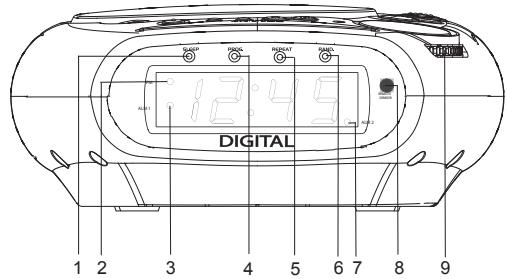
- SLEEP Indicator
- PM Indicator
- ALARM 1 Indicator
- PROG. (Program) Indicator
- REPEAT Indicator
- RAN. (Random) Indicator
- ALARM 2 Indicator
- Remote Sensor
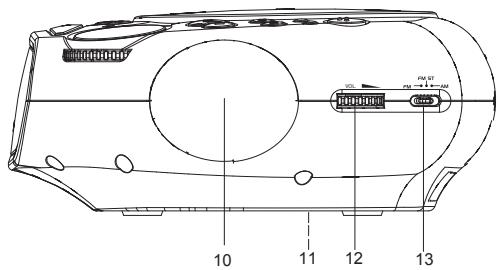
- TUNING Control
- Right Speaker
- Battery Compartment (Bottom of Unit)
- VOL. (Volume) Control
- AM/FM Switch
LOCATION OF CONTROLS (Cont')
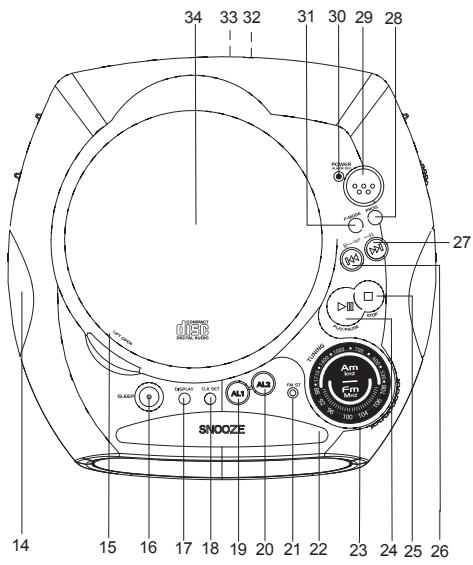
- Left Speaker
- CD Door OPEN/CLOSE Area
- SLEEP Button
- DISPLAY Button
- CLK SET (Clock Set) Button
- AL1 (Alarm 1) Button
- AL2 (Alarm 2) Button
- FM ST (Stereo) Indicator
- SNOOZE Button
- AM/FM Dial Scale and Pointer
- PLAY/PAUSE Button
-
STOP Button
-
SKIP/MINUTES Button
- SKIP/HOUR Button
- PROG. (Program) Button
- POWER Button
- POWER and ALARM OFF Indicator
- P-MODE Button
- FM Wire Antenna (Rear Of Unit)
- AC Cord (Rear Of Unit)
- CD Compartment Door
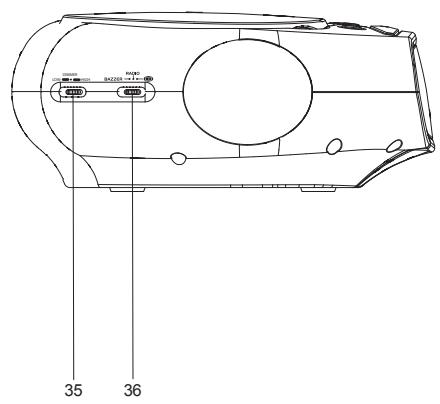
- Dimmer Switch
- BUZZER/RADIO/CD Switch
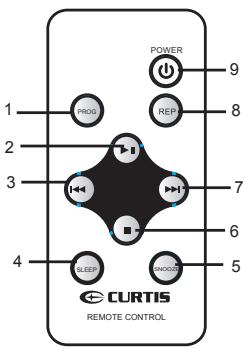
- PROG Button
- PLAY/PAUSE Button
- SKIP DN Button
- SLEEP Button
- SNOOZE Button
- STOP Button
- SKIP UP Button
- REPEAT Button
- POWER Button
INSTALLATION
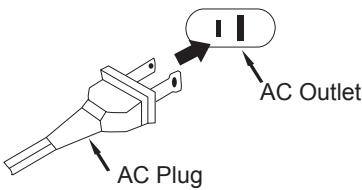
CAUTION: TO PREVENT ELECTRIC SHOCK, MATCH WIDE BLADE OF PLUG TO WIDE SLOT, FULLY INSERT.
Unravel the AC cord and connect it to a conveniently located AC outlet having 120V and 60Hz only. The Clock Display will illuminate and "12:00" will appear in the window.
NOTE: If the AC plug does not fit into a nonpolarized outlet, do not file or cut the wide blade.
If the AC cord is disconnected or if there is a power failure, this electronic clock is designed to continue operating internally (without showing the time on the Clock Display) with a 9 volt battery (not included). To install the battery, remove the battery compartment cover by pressing in on the tab, connect the battery to the terminals of the battery snap inside the compartment (use of an alkaline battery is recommended), then replace battery compartment cover.
Be sure to check the condition of the battery periodically by disconnecting the AC cord and connecting it again 2 or 3 minutes later. The preset times should continue operating. If the present time does not appear, it indicates the battery is dead or not connected properly. The 9 volt battery will keep the internal
times accurately for approximately 30 minutes. If the
power is restored after 30 minutes, the times may need to be reset.
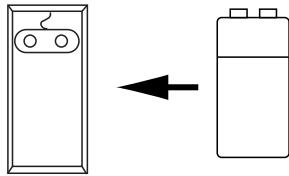
BATTERY PRECAUTIONS
Follow these precautions when using a battery in this device:
- Use only the size and type of batteries specified.
- Be sure to follow the correct polarity when installing the battery as indicated in the battery compartment. Reversed battery may cause damage to the device.
- If the device is not to be used for a long period of time, remove the battery to prevent damage or injury from possible battery leakage.
- Do not try to recharge a battery not intended to be recharged; it can overheat and rupture. (Follow battery manufacturer's directions)
OPERATION
TO LISTEN TO THE RADIO
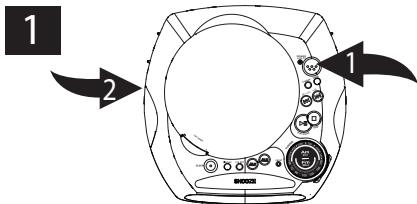
2
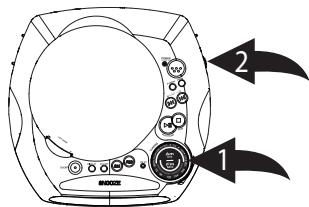
Press the POWER Button "1" to turn the unit on; the POWER indicator will light. Slide the FUNCTION switch "2" to the RADIO position.
Tune a station by turning the TUNING control "1". When a strong FM stereo signal is received the FM Stereo indicator will light. Adjust the VOLUME control "2" as desired.
Antennas
FM: Extend the FM wire antenna for best reception.
AM: Turn the unit for better AM reception.
Why am I not getting sound from the radio?
FAQ: Make sure the FUNCTION switch is set to the RADIO position and the VOLUME control is not set to the minimum level.
TO INSERT A CD
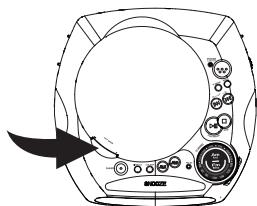
1
Open the CD compartment door by pressing on the OPEN/CLOSE area on the bottom right of the CD compartment door. Gently place a disc, label side up, onto the spindle and gently close the CD compartment door.
TO REMOVE A CD
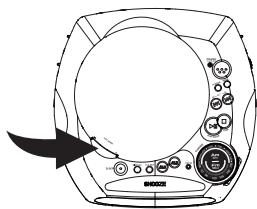
1
Make sure the CD has stopped and open the CD compartment door by pressing on the OPEN/CLOSE area on the CD compartment door. Hold the edge of the CD and pick it up.
OPERATION (CONTINUED)
TO PLAY A CD
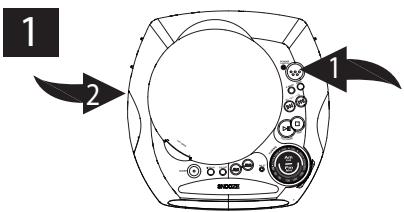
Insert a CD as described on the previous page. Press the POWER button "1" to turn the unit on; The Power indicator will light. Slide the FUNCTION swtich "2" to the CD position. (The total number of track will appear in the display).
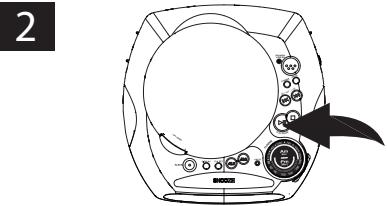
Press the PLAY/PAUSE button to start playback. TO PAUSE PLAYBACK, press the PLAY/PAUSE button again; the display will briefly blink. Press again to resume playback.
3
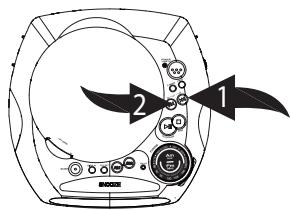
To skip forward or backward through the tracks on the disc, press the SKIP "1" or "2" button. To search forward or backward through the tracks on the disc, press and hold the SKIP "1" or "2" button.
4
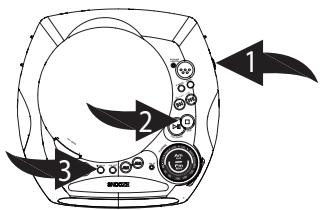
Adjust the VOLUME control "1" as desired. Press the DISPLAY button "3" when the time is showing to see the number of tracks on the CD. When the disc is through playing, it will stop. Press the STOP button "2" to stop the disc before it is finished.
FAQ:
What is the maximum time for a CD in this unit?
The maximum time is 74 minutes.
NOTES: If a disc is inserted incorrectly, dirty, damaged or not present at all, the display will show, "no".
OPERATION (CONTINUED)
TO REPEATEDLY PLAY BACK ONE TRACK
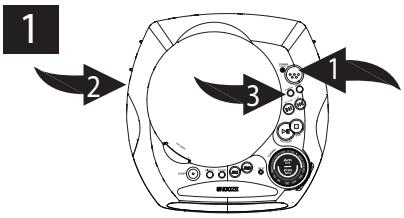
Press the POWER button "1" to turn the unit on; The Power indicator will light. Slide the FUNCTION swtich "2" to the CD position. Press the P-MODE button "3" once; the REPEAT indicator will blink.
2
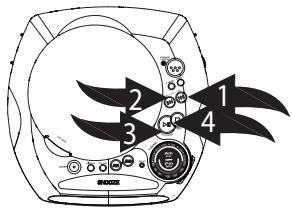
Press the SKIP "1" or "2" button to select a track and the PLAY/PAUSE button "3" to start playback and the unit will play the same track over and over until the STOP button "4" is pressed.
TO REPEATEDLY PLAY BACK ALL TRACKS
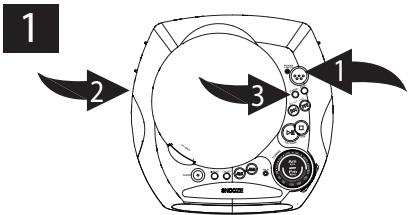
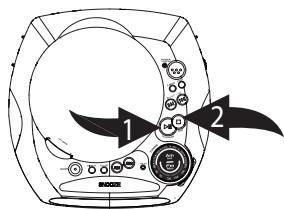
Press the POWER button "1" to turn the unit on; the POWER indicator will light. Slide the FUNCTION switch "2" to the CD position. Press the P-MODE button "3" twice; the REPEAT indicator will light solid.
2
Press the PLAY/PAUSE button "1" to start playback and the unit will then play all the tracks on the CD over and over until the STOP button "2" is pressed.
OPERATION (CONTINUED)
TO PLAY CD TRACK RANDOMLY
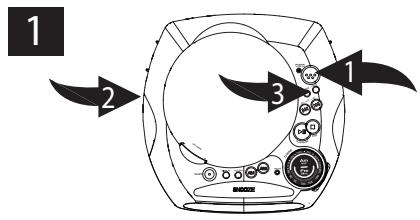
Press the POWER button "1" to turn the unit on; the POWER indicator will light. Slide the FUNCTION switch "2" to the CD position. Press the P-MODE button "3" three times; the RANDOM indicator will light solid.
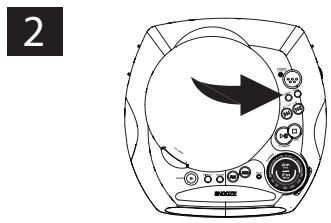
All CD Track will play randomly, press the P-MODE button again to cancel RANDOM Mode.
TO DIMMER DISPLAY
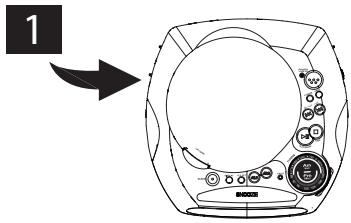
Slide the DIMMER switch High or Low to adjust the display brightness.
OPERATION (CONTINUED)
TO PROGRAM THE MEMORY (UP TO 20 TRACKS)
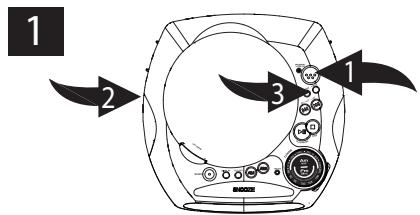
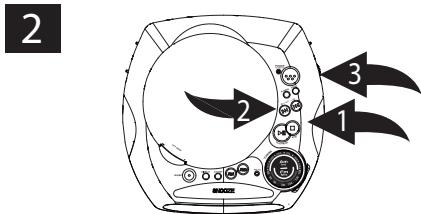
Press the POWER button "1" to turn the unit on; the POWER indicator will light. Slide the FUNCTION switch "2" to the CD position. Press the PROG. button "3" once; "P 01" will appear in the display and the PROG. indicator will blink.
Within 7 seconds, select the first track to be played back using the SKIP "1" or "2" button, then press the PROG. button "3" again. Repeat this step to program additional tracks up to a maximum of 20 tracks
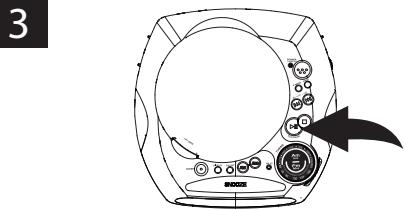
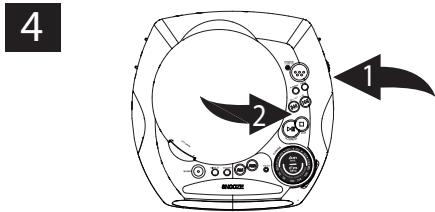
Press the PLAY/PAUSE button to begin playback. The unit will play all the tracks in the order you programmed them, then the prog. indicator will light solid.
Adjust the VOLUME control "1" as desired. When the disc is through playing, it will stop. Press the STOP "2" button to stop the disc before it is finished.
NOTES:
- To skip forward or backward through the programs, press the SKIP button. When the disc is through playing, it will stop.
- Programming is the ability to preselect the order in which a series of tracks will be played.
FAQS:
How do I clear the memory?
When at the STOP mode, press the PROG. button to enter the Program mode, and then press the STOP button or change the position of the FUNCTION switch.
OPERATION (CONTINUED)
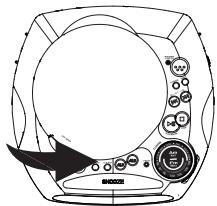
TO SET OR RESET THE ACTUAL TIME
1
2
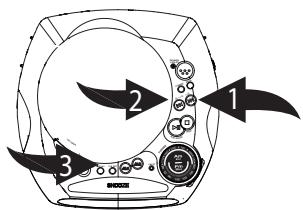
Press the CLK SET button once;
the time will blink.
Press the SKIP/HOUR button "1" to set the present hour and the SKIP/MINUTE button "2" to set the present minute. Press the CLK SET "3" button to confirm the time.
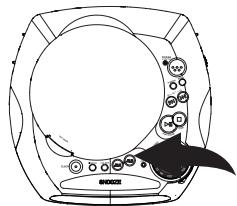
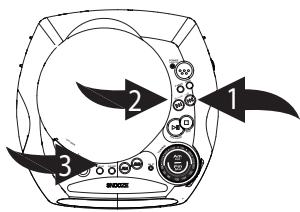
TO SET OR RESET THE ALARM TIME
1
2
Press the desired ALARM button (AL1 or AL2).
Press the SKIP/HOUR button "1" to set the desired alarm hour and the SKIP/MINUTE button "2" to set the desired alarm minute. Press the CLK SET "3" button to confirm the alarm time.
OPERATION (CONTINUED)
TO SET THE ALARM TO WAKE TO RADIO
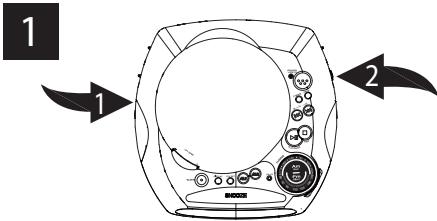
Set the alarm time as previously instructed. Slide the FUNCTION switch "1" to the RADIO position, select a radio station and make sure the VOLUME "2" is set as desired.
When the actual time matches the selected preset alarm time(s), the unit automatically turns on for 59 minutes and then shuts off. To Shut the alarm, see TO SHUT THE ALARM OFF section on the next page.
TO SET THE ALARM TO WAKE TO CD
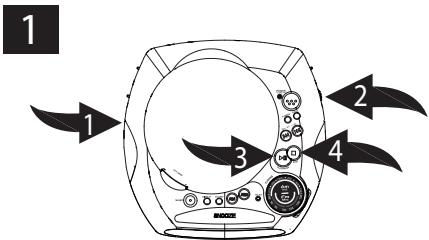
Set the alarm time as previously instructed. Slide the FUNCTION switch "1" to the CD position, insert a CD and make sure the VOLUME "2" is set as desired. You can set the unit to wake up to a CD program by setting the program as described on page 10. Then, press the PLAY/PAUSE button "3" followed by the STOP button "4" and the program will be set.
When the actual time matches the selected preset alarm time(s), the unit automatically turns on for 59 minutes and then shuts off. To Shut the alarm, see TO SHUT THE ALARM OFF section on the next page.
WAKING TO A CD OR CD PROGRAM
When waking to a CD or CD program, the unit will play back the tracks on the CD or the programmed tracks, then it will stop. If the CD or programmed total time is more than 59 minutes, it will only play back for 59 minutes and then stop.
OPERATION (CONTINUED)
TO SET THE ALARM TO WAKE TO BUZZER
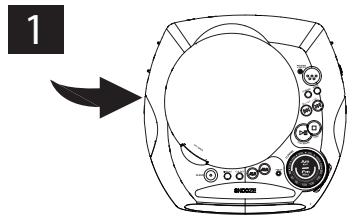
Set the alarm time as previously instructed. Slide the FUNCTION Switch to BUZZER position.
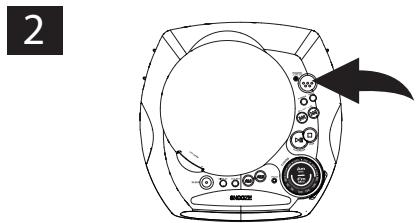
After switch to the BUZZER position and make sure the power is off. When the actual time matches the selected preset alarm time(s), the unit automatically turns on. To shut off the alarm, see TO SHUT THE ALARM OFF section below.
TO SHUT THE ALARM OFF
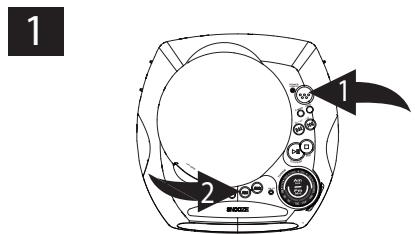
To shut the alarm off, press the POWER button "1" once and the alarm time will be reset for the next day. Press ALARM button "2" (AL1 or AL2) to turn off the alarm and not set it for the next day.
SNOOZE
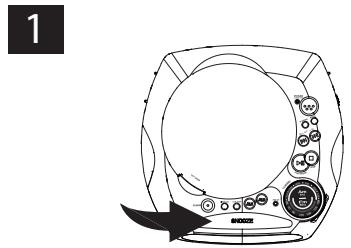
The alarm can be temporarily turned off manually by pressing the SNOOZE button; the alarm will turn back on automatically 6 minutes later. It can be repeated endlessly.
NOTE: In AL1 + AL2 Alarm mode, if both alarms are set, the Snooze feature will only operate up to the next alarm. If the next alarm time is reached, the unit automatically turns on for 59 minutes and then shuts off.
OPERATION (CONTINUED)
TO ACTIVATE THE SLEEP FUNCTION

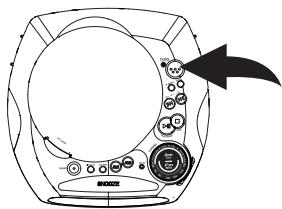

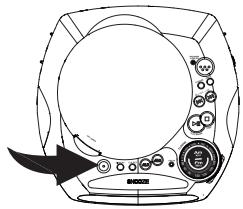
Tune the desired radio station or insert a CD as previously instructed and press the POWER button to turn the unit on; the POWER indicator will light.
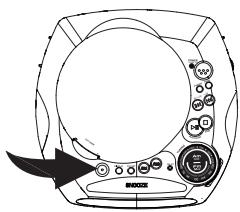
Press the SLEEP button and "--" will appear on the clock display, then release the button; the SLEEP indicator will on.
3
Press the SLEEP button and "90" will appear and set the unit to turn off after 90 minutes. Press a third time to set to 60 minutes. Press a fourth time to set to 30 minutes. Press a fifth time to set to 15 minutes. After five seconds, the Sleep function will activate and the SLEEP indicator will light solid. Pressing the SLEEP button again turns off the Sleep feature.
CARE AND MAINTENANCE
Caring for Compact Discs
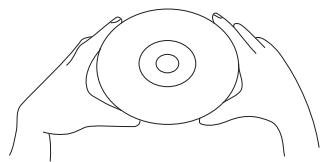
- Treat the disc carefully. Handle the disc only by its edges. Never allow your fingers to come in contact with the shiny, unprinted side of the disc.
- Do not attach adhesive tape, stickers, etc. to the disc label.
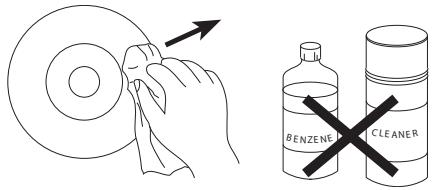
- Clean the disc periodically with a soft, lint-free, dry cloth. Never use detergents or abrasive cleaners to clean the disc. If necessary, use a CD cleaning kit.
- If a disc skips or gets stuck on a section of the disc, it is probably dirty or damaged (scratched).
- When cleaning the disc, wipe in straight lines from the center of the disc to the outer edge of the disc. Never wipe in circular motions.

- This unit is designed to play only discs bearing the identification logo as shown here. Other discs may not conform to the CD standard and may not play properly.
- Discs should be stored in their cases after each use to avoid damage.
- Do not expose discs to direct sunlight, high humidity, high temperatures, or dust, etc. Prolonged exposure or extreme temperatures can warp the disc.
- Do not stick or write anything on either side of the disc. Sharp writing instruments or the ink may damage the surface.
Cleaning the Unit
- To prevent fire or shock hazard, disconnect your unit from the AC power source when cleaning.
- The bnish on your unit may be cleaned with a dust cloth and cared for as other furniture. Use caution when cleaning and wiping the plastic parts.
- Mild soap and a damp cloth may be used on the front panel.
TROUBLESHOOTING GUIDE
If you experience a problem with this unit, check the chart below:
| SYMPTOM | CAUSE | SOLUTION |
| Unit will not turn on. | AC cord not connected. | Check AC cord connection. |
| Disc will not play. | CD compartment not closed. | Close CD compartment door. |
| Disc inserted incorrectly. | Reinsert disc correctly. | |
| Dirty or defective CD. | Try another disc. | |
| Moisture condensation on disc. | Wipe disc with soft cloth. | |
| No sound. | VOLUME control set to minimum. | Increase volume. |
| Defective disc. | Try another disc. | |
| Erratic playback. | Dirty or defective disc. | Clean or replace disc. |
| Time reset to "12:00". | Battery connected improperly, not connected or dead. | Check the battery. |
| Clock not set. | Set the clock. | |
| Alarm does not turn on. | ALARM switch is not in correct position. | Set ALARM switch to the desired alarm. |
| Clock is not set. | Set the clock. | |
| Alarm is not set. | Set the Alarm. | |
| AM or FM, no sound. | Power is not on. | Press the POWER/ALARM RESET button to turn the unit on. |
| VOLUME control set to minimum. | Increase volume. |
- DANGER:
- FCC WARNING:
- INFORMATION:
- IMPORTANT SAFETY INSTRUCTIONS
- IMPORTANT SAFETY INSTRUCTIONS (CONTINUED)
- Dear Customer:
- To establish a safe level:
- We Want You Listening For A Lifetime
- Decibel
- THE FOLLOWING NOISES CAN BE DANGEROUS UNDER CONSTANT EXPOSURE:
- LOCATION OF CONTROLS
- LOCATION OF CONTROLS (Cont')
- INSTALLATION
- BATTERY PRECAUTIONS
- OPERATION
- TO LISTEN TO THE RADIO
- Antennas
- TO INSERT A CD
- TO REMOVE A CD
- OPERATION (CONTINUED)
- TO PLAY A CD
- 3
- 4
- FAQ:
- TO REPEATEDLY PLAY BACK ONE TRACK
- TO REPEATEDLY PLAY BACK ALL TRACKS
- TO PLAY CD TRACK RANDOMLY
- TO DIMMER DISPLAY
- TO PROGRAM THE MEMORY (UP TO 20 TRACKS)
- NOTES:
- FAQS:
- TO SET OR RESET THE ACTUAL TIME
- TO SET OR RESET THE ALARM TIME
- TO SET THE ALARM TO WAKE TO RADIO
- TO SET THE ALARM TO WAKE TO CD
- WAKING TO A CD OR CD PROGRAM
- TO SET THE ALARM TO WAKE TO BUZZER
- TO SHUT THE ALARM OFF
- SNOOZE
- TO ACTIVATE THE SLEEP FUNCTION
- CARE AND MAINTENANCE
- Caring for Compact Discs
- Cleaning the Unit
- TROUBLESHOOTING GUIDE
Brand : CURTIS
Model : CR3988
Category : Alarm Clock