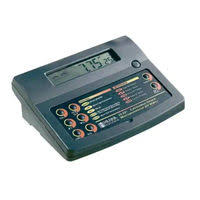
PH 211 - PH meter HANNA INSTRUMENTS - Free user manual and instructions
Find the device manual for free PH 211 HANNA INSTRUMENTS in PDF.


User questions about PH 211 HANNA INSTRUMENTS
0 question about this device. Answer the ones you know or ask your own.
Ask a new question about this device
Download the instructions for your PH meter in PDF format for free! Find your manual PH 211 - HANNA INSTRUMENTS and take your electronic device back in hand. On this page are published all the documents necessary for the use of your device. PH 211 by HANNA INSTRUMENTS.
USER MANUAL PH 211 HANNA INSTRUMENTS
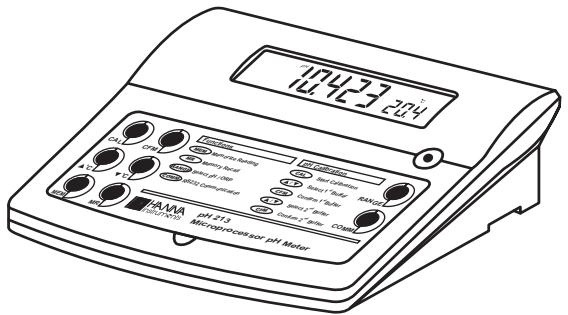
Microprocessor-based
pH / mV/^ C
Bench Meters
Dear Customer,
Thank you for choosing a Hanna Instruments product.
Please read this instruction manual carefully before using the instruments.
This manual will provide you with the necessary information for correct use of the instruments, as well as a precise idea of their versatility.
If you need additional technical information, do not hesitate to e-mail us at tech@hannaint.com or turn the back cover for our worldwide contact list.
These instruments are in compliance with C € directives.
WARRANTY
pH 210, pH 211, pH 212 and pH 213 are guaranteed for two years against defects in workmanship and materials when used for their intended purpose and maintained according to instructions. Electrodes and probes are guaranteed for six months. This warranty is limited to repair or replacement free of charge.
Damage due to accidents, misuse, tampering or lack of prescribed maintenance is not covered.
If service is required, contact the dealer from whom you purchased the instrument. If under warranty, report the model number, date of purchase, serial number and the nature of the problem. If the repair is not covered by the warranty, you will be notified of the charges incurred. If the instrument is to be returned to Hanna Instruments, first obtain a Returned Goods Authorization number from the Technical Service department and then send it with shipping costs prepaid. When shipping any instrument, make sure it is properly packed for complete protection.
TABLE OF CONTENTS
WARRANTY 2
PRELIMINARY EXAMINATION 3
GENERAL DESCRIPTION 3
FUNCTIONAL DESCRIPTION pH 210 AND pH 211
pH 210 AND pH 211 SPECIFICATIONS 5
FUNCTIONAL DESCRIPTION pH 212 AND pH 213
pH 212 AND pH 213 SPECIFICATIONS 7
OPERATIONAL GUIDE 8
pH CALIBRATION 11
TEMPERATURE CALIBRATION (for technical personnel only) 14
mV CALIBRATION (pH 213 only) (for technical personnel only) .... 16
PC INTERFACE (pH 212 & pH 213 only) 17
pH BUFFER TEMPERATURE DEPENDENCE 19
ELECTRODE CONDITIONING & MAINTENANCE 20
TROUBLESHOOTING GUIDE 23
TEMPERATURE CORRELATION FOR pH SENSITIVE GLASS 24
ACCESSORIES 25
PRELIMINARY EXAMINATION
Remove the instrument from the packing material and examine it carefully to make sure that no damage has occurred during shipping. If there is any damage, notify your Dealer or the nearest Hanna Customer Service Center.
Each instrument is supplied with:
HI 1131B Glass-body Combination pH Electrode
HI 7669/2W Temperature Probe
HI 76404 Electrode Holder
- pH 4.01 & 7.01 Buffer Solutions, 20 mL each
HI 7071S Electrolyte Solution
12VDC Power Adapter
- Instruction Manual
Note: Save all packing material until you are sure that the instrument functions correctly. All defective items must be returned in the original packing with the supplied accessories.
GENERAL DESCRIPTION
The Hanna pH 210, pH 211, pH 212 and pH 213 are microprocessor-based pH and Temperature bench meters.
pH 211 and pH 213 can also measure ion concentration (ISE) and Oxidation Reduction Potential (ORP) in the mV range.
pH measurements are compensated for temperature effect manually or automatically with the HI 7669/2W temperature probe.
The instrument is equipped with a large easy-to-read LCD which shows the pH (or mV) and temperature simultaneously, together with graphic symbols.
The calibration process is guided step by step through clear indications on the LCD. A stability indicator makes the calibration procedure error-free. Through the RS232 serial port data can be transferred to a PC (pH 212 and pH 213 only).
Hanna Instruments reserves the right to modify the design, construction and appearance of its products without advance notice.
FUNCTIONAL DESCRIPTION
pH 210 AND pH 211
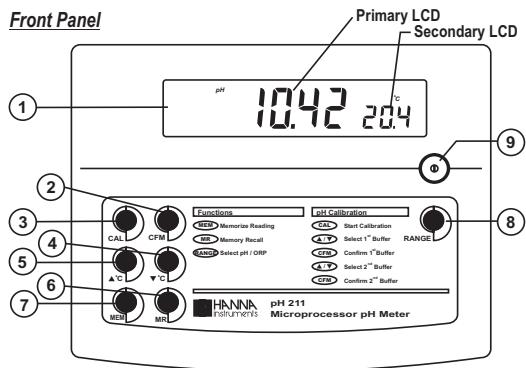
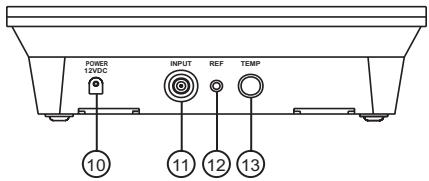
Rear Panel
1) Liquid Crystal Display (LCD).
2) CFM key, to confirm different values.
3) CAL key, to enter or exit/escape calibration mode.
4) ^ key, to manually decrease temperature or select pH buffer.
5) ^ key, to manually increase temperature or select pH buffer.
6) MR key, to recall the stored value.
7) MEM key, to store a value into memory.
8) RANGE key, to select measurement range (pH 211 only).
9) ON/OFF switch.
10) Power adapter socket.
11) BNC electrode connector.
12) Electrode reference socket.
13) Temperature probe socket.
pH 210 AND pH 211
SPECIFICATIONS
| RANGE | -2.00 to 16.00 pH |
| ±399.9 mV (pH 211 only) ±2000 mV (pH 211 only) | |
| -9.9 to 120.0 °C | |
| RESOLUTION | 0.01 pH |
| 0.1 mV (pH 211 only) 1 mV (pH 211 only) | |
| 0.1 °C | |
| ACCURACY @ 20°C / 68°F | ±0.01 pH |
| ±0.2 mV (±399.9 mV) ±1 mV (±2000 mV) | |
| ±0.5 °C (0.0 – 100.0 °C) ±1 °C (outside) (excluding probe error) | |
| pH Calibration | 1 or 2 point calibration, 5 buffers available (4.01, 6.86, 7.01, 9.18, 10.01) |
| Temperature compensation | Manual or Automatic from: -9.9 to 120.0 °C (14.2 to 248.0 °F) |
| pH Electrode | HI 1131B (included) |
| Temperature probe | HI 7669/2W (included) |
| Input impedance | 1012 ohms |
| Power supply | 12 VDC adapter (included) |
| Dimensions | 240x182x74 mm (9.4x7.1x2.9") |
| Weight | 1.1 Kg (2.5 lb); kit with holder 2.5 Kg (5.5 lb) |
| Environment | 0 to 50 °C (32 to 122 °F) max. 95% RH non-condensing |
| Warranty | 2 years |
FUNCTIONAL DESCRIPTION
pH 212 AND pH 213
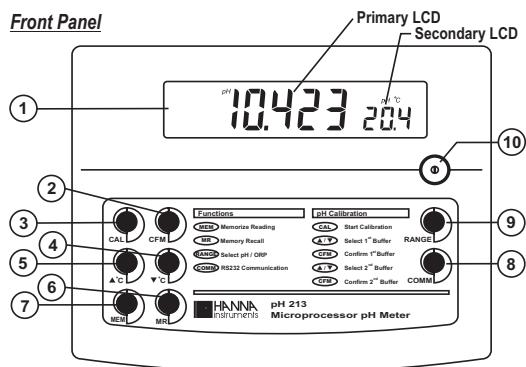
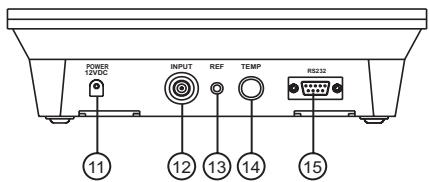
Rear Panel
1) Liquid Crystal Display (LCD).
2) CFM key, to confirm different values.
3) CAL key, to enter or exit/escape calibration mode.
4) ^ key, to manually decrease temperature or select pH buffer.
5) ^ key, to manually increase temperature or select pH buffer.
6) MR key, to recall the stored value.
7) MEM key, to store a value into memory.
8) COMM key, to set the baud rate and the command prefix.
9) RANGE key, to select measurement range.
10) ON/OFF switch.
11) Power adapter socket.
12) BNC electrode connector.
13) Electrode reference socket.
14) Temperature probe socket.
15) RS232 serial communication connector.
pH 212 AND pH 213
SPECIFICATIONS
| RANGE | -2.00 to 16.00 pH -2.000 to 16.000 pH |
| ±999.9 mV (pH 213 only) ±2000 mV (pH 213 only) | |
| -9.9 to 120.0 °C | |
| RESOLUTION | 0.01 pH 0.001 pH |
| 0.1 mV (pH 213 only) 1 mV (pH 213 only) | |
| 0.1 °C | |
| ACCURACY @ 20°C / 68°F | ±0.01 pH ±0.002 pH |
| ±0.5 mV (±999.9 mV) ±1 mV (±2000 mV) | |
| ±0.5 °C (0.0 – 100.0 °C) ±1 °C (outside) (excluding probe error) | |
| pH Calibration | 1 or 2 point calibration, 5 buffers available (4.01, 6.86, 7.01, 9.18, 10.01) |
| Temperature compensation | Manual or Automatic from: -9.9 to 120 °C (14.2 to 248 °F) |
| pH Electrode | HI 1131B (included) |
| Temperature probe | HI 7669/2W (included) |
| Input impedance | 10^12 ohms |
| Computer interface | RS232 opto-isolated |
| Power supply | 12 VDC adapter (included) |
| Dimensions | 240x182x74 mm (9.4x7.1x2.9") |
| Weight | 1.1 Kg (2.5 lb); kit with holder 2.5 Kg (5.5 lb) |
| Environment | 0 to 50 °C (32 to 122 °F) max. 95% RH non-condensing |
| Warranty | 2 years |
OPERATIONAL GUIDE
POWER CONNECTION
Plug the 12 VDC adapter into the power supply socket.
Notes: These instruments use non volatile memory to retain the pH, mV, temperature calibrations and all other settings, even when unplugged.
- Make sure a fuse protects the main line.
ELECTRODE AND PROBE CONNECTIONS
For pH or ORP measurements connect an electrode with internal reference to the BNC connector on the back of the instrument.
For electrodes with a separate reference connect the electrode's BNC to the BNC connector and the reference electrode plug to the reference socket.
For temperature measurements and automatic temperature compensation connect the temperature probe to the appropriate socket.
INSTRUMENT START-UP
- Turn the instrument on by pressing the ON/OFF switch.
- All LCD tags are displayed and a beep is heard while the instruments perform a self test (pH 212 and pH 213 only).

pH 210 & pH 211
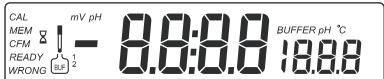
pH 212 & pH 213

pH MEASUREMENTS
Make sure the instrument has been calibrated before taking pH measurements.
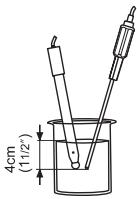
- Submerge the electrode tip and the temperature probe approximately 4cm (112^ ) into the sample to be tested and stir gently. Allow time for the electrode to stabilize.
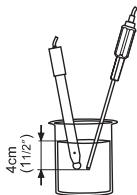
- The pH is displayed on the primary LCD and the temperature on the secondary LCD.
7426 204
- If the pH reading is out of range, "----" will be displayed on the LCD.
If measurements are taken successively in different samples, it is recommended to rinse the electrode thoroughly with deionized water or tap water and then with some of the next sample in order to prevent cross-contamination.
The pH reading is affected by temperature. In order to measure the pH accurately, the temperature effect must be compensated for. To use the Automatic Temperature Compensation feature, connect and submerge the HI 7669/2W temperature probe into the sample as close as possible to the electrode and wait for a few seconds.
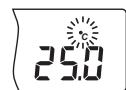
If the temperature of the sample is known, simple manual temperature compensation can be performed by disconnecting the temperature probe.
The display will then show the default temperature of 25^ or the last recorded temperature reading with the ^ C tag blinking. The temperature can now be adjusted with the ARROW keys (from -9.9^ to 120.0^ ).


ORP MEASUREMENTS (pH 211 and pH 213 only)
An optional ORP electrode must be used to perform ORP measurements (see Accessories).
Oxidation-reduction potential (REDOX) measurements provide the quantification of the oxidizing or reducing power of the tested sample.
To correctly perform a redox measurement, the surface of the ORP electrode must be clean and smooth.
- Press RANGE to enter mV range.
- Submerge the tip of the ORP electrode (4 cm/ 1^1/2 ) into the sample to be tested and allow a few seconds for the reading to stabilize.
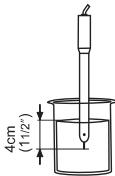
- The instrument displays the mV reading on the primary LCD and the temperature on the secondary LCD.
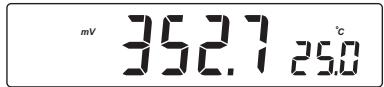
- If the reading is out of range, "----" will be displayed on the LCD.
TEMPERATURE MEASUREMENTS
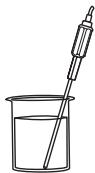
Connect the HI 7669/2W temperature probe to the appropriate socket and turn the instrument on.
Immerse the temperature probe into the sample and allow the reading on the secondary LCD to stabilize.
MEMORY FUNCTION
Press and hold down MEM. The last reading will appear on the LCD along with "MEM" tag until MEM is released.


Press MR and the previously memorized reading will be displayed with "MEM" tag on the LCD.
BEEP SETTING (pH 212 and pH 213 only)
Press and hold down ^ and MEM keys and then power on the instrument. After about 5 seconds the meter will display BEEP setting menu. Use the ARROW keys to change the current setting. Press CFM to confirm or CAL to escape without saving.
pH CALIBRATION
Calibrate the instrument often, especially if high accuracy is required. The instrument should be recalibrated:
- Whenever the pH electrode is replaced.
- At least once a week.
After testing aggressive chemicals.
PREPARATION
Pour small quantities of the buffer solutions into clean beakers. If possible use plastic or glass beakers to minimize any EMC interferences. For accurate calibration and to minimize cross-contamination, use two beakers for each buffer solution: one for rinsing the electrode and one for calibration.
If you are measuring in the acidic range, use pH 7.01 as first buffer and pH 4.01 as second buffer. If you are measuring in the alkaline range, use pH 7.01 as first buffer and pH 10.01 or pH 9.18 as second buffer.
PROCEDURE
Calibration has a choice of five memorized buffers: pH 4.01, 6.86, 7.01, 9.18 and 10.01.
It is recommended to perform a two-point calibration. However, one-point calibration is also provided by the instruments.
TWO-POINT CALIBRATION
- Submerge the pH electrode and the temperature probe approximately 4cm (112^ ) into a buffer solution and stir gently. The temperature probe should be close to the pH electrode.
- Press CAL. The "CAL" and "BUR" tags will appear and "7.01" buffer will be displayed on the secondary LCD.

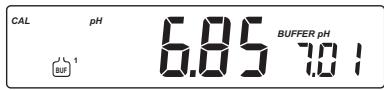
- If necessary, press the ARROW keys to select a different buffer value.


The "s" tag will blink on the LCD until the reading is stable.
- When the reading is stable and close to the selected buffer, "READY" tag will appear and "CFM" tag will blink.
- Press CFM to confirm calibration.
- The calibrated value is then displayed on the primary LCD and the secondary LCD will display the second expected buffer value.

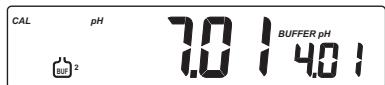
Note: The instruments will automatically skip the buffer used for the first point. It also skips 6.86 if 7.01 buffer was used and viceversa. Likewise, it will skip 9.18 if 10.01 buffer was used and viceversa.
After the first calibration point is confirmed, immerse the pH electrode and the temperature probe approximately 4cm (112^ ) into the second buffer solution and stir gently. The temperature probe should be close to the pH electrode.
- If necessary, press the ARROW keys to select a different buffer value.


The "s" tag will blink on the LCD until the reading is stable.
- When the reading is stable, "READY" tag will appear and "CFM" tag will blink.
- Press CFM to confirm calibration. The instrument will return to measurement mode.
Notes: If the value measured by the meter is not close to the selected buffer, "WRONG" and "WRONG" tags will blink alternately. In this case check if the correct buffer has been used, or regenerate the electrode by following the cleaning procedure (see page 22). If necessary, change the buffer or the electrode.
-
The "WRONG" tag and temperature value are displayed blinking if the temperature reading is out of the defined temperature range of the buffer. Calibration cannot be confirmed in this situation.
-
Press RANGE to display the temperature reading on the LCD during calibration (pH 211, pH 212, pH 213 only).

- Proceed as described in "Two-point calibration" section.
- Press CAL after the first calibration point was confirmed.
The instrument will return to measurement mode and will memorize the one-point calibration data.

Note: Press and hold down CFM and then press CAL. The instrument sets default calibration parameters, displays "CLR" message for a few seconds and then returns to normal measurement mode.
TEMPERATURE CALIBRATION (for technical personnel only)
All the instruments are factory calibrated for temperature.
Hanna's temperature probes are interchangeable and no temperature calibration is needed when they are replaced.
If the temperature measurements are inaccurate, temperature recalibration should be performed.
For an accurate recalibration, contact your dealer or the nearest Hanna Customer Service Center, or follow the instructions below.
- Prepare a vessel containing ice and water and another one containing hot water (at a temperature of around 50^ ). Place insulation material around the vessels to minimize temperature changes.
- Use a calibrated thermometer with a resolution of 0.1^ as a reference thermometer.
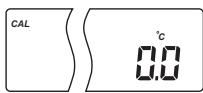
- With the instrument off, press and hold down the CAL&MEM keys, then power on the instrument. The "CAL" tag will appear and the secondary LCD will show 0.0^ .
- Immerse the temperature probe in the vessel with ice and water as near as possible to the reference thermometer. Allow a few seconds for the probe to stabilize.
- Use the ARROW keys to set the reading on the secondary LCD to that of ice and water, measured by the reference thermometer.


- When the reading is stable and close to the selected calibration point, "READY" tag will appear and "CFM" tag will blink.
- Press CFM to confirm. The secondary LCD will show 50.0^ .

- Immerse the temperature probe in the second vessel as near as possible to the reference thermometer. Allow a few seconds for the probe to stabilize.
- Use the ARROW keys to set the reading on the secondary LCD to that of the hot water.


- When the reading is stable and close to the selected calibration point, "READY" tag will appear and "CFM" tag will blink.
- Press CFM to confirm. The instrument returns to measurement mode.
Note: If the reading is not close to the selected calibration point, "WRONG" tag will blink. Change the temperature probe and restart calibration.

mV CALIBRATION (pH 213 only) (for technical personnel only)
All the instruments are factory calibrated for mV.
Hanna's ORP electrodes are interchangeable and no mV calibration is needed when they are replaced.
If the mV measurements are inaccurate, mV recalibration should be performed.
For an accurate recalibration, contact your dealer or the nearest Hanna Customer Service Center, or follow the instructions below.
A two or three-point calibration can be performed at 0.0mV 600.0 mV and 1800.0mV
- Attach to the BNC connector a mV simulator with an accuracy of ± 0.1 mV.
- With the instrument off, press and hold down the MR&CFM keys, then power on the instrument. The "CAL" tag will appear and the secondary LCD will show 0.0mV .
- Set 0.0mV on the simulator.
When the reading is stable and close to the selected calibration point, "READY" tag will appear and "CFM" tag will blink.
- Press CFM to confirm. The secondary LCD will display 600mV .
- Set 600.0mV on the simulator.
When the reading is stable and close to the selected calibration point, "READY" tag will appear and "CFM" tag will blink.
- Press CFM to confirm. The secondary LCD will display 1800mV .
- Set 1800.0mV on the simulator.
When the reading is stable and close to the selected calibration point, "READY" tag will appear and "CFM" tag will blink.
- Press CFM to confirm. The instrument returns to measurement mode.
Notes: If the reading is not close to the selected calibration point, "WRONG" tag will blink. Verify calibration condition or contact your vendor if you can not calibrate. - Press CAL in any moment of the calibration process. The instrument will return to measurement mode. If calibration process is stopped after 600mV is confirmed, the 600mV range is calibrated and calibration parameters are memorized.
PC INTERFACE (pH 212 & pH 213 only)
Data transmission from the instrument to the PC can be done with the HI 92000 Windows® compatible software (optional). HI 92000 also offers graphing and on-line help feature.
Data can be exported to the most popular spreadsheet programs for further analysis.
To connect your instrument to a PC, use the optional Hanno HI 920010 cable connector. Make sure that your instrument is switched off and plug one connector to the instrument RS232C socket and the other into the serial port of your PC.
Notes: Other cables than HI 920010 may use a different configuration. In this case communication between in-strument and PC may not be possible.
If you are not using Hanna Instruments HI 92000 software, please see the following instructions.
SETTING THE BAUD RATE AND THE COMMAND PREFIX
To set the instrument baud rate, press COMM while in measurement mode. The primary LCD will show the current baud rate.

- Use the ARROW keys to change the displayed value (150; 300; 600; 1200; 2400 - factory setting; 4800; 9600).


- Press CFM to confirm. The primary LCD will show the current command prefix (factory setting is 16).
- Use the ARROW keys to change the displayed value (between 0 and 47).
- Press CFM to confirm. The meter returns to measurement mode.

Note: The command prefix must not be changed if HI 92000 PC software is used.
SENDING COMMANDS FROM PC
It is also possible to remotely control the instrument with any terminal program. Use HI 920010 cable to connect the instrument to a PC, start the terminal program and set the communication options as follows: 8, N, 1, no flow control.
COMMAND TYPES
To send a command to the instrument, follow the next scheme:
$$ < D L E > < c o m m a n d > < C R > $$
This line makes the computer send a Data Link Escape character, the command expressed as a 3-character sequence and a CR character.
Note: All the terminal programs that support the ANSI escape sequence, represent the DLE character by the string '^P' and the CR character by the string '^M'.
SIMPLE COMMANDS
PHR sets the range to pH
MVR sets the range to mV (pH 213 only)
CAL is equivalent to pressing CAL
CFM is equivalent to pressing CFM
UPC is equivalent to pressing the ^ key
DWC is equivalent to pressing the ^ key
MEM is equivalent to pressing MEM
MRR is equivalent to pressing MR
COM is equivalent to pressing COMM
COMMANDS REQUIRING AN ANSWER
pH? Causes the instrument to send the pH reading ("Err 1" is sent if out of range). If the range is set to mV, "Err 6" is sent.
MV? Causes the instrument to send the mV reading "Err 2" is sent if out of range). If the range is set to pH, "Err 6" is sent.
TM? Causes the instrument to send the temperature reading ("Err 3" is sent if out of range).
Notes: Either small or capital letters can be used.
The characters sent by the meter are always capital letters.
- A "CAN" character (ASCII Code 24) is sent when the instrument receives an unknown or a corrupted command.
Note: Invalid commands will be ignored.
pH BUFFER TEMPERATURE DEPENDENCE
The temperature has an effect on pH. The calibration buffer solutions are affected by temperature changes to a lesser degree than normal solutions. During calibration the instrument will automatically calibrate to the pH value corresponding to the measured or set temperature.
| TEMP | pH BUFFERS | |||||
| °C | °F | 4.01 | 6.86 | 7.01 | 9.18 | 10.01 |
| 0 | 32 | 4.01 | 6.98 | 7.13 | 9.46 | 10.32 |
| 5 | 41 | 4.00 | 6.95 | 7.10 | 9.39 | 10.24 |
| 10 | 50 | 4.00 | 6.92 | 7.07 | 9.33 | 10.18 |
| 15 | 59 | 4.00 | 6.90 | 7.05 | 9.27 | 10.12 |
| 20 | 68 | 4.00 | 6.88 | 7.03 | 9.22 | 10.06 |
| 25 | 77 | 4.01 | 6.86 | 7.01 | 9.18 | 10.01 |
| 30 | 86 | 4.02 | 6.85 | 7.00 | 9.14 | 9.96 |
| 35 | 95 | 4.03 | 6.84 | 6.99 | 9.11 | 9.92 |
| 40 | 104 | 4.04 | 6.84 | 6.98 | 9.07 | 9.88 |
| 45 | 113 | 4.05 | 6.83 | 6.98 | 9.04 | 9.85 |
| 50 | 122 | 4.06 | 6.83 | 6.98 | 9.01 | 9.82 |
| 55 | 131 | 4.08 | 6.84 | 6.98 | 8.99 | 9.79 |
| 60 | 140 | 4.09 | 6.84 | 6.98 | 8.97 | 9.77 |
| 65 | 149 | 4.11 | 6.84 | 6.99 | 8.95 | 9.76 |
| 70 | 158 | 4.12 | 6.85 | 6.99 | 8.93 | 9.75 |
| 75 | 167 | 4.14 | 6.86 | 7.00 | 8.91 | 9.74 |
| 80 | 176 | 4.16 | 6.87 | 7.01 | 8.89 | 9.74 |
| 85 | 185 | 4.17 | 6.87 | 7.02 | 8.87 | 9.74 |
| 90 | 194 | 4.19 | 6.88 | 7.03 | 8.85 | 9.75 |
| 95 | 203 | 4.20 | 6.89 | 7.04 | 8.83 | 9.76 |
During calibration the instrument will display the pH buffer value at 25^ .
ELECTRODE CONDITIONING & MAINTENANCE
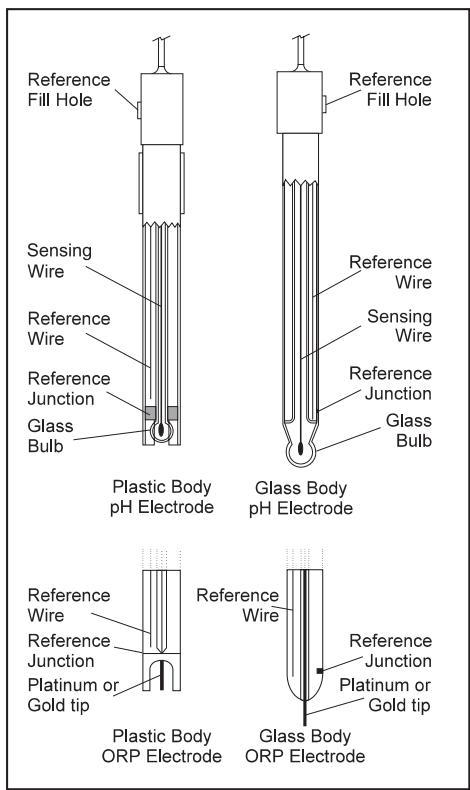
PREPARATION PROCEDURE
Remove the protective cap of the pH electrode.
DO NOT BE ALARMED IF SALT DEPOSITS ARE PRESENT. This is normal with electrodes. They will disappear when rinsed with water.
During transport, tiny bubbles of air may form inside the glass bulb affecting proper functioning of the electrode. These bubbles can be removed by "shaking down" the electrode as you would do with a glass thermometer.
If the bulb and/or junction is dry, soak the electrode in HI 70300 or HI 80300 Storage Solution for at least one hour.
For refillable electrodes:
If the filling solution (electrolyte) is more than 212cm(1^ ) below the fill hole, add HI 7082 or HI 8082 3.5M KCl Electrolyte Solution for double junction or HI 7071 or HI 8071 3.5M KCl + AgCl Electrolyte Solution for single junction electrodes.
For faster response, unscrew the fill hole screw during measurements.
For Amphel electrodes:
If the electrode does not respond to pH changes, the battery is run down and the electrode should be replaced.
MEASUREMENT
Rinse the electrode tip with distilled water. Immerse the tip (bottom 4cm / 1^1/2 ) in the sample and stir gently for a few seconds.
For a faster response and to avoid cross-contamination of the samples, rinse the electrode tip with a few drops of the solution to be tested, before taking measurements.
STORAGE PROCEDURE
To minimize clogging and assure a quick response time, the glass bulb and the junction should be kept moist and not allowed to dry out.
Replace the solution in the protective cap with a few drops of HI 70300 or HI 80300 Storage Solution or, in its absence, Filling Solution (HI 7071 or HI 8071 for single junction and HI 7082 or HI 8082 for double junction electrodes). Follow the Preparation Procedure on page 20 before taking measurements.
Note: NEVER STORE THE ELECTRODE IN DISTILLED OR DEIONIZED WATER.
PERIODIC MAINTENANCE
Inspect the electrode and the cable. The cable used for connection to the instrument must be intact and there must be no points of broken insulation on the cable or cracks on the electrode stem or bulb. Connectors must be perfectly clean and dry. If any scratches or cracks are present, replace the electrode. Rinse off any salt deposits with water.
For refillable electrodes:
Refill the reference chamber with fresh electrolyte (HI 7071 or HI 8071 for single junction or HI 7082 or HI 8082 for double junction electrodes). Allow the electrode to stand upright for 1 hour.
Follow the Storage Procedure above.
CLEANING PROCEDURE
- General Soak in Hanna HI 7061 or HI 8061 General Cleaning Solution for approximately 12 hour.
Protein Soak in Hanna HI 7073 or HI 8073 Protein Cleaning Solution for 15 minutes. - Inorganic Soak in Hanna HI 7074 Inorganic Cleaning Solution for 15 minutes.
- Oil/grease Rinse with Hanna HI 7077 or HI 8077 Oil and Fat Cleaning Solution.
IMPORTANT: After performing any of the cleaning procedures, rinse the electrode thoroughly with distilled water, refill the reference chamber with fresh electrolyte (not necessary for gel-filled electrodes) and soak the electrode in HI 70300 or HI 80300 Storage Solution for at least 1 hour before taking measurements.
TROUBLESHOOTING GUIDE
| SYMPTOMS | PROBLEM | SOLUTION |
| Slow reponse/excessive drift. | Dirty pH electrode. | Soak the electrode tip in HI 7061 or HI 8061 solution for 30 minutes and then clean the electrode. |
| Readings fluctuate up and down (noise). | Clogged/dirty junction. Low electrolyte level (refillable electrodes only). | Clean the electrode. Refill with fresh solution (for refillable electrodes only). |
| Out of range in the mV scale. | Dry membrane/junction. | Soak in HI 70300 or HI 80300 storage solution. |
| The meter does not accept the buffer solution for calibration. | Out of order pH electrode. | Follow the cleaning procedure. If still no results, replace the electrode. |
| The display shows "pH" and "...". | Out of range in the pH scale. | a) Recalibrate the meter. b) Make sure the pH sample is in the specified range. c) Check the electrolyte level and the general state of the electrode. |
| The display shows "mV" and "...". | Out of range in the mV scale. | Electrode not connected. |
| The meter does not work with the temperature probe. | Broken temperature probe. | Replace the temperature probe. |
| The meter fails to calibrate or gives faulty readings. | Broken pH electrode. | Replace the electrode. |
| At startup the meter displays all LCD tags permanently. | One of the keys is blocked. | Check the keyboard or contact the vendor. |
| "Err xx" error message displayed. | Internal error. | Power off the meter and then power it on. If the error persists, contact the vendor. |
TEMPERATURE CORRELATION FOR pH SENSITIVE GLASS
The resistance of glass electrodes partially depends on the temperature. The lower the temperature, the higher the resistance. It takes more time for the reading to stabilize if the resistance is higher. In addition, the response time will suffer to a greater degree at temperatures below 25^ .
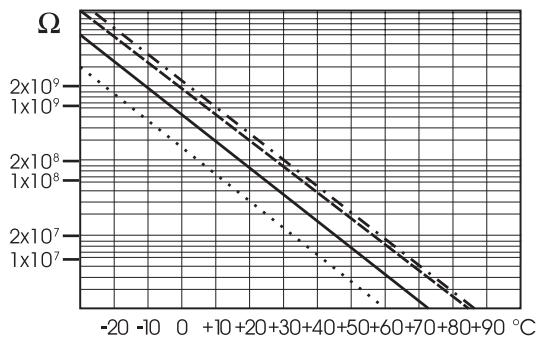
Since the resistance of the pH electrode is in the range of 50-200 Mohms, the current across the membrane is in the pico Ampere range. Large currents can disturb the calibration of the electrode for many hours.
For these reasons high humidity environments, short circuits and static discharges are detrimental to a stable pH reading.
The pH electrode's life also depends on the temperature. If constantly used at high temperatures, the electrode life is drastically reduced.
Typical Electrode Life
Ambient Temperature
1-3 years
90^
Less than 4 months
120°C
Less than 1 month
Alkaline Error
High concentrations of sodium ions interfere with readings in alkaline solutions. The pH at which the interference starts to be significant depends upon the composition of the glass. This interference is called alkaline error and causes the pH to be underestimated. Hanna's glass formulations have the indicated characteristics.
| Sodium Ion Correction for Glass at 20-25 °C | ||
| Concentration | pH | Error |
| 0.1 Mol L-1Na+ | 13.00 | 0.10 |
| 13.50 | 0.14 | |
| 14.00 | 0.20 | |
| 1.0 Mol L-1Na+ | 12.50 | 0.10 |
| 13.00 | 0.18 | |
| 13.50 | 0.29 | |
| 14.00 | 0.40 | |
ACCESSORIES
pH BUFFER SOLUTIONS
HI 70004P pH 4.01 Buffer Sachets, 20~mL 25 pcs
HI 70007P pH 7.01 Buffer Sachets, 20~mL 25 pcs
HI 70010P pH 10.01 Buffer Sachets, 20~mL 25 pcs
HI 7004L pH 4.01 Buffer Solution, 500~mL bottle
HI 7006L pH 6.86 Buffer Solution, 500~mL bottle
HI 7007L pH 7.01 Buffer Solution, 500~mL bottle
HI 7009L pH 9.18 Buffer Solution, 500~mL bottle
HI 7010L pH 10.01 Buffer Solution, 500~mL bottle
HI 8004L pH 4.01 Buffer Sol. in FDA approved bottle, 500~mL
HI 8006L pH 6.86 Buffer Sol. in FDA approved bottle, 500~mL
HI 8007L pH 7.01 Buffer Sol. in FDA approved bottle, 500~mL
HI 8009L pH 9.18 Buffer Sol. in FDA approved bottle, 500~mL
HI 8010L pH 10.01 Buffer Sol. in FDA approved bottle, 500~mL
ELECTRODE STORAGE SOLUTIONS
HI 70300L Storage Solution, 460~mL bottle
HI 80300L Storage Solution in FDA approved bottle, 460~mL
ELECTRODE CLEANING SOLUTIONS
HI 70000P Electrode Rinse Sachets, 20~mL 25 pcs
HI 7061L General Cleaning Solution, 460~mL bottle
HI 7073L Protein Cleaning Solution, 460~mL bottle
HI 7074L Inorganic Cleaning Solution, 460~mL bottle
HI 7077L Oil & Fat Cleaning Solution, 460 mL bottle
HI 8061L General Cleaning Sol. in FDA approved bottle, 460~mL
HI 8073L Protein Cleaning Solution in FDA approved bottle, 460~mL
HI 8077L Oil & Fat Cleaning Sol. in FDA approved bottle, 460~mL
ELECTRODE REFILL ELECTROLYT ESOLUTIONS
HI 7071 3.5MKCl + AgCl Electrolyte, 4× 50~mL , for single junction electrodes
HI 7072 1M KNO3 Electrolyte, 4x50 mL
HI 7082 3.5M KCl Electrolyte, 4x50~mL for double junction electrodes
HI 8071 3.5M KCl + AgCl Electrolyte in FDA approved bottle, 4× 50~mL for single junction electrodes
HI 8072 1M KNO, Electrolyte in FDA approved bottle, 4x50~mL
HI 8082 3.5M KCl Electrolyte in FDA approved bottle, 4x50~mL
ORP PRETREATMENT SOLUTIONS
HI 7091L Reducing Pretreatment Solution, 460~mL bottle
HI 7092L Oxidizing Pretreatment Solution, 460~mL bottle
pH ELECTRODES
All electrodes part numbers ending with B are supplied with BNC connector and 1m (3.3') cable, as shown below:

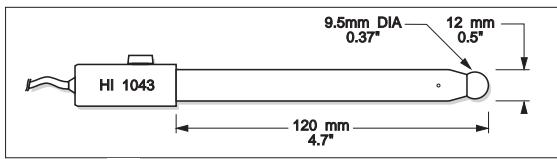
HI 1043B
Glass-body, double junction, refillable, combination pH electrode. Use: strong acid/alkali.
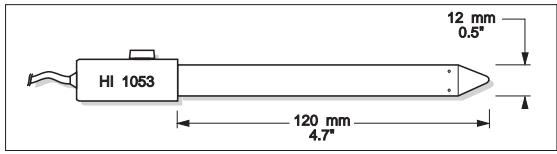
HI 1053B
Glass-body, triple ceramic, conic shape, refillable, combination pH electrode. Use: emulsions.
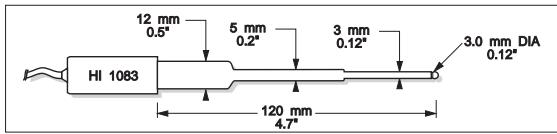
HI 1083B
Glass-body, micro, Viscolene, non-refillable, combination pH electrode. Use: biotechnology, micro titration.
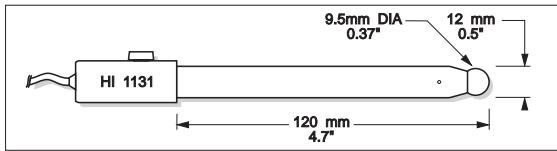
HI 1131B
Glass-body, single junction, refillable, combination pH electrode. Use: general purpose.
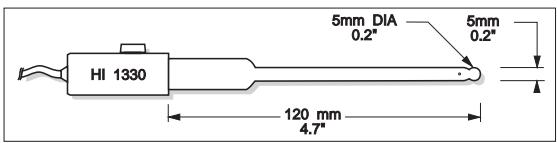
HI 1330B
Glass-body, semimicro, single junction, refillable, combination pH electrode. Use: laboratory, vials.
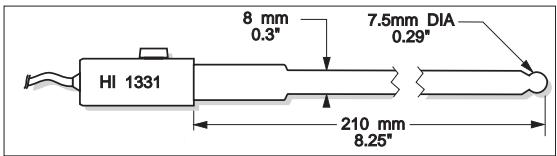
HI 1331B
Glass-body, semimicro, single junction, refillable, combination pH electrode. Use: flasks.
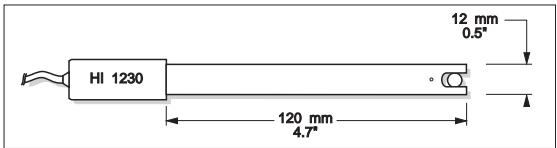
HI 1230B
Plastic-body (Ultem®), double junction, gel-filled, combination pH electrode. Use: general, field.
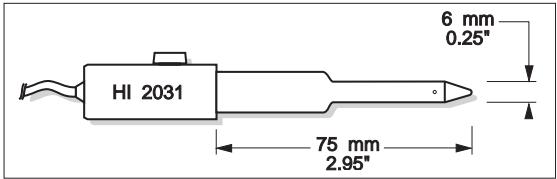
HI 2031B
Glass-body, semimicro, conic, refillable, combination pH electrode. Use: semisolid products.
HI 1332B
Plastic-body (Ultem®), double junction, refillable, combination pH electrode. Use: general purpose.
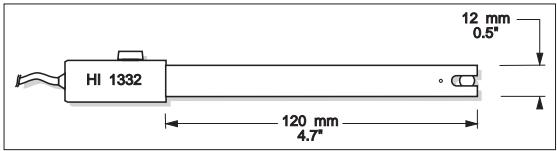
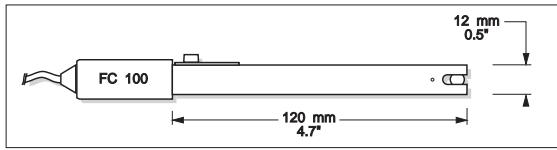
FC100B
Plastic-body (Kynar®), double junction, refillable, combination pH electrode. Use: general purpose for food industry.
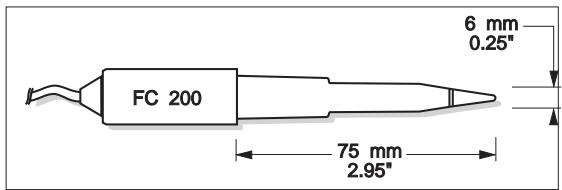
FC 200B
Plastic-body (Kynar®), open junction, conic, Viscolene, non-refillable, combination pH electrode. Use: meat & cheese.
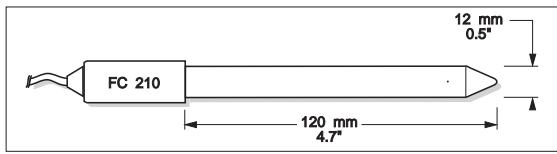
FC210B
Glass-body, double junction, conic, Viscolene, non-refillable, combination pH electrode. Use: milk, yogurt.
FC 220B
Glass-body, triple-ceramic, single junction, refillable, combination pH electrode. Use: food processing.
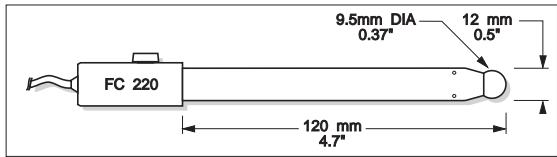
FC911B
Plastic-body (Kynar®), double junction, refillable with built-in amplifier, combination pH electrode. Use: very high humidity.
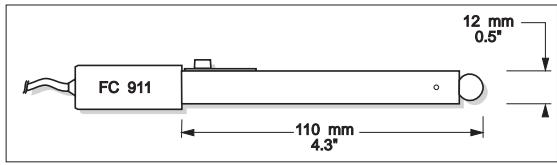
HI 1413B
Glass-body, single junction, flat tip, Viscolene, non-refillable, combination pH electrode. Use: surface measurement.
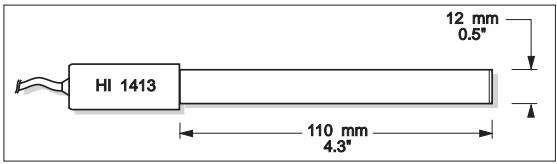
ORP ELECTRODES
HI 3131B
Glass-body, refillable, combination platinum ORP electrode. Use: titration.
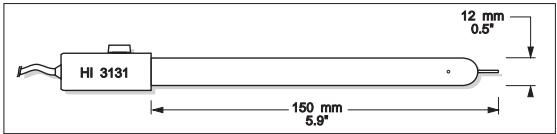
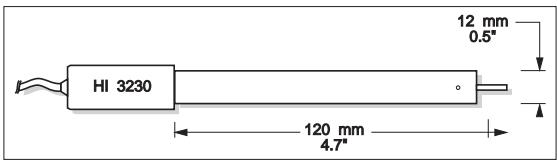
HI 3230B
Plastic-body (Ultem®), gel-filled, combination platinum ORP electrode. Use: general purpose.
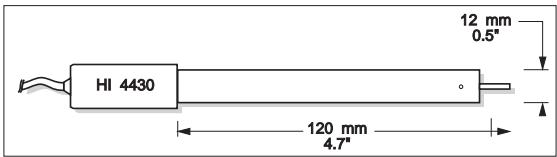
HI 4430B
Plastic-body (Ultem), gel-filled, combination gold ORP electrode. Use: general purpose.
Consult the Hanna General Catalog for more electrodes with screw-type or BNC connectors.
Ultem® is registered Trademark of "General Electric Co."
Kynar® is registered Trademark of "Pennwolt Corp."
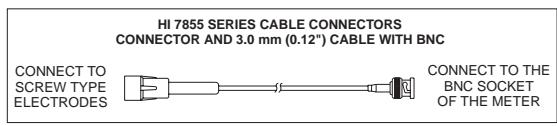
EXTENSION CABLE FOR SCREW-TYPE ELECTRODES (SCREW TO BNC ADAPTER)
HI 7855/1 Extension cable 1m (3.3') long
HI 7855/3 Extension cable 3m (9.9') long
OTHER ACCESSORIES
HI 710005 Voltage adapter from 115 VAC to 12 VDC (USA plug)
HI 710006 Voltage adapter from 230 VAC to 12 VDC (European plug)
HI 710012 Voltage adapter from 240 VAC to 12 VDC (UK plug)
HI 710013 Voltage adapter from 230 VAC to 12 VDC (South Africa plug)
HI 710014 Voltage adapter from 230 VAC to 12 VDC (Australia plug)
HI 76405 Electrode holder
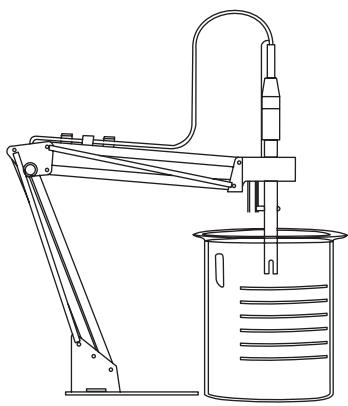
HI 8427 pH and ORP electrode simulator with 1m (3.3') coaxial cable ending in female BNC connectors
HI 931001 pH and ORP electrode simulator with LCD and 1 m (3.3') coaxial cable ending in female BNC connectors
HI 7669/2WTemperature probe with 1m (3.3^) cable
HI 92000 Windows® compatible software application
HI 920010 9 to 9-pin RS232 cable
RECOMMENDATIONS FOR USERS
Before using these products, make sure they are entirely suitable for the environment in which they are used.
Operation of these instruments in residential areas could cause unacceptable interferences to radio and TV equipment, requiring the operator to follow all necessary steps to correct interferences.
The glass bulb at the end of the pH electrode is sensitive to electrostatic discharges. Avoid touching this glass bulb at all times.
During operation, ESD wrist straps should be worn to avoid possible damage to the electrode by electrostatic discharges.
Any variation introduced by the user to the supplied equipment may degrade the instrument's EMC performance.
To avoid electrical shock, do not use these instruments when voltages at the measurement surface exceed 24 VAC or 60 VDC.
To avoid damage or burns, do not perform any measurement in microwave ovens.
SALES AND TECHNICAL SERVICE CONTACTS
Australia:
Tel. (03) 9769.0666 • Fax (03) 9769.0699
China:
Tel. (10) 88570068 • Fox (10) 88570060
Egypt:
Tel. & Fax (02) 2758.683
Germany:
Tel. (07851) 9129-0 • Fax (07851) 9129-99
Greece:
Tel. (210) 823.5192 • Fax (210) 884.0210
Indonesia:
Tel. (21) 4584.2941 • Fax (21) 4584.2942
Japan:
Tel. (03) 3258.9565 • Fax (03) 3258.9567
Korea:
Tel. (02) 2278.5147 • Fax (02) 2264.1729
Malaysia:
Tel. (603) 5638.9940 • Fax (603) 5638.9829
Singapore:
Tel. 6296.7118 • Fax 6291.6906
South Africa:
Tel. (011) 615.6076 • Fax (011) 615.8582
Taiwan:
Tel. 886.2.2739.3014 • Fox 886.2.2739.2983
Thailand:
Tel. (662) 619.0708.11 • Fax (662) 619.0061
United Kingdom:
Tel. (01525) 850.855 • Fax (01525) 853.668
USA:
Tel. (401) 765.7500 • Fax (401) 765.7575
For e-mail contacts and a complete list of Sales and
Technical offices, please see www.hannainst.com.
MAN213 12/06