
BT108 - Cordless phone UNIDEN - Free user manual and instructions
Find the device manual for free BT108 UNIDEN in PDF.


| Product Type | Mono Bluetooth Headset |
| Brand | UNIDEN |
| Model | BT108 |
| Weight | Approx. 10 g (estimated) |
| Dimensions (L x W x H) | Approx. 5 x 2 x 2 cm (estimated) |
| Power Supply | Built-in rechargeable lithium-polymer battery |
| Charger Included | 120 V AC power adapter (standard wall outlet) |
| Charging Time | Minimum 8 hours |
| Talk Time | Approximately 9 hours |
| Standby Time | Approximately 8 days |
| Bluetooth Range | Up to 10 meters (30 feet) |
| Bluetooth Version | Not specified, compatible with headset and hands-free profile |
| Main Functions | Answer/end call, reject call, call transfer, redial, voice dial, volume control, mute |
| LED Indicator | Red (charging, low battery), blue (powered on, connected), alternating red/blue (pairing) |
| Included Accessories | 2 additional earpieces, power adapter, startup guide |
| Maintenance and Cleaning | Clean with a damp, lint-free cloth, do not immerse |
| Safety | Do not expose to moisture, do not use near water, risk of hearing damage if volume is too high |
| Spare Parts and Repairability | Replaceable earpieces, battery not user-replaceable, repair by Uniden authorized center |
| Warranty | 2 years (United States and Canada only) |
| General Information | Cannot be used while charging, automatically turns off after 1 hour without connection |
Frequently Asked Questions - BT108 UNIDEN
User questions about BT108 UNIDEN
0 question about this device. Answer the ones you know or ask your own.
Ask a new question about this device
Download the instructions for your Cordless phone in PDF format for free! Find your manual BT108 - UNIDEN and take your electronic device back in hand. On this page are published all the documents necessary for the use of your device. BT108 by UNIDEN.
USER MANUAL BT108 UNIDEN
BT108 and BT109 Bluetooth® Headsets
Also in this package:
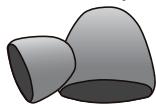
2 extra ear cushions

AC (indoor) power adapter
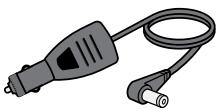
DC (car) power adapter (BT109 only)
Questions? Problems?
Get help on the web at www.uniden.com
or call our Customer Service line at 800-292-2294.
Getting to Know the Headset
Using the headset at excessive volume can cause permanent hearing loss. To reduce the risk of hearing damage, use the minimum volume level necessary (see page 12).
What the buttons do
The buttons activate the function after you release them.
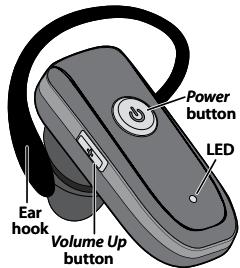
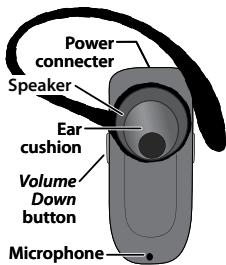
| Button | Press it to | Press and hold it for two seconds to |
| Power | During an incoming call: Answer the call. During a call: Hang up. | In standby: Turn the headset on or off. During an incoming call: Reject the call. During a call: Transfer the call to your phone. |
| Volume Up | During a call: Increase the call volume. | NA |
| Volume Down | During a call: Decrease the call volume. | Redial the most recently dialed number. |
What the LED colors mean
| Color | State | Meaning |
| Red | Steady | The headset is currently charging. When the battery is fully charged, the LED turns off. |
| Flashing | The battery is low. | |
| Blue | Flashing | The headset is turned on. |
| Slow flash (every 3 seconds) | The headset is paired to a Bluetooth device. | |
| Red & blue | Alternating flash | The headset is in pairing mode. |
Setting Up Your Headset
Charge the battery
Before using your headset, charge the battery for at least 8 hours.
Charging the battery completely (and keeping it charged) will help you get the longest possible talk and standby time out of the battery.
Use ONLY the power adapter supplied with the headset! Using any other adapter could damage your headset, create a fire hazard, or cause a risk of electric shock!
| Charging the BT108 | Charging the BT109 |
| Connect the adapter to the power connector on the top of the headset, then plug it into a standard 120 volt AC (regular indoor) power outlet. | Connect either adapter to the power connector on the top of the headset. Connect the AC adapter to a standard 120 volt AC (regular indoor) power outlet. Connect the DC adapter to a standard 12 volt DC (regular automobile) power outlet. |
Pair the headset to your Bluetooth phone
Pairing is like "introducing" two Bluetooth devices and giving them permission to connect to each other. If you want to use the headset with more than one phone, you need to pair it with each phone separately. Once a phone and the headset are paired, they can connect automatically whenever they detect each other.
- Make sure the headset is powered off and the power adapter is not connected (you can't use the headset while it's charging).
-
Press and hold Power until the LED flashes alternating red and blue. The headset is in pairing mode and should be visible to other Bluetooth devices.
-
On your phone, start a search for Bluetooth headsets or handsfree devices. (This process may take several seconds, and it will be different for each phone; see your phone's manual for detailed instructions.)
- Your phone should discover a device called a device called a BT108, BT108 headset, BT109, or BT109 headset, When your phone asks if you want to pair with this device, answer yes.
- When your phone prompts you for a PIN code or password to pair with the BT108 or BT109 enter 0000.
- When the headset is paired, the LED turns blue and flashes every 3 seconds. Your phone might display a confirmation message, also.
- Your phone might ask if you want to change the headset's name; generally, you should only change the name if you have more than one BT108 or BT109 headset that you use with this phone.
Connecting to your phone
Most phones connect to the headset as soon as you pair it; if yours won't, turn the headset off and back on. If headset still won't connect, check your phone's owner's manual for additional Bluetooth information.
Once the headset is paired:
Whenever you turn the headset on, it will automatically try to connect to whatever device it was connected to last.
- If the headset loses the connection (e.g., if your phone is out of range), it reconnects automatically. To manually reconnect, press Power.
If the headset goes more than 1 hour with no connection, it automatically turns off.
Using Your Headset
Put your headset on
Insert the ear cushion, then wrap the earhook behind your ear.
Everyone's ear has a sweet spot, a particular angle of the speaker where the audio comes in loud and
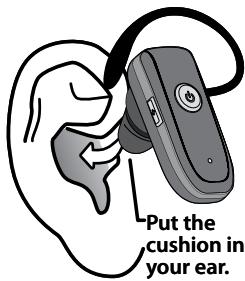
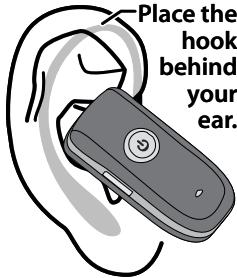
clear. Take a few minutes to move the headset around until you find the best angle for the ear cushion.
If you can't find your sweet spot or if the cushion doesn't fit comfortably in your ear, change it to one of the other sizes that came with the headset. Pull the cushion off gently and snap a new one on.
Wearing the headset on your left ear
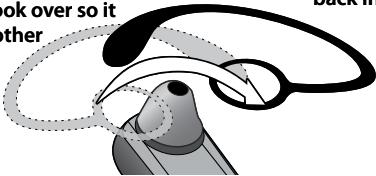
If you want to wear the headset on your left ear, take the earhook off and turn it over.
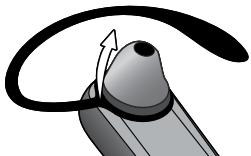

Hold the hook at the bottom and gently lift it over the speaker.
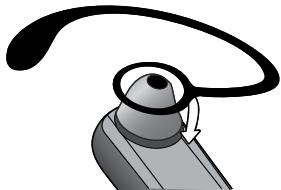

Slide it over the speaker and back into place.

Flip the hook over so it faces the other direction.
Available Features
After the headset is connected, you can use the following features:
| Make a call | Just make the call from your mobile phone as usual; your phone should automatically send the call to the headset. If your phone doesn't, press and hold Power for 2 seconds to send the call to the headset manually. |
| Answer a call | While the call is ringing, press Power. |
| Hang up | Press Power. |
| Send a call back to your phone. | During a call, press and hold Power for 2 seconds. The headset sends the call to your phone and disconnects from the phone. |
| Reject an incoming call | Press and hold Power for 2 seconds; when you hear a beep, release the button. |
| Redial the last number | Press and hold Volume Down; when you hear 4 beeps, release the button. |
| Activate voice dialing | With the phone in standby, press Power and release. When you hear a beep, start using your phone's voice commands. (Your phone must support voice dialing, and all commands must be pre-programmed.) |
Muting the microphone
To mute the microphone so the caller can't hear you, press and hold both Volume Up and Volume Down for about one second. The headset beeps periodically to remind you that the microphone is muted. Press and hold the buttons again to turn the microphone back on.
Troubleshooting and Maintenance
If you have problems with the headset, see the suggestions in the table below. If these suggestions don't help, contact customer support (see the cover for contact information).
| If... | Try... |
| The headset won't turn on. | - Charging the battery completely. |
| The headset won't pair with my phone. | - Making sure your phone is in pairing mode. Check your phone's manual for instructions on Bluetooth device pairing. - Turning the headset off. Wait at least 10 seconds, then try again. (See page 4 for pairing instructions.) - Making sure your phone supports the Bluetooth Headset or Hands Free Profile. |
| The headset paired with my phone, but I can’t hear anything through it. | - Making sure the call connected and is still active. - Making sure the phone transferred the call to the headset. Press and hold Power for two seconds to transfer the call. |
| The headset keeps beeping, and I don’t know why. | - The battery may be getting low. If the LED is blinking red, charge the battery. - Seeing if your phone has lost the network signal. If your phone sounds an alert when it can’t connect to the network, the headset passes on this alert by beeping every 5 seconds. |
| I can hear the caller, but the audio is very weak or soft. | - Turning the speaker volume up. - Moving closer to your phone (if you aren’t carrying it). - Adjusting the ear cushion to find your “sweet spot” (see page 6). - Keeping the battery fully charged; As the battery starts to run out, the speaker gets softer. |
General Information
- You cannot use the headset while it is recharging.
-
Bluetooth wireless devices have a maximum range of 30 feet (10 m); the actual range will vary depending on current conditions (obstacles, battery power, interference, etc.).
-
The headset can be connected only to devices that support the Bluetooth headset or hands-free profile. This product is not compatible with standard cordless phones.
Battery life
With average use, the battery should provide about 9 hours of talk time and 8 days of standby time. A battery that is new or left unused for long periods of time can have reduced capacity the first few times it is used. For maximum battery life, keep your battery charged.
- When the battery only has enough charge for about 15 minutes of talk time, the headset triggers a low battery alert: you'll hear a periodic beep, and the LED changed from blue to red.
- When the battery no longer has enough charge to operate the headset, the headset will power off; you won't be able to turn it back on until you connect the charger or charge the battery.
Noise or Static on the Headset
The most common cause of noise or static on any wireless device is interference. Bluetooth devices operate in the ISM band (2.402 GHz 2.480 GHz); any equipment operating in this frequency range might interfere with the headset. Some common sources of interference in this range are
- Equipment that uses microwaves, especially microwave ovens
- Wireless LAN equipment or WiFi connections
- Other Bluetooth devices or computers
Certain cordless telephones - Certain medical equipment and appliances If you have problems with static during calls, look for one of these interference sources. Try moving away from the suspected source.
If the noise continues, there may be interference on your phone itself, and any noise in the phone's connection will come through on the
headset, too. Transfer the call to your phone and see if the audio quality improves. If it doesn't, check around for things that might interfere with your phone.
Safety and Handling Information
For maximum product life, do not drop, throw, or crush the headset. Do not expose it to humidity, dust, or temperatures above 125 F.
Cleaning the headset
- If necessary, remove the ear cushion and earhook. Dampen a lint-free cloth with water or a cleaner specially designed for electronics, and gently wipe the headset clean.
- Do not expose this product to liquid (water, alcohol, etc.) or submerse in liquid for any reason.
Avoiding hearing damage
Using any headset or earbud at too high a volume can cause permanent hearing damage. To reduce the risk of hearing damage:
- Set the volume at the minimum level needed to hear in the current environment. If possible, use your headset in quiet surroundings or try to move to an area with less background noise before adjusting the volume.
- Start with the volume at its lowest setting, then gradually increase it until you can hear.
- Turn the volume down before powering off the headset and readjust the volume each time you turn it on.
- If someone next to you can hear the other end of the call through your headset or if your ears hurt or ring when you hang up, the volume is too high.
- The longer your ears are exposed to noise, the greater the risk of damage. Limit calls at higher volumes (or other exposure to loud noise).
- For more information on protecting your hearing, visit the WISE EARS® website (www.nidcd.nih.gov/health/wise/) or consult an audiologist.
Important Safety Instructions
Uniden America Corporation DOES NOT represent this product to be waterproof. To reduce the risk of fire, electrical shock, or damage to the product, DO NOT expose this product to rain or moisture.
When using the headset, always follow basic safety precautions to reduce the risk of fire, electric shock and injury to persons, including the following:
- Do not use this product near water, for example, near a bath tub, wash bowl, kitchen sink or laundry tub, in a wet basement or near a swimming pool.
-
Use only the power cord and batteries indicated in this manual. Do not expose the battery (or the device) to flames or dispose of it in a fire: the battery may explode. Check with local authorities for possible battery disposal instructions.
-
Do not disassemble, modify, or attempt to repair any component of this product.
- Check the laws and regulations on the use of mobile phones and hands-free equipment in the areas where you drive. Always give full attention to driving and pull off the road and park before making or answering a call if driving conditions require.
- Do not allow children to play with your headset since it contains small parts that could become detached and create a choking hazard.
- Turn off your headset when pumping gas, handling flammable materials, or in any area with a risk of explosion. In rare occurrences, this product could generate sparks which can cause an explosion or fire. Follow all warning notices in your immediate area!
SAVE THESE INSTRUCTIONS!
FCC Notice
This device complies with part 15 of the FCC rules. Operation is subject to the following two conditions: (1) This device may not cause harmful interference, and (2) This device must accept any interference received, including interference that may cause undesired operation. Privacy of communications may not be ensured when using this product.
To insure the safety of users, the FCC has established criteria for the amount of radio frequency energy various products may produce depending on their intended usage. This product has been tested and found to comply with the FCC's exposure criteria. For body worn operation, the FCC RF exposure guidelines were also met when used with the Uniden accessories supplied or designed for this product. Use of other accessories may not ensure compliance with FCC RF exposure guidelines and should be avoided.
Industry Canada statement
This device complies with RSS-210 of the Industry Canada Rules. Operation is subject to the following two conditions: (1) This device may not cause harmful interference, and (2) this device must accept any interference received, including interference that may cause undesired operation.
IMPORTANT NOTE: Radiation Exposure Statement
This equipment complies with IC radiation exposure limits set forth for an uncontrolled environment. End users must follow the specific operating instructions for satisfying RF exposure compliance. To maintain compliance with IC RF exposure compliance requirements, please follow operation instruction as documented in this manual.
Lithium-polymer battery information
This device contains a lithium-polymer battery. The headset and battery must be recycled or disposed of properly. Contact your local waste management office for information on battery recycling or disposal.
Two-Year Limited Warranty
Important: Evidence of original purchase is required for warranty service.
WARRANTOR: UNIDEN AMERICA CORPORATION ("Uniden")
ELEMENTS OF WARRANTY: Uniden warrants, for two years, to the original retail owner, this Uniden Product to be free from defects in materials and craftsmanship with only the limitations or exclusions set out below.
WARRANTY DURATION: This warranty to the original user shall terminate and be of no further effect 24 months after the date of original retail
sale. The warranty is invalid if the Product is a) damaged or not maintained as reasonable or necessary, b) modified, altered, or used as part of any conversion kits, subassemblies, or any configurations not sold by Uniden, c) improperly installed, d) serviced or repaired by someone other than an authorized Uniden service center for a defect or malfunction covered by this warranty, e) used in any conjunction with equipment or parts or as part of any system not manufactured by Uniden, or f) installed or programmed by anyone other than as detailed by the owner's manual for this product.
STATEMENT OF REMEDY: In the event that the product does not conform to this warranty at any time while this warranty is in effect, warrantor will either, at its option, repair or replace the defective unit and return it to you without charge for parts, service, or any other cost (except shipping and handling) incurred by warrantor or its representatives in connection
with the performance of this warranty.
Warrantor, at its option, may replace the unit with a new or refurbished unit.
THE LIMITED WARRANTY SET FORTH ABOVE IS THE SOLE AND ENTIRE WARRANTY PERTAINING TO THE PRODUCT AND IS IN LIEU OF AND EXCLUDING ALL OTHER WARRANTYES OF ANY NATURE WHATSOEVER, WHETHER EXPRESS, IMplied OR ARISING BY OPERATION OF LAW, INCLUDING, BUT NOT LIMITED TO ANY IMPLIED WARRANTYES OF MERCHANTABILITY OR FITNESS FOR A PARTICULAR PURPOSE. THIS WARRANTY DOES NOT COVER OR PROVIDE FOR THE REIMBURSEMENT OR PAYMENT OF INCIDENTAL OR CONSEQUENTIAL DAMAGES. Some states do not allow this exclusion or limitation of incidental or consequential damages so the above limitation or exclusion may not apply to you.
LEGAL REMEDIES: This warranty gives you specific legal rights, and you may also have
other rights which vary from state to state. This warranty is void outside the United States of America and Canada.
PROCEDURE FOR OBTAINING PERFORMANCE OF WARRANTY: If, after following the instructions in the owner's manual you are certain that the Product is defective, pack the Product carefully (preferably in its original packaging). The Product should include all parts and accessories originally packaged with the Product. Include evidence of original purchase and a note describing the defect that has caused you to return it. The Product should be shipped freight prepaid, by traceable means, to warrantor at:
Uniden America Service
4700 Amon Carter Blvd.
Fort Worth, TX 76155
- BT108 and BT109 Bluetooth® Headsets
- Getting to Know the Headset
- What the buttons do
- Setting Up Your Headset
- Charge the battery
- Pair the headset to your Bluetooth phone
- Connecting to your phone
- Using Your Headset
- Put your headset on
- Wearing the headset on your left ear
- Available Features
- Muting the microphone
- Troubleshooting and Maintenance
- General Information
- Battery life
- Noise or Static on the Headset
- Safety and Handling Information
- Cleaning the headset
- Avoiding hearing damage
- Important Safety Instructions
- SAVE THESE INSTRUCTIONS!
- FCC Notice
- Industry Canada statement
- IMPORTANT NOTE: Radiation Exposure Statement
- Lithium-polymer battery information
- Two-Year Limited Warranty
Brand : UNIDEN
Model : BT108
Category : Cordless phone