
PM950 - Audio amplifier tuner TEAC - Free user manual and instructions
Find the device manual for free PM950 TEAC in PDF.


| Product type | Integrated stereo audio receiver |
| Brand | TEAC |
| Model | PM950 |
| Dimensions (W x H x D) | 430 x 120 x 350 mm |
| Weight | Approximately 8 kg |
| Power supply | 220-240 V, 50/60 Hz |
| Power consumption | 150 W (max) |
| Output power | 2 x 50 W RMS (8 Ω) |
| Tuner frequency range | FM: 87.5-108 MHz; AM: 522-1611 kHz |
| Audio inputs | Phono (MM), CD, Tuner, Aux, Tape |
| Audio outputs | Speakers (A/B), Headphones, Tape (Recording) |
| Main functions | Stereo amplification, FM/AM tuner with presets, input selector, tone control (bass/treble), balance, loudness |
| Maintenance and cleaning | Disconnect the device, clean the casing with a soft dry cloth. Do not use solvents. |
| Safety | Do not expose to moisture, avoid heat sources, use in a well-ventilated area |
| Spare parts and repairability | Replacement fuses (internal type), potentiometers, capacitors. Entrust any repair to a qualified technician. |
| Included accessories | FM antenna, AM loop antenna, power cable, user manual |
Frequently Asked Questions - PM950 TEAC
User questions about PM950 TEAC
0 question about this device. Answer the ones you know or ask your own.
Ask a new question about this device
Download the instructions for your Audio amplifier tuner in PDF format for free! Find your manual PM950 - TEAC and take your electronic device back in hand. On this page are published all the documents necessary for the use of your device. PM950 by TEAC.
USER MANUAL PM950 TEAC
Dolby Digital 5.1 Multimedia Entertainment System with AC 3 Decoder
PowerMax-950
User Manual
To ensure the smooth handling of your warranty please write the serial number of your drive into the box. In the case of warranty you are expected to send it together with a copy of your invoice to your nearest TEAC sales representative.
Contents
Important Safeguards 19
Features 21
Package List 21
Precautions 22
PowerMax-950UserControls 23
Connecting Speakers 24
Connecting Equipment 25
How to connect the XBOX 26
How to connect PlayStation2 (PS2) 26
Positioning of the Speakers 26
Surround Sound 28
Specifications 29
Warranty 30
- Changes in specifications and features may be made without notice or obligation.
Copyright © 2003, TEAC Corporation. All rights reserved. First Edition: February 2003
- Company and product names provided herein are trademarks of their respective companies.
Important Safeguards
For your protection, please read these instructions completely, and keep this manual for future reference.
Carefully observe and comply with all warnings, cautions and instructions placed or described in the operating instructions or service manual.
Warning
To guard against injury, the following basic safety precautions should be observed in the installation, use, and servicing of the set.
Lightning
For added protection when using this speaker unit during a lightning storm, or when it is left unattended and unused for long periods of time, unplug it from the wall outlet. This will prevent damage to the receiver due to lightning and power line surges.
Do not use this unit near water.
Don't allow any foreign objects or liquid to get inside this unit.
Don't place small metal objects or anything containing liquid on or near the unit.
Avoid placement of the unit where ventilation is inadequate.
Do not place this unit in a bookcase or between cabinets, or where curtains of furniture may obstruct the ventilation openings.
Place this unit away from heat-emitting appliances.
Never place this unit near a radiator, heater, stove, or any other heat-emitting equipment (including amplifiers).
Placement
Place this unit on a stable, vibration-free, level shelf, table or stand.
Use of a Cart or Stand
When placing this unit on a cart or stand, be sure to follow recommendations for this unit in the operating instructions. An appliance and cart combination should be moved with care. Quick stops, excessive force, and uneven surfaces may cause the appliance and cart combination to overturn.
Check the voltage rating of this unit before connecting the unit to a power supply.
Be sure to connect the unit only to the type of power supply indicated in the operating instructions, or as indicated on the unit itself.
Care of the Power Cord and Plug
Take care that the cord is not bent sharply (especially near its connection to the unit or near the plug), that nothing is placed on it, and that it is not pinched or crushed.
Never take hold of the plug or cord if your hand is wet and always be sure to grasp the plug body when connecting or disconnecting it.
By strong electromagnetic fields (e.g. wireless phones) noisy sound may be caused. As long as the distortions may last we recommend to reduce the volume of the unit with the master volume control.
Polarization
If this unit is equipped with a polarized AC line plug (a plug having one blade wider that the other), that plug will fit into the power outlet only one way. This is a safety feature. If you are unable to insert the plug or if the plug should still fail to fit, contact your electrician to replace the obsolete outlet.
If the unit will not be used for a long time, turn the set off. When the set is left unattended and unused for long periods of time, unplug it from the wall outlet as a precaution against the possibility of an internal malfunction that could create a fire hazard.
Warning
To prevent fire or shock hazard, do not expose the unit to rain or moisture.
| CAUTION Risk of electric shock. Do not open. |
| Caution: to reduce the risk of electric shock, do not remove cover (or back). No user-serviceable parts inside. Refer servicing to qualified service personnel. |
Maintenance
Never attempt to repair the unit yourself if:
(a) The power cord or plug is damaged.
(b) A foreign object or liquid falls into the unit.
(c) The unit is exposed to rain.
(d) The unit does not function normally, or if operation shows an unusual change.
(e) The unit has been dropped and the cabinet or chassis are damaged, etc.
Unplug the power cord and consult a qualified technician (or the dealer from whom the unit was purchased or the nearest service center).

This symbol is intended to alert the user to the presence of uninsulated "dangerous voltage" within the product's enclosure that
may be of sufficient magnitude to constitute a risk of electric shock to persons.

This symbol is intended to alert the user to the presence of important operating and maintenance servicing) instructions in the literature
accompanying the appliance.
CAUTION
TO PREVENT ELECTRIC SHOCK, DO NOT USE THIS POLARIZED AC PLUG WITH AN EXTENSION CORD, RECEPTACLE OR OTHER OUTLET UNLESS THE BLADES CAN BE FULLY INSERTED TO PREVENT BLADE EXPOSURE.
Repairs
Except for adjustments explained in the operating instructions do not attempt any repairs by yourself. Be sure to request service from a qualified technician (or the nearest service center).
Cleaning
Unplug the set from the wall outlet before cleaning or polishing it. Do not use liquid cleaners or aerosol cleaners. Use a cloth lightly dampened with water for cleaning the exterior of the set.
Features
Dolby Digital (5.1 channel) surround sound
Dolby Pro · Logic surround sound
Stereo sound
Two digital inputs (optical and coaxial)
One analog stereo input (Ø3,5mm)
Adapter for the optical audio output of the XBOX
- Compact design with separate panel at the decoder unit
Five satellite speakers (wall mounting possible)
Powerful subwoofer in a wooden case
Magnetically shielded speakers
Connectable to:
XBOX, PS2, DVD, TV, PC, Notebook, MP3 player, VCR, LDP, CD-ROM
Package List
1 Decoder unit
1 Subwoofer
4 Satellite speakers
1 Center speaker
1 9pin connecting cable
1 12V power cable for connecting the decoder unit
1 XBOX adapter
1 Coaxial cable
1 Optical cable (for connecting PS2)
1 User manual including warranty card
Precautions
Please read this owner's manual carefully. It has been prepared to help you with initial set up procedures.
- Do not open the cabinet. Doing so may cause an electric shock.
- Don't touch the main set with wet hands, as this may cause an electric shock.
- When removing the power plug from the wall outlet, pull the plug directly away and never pull the cord.
-
Don't install the set under direct sun light.
-
Never put anything, especially metal into the unit.
- Do not attempt to clean the unit with alcohol, benzene or thinner, as this may damage the finish.
- Keep away from heating equipment.
- Put the subwoofer more than 10cm (0.3 feet) distant from wall and more than 30cm (1 feet) distant from TV set or PC monitor.
Caution!!! Power ON-OFF switch does not separate main power!!
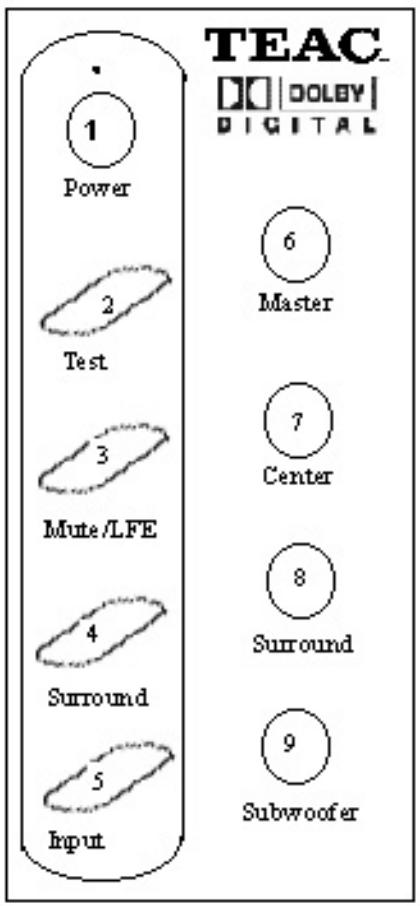
1. Power
On-/Off switch. The LED lights green if in operation mode and red during standby.
2. Test
If this key is pressed to all outputs a white noise signal is applied one after
another. During the test the corresponding LEDs at the front panel of the decoder unit light and show which of the speakers the test signal is actually applied (/L, /C, /R, /SR, /SL, /LFE). After passing the test the system resumes with the last settings.
3. Mute
Mutes temporarily any of the channels.
4. Surround
This is used to select the mode of operation like Dolby Pro · Logic, Dolby Digital or stereo.
5. Input
This control allows to switch between analog and digital inputs.
6. Master
This is the master volume control of the unit (all channels).
7. Center
This control is used to set the volume of the center speaker.
8. Surround
This control allows to set the volume of the surround (rear) speakers.
9. Subwoofer
This control is used to set the volume of the subwoofer individually.
Connecting Speakers
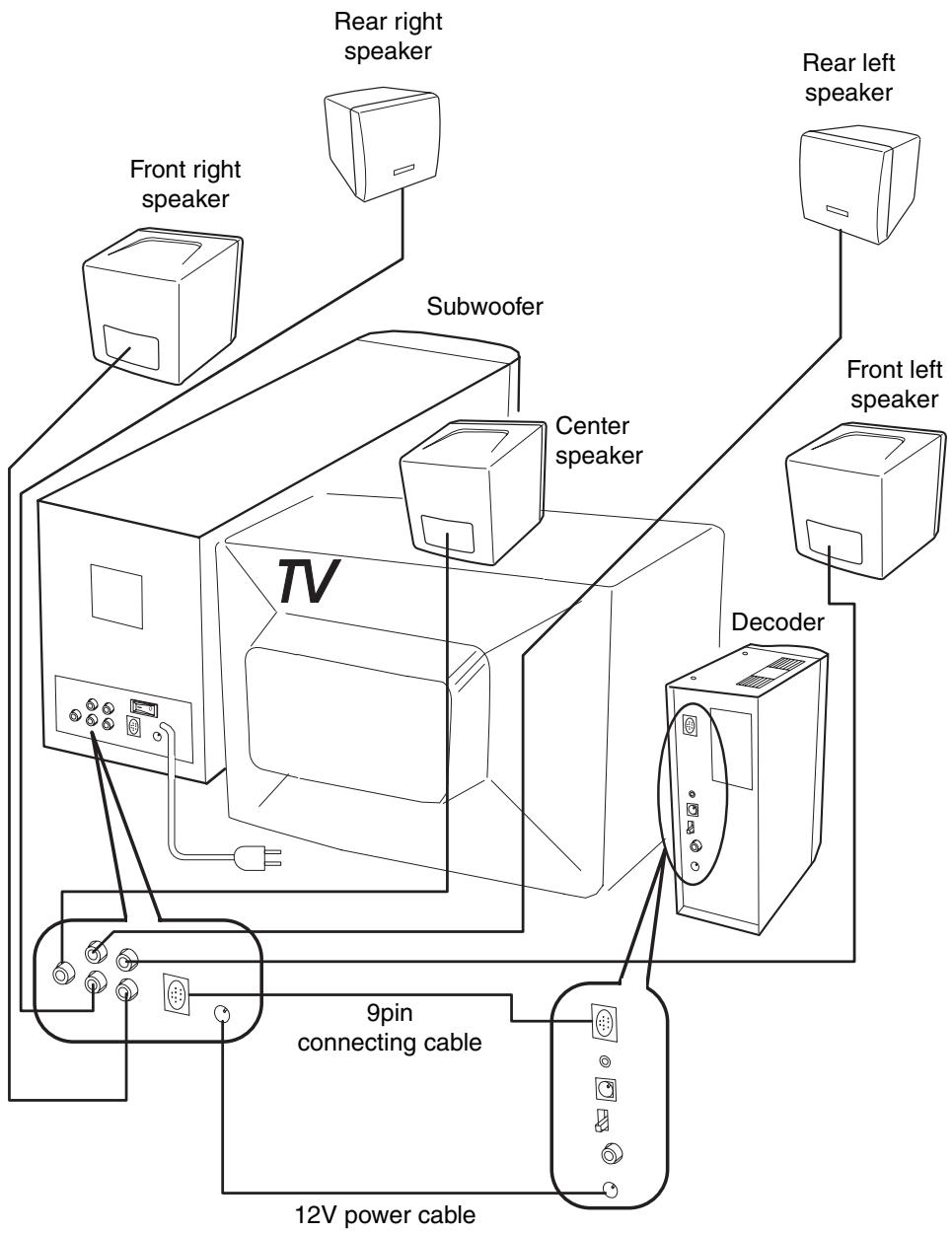
Connecting Equipment
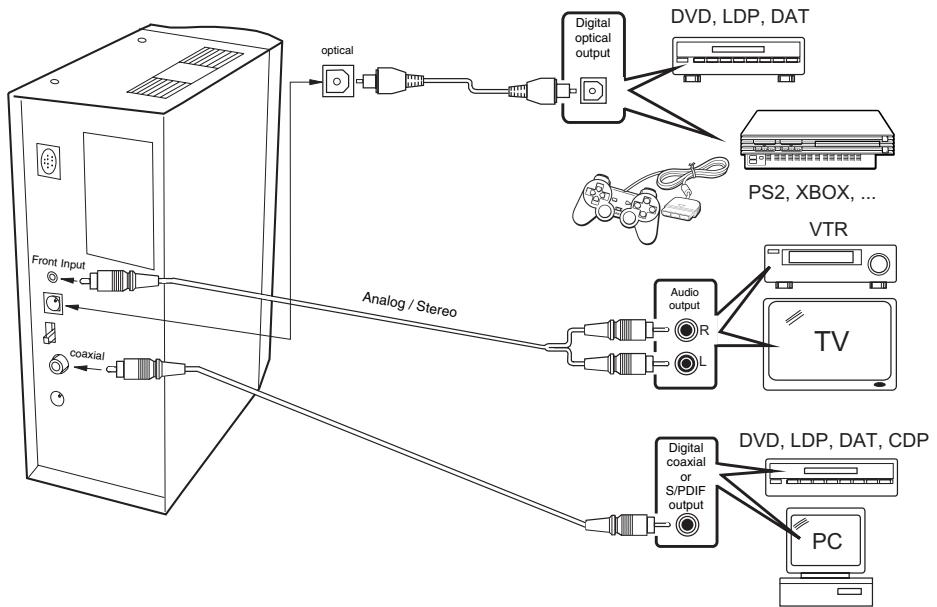
Your PowerMax-950 can be connected to the following devices:
DVD player
XBOX / PS2 (see "How to connect XBOX/PS2" on next page)
PC / notebook
TV/video
CD player / HiFi-Amplifier (Line Out)
MP3 player / discman etc.
To enjoy Dolby Digital Sound your sound source has to be provided with a digital output. PowerMax-950 offers two digital inputs: coaxial and optical.
The unit receives its input signal over both of the channels. To select the input you have to set the little switch at the back side of the unit to "COAXIAL" or "OPTICAL". If there is no digital input signal available the unit sets itself automatically to Dolby Pro - Logic respectively to stereo. If you like to connect a standard analog signal source, you may achieve this with a 03,5mm stereo mini plug.
Important: Dolby Digital may be reproduced from games and DVDs only if they have been recorded in this audio format. The respective audio format is indicated by this icon:

How to connect the XBOX
To enjoy Dolby Digital Sound over an optical cable with a XBOX you have to install the enclosed adapter at the optical interface. Please carry out the following steps:
- Remove the installed AV cable if there is any.
- Plug the enclosed adapter into the AV output of the XBOX.
-
Connect the AV cable with the adapter installed in step 2.
-
Remove the dirt protection cover of the optical output which is located on the side of the adapter.
- Connect the optical cable to the adapter and plug its other side into the decoder device of the PowerMax-950.
Now activate the Dolby Digital mode of your XBOX. To achieve this you have to switch on your XBOX without any CD/DVD inserted in its drive. Then select settings / audio and activate "Dolby Digital".
How to connect PlayStation2 (PS2)
- Connect the PlayStation2 and the PowerMax-950 with the provided coax cable.
-
Switch the PlayStation2 to on without any CD/DVD inserted.
-
Select in the menu system configuration the option "digital out" and set it to on.
Positioning of the Speakers
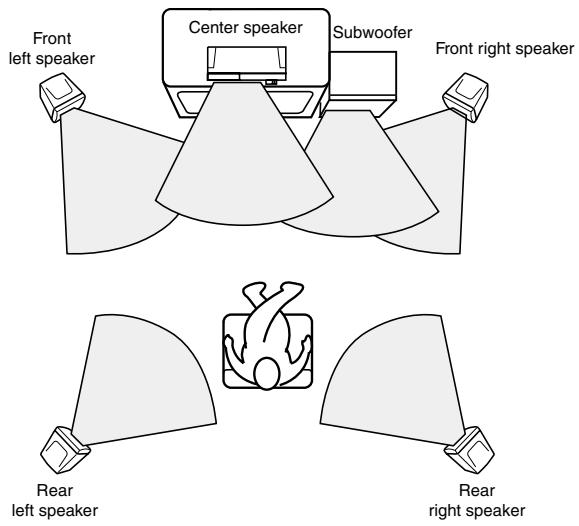
Speaker placement plays an important role in the reproduction of Surround sound. The manner in which the speakers are placed varies depending on the size of the room and the wall coverings used in the room. The illustration below
shows an example of a layout for standard speaker placement. Refer to this example when positioning the speakers in order to experience the best of Surround sound.
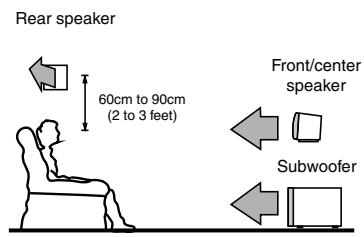
Front/Center Speakers:
The left, right and center speakers should face the seated listener and be placed at ear level. The center speaker produces a richer sound image by enhancing the perception of the sound's source and movement.
Rear (Surround) Speakers:
Place the left and right rear speakers 60 to 90cm (2 to 3 feet) above the listener's ear level and toward the sides of the room, making sure that the listener is within the speaker's dispersion angle. These speakers produce the feel of a moving sound while generating the sensation of being in the middle of the action.
Subwoofer:
The placement of the subwoofer does not affect the final quality of the sound image too much, so you can install it with the room layout in mind. Placing the subwoofer on the floor is recommended.
Note:
Place the subwoofer more than 10cm (0,3 feet) distant from wall and more than 30cm (1 feet) distant from TV set or PC monitor.
Note:
For ideal Surround effects, all speakers should be installed.
Surround Sound
Since the unit is equipped with front, center, rear and subwoofer amplifiers, Dolby Digital and Dolby Pro · Logic effects can be reproduced. You can enjoy the feeling of a movie theater, concert hall or ball game ground in your own room.
Dolby Digital DOLBY DIGITAL
Dolby Digital is a new-generation digital audio format for multi-channel Surround audio. With this digital audio format, you can create a five channel full-range system which is a developed version of the conventional surround system (left, center, right, and two surround channels).
Adding to its five full-range channels, Dolby Digital supports an LFE (low frequency effect) channel, which is used solely for low frequency sounds independent of the other channels. Dolby Digital is therefore sometimes referred to as a "5.1" channel format since its LFE channel is indicated as 0.1.
This fully discrete 5.1 channel Dolby Digital system can reproduce sound of a wide and dynamic range, chang
ing your room into a home theater. Dolby Digital technology is implemented in such media as laser discs, DVDs (digital video discs), CATV (cable television), DBS (direct broadcasting), and HDTVs (high definition televisions).
- Dolby Pro • Logic Surround

Many motion pictures produced have been released in the 4-channel "Dolby Stereo" sound, with music, dialogue, and surround effects and ambience emanating from the sides and the rear of the theater.
The motion picture masters are used for production of stereo VHS, VHS Hi-Fi, Beta Hi-Fi, and stereo laser discs that you can buy or rent at your video store.
Speaker Driving by Mode
| MODE | FRONT L R | CENTER | REAR (SURROUND) L R | SUBWOOFER |
| Dolby Digital | ● | ● | ● | ● |
| Dolby Pro • Logic | ● | ● | ● | ● |
| Stereo | ● | ● |
Specifications
| Amplifier Section | ||
| Power Output | P.M.P.O. | RMS |
| Front-/Rear speaker | 4 x 100 watts | 15 watts |
| Center speaker | 150 watts | |
| Subwoofer | 400 watts | 15 watts |
| Power Source | AC 230V ~ 50Hz/55watts | |
| Safety Standards | CE | |
| Speaker Section | |
| Front, Center and Rear speaker | |
| Speaker | 7.6cm (magnetic shielded type) |
| Impedance | 8 Ohm |
| Frequency Response | 200 - 18.000Hz |
| Dimensions (W x H x D) | 110mm x 158mm x 110mm |
| Subwoofer | |
| Speaker | 14cm (magnetic shielded type) |
| Impedance | 4 Ohm |
| Frequency Response | 60 - 300Hz |
| Dimensions (W x H x D) | 165mm x 203mm x 410mm |
| Control panel/Decoder | |
| Dimensions (W x H x D) | 60mm x 180mm x 130mm |
| Inputs | optical, coaxial (digital) / Stereo (analog) |
| Modes | Dolby Digital, Dolby Pro • Logic, Stereo |
| Functions | Power (on/off) / Test / Mute / Surround / Input / Volume control: Master, Center, Subwoofer, Surround |
Warranty
Model
Serial No.
PowerMax-950
Owner's name
Address
Dealer's name
Dealer's address
Warranty Period
TEAC Corporation, hereinafter called TEAC, warrants this product against any defect in material and workmanship for two (2) years from the date of purchase by the original retail purchaser. According to the following terms this TEAC product will be repaired without charge of labor and materials by the authorized TEAC service stations, by the authorized TEAC dealers and/or their authorized service stations. TEAC, the authorized TEAC service stations, the authorized TEAC dealers and/or their authorized service stations may decide wether the defective product will be repaired or replaced as a whole or partially. The TEAC dependancies, the authorized TEAC service stations, the authorized TEAC dealers and/or their authorized service stations will also honour this warranty in the other EC and EFTA member states based on the terms in this warranty conditions.
What is Covered and What is Not Covered.
Except as specified below, this warranty covers any defects in materials and workmanship of this product. The following are not covered by the warranty:
- Damage to or deterioration of the external cabinet.
- Any unit that has been altered or on which the serial number has been defaced, modified, or removed.
- Damage, deterioration or malfunction resulting from:
(a) accident, misuse, abuse or neglect;
(b) failure to follow instructions supplied with the product;
(c) any shipment of the product. Any damage arising of transportation is the liability of the freight company. Any damage arising of transportation and any implicit and explicit risks are the liability of the freight company. This is expressly not a liability of TEAC;
(d) repair or attempted repair by anyone not authorized by TEAC to repair this product;
(e) causes other than product defects, including lack of technical skill, competence or experience of the user. Especially damages which may arise of incidental use respectively by improper ventilation,
(f) damages caused by improper or incorrect installation of software,
(g) periodic check-ups,
(h) maintenance respectively repair of parts due to normal wear and tear,
(i) adoptions or adjustments to the product in order to conform to different national technical or safety standards of any country other than the one for which the product was originally designed and manufactured.
Who May Enforce the Warranty
This warranty may be enforced only by the original retail purchaser.
What We Will Pay For
We will pay all labor and material expenses for items covered by the warranty. Payment of shipping and insurance charge is discussed in the next section of this warranty.
How You Can Get Warranty Service
-
If your unit needs service during the warranty period, please contact the local authorized distributor for this product. If you are unable to locate such a distributor, please contact your TEAC facility at the address indicated below.
-
After identifying the nearest authorized service station for this product
the product or any parts believed to be defective must be shipped freight and insurance prepaid to such service station, together with a copy of this warranty certificate and a copy of your sales receipt, showing the date of purchase. Please ensure to fill out the warranty certificate correctly (do not forget the serial number of the product). TEAC reserves the right to refuse the guarantee service if the documents are missing or incomplete in the understanding of this terms.
If the necessary repairs are covered by the warranty, and if you have sent the product or parts of it to the nearest authorized service station, the return freight and insurance charges will be prepaid.
Please do not return your unit to the TEAC factory without out prior authorization (see also RMA form)!
Limitations of Liability and Exclusion of Implied Warranties
Unless considered unenforceable or unlawful under the applicable national law:
- TEAC's liability for any defective product is limited to repair or replacement of the product, at TEAC's option and the option of authorized service stations, authorized dealers and their authorized service stations. No one is authorized to assume any greater liability on TEACs behalf. TEAC shall not be liable for any dam-
age to any other properties independant of their virtual or real nature especially there is no liability for any damage to any kind of software and/or any kind of databases caused by TEAC products. Furthermore TEAC is not liable for damages arising out of loss of use, loss of revenue or profits, or any other damages, wether incidental, consequential, or otherwise.
- All implied warranties or conditions, including but not limited to warranties or conditions of merchantability and fitness for a particular purpose, hereby are excluded.
These warranty terms do not affect any statutory rights of consumers which were granted by the respective national laws.
TEAC UK LIMITED DATA STORAGE PRODUCTS DIVISION:
5 Marlin House, Marlin Meadow, Croxely Business Park,
Watford, Hertfordshire, WD18 8TE, U.K.
TEAC FRANCE S.A.
92182 ANTONY CEDEX, France
GARANTIE
- PowerMax-950
- Contents
- Important Safeguards
- Warning
- Lightning
- Placement
- Use of a Cart or Stand
- Care of the Power Cord and Plug
- Polarization
- Maintenance
- CAUTION
- Repairs
- Cleaning
- Features
- Package List
- Precautions
- Power
- Test
- Mute
- Surround
- Input
- Master
- Center
- Surround
- Subwoofer
- Connecting Speakers
- Connecting Equipment
- How to connect the XBOX
- How to connect PlayStation2 (PS2)
- Positioning of the Speakers
- Front/Center Speakers:
- Rear (Surround) Speakers:
- Subwoofer:
- Note:
- Surround Sound
- Dolby Digital DOLBY DIGITAL
- - Dolby Pro • Logic Surround
- Specifications
- Warranty
- Warranty Period
- What is Covered and What is Not Covered.
- Who May Enforce the Warranty
- What We Will Pay For
- How You Can Get Warranty Service
- Limitations of Liability and Exclusion of Implied Warranties
- TEAC UK LIMITED DATA STORAGE PRODUCTS DIVISION:
- TEAC FRANCE S.A.
Brand : TEAC
Model : PM950
Category : Audio amplifier tuner