
V182 SOLAR - Solar watch SEIKO - Free user manual and instructions
Find the device manual for free V182 SOLAR SEIKO in PDF.


| Product Type | Solar Watch |
| Brand | SEIKO |
| Model | V182 SOLAR |
| Caliber | V182 |
| Power Source | Solar cell + rechargeable lithium-titanium-manganese battery |
| Power Reserve after Full Charge | Approximately 2 months |
| Main Functions | Time display, date, instant start function, power depletion warning, overcharge prevention |
| Accuracy (Monthly rate) | ±20 seconds at normal temperature (5 °C to 35 °C) |
| Circuit Frequency | 32,768 Hz |
| Operating Temperature Range | -5 °C to 50 °C |
| Crown Type | Screw-lock (depending on model) |
| Rotating Bezel | Yes (depending on model), for elapsed time measurement up to 60 minutes |
| Care and Cleaning | Avoid extreme temperatures (>50 °C) and intense heat sources; clean with a soft cloth |
| Charging Precautions | Do not expose to intense light (flash, spotlight) to avoid overheating; do not leave on a car dashboard |
| Safety | Never insert a standard silver-oxide battery: risk of explosion, intense heat, or fire |
| Spare Parts and Repairability | Specific rechargeable battery, not user-replaceable; contact an authorized SEIKO service center |
Frequently Asked Questions - V182 SOLAR SEIKO
User questions about V182 SOLAR SEIKO
0 question about this device. Answer the ones you know or ask your own.
Ask a new question about this device
Download the instructions for your Solar watch in PDF format for free! Find your manual V182 SOLAR - SEIKO and take your electronic device back in hand. On this page are published all the documents necessary for the use of your device. V182 SOLAR by SEIKO.
USER MANUAL V182 SOLAR SEIKO
HOW TO CHARGE AND START THE WATCH 6
TIME/CALENDAR SETTING 8
GUIDELINE OF CHARGING TIME/ACCURACY 10
ENERGY DEPLETION FOREWARNING FUNCTION 12
NOTE ON POWER SUPPLY 13
For the care of your watch, see "TO PRESERVE THE QUALITY OF YOUR WATCH" in the attached Worldwide Guarantee and Instruction Booklet.
SEIKO CAL. V110, V111, V145, V181 & V182
FEATURES
■ POWERED BY LIGHT ENERGY
NO NEED FOR BATTERY CHANGE
LASTS FOR 2 TO 6 MONTHS AFTER FULL CHARGE (DEPENDS ON THE CALIBRE)
ENERGY DEPLETION FOREWARNING FUNCTION (FOR CAL. V111, V145, V181, V182 ONLY)
INSTANT-START FUNCTION (FOR CAL. V145, V181, V182 ONLY)
OVERCHARGING PREVENTION FUNCTION
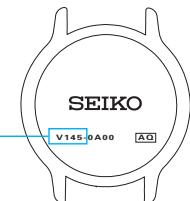
Calibre number of your watch
Please check the case back of your watch to find its calibre number inscribed on it. As illustrated at right, the calibre number of your watch is the 4-digit number to the left of the hyphen mark. Calib
Calibre No.
HOW TO CHARGE AND START THE WATCH
- When you start the watch or when the energy in the rechargeable battery is reduced to an extremely low level, charge it sufficiently by exposing the watch to light.
Instant-start function:
When the watch is exposed to sunlight or strong artificial light (of more than 1,000 lux), it will start operating immediately with the second hand moving at 2-second intervals.
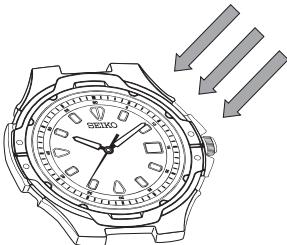
- Expose the watch to sunlight or strong artificial light.
-
When the watch has stopped operating, the second hand will start moving at 2-second intervals.
-
Keep the watch exposed to the light until the second hand moves at 1-second intervals.
- When the watch is charged after it has completely stopped, set the date and time before wearing the watch.
See "GUIDELINE OF CHARGING TIME/ACCURACY".
NOTES:
- When the instant-start function is activated after the watch is exposed to light, the second hand starts moving at 2-second intervals immediately, but the energy stored in the rechargeable battery is not sufficient. If the watch is turned away from the light, it may stop operating.
- It is not necessary to charge the watch fully. It is important, however, to charge the watch sufficiently, especially in case of initial charge.

CAUTION
Caution for charging
- When charging the watch, do not place it too close to a photoflash light, spotlight, incandescent light or other light sources as the watch temperature will become extremely high, causing damage to the parts inside the watch.
- When exposing the watch to sunlight to charge it, do not leave it on the dashboard of a car, etc. for a long time, as the watch temperature becomes extremely high.
While charging the watch, make sure the watch temperature does not exceed 50^ . (For Cal. V110, V145, V181 and V182)
While charging the watch, make sure the watch temperature does not exceed 60^ . (For Cal. V111)
TIME/CALENDAR SETTING
Models with two/three hands
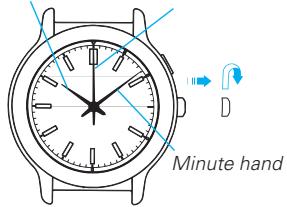
- Pull out the crown to the first click.
- Turn the crown to set the desired time.
- Push back the crown completely (in accordance with a time signal for a three-hand model.)
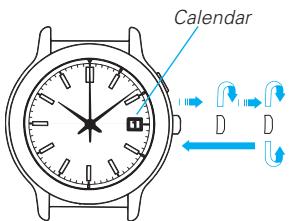
Models with date
- Pull out the crown to the first click and set the previous day's date.
- Pull out the crown to the second click when the second hand is at the 12 o'clock position.
- Turn the crown until the desired date appears.
- Turn the crown to set the hour and minute hands to the desired time.
- Push back the crown completely in accordance with a time signal.
Hour hand Second hand
NOTES:
-
Do not set the date between 9:00 p.m. and 1:00 a.m. Otherwise, it may not change properly.
-
If it is necessary to set the date during that time period, first change the time to any time outside it, set the date and then reset the correct time.
-
When setting the hour hand, check that AM/PM is correctly set.
-
The watch is so designed that the date changes once in 24 hours. Turn the hands past the 12 o'clock marker to determine whether the watch is set for the A.M. or P.M. period. If the date changes, the time is set for the A.M. period. If the date does not change, the time is set for the P.M. period.
-
When setting the minute hand, first advance it 4 to 5 minutes ahead of the desired time and then turn it back to the exact minute.
- It is necessary to adjust the date at the end of February and 30-day months.
GUIDELINE OF CHARGING TIME/ACCURACY
| Environment/Lightsource (lux) | V110 | V111 | ||||
| A (minutes) | B (hours) | C (hours) | A (minutes) | B (hours) | C (hours) | |
| General offices/ Fluorescent light (700) | 50 | 16 | 140 | 180 | 60 | - |
| 30W20cm/ Fluorescent light (3000) | 11 | 3.5 | 30 | 35 | 10 | 180 |
| Cloudy weather/Sunlight (10000) | 3 | 0.9 | 8 | 12 | 4 | 60 |
| Fair weather/Sunlight (100000) | 1 | 0.3 | 2 | 2 | 0.5 | 10 |
| Expected life per charge from full charge to stoppage | 5 months | 6 months | ||||
| Loss/gain (monthly rate) | Less than 20 seconds when the watch is worn on your wrist at a normal temperature range (5 °C to 35 °C) | Less than 15 seconds when the watch is worn on your wrist at a normal temperature range (5 °C to 35 °C) | ||||
| Operational temperature range | -5 °C to 50 °C | -10 °C to 60 °C | ||||
A: Time to charge 1 day of power
B: Time required for steady operation
C: Time required for full charge
| V145 | V181/V182 | ||||
| A (minutes) | B (hours) | C (hours) | A (minutes) | B (hours) | C (hours) |
| 50 | 11 | 175 | 75 | 6 | 82 |
| 10 | 2 | 40 | 18 | 1.3 | 20 |
| 3 | 0.5 | 10 | 5 | 0.3 | 5 |
| 1 | 0.2 | 3 | 2 | 0.2 | 2.1 |
| 6 months | 2 months | ||||
| Less than 20 seconds when the watch is worn on your wrist at a normal temperature range (5 °C to 35 °C) | |||||
| -5 °C to 50 °C | |||||
The above table provides only a general guideline.
-
The watch operates while charging electricity by converting light received on the dial to electrical energy. It cannot properly operate unless the remaining energy is sufficient. Place or store the watch in a location receiving light etc., to sufficiently charge electricity.
-
When the watch is stopped or the second hand starts moving at 2-second intervals (for models with a second hand,) charge the watch by exposing it to light.
- The time required for charging the watch varies depending on the calibres. Check the caliber of your watch engraved on the back cover.
It is recommended that the watch be charged for as long as the charging time "B" to assure the stable movement of the watch.
ENERGY DEPLETION FOREWARNING FUNCTION
- When the energy stored in the rechargeable battery is reduced to an extremely low level, the second hand starts moving at 2-second intervals instead of the normal 1-second intervals.
- In that case, recharge the watch as soon as possible by exposing it to light. Otherwise, the watch may stop operating in about 3 days. (For recharging the watch, see "HOW TO CHARGE AND START THE WATCH")
TO PREVENT THE ENERGY DEPLETION
- When wearing the watch, make sure that the watch is not covered by clothing.
- When the watch is not in use, leave it in a bright place as long as possible.
- Make sure that the watch temperature does not exceed 50^ .
NOTE ON POWER SUPPLY
This watch is provided with a rechargeable battery for exclusive use with the watch. Unlike conventional battery-powered watches, therefore, battery replacement is not necessary.
- The solar cell is a clean energy source, having no adverse effect on the natural environment.

CAUTION
- Never insert a conventional silver oxide battery in your watch as it may explode, generate an intense heat or catch fire. The watch is so designed that if a wrong battery is installed in the watch, the watch will not operate.
HOW TO OPERATE THE SCREW LOCK TYPE CROWN (for models with screw lock type crown)
To unscrew the crown:
Turn the crown counterclockwise. (Then, pull it out for time/calendar setting)
To screw in the crown:
With the crown at the normal position, turn it clockwise while pressing it.
ROTATING BEZEL (for models with rotating bezel)
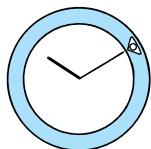
The rotating bezel can show up to 60 minutes of elapsed time.
- Turn the rotating bezel to align its "mark with the minute hand.
- Read the number on the rotating bezel that the minute hand points to.

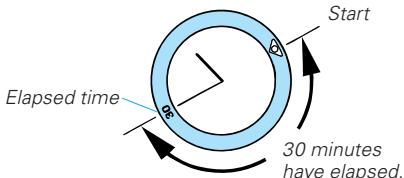
Note: For some models, the rotating bezel rotates only counterclockwise.
SPECIFICATIONS
1 Frequency of crystal oscillator 32,768 Hz (Hz = Hertz ... Cycles per second)
2 Loss/gain (monthly rate)
For Cal. V110, V145, V181, V182 ... ±20 seconds at normal temperature range
(5°C to 35°C/41°F to 95°F)
For Cal. V111 ±15 seconds at normal temperature range
(5°C to 35°C/41°F to 95°F)
3 Operational temperature range
For Cal. V110, V145, V181, V182 ... -5°C to 50 °C/ 23 °F to 122 °F
For Cal. V111 -10 °C to 60 °C/ 14 °F to 140 °F
4 Driving system. Step motor
5 Power supply. Manganese titanium-lithium rechargeable battery
6 Additional function
For Cal. V145, V181, V182 ....... Instant-start function, energy depletion forewarning
function and overcharging prevention function
For Cal. V111 Energy depletion forewarning function and overcharging
prevention function
For Cal. V110 Overcharging prevention function
7 IC (Integrated Circuit) C-MOS-IC, 1 piece
- The specifications are subject to change without prior notice for product improvement.
- SEIKO CAL. V110, V111, V145, V181 & V182
- FEATURES
- Calibre number of your watch
- HOW TO CHARGE AND START THE WATCH
- NOTES:
- CAUTION
- Caution for charging
- TIME/CALENDAR SETTING
- Models with two/three hands
- Models with date
- GUIDELINE OF CHARGING TIME/ACCURACY
- ENERGY DEPLETION FOREWARNING FUNCTION
- TO PREVENT THE ENERGY DEPLETION
- NOTE ON POWER SUPPLY
- HOW TO OPERATE THE SCREW LOCK TYPE CROWN (for models with screw lock type crown)
- ROTATING BEZEL (for models with rotating bezel)
- SPECIFICATIONS
Brand : SEIKO
Model : V182 SOLAR
Category : Solar watch